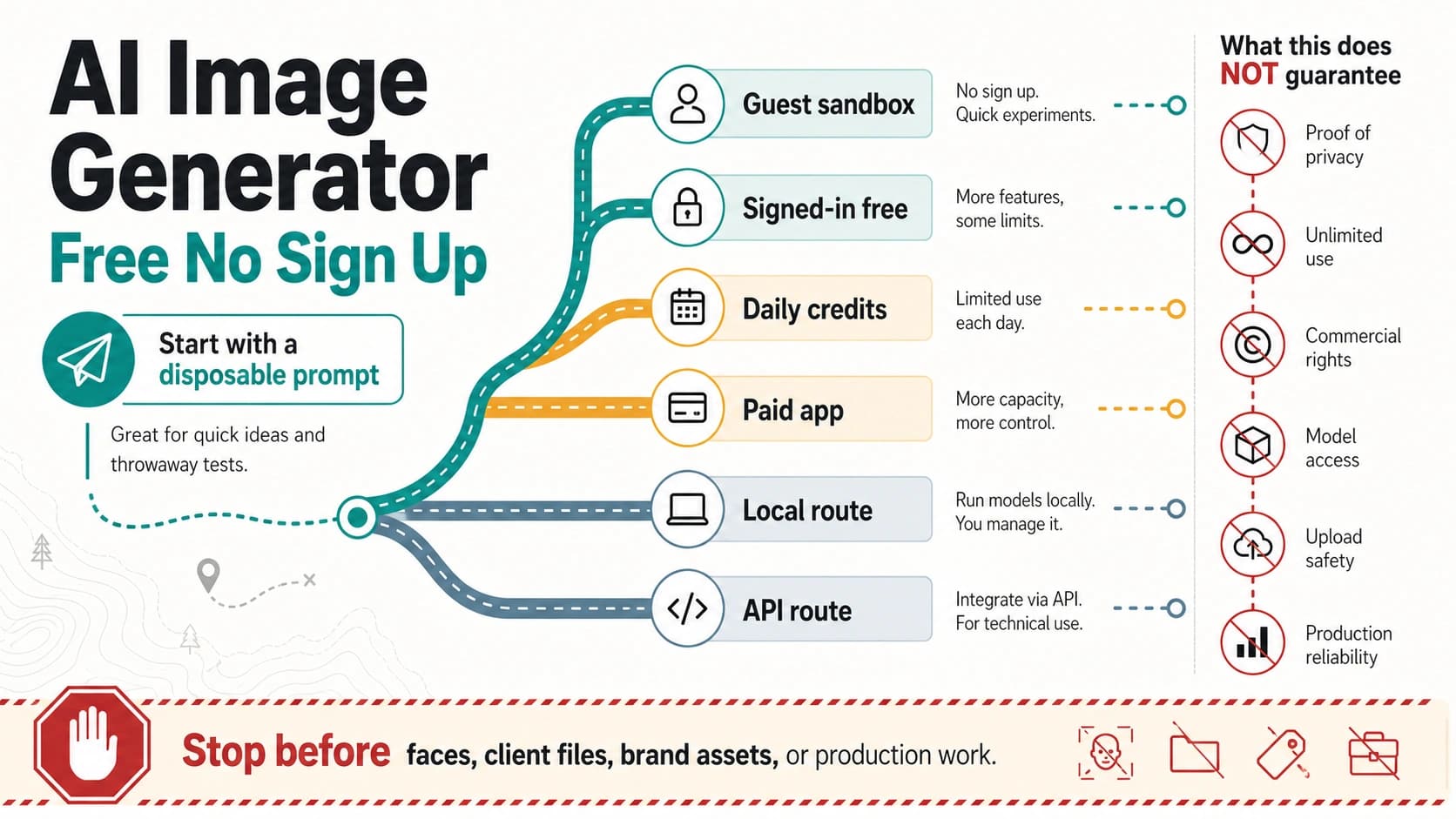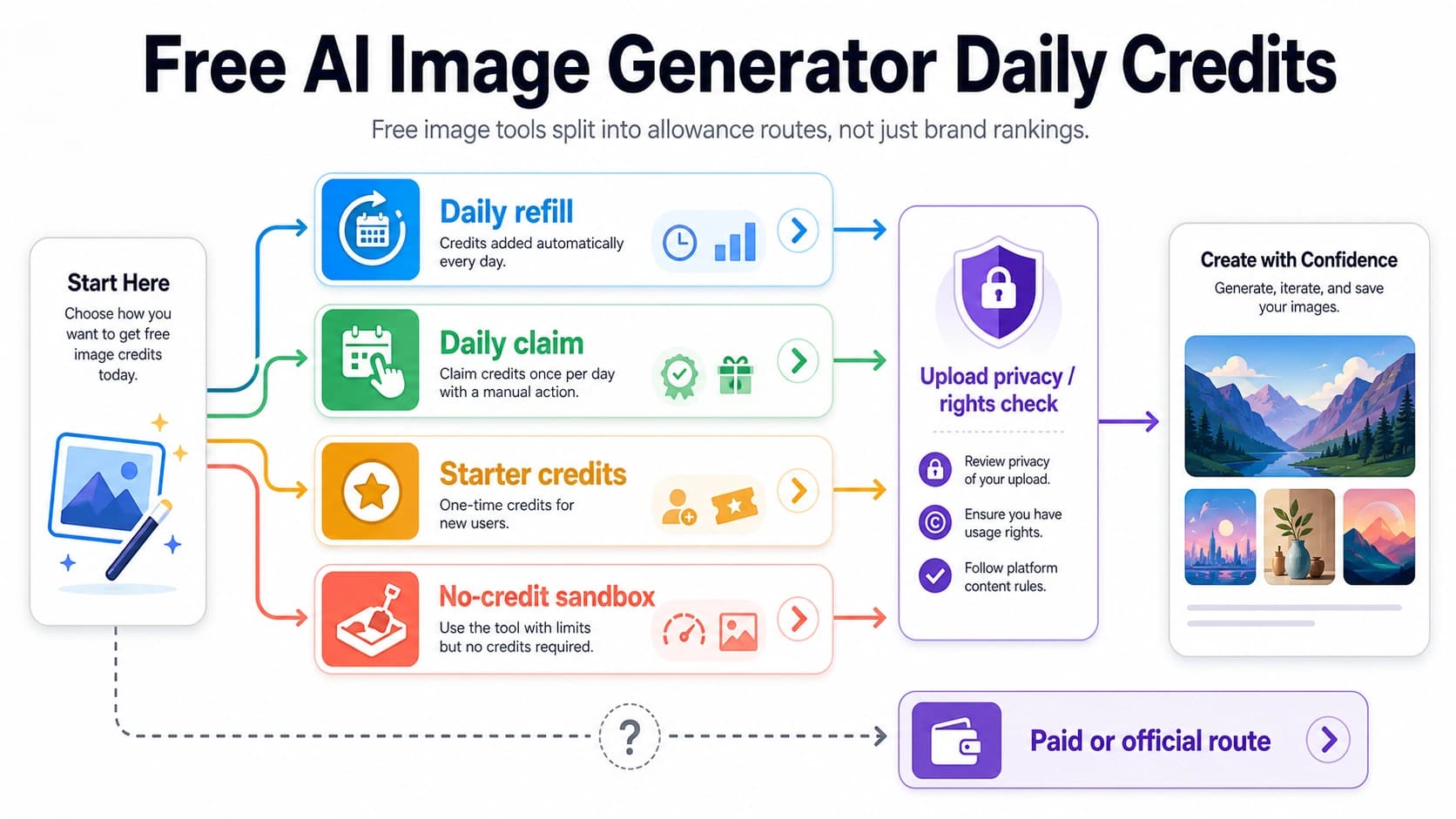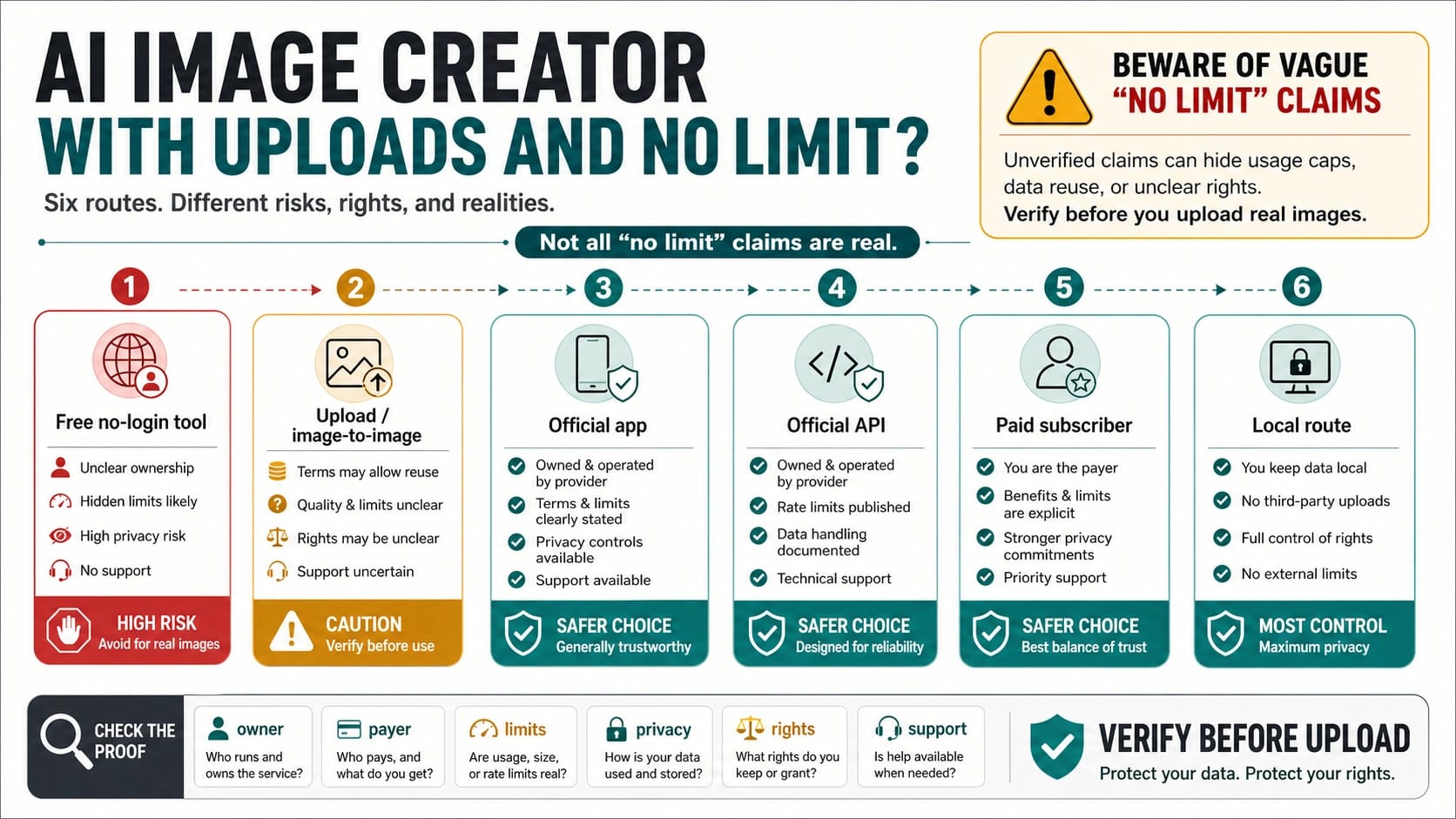
A free AI image creator with uploads can be useful for disposable tests, but a no-limit claim is not a trust contract. Before you upload a real image, classify the route: who owns it, who pays for generation, what limits still apply, how uploads are handled, what rights you keep, and who supports failures.
The safest first move is not picking the loudest "unlimited" page. It is choosing the route that fits the image risk. A public-domain sketch or throwaway prompt test can tolerate a looser free tool; a client asset, product photo, face, legal document, medical image, financial screenshot, or paid-campaign creative needs clearer terms, stronger support, or a route you control.
| Route type | What it can be good for | What must be clear first | Stop rule |
|---|---|---|---|
| Free no-login tool | Fast disposable tests and low-risk prompt trials. | Owner, limits, upload handling, output rights, support. | Do not upload real client, product, likeness, or sensitive files. |
| Upload / image-to-image tool | Reference-image remixing, enhancement, or style transfer. | File-size caps, queue rules, watermark, retention, commercial terms. | Stop if uploads may be reused or retained without clear consent. |
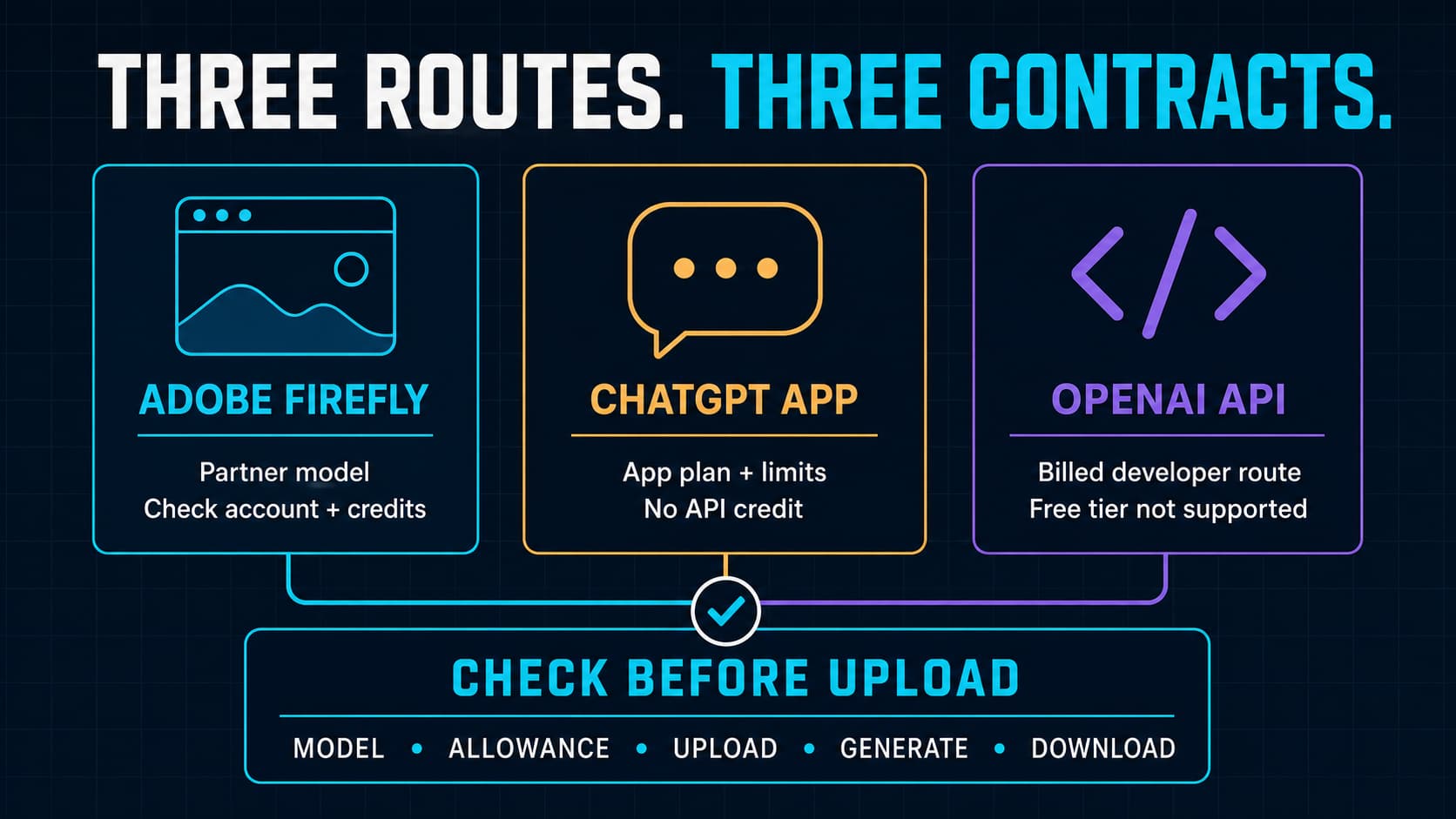
| Official app route | Manual creative work in a first-party app such as ChatGPT Images or Google Whisk. | Account limits, plan boundaries, image-input behavior, and usage policy. | Do not treat app access as an unlimited developer API route. |
| Official API route | Production workflows, automation, logging, and repeatable integration. | Billing, verification, rate limits, data handling, and support path. | Do not use it when you need no-sign-up or free unlimited access. |
| Paid subscriber route | Creative-suite work where the payer, plan, and support model are explicit. | Plan terms, reference upload rules, commercial rights, and renewal limits. | Do not call a paid plan a free route. |
| Local route | Sensitive experiments where files should stay on your machine. | Hardware, model license, output quality, and maintenance burden. | Stop if local control matters but the model license is unclear. |
Treat "no limit" as a proof checklist, not a promise. If a route cannot show the operator, payer, caps, queue behavior, file-size limit, watermark policy, upload privacy, commercial rights, abuse controls, and support path, use it only for disposable tests or skip it.
Upload support changes the risk
Text-to-image and image-to-image are not the same decision. A text prompt can reveal product plans or private details, but an uploaded image carries its own data: faces, product shapes, documents, brand marks, backgrounds, metadata, and sometimes customer information. The route needs a higher trust bar because the file itself may be stored, logged, shared with service providers, or used under broad user-content terms.
That is why a page that says "unlimited AI image generator" may still fail the upload job. Perchance-style text-to-image generators can be useful for prompt exploration, but an unlimited text prompt route does not prove reference-image upload, editing, or image-to-image support. A route only satisfies the upload job when it clearly accepts an image input and explains what happens to that input.
Use three questions before uploading anything real:
| Question | Low-risk answer | Higher-risk answer |
|---|---|---|
| What am I uploading? | A disposable sketch, public-domain test image, or synthetic placeholder. | A real person, client asset, product shot, document, brand material, or campaign image. |
| What do I need back? | A quick visual direction or prompt test. | A production asset, commercial use, editing repeatability, or customer-facing output. |
| What do I know about the route? | Owner, limits, privacy, rights, and support are clear enough. | Ownership, retention, rights, or support are vague. |
If any answer lands in the higher-risk column, move slowly. The route may still be useful, but it needs stronger proof than a no-sign-up button.
What "no limit" still needs to prove
Unlimited generation is expensive to provide. Even when a tool honestly removes a visible daily counter, generation still consumes compute, bandwidth, storage, policy checks, and support capacity. A credible no-limit route needs to explain how it survives normal use and abuse.
The most useful proof is boring:
| Proof signal | What to look for | Why it matters |
|---|---|---|
| Owner | Company, operator, support identity, terms page. | You need to know who controls the route. |
| Payer | Free plan, ad-supported route, paid subscription, API billing, or local compute. | Someone pays for generation; hidden payer means hidden durability. |
| Limits | Daily caps, dynamic limits, queue, concurrency, file size, export size, watermarks. | "No limit" may still mean bounded usage. |
| Upload handling | Retention, deletion, service-provider sharing, training use, account history. | Uploaded files are the sensitive part of this query. |
| Output rights | Commercial use, ownership, license, restrictions, user obligations. | A usable output is not automatically a usable asset. |
| Support | Contact path, refunds, failure behavior, policy appeals, uptime status. | Production work needs a failure path. |
Checked May 17, 2026, the top free-generator examples show why this matrix matters. FreeGen presents no-sign-up and optional image-prompt/upload language, while its terms also reserve dynamic limits for abuse or high traffic. Vider.ai's image-to-image page uses "unlimited" language but also describes practical boundaries such as one free task at a time, queues during busy periods, watermark behavior, and upload size limits. Those are not necessarily bad routes. They are proof that unlimited needs a definition.
How to read free generator examples
Do not start by asking which site is "best." Start by asking what kind of promise each site is making.
FreeGen is a strong example of an action-first free route. It is useful to study because it joins several reader desires in one place: no signup, free generation, image prompt/upload language, and commercial-use wording. The responsible way to use that kind of page is to pair the landing promise with the terms. If the terms reserve dynamic limits, the article should not turn "unlimited" into a production promise.
NoteGPT-style generator pages are useful for a different lesson. They can be strong on free, unlimited, no-sign-up, and model-name language, but upload support needs its own verification. If a page gives you a prompt box but does not clearly show reference-image upload for the specific tool, treat it as text-to-image until proven otherwise.
Raphael AI is a good example of no-count-limit language with policy boundaries. Its landing page describes no registration and no generation-count limits, while its privacy policy names data categories that can include prompts, uploaded files, generated outputs, history, logs, billing, support, and anti-abuse data depending on use. That does not make the route unusable. It means no signup is not the same thing as no data handling.
Whisk-style pages need an official-owner check. Google's official Whisk announcement describes an experimental image-prompting tool for subject, scene, and style exploration, not a generic no-limit upload wrapper. A page that says it is "inspired by Whisk" is not automatically Google's official route. For uploaded images, that distinction matters because terms, privacy, support, and data handling come from the route owner, not from the borrowed name.
Official app routes are safer, but not unlimited
Official app routes are often the best choice for manual image work because the owner is visible and the user experience is designed for people, not hidden backend usage. OpenAI's help page for images in ChatGPT describes uploading an image and asking ChatGPT to change it. That makes ChatGPT a better fit than a vague wrapper when you are editing a personal image manually and want a first-party app boundary.
The boundary is just as important as the benefit. ChatGPT app access is not a free unlimited developer API. It does not give your product backend a route, billing plan, logs, retry controls, file pipeline, or commercial support model. If your real question is model-specific GPT Image 2 free access, use the sibling route audit on GPT Image 2 free or unlimited routes. If the question is app naming and capability, use the ChatGPT Images 2.0 guide.
Google Whisk belongs in the same app-route category. It is helpful for fast visual exploration using image prompts, especially subject/scene/style ideation. It is not a proof that every Whisk-named upload page is official, no-limit, or safe for client files.
Official API, paid subscriber, and local routes
The official API route is the right route when the work becomes repeatable, automated, customer-facing, or operationally accountable. OpenAI's image generation guide and image input documentation describe developer routes for image generation, editing, and image inputs. Those routes bring billing, account, verification, limits, data handling, and support boundaries. They are not no-sign-up tools, but they are built for production control.
Paid subscriber routes can also make sense when the payer and plan are explicit. Adobe's Firefly materials describe subscriber-bound unlimited-generation framing and reference-image workflows in a plan context. That is a different contract from "free no-login." It may be appropriate for a designer or creative team that wants predictable app access, but the plan terms still control what "unlimited" means.
Local routes solve a different problem: file control. If uploads must stay on your machine, a local model or self-hosted workflow may be safer than a free web tool. The tradeoff is maintenance. You own hardware, model license checks, quality tuning, updates, storage, and security. Local is not automatically easier or better. It is the route to consider when data control is more important than convenience.
A low-risk test workflow
Use a small test before a real upload. The workflow should prove both generation quality and route clarity.
- Pick a disposable image that does not include a real face, client material, private document, product secret, or brand-sensitive asset.
- Upload it only after you can identify the route owner and the relevant terms.
- Run one simple image-to-image task and record what happens: queue, file-size warning, watermark, output size, download path, and failure behavior.
- Check whether the page explains upload retention, output rights, commercial use, content policy, and support.
- Decide whether the route belongs in throwaway testing, manual app work, paid creative workflow, API production, local processing, or rejection.
This workflow sounds slower than clicking the first free page, but it prevents the expensive mistake: sending a real asset into a route that cannot explain what happens next.
When to stop using a free upload tool
Stop when the route cannot say who operates it. Anonymous generation can be acceptable for a throwaway prompt, but not for customer, client, or business files.
Stop when the payer is hidden. A hidden payer usually means the route can throttle, disappear, change model labels, add watermarks, or push a payment step without warning.
Stop when upload retention is vague. If the route may store, reuse, share, or train on uploaded files without a clear boundary, do not use it for real people, clients, unreleased products, private screenshots, or regulated material.
Stop when rights are unclear. The output may look good, but commercial use still depends on route terms, input rights, model policy, and the user's legal context.
Stop when support is absent. Image tools fail for many reasons: safety policy, file format, size, capacity, account status, model changes, or provider outages. If a route cannot explain failure behavior, it should not be part of a production promise.
FAQ
Is there an AI image creator with uploads and no real limit?
Some pages claim no limits, but treat that as a route claim until the operator, payer, caps, queue behavior, file size, watermark policy, privacy terms, commercial rights, and support path are clear. A route can be useful without being safe for every upload.
Does no signup mean my uploaded images are private?
No. No signup only means the page may not require an account before use. It does not prove that prompts, uploaded files, outputs, logs, or history are never processed, retained, shared, or used for abuse prevention. Read the privacy and terms pages before uploading real images.
What is the safest free route for quick testing?
The safest free route is the one used with a disposable image and clear enough terms for the risk level. Public-domain sketches, synthetic placeholders, and non-sensitive prompt tests are safer than real faces, product images, client files, or private documents.
When should I use ChatGPT Images instead of a free upload generator?
Use ChatGPT Images when the work is manual, app-side, and you want a visible first-party route for editing or creative exploration. Do not treat that as backend API credit or an unlimited production route.
When do I need an official API?
Use an official API when the workflow needs automation, repeatable calls, logging, retries, customer-facing reliability, documented limits, and a support path. If the decision is model-specific or cost-specific, the GPT Image 2 sibling pages on free/unlimited access, cheap API routes, and 4K image generation are the better next reads.
Can I upload client photos or product images to a no-login tool?
Only when the route's terms, privacy policy, rights language, and support path are strong enough for that client or product context. In most cases, a no-login route should stay in the disposable-test bucket until the client approves the route and the terms.
Can outputs from free AI image generators be used commercially?
Only if the specific route grants that right and your inputs are lawful to use. Commercial rights depend on the provider terms, input ownership, likeness consent, brand rights, and local compliance needs. Do not infer commercial permission from "free" or "no signup."
Are local image generators better for privacy?
They can be better when files must stay on your machine, but they shift responsibility to you. You still need to check model license, storage security, output quality, maintenance, and whether the result is acceptable for the use case.