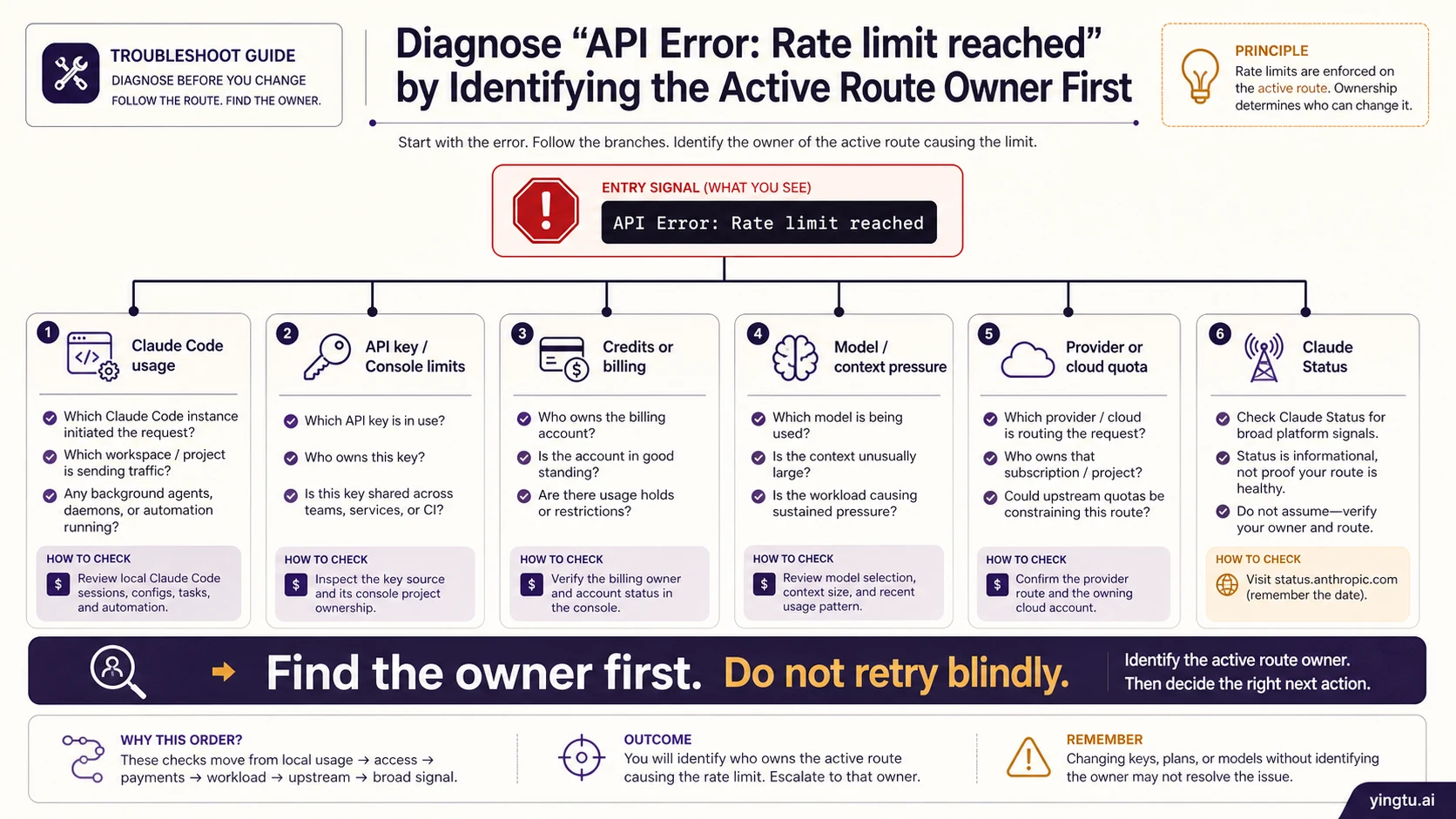
If Claude Code or a Claude API request returns API Error: Rate limit reached, identify the active route before changing retries, models, credits, or providers. Current Claude Code documentation separates usage or session exhaustion, a short-lived server throttle, a request rejected with HTTP 429, and low Console credits; the same visible symptom can also be shaped by the active API key, provider project, model, or context. Each branch needs different evidence and a different fix.
| Where the error appears | Check first | Likely owner | Next move |
|---|---|---|---|
| Claude Code command or chat-like terminal flow | /status, signed-in account, selected plan, and whether an API key override is active | Claude Code allowance, login state, or API-key override path | Keep the command stable, confirm the route, then wait, re-auth, or move to the correct key path |
| Claude Code reports temporary server throttling | Exact message, time of failure, /status, and whether a brief pause clears the same command | Short-lived server-side pressure on the current route | Wait a few minutes and retry once; if it persists, continue through the route and evidence checks below |
| SDK, curl, server logs, or raw HTTP 429 | API key, organization, project, model, response headers, Console Limits, and Rate Limits API | Anthropic API limiter for that key, project, model, or token/request pattern | Retry only with backoff after the owner is rate pressure; otherwise fix the scope or request shape |
| A gateway, proxy, hosted app, or third-party provider | Provider dashboard, upstream logs, project selection, and whether the error body is passed through unchanged | Provider quota, wrapper throttle, wrong provider project, or upstream Anthropic limit | Diagnose the provider route before applying direct Anthropic API advice |
| Console shows low balance, credits, or billing friction | Credits, billing state, usage, and spend configuration | Account funding or billing state | Stop retrying until the account state changes |
| It happens only on one model, long context, or large generation | Model, context length, token volume, concurrency, and fallback model behavior | Model/context pressure or shared model-family limit | Reduce tokens, shorten context, lower concurrency, or test a smaller model |
| Many routes fail while Status is degraded | Anthropic Status, timestamp, request id, affected product, and recent changes | Platform incident or degraded service | Wait, preserve evidence, and avoid account churn |
The stop rule is simple: retry only after the owner is request or token rate pressure and you have a reset, header, limit, or live Console/provider signal. If the evidence points to credits, billing, wrong organization, wrong project, wrong key, Claude Code allowance, provider quota, or a status incident, repeating the same request is not a fix; capture the exact error, timestamp, request id, route, model, headers, Console or provider state, and status state instead.
Run the First Route Check Before You Retry
The error wording is visible, but the route owns the fix. Start by writing down the exact surface that produced the error: Claude Code, an SDK call, a raw HTTP request, a hosted app, a gateway, or a cloud provider route. Then keep that same path stable while you inspect evidence. Changing the model, key, provider, and retry logic all at once can hide the one variable that actually mattered.
In Claude Code, run /status first. That command is the fastest way to see whether the current session is using a signed-in Claude route or an API-key route. If the environment has ANTHROPIC_API_KEY set, Claude Code can move away from subscription login behavior and use the API key path instead. That means a person who thinks they are consuming a Pro or Max allowance might actually be hitting API billing, API limits, or a provider-owned key path. For billing-route detail, the related Claude API pricing versus subscription breakdown explains the split, but the immediate recovery check is still /status.
Anthropic's Claude Code errors reference distinguishes usage/session limits, temporary server throttling, request-rejected 429 responses, and low credit balance. Those labels are useful product-surface clues, but they still need route evidence from the current session. A Claude Code-looking error can be a subscription allowance issue, an API-key override, a model/context issue, or a broader service problem.
For raw API calls, preserve the failing request. Do not rotate the key before you know whether the key is the problem. Save the model, endpoint, organization, project, timestamp, request id if present, response body, and response headers. If a provider or gateway is involved, save the provider request id and upstream error body too. The goal is not to build a large incident report; it is to prevent a false fix from passing one test and failing again later.
Use a 10-Minute Recovery Sequence
A useful recovery path has a fixed order. First, copy the exact error. Include capitalization, HTTP status if present, error type, error code, request id, endpoint, model, and timestamp with timezone. Many failed debugging sessions start with only "rate limit reached" in a chat message, which is not enough to distinguish Claude Code usage from an API limiter or a wrapper throttle.
Second, confirm the active surface. Claude Code, the Anthropic Console API, a provider route, AWS Bedrock, Vertex AI, and a third-party gateway can all produce limit-looking failures. The visible text may be similar, but the owner is different. If the error comes from Claude Code, check /status, /usage, /model, and active environment variables. If it comes from your code, inspect the HTTP response and the exact client configuration. If it comes from a gateway, inspect the provider dashboard before assuming the Anthropic account itself is blocked.
Third, inspect account scope. Wrong organization, wrong project, a copied key from another workspace, or a provider project with its own quota can look like a capacity problem. A new key from the same exhausted project will usually not repair a project-level or organization-level owner. A smaller model may not repair a billing owner. A retry loop may not repair a Claude Code allowance owner. Each branch needs its own proof.
Fourth, choose one minimal test. For Claude Code, that might be a short command in the same authenticated session after checking /status. For the API, it might be one small request with the same key and model after reading the headers and Console state. For a provider, it might be one request through the provider's smallest supported route plus the provider log view. The point is to prove the branch, not to spray retries until something happens to succeed.
Read API Limit Evidence Correctly
Anthropic's rate limits documentation describes API limits as dynamic controls across request rate, input tokens, and output tokens. The important terms for Messages API work are RPM, ITPM, and OTPM: requests per minute, input tokens per minute, and output tokens per minute. Those categories matter because a small number of long-context requests can hit a token limiter even when request count looks low.
When the API branch is active, response headers and live account surfaces are stronger than copied limit tables. Anthropic also documents a Rate Limits API for querying organization limits and workspace overrides programmatically. It requires an Admin API key; an unlisted workspace model group inherits the organization limit rather than becoming unlimited. Use those surfaces to understand the current account and model route. Do not publish or depend on a universal RPM number unless it comes from the reader's current account, model family, workspace, or provider route.
The API branch has three common fix families:
| Evidence | Meaning | Better first fix |
|---|---|---|
| Headers or live limits show request pressure | Too many requests in the active window | Backoff with jitter, lower concurrency, queue per tenant |
| Input or output token pressure dominates | Context or generation size is the bottleneck | Shorten context, cap output, split work, use prompt caching where it fits |
| Only one model or model family fails | Shared family or selected model limit | Test a smaller model, reduce load, or wait for reset before scaling |
Backoff is useful only in the first two rows. It should be bounded and tied to evidence. A retry policy that ignores headers, token volume, and request owner can make a limit event worse by adding failed traffic. If the API client exposes a retry-after signal, use it as a stoplight. If it does not, use exponential backoff with jitter and cap the total attempts so the application fails clearly instead of creating a hidden loop.
Separate Claude Code Allowance From API Limits
Claude Code deserves its own branch because it can feel like "the API" while being governed by a different contract. A terminal error can be produced while the user is signed in through Claude Code, while an API key override is active, or while a team or provider environment injects credentials. The visible symptom is not enough to decide which contract applies.
If /status shows a subscription login route, inspect Claude Code usage, selected model, context size, and session shape. A very long coding session can carry repeated context, file summaries, tool outputs, and previous decisions. Compacting context, clearing a session, reducing parallel sessions, or switching to a smaller model can be a valid test. That does not mean "1M context is always the cause"; it means context and model pressure are one branch to test after the route is known.
If /status or the environment shows an API key route, treat the error like an API-owner problem. Inspect ANTHROPIC_API_KEY, shell profiles, project env files, CI variables, and provider credentials. A developer may have several keys available locally. One shell may use direct Anthropic credentials while another uses a gateway or cloud provider. The right fix can be as small as removing an unintended key from the session or moving the workload to the correct project.
Do not use unsupported token extraction, OAuth workarounds, or random proxy instructions to bypass Claude Code limits. They make the route harder to prove, move secrets into places they should not live, and can create account or security risk. If the authenticated route is exhausted, use supported product behavior: wait for the window, reduce load, re-authenticate if the account is wrong, or intentionally switch to an API route that you are willing to pay for and monitor.
Check Credits, Billing, and Key Ownership Without Guessing
Credits and billing issues often masquerade as rate-limit errors because the immediate user experience is the same: the request is blocked. The repair is not the same. If Console evidence shows low or unavailable credits, a billing issue, a spend cap, or an account state problem, retry logic should stop. A retry loop cannot add funds or repair billing state.
Key ownership is the second billing-adjacent trap. A key belongs to a project and organization context. If the active code path uses a key from a different project than the one the developer is inspecting in Console, the limit or credit evidence will look contradictory. Record the active key route without exposing the key itself: organization, project, provider, environment variable source, and deployment environment are enough.
If the user has both a Claude subscription and API usage, keep the contracts separate. A subscription can help with supported Claude product usage and Claude Code login behavior, but it does not automatically become an API credit wallet. API calls through keys, provider routes, or cloud routes are governed by that route's billing and limits. When the error appears during Claude Code work, the fastest way to avoid a wrong purchase is still route evidence: /status, active env vars, Console state, and provider logs.
Diagnose Provider, Cloud, and Status Branches
A provider route should be diagnosed where the provider owns the contract. Bedrock, Vertex AI, a gateway, a hosted app, or an internal proxy can have its own quota, model mapping, throttling policy, project selection, and error wrapping. The upstream Anthropic error body is useful when it is passed through clearly, but it does not automatically prove that the direct Anthropic Console account is exhausted.
Ask three questions for provider routes:
- Does the provider dashboard show a local quota, project, or billing block?
- Does the provider log include an upstream Anthropic request id or only a provider request id?
- Does the same small request fail through direct Anthropic credentials, or only through the provider path?
Status is a separate branch. Open Claude Status when many routes fail at the same time, when errors spike without a deploy, or when users in multiple environments report the same symptom. A degraded status page can explain why waiting is better than account churn. A green status page does not prove that your key, workspace, provider, model, region, or Claude Code session is healthy. Treat status as a broad incident signal, not as a replacement for route-specific evidence.
Escalate With a Small Evidence Packet
Escalation should be boring and complete. Support cannot safely act on "rate limit reached" alone. The useful packet is small:
- timestamp with timezone
- exact error body and HTTP status if present
- request id or provider request id
- active route: Claude Code, direct API, provider, cloud route, or hosted app
- model and endpoint
- organization and project names or safe identifiers
- response headers when available
- Console Limits, credits, or provider quota state
- Claude Status state at the time
- one or two recent changes, such as model switch, new key, new project, deploy, or traffic spike
- confirmation that secrets are omitted
Prevention follows the same structure. Keep per-tenant queues for API traffic. Cap concurrency by model family. Shorten contexts before blaming global capacity. Add logs for route, project, model, request id, and token counts. Record whether Claude Code sessions are subscription-authenticated or API-key-authenticated. Monitor credits and spend caps before they become a production block. Test the same-path recovery sequence during a quiet period so the first real incident is not the first time anyone reads the headers.
The practical end state is not "never hit a limit." It is knowing which limit was hit, what evidence proves it, whether retry is safe, and what owner must change before the next request succeeds.
FAQ
Should I retry API Error: Rate limit reached immediately?
Only after the active owner is request or token rate pressure and you have a reset, header, Console, or provider signal that makes retry safe. If the owner is credits, billing, wrong project, wrong key, Claude Code allowance, provider quota, or status, immediate retry is usually noise.
Why does Claude Code show a rate limit when I have a subscription?
Claude Code can use a subscription login route or an API key route. Run /status and inspect ANTHROPIC_API_KEY before assuming the subscription is the owner. If an API key override is active, the session may be governed by API billing and API limits instead of subscription allowance.
Does buying more API credits fix Claude Code rate limits?
Not always. Credits help only if the active owner is API funding or billing. They do not fix an exhausted Claude Code subscription allowance, wrong login, model/context pressure, provider quota, or platform incident. Check the active route first.
Can a long context window cause the rate-limit error?
It can contribute when the active owner is token pressure, model family pressure, or Claude Code context shape. It should not become the universal explanation. Verify model, context length, input and output token pressure, concurrency, and whether a smaller model or shorter context succeeds.
Why does the error happen through a provider but not direct Anthropic?
The provider may own a separate quota, project, billing state, throttle, or model mapping. Inspect provider logs and dashboard state before applying direct Anthropic Console fixes. If the provider passes through an upstream request id and Anthropic error body, include both in the evidence packet.
What should I send to support?
Send the timestamp, timezone, exact error body, request id, active route, model, endpoint, safe org/project identifiers, relevant headers, Console or provider limit state, status page state, and recent changes. Do not send API keys, bearer tokens, session tokens, or secrets.