Gemini does not have one universal rate limit. For the Gemini Developer API, the number that matters is the active row for your exact Google Cloud project, model, tier, and metric in AI Studio; Gemini Apps, Firebase AI Logic, and Vertex AI use different counters or capacity systems.
Before changing code, billing, or keys, record a five-part limit fingerprint: surface, project or account, model or feature, metric or serving lane, and reset or evidence window. If any field is unknown, you do not yet know which limit you hit.
| Surface | Where the active evidence lives | First move |
|---|---|---|
| Gemini Developer API | The exact project and model row on the AI Studio rate-limit page | Identify the binding RPM, input TPM, RPD, IPM, TPD, spend, Priority, or Batch lane. |
| Gemini Apps | Settings → Usage limits in the consumer app | Check the feature allowance and its rolling or stated reset. |
| Firebase AI Logic | Firebase per-user gateway settings plus the upstream provider quota | Check both layers; the lower one wins. |
| Vertex AI | Google Cloud quota, Dynamic Shared Quota, or Provisioned Throughput controls | Diagnose shared capacity separately from purchased throughput. |
Stop rule: do not rotate API keys or retry in a blind loop. A 429 RESOURCE_EXHAUSTED response points you toward quota or spend evidence; a 503 UNAVAILABLE response points you toward service capacity or temporary availability. Diagnose the branch before you change the workload.
Read the active Developer API row, not a copied table
The official Gemini Developer API rate-limit page defines the mechanics, while the authenticated AI Studio rate-limit view owns the values that apply to a specific project and model. A copied model table can explain the vocabulary, but it cannot tell you whether your current project has the same tier, account standing, preview status, or active capacity.
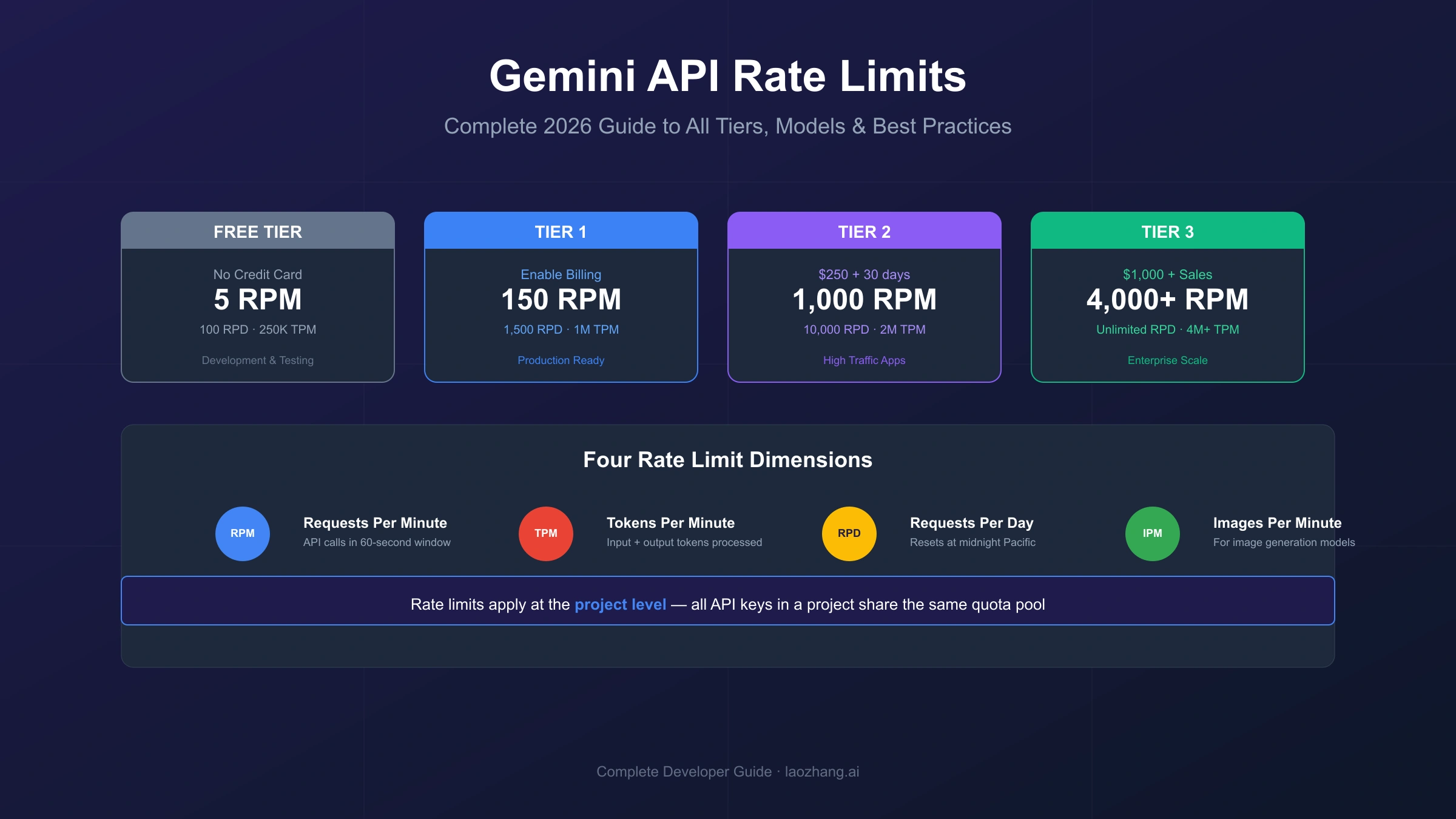
Developer API limits are normally expressed across three independent dimensions:
- Requests per minute (RPM) counts calls, so many small requests can bind RPM before tokens become scarce.
- Input tokens per minute (input TPM) counts prompt and context input, so fewer large requests can bind the token lane first.
- Requests per day (RPD) applies where the active row has a daily limit. Under the current official contract, that counter resets at midnight Pacific time.
Some model or feature rows also expose images per minute (IPM) or tokens per day (TPD). Exceeding any applicable dimension can lead to a rate-limit response. Preview and experimental models can have stricter limits, which is another reason to copy the exact model ID from the request rather than infer a limit from a family name.
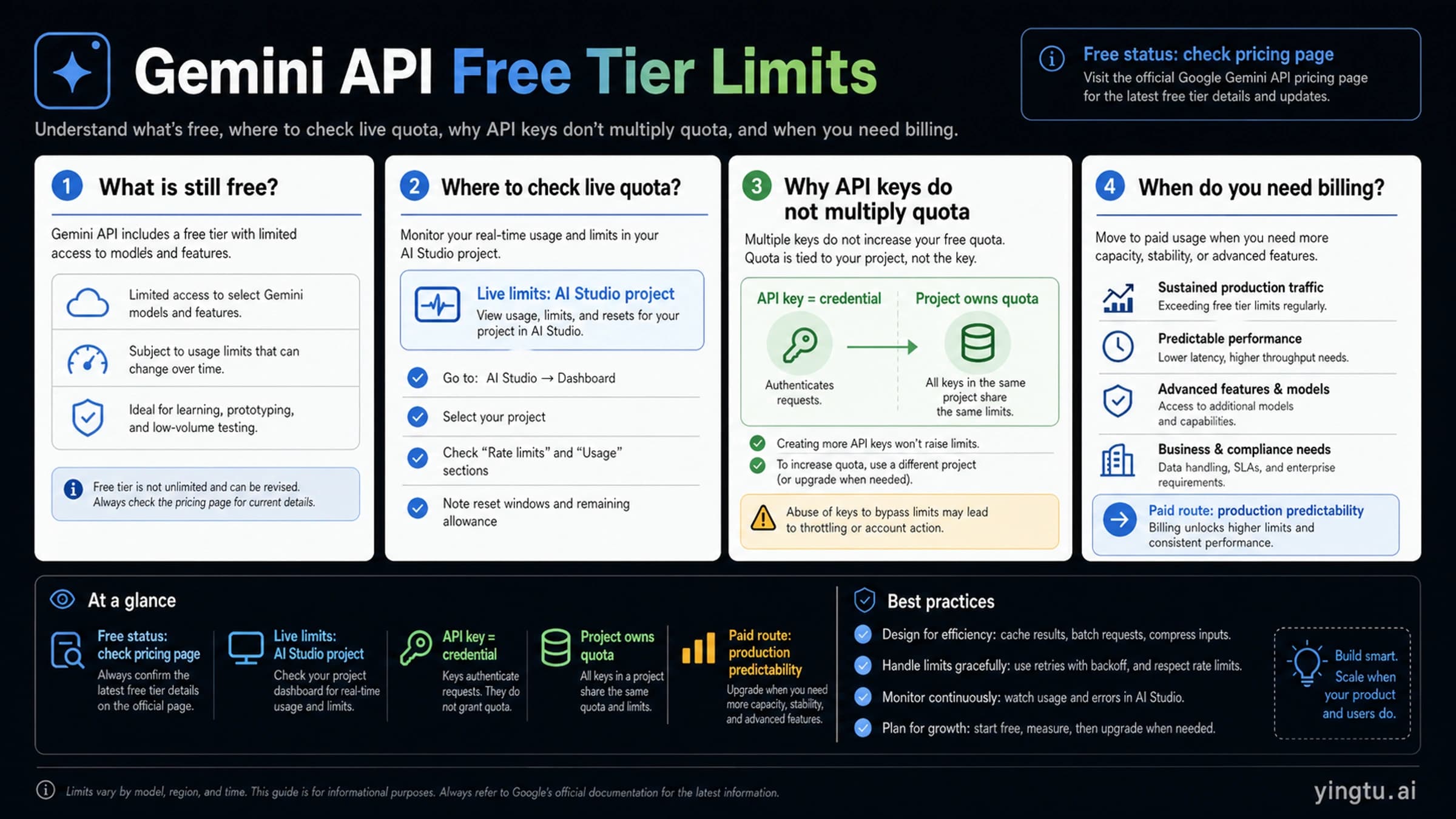
These limits apply per Google Cloud project, not per API key. Two keys in the same project draw from the same pool. A second key can be useful for credential rotation or service separation, but it does not create more RPM, TPM, or RPD. If an exact browser message rather than an API response is blocking work, use the narrower Google AI Studio rate-limit recovery path instead of treating the UI message as proof of an API counter.
Google also warns that specified rate limits are not guaranteed capacity. The displayed row is a ceiling and an admission contract, not a promise that every request below it will be served during a regional or service-wide capacity event.
Tier and spend conditions are volatile
As of July 15, 2026, Google's public rate-limit page lists the following tier qualification rules:
| Tier | Current public qualification rule | What still needs verification |
|---|---|---|
| Free | An active project or free-trial state | Which models and limits are active for the project |
| Tier 1 | A linked, active billing account | The project/model row after billing is active |
| Tier 2 | At least $100 paid and at least 3 days since the first successful payment | Account standing and the active tier shown by Google |
| Tier 3 | At least $1,000 paid and at least 30 days since the first successful payment | Account standing and the active tier shown by Google |
The same page currently describes a spend-based limit evaluated over a rolling 10-minute window: $10 for Tier 1 and $200 for Tiers 2 and 3. Those values and their applicability are freshness-sensitive. Recheck the official rate-limit page and the authenticated project before using them in an incident playbook or load test.
Billing therefore changes eligibility; it does not erase every limit. A paid project can still exhaust an RPM, input-TPM, RPD, spend, Batch, or serving-capacity constraint. For the separate question of whether a particular model row is available without billing, use the Gemini API free-tier guide.
Separate clocks and serving lanes before load testing
One request can be valid under the minute counters and still fail a daily or spend-window constraint. It can also be sent through Standard, Priority, or Batch, which are distinct serving lanes rather than three names for one shared allowance.
| Clock or lane | What it controls | Evidence to capture | Common planning error |
|---|---|---|---|
| RPM | Number of online calls per minute | Request timestamps and the active RPM row | Testing only average RPS and ignoring bursts |
| Input TPM | Prompt and context input per minute | Input-token distribution, not only request count | Treating every request as the same size |
| RPD | Daily request count where enabled | Active RPD row and Pacific reset time | Assuming a short backoff can solve a daily cap |
| Spend window | Spend-based admission over the applicable rolling window | Billing/tier state and the current official rule | Treating the window as a monthly budget |
| Priority | A separate priority-serving limit | Requested service tier and x-gemini-service-tier | Assuming Priority is unlimited extra capacity |
| Batch | A separate asynchronous quota pool | Concurrent jobs, file sizes, and enqueued tokens | Sending urgent interactive work to Batch |
Google's Priority inference documentation currently sets the default Priority limit at 0.3 times the corresponding Standard model/tier limit. When Priority capacity is exhausted, a request can be served as Standard instead of simply failing, so record the returned x-gemini-service-tier header if the lane matters to latency or cost.
Batch is useful for non-urgent work because its quota pool is separate from interactive calls. As of July 15, 2026, the Batch API documentation and rate-limit page list 100 concurrent batch requests, a 2 GB input-file limit, 20 GB of file storage, and model/tier-specific enqueued-token limits. Treat those as checked-date constraints, not permanent constants. Batch can move a workload to a better lane, but it does not make a malformed or unsupported workload valid.
A useful load-test record therefore has more than a target RPS. It names the exact model and project, input-token percentiles, burst profile, requested serving lane, p95 latency, daily volume, spend exposure, and whether requests are interactive or asynchronous.
Turn a live row into a safe capacity budget
The active row becomes useful when it is converted into a workload budget. Start by finding which per-minute ceiling binds:
Request ceiling = min(active RPM, active input TPM ÷ average input tokens per request)
This ceiling is a mathematical orientation point, not a production target. Input sizes vary, traffic arrives in bursts, retries add load, and capacity can be lower than the displayed limit. Choose operational headroom from observed variability and business risk; Google does not prescribe one universal headroom percentage.
Hypothetical worked example
Assume the active row shows 60 RPM and 120,000 input TPM, while observed requests average 4,000 input tokens:
- The RPM ceiling is 60 requests per minute.
- The input-TPM ceiling is 120,000 ÷ 4,000 = 30 requests per minute.
- The smaller ceiling binds, so the pre-headroom request ceiling is 30 requests per minute.
- If the application team chooses 20% headroom for this example, the initial operating target is 24 requests per minute, or 0.4 requests per second.
- With an observed p95 latency of 2 seconds, estimated steady-state concurrency is 0.4 × 2 = 0.8 in-flight requests. In practice, start with a concurrency cap of 1 and test the actual queue, burst, and retry behavior.
The 20% margin above is an engineering assumption for the example, not a Google recommendation. A spiky consumer workload may need more room; a smooth offline queue with tight request-size control may need less.
Minute math is only the first gate. At 24 requests per minute, a workload that ran continuously could attempt 34,560 requests per day. Compare that projection with the active RPD row instead of assuming the minute budget can run for 24 hours. Check any spend window separately as well.
Use percentiles, not just averages, when request sizes vary. A safe operating envelope can be calculated from p50, p95, and worst-expected input tokens:
| Planning view | Why it matters |
|---|---|
| Average input tokens | Gives a useful steady-state estimate |
| p95 input tokens | Exposes whether large prompts bind TPM during normal peaks |
| Maximum allowed input | Prevents one request class from consuming the entire minute budget |
| p95 latency | Converts safe RPS into a starting concurrency cap |
| Retry rate | Reveals amplification during partial failures |
| Cache hit rate | Shows whether repeated context can be removed from the hot path |
Recalculate when the model, prompt template, context size, tool use, traffic mix, tier, or serving lane changes. Capacity planning is a measured loop, not a one-time division.
Diagnose 429 before retrying
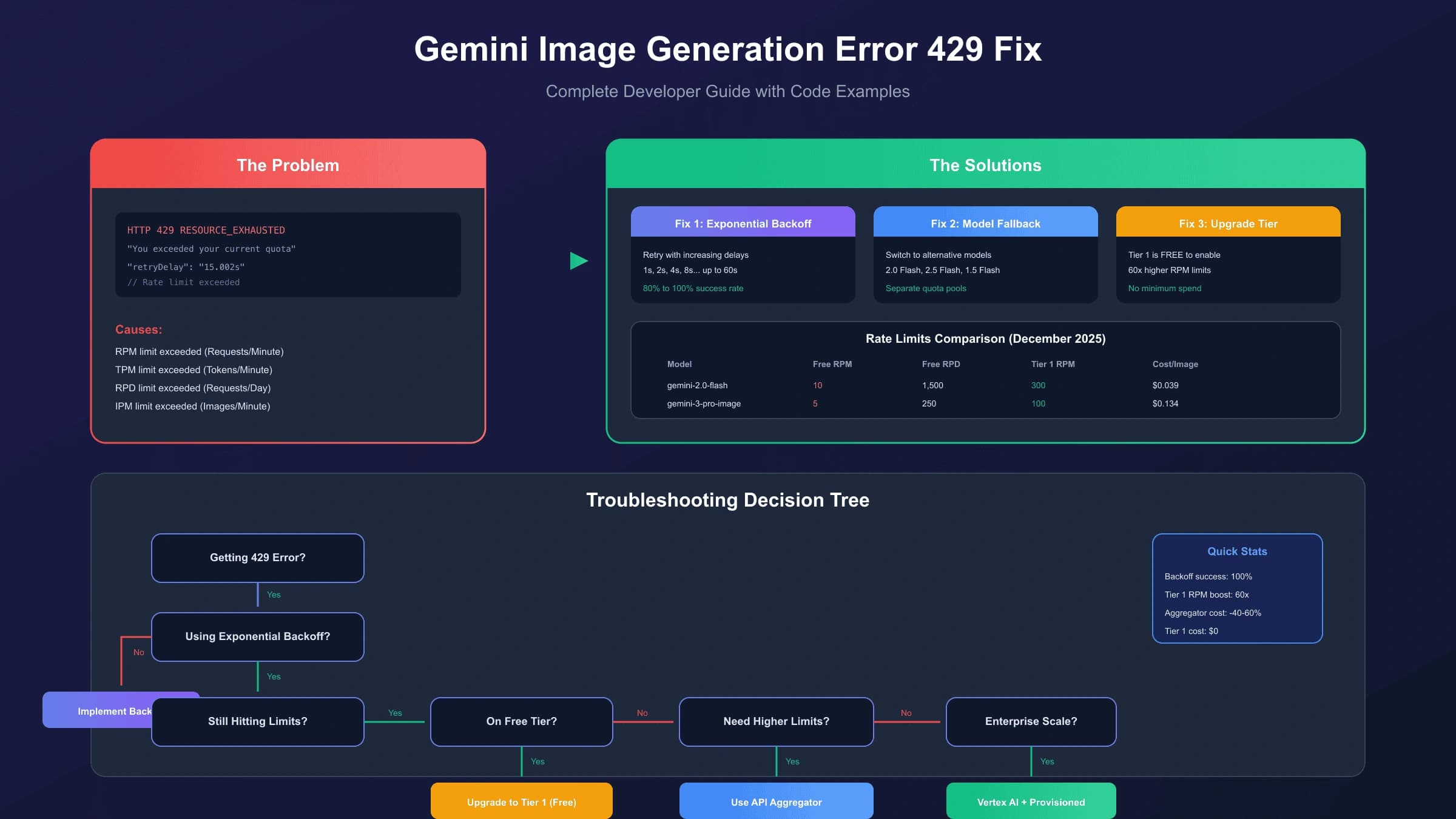
The official troubleshooting page gives 429 RESOURCE_EXHAUSTED and 503 UNAVAILABLE different meanings. Both can be transient, and both may justify bounded exponential backoff with jitter, but they do not point to the same evidence.
| Response | First diagnosis | Evidence to inspect | Useful action | Stop condition |
|---|---|---|---|---|
429 RESOURCE_EXHAUSTED | Quota, rate, RPD, spend, or another admission limit | Full error body, headers, Retry-After, project/model row, recent usage | Queue, reduce rate or input, wait for the correct window, or use the official quota path | Stop blind retries until the exhausted dimension and reset are known |
503 UNAVAILABLE | Temporary overload, capacity, or service unavailability | Request ID, time, endpoint/region, model, service status | Bounded backoff, traffic smoothing, supported global routing, then escalation with evidence | Stop after the retry budget or when impact is sustained |
A 429 caused by a minute burst may clear after the window moves. A 429 caused by RPD will not be repaired by retrying every few seconds. A spend-window 429 needs the correct rolling-window or billing action. A sustained 503 may need status verification or a different capacity route even when the displayed project limits look healthy.
A retry policy needs explicit boundaries
A production retry policy should define:
- which status codes are retryable;
- whether the operation is safe to repeat;
- a maximum attempt count and elapsed-time budget;
- exponential backoff with randomized jitter;
- support for
Retry-Afterwhen the response provides it; - a queue or circuit breaker that prevents synchronized retry storms;
- separate metrics for original calls and retry traffic;
- a final evidence packet containing request ID, exact model, endpoint, timestamp with timezone, response details, and observed impact.
Do not rotate API keys as a recovery tactic. Because quota belongs to the project, key rotation usually preserves the same constraint while obscuring which credential, service, and request pattern caused the incident. Do not distribute requests across projects to evade a limit; separate projects are appropriate only when they represent legitimate ownership, billing, security, or environment boundaries.
The code-heavy implementation details belong in the focused Gemini API quota-exceeded troubleshooting guide. The broad decision here is to identify the exhausted clock before choosing a retry, wait, quota, or capacity response.
Fix the binding limit, not the symptom
The fastest safe remedy depends on what actually bound:
| Binding constraint | Short-term control | Durable design move | Wrong shortcut |
|---|---|---|---|
| RPM | Smooth bursts, cap concurrency, queue calls | Admission control and per-workload budgets | More keys in the same project |
| Input TPM | Shorten context, remove duplicate instructions, reduce batch size | Cache stable context and separate large jobs | Counting requests without measuring tokens |
| RPD | Drop nonessential calls and wait for the Pacific reset where appropriate | Forecast daily volume and move eligible traffic to a qualified tier | Tight-loop retries |
| Spend window | Reduce admitted work and wait for the applicable rolling window | Budget alerts and cost-aware admission | Assuming billing means no spend limit |
| Priority limit | Observe the returned service tier and decide whether Standard overflow is acceptable | Reserve Priority for latency-sensitive work and monitor the lane | Treating Priority as universal headroom |
| Batch enqueued tokens or job limits | Stagger submissions and reduce job size | Build an asynchronous scheduler around the current Batch contract | Sending latency-sensitive requests to Batch |
| 503 capacity | Apply bounded backoff and smooth traffic | Supported global routing, capacity planning, or Provisioned Throughput where relevant | Chasing project quota without capacity evidence |
Caching is most useful when a large, stable prefix is repeated. Queueing is most useful when demand can wait. Batch is most useful when the answer does not need to be interactive. A model change is useful only when the replacement is currently available, meets the task's quality requirement, and has an active row that improves the binding constraint. A legacy model name from an old quota table is not a fallback plan.
Quota increases and higher tiers can help sustained legitimate demand, but they should follow a measured request: current project and model, observed traffic distribution, binding dimension, expected growth, mitigations already in place, and the business impact of the limit. That evidence is more useful than “we need more RPM.”
Do not transfer limits across Gemini products
The word “Gemini” appears across consumer apps, developer APIs, Firebase, and Vertex AI. Their limit contracts are not interchangeable.
Gemini Apps use a consumer allowance
Gemini Apps limits are compute-based and can depend on prompt complexity, selected model or feature, file use, and conversation length. As of July 15, 2026, Gemini Apps Help says the allowance refreshes every five hours until a weekly limit is reached, can change with capacity, and exposes the user's current reset in Settings → Usage limits.
That consumer allowance does not raise a Developer API project's RPM, TPM, or RPD. A Google AI subscription and a billed Developer API project solve different jobs. Do not copy consumer prompt counts into an API capacity plan.
Firebase AI Logic stacks two owners
Firebase AI Logic can add a gateway-level per-user control in front of the selected model provider. As of July 15, 2026, Firebase documents a default per-user limit of 100 RPM. The upstream Gemini provider's project/model quota still takes precedence.
The effective ceiling is therefore the lower applicable layer. If a single user is throttled while project-level usage looks healthy, inspect the Firebase gateway. If many users fail together and the Gemini project row is exhausted, changing only the gateway limit will not fix the upstream constraint.
Vertex AI uses a capacity contract
For newer Gemini models on Vertex AI PayGo, Google Cloud documents Dynamic Shared Quota rather than a fixed predefined project quota. A Vertex 429 can indicate contention in the shared pool, so traffic smoothing, the global endpoint where suitable, bounded retries, and Provisioned Throughput are Vertex-specific options.
Do not paste Developer API RPM/RPD values into a Vertex plan. If predictable enterprise throughput is required, compare observed PayGo behavior with Provisioned Throughput instead of treating shared capacity as a guaranteed fixed ceiling.
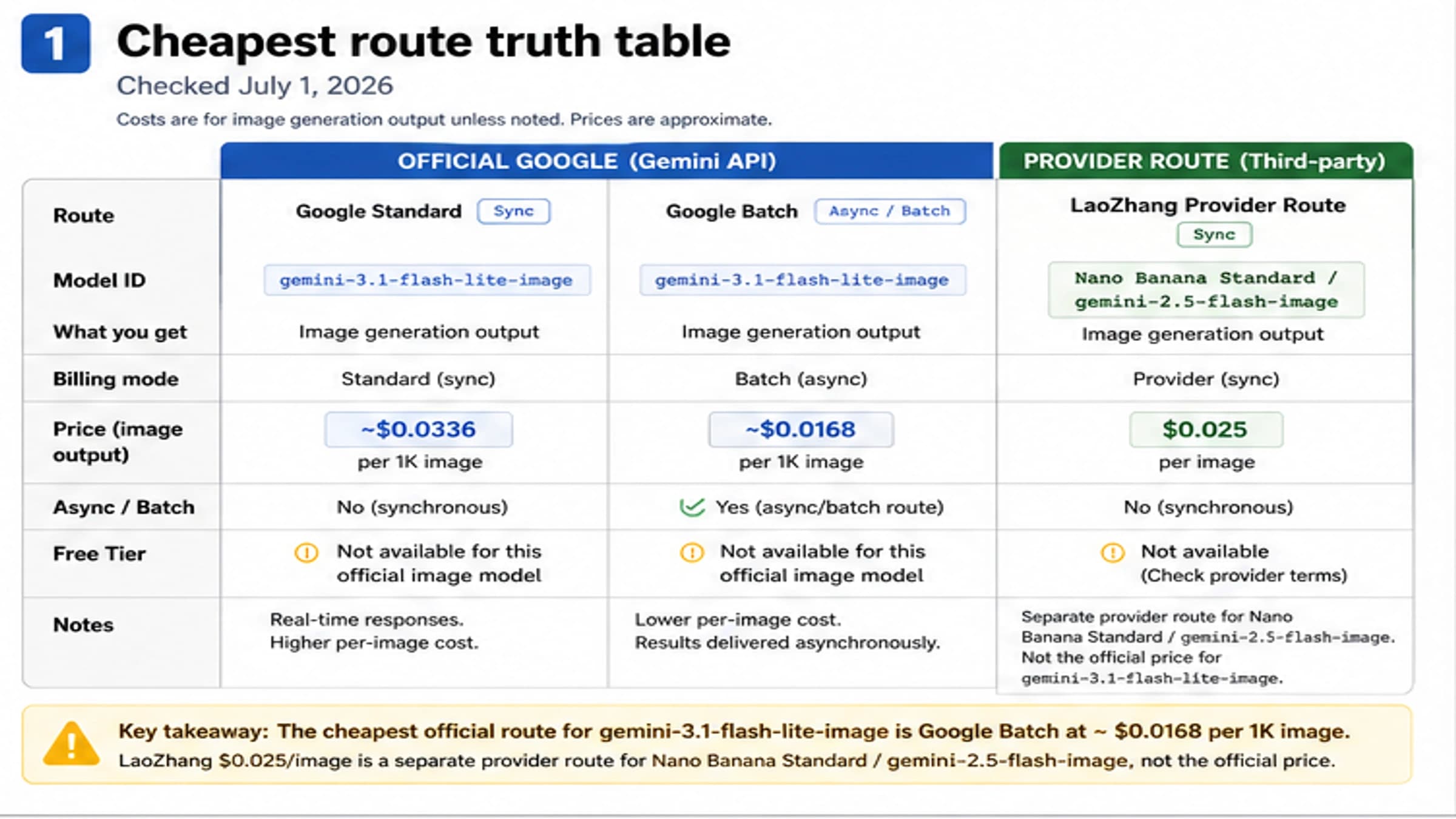
Image-generation workloads can add still more model- and surface-specific limits. Use the Gemini image-generation rate-limit guide when IPM, consumer image caps, or Vertex image capacity—not the broad Developer API contract—is the actual job.
Production preflight: record the contract before launch
A reliable launch record should answer all of these questions:
- Surface: Is traffic going through the Gemini Developer API, Gemini Apps, Firebase AI Logic, or Vertex AI?
- Owner: Which project, billing account, consumer account, or Firebase project owns it?
- Model: What exact model ID and status does the request use?
- Metric: Which RPM, input-TPM, RPD, IPM, TPD, spend, Batch, or Priority value applies?
- Window: When does the counter reset or roll, and where will the team verify it?
- Traffic shape: What are p50 and p95 input tokens, p95 latency, burst factor, daily volume, and retry rate?
- Admission: What queue, concurrency cap, token budget, and shed rule keep traffic below the operating target?
- Error branch: Are 429 and 503 tracked separately, with bounded retries and a stop rule?
- Lane: Are Standard, Priority, and Batch monitored as separate serving contracts?
- Evidence: Can an on-call engineer capture request IDs, timestamps, model, project, response details, status, and impact without exposing credentials?
Run the calculation with production-like input sizes, not a “hello world” prompt. Test both a burst and a sustained period. Confirm that retries are visible as added load. Then set alerts below the chosen operating target, not at the published ceiling.
The most useful dashboard is not a wall of model numbers. It is a small contract record that can tell an engineer, during an incident, which surface owns the failure, which clock bound, what changed, and which action is safe.
Gemini rate-limit FAQ
Are Gemini API rate limits per API key?
No. The Developer API documentation says rate limits apply per project, not per API key. Multiple keys in one project share the same quota pool.
Does Gemini API have a daily limit?
Some active model/project rows include RPD or TPD. Where RPD applies, the current official contract resets it at midnight Pacific time. Check the exact AI Studio row because there is no universal daily number for every model and tier.
Why can a paid Gemini API project still return 429?
Billing can change tier eligibility, but the project can still exhaust RPM, input TPM, RPD, spend-window, Batch, or another active limit. A 429 is evidence to identify the binding dimension, not proof that billing failed.
How long should I wait after a Gemini 429?
The answer depends on the exhausted window. Honor Retry-After when present, inspect the error and active row, and distinguish minute pressure from RPD or spend pressure. A short wait that helps RPM will not reset a daily counter.
Is Batch API quota separate?
Yes. Batch uses a separate quota pool from interactive requests, with its own concurrent-job, file, storage, and enqueued-token constraints. Recheck the current Batch page before scheduling production volume.
Does a Gemini app subscription increase API rate limits?
Do not assume it does. Gemini Apps allowances belong to the consumer app and account. Developer API quotas belong to the Google Cloud project, model, tier, and active AI Studio row.
Are Vertex AI Gemini limits the same as Developer API limits?
No. Newer Vertex AI PayGo Gemini traffic uses Dynamic Shared Quota, while Provisioned Throughput is a purchased-capacity route. Diagnose Vertex capacity with Google Cloud evidence, not Developer API RPM/RPD tables.
Can multiple Google Cloud projects increase capacity?
Projects can have separate ownership and limits, but they should represent legitimate environment, billing, security, or organizational boundaries. Do not create or rotate projects to evade quotas. For a genuine multi-project architecture, document routing, spend, data policy, and failure isolation explicitly.
What should I send with a rate-limit support request?
Include the product surface, project identifier where safe, exact model, endpoint or region, timestamp with timezone, request ID, full error code and details, current active-limit row, recent traffic and token distribution, retry behavior, and customer impact. Never include an API key or other credential.