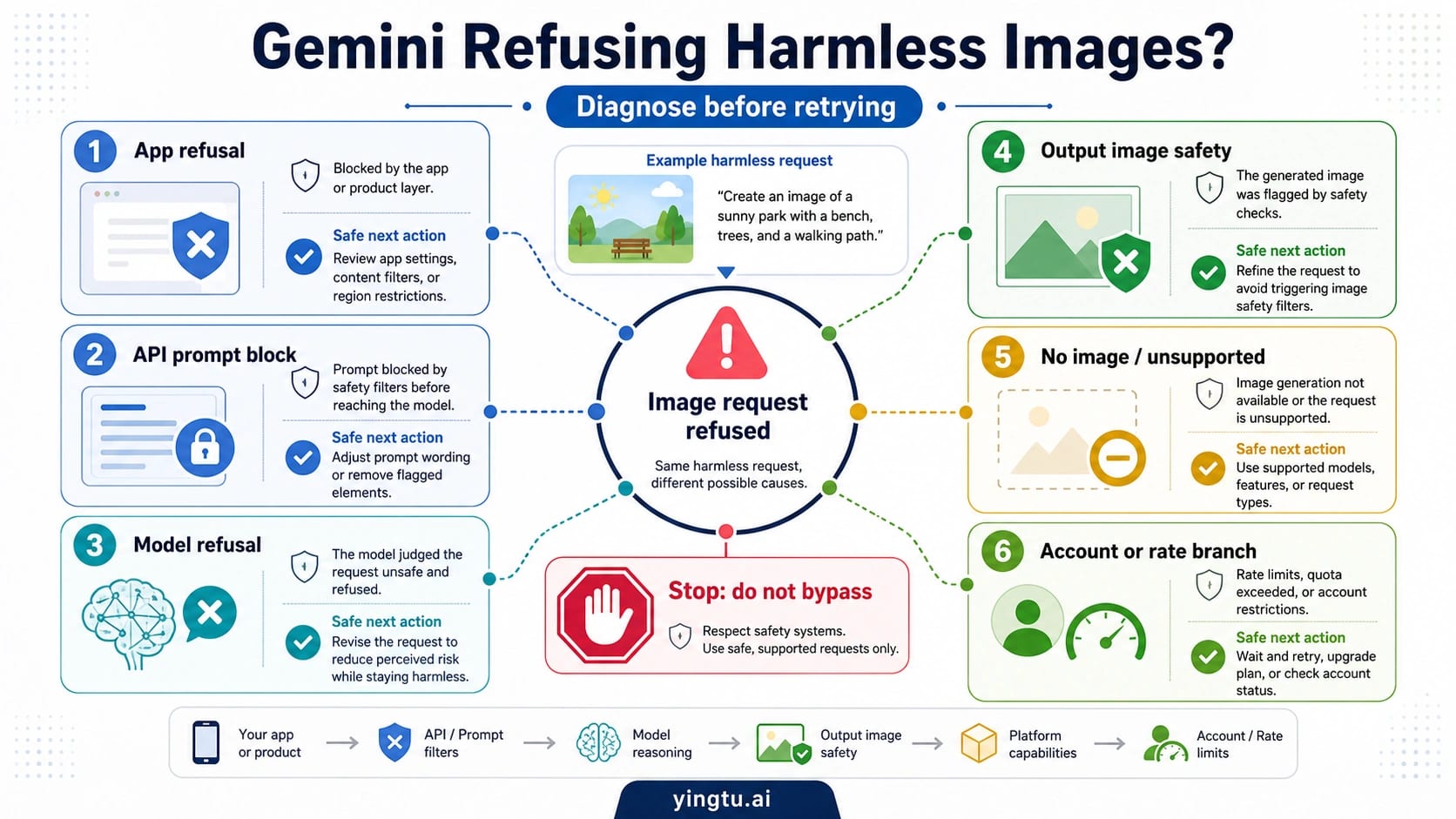
As of July 8, 2026, Gemini can still refuse an image prompt, upload, or edit that looks harmless to you, but the next move is not to force it through. First identify which layer said no: the Gemini app, the API prompt filter, the model's refusal text, the generated-image safety filter, an unsupported image route, an account or rate limit, or a true policy stop.
| What you see | Most likely layer | Evidence to check first | Safe next move |
|---|---|---|---|
| The Gemini app says it cannot create or edit the image | Gemini Apps refusal | Prompt wording, uploaded subject, face/person context, account, age, work/school, plan, and feature availability | Clarify the allowed goal, try a fresh session once, preserve the message, or report if it still looks like a false positive |
| API returns prompt feedback or a safety finish reason | API prompt or model-safety branch | promptFeedback.blockReason, finishReason: SAFETY, safetyRatings, model, project, and settings | Inspect the response before changing the prompt; use the API safety guide only if this branch is confirmed |
| The prompt is accepted but no image appears, or the generated image is blocked | Output image safety or request-shape branch | IMAGE_SAFETY, IMAGE_PROHIBITED_CONTENT, BlockedReason.OTHER, response parts, and whether the model supports the requested image operation | Simplify the request, remove ambiguous identity/rights risk, or stop if the output goal is disallowed |
| The message mentions limits, caps, heavy use, or 429 | Account, plan, quota, or rate branch | App plan state, daily image cap, API project quota, 429 body, retry delay, and current usage | Use the rate-limit or 429 branch instead of treating it as a policy refusal |
| The request involves a real person, public figure, child-safety risk, sexual content, violence, IP, privacy, deception, or filter evasion | Hard policy or rights boundary | The subject, consent, source rights, intended use, and prohibited-use category | Stop; do not rewrite the request to sneak it through |
A safe retry makes an allowed request clearer: name the non-deceptive purpose, remove ambiguous likeness or rights claims, simplify the edit, and avoid sexual, violent, privacy-sensitive, or identity-confusing context. A bypass request does the opposite, so that path should stop rather than be reworded.
If the refusal still looks like a false positive, save the prompt, uploaded-image context, visible message, model or app surface, timestamp, account or project route, and API fields before repeated retries. Community reports can show that false positives happen, but only your own evidence can support a useful report or escalation.
Start with the surface, not the prompt wording
The same visible symptom can have different owners. A Gemini Apps message is a consumer-product signal. A Gemini API response is a developer response object. A Google Cloud or Vertex image-generation response may expose image-specific output filters. A 429 or "limit reached" message is usually quota or account state, not proof that the image request violated policy.
Google's Gemini Apps Help owns the consumer route: app image generation and editing depend on the current product surface, account context, age and school-account restrictions, supported countries and languages, quota state, and Google's app policies. Google's Gemini app policy guidelines and Generative AI Prohibited Use Policy own the hard boundary language, including child safety, non-consensual intimate imagery, self-harm, sexually explicit content, violence, hate, harassment, deception, privacy, IP, and safety-filter circumvention. For developers, the Gemini API safety settings and Gemini API troubleshooting guide explain response fields, configurable filters, and cases that remain blocked outside ordinary threshold tuning.
That split prevents three common mistakes:
| Mistake | Why it wastes time | Better first move |
|---|---|---|
| Treating every app refusal as an API safety-settings problem | The Gemini app does not expose promptFeedback or project safety settings | Preserve the visible app message and check account, subject, uploaded image, and feature availability |
| Treating every API block as a prompt-word problem | The prompt can pass while the output image is blocked later | Inspect candidate finish reasons, response parts, and image-specific block fields |
| Treating every refusal as proof that Gemini is wrong | Some requests involve consent, identity, privacy, IP, sexual, violence, deception, or child-safety boundaries | Stop when the underlying request is disallowed; report only possible false positives with evidence |
Decode Gemini Apps refusals
If the refusal happened in the Gemini app, start with the visible context. Gemini Apps currently describe image creation and editing through Nano Banana models, but access can still depend on age, account type, work or school controls, plan state, daily quota, location or language availability, feature rollout, and the current request. A harmless-looking prompt in your head may still look ambiguous to the system if the upload includes a real person, a recognizable public figure, a child, a private setting, a brand mark, or an edit that could mislead someone about the subject.
Use an app-side checklist before rewriting the prompt:
| App check | What to look for | Safe action |
|---|---|---|
| Upload subject | Real person, public figure, child, private scene, medical or intimate context | Confirm consent and rights; stop on non-consensual or deceptive edits |
| Prompt goal | Is the requested edit clearly non-deceptive and allowed? | State the benign purpose directly instead of using vague words like "make it dramatic" |
| Account route | Personal account, work or school account, age-restricted account, plan feature | Check whether the feature is actually available in that route |
| Session context | Earlier conversation turns that may make the edit look unsafe | Try one fresh session with clearer allowed context |
| Limit signal | Cap, heavy-use notice, redo limit, or temporary feature notice | Move to the limit branch instead of treating it as policy |
An app false positive is possible, especially with face edits, public-figure wording, pets or people misread as identifiable subjects, or benign prompts that share language with risky categories. But "possible" matters. Do not call it allowed until the branch is clear. Save the exact refusal message and the surrounding context before trying a series of near-duplicate prompts, because repeated retries can erase the best evidence.
Decode API and AI Studio refusals
For API requests, inspect the response before changing the prompt. The Gemini API can expose whether the prompt was blocked, whether a candidate stopped for safety, whether safety ratings were returned, and whether the generated image itself was filtered. The exact shape depends on the model, route, SDK, and response, but the decision habit is consistent: read the response object first, then decide whether the request can be clarified.
| API signal | What it usually means | Next safe action |
|---|---|---|
promptFeedback.blockReason | The input prompt was blocked before generation | Compare the prompt with configured filters and prohibited-use boundaries; do not assume output filtering is the issue |
finishReason: SAFETY | A candidate stopped because a safety filter fired | Review safetyRatings, context, and category; adjust settings only for allowed categories and use cases |
IMAGE_SAFETY | The generated image was blocked by image-output safety filtering | Simplify the visual request or stop if the output goal is unsafe |
IMAGE_PROHIBITED_CONTENT | The generated image or requested content hit a prohibited-content boundary | Stop; this is not a normal prompt-polish problem |
BlockedReason.OTHER | The issue may be unsupported, Terms-related, or outside ordinary category tuning | Check troubleshooting docs, model support, route shape, and project context |
| No image part returned | The request may be text-only, unsupported for the model, blocked, or malformed | Confirm model capability, response parts, media settings, and SDK handling |
BLOCK_NONE is not a universal override. The API safety settings documentation describes adjustable filters for harassment, hate speech, sexually explicit, and dangerous-content categories, while Google keeps built-in protections for core harms such as child safety that cannot be adjusted. Image generation adds another practical layer: the prompt can be accepted, then the visual output can still be blocked. When that happens, raising or lowering text safety thresholds may not change the result.
If the deeper issue is API safety configuration, use Google's Gemini API safety settings guide. If the exact error belongs to a generateContent block or finish reason on a Nano Banana route, use the GenerateContent response reference after confirming the model and route.
Safe clarification is not filter evasion
A safe retry makes the allowed request easier to understand. It does not hide a disallowed one. Good clarification names the benign use case, removes ambiguity around people and rights, narrows the edit, and avoids terms that make the request look like deception, impersonation, sexual exploitation, violence, self-harm, privacy invasion, IP misuse, or abuse-protection circumvention.
Use this boundary:
| If the underlying request is... | Safe retry? | Example safe direction |
|---|---|---|
| A product mockup, layout cleanup, lighting correction, background change, or non-deceptive creative edit | Usually yes | State the concrete edit and remove unnecessary sensitive context |
| Your own image or an authorized subject with consent | Sometimes | Mention consent, purpose, and whether identity should be preserved or anonymized |
| A public figure, private person, child, intimate image, medical image, or identity-confusing edit | High caution | Stop unless the use is clearly allowed, consented, and non-deceptive |
| Copyrighted character, brand mark, logo, or style imitation that depends on protected identity | Often risky | Use original descriptive direction instead of requesting protected material |
| Sexual, violent, extremist, self-harm, privacy-invasive, deceptive, or filter-evasion content | No | Stop |
The difference is intent plus evidence. "Create a clean product-photo background for my own catalog image" is a clarification. "Avoid the filter by disguising the public figure" is evasion. The first helps Gemini understand an allowed job; the second tries to remove the safety boundary from the decision.
Build a false-positive evidence packet
If the refusal still appears wrong after the branch check, preserve evidence before repeated retries. A useful report is specific enough for another person, support channel, or engineering owner to reproduce the failure without guessing which surface, model, or context was involved.
Capture these items:
| Evidence item | Why it matters |
|---|---|
| Surface | Gemini app, AI Studio, Gemini API, Vertex AI, SDK, or wrapper determines the owner |
| Date and timestamp | Policy, models, limits, and feature behavior can change |
| Model and route | The same prompt may behave differently across app, API, and image model routes |
| Prompt and uploaded-image context | A refusal can depend on the full multimodal context, not only the final sentence |
| Exact visible message | App messages and API fields point to different branches |
| API response fields | promptFeedback, finishReason, safetyRatings, response parts, and block reasons make the report actionable |
| Account or project state | Plan, work/school controls, quota, billing, and region can change the symptom |
| Minimal reproduction | A shorter allowed prompt helps separate false positive from hidden context |
Do not include private images, personal data, or third-party material in a public report unless you have the right to share it. For internal teams, store the evidence with access controls. For public community posts, redact sensitive uploads and describe only what is necessary to diagnose the branch.
Use the narrower guide after the branch is clear
The refusal classifier should keep the first decision small. Once the branch is known, move to the owner that can actually solve it.
| Confirmed branch | Better next guide |
|---|---|
| API safety settings, harm categories, thresholds, and response fields | Gemini API safety settings |
Exact generateContent block and finish reasons on a Nano Banana route | GenerateContent block and finish reasons |
| Gemini app image caps or plan limits | Gemini Apps limits and upgrades |
| Gemini API project quotas or image-per-minute limits | Gemini API rate limits |
API 429 RESOURCE_EXHAUSTED, retry delay, quota metric, or project throughput | Gemini API troubleshooting |
This split is not pedantry. It keeps an app account issue from turning into a code change, keeps a 429 from being mislabeled as policy, and keeps a real rights or safety boundary from being normalized as a prompt engineering challenge.
FAQ
Why does Gemini reject my own photo?
Own-photo edits can still trigger caution when the request involves identity, likeness preservation, sexualized context, medical or private context, or a confusing before/after transformation. Make the consent and non-deceptive purpose clear, simplify the edit, and stop if the requested result would mislead viewers or expose sensitive personal information.
Why does Gemini think a harmless image is a public figure or real person?
Image systems can be conservative around faces, names, likenesses, and public-figure cues. Treat that as a possible false positive only after checking whether the prompt, upload, filename, conversation context, or requested edit creates identity confusion. Save the visible message and context before reporting.
Does paying for Gemini Advanced, Pro, or Ultra remove image safety blocks?
No. Paid app access can affect feature availability, caps, redo limits, or model access, but it does not remove Google's policy boundaries. If the message is about limits or plan access, use the rate-limit branch. If it is a safety refusal, diagnose the safety layer.
Does BLOCK_NONE disable Gemini image safety filters?
No. BLOCK_NONE relates to configurable API safety filters for supported categories. Core protections, Terms-related blocks, unsupported requests, and image-output safety filtering can still stop a request or remove an image result.
Why did the same prompt work yesterday and fail today?
Model routing, app rollout state, safety behavior, account limits, conversation context, and uploaded-image interpretation can change. Compare the exact surface, model, account, timestamp, prompt, upload, and response fields before concluding that the policy changed.
Why did Gemini answer with text instead of returning an image?
The request may have gone to a text route, used a model or SDK call that did not request image output, returned no image part after filtering, or hit an unsupported request shape. Check the model capability, response parts, SDK parameters, and any safety or block fields.
How do I report a false positive?
Report the refusal with the evidence packet: surface, timestamp, model, prompt, upload context, exact message, account or project route, API fields, and a minimal reproduction. Keep private images and personal data out of public posts unless you have the right to share them.
Can I bypass Gemini's image safety filter?
No. Do not disguise prohibited content, evade abuse protections, or use another route to remove consent, identity, privacy, IP, sexual, violence, child-safety, or deception boundaries. If the request is allowed, clarify it. If it is disallowed, stop.