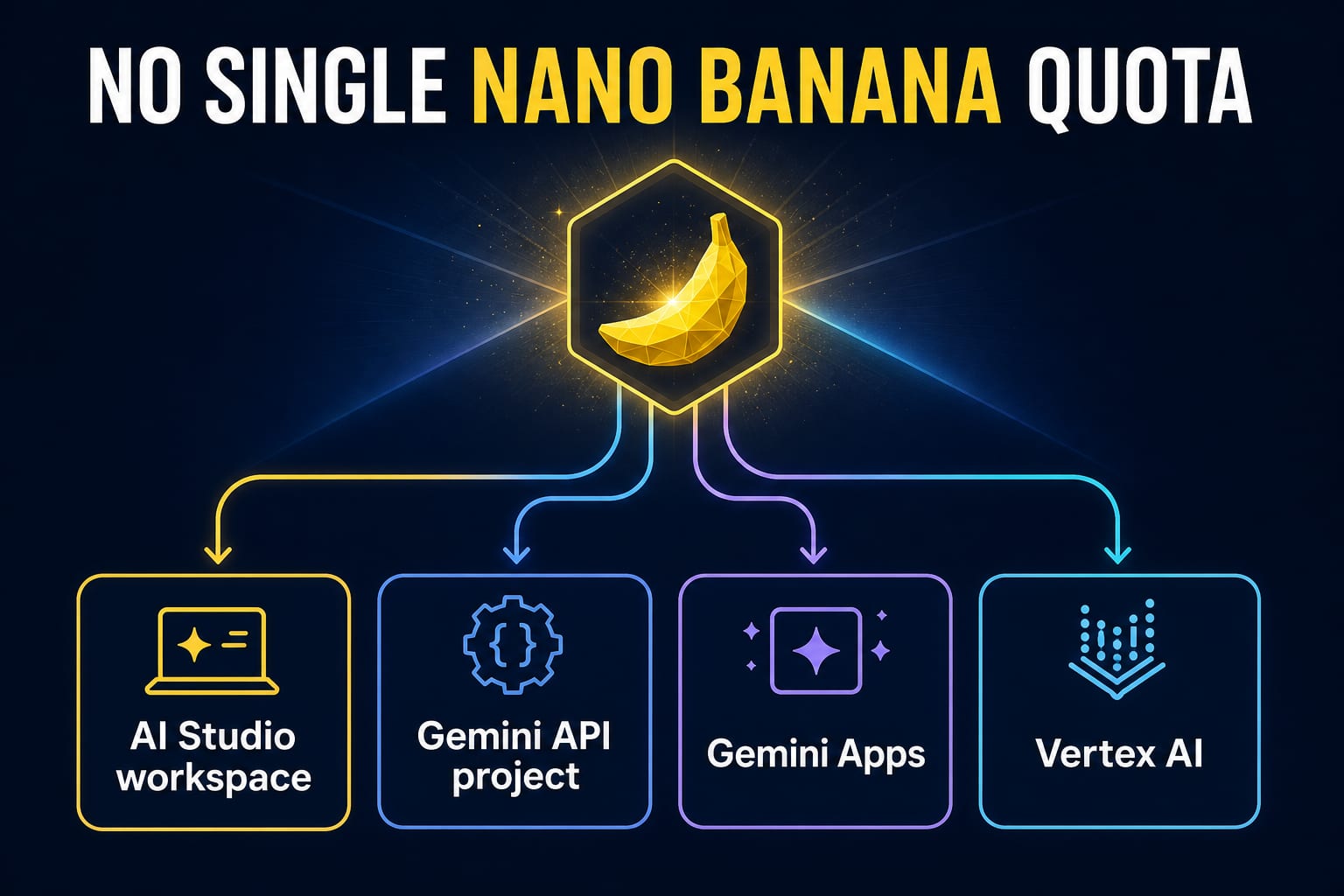
There is no universal “AI Studio Nano Banana quota.” If you are generating in the AI Studio browser workspace, a visible limit message belongs to that interactive workspace. If your code calls the Gemini Developer API, the active limits belong to the Google Cloud project behind the key—not to the browser session and not to each key separately.
Before looking for a number, record five things: the surface, project, exact model ID, usage tier, and the limit dimension shown in the notice or error. Without those, a quota figure is more likely to mislead than help.
Start with the surface, not a quota number
“Nano Banana” names an image-model family used through several products. Those products do not share one counter or one reset rule.
| What you are actually using | What owns the limit | Evidence to check now | What not to assume |
|---|---|---|---|
| AI Studio browser workspace | The signed-in workspace, selected model, account access, and current capacity | The exact on-screen notice, selected model, and whether the failure occurs only in the workspace | A browser notice does not prove that an API quota metric is exhausted |
| Gemini Developer API | Project, model, usage tier, and quota dimension | The active rate-limits view in AI Studio plus the API response | A second key in the same project does not create a second quota |
| Gemini Apps | Consumer plan, feature access, and the limit shown in Gemini | Gemini Apps Settings → Usage limits and the current Help page | A consumer plan allowance is not an API project quota |
| Vertex AI | Google Cloud project, region, billing, IAM, and Vertex capacity model | Cloud console quotas, model/region documentation, and request telemetry | Vertex AI is not an unlimited fallback |
| Third-party wrapper | The provider's balance, subscription, queue, and model alias | The provider's own usage record and terms | Wrapper credits do not reveal or expand a Google project quota |
This surface check resolves a common contradiction: image generation may still work in Gemini Apps while a developer project returns 429 RESOURCE_EXHAUSTED, or the API may work while the AI Studio workspace shows a temporary limit. Both can be true because the contracts are different.
AI Studio is both a workspace and a project-management surface
The phrase “AI Studio limit” is ambiguous for a practical reason. Google AI Studio is an interactive browser workspace for trying models, but it also links developers to project-level Gemini API information. Seeing an error in one part does not identify the other part automatically.
If you clicked Run in the browser and did not send an API request, capture:
- the full visible message;
- the selected Nano Banana model;
- whether a new prompt and an existing conversation fail in the same way;
- the time and timezone;
- whether the API for the same intended model was tested separately.
Do not manufacture an API diagnosis from a browser-workspace message. If the notice is specifically about the AI Studio interface, the focused recovery guide is Google AI Studio rate limit reached.
If an application sent a request with a Gemini API key, use the API branch instead. Google's current Gemini API rate-limit documentation says active limits are visible in AI Studio, are applied per project rather than per API key, vary by model and tier, and are not guaranteed capacity.
Read the exhausted API dimension before changing anything
The Gemini API can evaluate several limits at once. Exceeding any applicable dimension can stop a request, so “raise my rate limit” is not yet a diagnosis.
| Dimension | What it measures | A typical traffic shape | First corrective action |
|---|---|---|---|
| RPM | Requests per minute | Many small calls arrive together | Smooth bursts, queue work, and cap request concurrency |
| Input TPM | Input tokens per minute | Large prompts or image-heavy context arrive rapidly | Reduce repeated context, shrink inputs, and avoid resending unchanged material |
| RPD | Requests per day | Steady traffic consumes the daily request allowance | Stop tight retries, schedule non-urgent work, and wait for the API reset |
| IPM | Images per minute for image-capable models | Concurrent image jobs exceed image throughput | Add an image queue and lower simultaneous generations |
| Spend-based limit, when applicable | Cost accumulated in a rolling window | A burst of expensive image requests | Slow expensive work, inspect billing/tier state, and request an increase only with real workload evidence |
Google currently states that Gemini API RPD resets at midnight Pacific time. That rule belongs to the Gemini Developer API. Do not apply it to Gemini Apps, an AI Studio workspace notice, Vertex AI, or a wrapper's credit balance.
The active project view matters more than a copied table. Published limits can change with model, tier, account status, and capacity; preview or experimental models can be more restrictive. If a forum post says “the limit is X,” it still cannot establish what your project is allowed to do now.
A new API key does not create fresh image quota
Gemini API rate limits are project-level. If three keys belong to one project, traffic from those keys contributes to the same project limits.
That makes key rotation a poor quota strategy. It can hide which client caused a burst while leaving the actual project bottleneck untouched. Instead:
- give each service a traceable key or service identity for security and attribution;
- keep one project-level concurrency budget for image jobs;
- log the exact model and quota metric with each 429;
- separate user-facing retry behavior from background queue retries;
- request higher capacity only after measuring sustained legitimate demand.
Creating a separate project is an ownership and billing decision, not a trick for evading controls. It adds another project to secure, observe, fund, and govern.
Do not confuse model access, API price, and live quota
These are three separate questions:
- Model access: Is the model available on this product surface and to this account or project?
- Price or free-tier status: Does the official pricing row offer a free API lane for that model?
- Live quota: What does the signed-in project currently show for the applicable rate-limit dimensions?
The Gemini Developer API pricing page owns the second question. Checked on July 20, 2026, the Standard API rows for gemini-3.1-flash-image, gemini-3.1-flash-lite-image, gemini-3-pro-image, and gemini-2.5-flash-image showed Free Tier: Not available. That is a dated API pricing snapshot. It does not prove that Nano Banana is unavailable in Gemini Apps or that every browser-based use is paid-only, and it does not reveal your project's RPM or IPM.
Conversely, paying does not make image generation unlimited. Billing can affect API model eligibility, usage tier, and the path for requesting more capacity, while project, model, spend, safety, and system-capacity controls still remain.
For the broader “is this model free?” decision, use the Gemini API free-tier guide. Keep that question separate from the live quota diagnosis on this page.
Why the old Gemini Apps image-count table is no longer a safe answer
The consumer Gemini Apps contract changes independently of the developer API. Google's Gemini Apps limits and upgrades page currently warns that limits can change because of testing, availability, and capacity. It tells signed-in users to view Settings → Usage limits, where Gemini reports proximity to a limit and when it refreshes.
That is why an old fixed-count image table should not be used as a universal answer. It mixed a dated consumer-plan snapshot into questions about AI Studio and API projects. It also encouraged a false precision that the current account UI may contradict.
For Gemini Apps, trust the signed-in usage screen and current Help wording. For a Gemini API project, trust the active rate-limits view and the request error. Never transfer a number or reset rule from one surface to the other.
A worked diagnosis: two failures that look similar
Case A: the browser workspace stops generating
Suppose a designer selects a Nano Banana model in AI Studio, generates several variations, and then sees a limit notice. No API request log exists.
The evidence points to the workspace branch. Record the exact notice and selected model, check whether Gemini API requests were ever involved, and follow the refresh or wait guidance displayed in the product. Opening an API quota dashboard can provide project information, but it does not retroactively turn the browser notice into an API IPM or RPD event.
Case B: a worker returns 429 RESOURCE_EXHAUSTED
Suppose a backend launches 12 image jobs at once. Three API keys all belong to project image-worker-prod, and the response identifies an image or request rate metric.
The keys share one project pool. Queue the jobs, reduce concurrency, respect any retry delay, and compare the timestamp with the active project view. If the load is normal and sustained, preserve the evidence needed for a quota-increase request. Do not rotate keys or upgrade a consumer Gemini subscription and expect the API project to change.
The important difference is not the wording “limit reached.” It is whether the event came from a browser workspace or a measured API request.
What to save when the API returns 429
Before retrying or contacting support, preserve a compact diagnostic record:
- a safe project alias, without exposing the project ID publicly;
- the exact model ID;
- request timestamp and timezone;
- HTTP status and full structured error body;
- quota metric or dimension, if present;
retryDelay, if present;- traffic shape immediately before the error;
- current signed-in rate-limit value for that project and model;
- billing or usage tier, without publishing billing details.
Then choose the fix that matches the dimension. A one-minute burst needs pacing; a daily allowance needs a daily-volume decision; image throughput needs a generation queue. Blind retries can make every branch worse by turning one rejected request into a retry storm.
For implementation details—backoff with jitter, request logging, and escalation evidence—continue to How to fix Gemini image generation error 429.
Billing, Vertex AI, and wrappers are routes—not bypasses
A paid consumer Gemini plan and a billed Gemini API project are not interchangeable. A subscription may change Gemini Apps access; API capacity is attached to the developer project's model, tier, and limits.
Vertex AI is a separate Google Cloud operating contract with its own project, region, IAM, billing, quota or dynamic capacity, governance, and support path. Choose it when your workload needs Cloud ownership and controls. Moving there solely to search for “unlimited Nano Banana” replaces one capacity contract with another.
Third-party wrappers are separate again. Their credits, subscriptions, aliases, queues, and retry policies tell you about that provider. They do not expose Google's internal project quota, and buying wrapper credits does not increase a Gemini Developer API project's limits.
A five-minute quota check
When image generation stops, use this order:
- Name the surface. AI Studio workspace, Gemini API, Gemini Apps, Vertex AI, or a wrapper.
- Copy the exact symptom. Preserve the notice or structured response before paraphrasing it.
- Identify the owner. For API calls, confirm project, model ID, and tier. For apps, confirm plan and the signed-in usage screen.
- Find the dimension. RPM, TPM, RPD, IPM, spend, consumer feature access, or temporary capacity.
- Apply one matching action. Pace bursts, shrink repeated input, queue images, wait for the correct reset, or prepare evidence for a legitimate capacity request.
If you cannot fill in those five fields, the honest answer is that the quota is still unknown—not that it equals a number copied from another product surface.
FAQ
How many Nano Banana images can I generate in Google AI Studio?
There is no single number that applies to every AI Studio workspace and Gemini API project. For browser generation, read the signed-in workspace notice. For API traffic, check the active project and model limits in AI Studio.
Is the Gemini API image quota per API key?
No. Google's rate-limit documentation says Gemini API limits are applied per project, not per API key. Multiple keys in one project share the project's applicable limits.
Does a Google AI Pro or Ultra subscription increase my API quota?
Do not assume so. A consumer subscription changes the Gemini Apps contract. Gemini Developer API quota belongs to the API project, model, tier, and current capacity.
When does the Nano Banana quota reset?
It depends on the surface and dimension. Google says Gemini API RPD resets at midnight Pacific time, but minute-based dimensions use shorter windows. Gemini Apps and workspace notices should be read from their own signed-in refresh guidance.
Does “Free Tier: Not available” mean Nano Banana cannot be used in a browser?
No. That label belongs to a specific Gemini Developer API pricing row. It does not describe every Gemini Apps or AI Studio browser experience, and it does not state a project's live quota.
Why did billing not remove my 429 error?
Billing can affect eligibility and usage tier, but it does not remove RPM, TPM, RPD, IPM, spend, safety, or capacity controls. Inspect the error's actual metric before changing billing again.
Can I use a second key, Vertex AI, or a wrapper to bypass the limit?
No safe diagnosis starts with bypassing controls. A second key in the same project shares quota; Vertex AI has a separate Cloud capacity contract; a wrapper has its own credits and queue. Choose a route for operational fit, not as an unlimited loophole.
What is the minimum evidence for an API quota request?
Keep the project, exact model, quota metric, timestamp, structured error, retry delay, active dashboard value, and a measured description of normal workload. Remove secrets and private billing information before sharing the record.