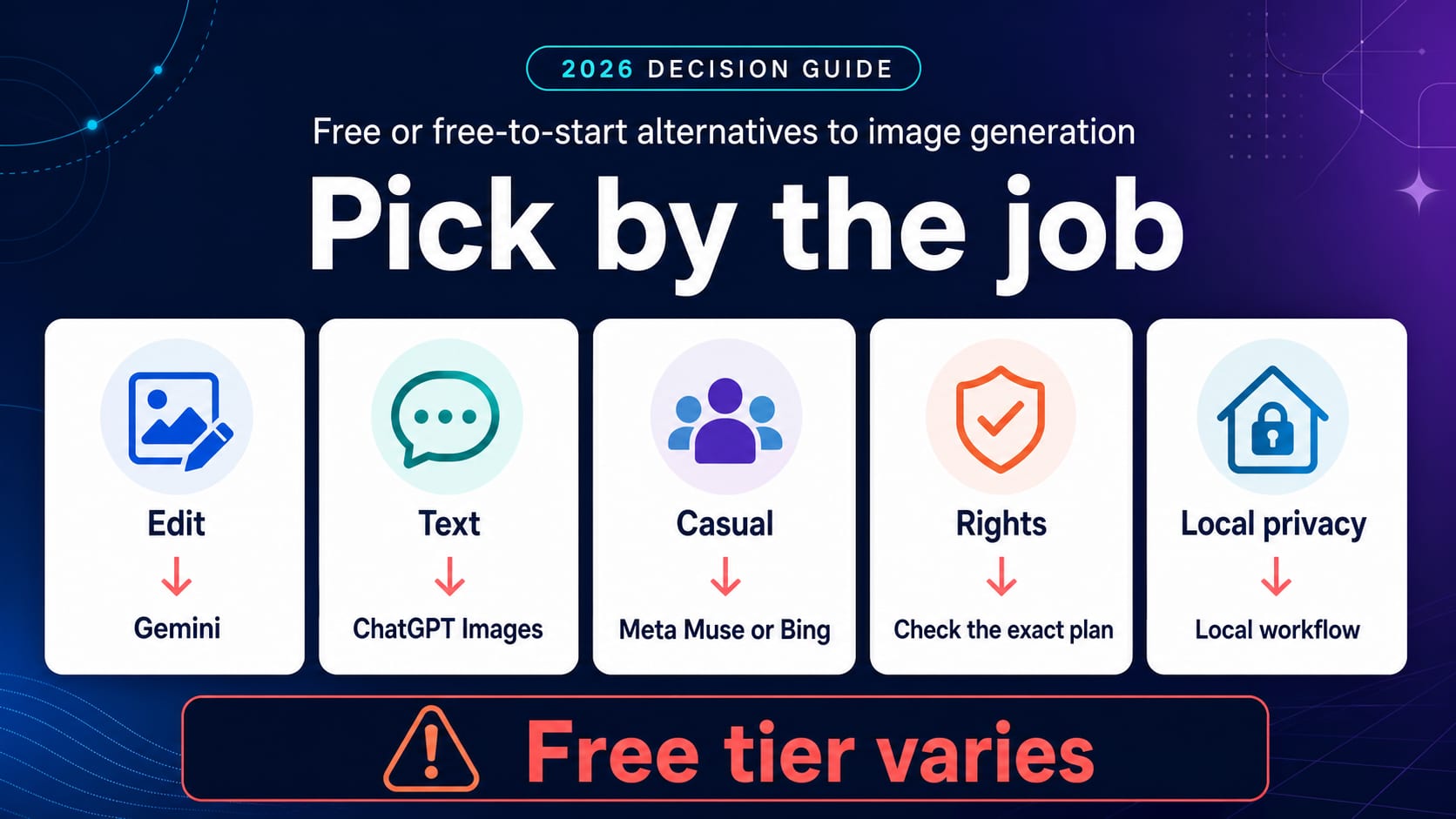
If you need a free alternative to Grok for image generation, start with the job—not a universal ranking. Use Gemini for reference-image edits and controlled revisions, ChatGPT Images for instruction-heavy scenes or wording inside an image, Meta AI with Muse Image or Bing Image Creator for casual ideas, Ideogram for poster-style typography, and Adobe Firefly when an Adobe production workflow matters. Recraft can be useful for design exploration, but its Free-plan outputs have unusually important public-visibility and rights limits.
None of those routes is simply “free forever.” Free may mean a separate tool limit, a daily or weekly credit balance, a slower queue, public output, a trial surface, or hardware you pay for yourself. Check the current account screen before building a repeatable workflow around any allowance.
| Your main need | First route to try | The catch to check first |
|---|---|---|
| Preserve a reference while changing one detail | Gemini | Age, country, language, plan, and the daily quota shown to your account |
| Follow a long brief or place readable words in the image | ChatGPT Images | Image creation has a separate Free-tier limit |
| Make a few casual concepts quickly | Meta AI / Muse Image or Bing Image Creator | Rollout and account limits vary; Bing has fast and standard-speed lanes |
| Create a poster, title card, or text-led social graphic | Ideogram | Free generations are public and use a weekly slow-credit allowance |
| Explore icons, vector-like assets, or brand directions | Recraft | Free outputs are public, Recraft-owned, and not licensed for commercial use |
| Move from generation into an Adobe workflow | Adobe Firefly | Free generations are limited; Adobe-model and partner-model terms differ |
| Keep sensitive work on hardware you control | A local image workflow | Hardware, setup, licenses, updates, and safety responsibility move to you |
First decide what “free” has to cover
The word free is too vague to make the choice. A personal experiment and a customer-facing campaign can use the same prompt while requiring completely different contracts.
Define these five things before opening another generator:
- Task: Is this a new image, a controlled edit, text inside an image, or a reusable design asset?
- Volume: Do you need two attempts today or a predictable batch every week?
- Visibility: Can the prompt and output be public, or does the work include a client, unreleased product, home, face, or private photo?
- Rights: Is the result only for personal exploration, or will it appear in advertising, packaging, a paid product, or a client deliverable?
- Handoff: Do you need a browser download, an editable design workflow, or a programmatic API?
Those answers eliminate most bad fits. A tool with generous credits is not a bargain if every Free-plan image is public. A strong consumer app is not an API. A local model avoids a provider quota, but it does not remove electricity, hardware, license review, or maintenance.
The practical meaning of “free” for the main routes was checked on July 22, 2026:
| Route | What the current free start means | What it does not prove |
|---|---|---|
| Grok consumer app | xAI lists a $0 consumer plan, but feature limits and reset details are account-dependent | A permanent Grok Imagine allowance for every account |
| Gemini Apps | Image generation is available on supported Gemini surfaces; access and daily quota depend on account conditions | A fixed public image count that applies to everyone |
| ChatGPT | Image creation is available on the Free tier and has a limit separate from the main chat limit | Unlimited images or the same limit as a paid plan |
| Meta AI / Muse Image | Meta describes everyday creation as free and subscriptions as the route for more use | Availability on every Meta surface or in every country |
| Bing Image Creator | A Microsoft account includes free fast creations and slower standard creation after the fast allowance | No account requirement or unlimited fast generation |
| Ideogram | A weekly slow-credit allowance supports public generation | Private generation on the Free plan |
| Recraft | Daily credits support experimentation | Private ownership or commercial use of Free-plan outputs |
| Adobe Firefly | Limited free daily generations across supported media and models | Identical rights for every third-party model available inside Firefly |
The best replacement routes, matched to the job
Gemini: choose it for edits and reference consistency
Gemini is the first test when “make a new picture” is not the whole request. Google's current Gemini Apps image help documents image uploads, multiple references, local edits, follow-up refinement, text rendering, and character consistency with Nano Banana 2. That combination fits product variations, room changes, visual mashups, and iterative corrections.
It is not a promise of unlimited free editing. Google requires a signed-in account, limits availability by supported app, country, and language, and applies age conditions. The help page also refers to a daily image quota without publishing one number for every user. Treat the quota and reset shown in your own Gemini account as the controlling answer.
Try Gemini first when your pass/fail test is precise: “Keep the person, camera angle, and lighting unchanged; replace only the jacket with a dark green raincoat.” If it redraws everything, it failed the job even if the result looks attractive.
ChatGPT Images: choose it for language-heavy briefs
ChatGPT Images is available across ChatGPT tiers and can create, edit, add text, adjust details, and work in different aspect ratios. It is a sensible Grok replacement when the request contains many constraints, when the conversation helps refine the brief, or when visible wording matters.
The Free tier is genuinely a starting route, but OpenAI's Free Tier FAQ says image creation can have a separate limit from the main chat allowance. ChatGPT shows the reset timing in the product after a limit is reached. Do not turn another person's screenshot into a quota promise for your account.
A useful text test is short and unforgiving: ask for a square coffee-shop poster containing exactly “OPEN LATE FRIDAY” once, with no extra lettering. Check spelling, hierarchy, and whether one correction preserves the rest of the layout.
Meta AI with Muse Image: choose it for low-friction, casual creation
Meta introduced Muse Image in July 2026 as its current image model inside Meta AI. Meta highlights multi-image blending, preset-driven ideas, conversational refinement, and direct markup for edits. It describes everyday creation as free, with subscriptions for people who want to create more.
That makes Muse Image a promising casual replacement for social concepts, style experiments, and personal remixes. The rollout caveat matters: Meta says more countries and surfaces are still coming. Check whether Muse Image is actually present in your Meta AI surface rather than assuming every Instagram, WhatsApp, Facebook, or Messenger account has the same controls.
Avoid using a convenient social surface as permission to reuse another person's photo. Public availability of a photo is not the same as consent to generate a new depiction.
Bing Image Creator: choose it when a slower free lane is acceptable
Bing Image Creator is one of the clearest consumer free contracts for US readers with a Microsoft account. As checked on July 22, 2026, Microsoft documents 15 fast creations per day, then continued free creation at standard speed; it also documents a 200-prompt maximum in a 24-hour period. Those numbers are volatile product facts, not permanent entitlements.
Bing is a practical choice for mood boards, thumbnails, background ideas, and casual variations when waiting is acceptable. It is a weaker fit if the workflow needs private client material, deterministic volume, or an editing feature tied to a particular model. Microsoft notes that uploaded-image edits may use a different model from some text-only choices.
Ideogram: choose it for posters and visible typography
Ideogram remains a focused test for posters, title cards, labels, and social graphics where text placement is central. Its current plan documentation gives Free accounts 10 slow credits per week—up to 40 images under the documented model/rendering example—with one slow generation active at a time.
The more important limit is visibility. Free accounts do not include private generation; the current documentation says generated images are public. That can be fine for an invented event poster. It is not fine for an unreleased campaign, confidential product, private face, or client brief. Ideogram says it does not restrict output usage rights, but you still remain responsible for third-party rights and applicable law.
Recraft: choose it only when its Free-plan rights fit
Recraft is attractive for icon directions, vector-like graphics, mockup exploration, and design-system ideas. Its current credit documentation gives Free users 30 credits per day, with different operations consuming different amounts.
Do not skip the Recraft ownership terms. Images generated on the Free plan are public, remain Recraft's property, and are not licensed for commercial use. That makes Free suitable for learning the interface or exploring noncommercial ideas, not for final client assets, a paid logo, packaging, advertising, or stock content.
This is a good example of why the highest visible credit count may be the wrong answer. Rights can disqualify a route before image quality enters the comparison.
Adobe Firefly: choose it for Adobe-centered production
Adobe Firefly makes the shortlist when the next step is Photoshop, Illustrator, Express, or another Adobe workflow. Adobe's current Firefly plans page describes limited free daily generations and distinguishes its own Firefly models from partner models available through the product.
Adobe says outputs from Adobe Firefly models can be used commercially, subject to its terms and the user's responsibility. It separately tells users to determine whether content from partner models is appropriate for a project. That distinction matters: “generated inside Firefly” does not make every underlying model contract identical.
Firefly is therefore a better first test for a real production handoff than for maximizing free volume. Confirm which model generated the asset, keep the relevant plan and terms record, and review any trademark, likeness, copyright, or client restrictions before release.
Use one test card instead of sampling ten tools
You do not need a giant benchmark. Choose two routes that match the job and give both the same compact test card:
Create a 4:5 launch poster for an imaginary sparkling-water brand. Show one silver can on a cobalt table, a grapefruit slice behind it, and the exact headline “BRIGHT, NOT SWEET.” Leave the lower-right corner empty. Then make one revision: change only the table to pale yellow.
Score the result on five checks:
- Prompt fidelity: Are the can, fruit, colors, and empty corner present?
- Text fidelity: Is the headline exact, readable, and shown only once?
- Revision control: Did the second pass change only the table?
- Free contract: What did the generation consume, and when does it reset?
- Production fit: Is the output private enough and licensed for the intended use?
This is not a claim that one provider always wins. It is a reproducible way to discover which account and surface fits your task today. If both tools fail the same hard requirement, change the route—not the scoring standard.
Stop before uploading a face, client file, or private image
Free image generation becomes a privacy and consent decision as soon as an upload includes a recognizable person, a minor, a home interior, a customer, medical context, a private event, or unreleased work.
Use these stop rules:
- Do not upload sensitive material until you have checked the provider, account owner, visibility, retention, training controls, deletion path, and applicable terms.
- Do not use shared accounts, copied API keys, borrowed identities, or payment and regional workarounds.
- Treat “unlimited,” “private,” “watermark-free,” “unrestricted,” and “commercially safe” as unverified until the actual operator and current terms support the claim.
- Do not use a wrapper for real-person sexualization, non-consensual imagery, minors, impersonation, harassment, or safeguard circumvention.
- If the purpose is to evade a safety restriction, no alternative on this page is an approved route. The separate Grok image-policy guide explains that boundary.
For sensitive but legitimate work, a properly licensed local workflow may reduce provider exposure, but it does not automatically make the activity lawful or safe. You still need consent, rights, security, model-license review, and a controlled output process.
The xAI API is a different answer
xAI's consumer Grok plan and its developer API are separate contracts. The official grok-imagine-image model page documents per-image API billing, input-image charges, regions, and rate limits. As checked on July 22, 2026, that model is usage-based, not a free consumer replacement.
Use the API when the actual job is software integration: authenticated requests, application-controlled prompts, logs, usage accounting, and programmatic generation or editing. Do not use an API key, third-party relay, or pooled account as a workaround for a consumer limit. If you only need a few images in a browser, the consumer routes above are the relevant comparison.
FAQ
What is the best free Grok alternative for image generation?
For editing a reference image, start with Gemini. For a complex brief or exact words inside an image, start with ChatGPT Images. For casual creation, check Meta AI with Muse Image or Bing Image Creator. Use Ideogram for public typography experiments, Recraft only when its Free-plan public and noncommercial terms fit, and Adobe Firefly when Adobe workflow and model provenance matter.
Is Grok Imagine still free in the United States?
xAI lists a free consumer plan, but that does not establish one durable Imagine allowance for every US account. Image access, limits, reset time, surface, rollout, and plan state can change. The controls and reset notice shown in your current Grok account are more reliable than an old quota screenshot.
Which option gives the most free images?
There is no durable cross-provider winner. Bing publishes fast and standard-speed limits, Ideogram uses weekly slow credits, Recraft uses daily credits, and other consumer apps show account-dependent limits. Compare usable outputs after queue, privacy, rights, and retry costs—not the largest headline number.
Can I use a free AI image commercially?
Only if the current terms for the exact tool, plan, model, and content allow it. Recraft Free is a clear counterexample: its outputs are public, Recraft-owned, and not licensed for commercial use. Adobe also distinguishes Firefly-model outputs from partner models. You remain responsible for likeness, trademark, copyright, and client restrictions.
Which free Grok alternative is private?
Do not assume a free web generator is private. Ideogram Free and Recraft Free have public-output rules. Other providers have their own retention, review, and training controls. For confidential work, verify the current plan in writing or use a properly secured local workflow whose model license and data path you understand.
Are “unlimited Grok” wrapper sites safe?
An unlimited claim does not prove who operates the site, how it reaches the upstream model, where prompts and images are stored, whether accounts or keys are pooled, or what rights you receive. Do not upload private images or production assets unless the operator, data policy, account source, and output terms are clear.
Should I use a local image generator instead?
Use a local workflow when privacy control, offline operation, repeated experiments, or provider independence justifies the setup. It is not zero-cost: hardware, electricity, installation, updates, model licenses, security, quality control, and safety policy become your responsibility.