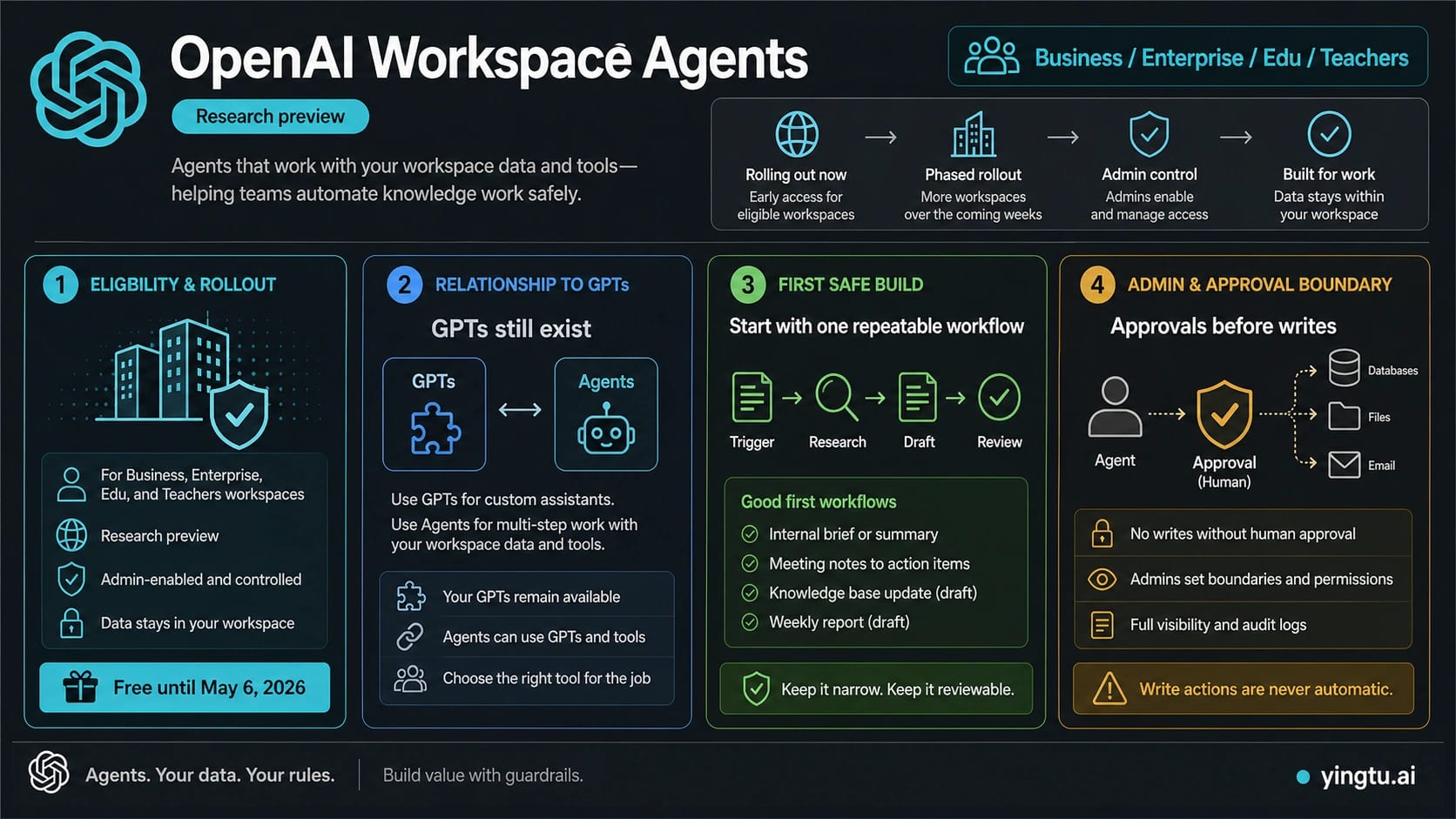
As of July 11, 2026, OpenAI describes Workspace Agents as a research-preview feature for ChatGPT Business, Enterprise, Edu, and Teachers. The current Help Center shows a mature operating surface: build from a template or prompt, test in Preview, connect apps and tools, publish to the workspace, run in ChatGPT or Slack, schedule work, or queue a run through an API trigger. Start with access and role controls, not an expired launch-week price or rollout claim.
The right first build is still narrow and reviewable. Choose one repeatable workflow, connect only the context it needs, test it in Preview, and keep sensitive writes behind an approval policy. Add schedules, Slack, API triggers, group editing, or broader connector permissions only after the basic run is predictable.
Do not choose a workspace agent merely because the job sounds autonomous. Regular ChatGPT remains better for one-off exploration; a GPT can still fit a reusable conversational assistant; deterministic automation is better for rigid rules. A workspace agent earns its extra operational surface when a shared workflow needs tools, schedules, channels, team access, governance, and repeatable execution.
ChatGPT, Slack, schedules, and API triggers are deployment routes, not permission models. Slack app connections must use shared authentication, API triggers use a Workspace Agents-scoped token, and connector constraints narrow allowed actions without filtering all data a connector may return. Governance still comes from RBAC, least privilege, approvals, logs, access scope, and version rollback.
Stop if the first candidate workflow needs broad private data, irreversible external action, an ownerless shared credential, or no clear rollback. Build the narrow draft-first version, then expand only after the team can explain who may edit it, which actions require approval, what the API trigger returns, and how a bad version is restored.
Quick Answer: Check the Route Before You Build
The current Workspace Agents product page describes shared agents that run repeatable team workflows under organization controls. The Workspace Agents Help Center is the operational owner: it documents the builder, Preview, apps, custom MCPs, skills, files, channels, schedules, API triggers, collaboration, approvals, version history, analytics, and RBAC.
The first practical question is whether the workspace is eligible today.
| Reader question | Current answer on July 11, 2026 | What to do next |
|---|---|---|
| Which plans does the product page name? | Business, Enterprise, Edu, and Teachers in research preview. | Check the signed-in workspace and ask an admin about your role; do not infer access from a personal plan. |
| Where do I find it? | Open Agents in the ChatGPT sidebar, then browse templates, start from a prompt, or start blank. | If Agents is missing, check workspace and role access before troubleshooting the builder. |
| Can it run outside ChatGPT? | Yes: an agent can use Slack, schedules, and an API trigger when configured. | Treat each channel as a separate deployment and authentication decision. |
| What does the API trigger return? | It queues the run and currently returns 202 Accepted with no response body, no run ID, and no result retrieval through that trigger. | Use it as a fire-and-queue trigger only when that limitation fits the workflow. |
| Can teammates edit the same agent? | Workspace agents support individual or group access, multiplayer editing, shared drafts, and version history, with owner-only controls remaining restricted. | Define Can chat, Can edit, owner, and rollback responsibilities before broad sharing. |
| What does it cost now? | OpenAI's current product and Help Center pages do not publish a stable numeric Workspace Agents price table. | Check the official plan or workspace owner before budgeting; ignore the expired May 6 preview offer. |
That route prevents wasted setup. If Agents is unavailable to the signed-in role, builder steps do not matter yet. If access works, the next decision is whether the task deserves an agent and which deployment path the team can govern.
What Workspace Agents Are—and When Not to Use One
Workspace agents are shared agents inside ChatGPT that can use approved workspace knowledge, apps, tools, files, skills, and custom MCPs. The Workspace Agents Academy favors repeatable, structured, event- or time-driven, tool-based work. Regular ChatGPT still fits one-off exploration; GPTs fit reusable conversation patterns; deterministic automation fits rigid rules.
Use a Workspace Agent when the missing value is shared execution, schedules, channels, governed tools, team ownership, and reviewable action. Keep a working GPT or automation until the agent proves the same job with better control and rollback. The Codex Workspace Agents plugin follows the same Workspace Agents RBAC and has no separate Codex-only toggle.
Should This Workflow Become An Agent?
The best first candidate has one trigger, approved sources, a draftable output, and a human checkpoint. Internal briefs, reviewed action lists, handoff summaries, and update proposals fit. One-off brainstorming belongs in regular ChatGPT; rigid rules belong in deterministic automation; customer actions, broad inbox control, database writes, and unbounded Slack posting should not be the first build.
Build The First Safe Workspace Agent
OpenAI's Help Center describes a builder surface where admins or users can add apps, tools, custom MCPs, skills, files, and channels, then test the agent in Preview before creating and sharing it. The safest build sequence is:
- Define the job in one sentence.
- Name the trigger: manual mention, schedule, channel, or event.
- List the exact data sources the agent may use.
- Decide whether the output is a summary, recommendation, checklist, draft message, or file update proposal.
- Add the minimum tools, apps, files, skills, or MCP connections.
- Test in Preview with realistic examples.
- Keep write actions on approval.
- Share only after the team agrees on the success signal and stop rule.
Write the instruction like an operating contract: name the trigger, approved sources, output, citation expectation, owner, write boundary, and stop rule. A weekly brief with fixed documents and approval before posting is measurable; “act as our customer success agent” is not.
Tools, Skills, MCP, Auth, And Write Approvals
Apps and connectors provide external systems; files provide stable context; skills encode reusable procedures; custom MCPs add tools; channels define where the agent is invoked. None of them is a permission model by itself. App connections may use the end user's account or an agent-owned shared connection; OpenAI recommends service accounts when possible. Read only needed sources, draft first, approve risky writes, and expand scope after successful runs.
API Triggers, Connector Constraints, and the Retrieval Boundary
The current Help Center adds an API channel for starting Workspace Agent runs from an internal workflow, scheduled job, support tool, or other system. The setup uses a Workspace Agent access token created in ChatGPT Admin with the Workspace Agents scope. Keep that token on the server side and scope the surrounding workflow as narrowly as the agent itself.
The trigger has an important current limitation: OpenAI says it queues the run and returns 202 Accepted with no response body. It does not return a run ID, and the agent response cannot currently be retrieved through the trigger. That makes it appropriate for fire-and-queue jobs whose effect or output appears elsewhere, not for an API caller that expects a synchronous answer or a pollable run result.
Connector Action Constraints solve a different problem. They let a builder narrow supported connector actions—for example, limit an email action to a domain or restrict an agent to one Google Doc. They do not filter every piece of data a connector may return through an otherwise permitted action. Treat them as one layer alongside least privilege, connector scope, audience restrictions, approvals, and review of the data the connector can expose.
Use this deployment test:
| Need | Best current route | Stop rule |
|---|---|---|
| A teammate invokes the agent and reads the result | ChatGPT channel | Do not add Slack or API until the ChatGPT run is stable. |
| A team channel invokes or receives agent work | Slack channel | All app connections must use shared auth; limit the audience and actions. |
| A recurring internal job | Schedule | Preview manually before enabling the schedule. |
| An internal system only needs to queue the workflow | API trigger | Do not use it when the caller needs a run ID or response retrieval today. |
Collaboration, Versions, and Operational Ownership
Workspace agents can now be maintained by more than one teammate. The owner can grant Can chat or Can edit access to individuals, and eligible managed workspaces can share with groups. Editors can update the shared draft, instructions, files, skills, and supported apps or connectors, but sharing, workspace-wide distribution, deletion, channel setup, and some connected resources remain owner-only.
Multiplayer editing is a shared draft, not real-time conflict-free merging. If another editor saves first, the Help Center warns that refreshing can replace unsaved local changes. Teams should coordinate substantial edits, copy unsaved work before refresh, and use version history to review or republish a known-good version. That is the rollback path the launch-week article was missing.
Add three named owners before wider deployment: the workflow owner who defines success, the agent owner who controls publishing and channels, and the system owner who owns shared credentials or connector permissions. Agent analytics can show unique users and run counts, but those numbers do not replace output-quality review, approval audits, or incident ownership.
Slack Route And Admin Governance
Slack is useful when the workflow lives where the team already works, but it is not the first prerequisite. The current Workspace Agents Help Center says a Slack admin may need to approve the connection and that every app connection on the agent must use shared authentication before the agent can work in Slack.
Treat Slack as a deployment channel after the agent passes the ChatGPT-side test. Confirm enabled apps, channel or user-group scope, shared/service-account connections, response mode, and write approvals. Test mentions before scheduled posting. Customer messages stay drafts; file or database updates require explicit approval and a log; private-channel context must match the audience. The goal is a boring Slack route: clear audience, trigger, sources, approval, and audit trail.
Pricing and Availability: What to Recheck
Availability, plans, connectors, action support, and cost can change. On July 11, 2026, OpenAI's product page still names Business, Enterprise, Edu, and Teachers as the research-preview plans. The current Help Center documents Enterprise admin enablement, RBAC, the ChatGPT and Slack channels, schedules, API triggers, collaboration, and the Codex Workspace Agents plugin.
The old “free until May 6, 2026” preview line has expired and is not a current budgeting fact. OpenAI's current product and Help Center pages do not provide a stable numeric Workspace Agents price table. Before expanding to scheduled, tool-heavy, or high-volume workflows, check the signed-in workspace and current official plan owner rather than copying an April launch offer.
The same rule applies to connectors and actions. An app named in a help example is not proof that it is enabled for every workspace, and an approval option available for one app may not exist for another. Record the workspace, role, apps, authentication type, trigger route, approval policy, and version used whenever a rollout decision depends on them.
Safe Rollout Checklist
Before rollout, confirm the plan and role, one trigger and output, minimum necessary tools, documented auth owner, Preview evidence, approval policy, channel scope, rollback owner, and current usage terms. Do not schedule or publish broadly until the team knows what the agent must not do.
Treat user expansion, schedule frequency, and permission expansion as three separate changes: each alters a different risk surface and deserves its own Preview evidence and owner approval.
The best launch metric is not how many things the agent can touch. It is whether a repeatable workflow gets faster while the team can still explain the sources, approvals, and failure boundaries.
FAQ
Are OpenAI Workspace Agents available to ChatGPT Pro users?
OpenAI's current public eligibility language names ChatGPT Business, Enterprise, Edu, and Teachers plans for the research preview. It does not list personal Pro as an eligible plan. If you are on Pro and cannot find the feature, treat that as expected unless OpenAI later changes the plan list.
Are workspace agents replacing GPTs?
Do not treat Workspace Agents as a forced migration. Keep a useful GPT or existing automation until the agent route proves a material advantage in shared execution, tools, schedules, channels, collaboration, or governance.
Why can one Business or Enterprise workspace see it while another cannot?
The signed-in workspace, role, Enterprise admin enablement, and current RBAC can affect visibility. The same RBAC also controls the Codex Workspace Agents plugin; there is no separate Codex-only toggle.
Can an internal system trigger a Workspace Agent and read the result?
It can trigger the run through the API channel, but the current trigger queues the work and returns 202 Accepted without a response body or run ID. OpenAI says the result cannot currently be retrieved through that trigger, so do not design a synchronous or pollable integration around it.
Can a workspace agent send emails, edit files, or post to Slack automatically?
The feature can be configured with tools and apps that support actions, but the Help Center says write actions default to Always ask during a run. Keep that default for first builds. Let the agent draft and propose; require a human to approve external writes.
What is the difference between skills and custom MCPs?
Use skills for reusable procedures, instructions, templates, and workflow logic that the agent should apply consistently. Use custom MCPs when the agent needs a specific external tool or data surface. A first agent often benefits from a skill before it needs a custom MCP, because a good skill narrows behavior without adding a new integration risk.
How should Slack be enabled safely?
Enable Slack after the agent works in ChatGPT Preview. Confirm admin approval, shared authentication for every app connection, channel scope, response mode, and write approvals. Start with mentions or manual tests before scheduled posts.
Can multiple teammates edit the same Workspace Agent?
Yes. The owner can grant Can chat or Can edit access, and eligible managed workspaces can share with groups. Editors share a draft but simultaneous changes are not merged in real time, so coordinate major edits and use version history for rollback.
What do Connector Action Constraints protect?
They restrict how supported connector actions may be used, such as limiting recipients or a document scope. They do not filter every piece of data returned through an allowed action, so keep least privilege, audience restrictions, approvals, and data review in place.
What should a first workspace agent do?
Pick a workflow that repeats, uses known data, produces a reviewable draft, and has a clear human owner. Weekly briefs, meeting action items, handoff summaries, and knowledge-base update drafts are better first tests than broad inbox management or autonomous customer actions.
Why does OpenAI say workspace agents are powered by Codex?
It means the agent runtime uses OpenAI's Codex-powered cloud work loop for multi-step tasks. It does not turn workspace-agent adoption into a coding-assistant choice. For most teams, the useful question is still: can this ChatGPT workspace workflow be shared, permissioned, previewed, and approved safely?
Bottom Line
OpenAI Workspace Agents are worth testing when the team has an eligible workspace and a repeatable workflow that becomes better with shared context, tools, and governance. They are not a reason to automate the broadest process first.
Start with access and role controls. Then choose one workflow that can be drafted, previewed, approved, measured, and rolled back. Add Slack, schedules, API triggers, group editing, and broader connector actions only after the ChatGPT-side workflow is stable. Check current pricing and usage terms in the official owner before broad scheduled use.