Nano Banana Troubleshooting Hub: Fix Every Error (429, 503, 400) with Proven Solutions [2025]
Complete Nano Banana Pro troubleshooting guide. Fix 429 rate limits, 503 server errors, content blocked issues, region restrictions, and more with step-by-step solutions and code examples.
Nano Banana Pro
4K-80%Google Gemini 3 Pro · AI Inpainting
谷歌原生模型 · AI智能修图

Nano Banana Pro (Gemini 3 Pro Image) has become the go-to AI image generation model for developers and creators seeking studio-quality 4K output with exceptional text rendering capabilities. However, the experience can quickly turn frustrating when you encounter cryptic error messages, rate limits, or features that simply refuse to work. Whether you're staring at a 429 error after just a handful of requests, receiving "content blocked" messages for perfectly innocent prompts, or wondering why your images come out blurry instead of the promised 4K quality, this troubleshooting hub provides comprehensive solutions for every issue.
This guide consolidates fixes for every known Nano Banana Pro problem, organized by error type for quick diagnosis. Each section includes the underlying cause, step-by-step solutions, and code examples where applicable. For developers integrating the Gemini API, you'll find production-ready error handling patterns that prevent issues before they occur.
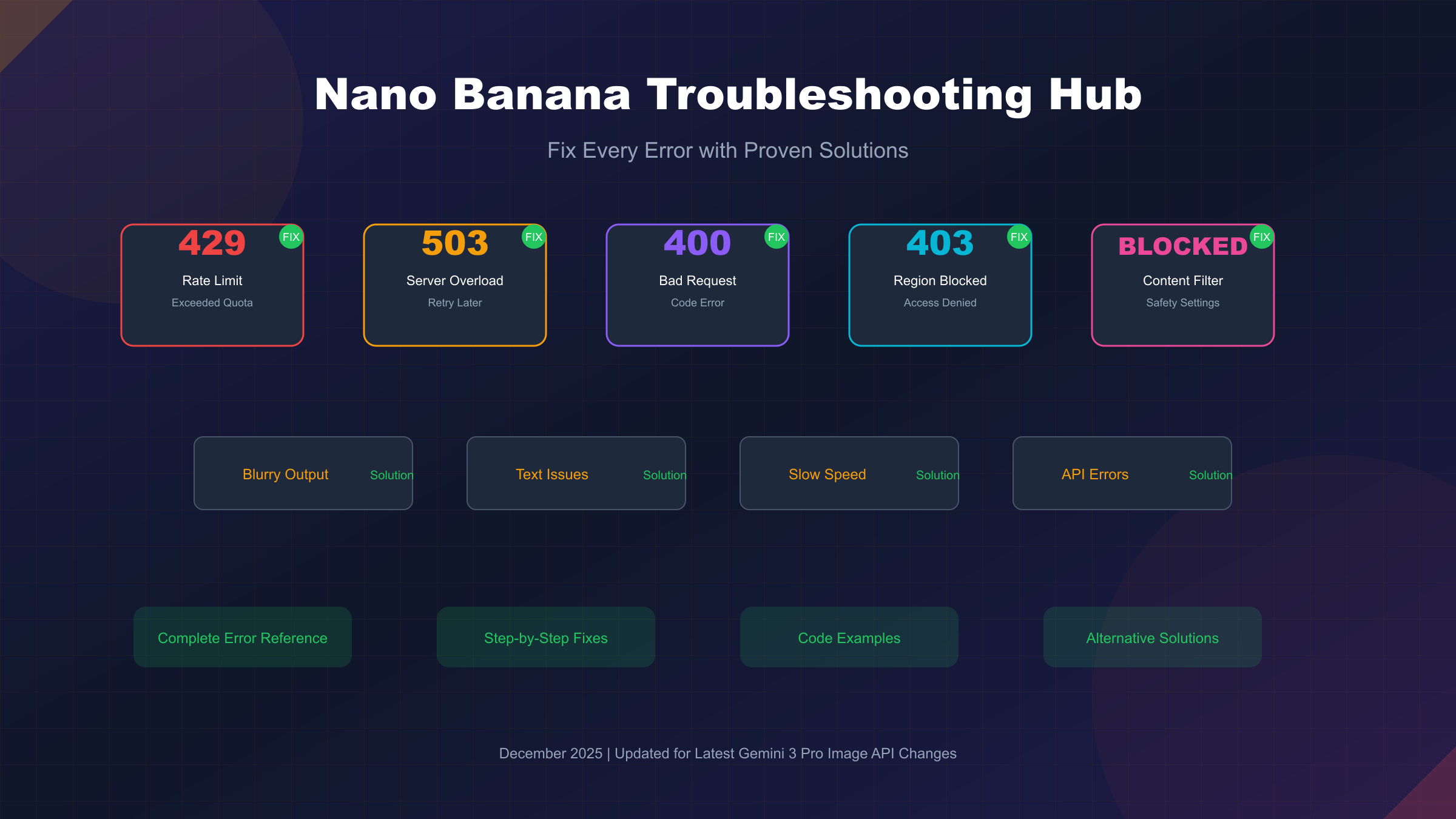
Quick Diagnosis: Identify Your Problem
Before diving into specific solutions, identify which category your issue falls into. The table below maps common symptoms to their likely causes and links directly to the relevant solution section.
| Symptom | Likely Cause | Solution Section |
|---|---|---|
| "Rate limit exceeded" or 429 error | Exceeded API quota | Rate Limit Solutions |
| "Model is overloaded" or 503 error | Server capacity issues | Error Code Reference |
| "Invalid request" or 400 error | Code/parameter issues | API Developer Guide |
| "Content blocked" message | Safety filter triggered | Content Blocked Fixes |
| "Region not supported" error | Geographic restriction | Region Restriction Bypass |
| Blurry or low-quality output | Resolution/download issue | Image Quality Issues |
| Text not rendering correctly | Prompt engineering needed | Text Rendering Fixes |
| Generation taking too long | Performance optimization | Performance Optimization |
| Feature not appearing in Gemini | Account/browser issue | Quick Diagnosis |
For issues where Nano Banana Pro features don't appear at all, start with these quick checks: clear your browser cache and cookies, try using a personal Google account rather than a Workspace account, and ensure you're using a supported browser (Chrome works best). If the Gemini app shows Nano Banana but the API doesn't work, verify billing is enabled in your Google Cloud project.
Error Code Reference: 429, 503, 400, 403
Understanding what each error code means helps you apply the right fix immediately rather than guessing. This reference covers every error you might encounter when using Nano Banana Pro through the Gemini API.
| Error Code | Status | Meaning | Primary Cause | Immediate Action |
|---|---|---|---|---|
| 429 | RESOURCE_EXHAUSTED | Rate limited | Exceeded RPM, TPM, or RPD quota | Wait and retry with backoff |
| 503 | UNAVAILABLE | Model overloaded | Server capacity exceeded | Retry later, try off-peak |
| 400 | INVALID_ARGUMENT | Bad request | Invalid parameters or format | Check code for errors |
| 403 | FORBIDDEN | Access denied | Region blocked or no billing | Enable billing or use alternative |
| 500 | INTERNAL | Server error | Google-side issue | Wait and retry |
The 429 error deserves special attention because it's the most common issue developers face, especially after Google's December 2025 changes that reduced the free tier from 250 to just 20 requests per day. The error response typically includes information about which specific limit was exceeded—look for mentions of RPM (requests per minute), TPM (tokens per minute), or RPD (requests per day) in the error details.
Server errors (503) indicate Google's infrastructure is temporarily overloaded. These typically resolve within minutes, though during peak usage periods they may persist longer. Unlike 429 errors, there's nothing wrong with your code or quota—the solution is simply to wait and retry.
For detailed troubleshooting of 429 errors specifically, see our Gemini 429 error fix guide.
Rate Limit Solutions (429 Errors)
Rate limit errors have become significantly more common since December 7, 2025, when Google reduced the free tier quota from 250 requests per day (RPD) to just 20 RPD—a 92% reduction that broke many existing applications overnight. If your previously working code suddenly started failing in December 2025, this change is almost certainly the cause.
The current free tier limits as of December 2025 are severely restricted:
| Limit Type | Before Dec 7 | After Dec 7 | Change |
|---|---|---|---|
| Requests per Day (RPD) | 250 | 20 | -92% |
| Requests per Minute (RPM) | 15 | 5 | -67% |
Solution 1: Implement Exponential Backoff
For transient rate limits where you haven't truly exhausted your quota, exponential backoff with retry logic handles temporary throttling gracefully:
hljs pythonimport time
import requests
from typing import Optional
def generate_with_backoff(prompt: str, max_retries: int = 5) -> Optional[dict]:
"""
Generate image with exponential backoff for 429 errors.
Implements Google's recommended retry strategy with increasing
delays between attempts.
"""
base_delay = 1 # Start with 1 second
for attempt in range(max_retries):
try:
response = requests.post(
"https://generativelanguage.googleapis.com/v1beta/models/gemini-3-pro-image-preview:generateContent",
headers={"Authorization": f"Bearer {API_KEY}"},
json={"contents": [{"parts": [{"text": prompt}]}]},
timeout=180
)
if response.status_code == 429:
delay = base_delay * (2 ** attempt) # Exponential: 1, 2, 4, 8, 16 seconds
print(f"Rate limited, waiting {delay}s before retry {attempt + 1}/{max_retries}")
time.sleep(delay)
continue
response.raise_for_status()
return response.json()
except requests.exceptions.RequestException as e:
print(f"Request failed: {e}")
if attempt == max_retries - 1:
raise
return None
Solution 2: Upgrade to Paid Tier
If your application genuinely needs more than 20 requests daily, upgrading to Google's paid tier significantly increases quotas. Tier 1 pricing is reasonable at approximately $0.134 per standard image, and the higher RPM/RPD limits support production workloads.
Solution 3: Use Third-Party API Provider
For developers who need predictable, unlimited access without rate limit concerns, laozhang.ai provides Nano Banana Pro API access at $0.05 per image with no rate limits. The service routes to Google's identical model, so output quality remains the same. This option particularly benefits applications with variable traffic patterns where Google's strict quotas would cause failures during peak usage.
For official solutions, Google recommends: navigating to AI Studio to check usage statistics, reducing request frequency, and considering billing tier upgrades for increased quotas.
Content Blocked Fixes (Safety Filters)
"Content blocked" or "content not permitted" messages occur when Gemini's safety filters flag your prompt—often incorrectly. These false positives frustrate users because perfectly innocent prompts get rejected due to overly cautious default settings.
The Gemini API's safety system evaluates content across four configurable harm categories: harassment, hate speech, sexually explicit content, and dangerous content. By default, these filters are relatively restrictive, leading to many false positives for creative or professional use cases.
Solution 1: Configure Safety Settings (API)
For API users, adjusting safety thresholds reduces false positives while maintaining appropriate content moderation:
hljs pythonfrom google import genai
from google.genai import types
client = genai.Client(api_key="YOUR_API_KEY")
# Configure less restrictive safety settings
safety_settings = [
{
"category": types.HarmCategory.HARM_CATEGORY_HARASSMENT,
"threshold": types.HarmBlockThreshold.BLOCK_ONLY_HIGH,
},
{
"category": types.HarmCategory.HARM_CATEGORY_HATE_SPEECH,
"threshold": types.HarmBlockThreshold.BLOCK_ONLY_HIGH,
},
{
"category": types.HarmCategory.HARM_CATEGORY_SEXUALLY_EXPLICIT,
"threshold": types.HarmBlockThreshold.BLOCK_ONLY_HIGH,
},
{
"category": types.HarmCategory.HARM_CATEGORY_DANGEROUS_CONTENT,
"threshold": types.HarmBlockThreshold.BLOCK_ONLY_HIGH,
},
]
# Apply settings to generation config
generation_config = types.GenerateContentConfig(safety_settings=safety_settings)
response = client.models.generate_content(
model="gemini-3-pro-image-preview",
contents="Your creative prompt here",
config=generation_config,
)
The available thresholds range from BLOCK_LOW_AND_ABOVE (most restrictive) to OFF (no automated blocking). For most creative applications, BLOCK_ONLY_HIGH provides a good balance between safety and usability.
Solution 2: Rephrase Your Prompt
Adding context often resolves blocks because you're providing information the safety system needs to correctly classify intent. Instead of "person with a knife," try "professional chef preparing ingredients with a kitchen knife for a cooking blog photo." The additional context signals legitimate intent.
Important Limitation: Built-in protections against content that endangers child safety are always active and cannot be adjusted through settings.
Region Restriction Bypass
Geographic restrictions manifest as "Image generation is not available in your region" errors. While Google markets Nano Banana Pro as globally available, some regions have limited or blocked access, particularly for the free tier.
Solution 1: Enable Billing
The most reliable official solution is enabling billing on your Google Cloud project. Many regions that block the free tier allow paid access. Navigate to Google Cloud Console, enable billing for your project, and the geographic restriction often lifts.
Solution 2: Use Third-Party Provider
For developers in regions where even billing doesn't enable access, third-party API providers offer an alternative path. Services like laozhang.ai provide access from regions where Google's direct API is blocked. These providers route requests through their infrastructure to Google's servers, with Asia-optimized routing delivering approximately 20ms latency compared to 150ms+ through direct US endpoints.
Solution 3: Google Workspace Account
Some users report success switching between personal and Workspace accounts. Geographic availability sometimes differs between account types, so try both if you have access to different Google account types.
Note on VPNs: Simple VPN usage often fails because Gemini can detect VPN connections. Google's recommendation is to check your Google account's region settings rather than relying on network-level workarounds.
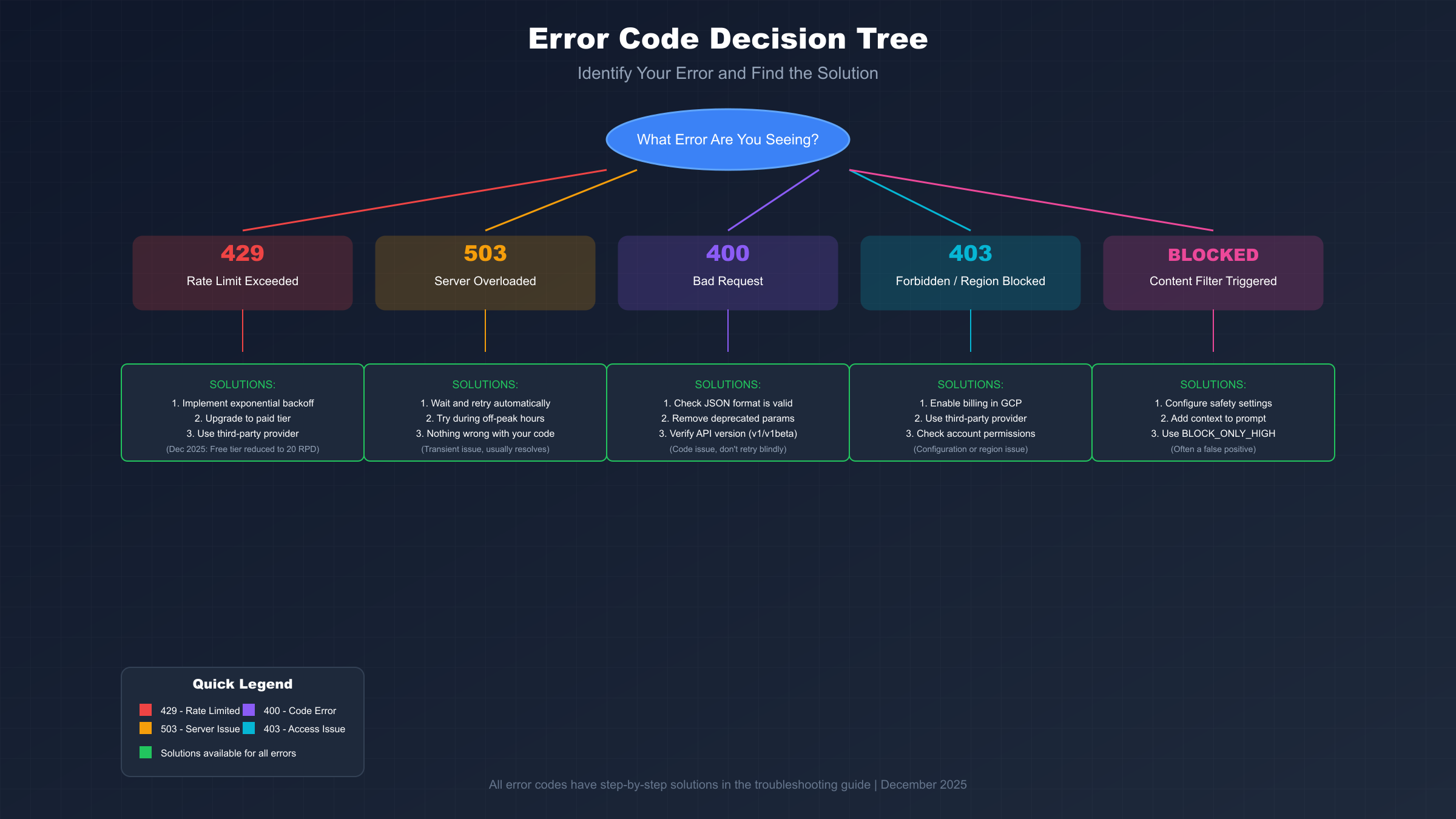
Image Quality Issues
Quality problems typically fall into three categories: blurry output, wrong resolution, and inconsistent results between attempts.
Blurry Output Fix
The most common cause of blurry images is viewing the compressed preview in Gemini's web interface rather than the full-quality output. The interface displays a compressed, lower-resolution preview to keep chat loading quickly.
To get full quality: hover over the generated image, click the "Download full size" button (downward arrow icon), and open the downloaded file. This should be the high-quality (up to 4K) version. If the downloaded file is still low quality, check your generation settings—make sure you've selected 2K or 4K output rather than the default resolution.
Wrong Resolution Fix
When using the API, explicitly specify your desired resolution in the generation config:
hljs pythonpayload = {
"contents": [{"parts": [{"text": "Your prompt"}]}],
"generationConfig": {
"responseModalities": ["IMAGE"],
"imageConfig": {
"imageSize": "4K" # Options: "1K", "2K", "4K"
}
}
}
Inconsistent Results Fix
Variability between generation attempts is inherent to AI image generation, but you can improve consistency through detailed prompts. Instead of "a red car," specify "a bright red 2024 sports car photographed from a 3/4 front angle in a studio setting with soft white background lighting." More specific prompts constrain the generation space, leading to more predictable outputs.
Text Rendering Fixes
Text rendering is one of Nano Banana Pro's strongest features, achieving approximately 94% legibility for generated text. However, achieving good results requires proper prompt engineering.
Best Practices for Text in Images
Keep text under 25 characters when possible—Nano Banana handles short text significantly better than long passages. The success rate drops substantially for text exceeding 25 characters. When text must appear in images, use all caps (ALL CAPS TEXT tends to generate more clearly than mixed case) and include typography details in your prompt.
A strong text prompt includes context, typography guidance, and placement: "Create a professional event poster with the headline 'SUMMER SALE' in bold sans-serif at the top center, white text on a gradient blue background."
Fixing Text Errors with Iterative Editing
If the first generation is mostly correct but has text errors, don't regenerate from scratch. Instead, use follow-up prompts to fix specific issues: "Change 'Developement' to 'Development' in the header text." Multi-turn editing succeeds approximately 75-80% of the time for targeted text changes.
Selecting the Right Model
When using Gemini's web interface, make sure the model is set to "Thinking" (which powers Nano Banana Pro) rather than "Fast" (which uses the standard Nano Banana model). The Thinking model has significantly better text rendering capabilities.
Performance Optimization
Slow generation times and timeouts typically result from server load, network issues, or suboptimal configuration.
Timeout Configuration
For API integrations, ensure your timeout is sufficiently long. Image generation can take 30-60 seconds for complex prompts at 4K resolution. A 180-second timeout provides adequate buffer:
hljs pythonresponse = requests.post(
API_URL,
headers=headers,
json=payload,
timeout=180 # 3 minutes for complex generations
)
Off-Peak Usage
Server capacity issues (503 errors) occur more frequently during peak hours. If possible, schedule batch processing for off-peak times to reduce server congestion.
Thought Signatures for Multi-Turn Editing
For conversational image editing (modifying previously generated images), thought signatures are critical. When you ask the model to modify an image, it relies on the thought signature from the previous turn to understand the composition. Official SDKs (Python, Node, Java) handle this automatically—ensure you're using standard chat history patterns rather than manual request construction.
API Developer Guide
Developers face additional error categories related to code structure, API versioning, and parameter formatting.
400 Bad Request Errors
The most common causes include mixing deprecated parameters with new ones (you cannot use both thinking_level and the legacy thinking_budget parameter in the same request), malformed JSON, and invalid aspect ratio specifications. These errors indicate bugs in your code rather than transient failures.
Role Parameter Issues
Gemini 3 Pro is strict about role parameters. Ensure you're not including "model:" role tags in your requests—some tools add these automatically. Your API key also needs both "Vertex AI User" AND "Generative Language User" permissions.
Production-Ready Error Handling
This comprehensive example handles all error types appropriately:
hljs pythonimport requests
import time
import logging
from typing import Optional, Dict
logging.basicConfig(level=logging.INFO)
logger = logging.getLogger(__name__)
class NanoBananaClient:
def __init__(self, api_key: str):
self.api_key = api_key
self.base_url = "https://generativelanguage.googleapis.com/v1beta"
def generate(self, prompt: str, retries: int = 3) -> Optional[Dict]:
"""Generate image with comprehensive error handling."""
payload = {
"contents": [{"parts": [{"text": prompt}]}],
"generationConfig": {
"responseModalities": ["IMAGE"],
"imageConfig": {"imageSize": "2K"}
},
"safetySettings": [
{"category": "HARM_CATEGORY_HARASSMENT", "threshold": "BLOCK_ONLY_HIGH"},
{"category": "HARM_CATEGORY_HATE_SPEECH", "threshold": "BLOCK_ONLY_HIGH"},
{"category": "HARM_CATEGORY_SEXUALLY_EXPLICIT", "threshold": "BLOCK_ONLY_HIGH"},
{"category": "HARM_CATEGORY_DANGEROUS_CONTENT", "threshold": "BLOCK_ONLY_HIGH"},
]
}
for attempt in range(retries):
try:
response = requests.post(
f"{self.base_url}/models/gemini-3-pro-image-preview:generateContent",
headers={"Authorization": f"Bearer {self.api_key}"},
json=payload,
timeout=180
)
if response.status_code == 429:
delay = 2 ** attempt
logger.warning(f"Rate limited (429), waiting {delay}s")
time.sleep(delay)
continue
elif response.status_code == 503:
delay = 5 * (attempt + 1)
logger.warning(f"Server overloaded (503), waiting {delay}s")
time.sleep(delay)
continue
elif response.status_code == 400:
logger.error(f"Bad request (400): {response.text}")
return None # Code error, don't retry
elif response.status_code == 403:
logger.error(f"Access denied (403): Check billing/region")
return None # Configuration issue, don't retry
response.raise_for_status()
return response.json()
except requests.exceptions.Timeout:
logger.warning(f"Timeout on attempt {attempt + 1}")
except Exception as e:
logger.error(f"Unexpected error: {e}")
return None
For additional API integration patterns, see our Nano Banana Pro API guide.
Alternative Solutions: When Fixes Don't Work
Sometimes official solutions aren't sufficient—whether due to persistent rate limits, unsolvable regional restrictions, or reliability requirements that Google's free tier can't meet. Here are proven alternatives.
Third-Party API Providers
Services like laozhang.ai route requests to Google's identical Gemini 3 Pro Image model through their infrastructure. Benefits include: no rate limits ($0.05/image flat rate), global access from any region, and OpenAI-compatible endpoints for easy integration.
For applications where official API access creates ongoing issues, third-party providers offer production-ready reliability. The output quality is identical since requests ultimately process on Google's servers—only the billing and routing differ.
Gemini CLI (Alternative Free Access)
The Gemini CLI provides surprisingly generous limits that exceed the standard API free tier: 60 requests per minute (vs 2 RPM for standard API) and 1,000 requests per day (vs 20 RPD). Access requires logging in with a personal Google account.
Other Image Models
If Nano Banana Pro issues persist and you need an alternative model entirely, consider DALL-E 3 or Stable Diffusion. Each has different strengths—DALL-E 3 excels at creative interpretation while Stable Diffusion offers more control. However, Nano Banana Pro's text rendering accuracy remains unmatched.
For cost-effective alternatives, see our cheap Nano Banana API credits guide.
FAQ: Common Questions Answered
Q1: Why did my Nano Banana Pro suddenly stop working in December 2025?
Google reduced the free tier quota from 250 to 20 requests per day on December 7, 2025. This 92% reduction caught many developers off-guard because existing applications that worked fine suddenly started returning 429 errors. The solutions are: implement exponential backoff, upgrade to a paid tier, or use a third-party provider like laozhang.ai for unlimited access.
Q2: Why does Nano Banana Pro work in the Gemini app but not the API?
The Gemini app and API have different quota pools and access requirements. The API requires a Google Cloud project with billing enabled for most features, while the app works with just a Google account. Enable billing in Google Cloud Console, verify your API key has correct permissions, and check that the Gemini API is enabled for your project.
Q3: How do I know which rate limit I'm hitting?
The 429 error response includes information about the specific limit exceeded. Look for mentions of RPM (requests per minute), TPM (tokens per minute), or RPD (requests per day) in the error details. You can also check your usage in the Google Cloud Console under the "Generative Language API" section to see real-time consumption across all limit types.
Q4: Are third-party API providers safe to use?
Reputable third-party providers like laozhang.ai route requests to Google's official servers—your prompts are processed by the same Gemini 3 Pro Image model. The output quality is identical. The main difference is billing structure and SLA guarantees. For applications requiring Google's official SLA and direct support, use the official API. For most other use cases, third-party providers offer better economics without quality compromise.
Q5: How do I prevent content blocks for legitimate creative work?
Configure safety settings to BLOCK_ONLY_HIGH for all categories (the least restrictive setting that still provides safety). Add context to prompts that might otherwise seem ambiguous—"professional chef with kitchen knife" rather than just "person with knife." For the web interface where you can't configure safety settings, rephrasing with additional professional context usually resolves false positives.
Q6: What's the difference between Nano Banana and Nano Banana Pro?
Nano Banana (standard) uses the Gemini 2.5 Flash Image model—faster but lower quality. Nano Banana Pro uses Gemini 3 Pro Image Preview—slower but significantly better quality, especially for text rendering and 4K output. In the Gemini interface, select "Thinking" mode for Nano Banana Pro or "Fast" mode for standard Nano Banana.
Conclusion: Prevention & Best Practices
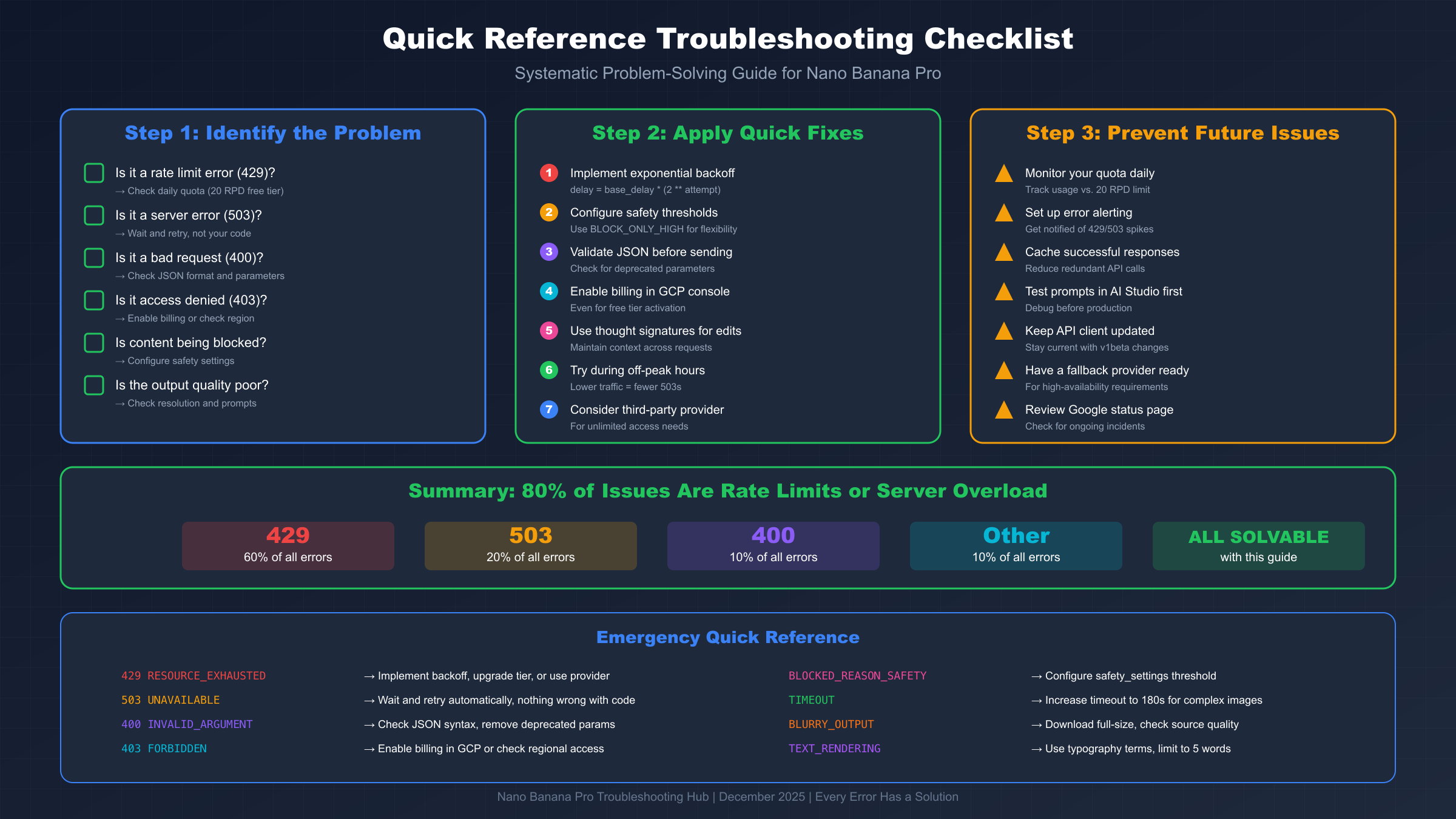
Most Nano Banana Pro issues are preventable with proper setup and realistic expectations about the service's capabilities and limitations.
Proactive Monitoring
Check your API usage regularly in Google Cloud Console to catch quota issues before they cause failures. Set up alerts for approaching limits so you have time to adjust before hitting hard caps.
Implementation Best Practices
Always implement exponential backoff for rate limit handling—even if you don't expect to hit limits, traffic spikes happen. Set appropriate timeouts (180 seconds minimum for image generation) and handle all error codes gracefully rather than letting failures crash your application.
When to Upgrade
If you're consistently hitting rate limits or need production-level reliability, the free tier isn't appropriate for your use case. Evaluate whether a paid Google tier or a third-party provider like laozhang.ai better fits your requirements—consider both cost and the level of support/SLA guarantees you need.
For ongoing guidance on Nano Banana Pro optimization, explore our complete Nano Banana Pro guide and API pricing comparison.