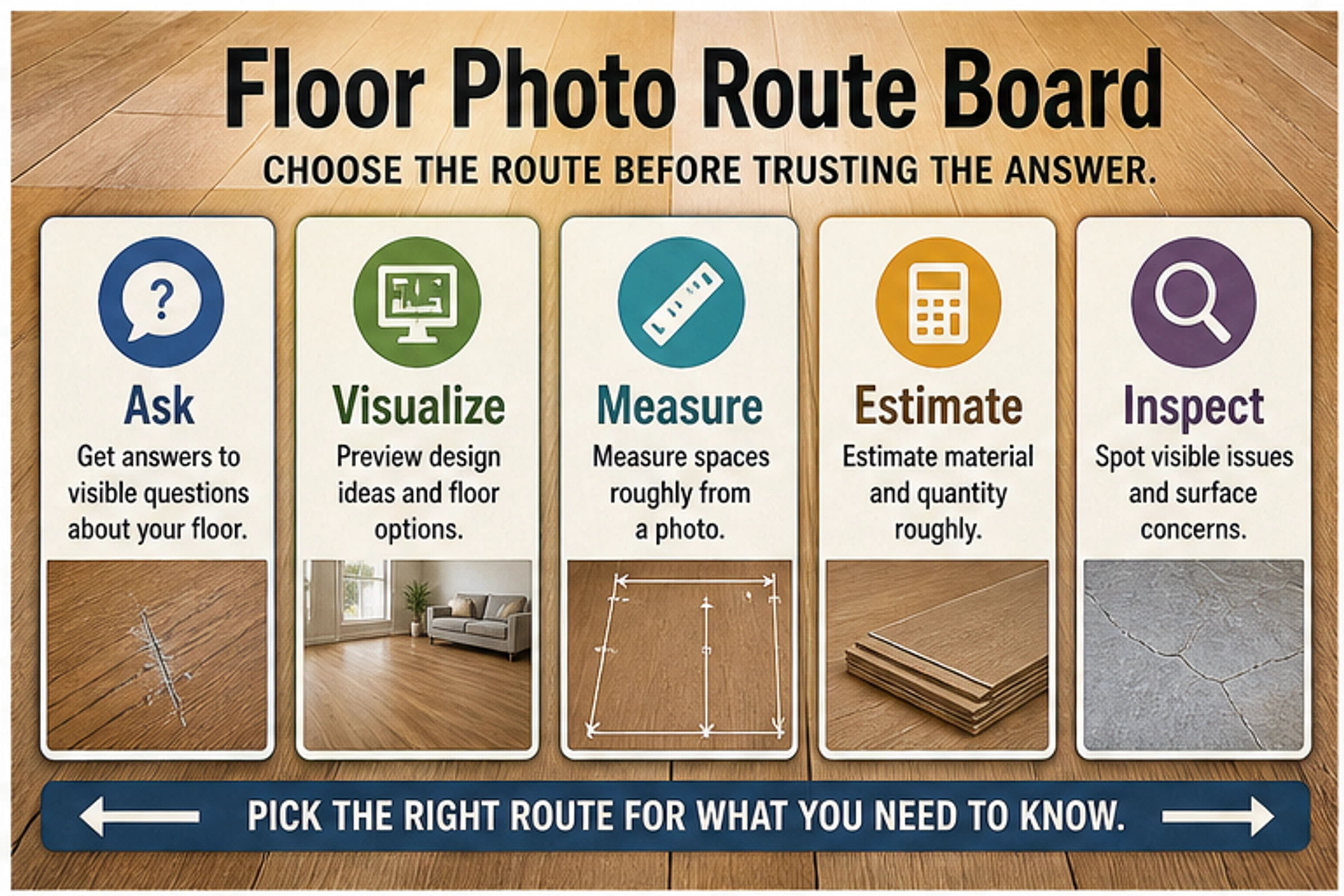
A floor photo can help AI identify visible flooring clues, preview a new look, or prepare a better contractor question, but it is only useful when you choose the right route first. Use an image-capable assistant for visible material or condition questions, a flooring visualizer for design previews, photo measurement only for rough planning, dealer estimate tools for quote readiness, and a professional for hidden or final decisions. Stop before trusting AI on hidden moisture, subfloor damage, asbestos, mold, structural movement, exact cost, or liability-sensitive choices. The practical workflow is simple: pick the route, take the right photo, ask a narrow question, then verify whether the answer is enough or the job has moved to a pro.
Choose the Route Before You Ask the AI
The fastest mistake is treating "analyze this flooring photo" as one job. A floor photo can start at least five different workflows, and each one has a different standard of proof.
| Your real job | Best first route | Good answer looks like | Do not use it for |
|---|---|---|---|
| "What kind of flooring is this?" | Image-capable assistant | Visible clues, likely material family, what to check next | Final product identification or warranty decisions |
| "Would oak, tile, or darker vinyl look better here?" | Flooring visualizer | A design preview from the room photo | Measuring, diagnosis, or cost certainty |
| "How much floor area might this room have?" | Photo measurement with a reference object | Rough planning number and uncertainty | Ordering exact material |
| "Can I get a quote from this photo?" | Dealer estimate or contractor intake route | Preliminary estimate and follow-up questions | Binding bid or hidden-condition assessment |
| "Is this damage serious?" | Professional inspection after AI triage | Site visit, moisture/subfloor checks, documented advice | Photo-only proof of hidden risk |
Use that table as the first filter. If the question is visible and low-risk, AI can help. If the question depends on what is under the surface, behind a wall, below a plank, or inside a quote contract, the photo can only prepare the conversation.
What AI Can Actually Answer From a Floor Photo
An AI flooring photo analyzer is strongest when the answer is about visible surface evidence. It may notice that a floor looks like hardwood, engineered wood, laminate, vinyl plank, ceramic tile, stone, or carpet. It can point to visual cues such as plank repetition, bevels, grout lines, surface shine, printed texture, board width, scratches, gaps, stains, transitions, and room lighting.
That makes it useful for a first-pass question such as: "What flooring types could this be, and what details should I photograph next?" The answer is not a certified identification, but it can narrow the inspection path. For example, if the AI sees repeated printed grain, identical knots, and a thin plank profile at an edge, it may suggest laminate or vinyl plank and ask for a close-up of the side profile. If it sees grout lines and chipped edges, it may route you toward tile repair questions.
General image-capable assistants are also useful for describing what is visible in a photo. OpenAI's ChatGPT image inputs FAQ says users can upload images and ask questions about visual content, while also warning that unclear images, spatial localization, counting, and some visual details can be unreliable. Google's multimodal AI Mode announcement describes asking questions with uploaded or snapped photos, including object and material understanding. Those capabilities support the floor-photo Q&A route, but they do not remove the need for judgment.
The useful pattern is to ask for visible observations plus next evidence, not a final verdict. A better prompt is: "Based only on what is visible, what flooring material families are plausible, what clues support each one, and what photo should I take next to confirm?" A weaker prompt is: "Tell me exactly what floor this is." The first prompt keeps uncertainty visible; the second invites overconfidence.
What AI Cannot Prove From One Flooring Photo
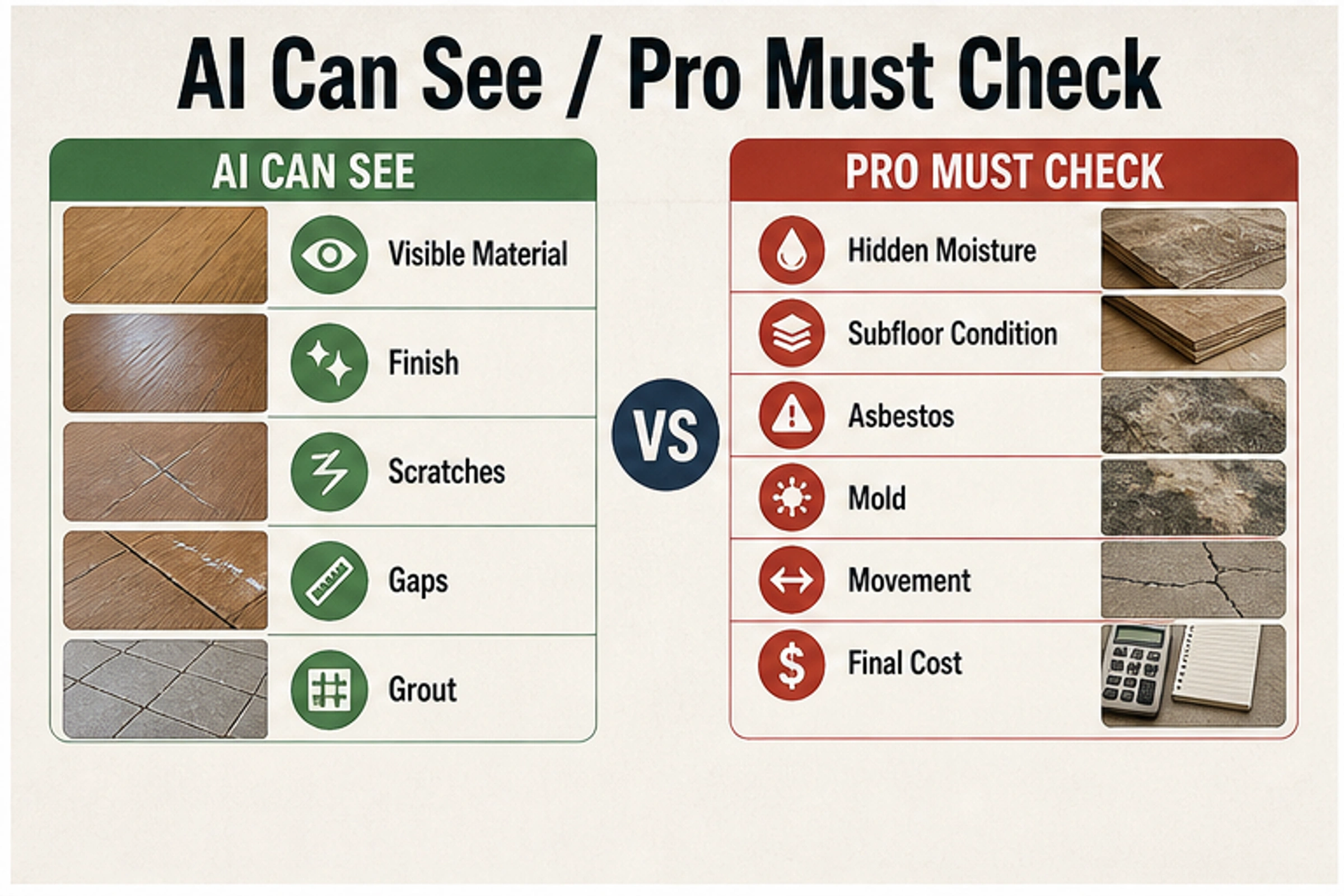
Photo-only AI cannot prove hidden moisture, subfloor condition, asbestos, mold, structural movement, adhesive failure, exact material quantity, final installation cost, code compliance, or liability. It can notice visible symptoms that justify a next step, but it cannot inspect the layers that make flooring decisions expensive.
That boundary matters most when the photo shows stains, cupping, buckling, cracks, soft-looking areas, black spots, uneven transitions, or old sheet flooring. AI can help you list visible concerns and prepare questions. It should not decide that a floor is dry, safe, mold-free, asbestos-free, structurally sound, or ready for installation.
Industry tools show the same boundary. Floor Covering News covered MEasure as an AI tool for dealers that can use uploaded room photos for virtual flooring estimates and visible issue flags, while the same workflow still recognizes that in-home measurement can reveal conditions not visible in photos. Commercial estimation can also move away from photos entirely: Cyncly's Blueprint.AI launch coverage describes AI-assisted takeoff from uploaded PDF blueprints, room boundaries, surface areas, and material estimates. Those are different proof environments from a homeowner's single phone picture.
Use a hard stop rule: if the answer changes safety, demolition, insurance, purchase, rental liability, contractor payment, or final material ordering, get professional confirmation.
Take Photos That Make the Answer Useful
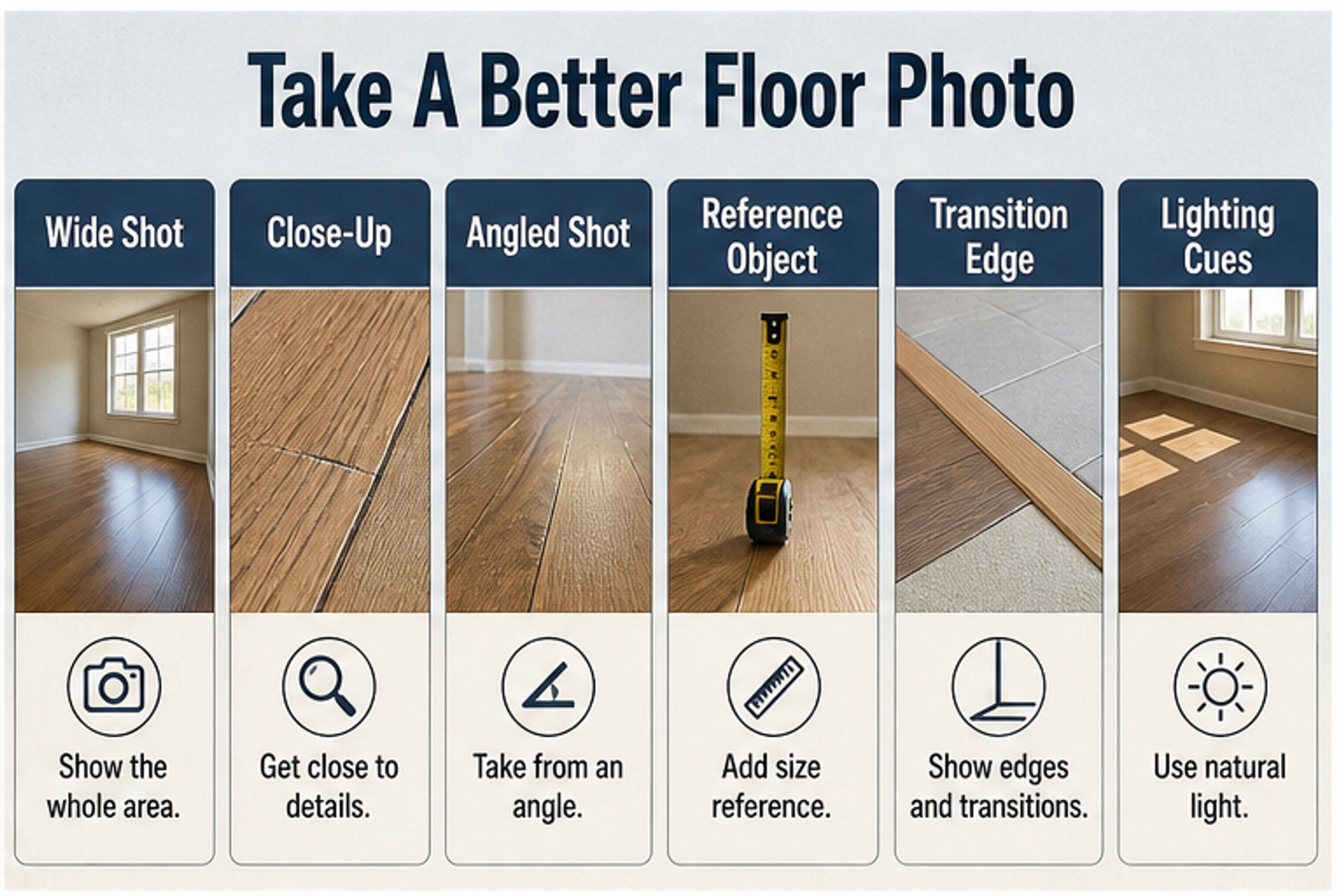
The answer quality usually starts with the photo. A close-up of one scratched plank may be good for surface damage but poor for material identification. A wide room photo may be good for design preview but poor for seeing seams, grout, or board edges. A shiny photo under mixed lighting may make color and finish guesses unreliable.
Capture a small set instead of one perfect shot:
| Photo | Why it helps | What to avoid |
|---|---|---|
| Wide room shot | Shows layout, light, furniture, transitions, and design context | Cropping out doorways and edges |
| Close-up surface shot | Shows grain, texture, scratches, grout, wear, and finish | Shooting so close that scale disappears |
| Angled low shot | Reveals gloss, bevels, lippage, gaps, cupping, and unevenness | Harsh glare across the whole floor |
| Reference object | Helps rough scale and photo measurement | Using an unknown object with no size |
| Edge or transition shot | Shows thickness, plank profile, tile edge, carpet tack strip, or threshold | Hiding the edge under trim or furniture |
| Problem-area shot | Documents stains, cracks, swelling, soft spots, or lifted seams | Asking for hidden cause from visible symptom alone |
Remove private documents, faces, valuables, address labels, and security details before uploading. For a contractor or dealer estimate, include room dimensions if you know them. For photo measurement, include a reference object with a known size and expect a rough planning number, not a purchase quantity.
Prompt Bank: Ask Narrow Questions, Then Verify the Route
A good flooring-photo prompt has three parts: the visible job, the uncertainty boundary, and the next action. It should tell the AI not to infer hidden conditions.
| Job | Prompt you can use |
|---|---|
| Material ID | "Based only on visible clues in this floor photo, what material families are plausible? List the visual evidence for each and the next photo that would help confirm." |
| Visible condition | "What visible flooring issues do you see in this photo? Separate cosmetic wear from symptoms that need a flooring professional." |
| Damage triage | "This area looks stained or uneven. What visible signs should I document, and which hidden causes cannot be confirmed from the photo?" |
| Design preview | "I want to compare lighter oak, dark walnut, and stone-look tile in this room. What floor color or pattern risks should I watch for before using a visualizer?" |
| Rough measurement | "Using the visible reference object only for rough scale, what planning questions should I answer before asking for an estimate?" |
| Contractor prep | "Turn these photos into a short message for a flooring contractor: visible material, room context, problem area, questions, and what needs an in-person check." |
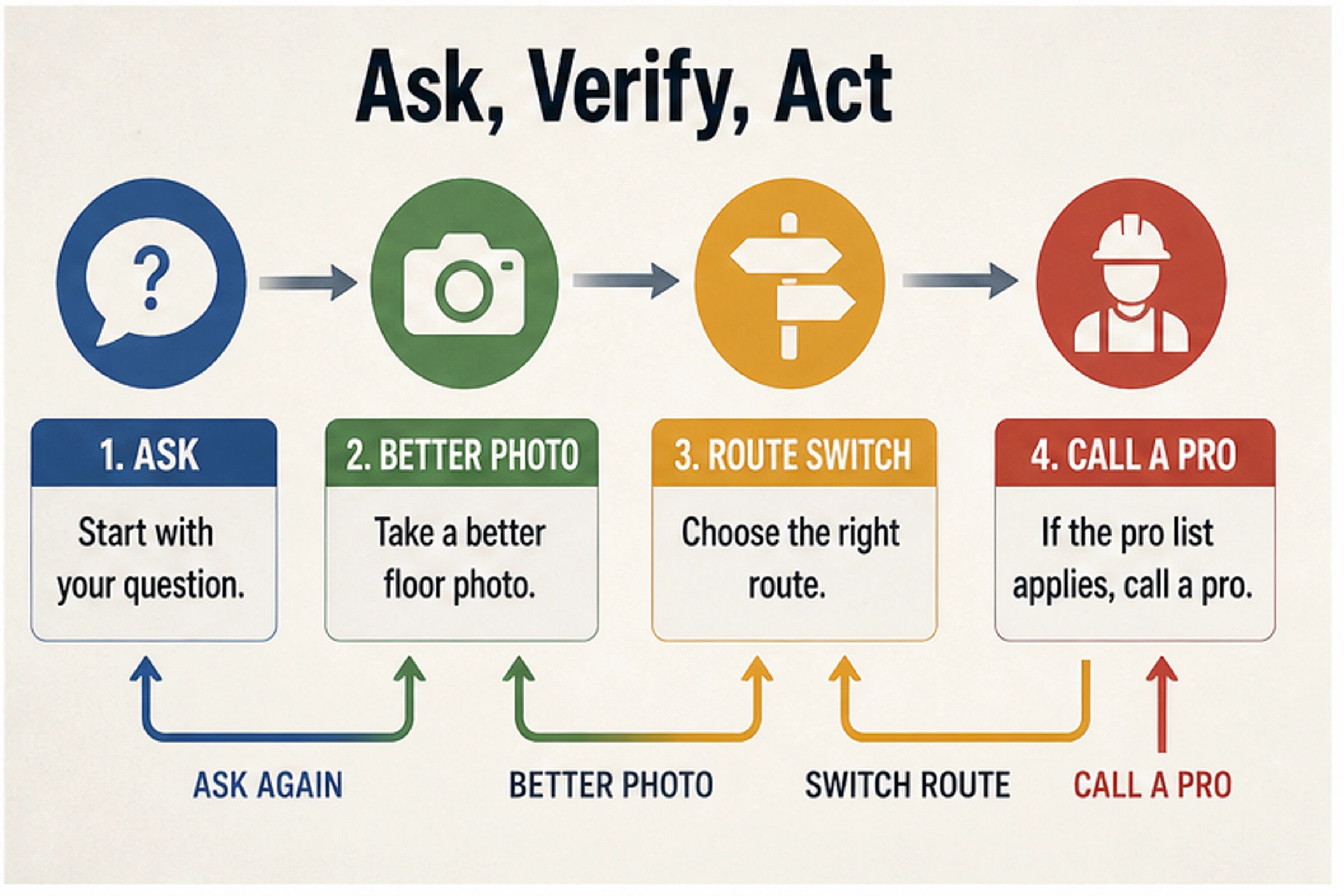
After the first answer, do not keep prompting the same route if the job changed. If AI asks for a better close-up, take one. If you move from material curiosity to design preview, use a flooring visualizer. If you move from rough planning to a quote, use a dealer or contractor intake route. If the answer touches hidden moisture, subfloor, asbestos, mold, movement, or final cost, move to a professional inspection.
Which Tool Lane Fits Each Flooring Photo Job?
An image-capable assistant is the flexible lane. It is best for visible Q&A, wording a contractor message, comparing possible material families, and building a checklist. It is not the best lane for replacing the floor in the photo, because its answer is usually textual rather than a controlled product preview.
A flooring visualizer is the design lane. Floori's AI visualizer presents the route as uploading a room photo, detecting surfaces, applying selected flooring products, and comparing before/after views. Pixelcut's AI flooring visualizer similarly frames the consumer job as uploading a clear room photo and previewing a different floor, while noting that previews are guidance rather than perfect replicas. Use that lane when the question is "what would this look like?", not "what is wrong under this floor?"
Photo measurement is the rough-planning lane. A general photo measurement explainer such as Scale to Grams points to perspective analysis, object recognition, and reference objects. That is useful for early planning, but a floor area estimate from a photo should not become your final square footage. Room shape, camera perspective, hidden edges, furniture, and reference-object mistakes all matter.
Dealer estimate tools are the quote-prep lane. Quoin currently describes a homeowner flow where users upload photos, receive an AI estimate, and connect with local contractors, with the photo estimate labeled as beta on its site. MEasure is a dealer-oriented example. These tools can reduce friction before a human conversation, but the practical output is still preliminary until measurements, product choice, floor prep, and site conditions are confirmed.
Blueprint or takeoff AI is the plan-based lane. It belongs to remodelers, commercial jobs, and teams with drawings, not a homeowner trying to identify a scratch from a phone photo. If you have plans, measurements, and product scopes, that route can be more appropriate than visual photo analysis.
Professional inspection is the risk lane. Use it when the floor problem could involve water, structural movement, pests, mold, asbestos, a failed installation, a warranty claim, a rental dispute, or expensive demolition.
A Practical Decision Workflow
Start with one sentence: "I want this photo to help me decide ____." Fill the blank before uploading anything. The blank might be "what material this might be," "whether this visible mark looks cosmetic," "what color floor to preview," "what photos to send a contractor," or "whether I should stop and call someone."
Then pick one of four outcomes:
- If the answer is visible and low-risk, use the AI answer as a checklist.
- If the answer is visual design, switch to a flooring visualizer and compare options.
- If the answer needs dimensions or price, gather reference measurements and ask for a preliminary estimate only.
- If the answer touches hidden damage or final responsibility, call a flooring professional.
The goal is not to make AI sound cautious. The goal is to make the next action clearer. A useful flooring photo answer should leave you with one of these next moves: take a better photo, ask a sharper question, try a visualizer, prepare an estimate request, compare a sample in the room, or schedule an inspection.
FAQ
Can AI identify flooring from a photo?
AI can often suggest plausible material families from visible clues such as grain, grout, seams, finish, plank repetition, wear, and edge profile. It should not be treated as a certified identification. Ask for evidence and next photos rather than an exact product name.
Can AI detect water damage in flooring?
AI can point out visible symptoms such as staining, cupping, swelling, discoloration, gaps, or lifted seams. It cannot confirm hidden moisture, subfloor damage, mold, or the source of the water from a photo alone. Those require inspection and usually moisture testing.
Can AI change the flooring in my room photo?
Yes, but that is a flooring visualizer job rather than a diagnosis job. Use a visualizer when you want to preview colors, materials, or patterns in a room photo. Treat the result as a design guide because lighting, screen color, product texture, and photo quality affect realism.
Can AI measure square footage from a floor photo?
It can support rough planning when the photo has a known reference object, clear perspective, and visible room boundaries. Do not order material or accept final labor pricing from photo measurement alone.
Should I upload flooring photos with personal items visible?
Remove private information first. Crop out documents, faces, valuables, addresses, screens, and security details. If you are sending photos to a contractor, keep the room context but hide anything unrelated to the flooring decision.
Is an AI flooring photo answer enough for a contractor quote?
It can help you prepare a better quote request, especially if you include room shots, close-ups, edges, problem areas, rough dimensions, and your desired outcome. The quote still needs human confirmation before it becomes final.
When should I stop using AI and call a professional?
Call a professional when the photo raises hidden-risk questions: moisture, subfloor, asbestos, mold, structural movement, pests, failed installation, electrical or plumbing context, insurance, warranty, rental liability, or exact project cost.