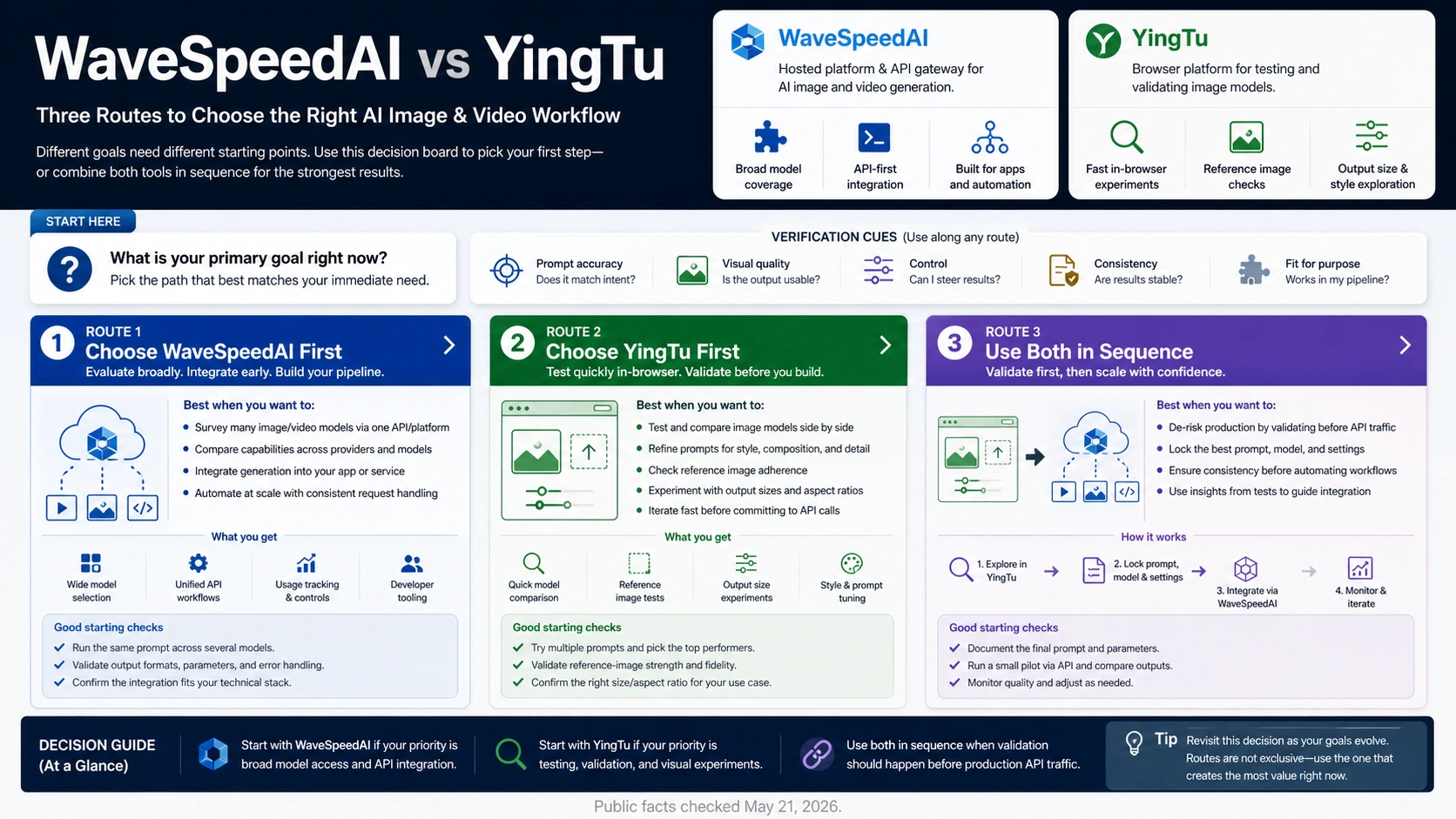
As of May 21, 2026, WaveSpeedAI and YingTu are not the same kind of tool. Start with WaveSpeedAI when you need to evaluate a broad hosted media-generation API and production platform; start with YingTu when you need to test image prompts, reference images, model fit, or output sizes in a browser before committing to an API route. Use both in sequence when prompt or model uncertainty should be resolved before production traffic.
| Your next job | Test this route first | Why | Verify before production |
|---|---|---|---|
| Production media API evaluation, broader model catalog, app integration, or video/image infrastructure | WaveSpeedAI | It is the heavier hosted media-generation platform route to inspect for API, model, pricing, and account behavior | Account tier, model availability, per-model pricing, rate limits, concurrency, logs, support, and failure rules |
| Prompt, reference-image, model-fit, or output-size uncertainty before code work | YingTu | It is faster as a browser playground for image-model testing before choosing a production API path | Free-test boundary, account balance, route price, model availability, and whether the chosen result maps to an API route |
| Team is not sure which model or prompt will survive production | YingTu, then a production route such as WaveSpeedAI or another provider | Browser validation reduces guesswork before production traffic costs money | Re-run a small production pilot with logged prompt, model, size, price owner, limits, and failure handling |
The stop rule is simple: free browser testing is not the same thing as free production API use. Before shipping traffic, verify the account, balance or credits, current pricing, model access, limits, concurrency, logs, and failure rules in the route that will actually process the production request.
What WaveSpeedAI solves
WaveSpeedAI is the route to inspect when the job is closer to production media infrastructure than prompt exploration. Its public documentation describes unified API access to more than 1,000 AI media models across text-to-image, image-to-video, text-to-video, and audio generation, with REST API, SDK, desktop app, ComfyUI, N8N, and web interface routes. That makes it a platform candidate for teams that already know they need a deployable generation layer.
The practical value is breadth plus integration shape. If a product team needs a catalog of image and video models, an API surface, account tiers, and a place to inspect model-specific behavior, WaveSpeedAI is the more natural first platform to evaluate. The comparison should therefore begin with production questions: which model family is available, what parameters the model accepts, what a request costs, how usage is logged, and what account level or rate limit applies.
That does not make WaveSpeedAI the automatic first stop for every image task. A broad platform can still be slower than a focused browser playground when the team has not yet learned whether the prompt, reference image, output size, or model family works. If the uncertainty is creative or model-fit uncertainty, testing directly inside a production route can turn early iteration into paid infrastructure noise.
Use WaveSpeedAI first when the next decision is one of these:
| Decision | Why WaveSpeedAI is the better first surface |
|---|---|
| "Can this model run inside our app?" | API, SDK, and integration routes matter more than browser convenience. |
| "Can we support both image and video generation?" | The public docs emphasize a broad AI media model catalog. |
| "What will production usage cost?" | Pricing and model-page checks are owned by the platform that will process traffic. |
| "Can our account handle the expected volume?" | Account tier, rate limit, and concurrency checks belong to the production route. |
| "Do we need logs, support, and repeatable request behavior?" | Those are platform-contract questions, not prompt-playground questions. |
The clean evaluation method is to pick one target workload, then inspect the exact WaveSpeedAI model page, request parameters, pricing estimate, rate limit notes, and account behavior for that workload. A broad catalog is useful only when the exact model contract matches the product you plan to ship.
What YingTu solves
YingTu is the better first stop when the blocker is not infrastructure yet. Its public English site frames the product as a browser testing surface for image-model routes such as Nano Banana and GPT Image 2, including text-to-image, reference-image editing, and output-size checks before API integration. That is a different job from evaluating a production media platform.
The browser route matters because many image workflows fail before the API question becomes important. The prompt may not preserve the subject. A reference image may produce the wrong identity, lighting, or composition. A model that looks strong in examples may fail on the exact style, size, or edit operation your workflow needs. Testing those unknowns in a browser can save engineering time before anyone writes integration code.
YingTu is especially useful when a team is trying to answer concrete creative and model-fit questions:
| Question | Why YingTu can be the faster first surface |
|---|---|
| "Which prompt direction survives several attempts?" | Browser iteration is faster than building a production call path first. |
| "Does this reference image behave well?" | The user can test visual continuity before API work begins. |
| "Which model route looks closest to the intended output?" | A playground comparison can narrow the model shortlist. |
| "Does 1K, 2K, or 4K output change the result enough to matter?" | Size tests belong early, before a cost model is locked. |
| "Is this worth turning into an API workflow?" | Browser validation gives the product team evidence before engineering commits. |
The boundary has to stay visible. YingTu browser testing is not proof that production API traffic will be free, cheap, available, or unlimited. The same public site distinguishes free playground testing from production API use and tells users to verify API key status, balance, pricing, model availability, concurrency, and failure rules before production. Treat the browser result as a validation signal, then verify the account and route that will process real traffic.
Side-by-side decision matrix
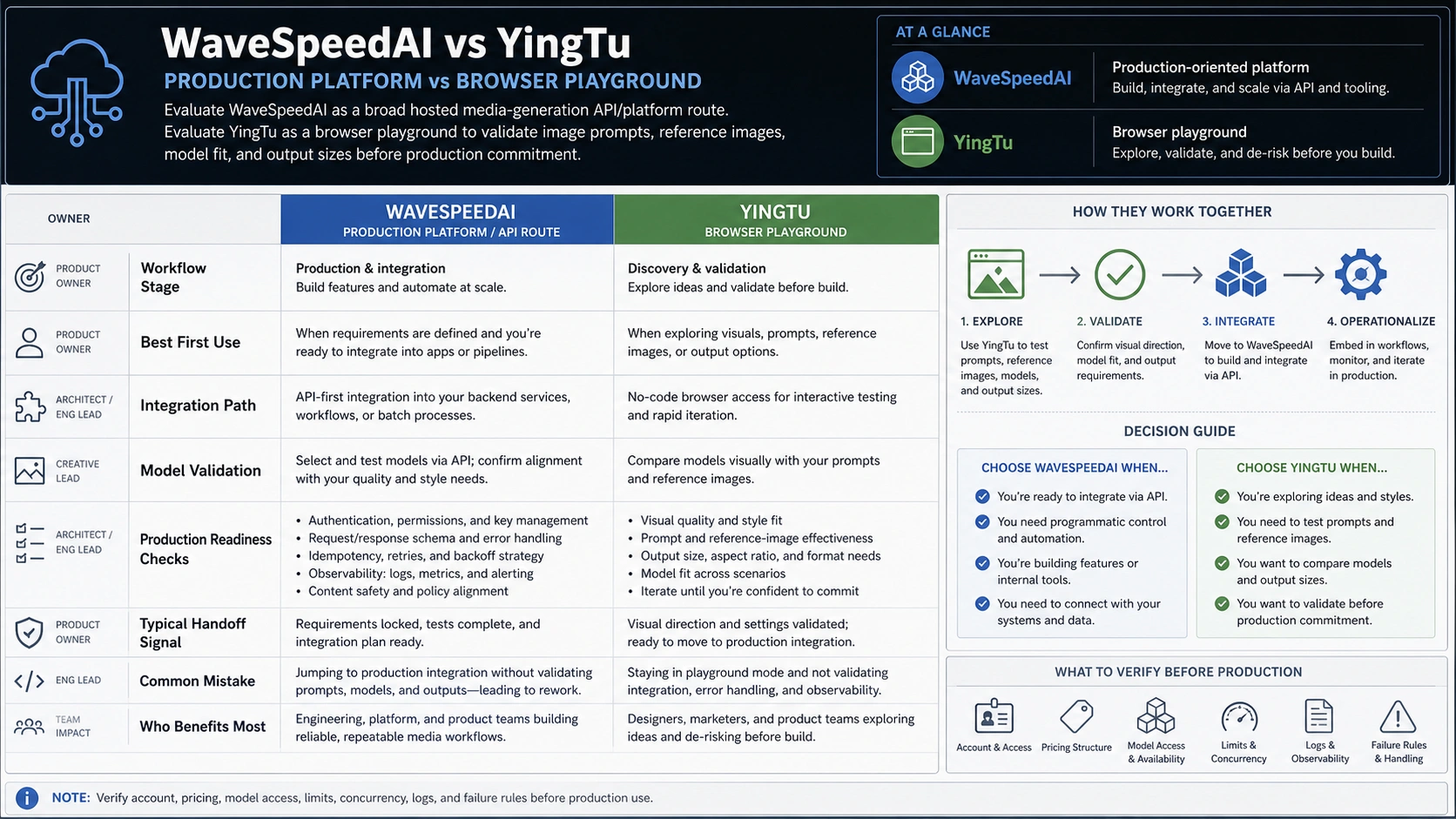
WaveSpeedAI and YingTu overlap around AI media generation, but they do not own the same workflow stage. The safest comparison is not a feature-count race. It is a route-choice matrix: what are you trying to learn next, and which surface gives that answer with the least false confidence?
| Comparison axis | WaveSpeedAI | YingTu | Common mistake |
|---|---|---|---|
| Primary role | Hosted AI media generation platform and API route to evaluate for production | Browser playground for image-model and prompt validation before API commitment | Treating both as interchangeable "image generators" |
| Best first use | API, model catalog, video/image infrastructure, usage cost, account capacity | Prompt fit, reference-image behavior, output-size tests, model shortlist | Starting with production integration before the model result is understood |
| Production readiness signal | Docs, model pages, pricing lookup, account tier, rate limits, logs, support path | Account status, API key route, balance, route price, model access, failure rules after browser validation | Assuming a good browser result proves production routing |
| Pricing logic | Usage-based and per-model according to WaveSpeedAI's pricing docs | Browser testing can be free, while production route billing must be checked in account/API context | Comparing a public playground claim with a production invoice |
| Video workflow fit | Stronger fit when video generation or broader media infrastructure is part of the job | Mainly useful for image-model testing and image route validation | Expecting YingTu to replace a full media API platform |
| Team workflow | Engineering or platform team evaluating deployable generation infrastructure | Product, design, marketing, or engineering team validating image output before code | Letting engineering build before the creative route is stable |
For a product team, the important question is sequence. If the prompt and model are already proven, inspect WaveSpeedAI or another production route directly. If the prompt and model are still uncertain, use YingTu first to reduce uncertainty, then run a small production pilot in the route that will actually own the account, cost, logs, and support.
Pricing, limits, and account checks
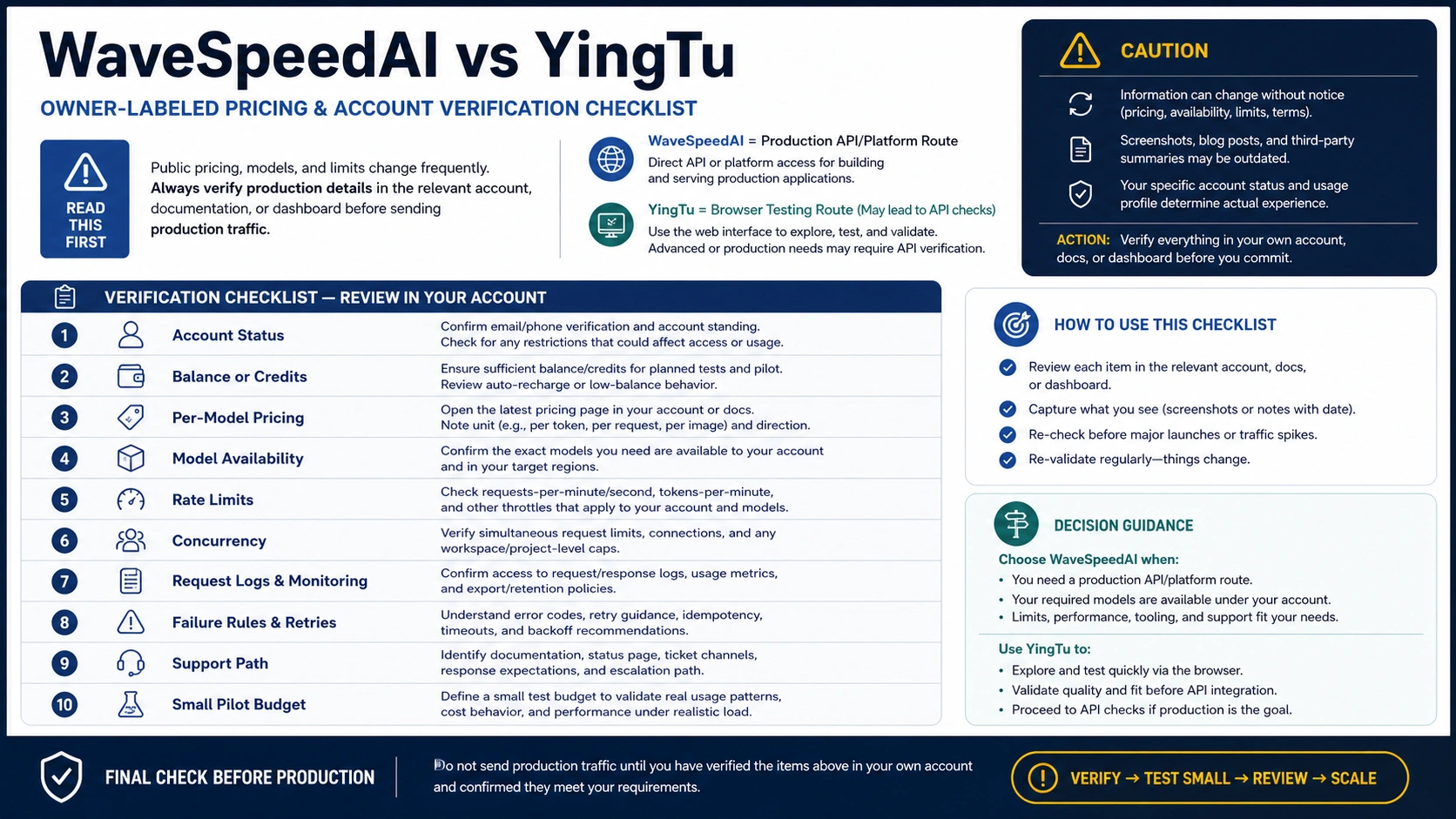
Pricing is the easiest place to make the wrong comparison. WaveSpeedAI's pricing documentation describes usage-based, per-model pricing with top-up credits and cost estimates before generation. Its model documentation says each model can have its own identifier, parameters, pricing information, and possible rate limits. That means the exact model page or API lookup matters more than a general brand-level estimate.
YingTu's visible model table is useful for planning, but it should be read as YingTu-owned browser and route-planning context, not as an official provider price sheet. If a workflow later becomes a production API workflow, the account, model route, balance, request shape, output size, concurrency, and failure handling need to be checked in the API route that will process the request.
Use this verification checklist before putting either route into production:
| Check | Why it matters |
|---|---|
| Account owner | The account that tests the output may not be the account that pays for production traffic. |
| Model identifier | Similar display names can map to different provider routes or model versions. |
| Request parameters | Size, duration, quality, reference images, batch size, and edit inputs can change cost and output behavior. |
| Price owner | A platform price, provider route estimate, and official model price are different contracts. |
| Balance or credits | A successful browser test does not prove production balance or credit availability. |
| Rate limits and concurrency | Early manual tests rarely expose production volume limits. |
| Logs and observability | Production support requires request IDs, failure reasons, and enough logging to debug issues. |
| Failure charging | Timeouts, safety rejections, partial outputs, and failed jobs need explicit billing rules. |
| Data and privacy terms | Reference images, prompts, and generated assets may carry customer or brand-sensitive information. |
| Fallback route | A production workflow needs a second path if the chosen model or provider route changes. |
If the later question becomes specifically "what is the cheaper GPT Image 2 API route?", use a route-owner comparison instead of stretching this WaveSpeedAI/YingTu decision into a price-only page. The cheap GPT Image 2 API guide separates official and provider pricing logic for that narrower cost decision.
A dual-lane workflow
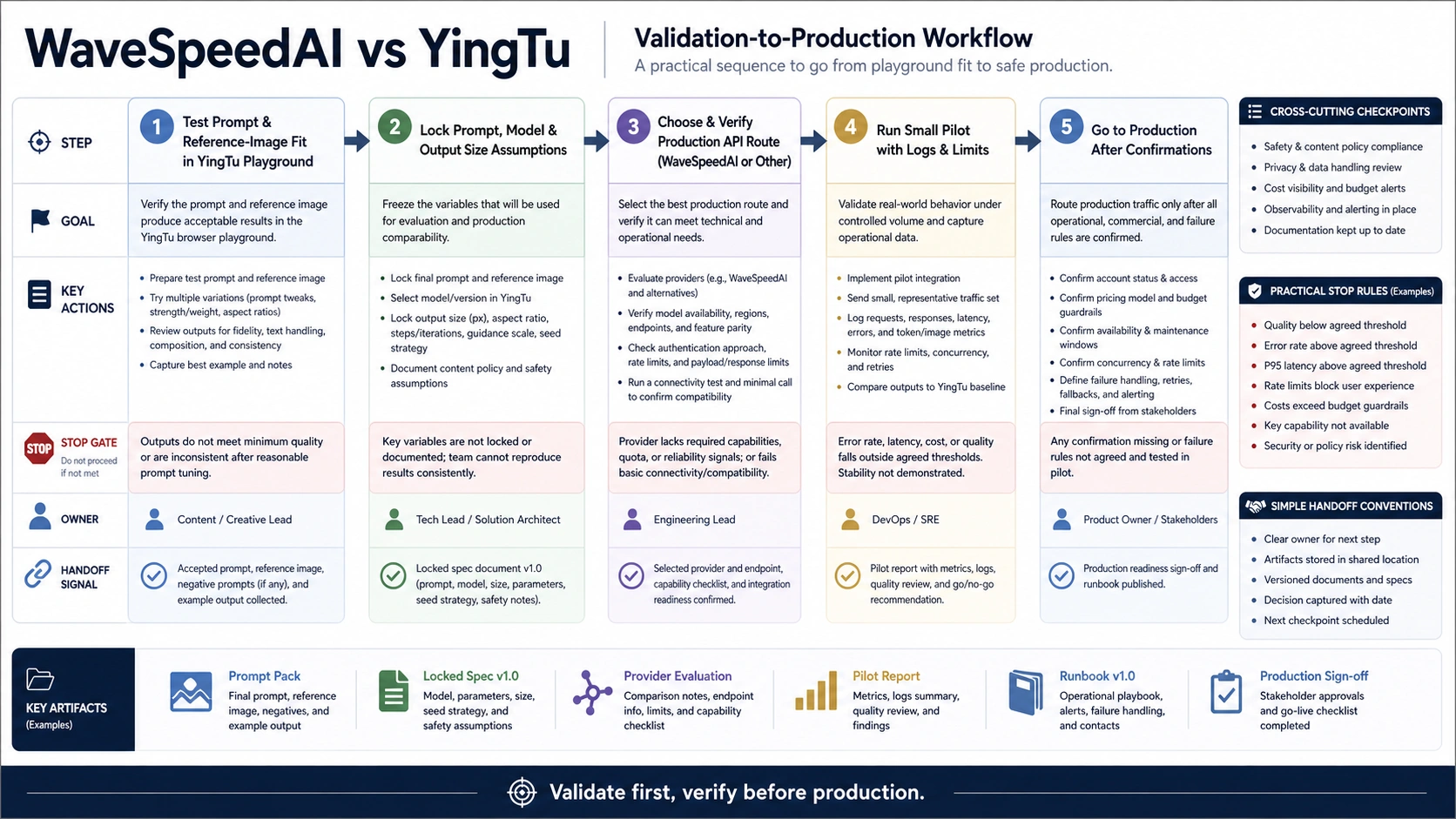
The strongest answer for many teams is not "choose one forever." It is "validate in the lightweight surface, then production-test in the route that will own real traffic." This keeps creative uncertainty away from production infrastructure until the team has enough evidence to justify integration.
Use this sequence when prompt or model fit is still unknown:
| Step | What to do | Output to keep |
|---|---|---|
| 1. Define the target output | Write the real image or video job, including subject, style, size, edit type, and quality bar. | One short task brief and success criteria. |
| 2. Test in YingTu | Try the prompt, reference image, model route, and output size in the browser. | Winning prompt, model candidate, reference behavior, and rejected variants. |
| 3. Decide whether API work is justified | Stop if the browser tests cannot meet the creative bar; continue if they do. | A clear go/no-go decision. |
| 4. Choose the production route | Evaluate WaveSpeedAI or another API route against the winning workload. | Exact model identifier, parameters, price owner, account owner, and limits. |
| 5. Run a small production pilot | Send a small batch through the production route before scaling. | Request logs, cost sample, failure cases, latency, and fallback notes. |
| 6. Lock the production rule | Document when to use the route, when to retry, when to fall back, and when to recheck pricing or model access. | A production checklist the team can actually follow. |
This sequence is slower than clicking a single generate button, but faster than building against the wrong route. It also gives both tools a fair role: YingTu reduces prompt and model uncertainty; WaveSpeedAI can then be judged on the production platform questions it is better positioned to answer.
What to choose first
Choose WaveSpeedAI first if your next milestone is API or infrastructure evaluation. That includes app integration, broader model catalog inspection, image-to-video or text-to-video workflows, account-level throughput, production cost modeling, or support and logging requirements. In that case, a browser playground may be useful later for creative iteration, but it should not replace the production contract check.
Choose YingTu first if the next milestone is output validation. That includes prompt tuning, reference-image testing, model shortlist building, size comparison, and deciding whether an image route is good enough to justify code work. In that case, do not read a successful browser result as production proof. Move from the browser result into account and API verification before traffic goes live.
Use both when the team is early and risk is split across creative quality and production reliability. A typical sequence is: validate several image prompts in YingTu, choose the best model and output size, then test that workload in WaveSpeedAI or another production API route with real account, price, limit, and failure handling checks. The browser lane answers "can we get the right output?" The production lane answers "can we ship and support it?"
Avoid a universal winner claim. WaveSpeedAI is the stronger first route for production media platform evaluation. YingTu is the stronger first route for browser image-model validation. The right first click depends on which uncertainty is blocking the project today.
FAQ
Is YingTu free?
YingTu can be used as a browser testing route, and its public site frames free use around playground testing. Do not turn that into a free production API claim. Before production, verify account status, balance, current route price, model access, concurrency, and failure rules.
Does YingTu replace WaveSpeedAI?
No. YingTu is better understood as a browser image-model testing route and prompt-validation surface. WaveSpeedAI is the broader hosted media-generation platform and API route to evaluate when production integration, video/image infrastructure, account behavior, and model-specific pricing matter.
When is WaveSpeedAI the better first choice?
WaveSpeedAI is the better first choice when the work is already an API or platform evaluation. If the team needs to test model identifiers, request parameters, cost estimates, account tiers, rate limits, logs, and support behavior, inspect the production route directly.
When is YingTu the better first choice?
YingTu is the better first choice when the team still does not know which prompt, reference image, model route, or output size will work. Browser testing can remove creative uncertainty before engineers commit to a production API path.
Should a team use both?
Often, yes. Use YingTu to validate prompt and model fit when those are uncertain, then run a small production pilot in WaveSpeedAI or another API route. Keep the winning prompt, model, size, account owner, price owner, limits, request logs, and failure rules together so the production decision is traceable.
How often should prices, limits, and model availability be rechecked?
Recheck them before every production rollout, budget change, model migration, or large traffic increase. Model catalogs, per-model prices, account tiers, limits, and provider route behavior are volatile. A useful browser test or old cost estimate should not be treated as a permanent production contract.