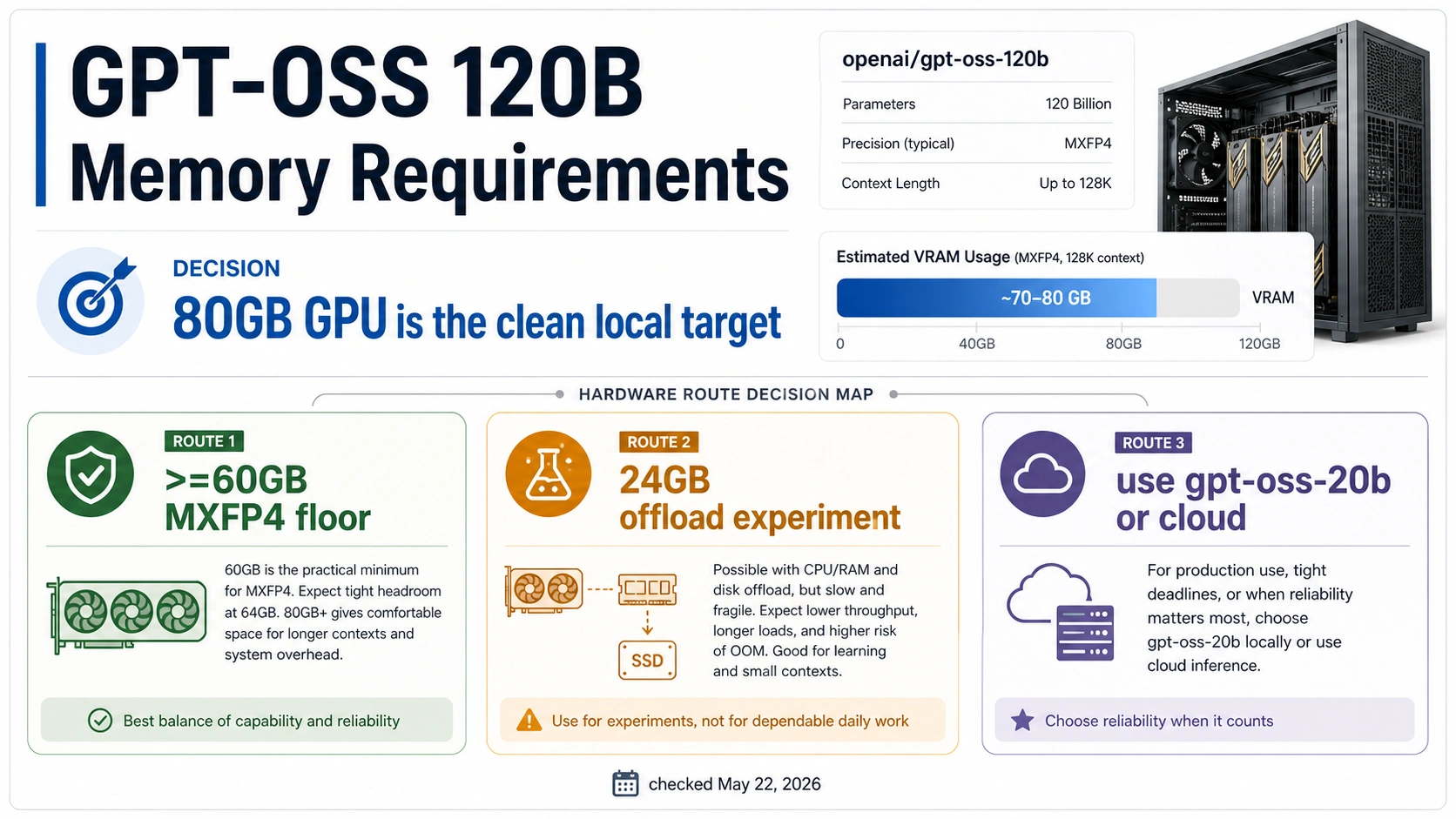
Plan gpt-oss-120b as an 80GB GPU-class model if you want a clean local run. The >=60GB number is a constrained MXFP4 runtime floor, not comfortable headroom, and a 24GB-card offload setup belongs in experiment territory. If stable speed, longer context, or concurrent use matters more than proving that the 120B model can load, switch to gpt-oss-20b, rent a cloud GPU, or use a hosted route instead.
| Hardware route | Treat it as | Practical meaning |
|---|---|---|
| 80GB GPU-class server card | Clean local route | Best single-GPU plan for serious local work. |
>=60GB VRAM or unified memory | Constrained floor | Possible on supported runtime paths, but context, batch, and overhead still matter. |
| 24GB GPU with CPU/NVMe offload | Experiment route | Useful for learning and tinkering, not a production hardware plan. |
gpt-oss-20b, cloud GPU, or hosted access | Fallback route | The better choice when local memory, speed, or reliability is the real constraint. |
Stop before buying hardware if your plan depends on vague "RAM" claims, a single Reddit success report, or a benchmark that does not match your runtime, context length, and concurrency target.
Short answer: choose the route before the runtime
The useful GPT-OSS 120B memory answer depends on the route you plan to run. OpenAI's launch material describes gpt-oss-120b as a 117B-parameter open-weight model with 5.1B active parameters and a long context window, and frames it as efficient on a single 80GB GPU. The OpenAI model reference also lists gpt-oss-120b with 117B parameters, 5.1B active parameters, and a 131,072 token context window.
Those facts do not mean every 80GB card, every runtime, or every workload behaves the same. They mean 80GB GPU-class hardware is the clean local planning target. OpenAI's runtime guides then introduce the lower >=60GB path because MXFP4-weight serving can fit on certain supported stacks with tighter assumptions. That lower number is useful, but it is not a promise that long context, high batch size, multi-user serving, or slower offload will feel acceptable.
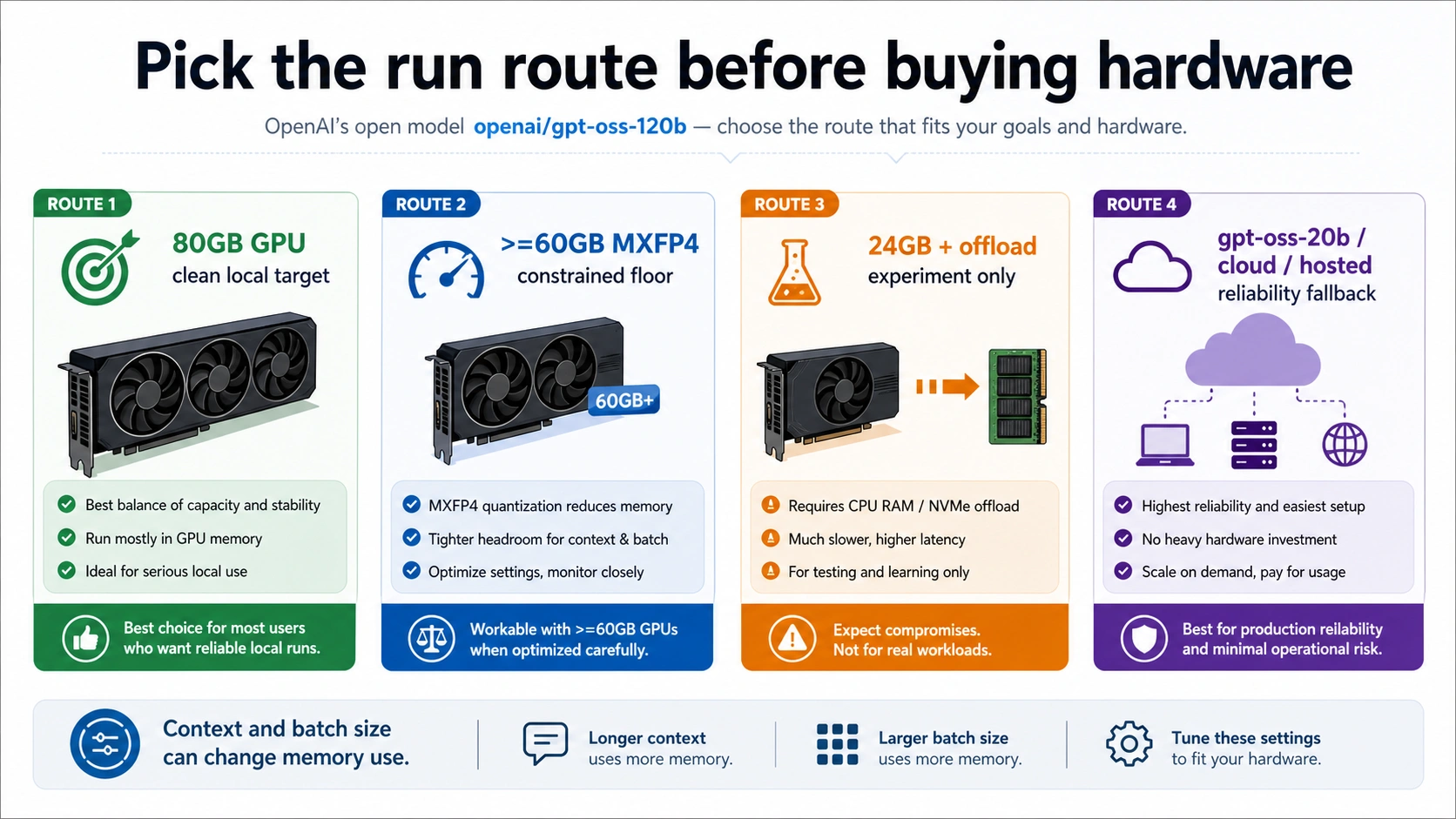
Use this split when deciding what to do next:
| If your real goal is... | Start with | Why |
|---|---|---|
| Reliable local 120B experimentation or internal use | One 80GB-class accelerator such as H100/MI300X-class hardware | It gives the model weights, runtime overhead, and ordinary context room to breathe. |
| Proving the model can load on a supported stack | A >=60GB VRAM or unified-memory route | Official runtime examples use this as a floor, but it needs careful context and batch control. |
| Learning on consumer hardware | 24GB GPU plus CPU/NVMe offload | It can teach the workflow, but memory movement and latency change the job. |
| Running a useful local assistant on smaller hardware | gpt-oss-20b | OpenAI frames 20B as the 16GB-class local model. |
| Shipping a service before hardware is settled | Cloud GPU or hosted route | It lets you test workload shape without turning the first week into hardware procurement. |
The cleanest buying rule is conservative: do not buy a marginal setup because it appears in one screenshot. Buy the hardware that matches the route you need, then validate the exact runtime, context length, and concurrency before treating it as finished.
Why 80GB and 60GB can both be true
The two numbers answer different questions. The 80GB answer is the clean hardware target. The >=60GB answer is a constrained runtime floor under specific quantized and implementation assumptions.
OpenAI's Transformers guide says the 120B model requires at least 60GB of VRAM or a multi-GPU setup for that route, and notes that MXFP4 support depends on modern hardware. The vLLM guide puts gpt-oss-120b in a server-oriented path with dedicated GPUs such as H100-class hardware. The Ollama guide also describes 120B as best with at least 60GB VRAM or unified memory while treating 20B as the easier local route.
The Hugging Face model card and the OpenAI GitHub repository keep the 80GB-class framing visible. That is the number to use when the question is, "What should I plan around if I want a clean local 120B setup?"
The 60GB floor exists because the model is sparse and uses MXFP4 quantization. It does not erase the rest of the memory budget. Runtime overhead, tensor parallelism choices, KV cache, context length, and batch size still add pressure. A setup that loads the model at a short prompt can still run out of memory when the context grows or several requests arrive at once.
Separate VRAM, unified memory, system RAM, disk, and KV cache
Do not ask "How much RAM does GPT-OSS 120B need?" without naming the memory pool. The answer changes depending on whether you mean accelerator VRAM, Apple-style unified memory, ordinary CPU RAM, disk offload, or the extra memory used by KV cache during generation.
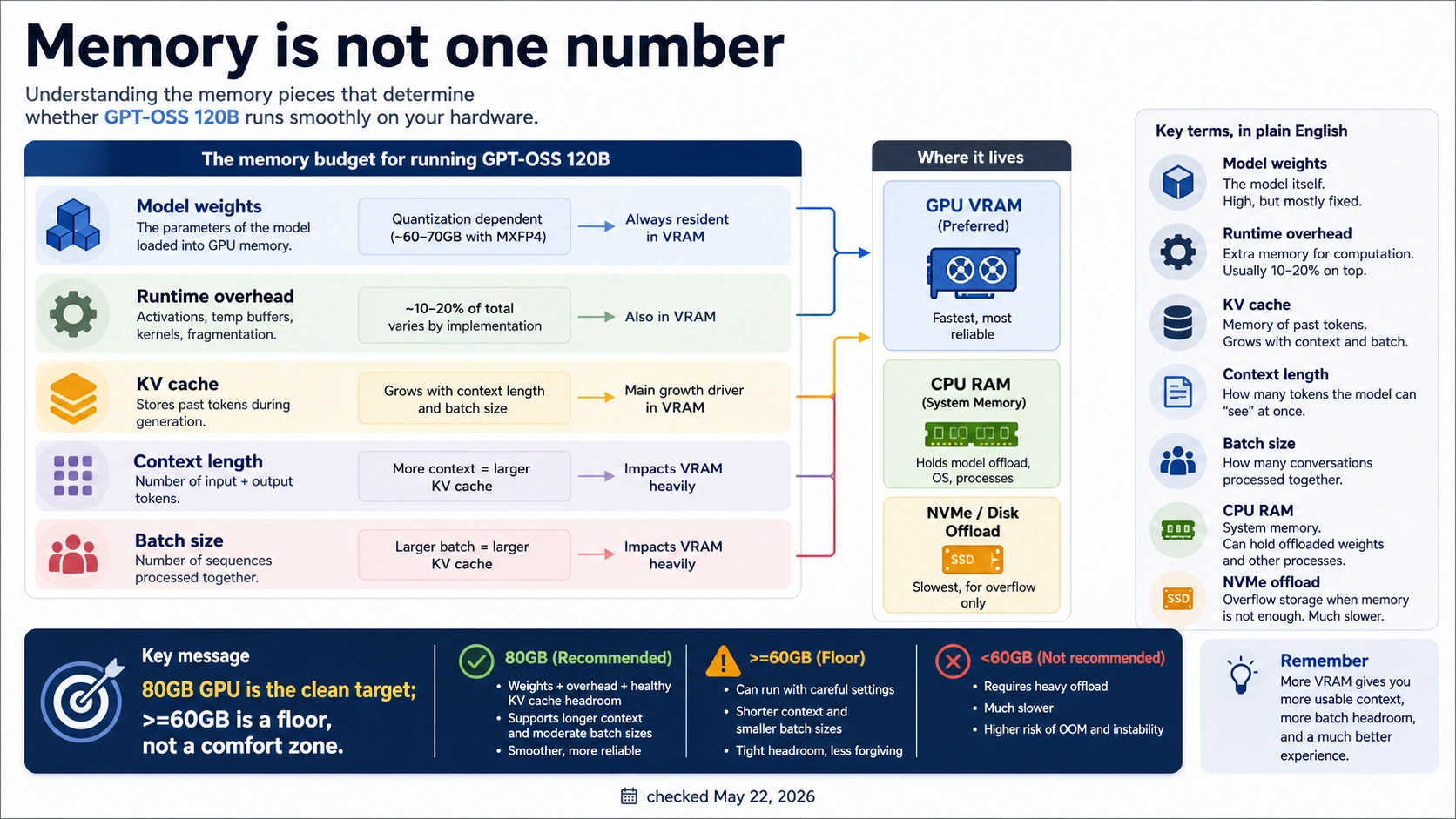
| Memory term | What it means for gpt-oss-120b | Buying implication |
|---|---|---|
| VRAM | Memory on the accelerator that holds weights, runtime state, and often KV cache | The clean single-device target is 80GB-class. |
| Unified memory | A shared memory pool used by some local runtimes and Apple-style systems | Treat >=60GB unified memory as a constrained route, not a blanket speed promise. |
| System RAM | CPU-side memory used by the operating system, runtime, tokenizer, offload buffers, and background work | More RAM helps offload experiments, but it does not become fast VRAM. |
| Disk or NVMe offload | Moving parts of the workload through storage | Useful for learning and loading; risky for latency-sensitive use. |
| KV cache | Memory used to remember attention state across the active context | Longer context and more simultaneous requests can dominate the margin. |
| Batch and concurrency | How many tokens or requests are handled together | Serving many users can require a larger memory plan than a single local chat. |
Checkpoint size is another source of confusion. A downloaded model's file size is not the same as runtime memory. The runtime may allocate temporary buffers, upcast some operations, hold KV cache, reserve allocator space, or shard across GPUs. A model can be "quantized" and still need careful memory planning.
That is why the right answer is not one universal system-RAM number. A consumer workstation with 128GB system RAM and a 24GB GPU can be interesting for offload experiments, but it is still not equivalent to an 80GB accelerator. Conversely, an 80GB accelerator can still hit limits if the serving configuration asks for a long context and high concurrency without adjusting runtime knobs.
Runtime routes and where the memory goes
The runtime decides how much of the memory budget is practical. OpenAI's implementation notes emphasize that gpt-oss uses the Harmony format and MXFP4 MoE weights; it should not be treated as a generic dense checkpoint that every loader handles equally. The implementation verification guide is useful because it keeps the model format, tool-call behavior, and runtime fidelity in view.
For local experiments, Transformers gives you a direct Python route, but hardware support and precision choices matter. If a path upcasts weights or falls back to less efficient kernels, the memory story changes. For server-style use, vLLM is a more natural route, but its memory profile is controlled by serving settings. The vLLM GPT-OSS recipe points at practical knobs such as max model length, batched tokens, and tensor parallelism. Those knobs are not cosmetic; they decide how much headroom remains after the model loads.
Ollama and local desktop runners can be easier to start with, especially when you only need a private test chat. They are also where the wording "VRAM or unified memory" appears. Read that as route-specific support language, not a guarantee that any consumer machine with enough total RAM will deliver usable 120B performance.
Multi-GPU setups add another branch. They can make the memory envelope possible, but they introduce interconnect, sharding, configuration, and debugging complexity. A two-GPU setup is not automatically better than one right-sized GPU if the runtime cannot distribute the model cleanly or the workload spends too much time moving data.
Consumer GPU stop rules
A 24GB GPU changes the job from deployment to experiment. It may load a quantized model through CPU or NVMe offload in some community paths, but that is a different promise from "I can run GPT-OSS 120B well." It is useful if the reader wants to learn the model format, verify prompts, inspect tool behavior, or compare outputs slowly. It is a weak plan for long-context local work or shared service use.
Use these stop rules before treating consumer hardware as "enough":
| Hardware situation | Sensible route | Stop rule |
|---|---|---|
| One 24GB NVIDIA card | Offload experiment or gpt-oss-20b | Stop calling it a production 120B setup if CPU/NVMe movement dominates latency. |
| Two 24GB cards | Advanced experiment, maybe partial sharding | Stop if the runtime requires fragile manual placement or cannot handle your context target. |
| 48GB workstation GPU | Serious test route, still below clean 80GB target | Stop if a short demo works but your real prompts, tools, or batch size fail. |
| Apple unified memory system | Local test route when memory is high enough | Stop if unified memory capacity is used as a substitute for measured throughput. |
| CPU-only path | Education and offline inspection | Stop if the goal is interactive use, long context, or serving other users. |
The fallback route is not failure. If the useful job is a private local assistant on consumer hardware, gpt-oss-20b may be the better local model. If the useful job is evaluating the 120B model for a project, renting an H100-class cloud GPU for a day can be cheaper than buying marginal hardware and spending a week debugging offload. If the useful job is product delivery, a hosted path can separate model evaluation from infrastructure ownership.
Validation worksheet before buying or renting
Run the validation in the order below. Do not start with benchmark screenshots. Start with the workload that matters.
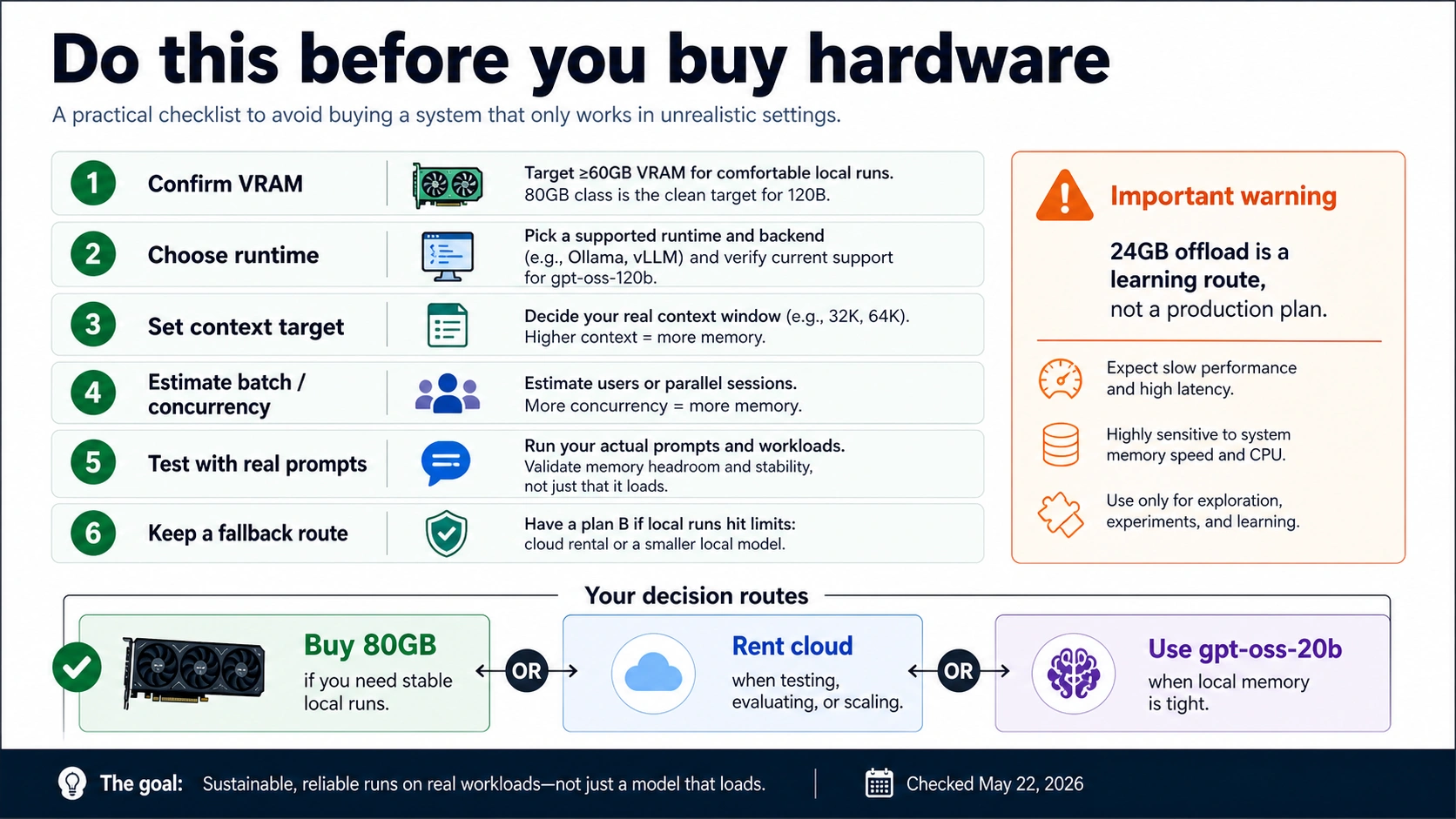
| Step | What to write down | Why it matters |
|---|---|---|
| 1. Runtime | Transformers, vLLM, Ollama/local app, multi-GPU, offload, hosted | The same model can have different memory behavior by route. |
| 2. Hardware memory pool | VRAM, unified memory, system RAM, disk offload | "RAM" alone hides the important bottleneck. |
| 3. Context target | Short chat, 32k, 64k, 128k, or another bound | KV cache grows with context and can erase the remaining margin. |
| 4. Batch or concurrency | One local user, batch tests, or serving multiple users | A setup that works for one request can fail under serving load. |
| 5. Precision and quantization | MXFP4 path, BF16 path, runtime-specific conversion | Memory claims depend on the actual representation being loaded. |
| 6. Real prompt set | Tool calls, long documents, code, or short chat | Real prompts reveal memory and latency that toy prompts hide. |
| 7. Telemetry | Peak VRAM, CPU RAM, swap, tokens/sec, OOM point | A repeatable measurement beats a one-off success screenshot. |
| 8. Fallback | 20B, cloud GPU, hosted route, or smaller context | Decide the escape route before the hardware purchase. |
For a rental, run a proof session with the exact runtime and context target before committing to a longer reservation. For a purchase, insist on a workload test that includes the prompt length and concurrency you actually expect. The right answer may be "buy 80GB," "rent first," "run 20B locally," or "do not self-host this workload yet."
FAQ
How much VRAM does GPT-OSS 120B need?
Use 80GB GPU-class hardware as the clean planning target for gpt-oss-120b. The >=60GB figure appears in official runtime paths, but it is a constrained floor that depends on MXFP4 support, runtime choice, context length, batch, and overhead.
Can GPT-OSS 120B run on a 24GB GPU?
Treat 24GB as an offload experiment, not a clean local deployment. CPU or NVMe offload may help the model load in some setups, but latency, context length, and reliability are the real limits.
Is system RAM enough if VRAM is low?
No. System RAM can support offload and buffering, but it is not equivalent to accelerator VRAM. Once the workload depends on moving model state through CPU memory or disk, the route changes from clean GPU execution to constrained experimentation.
Why does OpenAI mention both 80GB and 60GB?
The 80GB number is the clean hardware class for a single-accelerator local route. The >=60GB number belongs to specific MXFP4 runtime paths and still needs workload qualification.
Does GPT-OSS 20B need the same hardware?
No. OpenAI positions gpt-oss-20b as the smaller local model and describes it as a 16GB-class route. Choose it when local memory is tight or when the goal is a useful local assistant rather than a 120B hardware proof.
Does the 128k context window mean I can use 128k on any setup?
No. The model reference lists a long context window, but using long context increases KV-cache memory pressure. Plan memory around the context length you will actually use, not only the theoretical maximum.
Should I buy an H100-class card, rent cloud GPU, or use hosted access?
Buy only when repeated local 120B work justifies the hardware and the workload test passes. Rent cloud GPU when you still need to validate runtime, context, and throughput. Use hosted access when reliability and delivery matter more than owning the infrastructure.
Are Reddit or Hacker News memory reports useful?
They are useful for finding edge cases and offload experiments. They are not requirement owners. Use official model and runtime docs for the requirement boundary, then use community reports only to decide what to test or avoid.