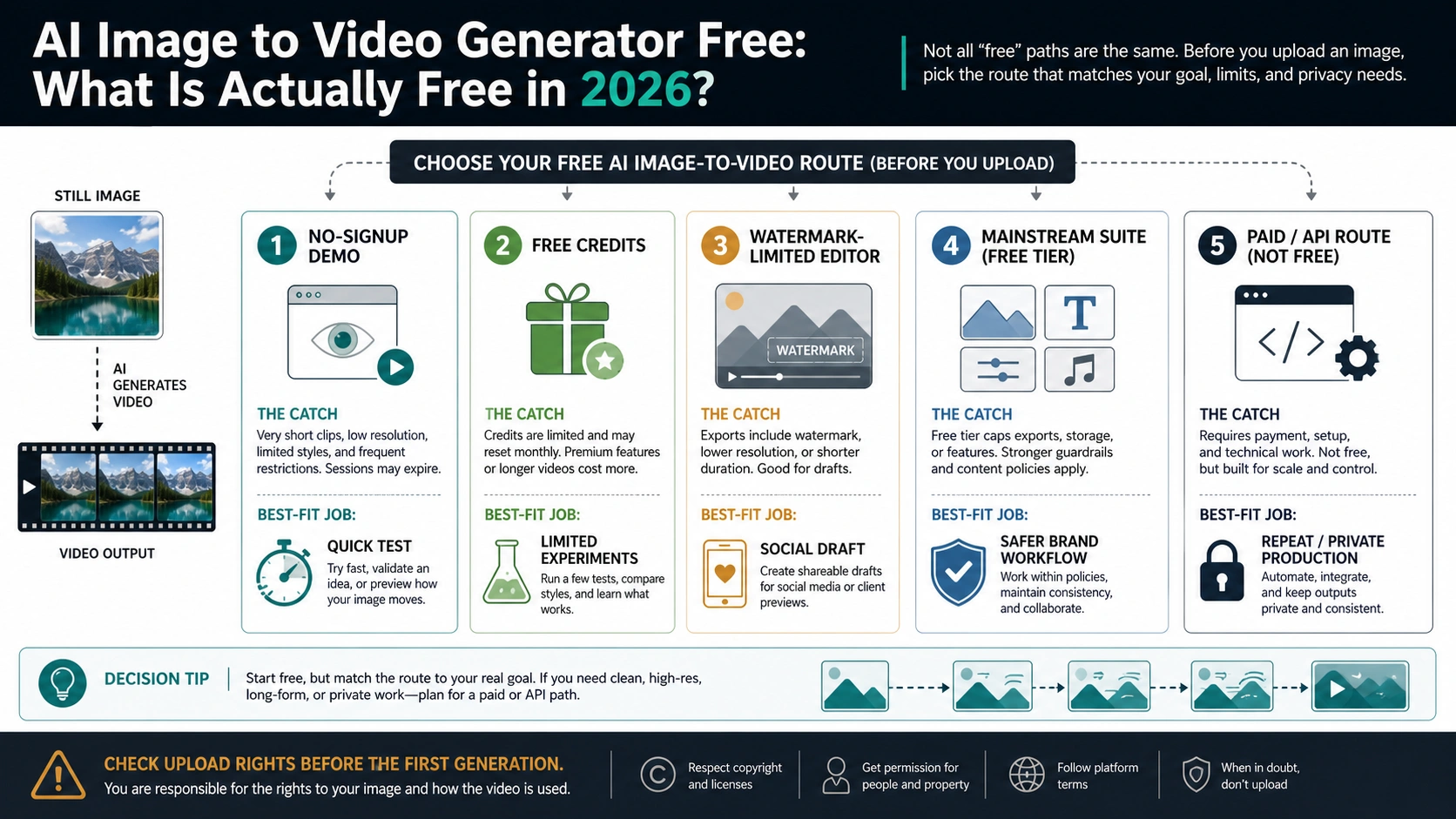
As of July 2, 2026, a free AI image-to-video generator is still useful for testing motion, but "free" is a contract to inspect, not a promise of unlimited clean production. Most routes fall into a small set of contracts: a no-signup demo, free credits or daily generations, a watermark-limited editor, a mainstream creative-suite trial, a wrapper, or a paid/API and official model route.
Start with the source image before the tool list. Do not upload faces, customer assets, IDs, medical or financial context, minors, licensed art, or unreleased product images to an unverified free generator. If the image is sensitive or commercial, a trusted account, paid editor, or auditable API route is usually the safer first route.
| If your job is... | Start with... | Check before upload or export |
|---|---|---|
| One quick idea test | No-signup demo | Daily cap, queue, low resolution, unclear terms |
| A few experiments | Free-account credits | Credit reset, duration, model access, reroll cost |
| A social draft | Watermark-limited editor | Watermark removal, export size, commercial-use terms |
| A free claim from a model-name wrapper | Wrapper route | Whether the page proves model owner, storage, export, and watermark terms |
| A brand or product asset | Mainstream creative suite | Upload rights, license handling, team workflow |
| Repeatable, private, or official-model production | Paid/API or official model route | Price, privacy/storage policy, logs, integration work |
Official-model questions need a separate route check. Google/Veo access belongs to current Google product or developer surfaces, not to a third-party page that merely uses Veo-style wording. OpenAI/Sora belongs to current Sora Videos API documentation and account access, not to a generic no-signup image-to-video upload box.
What Is Actually Free?
The useful answer is not a single tool name. "Free" in image-to-video usually means a small set of route contracts, and each one changes what you should risk on the first upload.
| Free contract | What it can be good for | The catch to verify |
|---|---|---|
| No-signup demo | One low-stakes idea test or a quick motion preview | It may still cap generations, lower quality, queue jobs, or require signup at export |
| Free-account credits | A few controlled experiments after you create an account | Credits may be one-time, monthly, daily, model-specific, or consumed by failed rerolls |
| Watermark-limited editor | Social drafts, tests, and non-final previews | Clean export, HD, longer clips, or commercial use may require an upgrade |
| Mainstream creative suite | Safer team workflows, product drafts, and design handoff | The free plan may hide quota, export, model, or license limits behind account screens |
| Wrapper route | A fast way to try a model-style output when the source image is low risk | The page may not prove model owner, data handling, export rights, or watermark terms |
| Paid/API or official model route | Repeatable production, private assets, logs, named models, and integration | It is honest but no longer a no-signup free browser route |
Use the no-signup route only when the input image is disposable and the output does not need to be clean. Use free credits when you can tolerate account creation and a limited number of attempts. Use a watermark-limited editor when the video is a draft, not the deliverable. Move to a mainstream suite, paid route, or official model/API route when the source image belongs to a client, a brand, a real person, or a product launch.
The pattern matters because exact free limits change quickly. A page can say "free" on the upload screen and still charge at export. A pricing page can include free credits and still separate free browser credits from API credits. A no-signup page can be easy to try and still say little about storage, deletion, or training. Treat the first generation as a contract check, not a commitment.
Photo-To-Video Starts With The Source Image
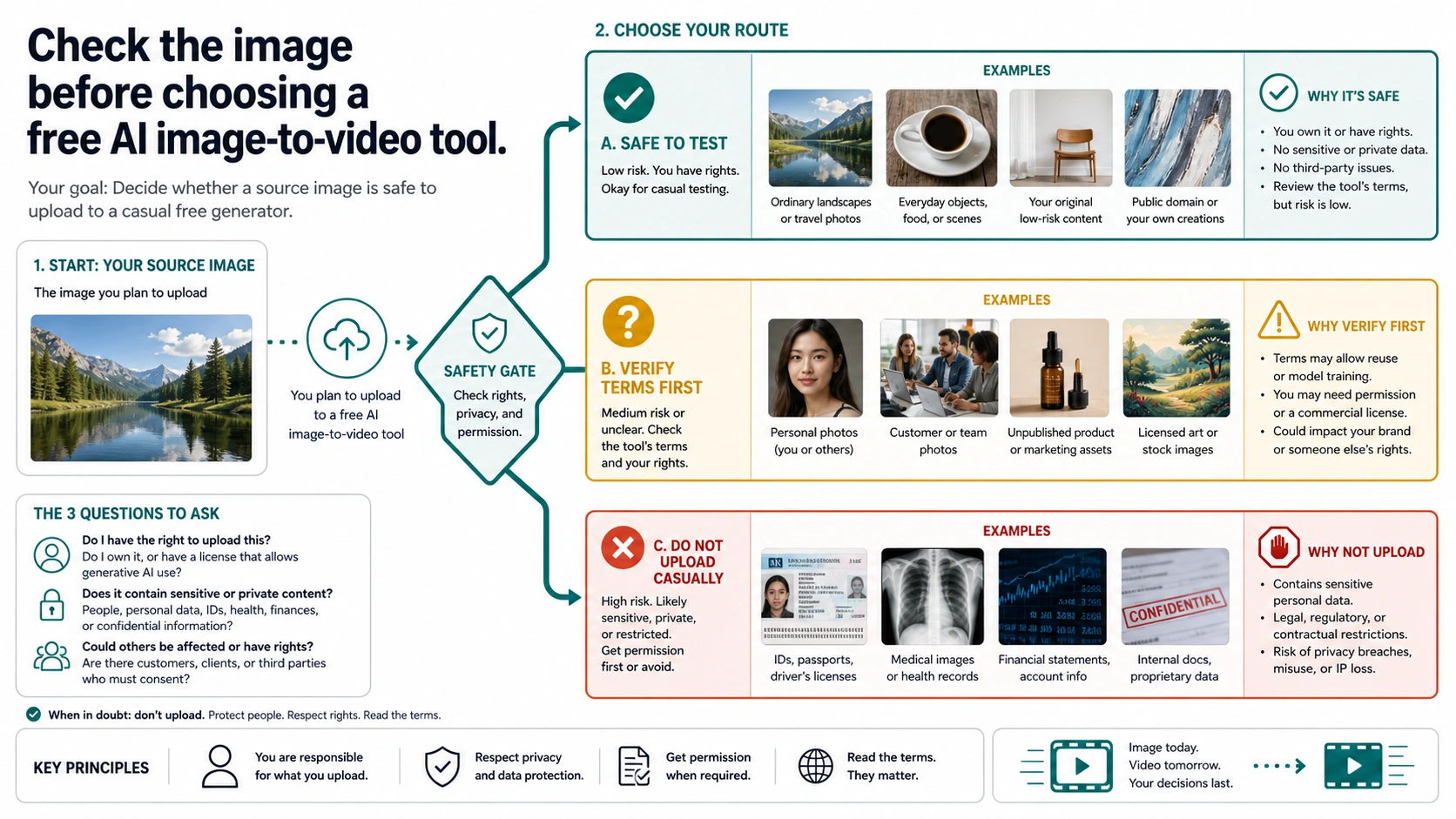
The source image is the part you control before any generator touches it. That is why a "photo to video AI free" route is not just a tool choice: the photo itself decides whether a free upload is reasonable. If the image includes a private face, a customer asset, a regulated setting, a confidential product, a brand campaign, or licensed artwork, do not let a free upload box become the first review step.
Start with a three-way classification before the tool list.
| Source image type | Free demo route | Better first route |
|---|---|---|
| Disposable test image, synthetic sample, or public-domain-style practice asset | Acceptable for a no-signup or free-credit test | Still verify export rights before posting |
| Product photo, client creative, staff image, private location, or unpublished campaign | Risky in casual free tools | Use a trusted account, a suite with clearer terms, or an approved production route |
| IDs, medical/financial context, minors, intimate imagery, or legal-sensitive material | Stop | Do not use a casual free image-to-video generator |
No signup is not the same as privacy. It can mean fewer account steps, but it does not prove deletion, storage limits, gallery privacy, support access, training exclusion, or rights handling. For sensitive images, the safest free test is often to create a harmless stand-in image first, test the motion style there, and only move the real asset into a route your team can approve.
For product photos, also decide whether realism matters. A casual free generator may add warped labels, strange hands, inconsistent shadows, or motion that makes the product look different from the actual item. If the video will be used in advertising, ecommerce, investor material, or a client review, the upload and export contract matters as much as the model quality.
The Free Contracts Explained
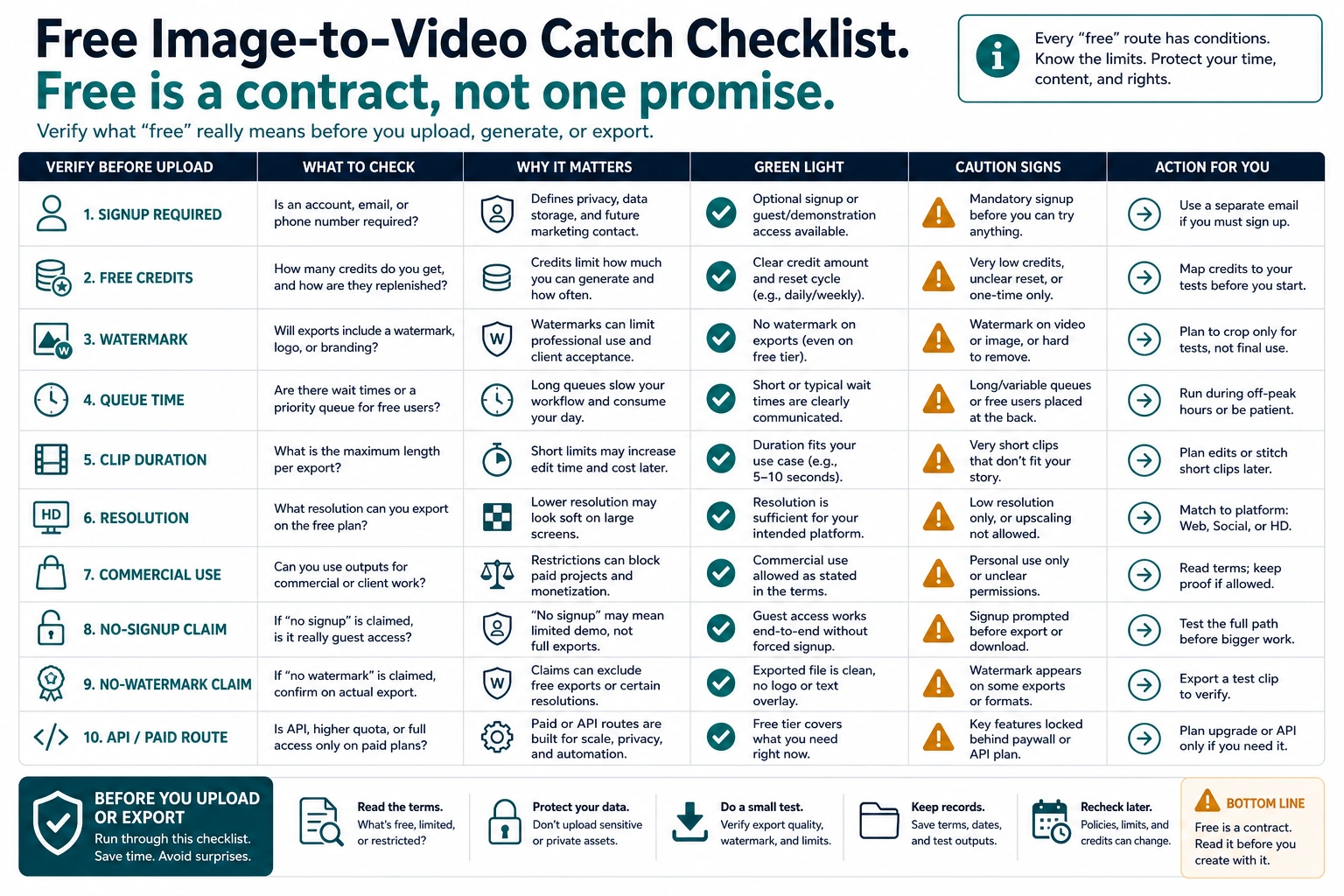
No-Signup Demos
A no-signup demo is the fastest way to see whether an image can animate at all. It is best for a throwaway test: a non-sensitive image, a short clip, and a result you may not use.
Check three things before you trust it. First, does generation really happen without account creation, or only the upload screen? Second, does the page show a daily cap, queue, or low-resolution export? Third, does it explain what happens to uploaded images? If those answers are missing, keep the input disposable.
Free-Account Credits
Credit-based tools are usually more honest than "unlimited" pages because they admit that video generation has a cost. Treat Kapwing, Runway, Pika, Luma, and similar routes as account-and-credit checks rather than durable free winners. Before spending the first attempt, open the current account or pricing surface and check whether credits are one-time, daily, monthly, model-specific, export-specific, or consumed by failed rerolls.
That can be a good fit when you need a few experiments, but credits create a planning problem. A failed prompt, bad crop, or unnecessary reroll may spend the same scarce allowance as a useful output. Before you click generate, decide what counts as success: motion direction, character stability, product realism, absence of watermark, or export quality.
Watermark-Limited Editors
Watermark-limited editors are useful when the first output is meant to prove direction, not serve as the final asset. A route can be genuinely free for preview and still charge for watermark removal, longer duration, higher resolution, commercial rights, or priority generation. That is not a contradiction; it is the contract. Inspect the export screen before you spend time tuning prompts.
A watermark is not a failure if the job is a social draft or internal review. It is a problem if the asset will ship, be delivered to a client, or appear in paid media. Do not treat "free export" and "clean final export" as the same thing.
Mainstream Creative Suites
Canva, Adobe Firefly, Renderforest, Kapwing, and similar creative suites can be good when you need surrounding workflow: design assets, templates, captions, brand controls, team review, or a familiar editor. They deserve a separate lane because they solve a different job from direct upload generators. A suite can be more useful than a standalone demo when the output needs text, brand context, layout, or review.
The catch is that suite pages often lead with the creative workflow while quota, watermark, model selection, export, and license details live in account screens or plan pages. Use them when the surrounding workflow matters, and verify the exact free-plan export contract before promising a final video.
Paid/API And Official Model Routes
Paid, API, and official model routes are not the default answer to a "free" query, but they are the right answer when free would waste more time than it saves. If you need repeat generation, private source images, audit logs, backend integration, stable pricing, named model behavior, or team approval, a paid route is usually more honest.
Google/Gemini/Veo and OpenAI/Sora sit in this layer. As of July 2, 2026, Google's developer documentation points general video generation toward Gemini Omni Flash while keeping Veo 3.1 for capabilities such as image-based direction, scene extension, frame-specific generation, and legacy pipeline needs. OpenAI's current video-generation docs describe Sora 2, Sora 2 Pro, the Videos API, image references, extensions, edits, downloads, and batch workflows. A browser wrapper promising a free Veo-style or Sora-style result is not the same contract as the official product or API.
Tool Examples And What To Verify
Use tool examples as contracts to inspect, not as a permanent ranking. The useful question is not "which name is free forever?" but "which route exposes the catch before I upload or export?"
| Tool or route | Useful current reading | What to verify before relying on it |
|---|---|---|
| Direct upload generator | Fastest way to test a disposable image or photo | Whether generation, preview, and export are all free, and what happens to uploads |
| Free-credit editor | Better when you can create an account and spend a small allowance carefully | Credit reset, failed reroll cost, duration, resolution, model access, and export gate |
| Watermark-limited editor | Useful for social drafts and internal review | Whether clean export, HD, longer clips, or commercial use requires an upgrade |
| Creative suite such as Canva or Adobe Firefly | Stronger when layout, captions, brand assets, or team review matter | Plan eligibility, credits, export quality, commercial terms, and account controls |
| Google/Gemini/Veo official route | Cleaner when the model owner matters more than a free wrapper | Gemini app, Flow, Google Vids, Gemini API, Vertex AI, country, plan, quota, and Gemini Omni Flash/Veo boundary |
| OpenAI/Sora Videos API route | Developer route to audit before relying on it | Account access, Sora 2 or Sora 2 Pro availability, image-reference support, queue/pricing route, and export workflow |
If a tool advertises "unlimited", "no watermark", "free forever", or "commercial use", do not repeat that claim until the same page or a linked plan page proves the exact meaning. A screenshot of a generate button is not enough. The key evidence is the account screen, pricing page, export dialog, or terms text that controls your real output.
For Google/Veo-specific free access, use the dedicated Veo route article at /en/posts/veo-3-1-free. For model-level tradeoffs after you already know you need a stronger video model, use /en/posts/sora-2-vs-veo-3-vs-kling. If the intent turns into adult or NSFW image-to-video generation, keep it out of this workflow and use the separate boundary page at /en/posts/ai-image-to-video-nsfw.
A First-Test Workflow That Saves Credits
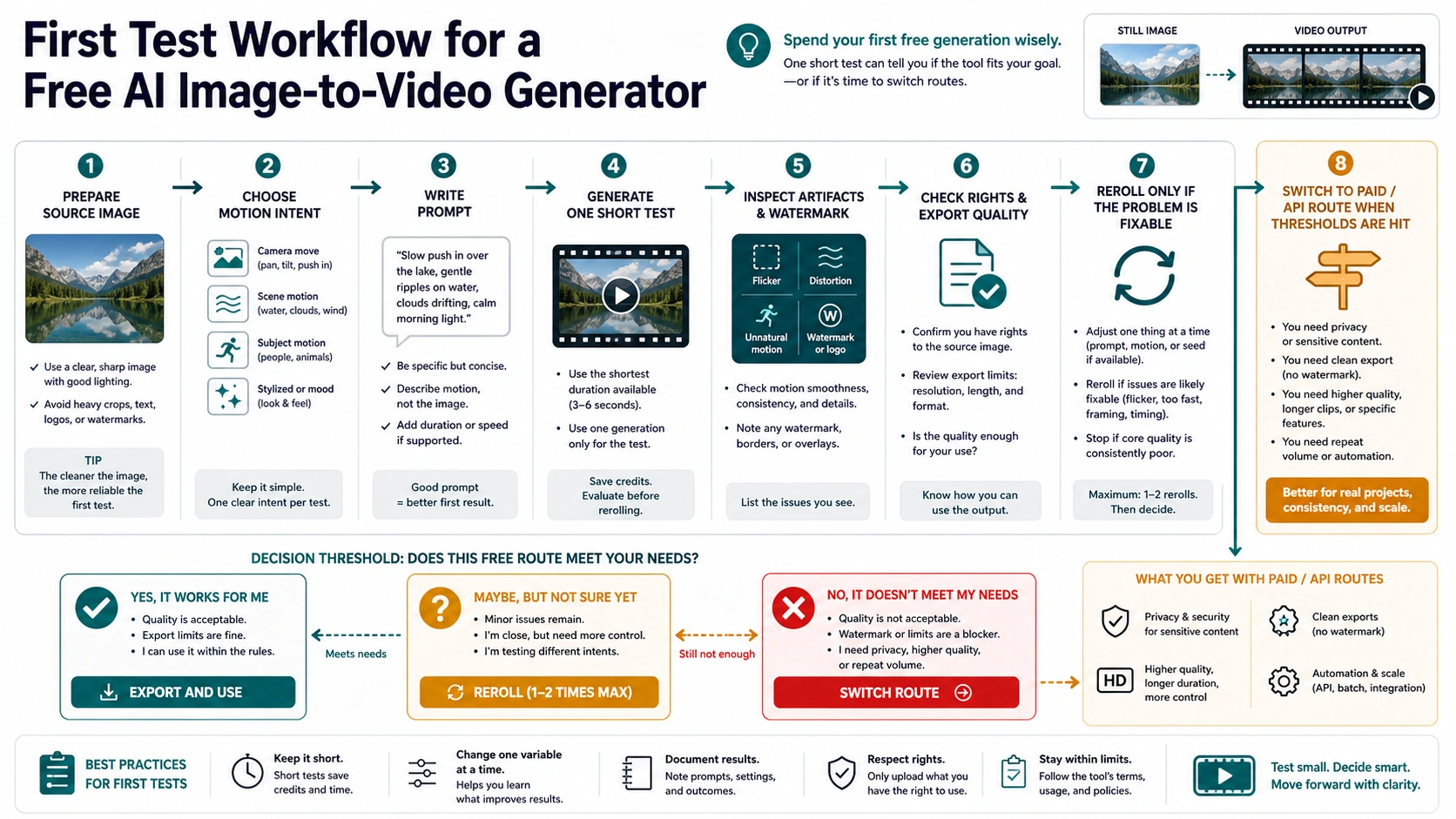
The first free generation should answer one decision, not try to create the final clip.
- Prepare a safe source image. Use a duplicate, crop out private context, and avoid real faces or client assets unless the route is approved.
- Decide the motion. Write one sentence such as "slow camera push-in with slight background parallax" or "product rotates gently on a clean studio surface."
- Keep the prompt narrow. Do not ask for scene changes, new characters, camera moves, lighting shifts, and text overlays all at once.
- Generate one short test. Treat the output as a feasibility check.
- Inspect the failures. Look for warped logos, melting faces, object identity drift, flicker, unnatural hands, watermarks, low resolution, or unusable motion.
- Decide once. Reroll only if the problem is fixable by a narrower prompt or cleaner image. Export only if the watermark, rights, and resolution fit the job. Switch route if the problem is privacy, repeatability, clean export, or production control.
This workflow matters because free credits often disappear into avoidable rerolls. If the first output fails because the input image is cluttered, fix the image before spending another attempt. If it fails because the free route cannot export cleanly, stop testing and price the paid route. If it fails because the image is sensitive, the correct fix is not another prompt.
When Free Is The Wrong Route
Choose paid, suite, or API access when any of these conditions are true.
| Condition | Why free is weak | Better move |
|---|---|---|
| The source image is private or client-owned | Casual free tools may not expose enough upload and storage terms | Use an approved account or route with clearer data handling |
| The output must be watermark-free | Many free tools charge for clean export | Price the upgrade before generating |
| You need repeat volume | Free credits and daily caps are unpredictable | Use a paid plan or API budget |
| You need backend integration | Browser tools do not give logging, retry control, or stable inputs | Use an official API or a vetted provider |
| The model route matters | Wrapper pages may not disclose which model produced the output | Use the official model surface or a provider that names the route |
| The asset is commercial | Rights, watermark, and license terms decide usability | Verify terms before upload and export |
The practical rule is simple: free is good for learning whether a motion idea works. Free is weak when the main risk is ownership, privacy, clean export, repeated production, or a model/API contract. If the free route cannot answer those risks before upload, do not let a free button make the decision for you.
Google, Veo, ChatGPT, And API Routes
People often mix "free image-to-video generator", "Google image to video", "Veo free", and "ChatGPT image to video" into one question. They are not one route.
Google's video ecosystem spans consumer and developer surfaces. Gemini app, Flow, Google Vids, Gemini API, and Vertex AI can expose different video capabilities, eligibility, pricing, watermark/provenance behavior, and account controls. Google's current developer docs also split the model owner more sharply than older "Veo free" shorthand: Gemini Omni Flash is positioned as the default video-generation route in the Gemini API docs, while Veo 3.1 remains the route for capabilities such as image/reference direction, extension, and first/last-frame workflows. A free or no-cost consumer allowance does not automatically mean the Gemini API has a free video tier. A third-party wrapper using Veo-like language does not automatically prove official Google ownership.
ChatGPT and Sora are also different surfaces from a generic free image-to-video page. ChatGPT can help storyboard, rewrite prompts, or plan shot motion, but that does not mean every account has direct free image-to-video export inside the same route. OpenAI's current developer docs describe Sora video generation through the Videos API, including image references that can guide a generation from an input image. Treat ChatGPT/Sora as a product-surface or developer-route question unless the current account, plan, API status, and tool screen show the specific generation and export capability you need.
For developers, write the route owner in the brief before comparing outputs: official API, provider API, browser editor, consumer app, or wrapper. Then record what matters for the job: model name, image input rules, storage/logging, credit unit, watermark or provenance, retry behavior, and support. A free demo can be useful for creative direction, but it should not become the hidden production contract.
FAQ
Is there a free AI image-to-video generator?
Yes, but usually for testing. The free route may be a no-signup demo, a free-credit account, a watermark-limited editor, a creative-suite trial, or an official model route with separate limits. Treat "free" as a contract to verify, not as a promise of unlimited clean exports.
Can I get image-to-video with no signup?
Sometimes for a quick preview, but no signup does not prove privacy, deletion, full-resolution export, or watermark-free output. Use no-signup tools only with low-risk source images.
Which free image-to-video tool has no watermark?
This changes too often for one durable answer. Check the current pricing, export dialog, or account screen before relying on a no-watermark claim. Kling, Pika, Luma, and other current routes show why the answer depends on membership, credits, resolution, duration, and export rights rather than the word "free" alone.
Is unlimited free image-to-video real?
Be skeptical. Video generation has compute cost, so "unlimited" often hides daily caps, queues, low resolution, signup requirements, export limits, or subscriber priority. Require current owner proof before trusting it.
Is Google Veo free for image-to-video?
Google video access depends on the surface. Consumer products, Google Vids, Flow, Gemini app, Gemini API, and Vertex AI are separate contracts. Google's current developer docs distinguish Gemini Omni Flash from Veo 3.1 rather than making every video route a generic Veo route. Do not treat a free browser wrapper as the same thing as official Veo access unless the current page, account, and plan prove the route.
Can ChatGPT or Sora turn an image into a video for free?
Do not assume that from the phrase alone. ChatGPT can help plan prompts and workflows, but direct image-to-video generation and export depends on the current product surface, account, region, plan, queue, pricing, and available tools. OpenAI's current developer docs describe Sora video generation through the Videos API, with image references available for guiding a generation from an input image. Verify the live account or API route before promising output.
Is it safe to upload product photos or faces?
Only when the route is trusted enough for that asset. For faces, client images, unreleased products, IDs, medical or financial context, and licensed art, avoid casual free tools unless the upload, storage, rights, and export contract is clear.
What should I try first?
For a disposable image, try one no-signup or free-credit test with a narrow motion prompt. For a product, client, or repeat workflow, start with a trusted suite or paid/API route. For Veo-specific questions, check the Veo route separately before choosing a wrapper.