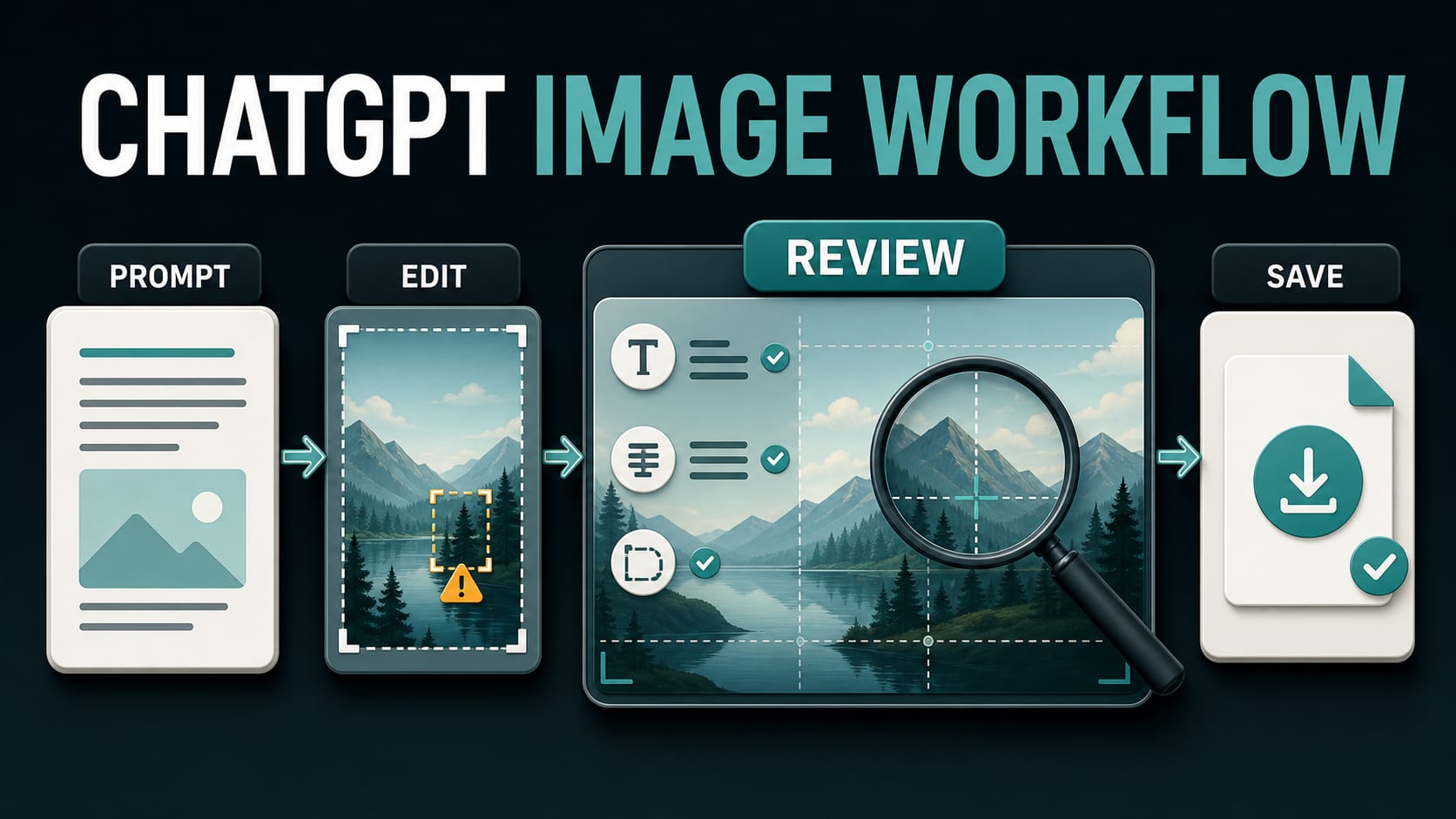
The quickest way to use the official ChatGPT image generator is to open ChatGPT, describe the image you need, inspect the full result, request one focused revision at a time, and select Save only after the image passes text, fact, layout, rights, and safety checks. You can also upload an image you are allowed to share and ask for either a whole-image edit or a change to a selected area.
That simple workflow hides several contract boundaries. ChatGPT access is not API credit. Creating an image is not the same limit as uploading one. A plan label is not a permanent quota. A third-party page using “ChatGPT image generator” in its title is not automatically the official product. And a provenance signal can indicate OpenAI origin without proving that the image is accurate, unedited, legally owned, or shown in truthful context.
| If your job is… | Start here | Keep separate |
|---|---|---|
| Create or revise one image conversationally | Official ChatGPT on web, iOS, or Android | API billing and rate limits |
| Make a precise edit to an existing image | Upload an authorized source, then describe the edit or select an area | Upload troubleshooting and storage limits |
| Plan a more complex visual before rendering | Images with thinking, only when your account visibly offers it | A promise that every tier has this mode |
| Generate images inside software | Image API or the Responses API image-generation tool | ChatGPT subscriptions and app quotas |
| Find a fixed free count, reset time, price, exact 4K size, or provider route | Use the focused guide for that question | This broad consumer workflow |
Start on the official surface, not a look-alike wrapper
As checked on July 21, 2026, OpenAI’s Images in ChatGPT guide says ChatGPT Images 2.0 is available on all tiers across web, iOS, and Android. You can ask for an image directly in a conversation or enter through the Images surface. Images with thinking is plan-qualified: the same current guide names Plus, Pro, and Business, with Enterprise and Edu described as coming soon. Check what your own account displays instead of treating that list as a permanent entitlement.
For an ordinary image, begin with the standard ChatGPT image flow. Use Images with thinking only when the job benefits from planning, comparison, research, or deliberate self-checking. A simple social graphic or reference edit usually does not need a more elaborate route.
Before uploading anything, apply a source-authority test:
- Did you create the source, license it, or receive clear permission to use and modify it?
- Does it contain a child, intimate/private material, an ID, confidential information, or a person who did not consent?
- Would the requested edit misrepresent a real event, person, product, or document?
- Can you finish the job with a synthetic or redacted reference instead?
Stop if the source fails that test. Generating a new output does not repair missing rights or consent in the input.
Write a first prompt that can be checked
“Make this look better” gives ChatGPT too much room to invent both the brief and the answer. A useful first prompt makes the desired result testable. Include the job, subject, setting, composition, format or aspect-ratio intent, exact text, constraints, and anything that must not change.
Use this prompt frame:
Create a [format and purpose] for [audience or placement]. Show [subject] in [setting], composed as [camera/layout direction]. Use [visual style, palette, lighting]. Include the exact text “[copy]”. Keep [protected elements] unchanged. Do not include [forbidden elements]. The result should work at [aspect-ratio intent or placement].
For example:
Create a landscape hero image for an independent coffee roaster’s spring landing page. Show one matte cream coffee bag on a pale stone counter, photographed at eye level with generous empty space on the left for a headline. Use soft morning window light and muted sage accents. Include the exact bag text “NORTH HARBOR — ETHIOPIA — APRICOT & HONEY.” Keep the logo geometry and bag color unchanged. Do not add people, cups, loose beans, awards, prices, or extra labels. Compose for a wide website banner.
This prompt is stronger because every important element has a review question. Is the headline space actually empty? Is the bag copy exact? Did an unrequested price appear? Did the composition survive the chosen format?
Avoid packing several conflicting art directions into one request. If you ask for documentary realism, glossy 3D illustration, flat vector geometry, hand-painted texture, and cinematic neon in the same sentence, the failure is in the brief before it is in the image.
Generate, then inspect the whole image
Send the prompt and let generation finish. OpenAI notes that generation may take a few minutes and that you can keep using ChatGPT while it runs. When the result arrives, open it at full detail. A conversation thumbnail is not enough for reviewing spelling, fingers, dates, small labels, edge artifacts, or unintended background objects.
Use a fixed first-pass order:
- Purpose: Would the intended audience understand the image without your prompt?
- Composition: Are the focal point, crop, empty space, hierarchy, and aspect intent correct?
- Text and facts: Check every letter, number, name, date, unit, product claim, axis, and label.
- Identity and continuity: Check faces, logos, product shape, colors, clothing, and protected reference details.
- Unrequested content: Look at corners, reflections, signs, packaging, hands, screens, and backgrounds.
- Safety and rights: Confirm the output does not create a deceptive, private, abusive, or unauthorized use.
Do not accept an image because the center looks polished. AI image errors often survive at the edges: a duplicate object in a reflection, a changed logo letter, a plausible but false statistic, or a background sign that was not in the brief.
Edit narrowly and recheck globally
OpenAI’s current editor supports two practical paths: describe an edit conversationally, or select an area and describe what should change. The official guide warns that a highlighted selection is not always precise and that an edit may extend beyond the selected area. Treat the selection as guidance, not a hard mask.
Use an edit request with three parts:
- Change: the smallest thing that should be different;
- Preserve: the elements that must remain identical;
- Verify: the details you will check after the edit.
Example:
Change only the small flavor line on the front bag from “APRICOT & HONY” to the exact text “APRICOT & HONEY.” Preserve the bag shape, logo, product name, lighting, shadows, camera angle, background, and all object positions. Do not add or remove anything. After the edit, keep the corrected line centered and readable at full size.
After every edit, zoom back out and inspect the entire image. A corrected word is not a successful edit if the logo changed, a product moved, the crop tightened, or a face drifted elsewhere. If a revision harms a previously correct detail, return to the last acceptable version and make a smaller request rather than stacking more repairs on a degraded branch.
Use a pass/fail QA sheet before saving
The final check should be stricter than the prompt check because polished mistakes are easier to trust. A useful image QA sheet separates visual appeal from release readiness:
| Check | Pass condition | Common reason to revise |
|---|---|---|
| Task fit | The image solves the intended placement and audience job | Attractive but wrong format or message |
| Text | Every visible word, number, and symbol is exact | Near-correct spelling or invented small print |
| Facts | Claims, dates, units, diagrams, and product details match an approved source | Plausible but unsupported content |
| Layout | Crop, safe area, contrast, and reading order work at delivery size | Key content too close to an edge |
| Source fidelity | Protected identity, product, and brand details remain consistent | Unrequested face, logo, color, or shape drift |
| Rights and safety | Input authority and intended use are documented | Consent, privacy, impersonation, or licensing gap |
| File | The saved local file opens and has the expected format and dimensions | Only a preview or clipboard copy was checked |
For an infographic or instructional image, compare the visual against the source facts line by line. Image quality cannot compensate for a wrong sequence, false number, or mislabeled arrow. For product work, compare the generated object against an approved reference rather than memory. For a real person, require explicit authority and check whether the use could mislead viewers.
Save the accepted result—and verify the file
Images created in ChatGPT are automatically available under Images, according to the current official guide. Open the accepted image and select Save to download it to your device. Copy and Share are different actions; neither proves that the final local deliverable was saved.
After saving:
- Locate the file in your downloads or chosen destination.
- Open that file outside the ChatGPT preview.
- Check width, height, file format, color, crop, and legibility.
- Confirm that the saved file is the approved revision, not an earlier draft.
- Give it a stable descriptive filename and keep the prompt plus review note with the project.
If a downstream platform resizes, converts, or compresses the file, inspect the transformed copy too. A social platform may crop the edge; a CMS may soften small text; a conversion step may remove metadata. The delivered asset—not merely the ChatGPT preview—owns the final pass.
Keep limits, uploads, API access, and 4K in separate contracts
Free users can currently create images in ChatGPT, but that does not establish a universal daily count. OpenAI’s Free Tier FAQ says image creation can have a usage limit separate from the main chat limit, and ChatGPT shows when the user can try again. Available models and limits can change over time. Use the in-product notice for your current account; do not plan around a recycled “images per day” number or an “unlimited” claim.
Current official evidence also does not establish that users can complete image creation, editing, and saving without signing in across all supported regions, so do not promise an accountless workflow.
The following boundaries prevent most access mistakes:
- Image creation limit: how often the current account can generate images;
- Upload limit: whether and how an input image can be attached;
- Storage: how uploaded or created files are retained in the account’s available library surfaces;
- ChatGPT subscription: consumer product access and plan features;
- API billing: a separate developer account, model, price, verification, and rate-limit contract;
- 4K or exact dimensions: a focused output-size problem, not a general promise about the consumer app;
- Third-party wrapper: its own login, billing, privacy, model, retention, and support terms.
If the image upload control is missing or a file is rejected, use the focused ChatGPT image upload troubleshooting guide. If your real question is the changing free quota or reset, use the ChatGPT free image generation limit guide. Developers should move to the Image API or Responses API documentation instead of assuming a ChatGPT plan includes API credit. For precise high-resolution implementation, use the GPT Image 2 4K guide.
Understand C2PA and SynthID without overclaiming
OpenAI’s current provenance guide says images generated through ChatGPT, Codex, and the OpenAI API include C2PA metadata and SynthID watermarks. It also gives the crucial limitation: OpenAI’s verification surface can identify supported OpenAI-origin signals, but it does not prove that an image is accurate, unedited, legally owned, or presented in the correct context.
C2PA and SynthID are complementary signals:
- C2PA metadata can carry signed provenance information, but metadata may be stripped by a platform or conversion.
- SynthID is an invisible signal embedded into the media and may survive some transformations, but it is not infallible.
- A detected signal supports an OpenAI-origin conclusion within the verification tool’s stated scope; it is not a fact-check or rights clearance.
- No detected signal does not prove that the image is human-made. The metadata may be gone, the watermark may be degraded, the source may be unsupported, or the file may predate the current signals.
Record provenance as one field in the review sheet, not as a substitute for source authority, factual review, consent, or editorial disclosure.
Troubleshoot by the failed checkpoint
The Images control is not visible. Ask for an image directly in a normal ChatGPT conversation, then check the official app, account, platform, and current rollout. Do not install a random wrapper merely because its page copies the same wording.
ChatGPT shows an image limit. Follow the reset timing or options shown in the product. Image creation can have its own limit; switching chats, accounts, or borrowed credentials is not a legitimate bypass.
The uploaded image fails. Confirm that the file opens locally, remove secrets, check the current upload requirements, and use the dedicated upload troubleshooting path. Do not repeatedly send sensitive media to unverified services.
The selection edit changed too much. Return to the last good version, reduce the selected area, name the single desired change, and list protected elements. Then recheck the full canvas because selected edits can extend outside the highlight.
Generated text is almost right. Quote the exact replacement, change one text block at a time, and verify every other label afterward. If the asset is legally or financially sensitive, move final typography into a controlled design workflow instead of repeatedly regenerating the whole image.
The saved image is missing or wrong. Open Images, select the approved revision, use Save, locate the file on the device, and open it outside ChatGPT. A successful preview is not proof of a successful handoff.
A repeatable prompt-to-publication record
For client, editorial, education, or product work, retain a short record with the asset:
- purpose and intended audience;
- first prompt and material revisions;
- source-image owner or permission basis;
- exact claims, copy, and references checked;
- protected elements and known limitations;
- accepted filename, dimensions, and format;
- reviewer and approval date;
- expected provenance signals and any later conversion;
- where and how the image will be disclosed or published.
This record is more useful than trying to remember which conversation produced the accepted file. It also makes a future correction possible when a claim, product, plan, or design requirement changes.
FAQ
Is the ChatGPT image generator free?
Free users can currently create images in ChatGPT, but usage is limited and the available limits can change. Image creation may have a limit separate from the main chat limit. Use the reset timing shown in your account instead of assuming a fixed daily number.
Do I need a special image mode?
No. You can request an image directly in a ChatGPT conversation or enter through Images. Images with thinking is useful for planning-heavy work only when your plan and account currently offer it.
Can ChatGPT edit my own photo?
ChatGPT can edit an uploaded image, but you should upload only material you are authorized to share and modify. Describe the exact change and what must remain unchanged, then inspect the whole result because an edit can affect more than the selected area.
Why did ChatGPT change something outside my selection?
The official editor guide says highlights are not always precise and edits may extend beyond the selected area. Use a smaller selection, a narrower instruction, and a clear preserve list, then compare the full result with the previous version.
Does ChatGPT Plus include Image API credit?
Do not treat a ChatGPT subscription as API credit. The consumer app and developer API have separate access, billing, model, verification, rate-limit, and output contracts.
Does ChatGPT always create 4K images?
Do not infer an exact 4K deliverable from a general ChatGPT image request. Check the saved file’s real dimensions. If exact size is the main requirement, use the focused API and 4K implementation guidance.
Does C2PA or SynthID prove an image is true?
No. These are provenance signals. OpenAI explicitly says its verification result does not prove accuracy, lack of editing, legal ownership, or correct context.
What should I do before publishing a ChatGPT image?
Open the final saved file, verify every visible word and fact, check crop and dimensions, confirm rights and consent, review safety and context, record the accepted prompt and source authority, and disclose AI involvement where the use or policy requires it.