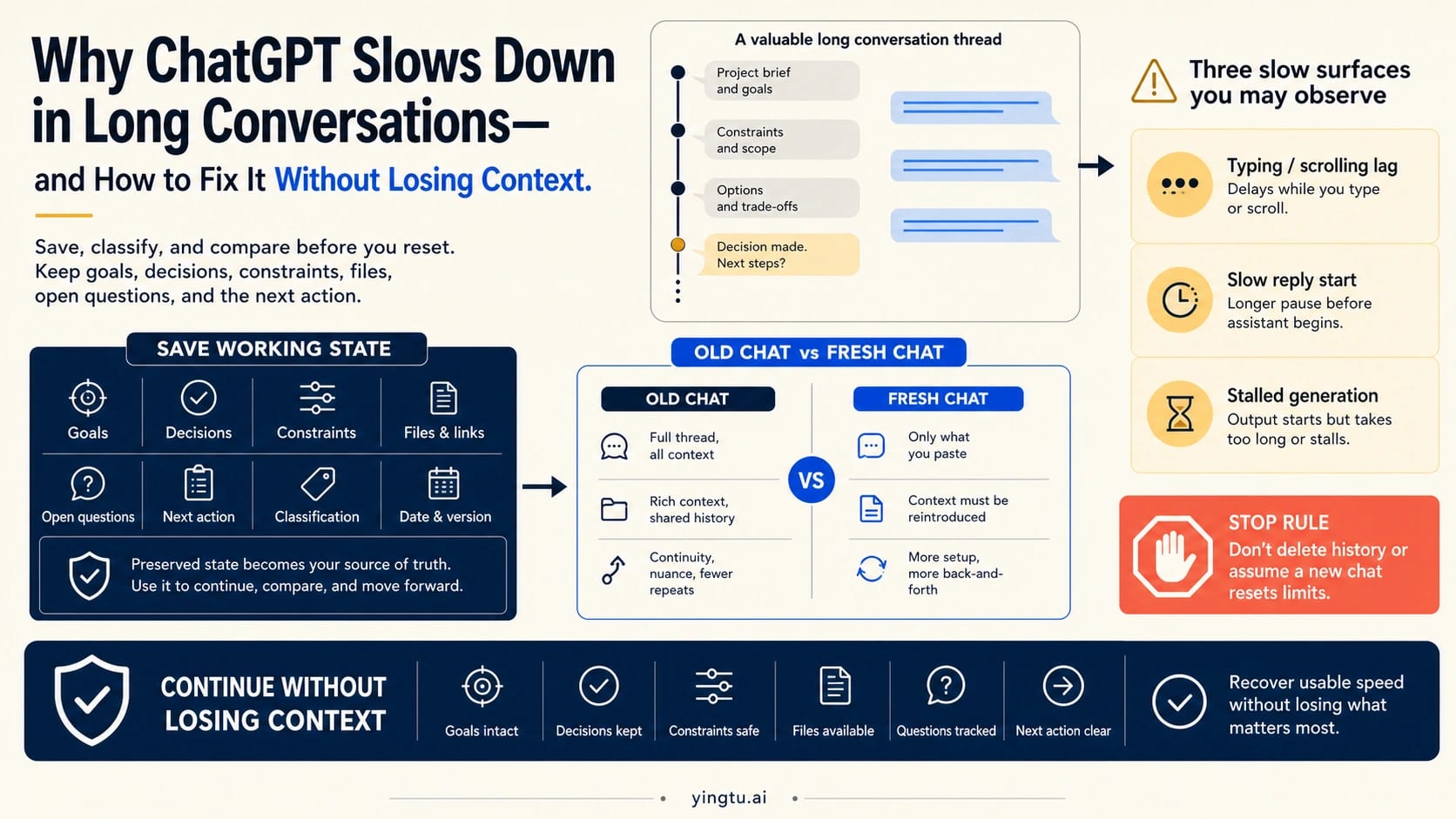
A long ChatGPT conversation can become slow in several visibly different ways: typing and scrolling may lag, a reply may take longer to begin, or generation may stall after it starts. Those symptoms do not reveal one universal cause. Before changing anything, save the six pieces of state you would hate to reconstruct: the goal, decisions already made, constraints, files or links, open questions, and the exact next action.
The fastest useful test is a fresh-chat control on the same client. Open a new chat and send a short prompt with similar complexity. If the fresh chat responds normally while the old conversation remains slow, the problem is likely scoped more narrowly than an account-wide or service-wide failure. That is the signal to prepare a reviewed handoff—not proof of a specific browser or context mechanism.
| What the comparison shows | What it suggests | Smallest useful next move |
|---|---|---|
| Old conversation slow; fresh chat fast on the same client | The symptom is likely tied to the old thread or its current page state | Keep the old thread, build a reviewed handoff, and continue the active task in the fresh chat |
| Old and fresh chats slow here, but the old thread works better on another supported client | The symptom is likely local to the current browser, app, or device | Check site data, extensions, open tabs or programs, then retry the same path |
| Multiple chats stay slow across clients or networks | The symptom is broader than one thread | Check the current OpenAI status, then compare device and network paths |
| Generation becomes blank, ends in an error, shows a limit message, or returns API 429 | A narrower error, consumer limit, or API branch now owns the problem | Use the matching error, limit, or API guide rather than treating it as ordinary long-chat lag |
Do not delete chat history, install an unknown extension, buy a different plan, or assume a fresh chat resets usage limits. These actions either destroy evidence, add risk, or solve a different problem. Preserve first, change one variable at a time, and keep the result you can verify.
Why a long ChatGPT conversation can feel slower
There is no single officially confirmed explanation for every slow long conversation. OpenAI's current slow-response troubleshooting guide recommends checking service status, browser data, extensions, open programs and tabs, device and network conditions, another model, and a brand-new chat. Those steps cover several possible owners because the word slow does not identify one by itself.
A long page can plausibly create more work for a browser or app than a short, clean page. That possibility fits reports where keystrokes, scrolling, or controls lag before a prompt has even been sent. But the visible symptom does not prove that ChatGPT keeps every message mounted in one universal DOM structure, and it does not establish that one browser is always faster. A different-client comparison is more useful than repeating an architecture claim that OpenAI's current Help documentation does not make.
The response path is separate. A mature thread may contain files, tool calls, competing instructions, corrections, and decisions that make the next request harder to resolve cleanly. More task state can plausibly contribute to a longer wait before a response begins. That still does not justify saying that consumer ChatGPT reprocesses every previous message in full on every turn. The product can change how it manages context, and the user-visible test remains the same: compare the old thread with a fresh control while keeping the client and request shape as stable as practical.
Service load, a network route, a device under memory pressure, a browser extension, or a temporary account-specific path can make multiple chats feel slow at once. That is why a green status page does not prove one conversation is healthy, while a declared incident is a strong reason to stop changing local settings and wait.
The practical answer is therefore diagnostic: classify the visible slow surface, see where it follows, and take only the action that belongs to that scope.
What exactly is slow?
Typing, scrolling, or page controls lag
If characters appear late, scrolling becomes choppy, or controls hesitate before you submit a message, the delay is happening before response generation starts. That makes client-side state a stronger first branch than model speed. Save the working state, then open the same conversation in another supported client or device. A clean client working better points toward the original browser profile, app state, extensions, open tabs, or device pressure.
Do not jump from that observation to “the DOM is definitely overloaded.” The test can show that the symptom follows one client; it cannot reveal the product's complete implementation. The useful next step is a reversible client check, not an architectural verdict.
The prompt sends, but the reply starts late
A response-start delay begins after the prompt has been accepted but before useful answer text appears. Compare a short, similar prompt in a fresh chat on the same client. Keep the interaction type similar—plain text against plain text, for example—so that files, browsing, data analysis, or another tool do not become a second variable.
If the fresh chat starts normally and the old one does not, the thread is the stronger branch. If both are slow, a broader client, network, account, model, or service path remains possible. This comparison does not measure benchmark latency; it tells you where to investigate next.
Generation starts, then stalls or goes blank
Once an answer begins, a long pause may still feel like ordinary slowness. The branch changes when generation stays blank, ends with a visible error, repeatedly cannot finish, or loses the stream. Save the prompt and any useful partial output. If ChatGPT shows “There was an error generating a response,” use the focused ChatGPT response-generation error guide rather than continuing to treat it as a long-chat performance question.
A smaller next request can be a legitimate diagnostic. Ask for the outline, first section, or next single action instead of the entire deliverable. A small answer succeeding suggests that request shape or thread state matters; it does not prove one universal context limit.
Many chats are slow
When fresh and old conversations are slow across more than one client or network, the old thread is no longer the best owner. Check OpenAI Status at the time of the problem. Status is an aggregate view, so a normal page cannot rule out every model, feature, plan, or account path. An active incident or degraded component, however, is a strong reason to preserve work and wait instead of clearing local data.
If status does not explain the symptom, compare one other device or network. Change only one: using a phone on the same Wi-Fi changes the device; using the same laptop on a hotspot changes the network. The result is much easier to interpret than switching browser, device, model, network, and chat at the same time.
Run the 60-second controlled comparison
The comparison is short, but it needs a stable baseline. Note the time and the visible symptom. Save the working-state checkpoint. Then use this order:
- In the old conversation, note whether the problem occurs while typing, before the reply begins, or during generation.
- In a fresh chat on the same client, send a short prompt with similar complexity and no extra tools.
- If both are slow, open the original old conversation on one different supported client or device.
- Check status or one different network only if the symptom is still broader than a single thread or client.
The wording “similar complexity” matters. Pasting the entire old transcript into the control defeats the purpose, while testing “say hello” against a file-heavy research task proves very little. Use a compact request from the same job family, such as asking for a three-point outline, a short rewrite, or the next decision.
Interpret the pattern conservatively:
| Pattern | Strongest current signal | Verify before acting |
|---|---|---|
| Old slow; fresh fast on the same client | Thread-local or old-page state | Repeat one short request; if the split holds, prepare the handoff |
| Old and fresh slow on this client; better elsewhere | Client-local state | Restart or hard refresh, then test extensions and site data in a reversible order |
| Multiple chats slow across clients | Wider service, account, device, or network path | Check status, then isolate device and network separately |
| Only tool-heavy or file-heavy requests are slow | Tool or workload-shaped branch | Compare plain text, one smaller file slice, or one tool at a time |
| A limit banner, explicit error, or API status appears | A narrower owner has surfaced | Stop the generic comparison and use that owner's recovery path |
One clean result is better than ten random fixes. If the pattern changes between attempts, record that too; intermittent behavior is useful support evidence and a warning against a confident single-cause story.
Apply the smallest matching fix
If only the old conversation is slow
Keep the original conversation. It remains an archive and a place to verify decisions. Build the reviewed handoff before moving the active task. In the fresh chat, ask for a small first action, then compare its understanding with your checkpoint. Reattach only files still needed for the next step instead of rebuilding every historical attachment.
You can also hard refresh or restart the app after saving state. If the old conversation becomes usable again, you have preserved both options. If it remains slow while the fresh control is stable, continuing from the handoff is usually more productive than forcing every future turn through the failing surface.
If one browser or app is the slow surface
Use the reversible part of OpenAI's troubleshooting order first:
- Hard refresh the page or restart the app.
- Close unnecessary tabs and programs that may be competing for memory or CPU.
- Test a private window or another supported browser before deleting data.
- Disable extensions temporarily, especially those that inject scripts or alter page content, then re-enable them after the test.
- Sign out and back in, or clear ChatGPT site data, only after the thread state and any unsent text are saved.
If a private window or another browser works, that result points to profile, cache, cookie, extension, or injected-script state. It does not mean security controls should stay disabled. Restore them, then narrow the specific conflict you control.
If the device or network is the variable
Test a different device on the same network, or the same device on a different trusted network. Avoid changing both at once. If a work or school network is involved, use a harmless prompt rather than moving private files to a personal device. A VPN, proxy, secure DNS service, or network filter may be part of the path; disable only a setting you are authorized to test, and restore it afterward.
If multiple chats are slow
Check current status, wait when an incident is active, and avoid aggressive retry loops. If status is normal but clean tests remain slow, OpenAI's help article also suggests trying another model or a brand-new chat. Treat either as a comparison, not a guaranteed speed upgrade. Model availability and demand can change, and a fresh chat does not repair account-wide limits.
Move the working state without losing context
Starting a new chat is only a good recovery if the new chat receives the state required to do the work. A vague summary such as “we were planning a launch” loses decisions, constraints, and the next action. Copying the full transcript brings noise and may recreate the very complexity you are trying to escape.
Use a reviewed handoff instead:
hljs textContinue this task from a previous ChatGPT conversation. Goal: [What success looks like] Decisions already made: - [Decision and brief reason] Constraints and preferences: - [Rules, deadlines, tone, formats, exclusions] Artifacts: - [Files, links, drafts, key data, and what each contains] Open questions: - [What is still unresolved] Next action: [The exact first task to perform] Before continuing, tell me the goal, constraints, and next action in your own words. Flag any missing information instead of guessing.
The review step is the control. Read the packet yourself, correct any invented or stale detail, and then ask the fresh chat to restate the goal, constraints, and next action. If its restatement is wrong, repair the packet before asking for substantive work.
The current ChatGPT Memory FAQ describes memory as useful context that can change over time; it should not be treated as a verbatim database of every detail from every prior chat. Memory may improve continuity, but the handoff protects exact task state. The two are complementary, not interchangeable.
Use Projects for recurring work, not as a speed fix
For work that spans many sessions, Projects in ChatGPT can keep related chats, files, and instructions together. Project memory and branching can help organize ongoing work, subject to current settings and availability. That makes a Project a useful home for a family of fresh chats when one giant thread has become the only place where the task makes sense.
A Project is not a guaranteed performance repair. If the browser, network, account path, or service is slow, moving the chat into a Project does not remove that owner. The same preservation rule still applies: keep a reviewed state packet, attach only the artifacts the next step needs, and verify the new chat's understanding before continuing.
Branching can also preserve a decision point without forcing every experiment into one linear transcript. Use a new branch or chat when the job is meaningfully different—testing an alternative, drafting a separate deliverable, or exploring a risky idea. Keep the stable decisions and constraints in the handoff so branches do not drift into incompatible versions of the task.
Know when a different problem owns the slowdown
Long-conversation lag stops being the primary diagnosis as soon as a more specific signal appears.
| Specific signal | Correct owner | Next route |
|---|---|---|
| “There was an error generating a response,” a blank answer, or repeated failed completion | ChatGPT response-generation failure | Use the response-generation error guide |
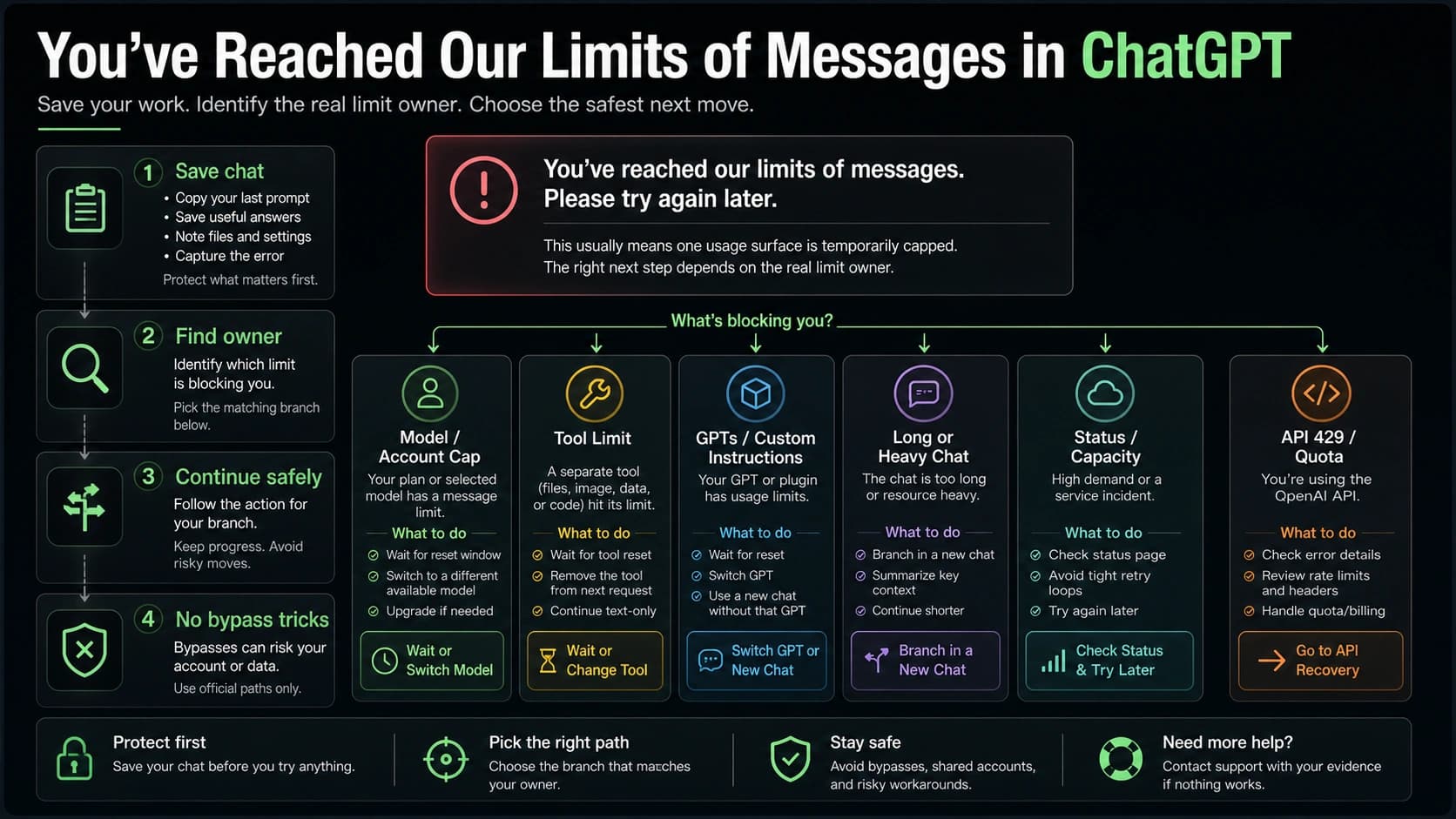
| “You've reached our limits of messages” or another visible consumer cap | ChatGPT message or tool limit | Use the ChatGPT message-limit guide |
HTTP 429, insufficient_quota, rate-limit headers, request IDs, project, organization, or billing language in code | OpenAI Platform API | Use the OpenAI API rate-limit guide |
| Multiple chats and clients degrade during a declared incident | OpenAI service status | Preserve work, wait, and retry after the incident changes |
| Clean new chat, clean client, alternate network, and status check still do not explain persistent slowness | Account-specific or unresolved support case | Build the evidence packet and contact official support |
A new chat can reduce thread-local complexity, but it does not reset an account-level message window, a selected-model allowance, a tool limit, a workspace control, or Platform API quota. Keeping these owners separate prevents a useful diagnostic from turning into limit-bypass advice.
Build a support packet when clean tests still fail
OpenAI's slow-response help article asks persistent cases for concrete evidence rather than a long, unstructured story. Record:
- the exact symptom: typing, scrolling, response start, streaming, blank output, or visible error
- timestamp and timezone
- conversation URL if the support flow requests it
- web, desktop, iOS, or Android surface
- browser or app version and device
- model and tool state shown at the time
- whether a fresh chat was fast or slow
- whether another supported client, device, or network changed the result
- the OpenAI Status state at that time
- request IDs, browser console errors, or a HAR capture only when official support asks for them
HAR files and console output may contain sensitive session, request, or account information. Review them and share them only through an official support channel. Do not post a private conversation URL, HAR file, or full transcript to a public forum.
A useful opening statement for support is short:
hljs textAt [time and timezone], one long ChatGPT conversation showed [exact symptom]. A fresh chat on the same client [worked / was also slow]. The old conversation on another supported client [worked / was also slow]. OpenAI Status showed [state]. I preserved the conversation and tried [only the relevant reversible steps].
That packet gives support a reproducible scope: one thread, one client, a wider path, or a persistent clean-path failure.
FAQ
What makes an established ChatGPT thread feel slower?
A long conversation can expose different kinds of slowness: the interface can lag, the reply can start late, generation can stall, or multiple chats can slow at once. Browser or app pressure and extra context work are plausible explanations in some cases, but the symptom alone does not prove either. Compare the old conversation with a fresh chat on the same client, then test another client only if needed.
Is the context window definitely the cause?
No. A long, file-heavy, tool-heavy, or internally conflicting thread can be harder to continue, but OpenAI's consumer Help documentation does not establish a universal length threshold or say that every previous message is fully reprocessed on every turn. Use the controlled comparison instead of assuming the mechanism.
Will starting a new chat make ChatGPT faster?
It can help when the slowdown follows one old conversation. A fresh chat is also a useful control: if it is fast while the old thread is slow, the problem is scoped more narrowly than a broad outage. It will not necessarily help when every chat, client, device, or network path is slow.
How do I start a new chat without losing context?
Move a reviewed state packet rather than the full transcript. Include the goal, decisions, constraints, files or links, open questions, and exact next action. Ask the fresh chat to restate the goal and constraints before it continues, then correct any misunderstanding.
Does ChatGPT memory preserve the entire old conversation?
Do not rely on memory for exact task-state transfer. Memory can carry useful context and preferences, but it is not a verbatim archive of every decision or instruction. Keep the old conversation and use a reviewed handoff for details that must remain exact.
Should I clear cache or delete chat history?
Do not delete history as a first-line fix. Save the state, test a fresh chat and another client, then clear site data only if the evidence points to the browser profile. Clearing cache or cookies may help a client-local problem; deleting all history destroys evidence and is not an official universal long-chat fix.
Is ChatGPT slow for everyone right now?
Check OpenAI Status when multiple chats or clients are slow. A declared incident supports the broader-service branch. A normal aggregate status page does not prove that every individual model, feature, plan, account, or conversation is healthy.
Why is the long conversation slow in my browser but better on my phone?
That result points toward a client-local difference: browser profile, extensions, open tabs, site data, app state, or device pressure. It does not prove one browser is universally better. Keep the network stable if possible, then test the original browser with a hard refresh, private window, or temporarily disabled extensions.
Should I install an extension that hides old messages?
Not as a default troubleshooting step. An unknown extension can read or change sensitive conversation content, and its claims may rely on an unverified mechanism. Use supported browser, app, device, and fresh-chat comparisons first. If you evaluate any extension later, review its permissions, code ownership, privacy policy, and data handling independently.