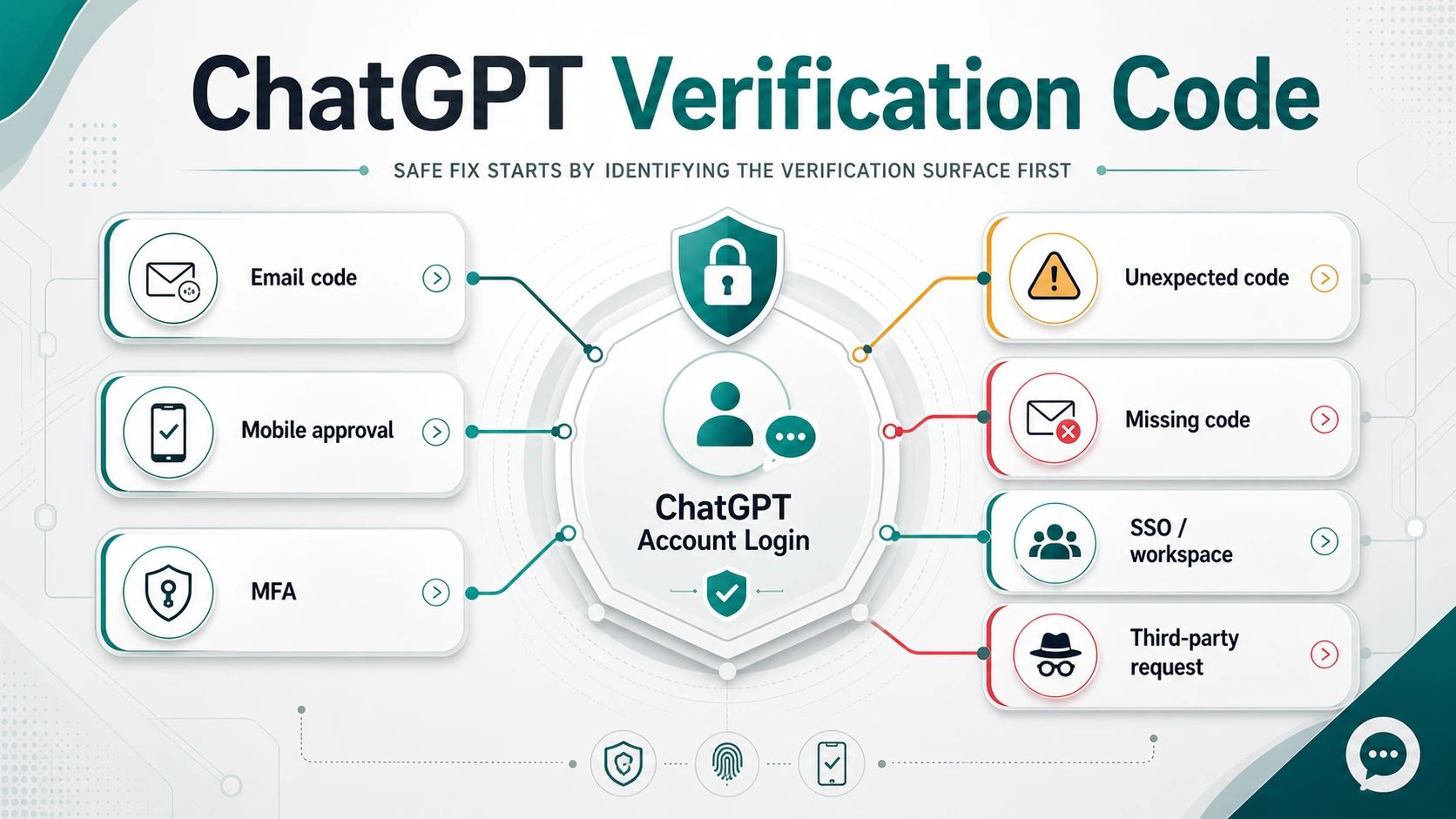
A ChatGPT verification code is not one universal login problem. It can be an email one-time code, a mobile app approval request, an MFA step, an account-activation prompt, a workspace or SSO sign-in route, a delayed email, or a warning that someone else tried to access your account. The safe fix is to identify the surface first, then take the smallest action that matches that surface.
| What you are seeing | What it usually means | Safe first move |
|---|---|---|
| Email code during login | OpenAI is checking the account owner for this login or sensitive action | Use the newest code from the same login flow, then check mailbox delivery and filters |
| Push approval in the ChatGPT app | The login is waiting for approval from a signed-in mobile device | Approve only if you started the login; deny it if you did not |
| Authenticator, passkey, SMS, WhatsApp, or email fallback | This is MFA, not the same thing as a normal email OTP | Use your configured MFA method or choose another available method |
| Code never arrives or arrives late | Mailbox, provider delay, old code, browser, VPN, or wrong sign-in method may be involved | Stop reusing old codes and work through the delivery branch |
| Code arrives when you did not request one | Someone may be trying to sign in or change something sensitive | Do not enter or forward it; secure the account |
| You no longer control the inbox | Self-serve email-code recovery may not work | Use OpenAI Support and ownership evidence |
| Workspace or SSO account | Your organization identity route may own the login | Follow the workspace or IT admin path |
| Seller or helper asks for the code | They are asking for account-control material | Stop the route; do not send the code, password, cookies, or remote access |
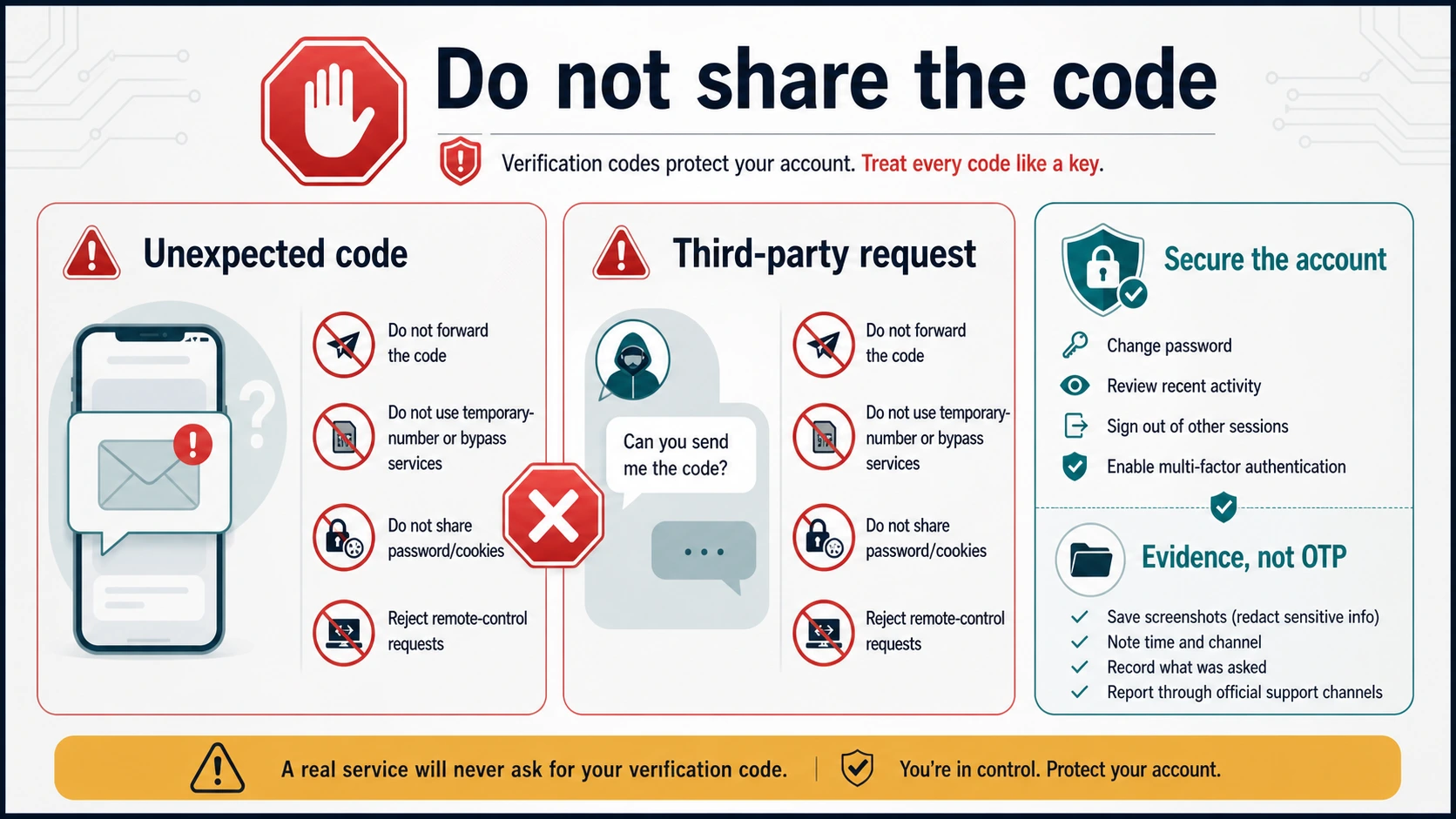
Do not share the code with a seller, payment helper, "activation" agent, friend, browser-extension operator, or remote-support stranger. A real recovery flow should help you keep control of the account. It should not ask you to hand over the one piece of proof that lets someone else finish the login.
Match the Verification Surface First
OpenAI's login-verification help separates several situations that support pages and forum threads often compress into the phrase "ChatGPT verification code." A login may need an email OTP when OpenAI wants extra confirmation, especially on a new device or sensitive action. A signed-in mobile app can also receive a push approval request. If MFA is enabled, the prompt may instead ask for a second factor such as an authenticator app, passkey, push notification, SMS, WhatsApp, or email fallback.
That distinction matters because the right fix is different. If you are looking at an email OTP, the useful questions are whether the message arrived, whether it is the newest code, and whether you are using the same account and sign-in method. If you are looking at a mobile push, the useful question is whether the request is yours. If you are looking at MFA, the useful question is whether another configured method is available. If the account belongs to a workspace, an SSO identity provider or IT admin may control the route.
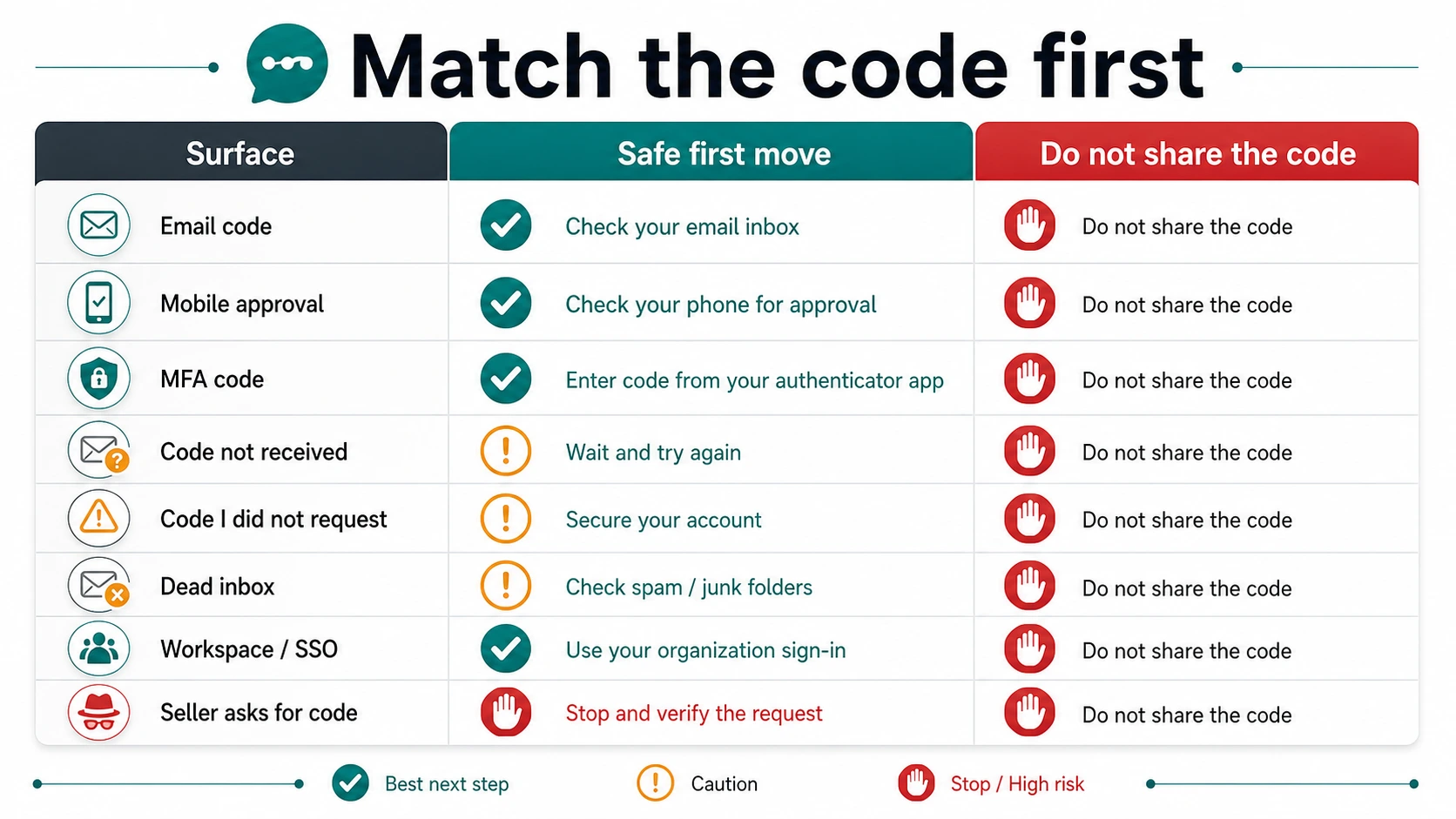
The first mistake is to keep pressing resend before you know which branch you are in. The second mistake is to treat every code as proof that the account is broken. A code can be normal. A missing code can be a delivery problem. An unexpected code can be a security signal. A seller asking for a code is a different problem entirely: account handover.
If the Email Code Is Missing, Late, or Invalid
When the prompt is asking for an email code, start with the same account and the same sign-in method. OpenAI's ChatGPT login troubleshooting says users who created an account with Google, Microsoft, or Apple need to keep using that method. If you switch from "Continue with Google" to email/password, the problem may look like a verification-code issue while the real issue is a wrong authentication method.
Use the newest code, not the code that arrived first. Verification codes are time-sensitive. Late emails can make this confusing: one code may arrive after you already requested another. In that case, the older code can fail even though it looks legitimate. Request a fresh code only when you are ready to enter it, then use the latest one from the same login attempt.
Check the mailbox path next. Look in spam, junk, quarantine, rules, filters, focused inboxes, and corporate mail security tools. If the mailbox is managed by a school, company, or email administrator, ask whether messages from OpenAI are delayed or blocked. If you are on a VPN, proxy, heavily filtered browser profile, or strict privacy extension setup, try a clean browser, private window, different network, or desktop device before assuming the code itself is wrong.
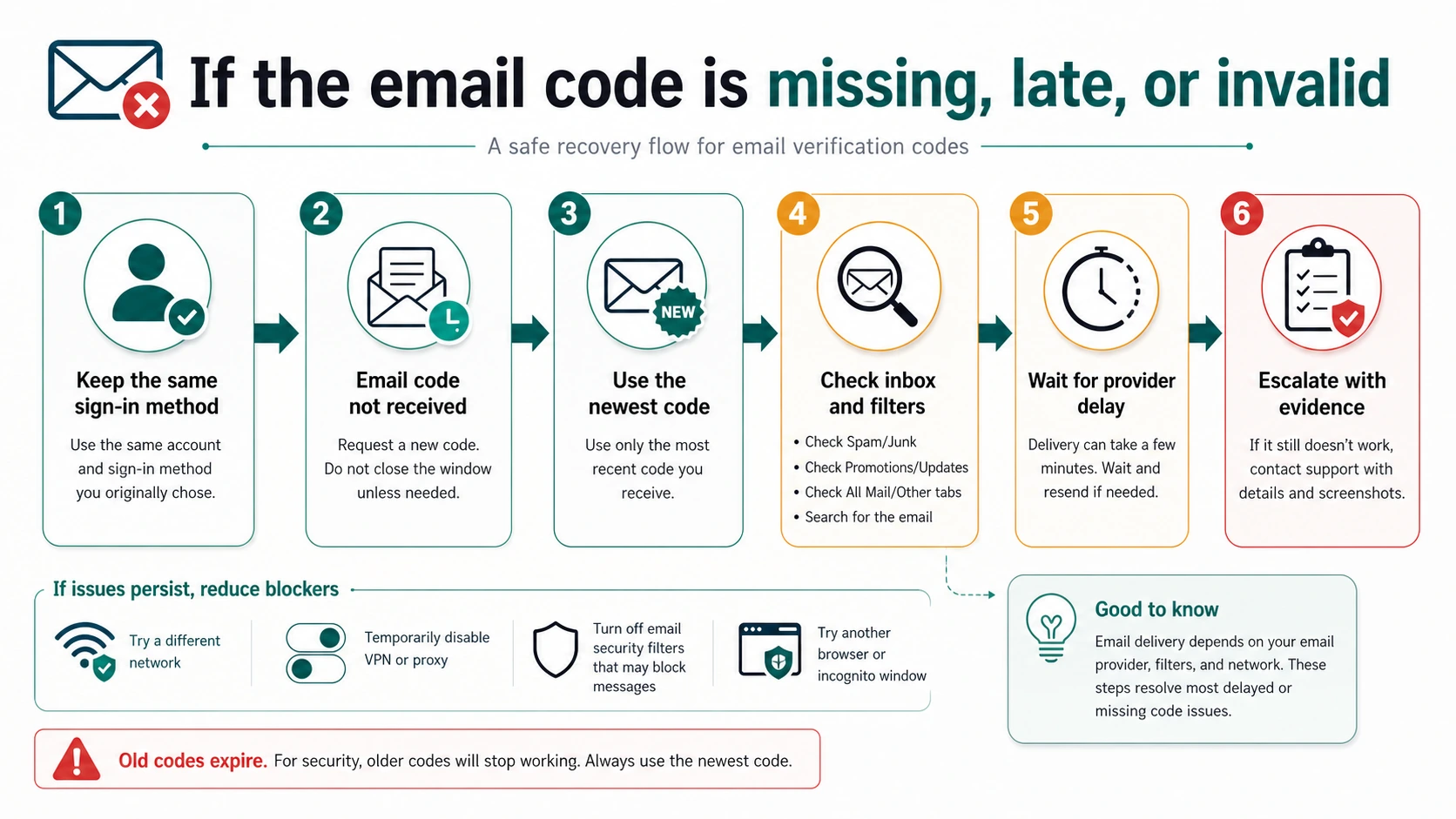
Do not solve a dead inbox by guessing, buying a phone number, or sending your code to a helper. OpenAI's login troubleshooting states that SMS is not an alternative for email-based login or verification when you cannot access the inbox. If you no longer control the account email, collect ownership evidence and contact Support instead of repeating self-serve retries.
If a Code Arrived When You Did Not Request One
An unrequested code should be treated as an account-control signal. It does not automatically prove that someone is inside your account, but it does mean a login or sensitive action may have been attempted. Do not enter the code into a page you did not open. Do not forward it to anyone. Do not paste it into a document, chat, support form, or seller conversation.
If the prompt is a mobile approval request and you did not start the login, deny it. OpenAI's login-verification help says an unexpected push request should be denied, and it recommends password reset, security-settings review, and MFA for additional protection. If the code came by email, secure the account from a clean session, review active sessions where available, and update the password if you suspect account exposure.
The safest evidence is non-sensitive: approximate time, the email subject without the code, the device or browser you were using, the sign-in method you tried, and any visible error message. Do not include the actual OTP unless an official support process explicitly tells you how to handle sensitive material.
MFA Is a Separate Branch From the Normal Email Code
MFA changes the login contract. OpenAI's MFA help says that once MFA is enabled, users are prompted for a one-time code from an authenticator app when they log in, and the available options can include authenticator apps, push notifications, SMS or WhatsApp, passkeys, and email. Availability can vary by device, country, account tier, and account creation path.
That means "disable the verification code" is not one answer. If you personally enabled MFA and can access the account, you may be able to manage MFA from ChatGPT or the API Platform security settings. But that is not the same as disabling every risk-based login verification OpenAI may require for a new device, unusual location, sensitive account change, or security check. Do not promise yourself that turning off MFA will stop every verification prompt.
If your usual MFA method is unavailable, use the on-screen "try another method" style path when it is offered. If you lost all configured methods, treat it as account recovery. Do not buy a temporary phone number, rent a shared account, or let someone else receive the code for you. Those routes make future recovery harder because the proof of account control moves away from you.
Wrong Login Method, Apple Relay, SSO, and Workspace Cases
Some "verification code not received" cases are really identity-route cases. If the account was created with Google, Microsoft, or Apple, use that same provider. Apple Hide My Email can attach the account to an Apple private relay address, so a personal email login can look like the wrong account even when the user thinks the address is the same. If the provider button is missing or the page loops, test a clean browser and reduce extensions before you assume the code is blocked.
Business, Enterprise, and Edu accounts can add another owner: SSO. OpenAI's SSO overview describes SSO as an admin and IT-team configuration for supported workspaces and Platform organizations. If your ChatGPT access belongs to a workspace, the verification step may depend on an identity provider, invite, provisioning state, domain setup, or admin policy. In that branch, your best first contact may be the workspace admin, not a public code-resend checklist.
If you have a paid subscription but cannot access the email, include billing or subscription evidence in a support request. Payment evidence does not replace login ownership, but it can help Support verify context. Keep the evidence focused: account email, sign-in methods attempted, receipt owner, approximate timestamps, and screenshots with real codes hidden.
What Not To Do With a ChatGPT Verification Code
Do not use a "bypass ChatGPT verification" article, temporary SMS service, rented phone number, shared account, proxy-account operator, cookie importer, or remote-control helper as a recovery route. Those may appear attractive when the official path is slow, but they solve the wrong problem. They move account-control proof to someone else.
Stop immediately if a seller or top-up agent asks for your password, verification code, recovery email, browser Cookie, or remote-control session. That request is not a normal payment step. If your actual problem is ChatGPT Plus payment or a seller-controlled upgrade route, use a payment-owner guide such as ChatGPT Plus in China 2026: Alipay, WeChat, Billing Owners, and Safer Payment Routes and keep login-code recovery separate.
Also avoid screenshotting or pasting full OTP emails into public documents. A code is temporary, but public exposure still teaches the wrong habit and may reveal account, timing, or sender details. For support, redact the actual code unless an official flow gives a secure upload path.
What To Send Support If Safe Fixes Fail
Before contacting OpenAI Support, collect the evidence that helps separate delivery failure from account-route failure:
- account email address and the sign-in method you believe created the account
- whether you used email/password, Google, Microsoft, Apple, mobile app approval, MFA, or SSO
- approximate timestamps of code requests and when emails arrived
- whether you received older codes after requesting newer ones
- browser, device, network, VPN/proxy, ad blocker, and extension context
- screenshots of the error or prompt with real OTP values hidden
- mailbox provider or admin notes if messages are delayed or quarantined
- billing or subscription evidence only when access or cancellation depends on ownership verification
If the OpenAI Status page shows a current incident, include the timestamp and symptom, but do not treat a green status page as proof that your account is healthy. Status pages report service-wide conditions. They cannot tell you whether your mailbox, login method, SSO route, or account security setting is the blocker.
FAQ
Why did ChatGPT send me a verification code?
It usually means OpenAI wants extra confirmation for a login, new device, unusual location, account-sensitive action, account activation, or security check. It can also be part of MFA if you enabled it.
Why am I not receiving the six-digit code?
Check that you are using the same sign-in method, then use the newest code from the same login flow. Look in spam, junk, quarantine, filters, and managed-mail tools. Try a clean browser, different network, or desktop device if extensions, VPN, or privacy tools may block the flow.
Which code should I enter if several arrive?
Use the newest code tied to the login attempt you are completing. Older codes can expire or become invalid after you request a new one.
I got a code I did not request. Am I hacked?
Not necessarily, but treat it as a security signal. Do not enter or forward the code. Deny any unexpected mobile approval request, review account security, and change the password if you suspect exposure.
Can I disable ChatGPT verification codes?
You may be able to manage MFA if you enabled it, but that is not the same as disabling every login verification OpenAI may require for security. Risk-based login checks can still appear when OpenAI needs additional confirmation.
Is SMS a replacement for email verification?
No. OpenAI's login troubleshooting says SMS is not an alternative for email-based login or verification when you cannot access the account inbox. SMS or WhatsApp can appear as MFA methods only when that branch is available to your account.
What if my ChatGPT account uses SSO?
Use the workspace route. Your organization identity provider, invite, provisioning state, or admin policy may own the sign-in step. Ask the workspace admin or IT team before repeating public email-code fixes.
Should I give a verification code to a seller who is helping me upgrade?
No. A seller asking for a verification code, password, browser Cookie, recovery email, or remote-control session is asking for account-control material. Stop that route and keep payment problems separate from login recovery.