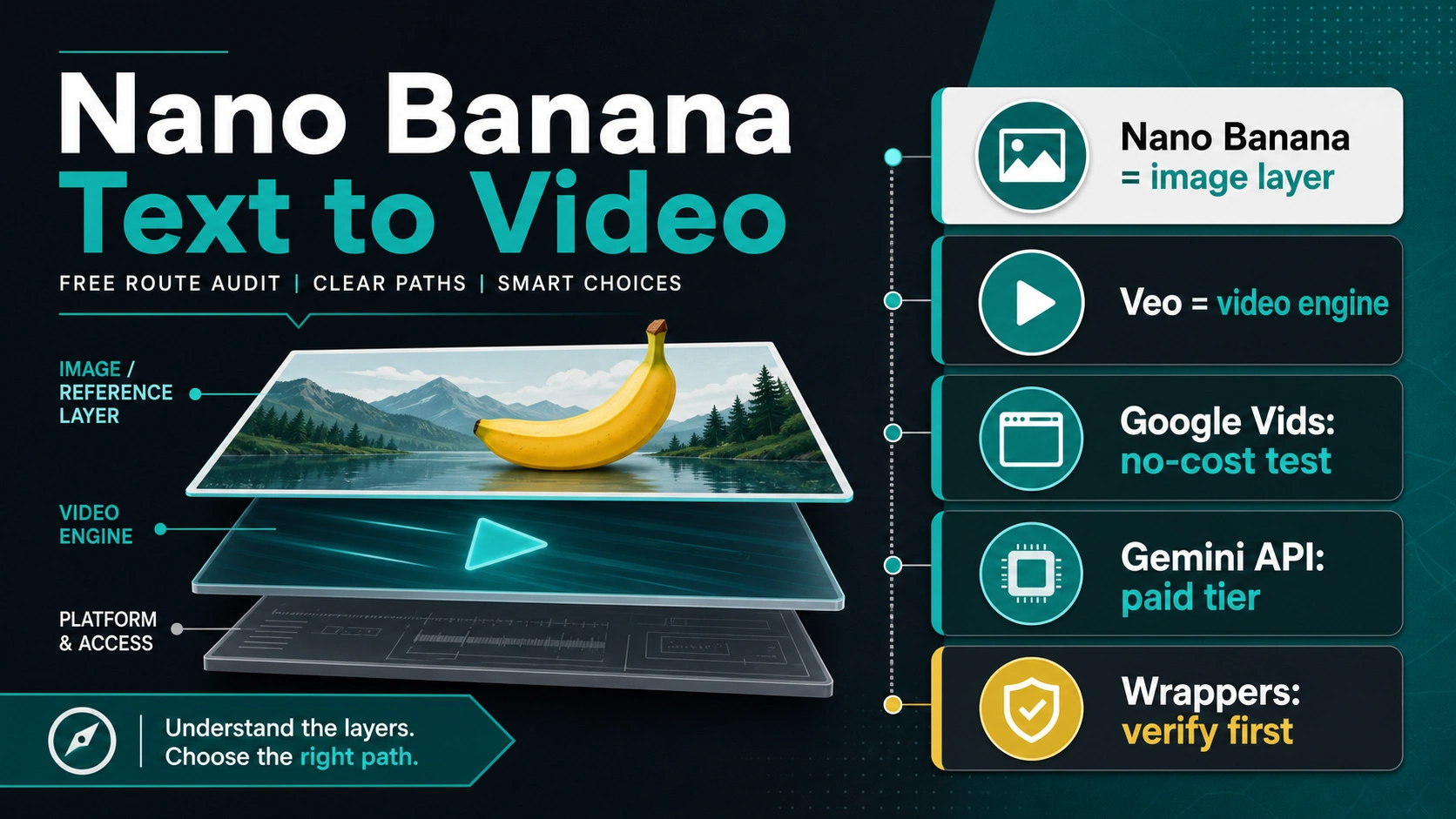
Nano Banana is not Google's official text-to-video model. In video workflows, treat Nano Banana as the image or reference-frame layer. For video, separate the surface: Google Vids is the first-party no-cost browser test, Gemini Omni Flash is Google's newer app route for video creation and editing in Gemini app, Flow, and YouTube Shorts, and developer automation still belongs to paid Gemini API + Veo 3.1.
That means a Nano Banana text-to-video search is really a route choice. You are deciding whether to make reference images first, test a Google-owned video surface, build with the API, or trust a third-party wrapper that uses the Nano Banana name for its own credit and upload contract.
| Route | What it really is | Best first use | Stop before trusting |
|---|---|---|---|
| Nano Banana image workflow | Create or edit a reference image, storyboard frame, product angle, or character frame | Preparing inputs for video generation | Calling it the official video model |
| Google Vids | Google-owned browser video creation surface with monthly no-cost generations for personal accounts | A low-friction first-party test | Assuming the allowance, account surface, or export rules fit production |
| Gemini Omni in Gemini app, Flow, or YouTube Shorts | Google's newer app-surface route for video creation and editing | Manual creation, conversational edits, and reference-driven clips | Reusing app availability as an API promise |
| Gemini API + Veo 3.1 | Developer video generation through Google's API | Backend automation and repeatable video jobs | Treating paid-tier Veo as a free API route |
| Nano Banana video wrappers | Provider-owned sites that may route to Veo, Seedance, Sora, Kling, or another model | Experiments after owner and credit checks | Uploading real assets before terms, credits, watermark, privacy, rights, and support are clear |
Start With The Official Boundary
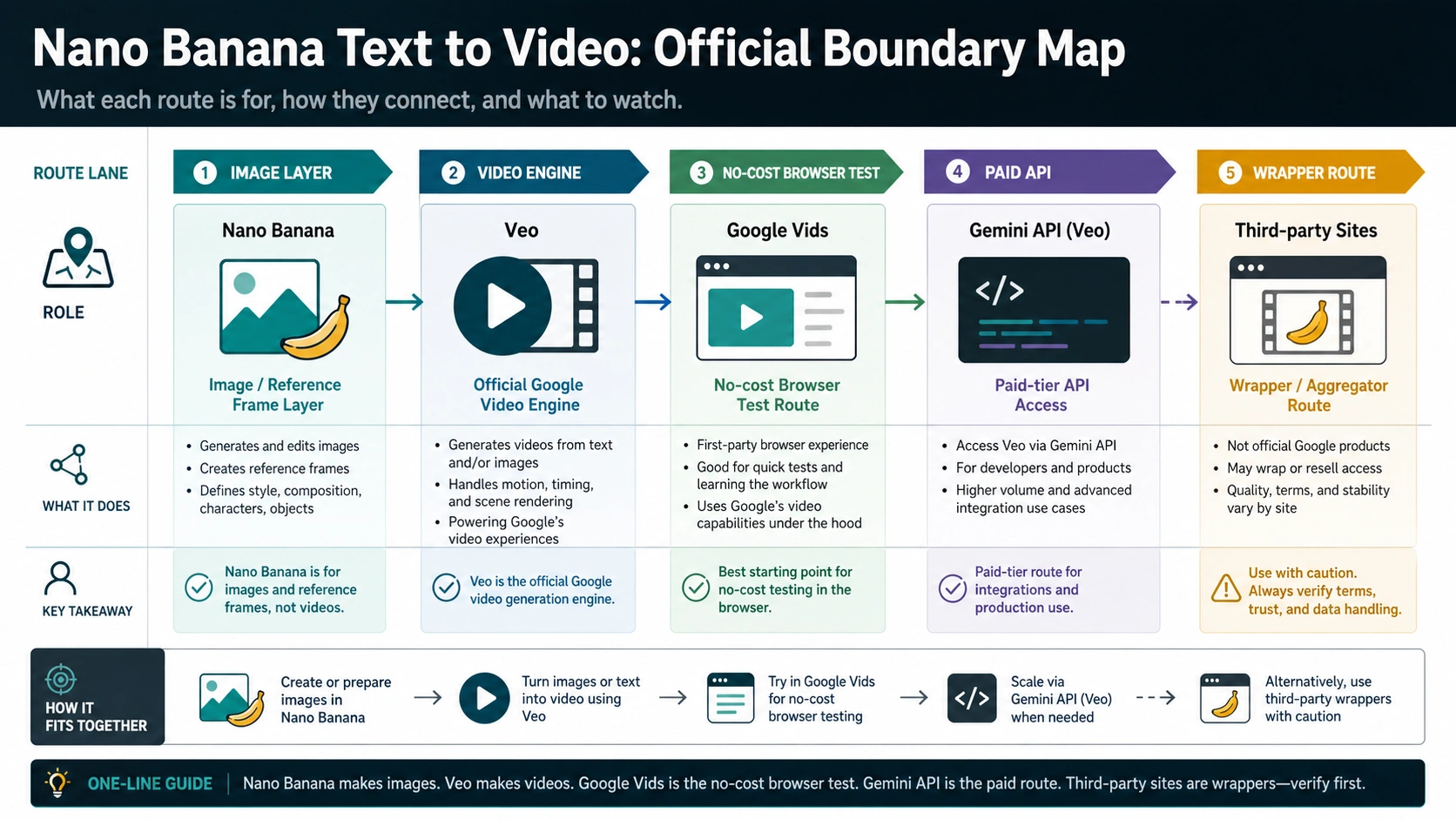
As checked on June 12, 2026, Google's developer documentation still places Nano Banana inside Gemini image generation and editing, not inside the video model lineup. The image docs describe Gemini 3.1 Flash Image as Nano Banana 2, and the model list describes Nano Banana as native image generation and editing. Those are image-generation and image-editing routes.
Google's documented developer video route is Veo. The Gemini API video docs describe Veo 3.1 for text-to-video and image-to-video generation, including prompts, image inputs, resolutions, and generated-video handling. Separately, Google has introduced Gemini Omni Flash for video creation and editing in Gemini app, Google Flow, and YouTube Shorts. That distinction matters because price, quota, permissions, privacy, API availability, and wrapper credits do not belong to the same contract.
Use this simple owner test: if the task is image creation, image editing, style consistency, product-frame preparation, or reference-frame creation, Nano Banana may be the right starting layer. If the task is creating or editing video inside a Google app, check whether the surface is Google Vids, Gemini Omni, or Flow. If the task is developer automation, look at Veo in Gemini API. If a site says Nano Banana makes videos, read the model selector and terms before you assume Google owns the whole route.
Do not use a video-route decision guide for dedicated image or API pricing work. If your real question is model pricing for image generation, use the Nano Banana API pricing guide at /en/posts/nano-banana-api-pricing. If your real job is object removal, background edits, or local image repair, the Nano Banana inpainting guide at /en/posts/nano-banana-inpaint is the better sibling.
The Free Google Route Is A Browser Test, Not A Free API Contract
Google Vids is the strongest first-party route for someone who simply wants to try video creation without starting from a third-party wrapper. Google's April 2, 2026 Vids update says personal Google accounts get 10 video generations each month at no cost. Treat that as a browser-surface allowance, not as a general developer API budget or a promise that every account, region, or future month will behave identically.
For a casual creator, this is the safest first stop. You avoid a random upload page, you get a Google-owned surface, and you can learn whether the prompt-to-video workflow fits the job before you compare providers. The catch is that Google Vids is still a product surface with account, region, feature, export, quota, and workflow behavior that can differ from the Gemini API and from other Google creative products.
Before you rely on it, check three things inside the live product: whether your account can access the video generation action, what monthly allowance or plan rule is shown to you, and whether the export output fits your channel. Google Help also separates basic Vids access from Gemini features by account type and admin controls. Do not copy a third-party "free Nano Banana video" claim into a client workflow just because Google Vids has a no-cost allowance. The owner and the surface are different.
If you are testing a social clip, a simple internal draft, or a low-stakes storyboard, Google Vids is a reasonable first-party starting point. If you need batch generation, API calls, automated retries, usage monitoring, or application ownership, move to the API section and price the job honestly.
The Developer Route Is Gemini API Plus Veo
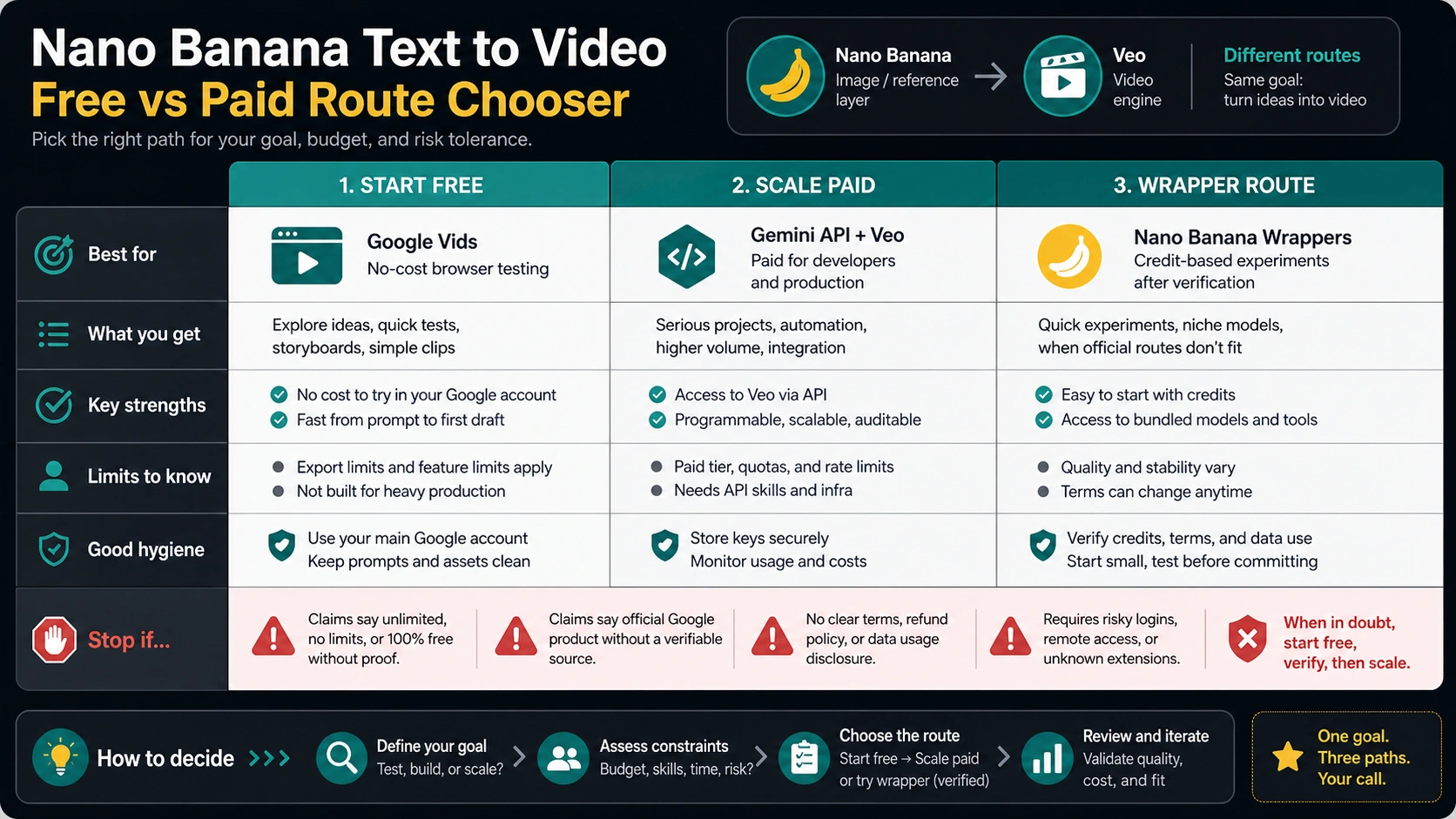
For developers, the video contract is still Gemini API with Veo, not Gemini Omni. Google's video docs are the source to follow for inputs, model names, supported output behavior, and generated-video handling. Google's pricing page is also the important boundary: as checked on June 12, 2026, Veo 3.1 API rows are marked for paid-tier use, and the Free Tier is not available for those models.
That does not mean the API route is bad. It means it should be chosen for the jobs an API is good at: controlled backend generation, repeatable prompts, logged requests, predictable ownership, automated retries, security review, and production budgeting. If you need those capabilities, the official API is usually safer than a wrapper with unclear credit rules.
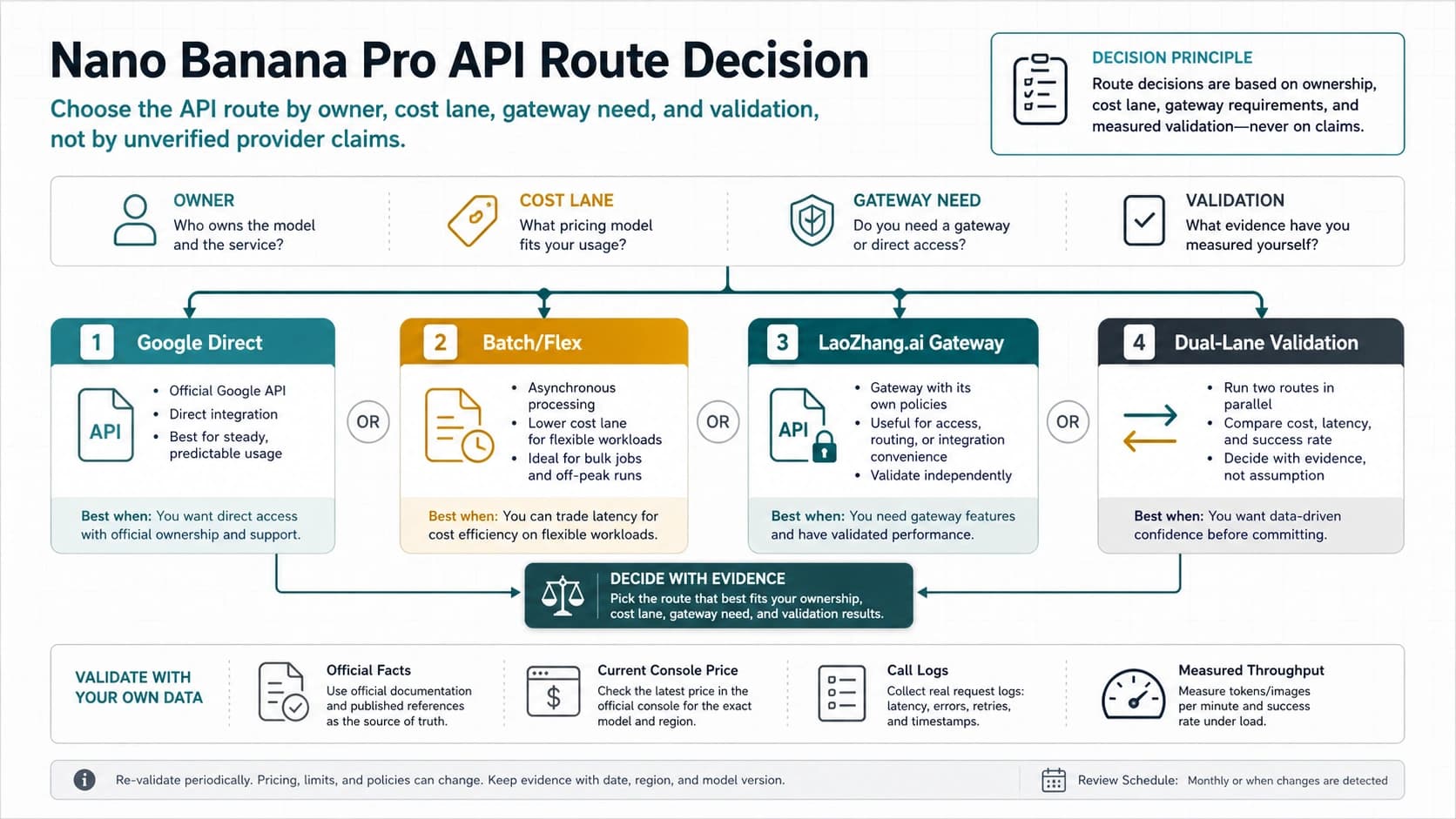
Do not plan a product around "free Nano Banana video API" unless the provider can show exactly who owns the account, which model is called, who pays, what unit is charged, what limits apply, how prompts and uploads are handled, and how failures are supported. Gemini Omni may be a useful route in Google app surfaces, but it is not a free Gemini API video call. A free playground or trial credit can be useful for evaluation, but it is not the same as a free official Veo API.
For implementation work, keep the layers separate in your notes. Nano Banana can create or edit the reference frame. Veo creates the video. The Gemini API owns the developer call path. Billing and quotas belong to the project and billing account. Wrapper credits belong to the wrapper provider.
Wrapper Sites Are Provider Contracts
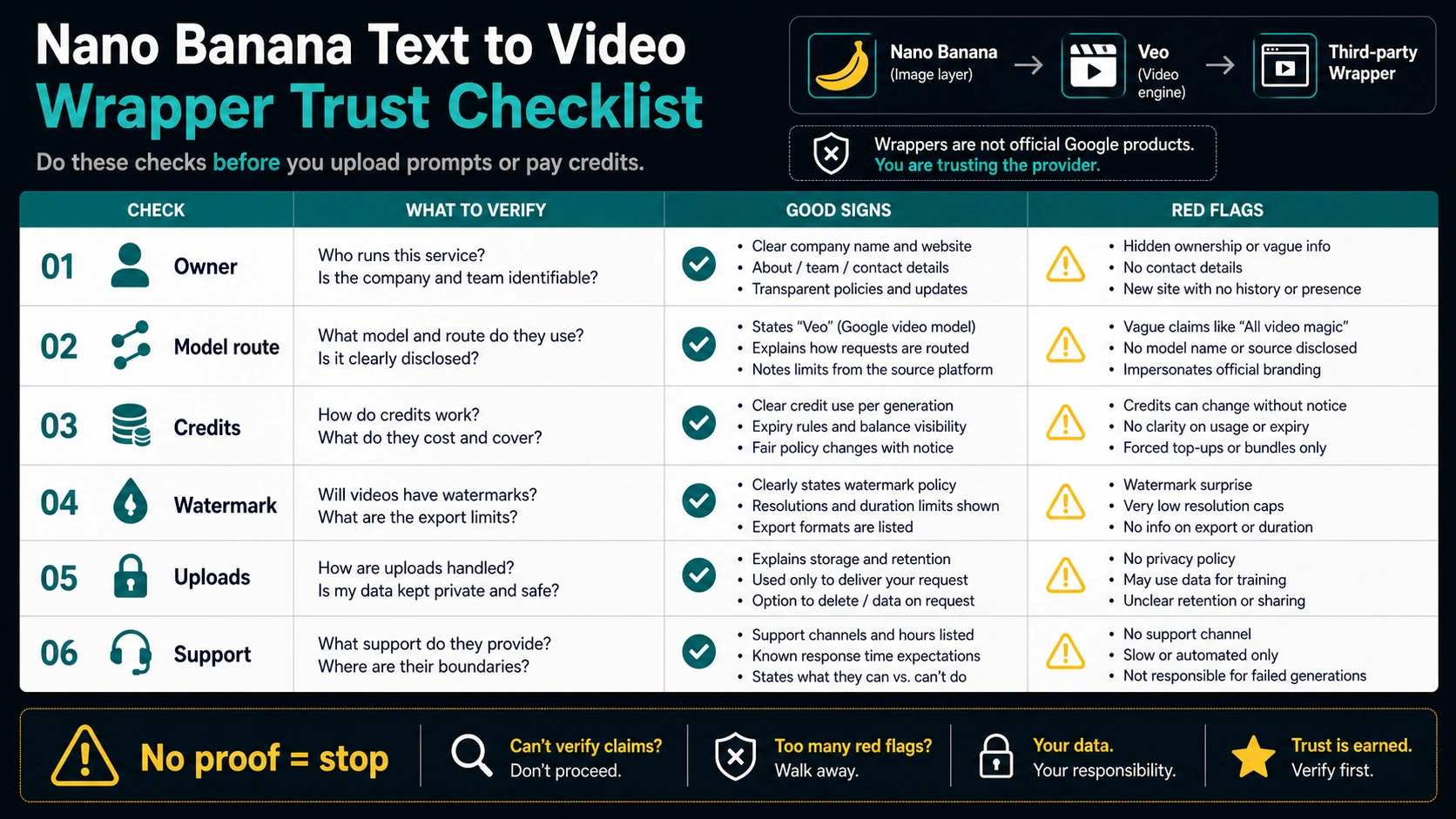
Exact-match generator sites often answer the click fast: a prompt box, a model selector, a free-credit headline, and a generate button. Some external generators now place Gemini Omni, Veo, Seedance, Sora, Kling, or a provider-owned video model under Nano Banana wording. Some of those routes may be useful for experiments. The problem is that they are not official just because they say Nano Banana.
Read a wrapper like a provider contract. First, find the owner. A real provider should disclose who operates the service, what route or model is being used, how credits are consumed, what happens on renewal, and what support channel exists. Write down the model or route shown on the job screen before you judge the output, because two Nano Banana-labeled sites can send the same prompt to different video engines. If the service uses "official", "unlimited", "no watermark", "commercial use", or "free forever", require a visible term or account screen before you trust the claim.
Second, check the upload boundary. Text-to-video workflows often use prompts only, but Nano Banana-style workflows may also involve uploaded images, product shots, faces, brand assets, or client materials. If the provider does not explain retention, training use, deletion, visibility, or export rights clearly enough for the data you are sending, do not use it for sensitive work.
Third, check the output boundary. Download resolution, watermark behavior, commercial rights, prompt privacy, seed reuse, and refund rules are provider-owned claims. They can change without changing Google's official docs. Use wrappers for low-stakes tests only after those claims are clear. For client or product assets, prefer a route where the owner, payer, terms, and support path are explicit.
Where Nano Banana Actually Helps The Video Workflow
Nano Banana can still be valuable even when it is not the video model. Video generation often fails because the first frame is vague, the product angle is inconsistent, the character reference drifts, or the desired scene is hard to describe from text alone. An image model can turn that vague prompt into a controlled reference frame before Veo or another video engine animates it.
A practical workflow looks like this: create a product frame, character reference, scene board, or style anchor with Nano Banana; revise that still image until the composition is acceptable; send the image into a video route that supports image-to-video; then judge motion, duration, audio, export quality, and rights in the video surface. This keeps the image problem separate from the motion problem.
For ecommerce, Nano Banana can help make the pack shot, lifestyle frame, ingredient layout, or before/after visual that starts the clip. For a creator, it can make a consistent thumbnail scene or character pose. For developers, it can become a pre-processing step before a paid Veo API call. The key is to name the step correctly: image generation first, video generation second.
If your task is actually a Sora tutorial or a Sora-vs-Runway decision, choose a Sora-specific guide. Use /en/posts/how-to-use-sora-2-video-generator-step-by-step for Sora workflow steps or /en/posts/sora-2-vs-runway-gen-2 for model comparison context.
Choose By Job, Not By The Loudest Free Claim
| Your job | Best starting route | Why | First check |
|---|---|---|---|
| Quick personal experiment | Google Vids | First-party browser route with no API setup | Account access, monthly allowance, export behavior |
| Need a better starting frame | Nano Banana image workflow, then video route | More control over subject, angle, and style before motion | Whether the video tool accepts image inputs |
| Conversational video creation or editing inside a Google app | Gemini Omni if available | Google is moving app-surface video creation and editing into Omni routes | Product access, account limits, export path |
| Developer automation | Gemini API + Veo | Programmatic ownership, logs, retries, budget controls | Paid-tier access, project billing, model availability |
| Brand or client assets | Official or clearly contracted provider route | Terms, privacy, support, and export rights matter more than a free headline | Upload handling, retention, commercial-use terms |
| Low-stakes wrapper test | Third-party Nano Banana video site | Fast UI and possible credits can help compare results | Owner, model route, credits, watermark, support |
| Mobile-only creation | Google app surface or a verified wrapper | Convenience matters when the output is casual | Account surface, app limits, download path |
The safest default is conservative. Use the Google-owned browser route for a first no-cost test, use Gemini Omni where a Google product exposes it for video creation or editing, use the official Veo API when you need a developer system, and use third-party wrappers only when their contract is clear enough for the material you are uploading.
Stop Rules Before You Upload Or Pay
Stop if the service does not say who owns it. Stop if the model route is hidden behind a Nano Banana label. Stop if credits, renewal, refunds, watermark, or download rules are vague. Stop if commercial-use rights are asserted without terms. Stop if private images, client assets, faces, or brand files are involved and the upload policy is unclear.
Also stop if the service turns "free" into a moving target. A few credits, a trial, a queue, a daily quota, a lower-resolution export, and a watermarked preview are all different forms of free. None of them should be described as unlimited official Google video generation.
If a route passes those checks, keep the first test small. Use a non-sensitive prompt, avoid real client media, download the output, note the model or route selected, and confirm whether the credits moved as expected. Only then decide whether the provider belongs in a repeatable workflow.
FAQ
Is Nano Banana a free text-to-video model?
No. Nano Banana is Google's image-generation and image-editing family. It can support a video workflow by making reference frames. For video, Google separates routes: Google Vids offers a no-cost browser route for eligible personal accounts, Gemini Omni Flash powers newer app surfaces, and Veo remains the developer video route in Gemini API.
Can I make Nano Banana videos for free?
You can test a first-party no-cost video route through Google Vids when your account has the relevant allowance. Third-party Nano Banana video sites may also offer credits, but those are provider-owned terms, not a Google API promise.
Is the Gemini API Veo route free?
As checked on June 12, 2026, Google's pricing docs mark Veo 3.1 API models as paid-tier, with Free Tier not available. Treat any free API story as a separate provider credit unless Google changes the official pricing surface.
Why do Nano Banana video sites mention Veo, Seedance, Sora, or Kling?
Many sites use Nano Banana as a market label while the actual video generation may come from another model. The model selector and provider terms matter more than the page title.
Can I get no-watermark Nano Banana video downloads?
Only if the provider's current terms and account screen say so for the route you use. Do not assume no-watermark export from a snippet, ad claim, or landing headline.
Is there a Nano Banana Pro video free route?
Nano Banana Pro is an image model route. If a service says Nano Banana Pro video, check whether it is generating images for a video workflow or wrapping a separate video model. Free access depends on the specific product surface or provider contract.
Where does Gemini Omni fit?
Gemini Omni Flash is Google's newer model for video creation and editing in Gemini app, Google Flow, and YouTube Shorts. It does not turn Nano Banana into a video model, and it does not replace the Veo 3.1 contract in Gemini API for developers.
Does Nano Banana text-to-video work on iOS?
Mobile access depends on the product surface. A Google app, Google Vids, a Gemini Omni-supported surface, or a wrapper may expose a mobile workflow, but the boundary remains the same: Nano Banana for images or frames, and Google video generation by surface through Vids, Omni, or Veo.
What is the safest first action?
Use Google Vids for a first-party no-cost browser test if it is available to your account. If a Google product exposes Gemini Omni, test it as an app-surface video creation or editing route. If you need developer automation, check Gemini API Veo paid-tier access. If you use a wrapper, verify owner, credits, watermark, uploads, rights, and support before sending real assets.