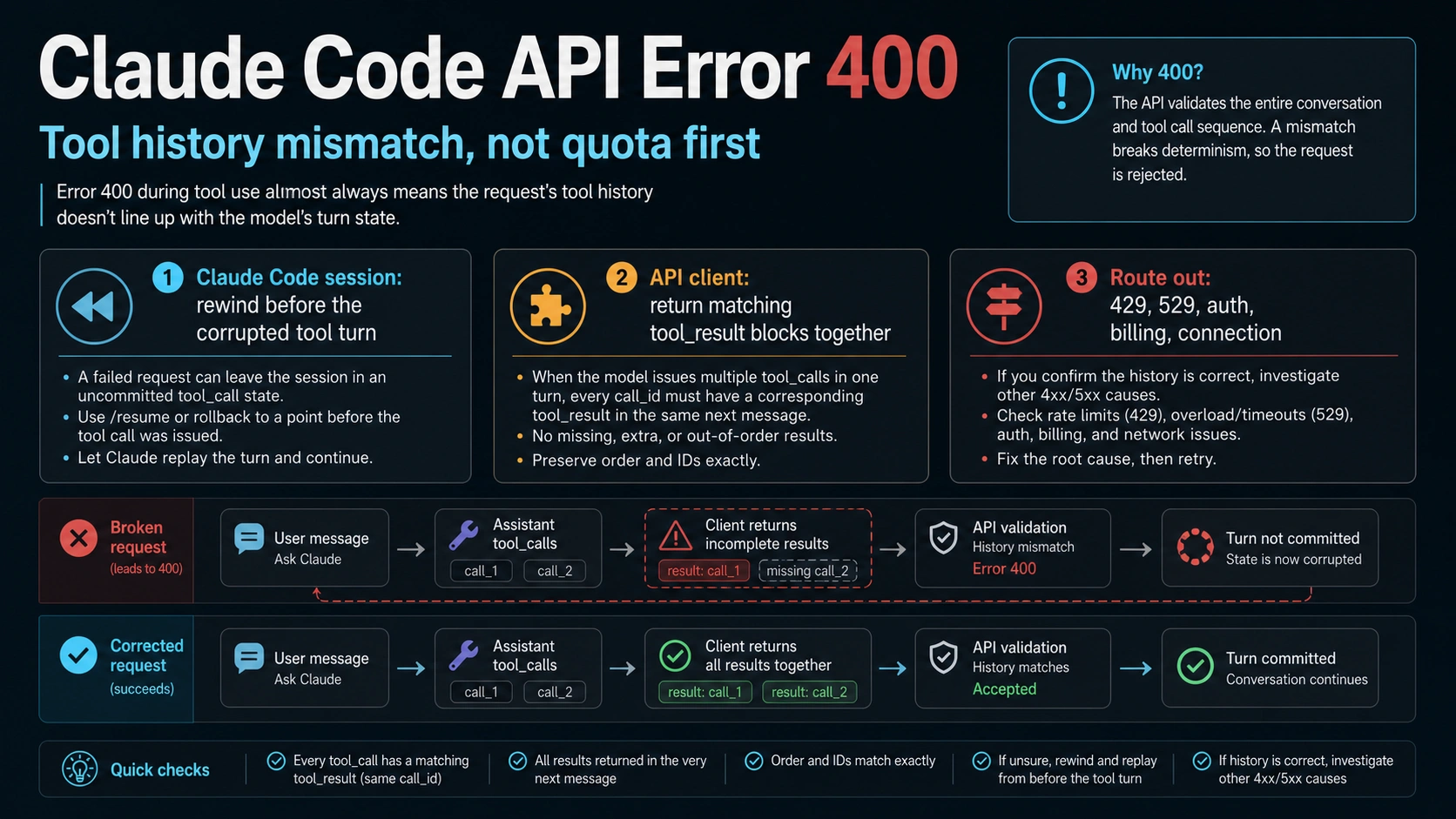
If Claude Code shows API Error: 400 due to tool use concurrency issues, treat it first as a tool/result history mismatch, not as a rate limit, outage, bad key, or quota problem. Claude Code users should save the visible context, update or check the client, then use /rewind or press Esc twice to step back before the corrupted tool turn. API implementers should inspect the previous assistant tool_use blocks and return every matching tool_result together in the next user message before any text.
| Surface | First owner to test | First safe action |
|---|---|---|
| Claude Code CLI | Corrupted tool or thinking history | Save context, run /rewind or press Esc twice, then continue with one clean instruction |
| VS Code, Cursor, or extension | Extension/client history mismatch | Compare CLI versus extension behavior and check version mismatch before reinstalling |
| Custom Anthropic client | Invalid tool result serialization | Match every tool_use_id, return all results together, and put results before text |
| Other 400 text | Request schema or role validation | Route to the exact validation error instead of using the concurrency fix |
| 429, 529, 500, auth, billing, connection | Different Claude error family | Use the relevant rate, overload, server, account, or network branch |
Stop before rotating keys, buying more quota, switching providers, or declaring a platform outage. Verify the recovery by running one simple tool action after rewind; verify an API fix by confirming the next request contains all required tool_result blocks in the right order.
What This Exact 400 Means
The phrase "tool use concurrency issues" can sound like you simply ran too many tools at once. That is not the safest first diagnosis. Anthropic's Claude Code error reference places the exact error under tool use or thinking block mismatch, and the Claude API error reference classifies HTTP 400 as an invalid_request_error for request format or content problems. The useful interpretation is narrower: the API is rejecting the conversation state it received.
That state can break in two ways. In Claude Code, a long or interrupted session may leave the next request with a tool, result, or thinking block that no longer lines up with the prior turn. In your own Messages API client, the request history may be valid prose but invalid tool history because a tool_result is missing, split across messages, placed after text, or attached to the wrong tool_use_id.
The recovery is different from a network, billing, or rate-limit branch. A fresh API key does not fix a corrupted transcript. More quota does not pair missing tool results. A gateway or provider switch may hide the symptom for one run while leaving the message-shape problem in your client. Start by preserving the failing context, then choose the session-recovery or API-serializer branch.
Recover a Claude Code Session Without Clearing Work First
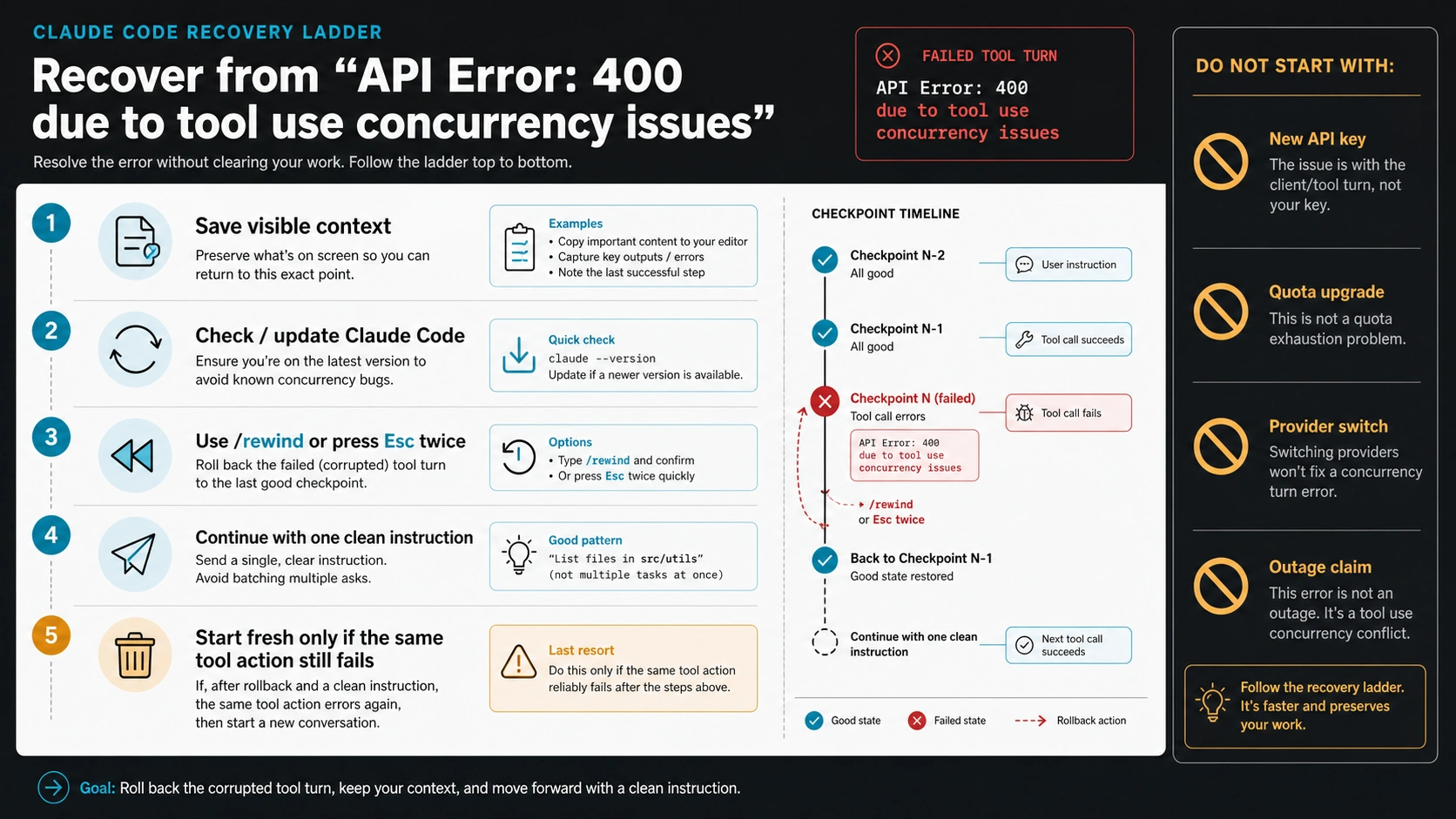
In Claude Code, the least destructive path is a checkpoint recovery. First, copy the visible context that matters: current task, files being edited, command or tool that failed, exact error string, and whether ordinary chat still works. That lets you preserve work even if you later need a clean session.
Then check the client surface. If the error appeared in the CLI, confirm the Claude Code version and update if you are behind. If it appeared inside an IDE integration, compare whether the same simple tool action works in the CLI. The point is not to prove the extension is always the cause; it is to avoid clearing a good CLI session because one surface has a broken tool history.
Use /rewind to move before the corrupted tool turn. Claude Code also documents pressing Esc twice as a way to step back in the conversation. After rewinding, continue with one clean instruction that does not ask for several unrelated tool actions at once. A good verification is deliberately boring: read one file, list one directory, or run one short command that previously failed.
Start a fresh session only after that recovery fails. When you do, do not paste the whole broken transcript back into the new session. Bring over the task summary, known files, the last good state, and any safe error evidence. Copying malformed tool history into a new session can reproduce the same problem under a new conversation.
If It Happens in VS Code, Cursor, or an Extension
The IDE branch deserves its own check because user reports around this error often involve tool calls failing while normal conversation still works. That pattern does not prove the user ran tools concurrently. It can mean the extension, local client, or conversation history is sending an invalid tool state.
Use this order:
- Record the exact surface: Claude Code CLI, VS Code, Cursor, terminal, remote SSH, WSL, or another wrapper.
- Compare one small tool action in the CLI and in the IDE integration.
- Check the Claude Code version and the extension version without downgrading or reinstalling as the first move.
- If the IDE fails and the CLI works, preserve the IDE error and continue work in the CLI while you isolate the extension path.
- If both fail in the same session, rewind the session before treating the extension as the owner.
This branch also protects you from stale advice. Some historical issue threads mention specific versions or downgrade attempts. Treat those as context, not current universal instructions. The durable rule is to compare surfaces, preserve evidence, and use the official recovery path before destroying context.
Fix the API Message Shape When You Run Tools Yourself
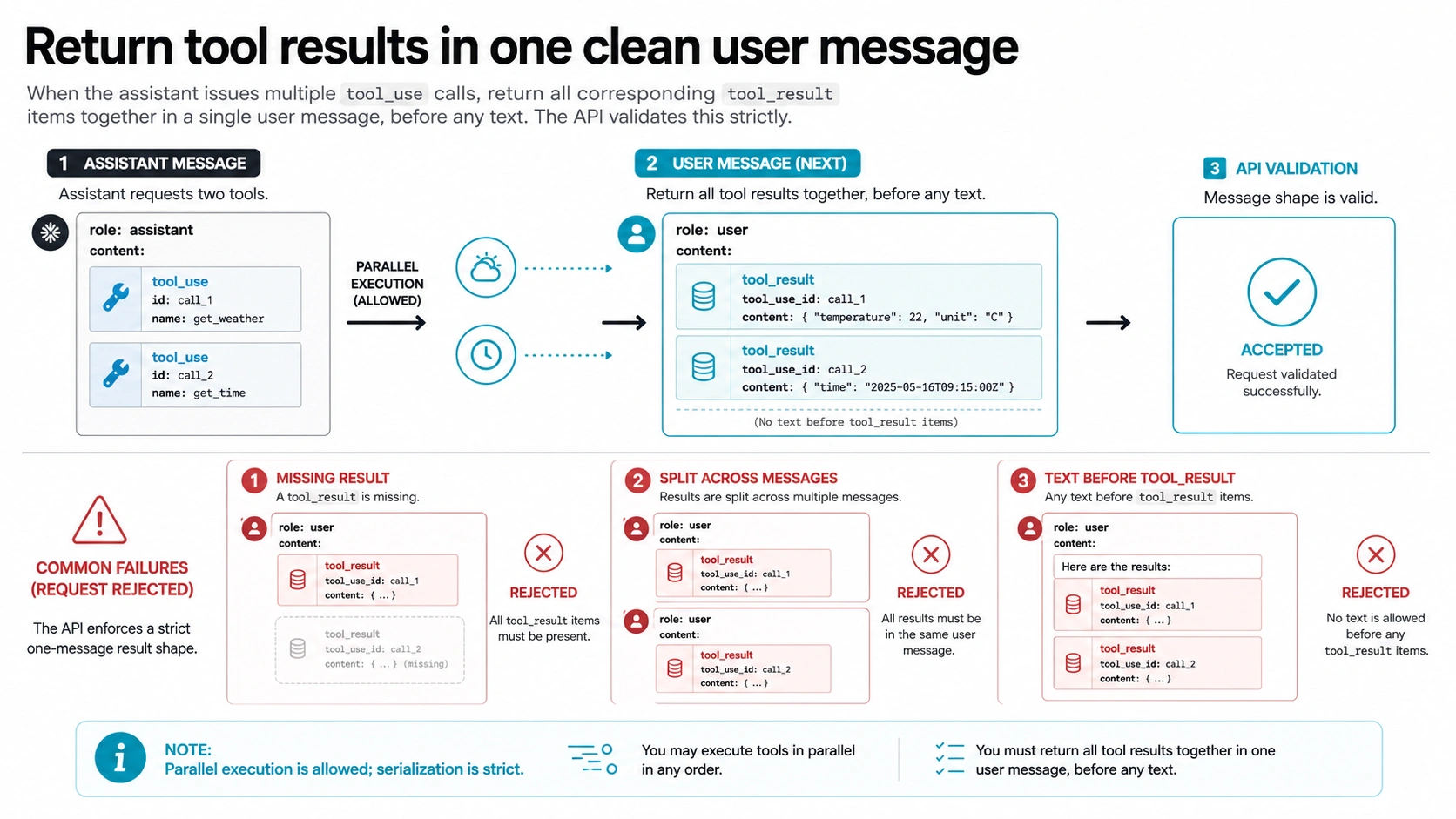
If you are building with the Anthropic Messages API, this error usually points at the message array rather than human behavior. The tool-use handling guide says tool results must immediately follow their corresponding tool-use blocks, and in a user message containing tool results, the tool_result blocks must come before text.
The healthy shape looks like this:
hljs json[
{
"role": "assistant",
"content": [
{ "type": "tool_use", "id": "toolu_01", "name": "read_file", "input": { "path": "app.ts" } },
{ "type": "tool_use", "id": "toolu_02", "name": "grep", "input": { "pattern": "handleTool" } }
]
},
{
"role": "user",
"content": [
{ "type": "tool_result", "tool_use_id": "toolu_01", "content": "file contents..." },
{ "type": "tool_result", "tool_use_id": "toolu_02", "content": "matches..." }
]
}
]
Three common mistakes create a valid-looking chat transcript but an invalid tool transcript:
| Mistake | Why it breaks | Repair |
|---|---|---|
Missing tool_result for one tool_use | The assistant asked for a tool call that never receives a result | Return one result for every tool-use ID or remove the unmatched tool-use turn from replayed history |
| Splitting results across separate user messages | The API expects the result set to follow the assistant tool-use turn together | Put all results for that assistant turn into the next user message |
Putting text before tool_result | The docs require tool results before text in that message | Place tool_result blocks first, then optional text if the flow allows it |
When debugging, log the assistant turn that emitted tools and the next user turn that returned results. Do not log API keys, private file contents, tokens, or proprietary payloads. The shape is what matters: role order, IDs, result count, and block ordering.
Parallel Tool Use Is Allowed, but Result Serialization Is Strict
The parallel tool-use guide separates execution from serialization. Claude may emit multiple tool calls in one assistant turn. Your client can execute them concurrently, execute them sequentially, or use a tool runner. The strict part is how the results go back into the conversation: every result for that assistant turn must be returned together, matched by tool_use_id, before any text in that result message.
That means "concurrency" in the error does not prove you should merely slow down prompts. A client can execute tools one at a time and still fail if it replays only one result, drops an ID, inserts a summary before results, edits old history, or stores partial tool output after an interrupted run.
Use disable_parallel_tool_use only when it solves a real client limitation. It can be reasonable for side-effecting tools, fragile external systems, or clients that cannot safely manage multiple tool calls yet. It is not a substitute for correct result formatting. Even a single tool call needs its matching result in the right place.
For production clients, keep a transcript validator near the tool runner:
- every assistant
tool_use.idhas one followingtool_result.tool_use_id - no extra
tool_resultappears without a corresponding tool-use ID - all results for one assistant turn live in the next user message
tool_resultblocks appear before text in that message- replayed history has not removed thinking, tool, or result blocks required by the model state
Why Long Sessions, Interrupted Turns, or Edited History Make It Reappear
This error often appears after a session has accumulated many tool actions, edits, aborted commands, or manual transcript changes. The reason is mechanical: tool history is not plain chat history. It has pairs, IDs, order, and sometimes thinking-block continuity that the next request depends on.
A long Claude Code session can become fragile if a tool call is interrupted halfway, a streamed response is stopped mid-turn, an IDE extension stores partial state, or a user edits the conversation around tool output. A custom API client can create the same failure when it summarizes, truncates, or compacts history without preserving the required tool-use and result blocks.
When the same error reappears after a rewind, ask what changed in the transcript:
| Situation | Likely risk | Safer recovery |
|---|---|---|
| The error started after a stopped tool run | Partial tool state may still be in history | Rewind before the tool turn, then retry one small tool action |
| The session was manually edited or compacted | Required tool or thinking blocks may have been removed | Start from a clean task summary, not copied tool history |
| Only one file/tool action fails repeatedly | Tool state or extension path may be broken | Compare CLI versus IDE and capture the minimal failing action |
| Your app replays stored messages | Serializer may be dropping or reordering result blocks | Validate the exact message array before the API call |
Do not repair repeated failures by asking the model to "try harder" or "avoid concurrency" alone. That may reduce the chance of multiple tool calls, but it does not fix invalid history that is already in the request.
When It Is a Different 400 or a Different Claude Error
The exact phrase matters. If the response is a generic 400 with a different message, use the message as the branch owner. Cursor or wrapper integrations may surface schema errors such as unsupported role, extra inputs, invalid system placement, or malformed request fields. Those are still request-format problems, but they are not the same as tool-use concurrency.
Use this route-out table:
| Symptom | Better branch |
|---|---|
| 400 plus extra inputs, unsupported role, invalid system, or malformed JSON | Request schema validation |
| 400 after tool calls or edited conversation history | Tool/result or thinking-block mismatch |
| 429 or "rate limit reached" | Claude Code allowance, API key limits, model/context pressure, or provider quota |
529 overloaded_error | Capacity and bounded retry branch |
| 500 or 504 | Server error, processing timeout, status check, and request evidence |
API Error: Connection error | Network, VPN, proxy, DNS, TLS, SDK timeout, or reachability branch |
| Auth, billing, or credits language | Account, project, organization, payment, or credential route |
Status is still worth checking, but it should not replace exact-error classification. On July 4, 2026, the saved Claude Status API snapshot showed Claude API and Claude Code as operational. That does not prove a reader's local session is healthy, and it will not stay current. Use Claude Status as a live sanity check, then come back to the exact error body and the current route.
Evidence Packet Before You File a Bug or Support Ticket
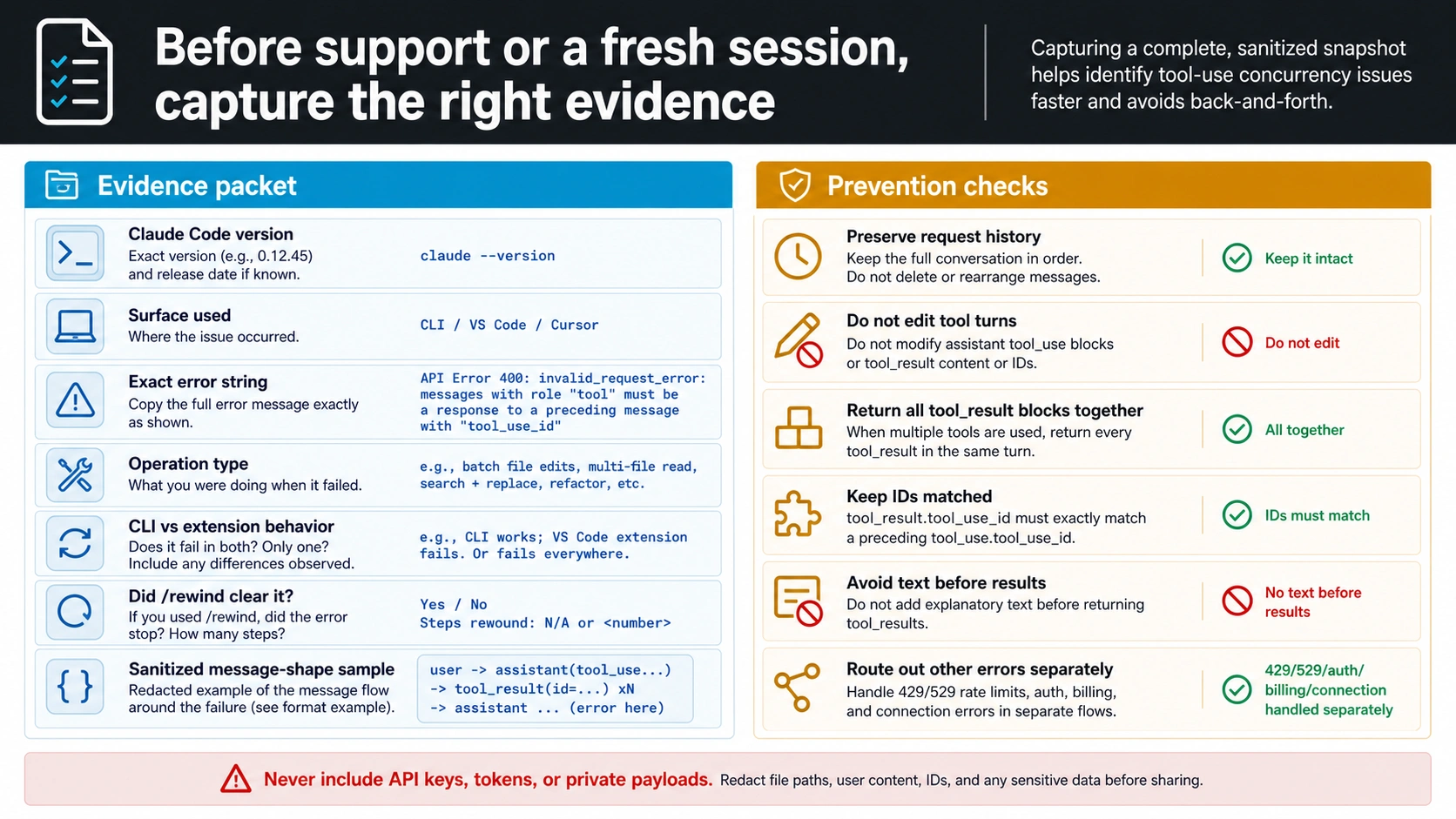
Before you clear the session or file a bug, capture a small packet that another engineer can act on:
- Claude Code version and extension version, if an extension is involved
- surface used: CLI, VS Code, Cursor, terminal, remote environment, or custom API client
- exact error string and timestamp with timezone
- operation type: file read, edit, bash command, search, tool runner, or custom tool call
- whether ordinary chat works while tools fail
- whether
/rewindor Esc twice cleared the symptom - CLI versus IDE comparison for one simple tool action
- for API clients, a sanitized message-shape sample with roles, block types, and tool IDs, but no secrets or private payloads
The same packet also helps you prevent the recurrence. Keep tool history intact when replaying messages. Do not edit old tool turns by hand. Do not insert natural-language summaries before tool_result blocks. Do not split one assistant turn's results across multiple user messages. Do not treat a green status page as proof that the request shape is valid.
If you do need to start fresh, carry forward a human task summary and safe file references, not the broken transcript. That is the difference between preserving work and preserving the invalid state that caused the 400.
FAQ
Should I use /rewind, Esc twice, /clear, or a new session?
Use /rewind or Esc twice first because those options try to step back before the corrupted tool turn while preserving more useful context. Use /clear or a new session only after the same simple tool action still fails after rewind. When starting fresh, bring a task summary instead of copying the tool-heavy transcript.
Why does normal chat work while file tools fail?
Normal chat can work because plain text turns do not need the same tool/result pairing as tool calls. File reads, edits, shell commands, and search actions depend on tool state. If that state is mismatched, tool calls can fail while conversational replies continue.
Does the error mean I ran too many tools concurrently?
Not necessarily. It can happen after true multi-tool output, but it can also happen after interrupted history, edited turns, extension state, missing results, split results, or text placed before results. The fix is to recover or repair the tool transcript, not just to slow down prompts.
Should I rotate my API key?
Not for this exact error as a first move. A new key does not repair a malformed message history. Rotate or replace keys only when the error body, route evidence, or account state points to authentication or credential ownership.
Should I disable parallel tool use?
Disable it only if your client cannot safely manage multiple tool calls or if side effects make parallel execution unsafe. You still need correct tool_result ordering for single-tool and multi-tool turns. The serializer rule remains the same.
Could Claude Status still matter?
Yes, but as a branch check rather than the main diagnosis. If many routes fail at the same time, check live status. If the exact error remains a 400 tool-history mismatch, recovery still centers on session rewind or message-shape repair.
What should I include in a GitHub issue or support ticket?
Include version, surface, exact error text, timestamp, operation type, whether chat works, whether /rewind helped, CLI versus extension behavior, and a sanitized message-shape sample if you own the API client. Do not include API keys, tokens, private file contents, or proprietary transcripts.
When should I stop trying to salvage the session?
Stop after a rewind and one or two simple same-session tool checks still reproduce the exact error. At that point, preserve evidence, start a clean session from a task summary, and avoid importing the broken tool history.