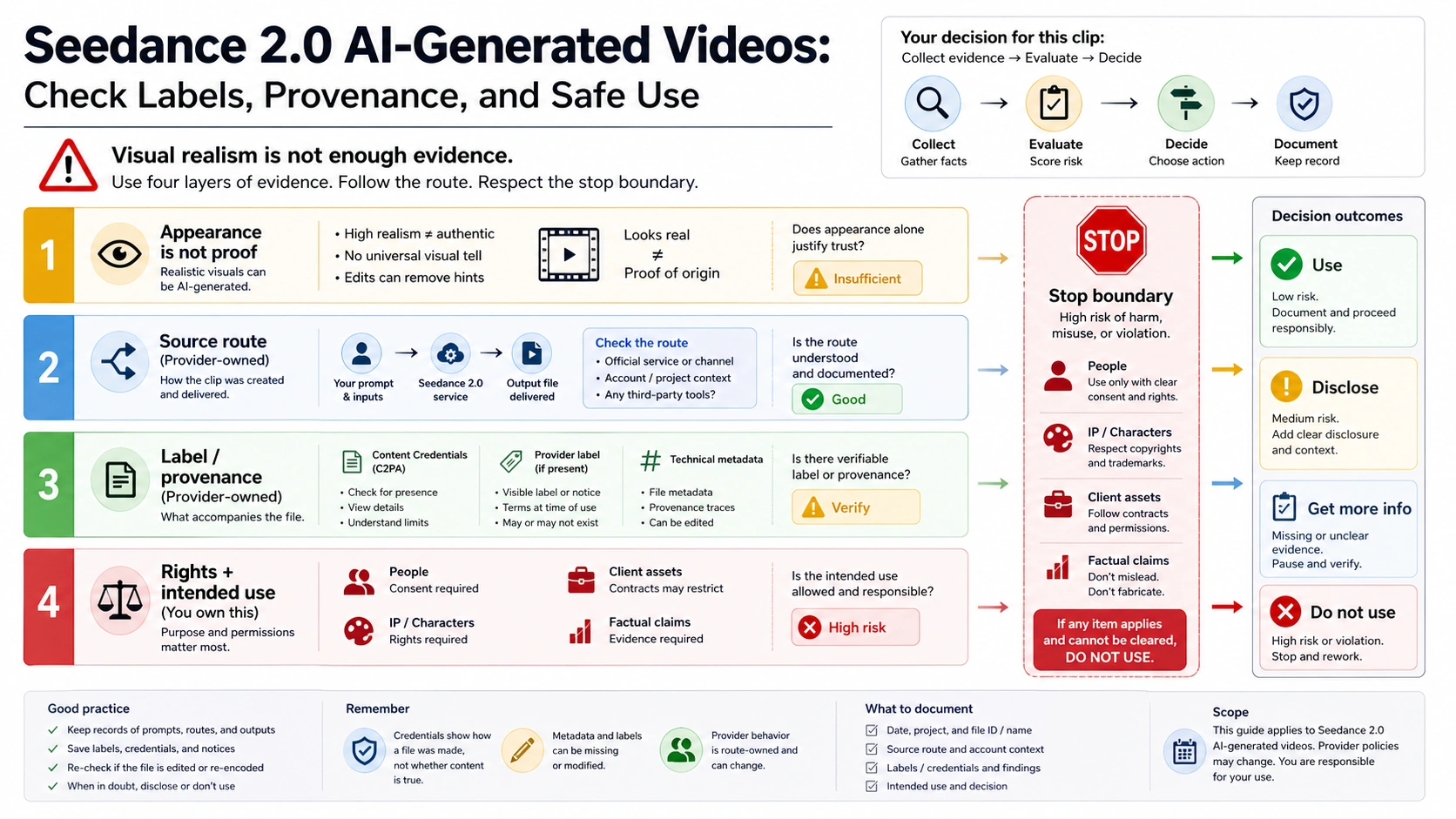
Do not judge a Seedance 2.0 AI-generated video by appearance alone. Before you trust, disclose, publish, or reuse it, check four layers: who generated or exported it, what AI label, watermark, Content Credentials, metadata, or source record stayed with it, what rights cover the inputs and output, and what use case you want to claim. As of July 4, 2026, Content Credentials and C2PA are provenance signals when preserved, not truth detectors, and a missing label or stripped metadata is not proof that a clip was human-shot. If the clip involves a real person, public figure, copyrighted character, brand or client asset, removed provenance, or a factual claim about the real world, stop until the source route and rights are stronger than the risk.
| Check layer | Ask first | Safe reading |
|---|---|---|
| Appearance | Does the clip merely look realistic, cinematic, or impossible? | Appearance alone does not prove real footage or AI generation. |
| Source route | Which creator, provider, API, wrapper, or repost route exported it? | The route owner tells you what evidence can be trusted. |
| Label and provenance | Did an AI label, watermark, Content Credentials record, metadata, or source file survive? | Preserved signals help; absence is not an all-clear. |
| Rights and use | Is this for a draft, social post, client work, ad, evidence claim, or sensitive subject? | Higher-risk uses need stronger source records and rights proof. |
What Seedance 2.0 officially generates
ByteDance Seed's Seedance 2.0 page is the clean source for model identity. It presents Seedance 2.0 as a multimodal audio-video generation model and describes text, image, audio, and video inputs, reference control, motion stability, and audio-video generation. That is the baseline you can cite when you say the model can generate video from multiple kinds of creative input.
The official launch post adds useful limits. It describes a unified multimodal architecture and stronger subject, motion, and audio-video consistency, while also acknowledging that multi-subject consistency, text rendering, complex edits, and audio artifacts can still be hard. That matters because provenance work should not start from hype. A model can be powerful, realistic, and still imperfect; none of those visual qualities tells you who made a specific clip or whether it is safe to publish.
Use first-party pages for model-level claims only. They do not prove that every Seedance-branded wrapper is official, that every export keeps the same label or metadata, that every account has the same rights, or that a reposted clip still carries trustworthy provenance. Once a clip leaves the original route, the source of the file becomes part of the evidence.
What labels, watermarks, Content Credentials, and metadata prove
The most useful mental model is a stack of signals, not a single detector. A visible AI label may tell a viewer that a platform marked the clip as generated. A watermark may help when the exporting route preserves it. Metadata can carry creation or export clues. Content Credentials, built around the C2PA standard and explained by the Content Authenticity Initiative, can provide tamper-evident origin and edit history when the route supports and preserves them.
None of those signals proves the depicted event is true. Content Credentials can tell you about origin and edits; they do not verify that the scene happened in the real world. A watermark can show that a route marked the media; it does not settle rights, consent, or commercial use. Metadata can be useful; it can also be stripped by social platforms, downloads, transcodes, screen recordings, or repost workflows.
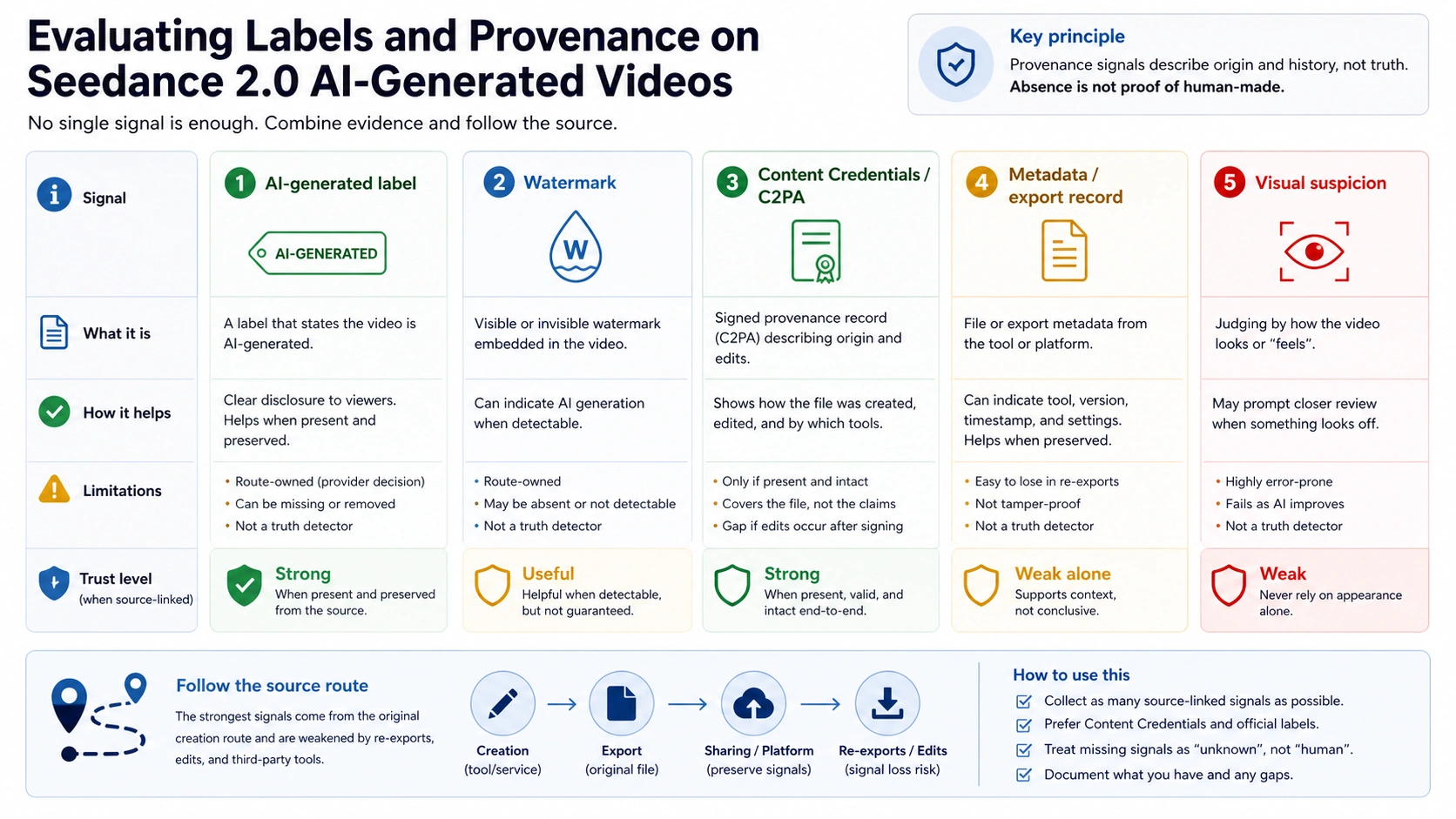
The dangerous shortcut is negative proof. A missing AI label does not mean the clip is human-shot. A missing watermark does not mean the clip is safe to reuse. A missing Content Credentials panel does not mean the file is fake or real. Absence usually means you have less evidence, not a better answer.
Secondary reporting has also tied Seedance 2.0 to watermarking and IP-safeguard discussions, including SCMP coverage of ByteDance's safeguards. Treat that as context for why provenance and disclosure matter. Do not stretch it into a universal claim that every route, provider, download, or repost retains the same signal.
Route matrix for generated or reposted clips
The route owner is the platform or workflow that generated, exported, hosted, or reposted the clip you are looking at. Route ownership matters because a provider can prove its own behavior but cannot prove every other Seedance 2.0 surface.
For example, Dreamina's Seedance 2.0 page is useful for a creator-route example. fal's Seedance 2.0 API page is useful for a provider/API-route example. Higgsfield and OpenArt pages can show how the market presents Seedance workflows. Those pages do not automatically tell you what another provider exports, whether metadata survives after social reposting, or whether a downloaded clip has enough rights for your use.
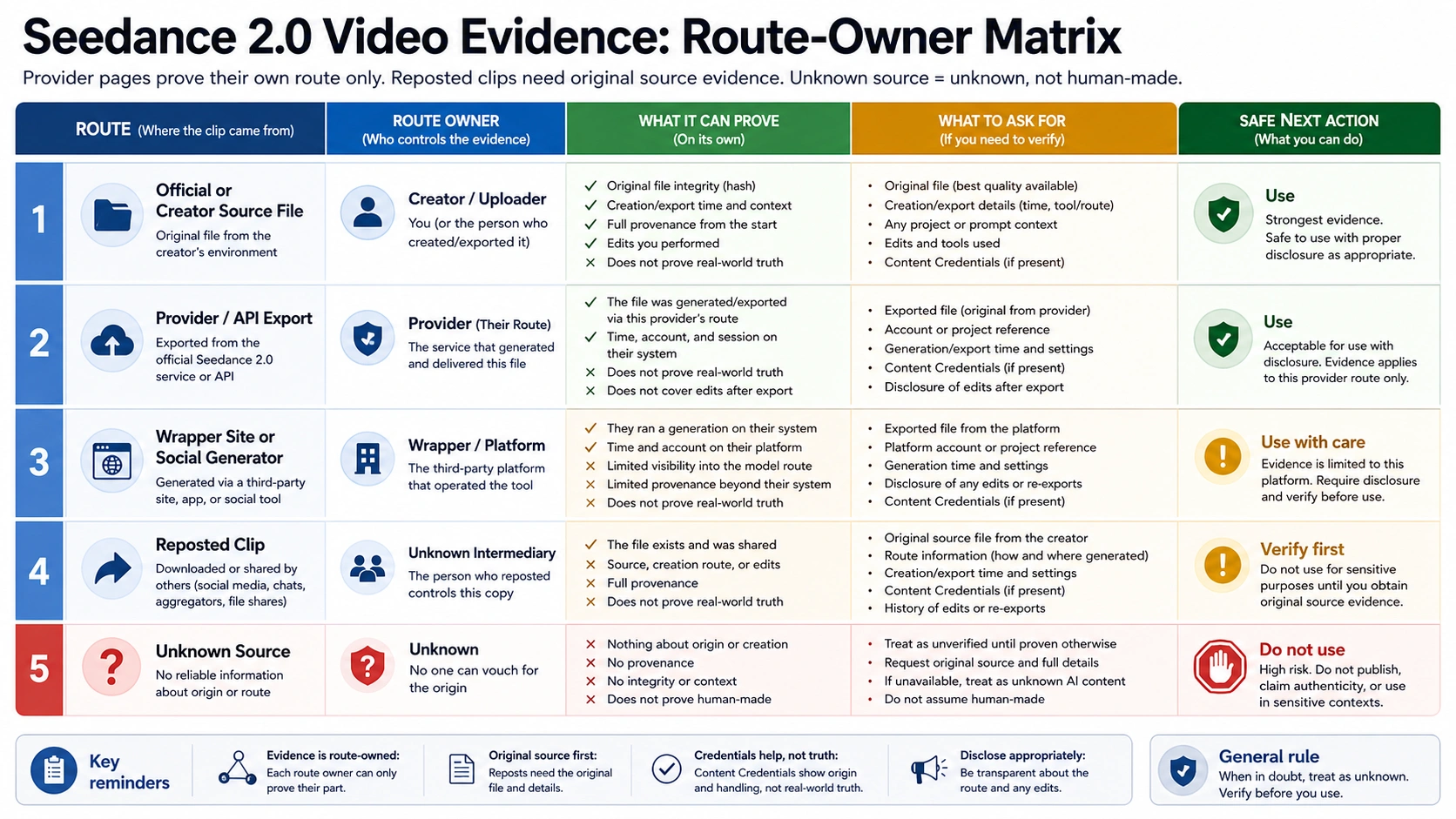
Use this route matrix before trusting a clip:
| Clip source | What it can prove | What to ask for |
|---|---|---|
| Original creator route or source file | Strongest evidence when the account, task, export record, and file match. | Route owner, account owner, task record, source file, label/provenance state, and rights. |
| Provider or API export | Evidence for that provider's route and terms. | Model selector, task ID, export settings, retention, rights, support, and billing behavior. |
| Wrapper or exact-match domain | Only what that site can document. | Operator identity, upstream route, terms, privacy, export rules, and support path. |
| Reposted social clip | Evidence that someone posted a clip, not that the original provenance survived. | Original upload, creator statement, source file, platform label, and permission to reuse. |
| Unknown downloaded file | Very weak evidence. | Treat as unknown until an owner, source route, or preserved provenance appears. |
This is especially important for impressive demos. A YouTube or social post can show that people are testing Seedance-like workflows, but it is not by itself an audit trail. If you need to publish, sell, cite, or use the clip in a sensitive context, ask for the source route instead of guessing from visual style.
When a Seedance 2.0 clip is safe to use
Safe use depends on the job. A personal draft needs less proof than a public ad. An internal mood board is not the same as a factual evidence claim. A client asset, brand mark, real person, public figure, or copyrighted character changes the threshold immediately.
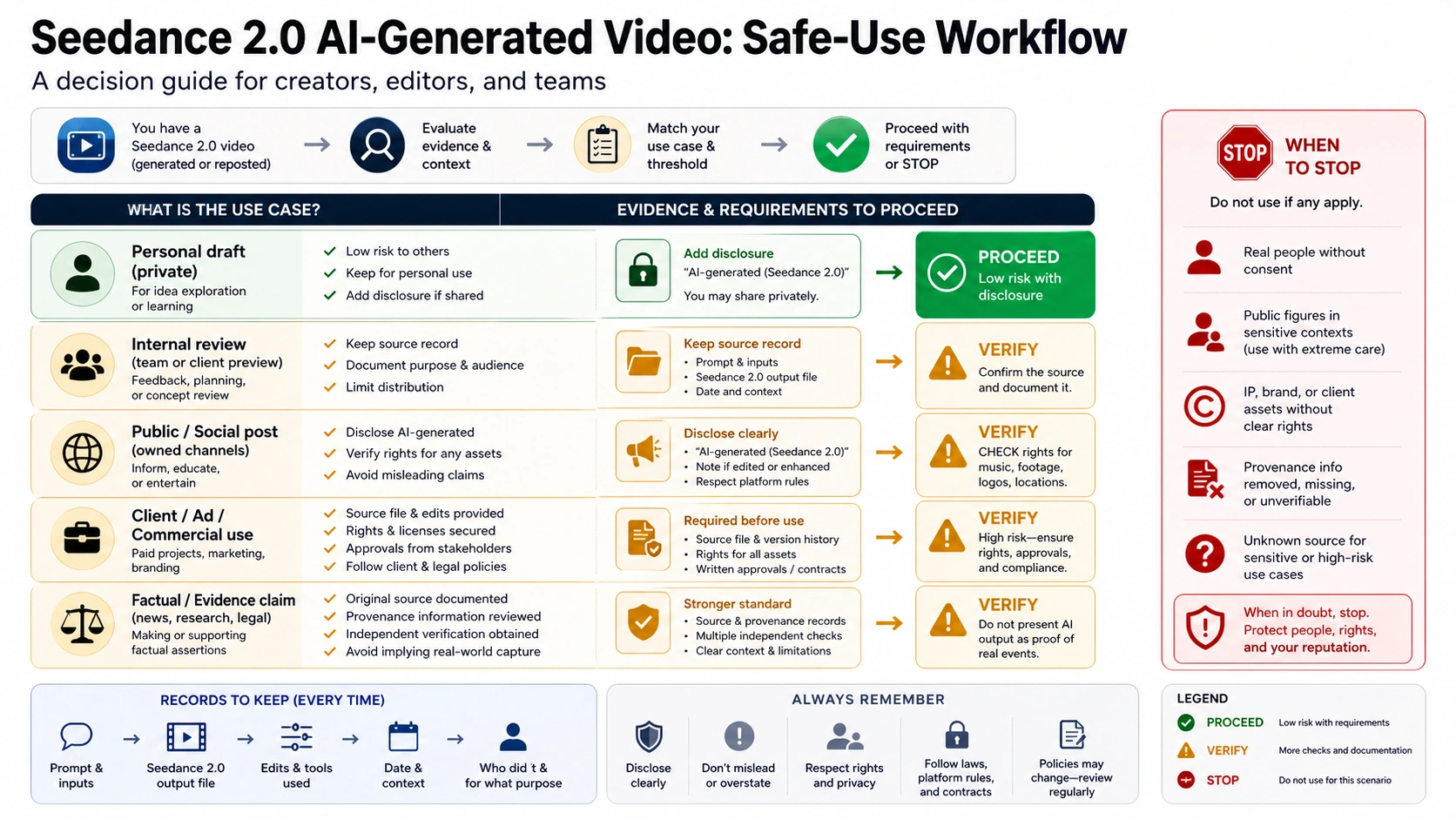
Use this as a practical threshold:
| Use case | Minimum threshold | Safer action |
|---|---|---|
| Personal draft or private exploration | Know that it is generated and keep the source route if available. | Disclose internally when sharing for review. |
| Internal team review | Keep prompt, route, export date, and file version. | Do not remove labels or provenance to make a point. |
| Public social post | Confirm rights to inputs and output, disclose generated status where needed, and avoid misleading real-world claims. | Keep the original file and route note in case questions arise. |
| Client, ad, or commercial asset | Verify source route, rights, approvals, brand/IP clearance, and contract terms. | Get written approval before using recognizable people, brands, or third-party IP. |
| News, evidence, education, or factual claim | Source file plus provenance is not enough by itself. | Require independent verification and do not present generated media as proof of a real event. |
| Sensitive subject or unknown source | Evidence threshold is high. | Stop until ownership, rights, and provenance are stronger. |
Do not teach or request watermark removal, AI-label bypass, metadata stripping, or C2PA removal. If a workflow depends on making a generated clip look less disclosed, that is usually a sign the use case is wrong. For legitimate creative work, preserve the route record and disclosure instead of trying to erase it.
Stop cases
Safe AI-generated video use needs clear stop rules. Stop does not always mean the model cannot generate something. It means the evidence, rights, or use context is not strong enough to proceed responsibly.
Stop or reframe when the clip involves:
- an identifiable real person without clear consent and a route that supports that use;
- a public figure, celebrity, or confusing near-match;
- copyrighted characters, logos, product designs, or brand assets you do not control;
- client footage or private materials without upload, retention, and deletion approval;
- stripped labels, removed watermarks, missing source files, or unknown repost history;
- a claim that the generated clip depicts a real event, crime, disaster, product proof, medical result, or political scene;
- a request whose main goal is to bypass an AI label, watermark, safety filter, or platform policy.
If the issue is an identifiable person, use the separate Seedance 2.0 human-face guide for consent, verified real-person routes, rejected face references, and likeness stop rules. If the issue is general access, APK risk, provider route hygiene, or upload safety before generation, use the Seedance 2.0 access guide. If the issue is Mini, API, free credits, or callable model proof, use the Seedance 2.0 Mini API free guide. If the issue is whether to move to another version, use the Seedance 2.1 vs Seedance 2.0 guide.
Keeping those lanes separate prevents a common failure: using provenance checks to answer access, API pricing, real-person verification, or version-switch questions they cannot settle.
A practical check before you publish
Before you publish or reuse a Seedance 2.0 AI-generated clip, write down the evidence in one place:
| Evidence item | Good enough for low-risk sharing? | Needed for high-risk use? |
|---|---|---|
| Route owner | Yes, if the route is known. | Required. |
| Source file or export record | Helpful. | Required. |
| AI label or watermark state | Helpful. | Required when available; do not remove it. |
| Content Credentials or metadata | Helpful when preserved. | Strongly preferred, but still not truth proof. |
| Rights to prompt inputs, references, people, brands, and output | Depends on use. | Required. |
| Disclosure plan | Recommended. | Required for public, client, ad, or factual contexts. |
| Repost history | Low-risk if clearly not factual or commercial. | Original source needed. |
| Stop-case review | Always useful. | Required. |
If you cannot name the route owner, cannot find the source file, cannot explain the rights, and cannot tell whether the clip was reposted, do not use it as evidence or as client-ready media. Use it as inspiration at most, and regenerate or request a verifiable source file through a route you can audit.
FAQ
Can you tell a Seedance 2.0 AI-generated video by looking at it?
Not reliably. Visual realism, camera motion, and cinematic polish are not proof either way. Use appearance as a reason to ask for source evidence, not as a verdict.
Does a Seedance 2.0 watermark prove the clip is safe to use?
No. A watermark or visible AI label can help identify generated status or route behavior, but it does not settle rights, consent, brand/IP clearance, commercial use, or factual truth.
Do Content Credentials or C2PA prove that the video is real?
No. Content Credentials and C2PA are provenance and history signals. They can show origin and editing information when preserved, but they do not prove the depicted event happened.
If metadata is missing, is the clip probably human-shot?
No. Metadata can be stripped by downloads, social platforms, transcodes, screen recordings, or reposts. Missing metadata means weaker evidence, not an all-clear.
Can I remove an AI label or watermark before posting?
Do not build a workflow around removal. If disclosure or provenance creates a problem for the use case, fix the use case, rights, or route record instead of hiding the signal.
Can I use a reposted Seedance 2.0 clip in an ad or client project?
Only if you can verify the source route, source file, rights, and permissions. A reposted clip by itself is not enough for client, ad, or commercial use.
Where should real-person Seedance clips be checked?
Use the human-face guide. Identifiable people require consent, route support, verification state, and stop rules that go beyond general provenance checks.
Is this the same as choosing a Seedance 2.0 provider or API?
No. Generated-output trust and safe use are a different decision from provider choice, Mini/free API status, or version switching. Those questions have their own route-owner and proof checks.