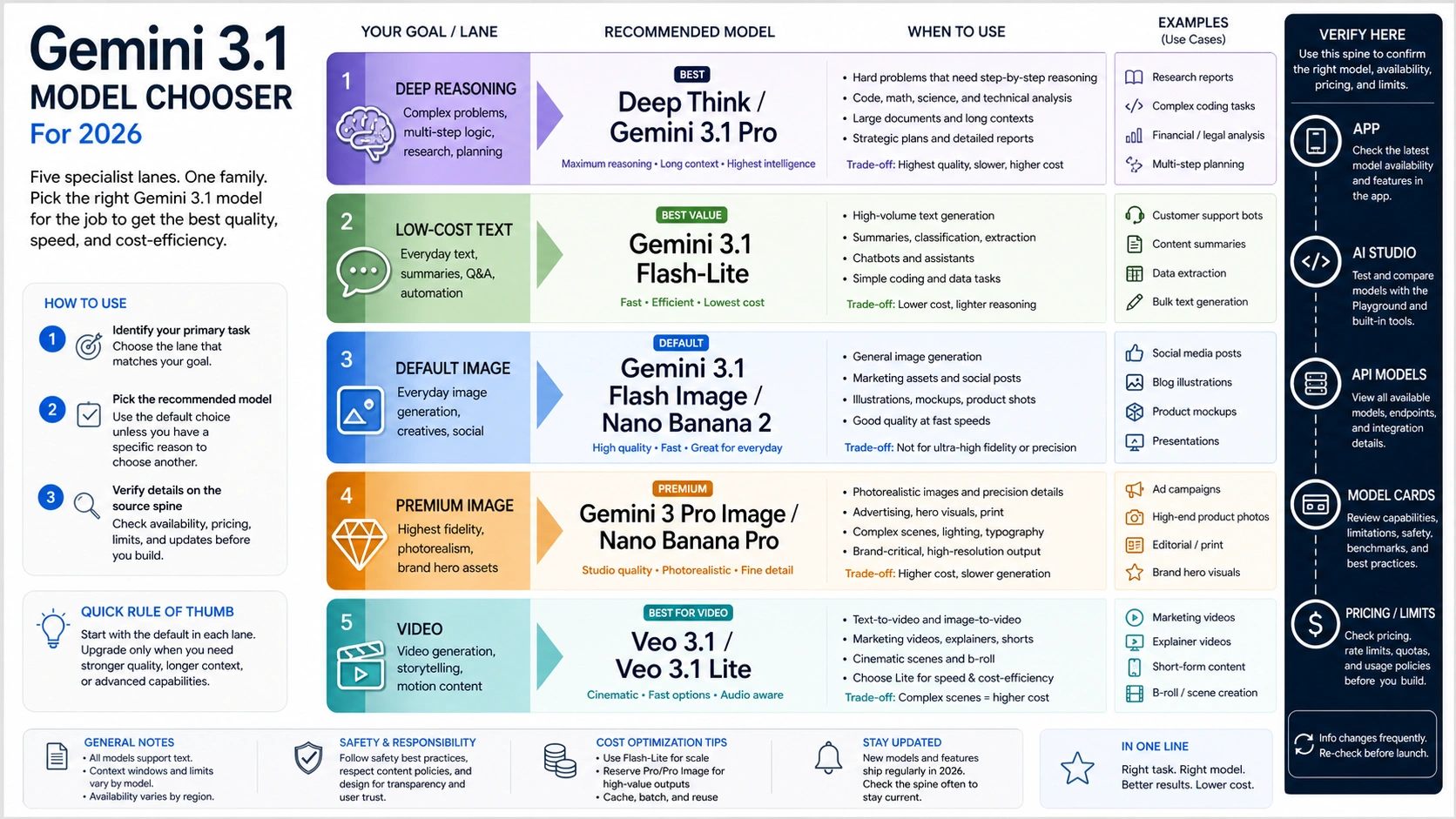
The fastest way to choose among Google's current Gemini 3.1, Nano Banana, and Veo names is to start with the job: use Gemini 3.1 Pro or Deep Think for difficult reasoning, Gemini 3.1 Flash-Lite for cheaper text runs, Gemini 3.1 Flash Image / Nano Banana 2 for most image tests, Gemini 3 Pro Image / Nano Banana Pro when premium image quality matters, and Veo 3.1 variants for video.
As of May 8, 2026, treat those names as routes with different owner surfaces, not as one ranked model list. Deep Think belongs to the Gemini app or subscription reasoning surface, Flash-Lite and Gemini 3.1 Pro need current model-row checks before API work, Nano Banana 2 and Nano Banana Pro sit in the image lane, and Veo 3.1 / Veo 3.1 Lite sit in the video lane.
| Job | First route | Owner surface to verify |
|---|---|---|
| Difficult reasoning | Gemini 3.1 Pro or Deep Think | Gemini app / subscription and DeepMind model cards |
| Cheaper text or API exploration | Gemini 3.1 Flash-Lite | Gemini API model rows and pricing |
| Default image generation tests | Gemini 3.1 Flash Image / Nano Banana 2 | AI Studio and Gemini API image rows |
| Premium image output | Gemini 3 Pro Image / Nano Banana Pro | Image model docs, pricing, and limits |
| Video generation | Veo 3.1 or Veo 3.1 Lite | Gemini API video docs, model rows, pricing, and limits |
Before you build around any of these routes, verify the exact model ID, price, free tier, rate or usage limits, region, and preview label on the current Google or DeepMind owner page. Deeper free-access, pricing, rate-limit, provider, and troubleshooting choices belong after the model family is selected.
Quick Chooser: Route First, Model Row Second
The useful first decision is not whether one name is "better" than another. It is which Google surface owns the task you are trying to run.
Use Gemini 3.1 Pro when the task needs long-context reasoning, complex synthesis, coding, multimodal input, or agentic planning. Google's February 19 announcement says 3.1 Pro is rolling out across the Gemini API, Google AI Studio, Vertex AI, Gemini Enterprise, the Gemini app, NotebookLM, and developer tools. The DeepMind model card also lists Gemini 3.1 Pro as a multimodal reasoning model with text, image, audio, and video inputs and a context window up to 1M tokens.
Use Deep Think only when the specialized reasoning mode is actually available on your surface. Google's Deep Think announcement places the upgraded mode in the Gemini app for Google AI Ultra subscribers and says API access is via an early access path for selected researchers, engineers, and enterprises. That is a different contract from simply choosing a Gemini API model row.
Use Gemini 3.1 Flash-Lite when cost, throughput, translation, simple data processing, or high-volume agentic work matters more than maximum reasoning depth. The Gemini API models page currently lists Gemini 3.1 Flash-Lite in the Gemini 3 family, and the pricing page gives preview pricing rows for gemini-3.1-flash-lite-preview. The practical rule is simple: use the model catalog for capability and exact model strings, then use the pricing page for the billing row.
Use Gemini 3.1 Flash Image / Nano Banana 2 for fast image generation and editing tests. Use Gemini 3 Pro Image / Nano Banana Pro when the task needs higher contextual image quality, stronger layout handling, or premium 4K visual work. Use Veo 3.1, Veo 3.1 Fast, or Veo 3.1 Lite when the output is video with audio, and choose the variant by quality, iteration speed, and supported resolution.
Name Map: Public Terms, Official Owners, and Traps

Google's naming layer is easy to misread because public labels, model-card labels, pricing labels, and API model strings do not always look the same. The safest way to read the lineup is to attach each public name to its owner surface.
| Public name readers search for | What it should mean in practice | First owner page to check | Common trap |
|---|---|---|---|
| Gemini 3.1 Pro | Advanced Gemini 3 reasoning and multimodal model | DeepMind model card, Gemini API model row, Gemini API pricing | Treating every "Deep Think" mention as the same as an open API row |
| Gemini 3.1 Deep Think | Specialized high-reasoning mode or entitlement | Gemini app, Google AI plan/support pages, Deep Think announcement | Assuming the app entitlement, API early access, and standard developer model row are interchangeable |
| Gemini 3.1 Flash-Lite | Cost-efficient Gemini 3 text/multimodal route | Gemini API models and pricing | Quoting one preview price after the row changes |
| Gemini 3.1 Flash Image / Nano Banana 2 | Fast image generation and editing route | AI Studio, Gemini API image docs, pricing | Treating Nano Banana 2 as a separate non-Google provider |
| Gemini 3 Pro Image / Nano Banana Pro | Premium image generation and editing route | AI Studio, Gemini API image docs, pricing | Jumping to the premium image model before testing the Flash Image route |
| Veo 3.1 / Veo 3.1 Fast / Veo 3.1 Lite | Video generation route | Gemini API video docs, model rows, pricing | Mixing video pricing with text/image pricing or assuming Lite supports every Standard feature |
The Gemini API models page is the cleanest high-level catalog. It groups Gemini 3.1 Pro, Gemini 3 Flash, Gemini 3.1 Flash-Lite, Nano Banana 2, Nano Banana Pro, Gemini 3.1 Flash Live, Gemini 3.1 Flash TTS, Veo 3.1, and Veo 3.1 Lite under their capability families. It also marks preview, stable, latest, and experimental naming patterns, which matters because preview aliases can move and can have more restrictive rate limits.
Reasoning and Text: Pro, Deep Think, and Flash-Lite
Start the reasoning lane by deciding whether the job is hard reasoning or cheap repeated text work.
For hard reasoning, Gemini 3.1 Pro is the default baseline. Google's announcement frames it as upgraded core intelligence for tasks where a simple answer is not enough, and it says 3.1 Pro is available to developers in preview through the Gemini API and Google AI Studio while also rolling out to consumer and enterprise products. The model card is the better source when you need model behavior boundaries: it says Gemini 3.1 Pro is a highly capable, natively multimodal reasoning model that can handle large multimodal inputs and is intended for agentic performance, advanced coding, long context, and algorithmic development.
Deep Think should be treated as a specialized mode, not as a casual synonym for "thinking tokens." The Deep Think announcement says the upgraded mode is available in the Gemini app for Google AI Ultra subscribers and that API access is an early access program for selected researchers, engineers, and enterprises. If a product screen says Deep Think, verify the app or plan entitlement there. If a developer integration needs deeper reasoning, verify the Gemini API model row and thinking controls separately.
For high-volume text and agentic tasks, Flash-Lite is the cost lane. On May 8, 2026, Google's pricing page lists gemini-3.1-flash-lite-preview with a free tier and a paid tier, and it describes the model as cost-efficient for high-volume agentic tasks, translation, and simple data processing. The model catalog also shows both stable and preview Flash-Lite cards. That means the exact API string should be the final check before deployment, especially if you are using aliases in examples or SDK wrappers.
The practical split:
| If the task looks like this | Start here | Why |
|---|---|---|
| Multi-document synthesis, codebase reasoning, multimodal analysis, hard planning | Gemini 3.1 Pro | The value is reasoning depth and context handling. |
| Research-grade or science/engineering reasoning where Deep Think is explicitly available | Deep Think route | The value is the specialized reasoning mode, but access is surface-dependent. |
| Classification, extraction, translation, routing, simple agent steps, cost-sensitive batch work | Gemini 3.1 Flash-Lite | The value is lower cost and higher throughput. |
| Interactive app prototype where model identity is still uncertain | AI Studio first, then API row | The value is fast model selection before production wiring. |
Image Generation: Nano Banana 2 First, Nano Banana Pro When the Job Demands It
The image lane is where name confusion is most likely to waste money. Nano Banana 2 is the reader-friendly name attached to Gemini 3.1 Flash Image. Nano Banana Pro is the reader-friendly name attached to Gemini 3 Pro Image. Both are Google image routes, but they are not the same job.
Use Gemini 3.1 Flash Image / Nano Banana 2 when you need fast interactive image generation, editing tests, prompt exploration, or high-throughput image workflows. The models page describes Nano Banana 2 as high-efficiency production-scale visual creation, and the pricing page lists gemini-3.1-flash-image-preview as the API model string. On May 8, 2026, the same pricing page showed no API free tier for this image row and listed paid image output equivalents of $0.045 per 0.5K image, $0.067 per 1K image, $0.101 per 2K image, and $0.151 per 4K image. Treat those as dated official rows, not permanent promises.
Use Gemini 3 Pro Image / Nano Banana Pro when the image task needs premium contextual understanding, stronger layout reasoning, or 4K studio-quality output. The models page describes Nano Banana Pro as a professional design engine with a reasoning core for studio-quality 4K visuals, complex layouts, and precise text rendering. On May 8, 2026, the pricing page listed gemini-3-pro-image-preview, no API free tier, and paid image output equivalents of $0.134 per 1K/2K image and $0.24 per 4K image.
That price gap is the operational reason not to default to Pro. A creator testing prompts, thumbnails, quick edits, or product variations should usually try Nano Banana 2 first. A designer producing final campaign visuals, complex infographics, text-heavy boards, or premium 4K assets has a stronger reason to test Nano Banana Pro. The name sounds like a hierarchy, but the better decision is job fit plus current owner-row verification.

Video Generation: Veo 3.1, Fast, and Lite
Veo is the video lane, not a text or image variant. The Gemini API video docs currently list veo-3.1-generate-preview, veo-3.1-fast-generate-preview, and veo-3.1-lite-generate-preview as developer-facing model codes. They also state that Veo 3.1 can generate 720p, 1080p, or 4K videos, while 4K is not available for Veo 3.1 Lite.
Use Veo 3.1 Standard when quality and final output matter more than iteration cost. Use Veo 3.1 Fast when you need faster iteration but still need the main Veo 3.1 feature set. Use Veo 3.1 Lite when cost and developer-first iteration are the primary constraints and 4K output is not required.
On May 8, 2026, the Gemini API pricing page listed Veo 3.1 as paid-tier developer access with no free tier in the Gemini API. The row showed Standard video with audio at $0.40 per second for 720p/1080p and $0.60 per second for 4K, Fast at $0.10 per second for 720p, $0.12 for 1080p, and $0.30 for 4K, and Lite at $0.05 for 720p and $0.08 for 1080p, with 4K unsupported. Those numbers are useful only if you keep the date and the route beside them, because video model pricing and preview labels can change quickly.
For deeper video-specific decisions, keep the owner narrow. Free-access questions belong to the existing Veo 3.1 free access article. API throttling and quota behavior belong to the Veo 3.1 API rate-limit explainer. Cost and provider stability questions belong to the cheapest stable Veo 3.1 video API comparison. The route choice should happen before those deeper questions.
Workload Matrix: Pick the First Route by Job

Different readers can look at the same model list and need different first moves.
| Reader job | Start with | Why this route comes first | What to verify before production |
|---|---|---|---|
| Developer building an agent or coding workflow | Gemini 3.1 Pro, then Flash-Lite for cheaper subtasks | Reasoning depth is the design risk; cost optimization comes after the agent behavior works. | Exact model ID, thinking controls, context behavior, rate limits, and paid tier. |
| Developer building high-volume extraction or translation | Gemini 3.1 Flash-Lite | The task is repeated, bounded, and cost-sensitive. | Whether stable or preview row is being used, input/output prices, caching, and data-use terms. |
| Creator testing image concepts | Gemini 3.1 Flash Image / Nano Banana 2 | Fast iteration beats premium output during exploration. | Image price, supported sizes, preview label, and whether the workflow is AI Studio or API. |
| Designer producing final image boards | Gemini 3 Pro Image / Nano Banana Pro | Layout fidelity, text handling, and premium quality may justify the higher route. | 1K/2K/4K pricing, output limits, rights and policy constraints, and model availability. |
| Video producer testing concepts | Veo 3.1 Lite or Fast | Iteration cost matters until the shot direction is locked. | Resolution, audio, supported input modalities, video length, and per-second price. |
| Video producer finalizing a deliverable | Veo 3.1 Standard | Final quality and 4K support may matter more than the cheapest path. | 4K availability, latency, price, API limits, and whether extension/reference features are needed. |
The matrix also shows why a single "best Gemini model" answer is misleading. Gemini 3.1 Pro may be the right answer for a coding agent, but it is not the first answer for a creator testing image variations. Nano Banana Pro may be the strongest image route, but it is not automatically the cheapest way to learn whether a prompt works. Veo 3.1 Standard may be the final route for video quality, but Lite may be the rational first route for prompt iteration.
Verification Checklist Before Production
Use the same verification order every time the name family changes:
- Confirm the workload. Reasoning, cheap text, image generation, premium image work, and video generation have different owner surfaces.
- Translate the public name to an official row. Nano Banana 2 should point to Gemini 3.1 Flash Image, Nano Banana Pro to Gemini 3 Pro Image, and Veo Lite to the Veo 3.1 Lite video row.
- Open the model catalog. Confirm whether the model is stable, preview, latest, or experimental.
- Open the pricing page. Check free tier, paid tier, token or per-second price, output-size pricing, and whether grounding or search has a separate charge.
- Open the product surface. If the task is Deep Think, Gemini app, NotebookLM, AI Studio, Vertex AI, or a subscription plan, verify the entitlement there rather than assuming the API row controls it.
- Record the date in your implementation note. The article can say "as of May 8, 2026"; your production docs should do the same when a price, limit, preview label, or region matters.
- Route out to a narrower page only after the family is selected. Free access, provider choice, rate limits, and troubleshooting are different jobs.
This prevents three expensive mistakes: paying for a premium route before the default route is tested, quoting a stale price from a preview row, or building against a consumer feature that is not available through the developer API path.
Where the Sibling Pages Take Over
Once the model family is selected, narrower questions deserve narrower pages.
- If the question is whether Gemini 3 Pro or Gemini 3.1 Pro can be used without paying, use the Gemini 3 Pro free guide.
- If the question is whether Veo 3.1 can be tested without paying, use the Veo 3.1 free access guide.
- If the question is why a Veo request is blocked or throttled, use the Veo 3.1 API rate-limit explainer.
- If the question is cost and reliability across video routes, use the Veo 3.1 video API cost comparison.
- If the question is the image-specific API path for Gemini 3.1 Flash Image, use the Gemini 3.1 Flash Image Preview API article.
- If the question is Nano Banana Pro pricing or subscription behavior, use the Nano Banana Pro pricing and subscription article.
The lineup decision should remain small: choose the family, check the official row, then move to the narrower route.
FAQ
Is Gemini 3.1 Deep Think the same as Gemini 3.1 Pro?
No. Gemini 3.1 Pro is the core model route for complex reasoning across consumer and developer surfaces. Deep Think is a specialized reasoning mode or entitlement, and Google's Deep Think announcement places its broad app access under Google AI Ultra while describing API access as an early access path for selected researchers, engineers, and enterprises. Verify the surface before treating the two as interchangeable.
Which Gemini 3.1 model should I try first for API text work?
Try Gemini 3.1 Pro first when reasoning quality, long context, coding, or agent behavior is the risk. Try Gemini 3.1 Flash-Lite first when the task is high-volume, bounded, translation-like, or cost-sensitive. Always confirm the exact model string and pricing row before production use.
Is Nano Banana 2 the same as Gemini 3.1 Flash Image?
For this route decision, yes: Nano Banana 2 is the reader-facing image name that maps to the Gemini 3.1 Flash Image lane. The production check should still use Google's official image docs, model catalog, and pricing row for the current model ID and limits.
When should I choose Nano Banana Pro instead of Nano Banana 2?
Choose Nano Banana Pro when premium output quality, complex layout, precise text rendering, or 4K studio-quality visuals justify the higher image route. For prompt exploration, concept testing, and high-throughput image iteration, start with Nano Banana 2 and upgrade only when the output requirement proves it.
Where does Veo 3.1 Lite fit?
Veo 3.1 Lite is the lower-cost video lane in the Veo 3.1 family. The video docs list it as a developer-facing video model with audio output, and they state that 4K is not available for Lite. Use it for iteration and cost-sensitive tests, not for every final video deliverable.
Are the free-tier and price numbers permanent?
No. Pricing, free tier, preview labels, model strings, limits, and regions are volatile. The article uses May 8, 2026 when it mentions official rows. For production planning, reopen the Gemini API models page, pricing page, video docs, model card, app entitlement page, or subscription page before relying on any number.