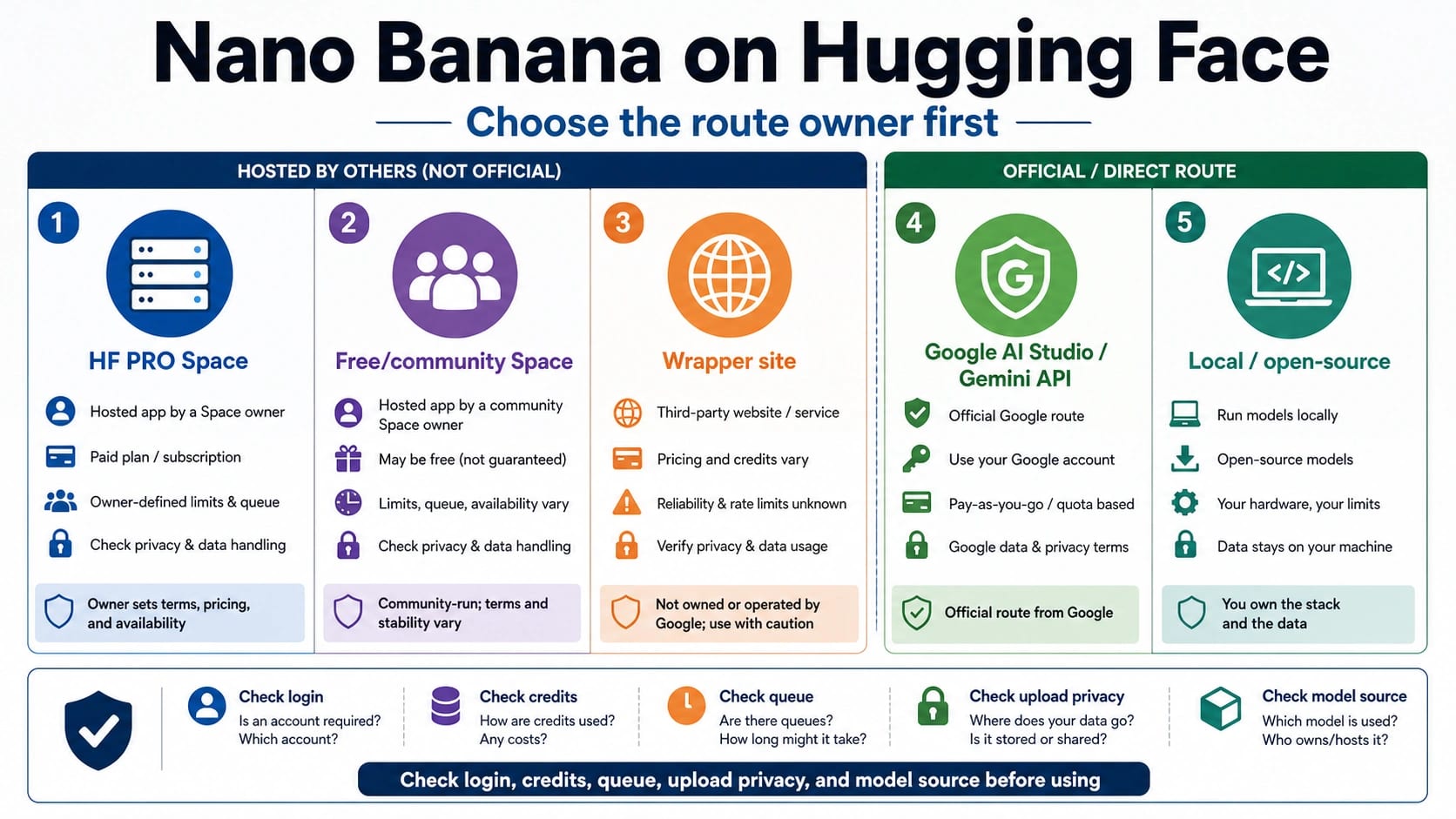
You can try Nano Banana online through Hugging Face Spaces, but the first useful question is who owns the route. A Space is a hosted app with its own login, queue, credits, model source, upload behavior, and support boundary; the official model contract still belongs to Google's Gemini image family.
Use Hugging Face for low-risk browser tests when the Space owner, access mode, and upload risk are clear. Use Google AI Studio or Gemini API when you need official model control, repeatable API behavior, or production accountability. Stop before uploading private images, client assets, or face data if the Space does not clearly explain who operates it, how access is gated, and where uploaded content can go.
Start With The Route Owner
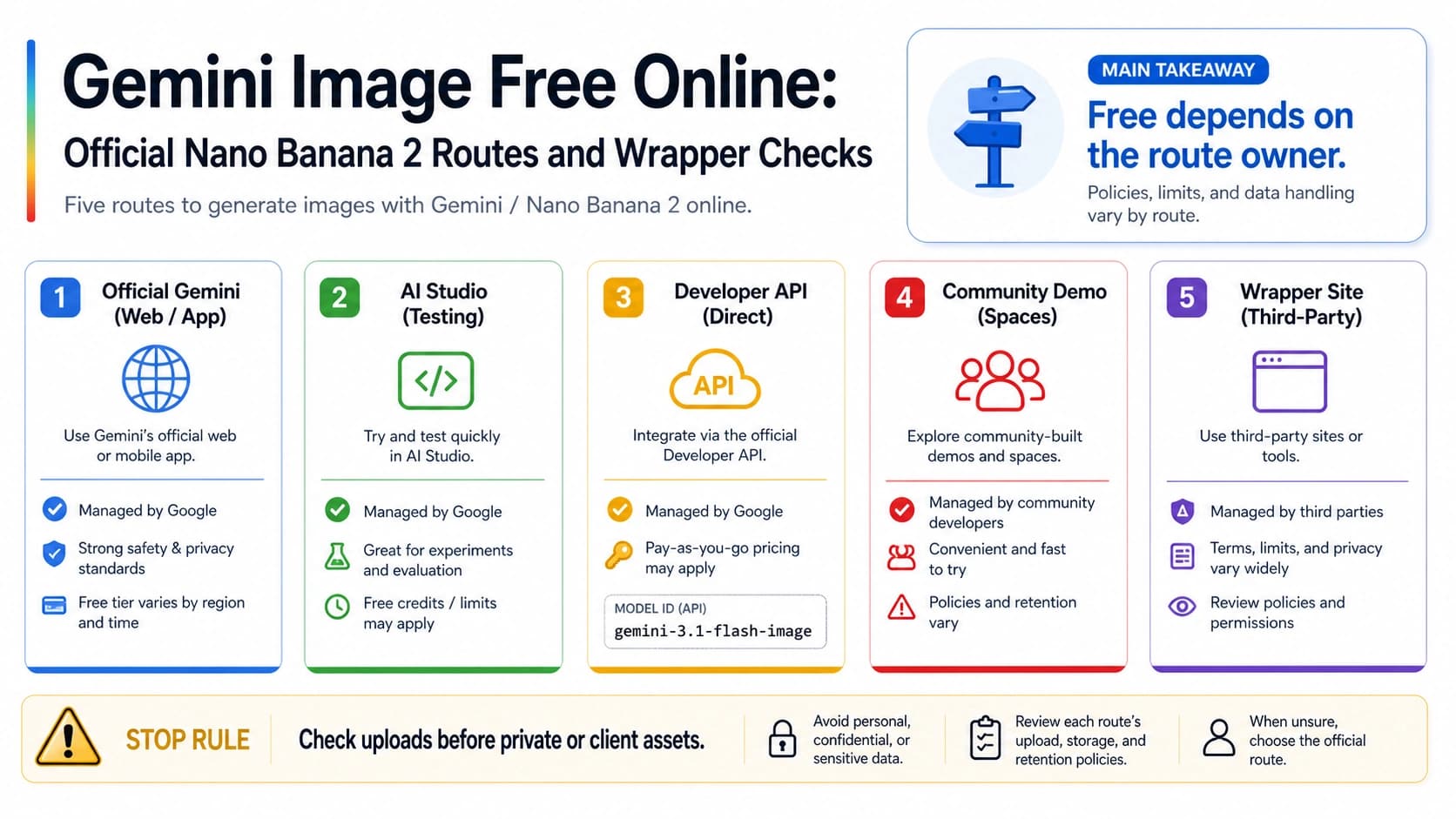
The fastest answer is not one link. It is a route board. Hugging Face can host a runnable Nano Banana Space, Google owns the model documentation and official API contract, wrapper sites own their own credit and upload terms, and local or open-source routes own a different privacy and maintenance burden.
| Route | What it is | Best first use | Stop before trusting |
|---|---|---|---|
| HF PRO Space | A Hugging Face-hosted app with Space-specific access rules | Quick browser test if you already have the required Hugging Face access | Treating it as the official Google product surface |
| Free or community Space | A public Space operated by a specific owner | Low-risk prompt experiments and UI exploration | Uploading sensitive assets before checking owner, auth, limits, and model source |
| Google AI Studio / Gemini API | Google's first-party image generation route | Official model control, repeatable tests, and developer workflows | Assuming app access, Space access, and API billing are one contract |
| Wrapper site | A provider-owned online tool using Nano Banana language | Casual comparison after owner and terms are clear | Copying free, API, or commercial claims without visible terms |
| Local or open-source alternative | A self-run or model-card route outside the hosted demo surface | Privacy-sensitive testing or local workflow experiments | Assuming it is the same model, policy, or quality as Google's Gemini route |
Use a Space when the job is exploratory and the input is safe to upload. Use Google AI Studio when you need a first-party browser surface. Use the Gemini API when the workflow needs project ownership, logging, repeatability, and support clarity. Use wrappers only after their owner, credits, privacy, and export terms are clear enough for the material you are sending.
What The Top Hugging Face Space Actually Gives You
Checked again on July 8, 2026, the most useful Hugging Face starting point is still the multimodalart/nano-banana Space. Its Hugging Face metadata presents it as Nano Banana PRO for Hugging Face PRO users, uses Hugging Face OAuth, and exposes a Gradio-style app surface. Its code and metadata also show why the route needs careful naming: it is a hosted Space backed by Google Gemini image model calls, not a separate official Hugging Face Nano Banana API.
That distinction changes the expectation. If you have the required Hugging Face access, the Space can be a practical browser route for trying prompts, comparing model choices, and learning how the UI behaves. If you do not have that access, it is not a universal free route. If you need API ownership, production logging, billing control, or contractual support, the Space is the wrong object to build around.
The Space also should not be read as a privacy guarantee. A hosted app can have its own authentication, queues, temporary files, logs, model calls, and usage accounting. Some of those behaviors may be visible in code, some may be inherited from the hosting surface, and some may depend on how the Space owner changes the app later. For private images, product assets, faces, legal material, or customer files, a runnable button is not enough. You need an owner and upload policy you can defend.
Audit Any Space Before You Upload
Free and community Spaces are useful for discovery, but their names do not settle the model route. A Space titled "Free Nano Banana", "Nano Banana API", or "Nano Banana Pro" can still be a community app, a paused demo, a wrapper around a Google key, a local experiment, or a different backend entirely. The safe move is to audit the Space before judging the output.
Start with ownership. Check who operates the Space, whether the repository is active, whether the app source is visible, and whether the README explains the intended route. Then check access. A Space may be public, require login, require PRO, ask for your own API key, or run from the owner's key with a shared usage pool. Those are different risk and billing models.
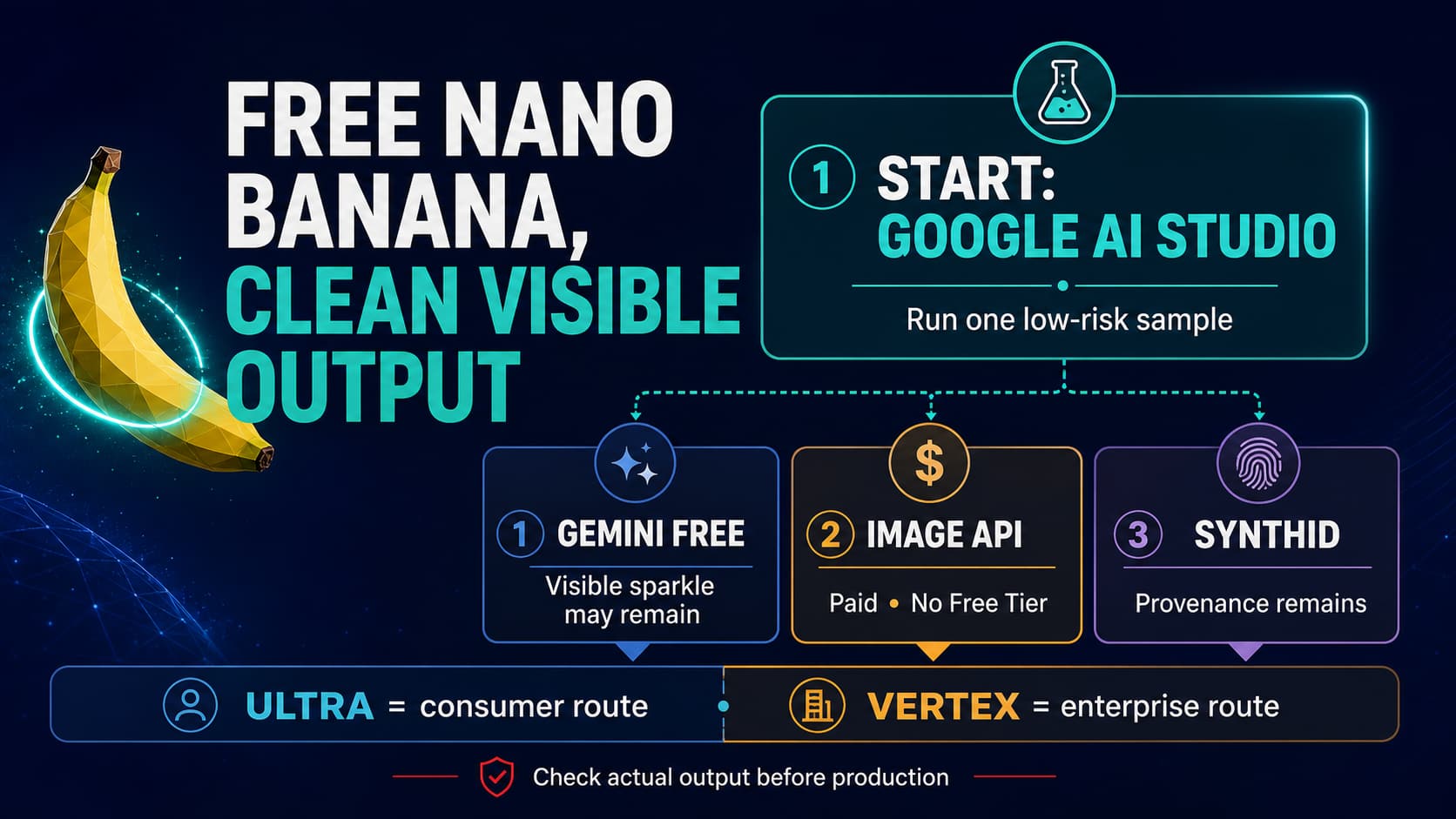
Next, check the model source. If the app calls Google Gemini model IDs, map the model truth back to Google's image generation docs, not only to the Space code. The current official family is gemini-3.1-flash-image for Nano Banana 2, gemini-3-pro-image for Nano Banana Pro, gemini-3.1-flash-lite-image for the lightweight image lane, and gemini-2.5-flash-image as the original Nano Banana route. Google's release notes list the older gemini-3.1-flash-image-preview and gemini-3-pro-image-preview IDs as deprecated and scheduled for shutdown on June 25, 2026, so treat those preview strings as stale production targets even if they still appear in an older Space implementation. If the Space does not show a model source, treat its output as an experiment rather than a known Google route.
Finally, check the upload boundary. A low-risk test prompt with a disposable image is different from a client product photo, a face, a medical image, or a confidential mockup. If the Space does not make retention, logging, deletion, visibility, or downstream model calls clear enough for your asset class, do not upload that asset there.
Choose The Route By Job
The right route depends on what would fail if the route changed tomorrow. For a one-off browser test, a Hugging Face Space can be enough. For a repeatable workflow, the official Google route is usually easier to control. For a private upload, a local or contractually clear route may be required even if it is slower to set up.
| Your job | Better starting route | Why |
|---|---|---|
| Try one public prompt and compare output style | Hugging Face Space | Fastest no-install surface when the input is low risk |
| Test whether Nano Banana 2 or Pro fits a visual style | HF PRO Space or Google AI Studio | Browser feedback is faster than building an API harness first |
| Build an app, batch workflow, or repeatable backend | Gemini API | Project ownership, logs, retries, billing, and model IDs matter |
| Upload private images or customer material | Official/private route, or a local alternative | Hosted demo convenience is not worth unclear upload handling |
| Compare wrapper tools | Wrapper after owner and terms check | The provider owns credits, watermark, export, support, and privacy claims |
| Explore local replacement options | Local or open-source route | Privacy and offline control may matter more than matching Google's route exactly |
This is also where adjacent Nano Banana questions should be split. If the real task is price modeling, use the Nano Banana Pro API cost guide. If the task is video, the Nano Banana text-to-video route guide separates the image layer from Veo. If the task is local workflow replacement, the ComfyUI Nano Banana Pro alternative guide is the better route.
Use The Official Google Route When Control Matters
Google's image generation documentation owns the stable model contract. That does not mean every reader must start there. It means model IDs, API behavior, official examples, and developer boundaries should be checked there before production decisions. A Hugging Face Space can remain useful as a browser surface while still lagging behind the official model lifecycle in its code or labels.
For browser evaluation, Google AI Studio is the cleanest first-party surface. It lets you test the model family without accepting a community Space owner's upload and account behavior. For developer work, the Gemini API is the route to use when request ownership, project billing, repeatable parameters, logs, and policy review matter. The API is also the cleaner place to test model IDs directly instead of inferring them from a hosted app.
The official route is slower only if the reader's goal is a quick click. It is faster when the real task is answering production questions: which model was called, where the request was logged, which project paid, how failure is handled, and what support path exists. Those questions are not overkill for customer assets, brand work, or any workflow where the output becomes part of a product pipeline.
Treat Wrapper Claims As Provider Claims
Wrapper pages can be useful. Some give a cleaner UI, starter credits, a simpler gallery, or access to several models in one place. The risk is that a wrapper headline can collapse five contracts into one phrase: Nano Banana, Hugging Face, Google model, online generator, and free access.
Read those claims as provider claims, not as Google or Hugging Face facts. If a wrapper says it is free, check whether that means starter credits, a queue, a watermarked preview, a lower-resolution output, a trial account, or a promotional allowance. If it says API, check whose API key, whose account, whose model route, and whose support channel are involved. If it says commercial use, look for terms that actually cover the image, upload, output, and payment route.
The safest wrapper test is small and disposable. Use a non-sensitive prompt, avoid client material, note the model or route shown in the job screen, download the result, and check whether credits moved as expected. Do not turn a smooth first generation into a production decision until the owner and terms are clear.
Stop Before Sensitive Uploads
Stop if the Space owner is unclear. Stop if the model source is hidden behind a Nano Banana label. Stop if the app asks for credentials or files without explaining why. Stop if access changes from public to gated at the moment you try to run a real job. Stop if the file contains a face, private product detail, legal content, unreleased creative, or customer data and the upload path is not clear enough for that data.
Switch routes when the same uncertainty would matter in a review. A low-risk prompt can stay on a Space. A production prompt should move to Google AI Studio or the Gemini API. A confidential image should move to a private, official, or local route. A wrapper comparison should stay isolated until its terms, credit behavior, and support path are visible.
Keep a short route note for any tool you decide to use: owner, access mode, model source, upload handling, output rights, credit or billing owner, and support path. That note is more useful than a favorite bookmark because it tells you when the route is still safe and when it has drifted.
Practical First Test
Use a non-sensitive image and a prompt that exposes the behavior you care about. For text-heavy image generation, include a short label and see whether the model follows it. For product work, use a generic sample object rather than a private catalog photo. For style testing, use a synthetic reference or a public-domain image. For edit workflows, test whether the app preserves the region you care about before uploading the real asset.
After the first generation, write down five things: the route you used, the access state, the model or selector shown, the credit movement, and whether the uploaded file can be removed or avoided next time. If any of those are unclear, the route is still an experiment.
The decision should be boring. If the Space gives a useful result on a disposable input, it is a good trial surface. If the next step involves private images, automation, customer-facing output, or a budget, move to a route with clearer ownership.
FAQ
Is Nano Banana available on Hugging Face?
Yes, through hosted Hugging Face Spaces. That does not make Hugging Face the official owner of the model contract. A Space is an online app surface, while Google's Gemini image generation docs own the official model mapping and developer route.
What is the best Nano Banana Hugging Face Space right now?
For a user with the required Hugging Face access, multimodalart/nano-banana is the strongest starting point because it is a prominent Nano Banana PRO Space and its metadata/code make the hosted-app route visible. Treat it as Space-specific, dated behavior, not as a universal free route.
Is there a free Nano Banana Hugging Face online option?
There are community Spaces and wrapper pages that use free language, but each one needs its own owner, auth, queue, model-source, and upload check. Use them only for low-risk tests until the route is clear.
Is Hugging Face the official Nano Banana API?
No. A Hugging Face Space can call a Google model or another backend, but the official Google developer route is Google AI Studio or the Gemini API. Do not describe a hosted Space as the official Hugging Face Nano Banana API.
Which model names should I check?
Use Google's model IDs for the official model map: gemini-3.1-flash-image for Nano Banana 2, gemini-3-pro-image for Nano Banana Pro, gemini-3.1-flash-lite-image for the lightweight image lane, and gemini-2.5-flash-image for the original Nano Banana route. Do not build new code around gemini-3.1-flash-image-preview or gemini-3-pro-image-preview; Google marked those preview IDs deprecated and scheduled them for shutdown on June 25, 2026.
Can I upload private images to a Hugging Face Space?
Only if the Space owner, upload handling, retention, logging, and support boundary are clear enough for that asset. If the file contains client work, private faces, unreleased product material, or regulated data, use an official/private route or a local alternative instead.
Should I use Hugging Face or Google AI Studio first?
Use Hugging Face first for a disposable browser test when the Space is clear enough. Use Google AI Studio first when you want a first-party surface. Use Gemini API first when you need production ownership, logs, repeatability, and project billing.
What if a wrapper says Nano Banana API online?
Treat it as a provider-owned route. Check who operates it, which backend is called, who pays, what limits apply, how uploads are handled, and where support lives before using it for anything beyond a small test.