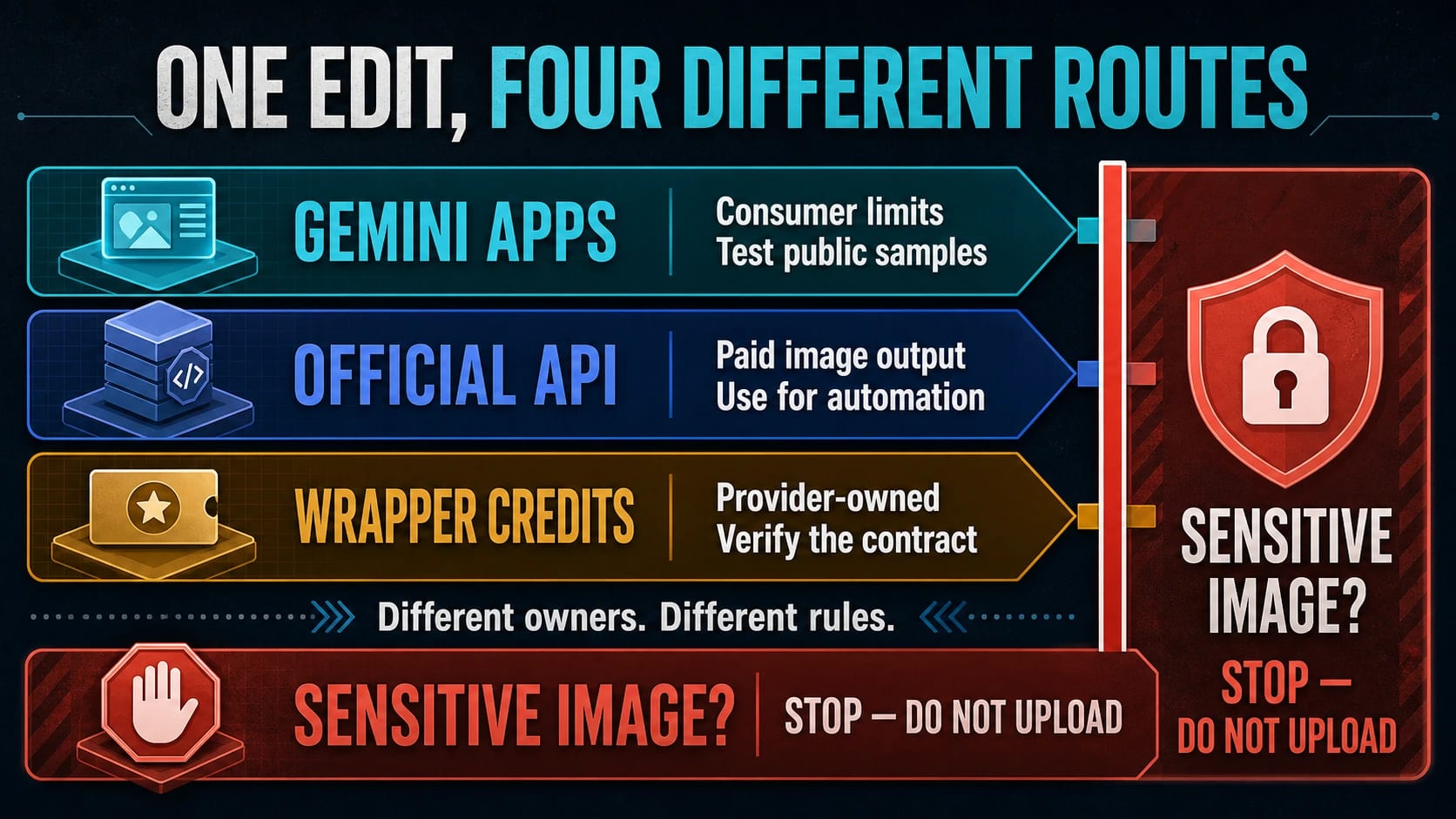
There is no universal pool of free daily Nano Banana Pro credits. In Gemini Apps, free account-dependent image editing currently uses Nano Banana 2, while Nano Banana Pro appears through a paid-plan “Redo with Pro” route; Google’s current API pricing lists no free tier for either image model. Any starter or daily credits you see on a third-party editor are that wrapper’s allowance, not Google’s—and they translate into an edit count only when the page names the model, reset, expiry, and credits per edit. The safest default is to test a non-sensitive sample in Gemini Apps, pay for the official API when automation matters, and stop before sending private or client images to an unclear wrapper.
Fast Answer: Who Owns the Free Allowance?
| Route | Who owns the allowance? | What is actually free? | Is Pro proved? | What does one edit cost? | Stop when |
|---|---|---|---|---|---|
| Gemini Apps | Google’s consumer product | Account-dependent Nano Banana 2 image use may be available without a paid plan | Only when the session exposes the paid-plan “Redo with Pro” route | Google does not publish one permanent edit count; limits can vary | The file is sensitive or the visible account/model route does not meet the job |
| Official Gemini API | Google’s developer platform | No free tier is listed for the current Nano Banana 2 or Pro image-model rows | Yes, when the request names gemini-3-pro-image | Paid per image output and resolution | You cannot accept billing, data-handling, or automation requirements |
| Third-party wrapper | The wrapper provider | A starter grant, daily check-in, or other vendor-defined balance may be advertised | Not from the “Pro” label alone | Unknown until the selected model, resolution, edit mode, and credit cost are disclosed | Model identity, upload handling, rights, privacy, or failure billing is unclear |
This ownership boundary resolves the apparent contradictions before an image leaves the device. Gemini Apps limits are not API credits. An API key is not a free-output entitlement. A wrapper’s “daily credits” are not issued by Google. The remaining decision is whether the route fits the image, the required quality, and the risk of uploading it.
Gemini Apps: The Official Consumer Test Route
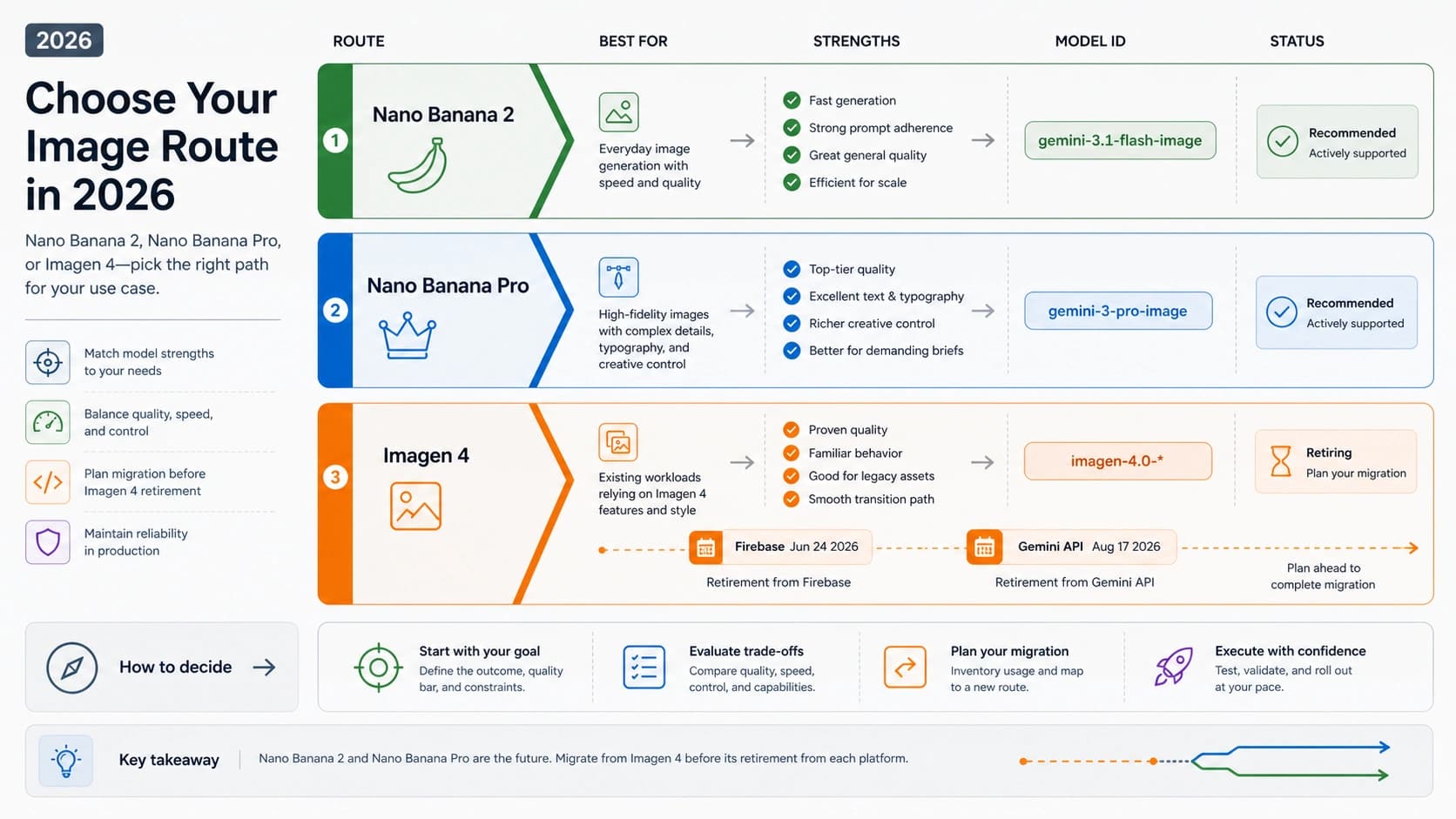
Google’s Gemini image-generation help, checked July 17, 2026, says Gemini Apps can edit an image generated in the app, edit an uploaded image, or combine uploaded images. The current consumer model split matters: ordinary image creation and uploaded-image editing use Nano Banana 2, while Nano Banana Pro is offered to paid subscribers through “Redo with Pro.” A free Gemini edit should therefore not be described as a free Pro edit unless the visible session actually identifies the Pro route.
The companion Gemini Apps limits page, also checked July 17, 2026, does not support a permanent daily number. Google says limits can change because of testing, experimentation, availability, activity, and capacity. Account age, region, plan, school or work account restrictions, the product surface, and the currently visible model can also change what a reader sees.
Use Gemini Apps first when all three conditions are true:
- The image is public, synthetic, disposable, or otherwise non-sensitive.
- The goal is to test an instruction or explore an edit, not build a repeatable automated pipeline.
- The result can tolerate account-dependent quotas and a model choice that may not be Pro.
Check the model label before drawing a conclusion. If the edit succeeds with Nano Banana 2, that proves the consumer route can complete the task; it does not prove a free Pro allowance. If “Redo with Pro” is visible and the account has the required paid plan, the reader can choose whether the extra detail is worth using the paid-plan quota. If the route is absent, do not infer entitlement from a tutorial or a wrapper’s branding.
Official Gemini API: No Free Image-Model Tier in the Current Table
The Gemini Developer API is a different contract. It is the clearer route for applications that need a named model, controlled resolution, logs, retries, and repeatable automation, but an API key only authenticates a request. It does not create free Nano Banana Pro output.
Google’s Gemini API pricing page, checked July 17, 2026 and marked “Last updated 2026-07-09 UTC,” lists no free tier for either current image-model row:
| Official API model | Free tier shown on July 17, 2026 | Standard image-output price shown on that date |
|---|---|---|
gemini-3-pro-image (Nano Banana Pro) | Not available | About $0.134 per 1K/2K output and $0.24 per 4K output |
gemini-3.1-flash-image (Nano Banana 2) | Not available | About $0.045 per 0.5K, $0.067 per 1K, $0.101 per 2K, and $0.151 per 4K output |
These are dated price rows, not permanent guarantees. Recheck the official table before estimating a production budget. Do not transfer a Gemini Apps consumer allowance, a Google AI subscription benefit, or a wrapper credit into an API cost calculation.
The API becomes the stronger choice when the edit must be reproducible, when the application needs to record the exact model and resolution, or when a team needs a supportable billing route. A one-off public sample may not justify that overhead. A recurring production workflow usually does. For budgeting, count the expected iterations at the target resolution rather than pricing only the accepted final.
Four Allowance Types That Should Not Be Added Together
“Free credits” can describe four materially different things:
- Consumer quota: product usage controlled by an account, plan, capacity, and interface. Gemini Apps belongs here.
- Starter credits: a one-time balance offered after signup or login. It can fund a trial but does not establish daily use.
- Daily refill or check-in: a wrapper-defined reward that may reset automatically or require a claim action. Its reset clock, rollover, and expiry still need proof.
- Paid balance: credits bought from a wrapper or image outputs billed by an official API. These are not free even if the same dashboard also shows a trial balance.
Never combine those balances into a single “Nano Banana daily limit.” Each owner can change its own contract, and a balance has no useful edit value until its denominator is known.
Use this calculation only when every input refers to the same route and current session:
estimated edits = floor(usable credits / credits per edit)
“Usable credits” means the amount that can actually be spent on the selected model, resolution, and edit mode before the relevant reset or expiry. A headline balance may include referral credits, model-locked credits, or a reward that has not yet been claimed. Those should not be counted unless the provider’s current interface says they are usable for the intended edit.
A fully calculable hypothetical example
Suppose a fictional wrapper shows 20 usable credits, charges exactly 3 credits for the selected image-edit model at the selected resolution, and confirms those values apply to the current session. The estimate is:
floor(20 / 3) = 6 edits, with 2 credits left.
That is an arithmetic example, not a promise by any provider. If the wrapper charges more for a reference image, high resolution, or a Pro-labeled route, the denominator must change before the calculation is reused.
An intentionally uncalculable real claim
The public nanobanana.im page advertised up to 2 free credits after login when checked July 17, 2026. The public claim did not establish a daily reset or a stable credit cost for the selected Pro edit. Therefore:
floor(up to 2 credits / unknown credits per edit) = unknown edits
The balance may still be useful as a trial offer. It cannot support an honest edit count or a daily recurrence claim from the public information reviewed.
The Allowance Worksheet
Fill this out for the exact route visible in the session. If any required calculation cell is unknown, keep the estimated edit count unknown.
| Worksheet field | What to record | Why it matters |
|---|---|---|
| Allowance owner | Google consumer product, Google API, or named wrapper | Prevents one owner’s promise from being transferred to another |
| Allowance type | Account quota, starter grant, daily refill, daily claim, or paid balance | Shows whether the balance repeats |
| Usable credits | Spendable amount for this model and edit mode | Removes locked, expired, or unclaimed credits |
| Reset and timezone | Exact time or unknown | Determines when recurring use returns |
| Rollover and expiry | Exact rule or unknown | Prevents overcounting saved credits |
| Selected model and resolution | Visible model ID/label and output size | Credit cost can change across choices |
| Credits per edit | Exact current cost or unknown | Supplies the denominator |
| Estimated edits | floor(usable / per edit) or unknown | Produces a defensible budget |
| Failure billing | Refund/restore rule or unknown | A failed edit can consume the same allowance |
This worksheet is also a stop test: an unknown cost per edit stops the calculation, while unknown upload handling or rights stops any real-file upload. A disposable image can still test the interface, but it cannot turn an unknown contract into a production-ready route. When failure billing is unknown, keep a credit reserve instead of budgeting the full theoretical edit count; do not assume a blocked, timed-out, or failed request restores credits.
What Current Wrapper Claims Do—and Do Not—Establish
Third-party editors can reduce signup friction or make an upload workflow convenient. Their numbers are still provider claims. Public pages were checked on July 17, 2026 without creating accounts, verifying logged-in balances, running generations, proving the backend model, testing privacy behavior, or reviewing commercial-rights enforceability.
| Provider claim checked July 17, 2026 | Allowance type | What can be stated | What remains unknown from the reviewed public evidence |
|---|---|---|---|
nanobanana.im: up to 2 free credits after login | After-login offer; daily recurrence not established | The provider advertised an after-login allowance | Reset, rollover, expiry, selected backend, per-edit cost, upload retention, rights, watermark, and failed-generation billing |
nanobananas.ai: 20 credits per daily check-in | Provider-described daily check-in | The provider advertised a recurring check-in amount | Reset time/timezone, rollover, expiry, selected backend, stable cost for an uploaded-image edit, privacy, rights, watermark, and failed-generation billing |
inanobanana.com: 2+ daily credits and 1–3 credits per generation | Provider-described daily allowance with a variable generation cost | The public numbers show why model and mode must be selected before estimating | Exact reset/expiry, whether upload editing follows the same cost range, backend identity, privacy, rights, watermark, and failed-generation billing |
nano-banana-pro.io: 20 starting credits and resolution-dependent Pro costs | Starter grant, not a proven daily refill | The provider advertised a first-session balance and variable cost by output choice | Recurrence, rollover, expiry, upstream route, upload handling, rights, watermark, and failed-generation billing |
These examples are not a ranking. A provider with more advertised credits is not automatically the better route. The offer with the clearest model, cost, reset, upload, rights, and support contract is easier to budget—even when its headline balance is smaller.
Apply the same questions to any wrapper:
- Who issues the credits, and are they starter, daily, claim-based, referral, or paid?
- What exact model, resolution, and edit mode consumes them?
- What is the current cost per edit, including reference-image or high-resolution surcharges?
- When do credits reset or expire, and do unused credits roll over?
- Are blocked, timed-out, or failed generations refunded?
- What happens to uploaded images, and are retention or deletion terms explicit?
- Are output rights, visible watermark rules, and support paths stated for this plan?
If the answer is missing, write unknown. Do not substitute a marketing label, a search snippet, or another provider’s terms.
Choose the Route by Job—and Let Sensitivity Override Price
The image’s sensitivity can make a free route unacceptable before quality or credit count is considered.
| Image job | First route | Why | Switch or stop when |
|---|---|---|---|
| Casual edit of a public or synthetic sample | Gemini Apps with Nano Banana 2 | Official consumer surface; good for testing the instruction | The visible route cannot complete the edit, or Pro-level detail becomes necessary |
| Non-sensitive wrapper UI trial | A provider whose current terms and allowance are clear | Useful for checking workflow fit without making it a production dependency | Model, reset, upload handling, rights, or failure billing is unclear |
| Dense text, detailed layout, or final high-resolution asset | Paid-plan “Redo with Pro” or the official Pro API | The job may justify Pro capability and a named owner | Nano Banana 2 already meets the acceptance bar, or the route cannot meet rights/privacy needs |
| Repeatable application workflow | Official Gemini API | Named models, explicit resolution choices, logs, and paid billing | The job is a one-off experiment with no automation need |
| Private, client-owned, regulated, unreleased, licensed, biometric, medical, financial, legal, or confidential image | No upload until a trusted route and applicable terms are approved | Data and rights risk owns the decision | Never bypass the stop rule to obtain free credits |
For the last row, “trusted” is contextual. It can require a contract, retention controls, regional processing commitments, a business account, legal approval, or a route that never receives the file. A generic public privacy page may not be enough for regulated or client-controlled material.
A Safe Test Workflow Before Production
Use this sequence to learn from a free route without treating it as a production contract:
- Choose a disposable image. Use a synthetic scene, a public-domain asset, or a sample you own that contains no faces, client data, confidential text, or unreleased product detail.
- Try Gemini Apps first. Confirm that uploaded-image editing is available and note whether the visible route says Nano Banana 2 or offers paid-plan “Redo with Pro.”
- Record the allowance owner. Do not call an account quota, API bill, starter credit, and daily check-in the same thing.
- Calculate only when possible. Capture usable credits, selected model, resolution, edit mode, reset/expiry, and credits per edit. Otherwise record
unknown edits. - Read wrapper terms before upload. Check retention, deletion, rights, watermark, support, and failed-generation treatment before a wrapper sees even a low-risk reference.
- Inspect the output and route record. Look for identity drift, unintended object changes, broken text, resolution limits, and whether the interface kept the model/cost promise visible.
- Move real work to a defensible route. Use a paid official or contractually approved route when automation, repeatability, privacy, rights, or support matters.
If the reader’s job broadens from Nano Banana-specific uploaded-image editing to comparing recurring allowances across many providers, continue with the free AI image generator daily credits guide. Keep the contracts separate: that broader category page does not prove that any listed allowance uses Nano Banana Pro.
FAQ
Does Gemini give free Nano Banana Pro edits every day?
Google’s current help pages do not establish a universal daily pool of free Pro edits. Gemini Apps currently uses Nano Banana 2 for account-dependent image editing and offers Nano Banana Pro through a paid-plan “Redo with Pro” route. Limits can change with account, plan, availability, and capacity.
Is there a free Nano Banana Pro API tier?
Not in the official pricing table checked July 17, 2026. The gemini-3-pro-image and gemini-3.1-flash-image rows both showed no free tier. An API key is a credential, not a free-output grant.
How many edits do wrapper credits buy?
Use floor(usable credits / credits per edit) only after the selected model, resolution, edit mode, and current cost are known. If a provider advertises a balance but does not disclose the matching denominator, the honest answer is unknown edits. A cost range still cannot produce one dependable count until the chosen edit maps to a specific value within that range.
Do daily credits roll over?
Only when the wrapper’s current contract says so. “Daily” may mean an automatic refill, a manual check-in, or a balance with a reset window. Reset time, timezone, rollover, and expiry are provider-specific; mark each field unknown when it is not disclosed.
Should I upload a private or client image to a free editor?
Not until the route satisfies the applicable privacy, retention, rights, support, and contractual requirements. For regulated, confidential, biometric, medical, financial, legal, licensed, client-owned, or unreleased material, stop before upload when any of those terms are unclear.