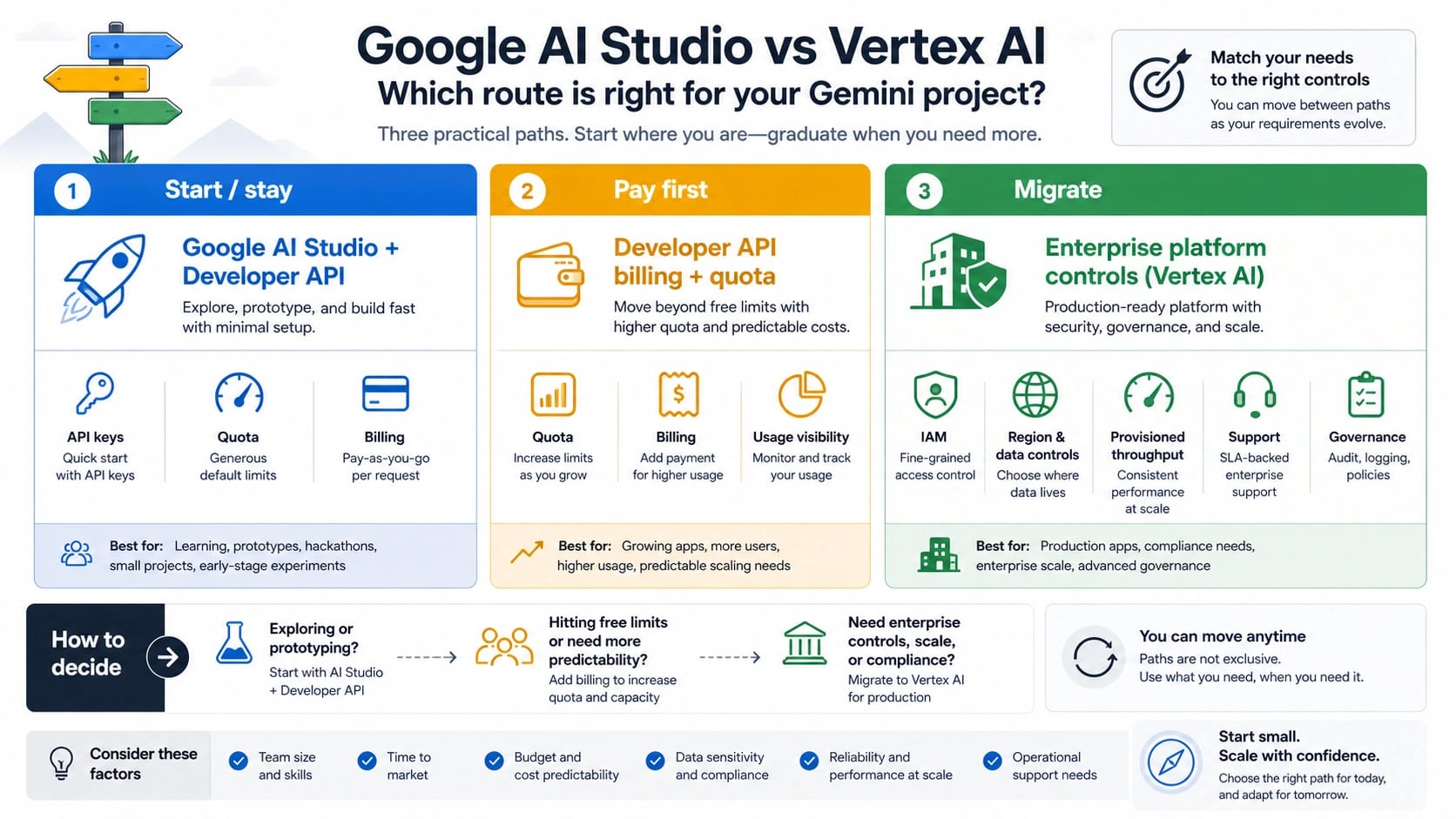
If your Gemini prototype is close to launch, start with Google AI Studio and the Gemini Developer API unless a specific enterprise control is already a requirement. Pay the Developer API when the blocker is quota, billing, project ownership, or ordinary model access; move to the enterprise platform when governance, regional/data controls, provisioned throughput, Model Garden, MLOps, private networking, support, or compliance becomes non-negotiable.
The familiar comparison often says "AI Studio vs Vertex AI", but the practical route is three lanes: Developer API for building, paid Developer API for normal production pressure, and Gemini Enterprise Agent Platform when Cloud-level controls are part of the acceptance criteria. Treat pricing, rate limits, API-key migration, endpoint behavior, data use, data residency, and zero-retention claims as current-doc checks before committing.
Quick route board
| If this is your blocker | Start here | Why |
|---|---|---|
| You need to test prompts, model behavior, function calls, or a backend prototype quickly. | Google AI Studio plus the Gemini Developer API. | Google positions the Developer API as the route most developers should use unless specific enterprise controls are needed. |
| The prototype works, but the next issue is quota, billing, project ownership, or model access. | A paid Developer API project. | The paid lane changes the project state without forcing an enterprise platform migration. |
| The workload cannot launch without IAM policy, organization controls, regional or data controls, provisioned throughput, Model Garden, MLOps, VPC/security review, support, or compliance review. | Gemini Enterprise Agent Platform. | Those controls belong to the Google Cloud enterprise route, not to a quick prototype surface. |
The most common mistake is treating AI Studio as a toy and the enterprise platform as the only production answer. That was a useful shortcut when the conversation was simple, but it hides the middle lane. A paid Gemini Developer API project can be the right production route when the application needs billing, higher limits, project ownership, and paid data-use terms, but not the full enterprise control stack.
The second mistake is treating a working AI Studio key as proof that the workload is production-ready. A key proves credential creation. It does not prove the project has the right billing state, live rate limits, data policy, endpoint choice, or rollout controls.
AI Studio, Developer API, Vertex AI, and Enterprise are different surfaces
Use the names by owner, not by vibe.
| Name readers use | Practical owner | Use it for | Do not use it for |
|---|---|---|---|
| Google AI Studio | Browser surface for trying Gemini, creating keys, inspecting projects, and prototyping. | Prompt testing, quick API keys, first calls, project visibility. | A guarantee that every model, region, quota tier, or production policy is already approved. |
| Gemini Developer API | The direct developer API route at ai.google.dev. | Most app builds, SDK integrations, simple production backends, paid projects that do not need enterprise controls. | Enterprise IAM, data residency promises, MLOps governance, or private networking by itself. |
| Paid Developer API | The same Developer API route with billing and paid-tier behavior. | Ordinary production pressure: quota, billing, higher usage, data-use boundary, team-owned projects. | Replacing compliance architecture when policy requires Cloud-level controls. |
| Vertex AI / enterprise platform | The Google Cloud enterprise route now surfaced in current docs as Gemini Enterprise Agent Platform and related Cloud AI services. | Organization governance, regional endpoints, managed model platform work, provisioned throughput, support, compliance, MLOps. | A default answer to every "production" question. |
| Gemini Enterprise app | A user-facing enterprise app experience. | Company knowledge, app-level workflows, enterprise user access. | The same thing as the Developer API route or every Vertex AI API call. |
Google's current Gemini API migration documentation describes two API products: the Gemini Developer API and the Gemini Enterprise Agent Platform API. It also says most developers should use the Developer API unless they need specific enterprise controls. That sentence is the center of the decision.
The word "Vertex" still matters because many developers, older tutorials, and Cloud users use it as shorthand for the enterprise side. Keep it as a recognition word. Do not let it erase the actual choice: direct Developer API first, paid Developer API when the next problem is ordinary production readiness, enterprise platform when a named control is mandatory.
Stay on the Developer API when the work is still app-shaped
Stay on Google AI Studio and the Gemini Developer API when the job is to build, test, and ship a normal Gemini-powered application without enterprise platform obligations.
Good Developer API jobs include:
- prompt and response-shape testing
- small or medium backend integrations
- SDK work with the unified Google Gen AI SDK
- model behavior checks before a product decision
- function calling, structured output, or multimodal tests
- team prototypes that need a known project owner
- low-risk production services that can operate inside Developer API billing, quota, logging, and data-use terms
The Developer API is not just a demo lane. The better question is whether the workload's unresolved risk is still an application risk or has become a platform governance risk. If the risk is "our paid project needs more predictable quota," stay in the Developer API lane and solve billing, quota, retries, prompt cost, and project ownership there first.
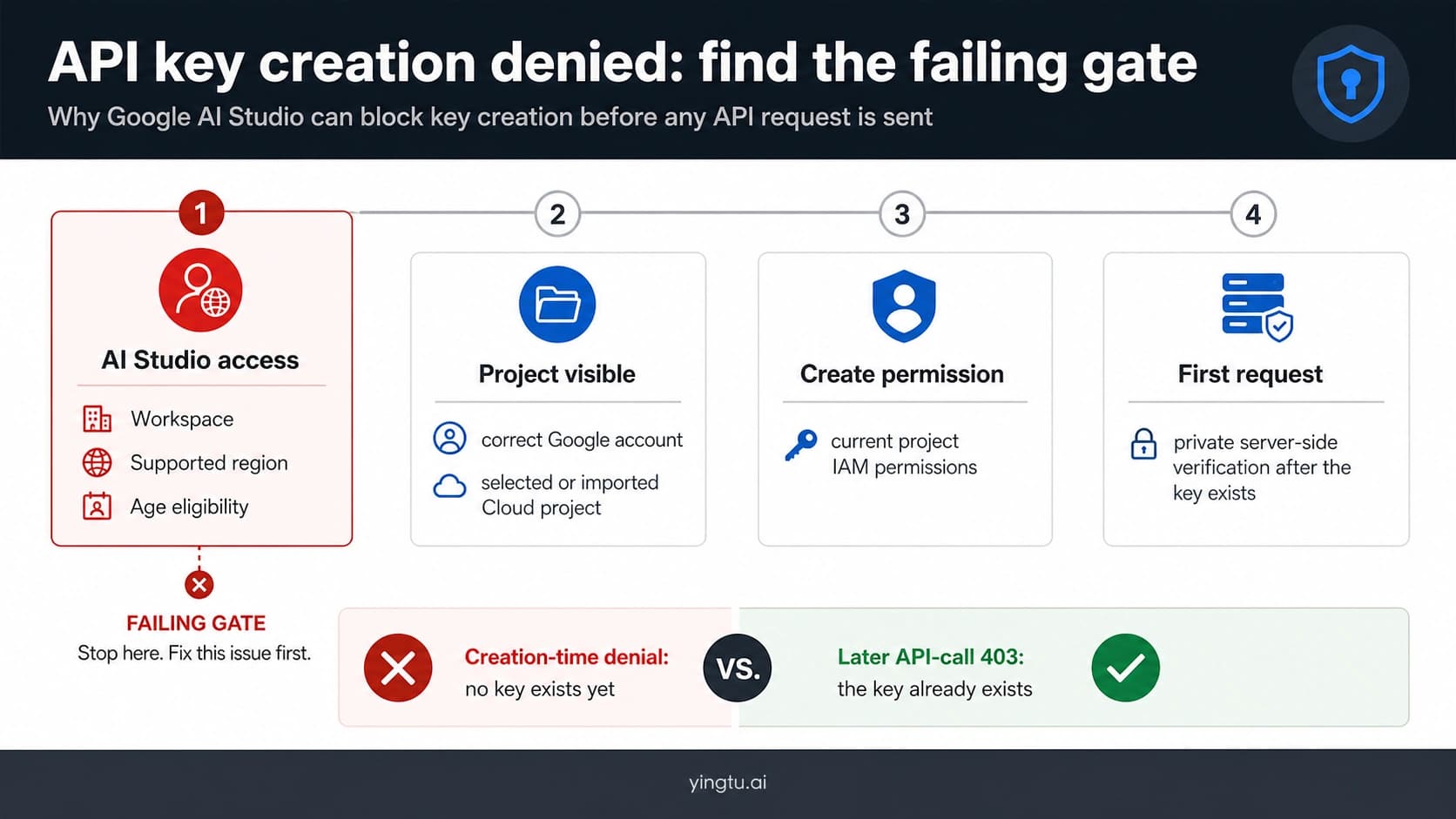
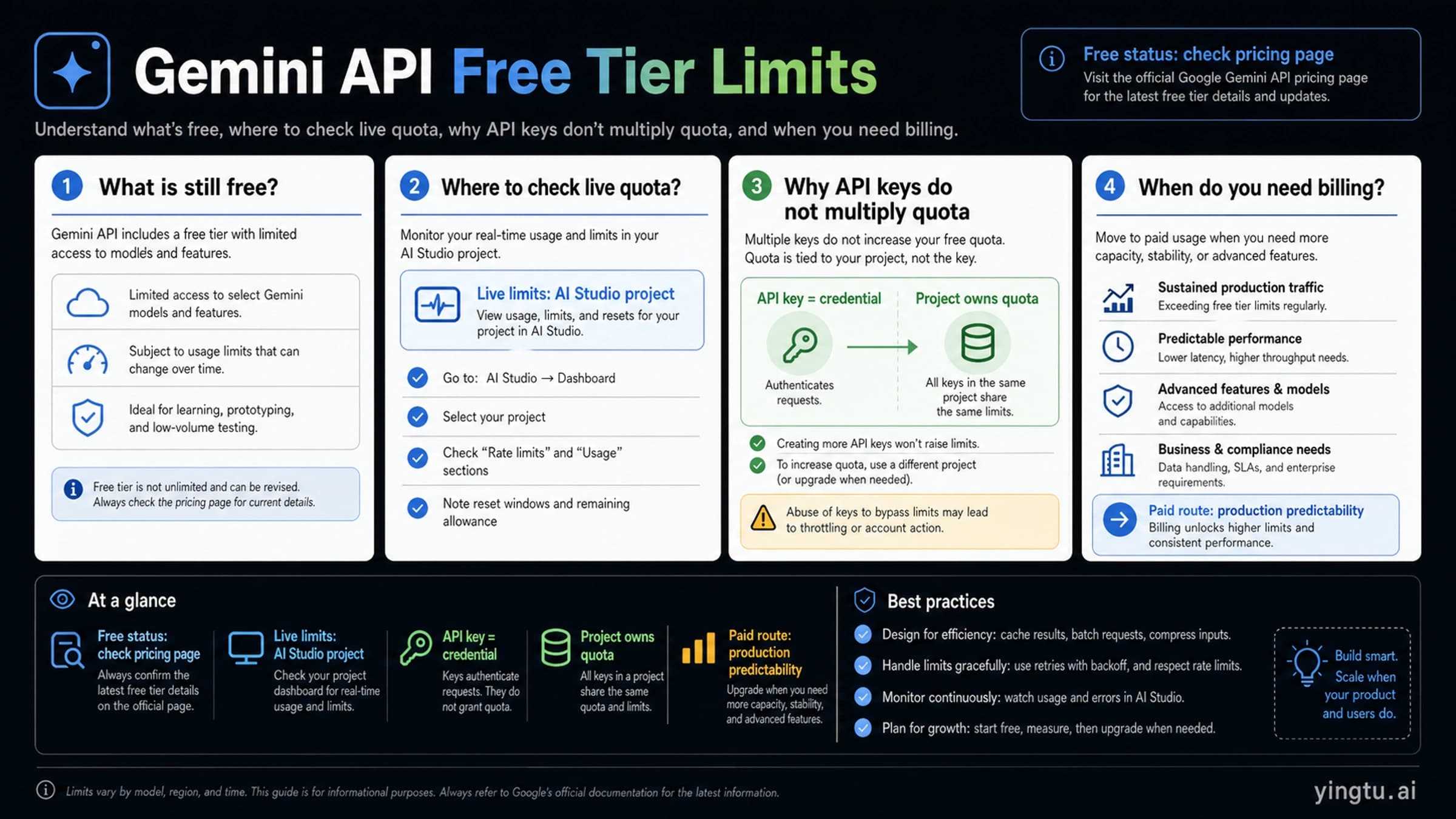
This is also where existing support pages fit. If the immediate job is key creation, project ownership, region eligibility, first request, or key safety, use the Google AI Studio API key setup route. If the immediate job is whether a model row is still free, how project quota works, or why a project hit 429, use the Gemini API free tier limits route.
Pay the Developer API before you migrate for vague production pressure
Paid Developer API is the lane that many two-column comparisons miss.
| Production pressure | Developer API paid lane can solve it when... | Enterprise platform becomes relevant when... |
|---|---|---|
| Billing | The team needs a paid project, budget owner, and higher usage tier. | Billing must align with organization-level procurement, support, committed capacity, or enterprise discount structure. |
| Quota | The app needs higher or more predictable RPM, TPM, RPD, or tier behavior. | Capacity planning requires provisioned throughput, Cloud quota governance, or dedicated enterprise support. |
| Data use | Paid Developer API terms are enough for the workload's data-handling review. | The workload requires enterprise-specific residency, retention, audit, or contractual review. |
| Project ownership | A known Google Cloud project, collaborator list, billing account, and key policy are enough. | IAM, organization policy, service accounts, network controls, and Cloud security review are mandatory. |
| Model access | The needed model is available through the Developer API route. | The team needs managed model platform capabilities, Model Garden, partner models, or MLOps integration. |
Google's pricing page currently separates Free, Paid, and Enterprise tiers. The important publishing-safe lesson is not a static model price copied into a table; it is what each tier means. Free is useful for developers and small projects but includes a product-improvement data-use boundary. Paid is aimed at production applications needing higher volume or advanced features and says content is not used to improve products. Enterprise points to the enterprise platform for support, security/compliance, provisioned throughput, discounts, MLOps, and Model Garden.
Google's billing documentation adds another practical point: rate limits, tiers, billing state, and caps are project or billing-account realities. A project can move through paid setup without turning every architecture decision into a Cloud platform migration.
So do not migrate just because someone says "production equals Vertex." Migrate when the production requirement names a control that the Developer API lane cannot satisfy.
Move to the enterprise platform when controls are mandatory
Enterprise migration is a control decision. The strongest triggers are concrete:
| Trigger | What to ask before moving |
|---|---|
| IAM and organization policy | Does access need Cloud IAM, service-account governance, org policy, or central security review? |
| Endpoint and region control | Does the workload require regional endpoint selection, global endpoint behavior, or location-specific architecture? |
| Data residency and retention | Is there a documented residency, retention, logging, or audit requirement that cannot be satisfied in the Developer API lane? |
| Provisioned throughput | Does traffic require reserved capacity rather than best-effort tier movement? |
| Model Garden and MLOps | Does the team need broader managed model platform work, evaluation pipelines, deployment governance, or partner models? |
| Network and security controls | Does review require VPC, private connectivity, centralized logs, or Cloud security controls? |
| Support and compliance | Does the buyer need enterprise support, contractual review, compliance workflow, or procurement alignment? |
Google's current enterprise docs matter because endpoint language is easy to overread. The locations documentation describes regional and global endpoints, but it also warns that endpoints do not by themselves guarantee data residency or in-region ML processing. The data residency documentation is the place to check supported residency behavior. The zero data retention documentation is the place to check what actions are required for that posture.
Those details change the migration conversation. "More enterprise" is not enough. A migration brief should say which exact control is required, which Google doc owns it, which service or endpoint will satisfy it, and what proof will be accepted by the security or compliance reviewer.
Auth keys changed the old API-key comparison
Older comparisons often imply that AI Studio is just a simple personal key route while the Cloud platform is the serious identity route. Current key behavior is more nuanced.
Google's Gemini API key documentation says Gemini API requests can authenticate with standard API keys or authorization API keys. It also says new keys created in Google AI Studio are auth keys by default. The same docs state that unrestricted standard keys are rejected after June 19, 2026, and that standard keys need migration before September 2026.
That does not make AI Studio the same as the enterprise platform. It means the Developer API route is more project-aware than old "simple key" summaries suggest. Every key is associated with a Google Cloud project, and the project manages collaborators, permissions, and billing context. That is enough for many teams, but it is not a substitute for organization-wide IAM policy, Cloud network controls, residency architecture, or MLOps governance.
Use this security split:
| Question | Developer API answer | Enterprise platform answer |
|---|---|---|
| Can a project-owned key support a backend app? | Yes, if the project, billing, limits, model, and key restrictions fit. | Also yes, but the reason to move is broader platform control, not key existence. |
| Should keys live in frontend code? | No. Keep keys server-side or in managed secrets. | Also no. Enterprise controls do not make public credentials safe. |
| Does one project key prove production readiness? | No. Check billing, live limits, data policy, region, and model access. | No. Check IAM, endpoints, residency, retention, support, and rollout controls. |
| Are the June and September 2026 key dates relevant? | Yes, if old standard keys remain in use. | Yes, but enterprise migration should not be used as a shortcut for poor key hygiene. |
A practical migration checklist
Before moving a Gemini workload from Developer API to the enterprise platform, write a short decision record. It should be specific enough that an engineer, product owner, and security reviewer can all agree what changed.
- Name the current route: AI Studio prototype, free Developer API project, paid Developer API project, or existing Cloud enterprise route.
- Name the unresolved blocker: quota, billing, data-use policy, region, IAM, support, provisioned capacity, MLOps, Model Garden, or compliance.
- Check the owner doc: API keys, pricing, billing, rate limits, enterprise locations, data residency, or zero retention.
- Decide whether the blocker is solved by paid Developer API or requires enterprise platform controls.
- Build a small pilot on the target route with the same model family, request shape, latency expectations, retry policy, and logging boundary.
- Confirm cost owner, quota owner, data owner, and support owner before traffic moves.
- Keep rollback simple: the old Developer API route should remain callable until the enterprise path proves equal or better for the accepted workload.
That record is more useful than a broad platform comparison because it keeps the decision tied to the actual blocker. A team that only needs quota and billing should not absorb enterprise migration complexity early. A team that needs data residency or provisioned throughput should not keep pretending a quick API key is enough.
Where setup, quota, and internal links belong
The platform-choice decision should not become a duplicate setup tutorial.
Use these supporting routes when the problem narrows:
| Narrow job | Better next route |
|---|---|
| Create a key, store it safely, make the first request, or debug 403/429 readiness. | Google AI Studio API key setup |
| Check whether a model row is free, understand project-level limits, or decide when to enable billing. | Gemini API free tier limits |
| Decide whether a workload now needs Cloud controls instead of ordinary Developer API production readiness. | Stay here and use the migration checklist. |
The split keeps each page useful. A key setup task needs concrete commands and first-request recovery. A quota task needs pricing and active-limit checks. A platform choice task needs owner surfaces and migration thresholds.
FAQ
Should production Gemini apps use Google AI Studio or Vertex AI?
Use the Gemini Developer API for most production apps unless the workload requires named enterprise controls. A paid Developer API project can handle many normal production needs: billing, quota, project ownership, paid terms, and backend integration. Move to the enterprise platform when IAM, regional/data controls, provisioned throughput, MLOps, Model Garden, support, compliance, or procurement requirements are mandatory.
Is Google AI Studio only for prototypes?
No. Google AI Studio is the browser surface for trying Gemini and creating or managing keys, while the Gemini Developer API is the route many developers can keep using beyond the prototype. The key is not whether the app is "real"; the key is whether the unresolved requirement is ordinary app production readiness or enterprise platform control.
Does Gemini use Vertex AI?
Gemini can be used through different Google surfaces. The direct developer route is the Gemini Developer API. The enterprise Google Cloud route is now framed in current docs around Gemini Enterprise Agent Platform and related Cloud AI services, and many people still use Vertex AI as shorthand for that side. Treat the exact surface as the fact that matters.
When should I pay the Developer API instead of migrating?
Pay the Developer API when the blocker is usage volume, billing, project ownership, access to paid model rows, or the paid data-use boundary. Those are not automatically enterprise migration reasons. They are often signs that the prototype should become a paid Developer API project.
When is the enterprise platform worth it?
The enterprise platform is worth it when the requirement names a platform control: IAM and organization policy, regional endpoint architecture, data residency, zero-retention work, provisioned throughput, Model Garden, MLOps, private networking, enterprise support, compliance review, or procurement structure.
Do AI Studio keys still have a migration issue after June 2026?
Old standard keys need attention. Google's API-key docs say unrestricted standard keys are rejected after June 19, 2026, and standard keys need migration before September 2026. New Google AI Studio keys are auth keys by default. Check the current key docs before relying on old setup snippets.
Does a regional endpoint guarantee data residency?
No. Google Cloud's enterprise endpoint docs distinguish endpoint location from data residency guarantees. If residency matters, verify the specific data-residency documentation, supported location, request path, logging behavior, and retention setup rather than assuming the endpoint name is enough.
Can I keep both Developer API and enterprise routes?
Yes, and a staged migration is often cleaner than a big switch. Keep the Developer API route for prototypes, low-risk workloads, or rollback while a small enterprise pilot proves IAM, endpoint, data, throughput, logging, support, and cost behavior. Move traffic only after the enterprise route satisfies the control that justified it.