When building AI-powered applications, API costs can quickly become the difference between a profitable product and a money-losing experiment. Google's Gemini Flash models have emerged as the go-to choice for cost-conscious developers, offering performance that rivals much more expensive alternatives at a fraction of the price. With the recent release of Gemini 3 Flash in December 2025, Google has further solidified its position as the provider of the most cost-effective AI APIs on the market.
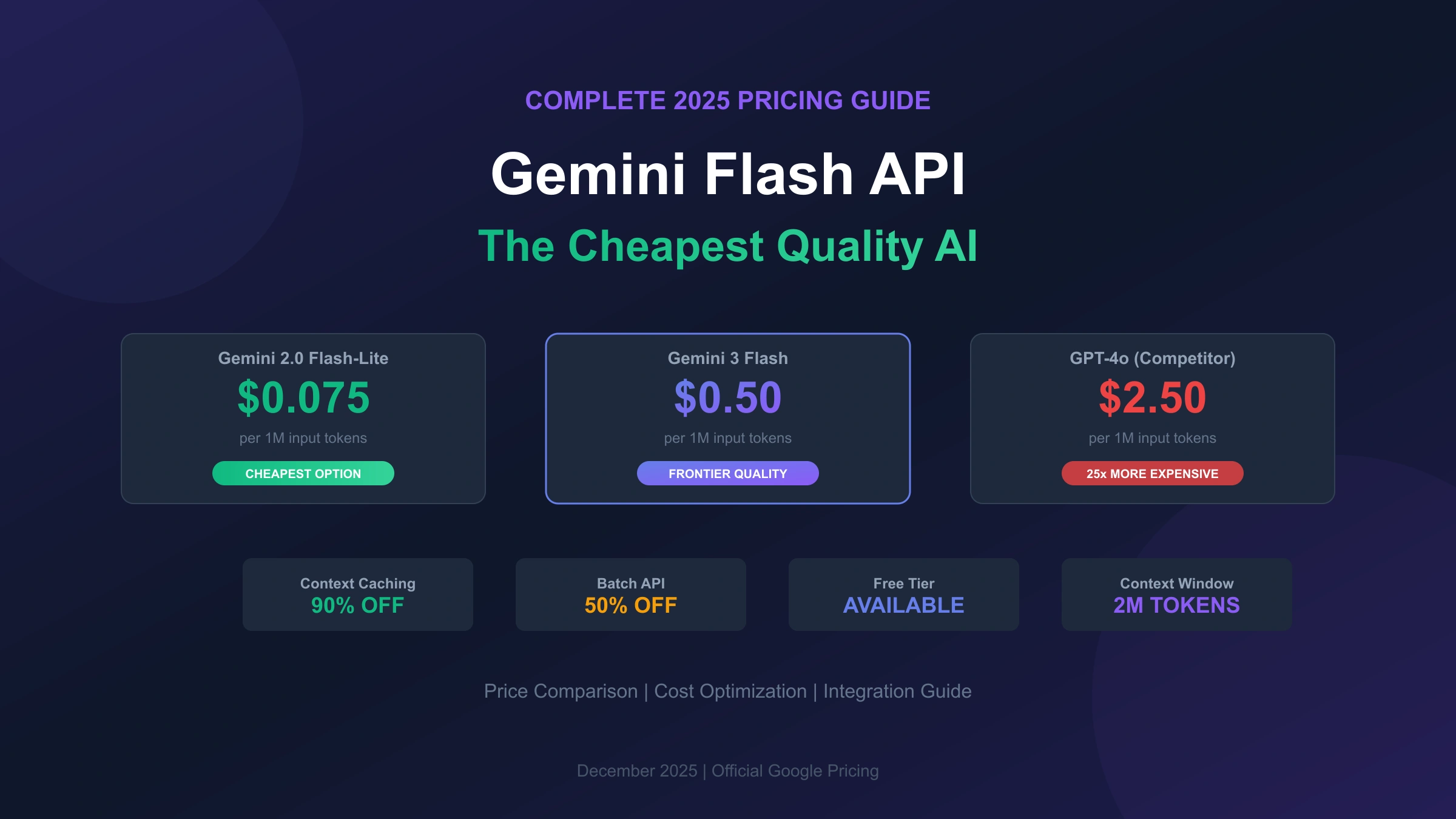
The Gemini Flash family now spans multiple generations and variants, each optimized for different use cases and budget requirements. From the ultra-cheap Gemini 2.0 Flash-Lite at just $0.075 per million input tokens to the frontier-capable Gemini 3 Flash at $0.50 per million tokens, there's an option for every project. Understanding these pricing tiers and how to optimize your usage can mean the difference between spending $100 or $1,000 on your monthly AI bill.
This comprehensive guide breaks down every aspect of Gemini Flash API pricing, compares costs against major competitors like GPT-4o and Claude, and reveals advanced optimization strategies that can reduce your costs by up to 90%. Whether you're a solo developer testing a new idea or an enterprise processing millions of requests daily, you'll find the information you need to make informed decisions about your AI infrastructure spending.
Understanding the Gemini Flash Model Family
Google's Gemini Flash lineup represents a strategic approach to AI accessibility, offering multiple performance tiers to match diverse use cases and budgets. The naming convention follows a generation-based system where higher numbers indicate newer models, while the "Flash" designation signifies optimization for speed and cost-efficiency rather than maximum capability.
The current Gemini Flash family consists of three generations available through the API. Gemini 2.0 Flash serves as the proven workhorse, delivering reliable performance at rock-bottom prices. It handles text, image, video, and audio inputs with a massive 1 million token context window, making it suitable for document analysis, code review, and conversational AI applications. The 2.0 Flash-Lite variant strips away some capabilities in exchange for even lower pricing, ideal for classification and routing tasks where full model capabilities aren't necessary.
Gemini 2.5 Flash represents the middle ground, introducing enhanced reasoning capabilities while maintaining cost efficiency. Its standout feature is implicit caching, which automatically reduces costs when you send similar prompts repeatedly. The 2.5 Flash-Lite variant continues the tradition of offering a budget option with reduced features but exceptional throughput. Both 2.5 models support an expanded 2 million token context window, double that of the 2.0 generation.
Gemini 3 Flash, released in December 2025, brings frontier-level intelligence to the Flash tier for the first time. According to Google's announcement, it achieves 78% on SWE-bench Verified, actually outperforming Gemini 3 Pro on this software engineering benchmark. The model operates 3x faster than Gemini 2.5 Pro while using 30% fewer tokens on average for thinking tasks. This combination of speed, capability, and efficiency makes it the most compelling option for applications that previously required Pro-tier models.
Complete Pricing Breakdown: Every Gemini Flash Model
Understanding exact pricing is crucial for accurate cost projections. The following table presents the current pricing for all Gemini Flash models available through the Google AI Developer API, verified as of December 2025.
| Model | Input Price (per 1M tokens) | Output Price (per 1M tokens) | Free Tier |
|---|---|---|---|
| Gemini 2.0 Flash-Lite | $0.075 | $0.30 | ✅ Available |
| Gemini 2.0 Flash | $0.10 (text/image/video), $0.70 (audio) | $0.40 | ✅ Available |
| Gemini 2.5 Flash-Lite | $0.10 (text/image/video), $0.30 (audio) | $0.40 | ✅ Available |
| Gemini 2.5 Flash | $0.30 (text/image/video), $1.00 (audio) | $2.50 | ✅ Available |
| Gemini 3 Flash Preview | $0.50 (text/image/video), $1.00 (audio) | $3.00 | ✅ Available |
The pricing structure reveals several important patterns. First, text, image, and video inputs are priced identically within each model tier, simplifying cost calculations for multimodal applications. Audio input commands a premium due to the additional processing required for speech recognition and understanding. Second, output tokens consistently cost more than input tokens, typically at a 3-4x ratio. This reflects the computational intensity of text generation compared to prompt processing.
For applications processing large volumes of data, the Flash-Lite variants offer exceptional value. At $0.075 per million input tokens, Gemini 2.0 Flash-Lite can process approximately 750,000 words for just 7.5 cents. Even the most capable Gemini 3 Flash Preview remains remarkably affordable, processing the same volume for only 50 cents. These prices represent a paradigm shift in AI accessibility, enabling use cases that would have been economically impractical just two years ago.
The free tier availability across all Flash models deserves special attention. Google provides generous rate limits for testing and development without requiring payment. While free tier usage means your data may be used to improve Google products, it provides an invaluable opportunity to prototype and validate ideas before committing financial resources.
Gemini Flash vs Competitors: The Price Comparison You Need
Choosing an AI API provider requires understanding the competitive landscape. The following comparison includes major alternatives available to developers in December 2025, with pricing data verified from official documentation and independent analysis by IntuitionLabs.
| Model | Provider | Input ($/1M tokens) | Output ($/1M tokens) | Context Window |
|---|---|---|---|---|
| Gemini 2.0 Flash-Lite | $0.075 | $0.30 | 1M tokens | |
| Gemini 2.0 Flash | $0.10 | $0.40 | 1M tokens | |
| GPT-4o mini | OpenAI | $0.15 | $0.60 | 128K tokens |
| DeepSeek V3 | DeepSeek | $0.28 | $0.42 | 128K tokens |
| Gemini 2.5 Flash | $0.30 | $2.50 | 2M tokens | |
| Gemini 3 Flash | $0.50 | $3.00 | 1M tokens | |
| Claude Haiku 3.5 | Anthropic | $0.80 | $4.00 | 200K tokens |
| GPT-4o | OpenAI | $2.50 | $10.00 | 128K tokens |
| Claude Sonnet 4 | Anthropic | $3.00 | $15.00 | 200K tokens |
The data reveals Gemini's commanding price advantage across the board. Gemini 2.0 Flash costs approximately 25x less than GPT-4o for equivalent token usage, a difference that compounds dramatically at scale. Even compared to OpenAI's budget option, GPT-4o mini, Gemini 2.0 Flash undercuts pricing by roughly 33% on input and output tokens while offering a context window 8x larger.
Against Anthropic's Claude family, the savings are equally substantial. Gemini 3 Flash, despite offering frontier-level capabilities comparable to Claude Sonnet, costs less than 20% as much. For applications where Claude Haiku would suffice, switching to Gemini 2.5 Flash can reduce costs by more than 60% while providing superior context length.
DeepSeek presents interesting competition in the budget segment, with V3 models priced competitively against Gemini Flash. However, DeepSeek's 128K context window limits its applicability for document-heavy workloads, and the company's infrastructure primarily serves Asian markets, which may impact latency for users in other regions. For developers who need reliable access from locations with restricted networks, the latency differences between providers become even more significant.
The context window advantage deserves emphasis. Gemini Flash models offer between 1-2 million tokens of context, dwarfing the 128K-200K offered by competitors. This means you can process entire codebases, lengthy documents, or extended conversations in a single API call, eliminating the need for complex chunking strategies and reducing overall API calls. A single Gemini 2.5 Flash call can analyze approximately 1.5 million words, equivalent to roughly 15 full-length novels or an entire enterprise codebase.
Total Cost of Ownership Analysis
Beyond per-token pricing, total cost of ownership includes factors like development time, infrastructure complexity, and operational overhead. Gemini Flash's advantages compound when considering these factors. The massive context window eliminates the engineering effort required to implement retrieval-augmented generation (RAG) for many use cases. Applications that would require complex vector databases and chunking logic with 128K context models can often work with simple single-call architectures on Gemini Flash.
The OpenAI SDK compatibility further reduces development costs. Teams with existing OpenAI integrations can test Gemini Flash with minimal code changes, enabling rapid cost comparisons without significant engineering investment. This compatibility also simplifies vendor diversification strategies, allowing production systems to fail over between providers seamlessly.
Cost Optimization Strategies That Can Save 90%
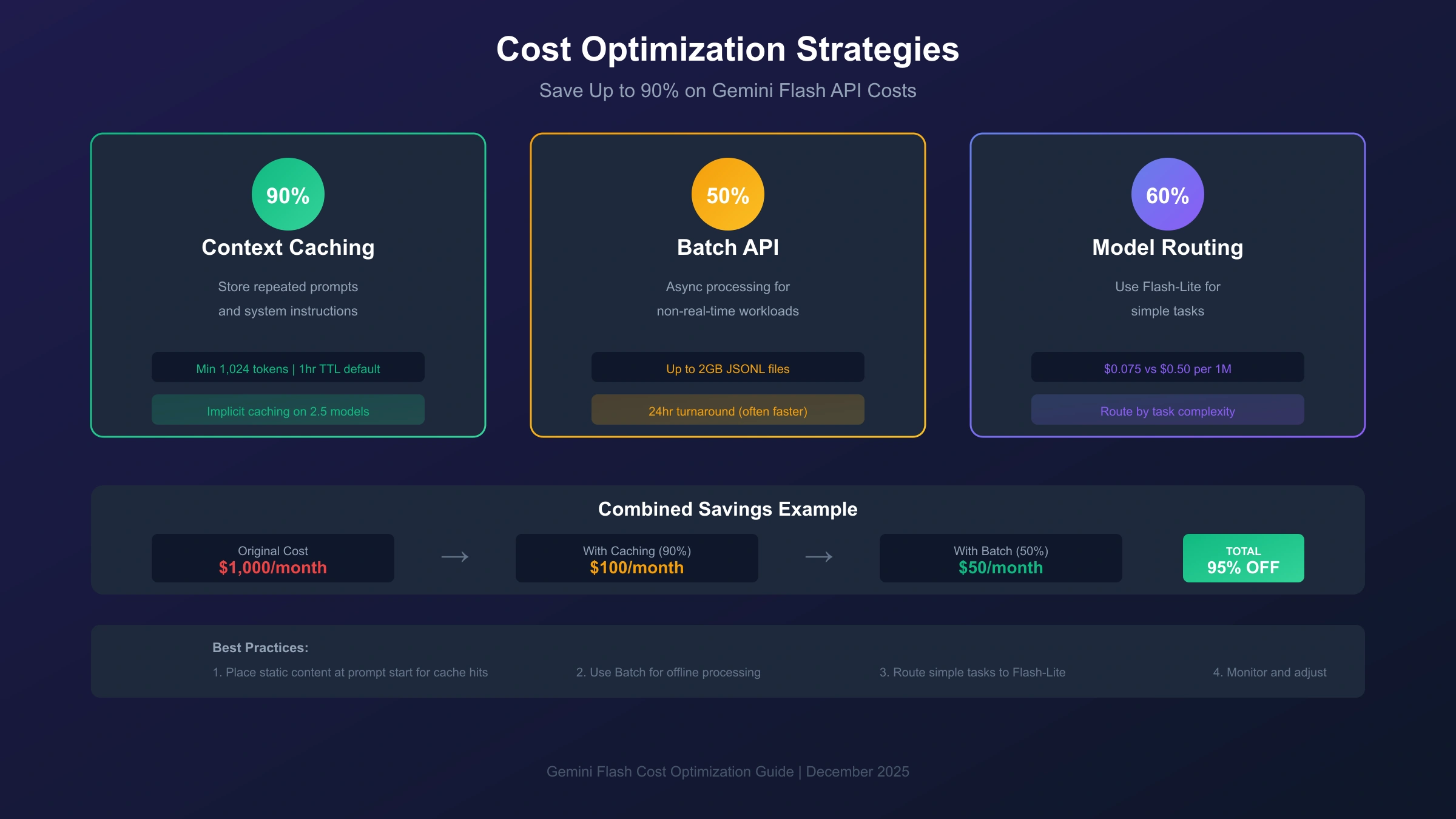
Raw API pricing tells only part of the story. Google provides several powerful mechanisms to reduce costs further, potentially cutting your bill by up to 90% in optimal scenarios. Understanding and implementing these strategies can transform your AI economics.
Context Caching represents the most significant cost-saving opportunity. When you repeatedly send similar content to the API, such as system prompts, reference documents, or few-shot examples, context caching allows you to store this content and reference it in subsequent calls at dramatically reduced rates. For Gemini 2.5 models, cached tokens cost 90% less than standard input tokens. For Gemini 2.0 models, the discount is 75%.
The mechanics work as follows: you create a cache containing your static content, specifying a time-to-live (TTL) that defaults to one hour. Subsequent API calls can reference this cache, paying only the reduced cached token rate instead of the full input price. The minimum cache size is 1,024 tokens for Gemini 2.5 Flash and 2,048 tokens for 2.5 Pro, so this strategy works best for substantial shared contexts.
According to Google's caching documentation, implicit caching is now enabled by default for all Gemini 2.5 models. This means the system automatically identifies cacheable content in your requests and applies discounts when cache hits occur, requiring no additional implementation effort on your part. To maximize hit rates, structure your prompts with static content at the beginning and variable content like user queries at the end.
Batch API processing offers a flat 50% discount on all API costs in exchange for asynchronous processing. Instead of receiving immediate responses, you submit requests in a JSONL file (up to 2GB), and the system processes them within a 24-hour window, though completion typically occurs much faster. This approach suits workloads like content generation, data annotation, document summarization, and offline analysis where real-time response isn't required.
hljs python# Batch API example with Google GenAI SDK
from google import genai
client = genai.Client(api_key="YOUR_API_KEY")
# Upload batch request file
uploaded_batch = client.files.upload(file="batch_requests.jsonl")
# Create batch job with 50% cost savings
batch_job = client.batches.create(
model="gemini-2.5-flash",
src=uploaded_batch.name,
config={'display_name': "document-processing-batch"}
)
# Check status and retrieve results
status = client.batches.get(batch_job.name)
print(f"Status: {status.state}, Progress: {status.request_counts}")
Model tier selection provides another optimization vector. Not every request requires your most capable model. Implementing intelligent routing that sends simple classification tasks to Flash-Lite models while reserving Flash or Pro models for complex reasoning can reduce average costs by 40-60%. Many production systems use a two-tier approach: a fast, cheap model handles initial triage, escalating only to more expensive models when the task demands it.
For developers requiring stable, high-volume API access, third-party aggregation platforms offer additional cost advantages. Services like laozhang.ai provide unified access to multiple AI models through a single API key, with transparent per-token billing and no monthly fees. The platform's multi-node architecture ensures high availability while the OpenAI-compatible interface means minimal migration effort for existing applications.
Real-World Cost Calculations: What You'll Actually Pay
Abstract pricing per million tokens becomes meaningful only when translated into actual project costs. The following scenarios demonstrate expected expenses across different usage patterns, helping you budget accurately for your AI implementation.
Scenario 1: Customer Service Chatbot (10,000 daily conversations)
A typical customer service interaction involves 500 input tokens (conversation history plus user message) and 300 output tokens (bot response). With 10,000 daily conversations:
| Model Choice | Daily Input Tokens | Daily Output Tokens | Daily Cost | Monthly Cost |
|---|---|---|---|---|
| Gemini 2.0 Flash | 5M | 3M | $0.50 + $1.20 = $1.70 | $51 |
| Gemini 2.5 Flash | 5M | 3M | $1.50 + $7.50 = $9.00 | $270 |
| GPT-4o mini | 5M | 3M | $0.75 + $1.80 = $2.55 | $76.50 |
| GPT-4o | 5M | 3M | $12.50 + $30 = $42.50 | $1,275 |
Choosing Gemini 2.0 Flash over GPT-4o for this chatbot saves $1,224 monthly, a 96% cost reduction with comparable quality for routine customer queries.
Scenario 2: Document Processing Pipeline (1,000 documents daily)
Processing legal documents, research papers, or technical manuals typically involves larger context. Assuming 10,000 input tokens per document (roughly 7,500 words) and 2,000 output tokens for summaries and extracted information:
| Model Choice | Daily Input Tokens | Daily Output Tokens | Daily Cost | Monthly Cost |
|---|---|---|---|---|
| Gemini 2.0 Flash | 10M | 2M | $1.00 + $0.80 = $1.80 | $54 |
| Gemini 2.5 Flash | 10M | 2M | $3.00 + $5.00 = $8.00 | $240 |
| With Batch API (50% off) | 10M | 2M | $0.50 + $0.40 = $0.90 | $27 |
| With Caching (90% off input) | 10M | 2M | $0.10 + $0.80 = $0.90 | $27 |
Using Batch API or caching effectively cuts costs in half. For document pipelines with repeated template prompts or system instructions, combining both strategies could reduce the monthly bill to under $20.
Scenario 3: Enterprise Scale (1 million API calls daily)
Large-scale deployments with 1 million daily requests (averaging 1,000 input and 500 output tokens each) represent significant investment:
| Model Choice | Daily Cost | Monthly Cost | Annual Cost |
|---|---|---|---|
| Gemini 2.0 Flash-Lite | $75 + $150 = $225 | $6,750 | $82,125 |
| Gemini 2.0 Flash | $100 + $200 = $300 | $9,000 | $109,500 |
| Gemini 2.5 Flash | $300 + $1,250 = $1,550 | $46,500 | $565,750 |
| GPT-4o | $2,500 + $5,000 = $7,500 | $225,000 | $2,737,500 |
At enterprise scale, model selection becomes a multi-million dollar decision. Gemini 2.0 Flash-Lite costs $2.65 million less annually than GPT-4o for equivalent throughput.
Free Tier: Maximizing Value Without Spending
Google's free tier for Gemini Flash models provides genuine utility for development, prototyping, and low-volume production use. Understanding the limits helps you extract maximum value before committing to paid plans. For developers encountering regional restrictions, our guide on fixing Gemini region not supported errors provides solutions to access the API from any location.
Current free tier allocations vary by model, with quotas resetting daily at midnight Pacific time. The following table summarizes key limits based on Google's rate limits documentation:
| Model | Requests Per Minute (RPM) | Tokens Per Minute (TPM) | Requests Per Day (RPD) |
|---|---|---|---|
| Gemini 2.5 Flash | 10 | 250,000 | 250 |
| Gemini 2.5 Flash-Lite | 15 | 250,000 | 1,000 |
| Gemini 2.0 Flash | 15 | 1,000,000 | 1,500 |
| Gemini 1.5 Flash | 1,000 | 1,000,000 | Unlimited |
These limits support substantial testing. With 250,000 tokens per minute on Gemini 2.5 Flash, you can process approximately 187,500 words (about 375 pages of text) every minute during active development. The 250 daily request limit translates to roughly 10 requests per hour around the clock, sufficient for personal projects or internal tools with limited users.
Strategic approaches maximize free tier value. First, use Gemini 1.5 Flash for high-volume testing scenarios since its unlimited daily requests and 1,000 RPM allowance far exceed other models. Second, implement request queuing to stay within rate limits rather than triggering 429 errors. Third, consolidate multiple small requests into fewer large ones, as token limits often exceed request limits.
For production applications, the free tier introduces important tradeoffs. Free tier usage permits Google to use your input and output data for product improvement, which may conflict with privacy requirements or client agreements. Paid plans explicitly exclude your data from training, making them mandatory for applications handling sensitive information. Students and educators should also explore Gemini student discount options for additional savings opportunities.
Upgrading to Tier 1 paid access immediately unlocks 300 RPM and 1 million TPM, a 30x increase in request throughput. For applications approaching free tier limits, the investment quickly pays for itself through reduced rate-limiting delays and improved user experience. Our complete guide to Gemini Flash free access covers additional strategies for maximizing your free quota.
API Integration Guide: Getting Started in 5 Minutes
Implementing Gemini Flash requires minimal setup thanks to Google's well-designed SDKs. The following examples demonstrate production-ready integration patterns for Python and Node.js, the two most popular languages for AI application development.
Python Integration
Install the Google GenAI SDK using pip, then configure your client with an API key obtained from Google AI Studio:
hljs python# Install: pip install google-genai
from google import genai
# Initialize client (key from environment or explicit)
client = genai.Client(api_key="YOUR_GEMINI_API_KEY")
# Simple text generation
response = client.models.generate_content(
model="gemini-2.0-flash",
contents="Explain quantum computing in simple terms"
)
print(response.text)
# Streaming for real-time output
for chunk in client.models.generate_content_stream(
model="gemini-2.5-flash",
contents="Write a short story about AI"
):
print(chunk.text, end="", flush=True)
# Multi-turn conversation
chat = client.chats.create(model="gemini-2.0-flash")
response1 = chat.send_message("What is machine learning?")
response2 = chat.send_message("How does it relate to AI?")
Node.js Integration
The JavaScript SDK follows similar patterns with TypeScript support:
hljs javascript// Install: npm install @google/genai
const { GoogleGenerativeAI } = require("@google/generative-ai");
const genAI = new GoogleGenerativeAI(process.env.GEMINI_API_KEY);
const model = genAI.getGenerativeModel({ model: "gemini-2.0-flash" });
// Basic generation
async function generate() {
const result = await model.generateContent("Explain REST APIs");
console.log(result.response.text());
}
// Streaming response
async function stream() {
const result = await model.generateContentStream("Write a poem");
for await (const chunk of result.stream) {
process.stdout.write(chunk.text());
}
}
OpenAI SDK Compatibility
For projects already using the OpenAI SDK, migration requires only changing the base URL and API key. This compatibility extends to third-party platforms, enabling seamless model switching:
hljs pythonfrom openai import OpenAI
# Direct Google access
client = OpenAI(
api_key="YOUR_GEMINI_API_KEY",
base_url="https://generativelanguage.googleapis.com/v1beta/"
)
# Or via aggregation platform for unified multi-model access
client = OpenAI(
api_key="YOUR_LAOZHANG_API_KEY", # Get from laozhang.ai
base_url="https://api.laozhang.ai/v1"
)
response = client.chat.completions.create(
model="gemini-2.0-flash", # Easy model switching
messages=[{"role": "user", "content": "Hello, Gemini!"}]
)
print(response.choices[0].message.content)
This compatibility means existing OpenAI-based applications can add Gemini support with a two-line change, enabling cost optimization through model selection without architectural modifications.
Choosing the Right Gemini Flash Model for Your Use Case
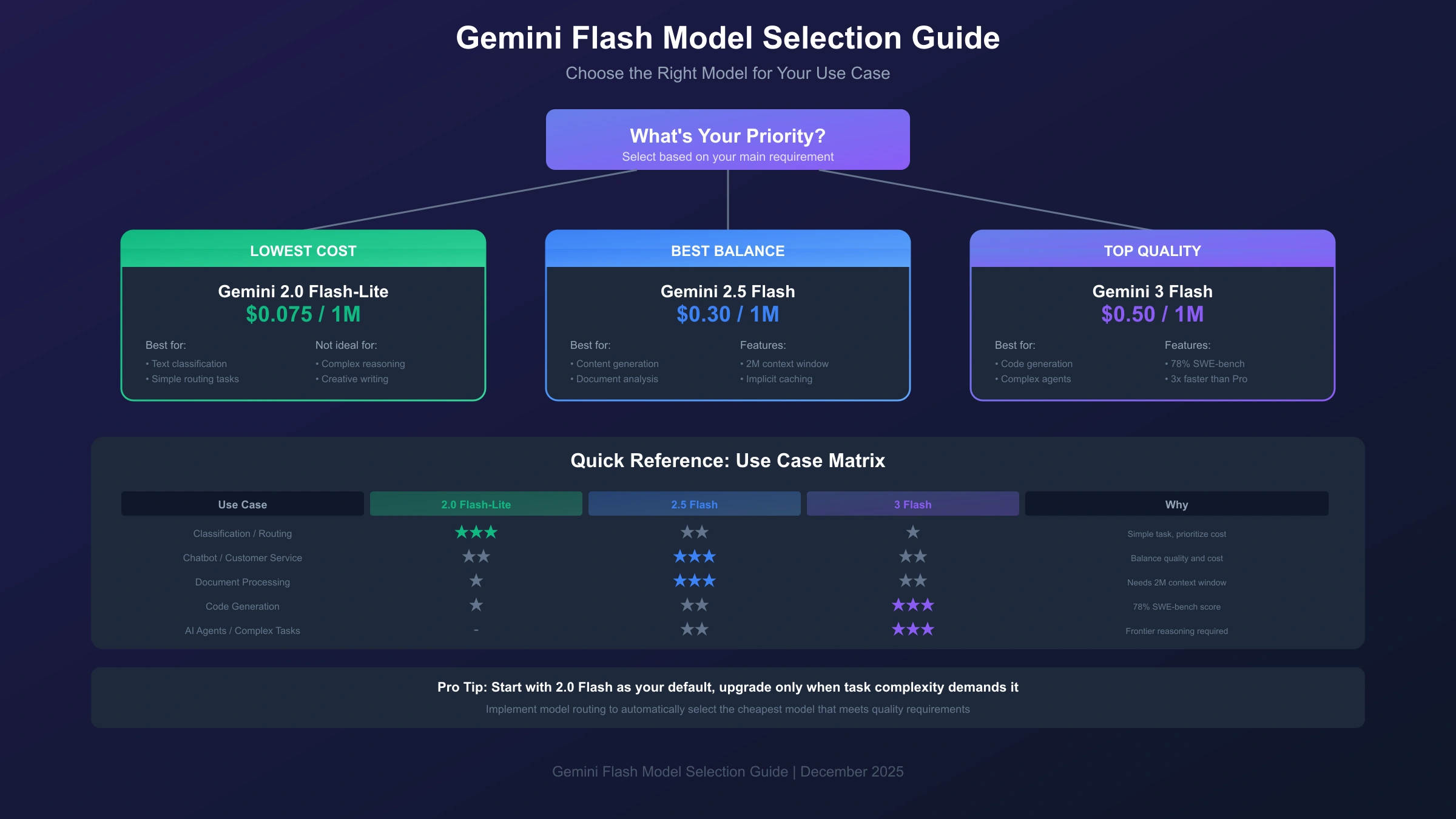
Model selection significantly impacts both costs and results. Each Gemini Flash variant optimizes for different scenarios, and matching your workload to the appropriate model maximizes value.
Gemini 2.0 Flash-Lite excels at high-volume, low-complexity tasks. Classification, routing, entity extraction, and simple Q&A all perform well on this model at minimal cost. If your prompts are straightforward and outputs don't require nuanced reasoning, Flash-Lite delivers the best economics. Benchmark testing shows it handles sentiment analysis, topic classification, and data formatting with accuracy comparable to larger models.
Gemini 2.0 Flash represents the sweet spot for most applications. It balances capability against cost effectively, handling conversational AI, content generation, code explanation, and document summarization competently. The 1 million token context window accommodates large documents without chunking. For teams unsure which model to choose, starting with 2.0 Flash provides a reliable baseline for comparison.
Gemini 2.5 Flash introduces enhanced reasoning worth the cost premium for applications requiring deeper analysis. Complex code generation, multi-step problem solving, and tasks benefiting from the larger 2 million token context justify the 3x price increase over 2.0 Flash. The implicit caching feature automatically reduces costs when system prompts or reference materials appear repeatedly.
Gemini 3 Flash targets frontier-level tasks traditionally requiring Pro models. Its 78% score on SWE-bench Verified demonstrates strong software engineering capabilities, and the 3x speed improvement over 2.5 Pro makes it suitable for latency-sensitive applications. Consider 3 Flash for agentic workflows, complex coding tasks, and applications where quality directly impacts user experience or business outcomes.
The following decision guide summarizes optimal model selection:
| Use Case | Recommended Model | Why |
|---|---|---|
| Text classification, routing | 2.0 Flash-Lite | Lowest cost, sufficient accuracy |
| Customer service chatbots | 2.0 Flash | Good balance, large context |
| Content generation | 2.5 Flash | Better creativity, implicit caching |
| Code generation, debugging | 3 Flash | Frontier coding capability |
| Document analysis (long) | 2.5 Flash | 2M token context window |
| Enterprise RAG systems | 2.5 Flash + Caching | Cost-efficient at scale |
| Real-time agents | 3 Flash | Speed + reasoning combined |
Enterprise and Production Considerations
Scaling Gemini Flash to production environments introduces considerations beyond basic API integration. Rate limits, cost management, reliability, and compliance all require attention at enterprise scale.
Rate Limit Management becomes critical as usage grows. Tier 1 paid accounts receive 300 requests per minute and 1 million tokens per minute immediately. For higher throughput, Google offers Tier 2 and Tier 3 options with progressively higher limits, though these require direct engagement with Google Cloud sales. Production systems should implement exponential backoff for 429 errors, request queuing during peak loads, and real-time monitoring of limit consumption.
Enterprises processing sensitive data should note that paid tier usage explicitly excludes data from model training, per Google's pricing documentation. This distinction matters for healthcare, financial, and legal applications where data confidentiality requirements are strict. Additional compliance certifications are available through Vertex AI on Google Cloud for organizations requiring SOC 2, HIPAA, or other regulatory compliance.
Cost Management at scale benefits from several practices. Set up budget alerts in Google Cloud to catch unexpected usage spikes before they become expensive surprises. Implement token counting before API calls to estimate costs accurately, rejecting requests that would exceed per-request budgets. Use model routing to direct simple requests to cheaper models automatically.
Monitoring should track key metrics including token usage by model, cache hit rates, error rates by type, and latency percentiles. These metrics inform optimization decisions like adjusting caching TTL values, rebalancing model routing thresholds, or identifying problem endpoints generating excessive costs.
High Availability architecture for production deployments should account for potential service disruptions. While Google maintains high uptime, mission-critical applications benefit from fallback strategies. Multi-provider approaches using aggregation platforms can route around outages automatically, and local caching of common responses reduces API dependency during degraded states.
Security and Compliance Considerations
Enterprise deployments must address data handling requirements specific to their industry. The Gemini API supports several security measures out of the box. All API traffic uses TLS 1.3 encryption in transit, and data at rest within Google's infrastructure follows standard cloud security practices. For organizations requiring additional assurances, Vertex AI provides enterprise-grade security features including VPC Service Controls, Customer-Managed Encryption Keys (CMEK), and audit logging integration.
Data residency requirements deserve attention for multinational organizations. Google's API endpoints serve requests globally, but Vertex AI offers region-specific deployments for organizations requiring data to remain within specific geographic boundaries. The pricing remains consistent across regions, though latency varies based on endpoint proximity.
Performance Optimization Beyond Cost
While cost optimization receives primary focus, performance optimization often yields indirect cost savings. Reducing latency improves user experience and can increase conversion rates in customer-facing applications. Several techniques help minimize response times while maintaining cost efficiency.
Streaming responses should be enabled for any application where users perceive wait times. Rather than waiting for complete generation, streaming begins returning tokens as they're produced, reducing perceived latency by 2-3 seconds on typical requests. The implementation requires minimal changes to client code and works across all Gemini Flash models.
Prompt engineering directly impacts both cost and performance. Concise, well-structured prompts reduce input token counts while often improving output quality. Techniques like providing clear examples, specifying output format constraints, and eliminating unnecessary context can reduce token usage by 20-40% without sacrificing results. For applications making millions of API calls, these optimizations translate to substantial savings.
Conclusion: Getting Started With the Cheapest Quality AI API
Gemini Flash has fundamentally changed the economics of AI application development. With pricing starting at $0.075 per million tokens and optimization strategies capable of reducing costs by 90%, building AI-powered products no longer requires substantial infrastructure budgets. The combination of low prices, generous free tiers, and powerful optimization features makes Gemini Flash the obvious starting point for most new projects.
Key takeaways from this pricing analysis: Gemini 2.0 Flash and Flash-Lite offer the absolute lowest costs while maintaining quality suitable for production use. Gemini 3 Flash delivers frontier capabilities at 25% the cost of competing models like GPT-4o. Context caching and Batch API can cut your final bill dramatically with minimal implementation effort. The free tier provides enough capacity for serious prototyping and low-volume production.
Getting started requires just three steps. First, obtain an API key from Google AI Studio at no cost. Second, install the SDK for your preferred language using pip or npm. Third, start with Gemini 2.0 Flash as your default model, upgrading to 2.5 or 3 Flash only when your use case demands additional capability.
For production deployments requiring high availability and simplified multi-model access, platforms like laozhang.ai offer unified API access with transparent pricing and OpenAI SDK compatibility. This approach simplifies vendor management while maintaining flexibility to use the optimal model for each request. Whether you're building your first AI prototype or optimizing enterprise-scale infrastructure, Gemini Flash provides the foundation for cost-effective AI that doesn't compromise on quality.