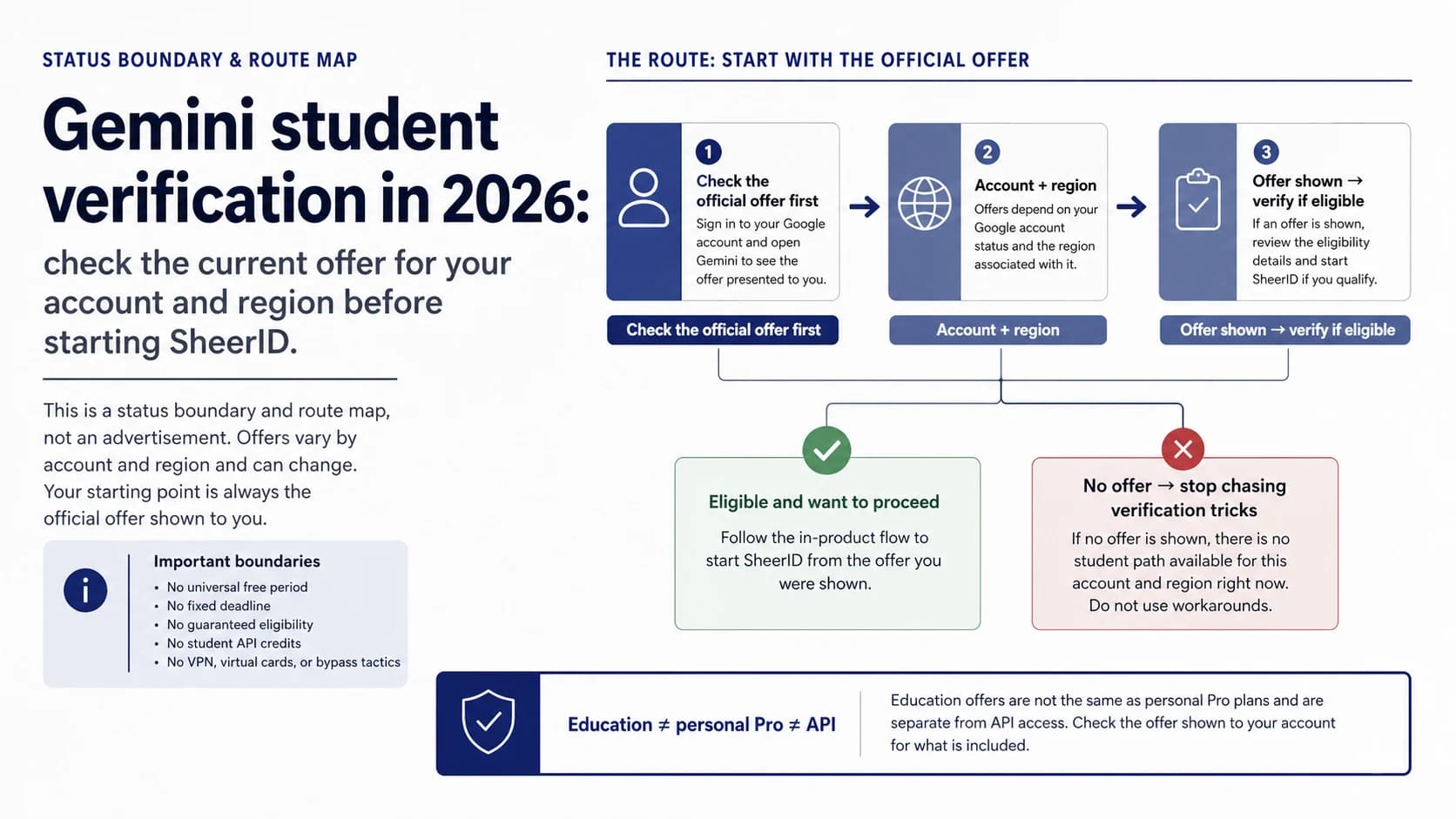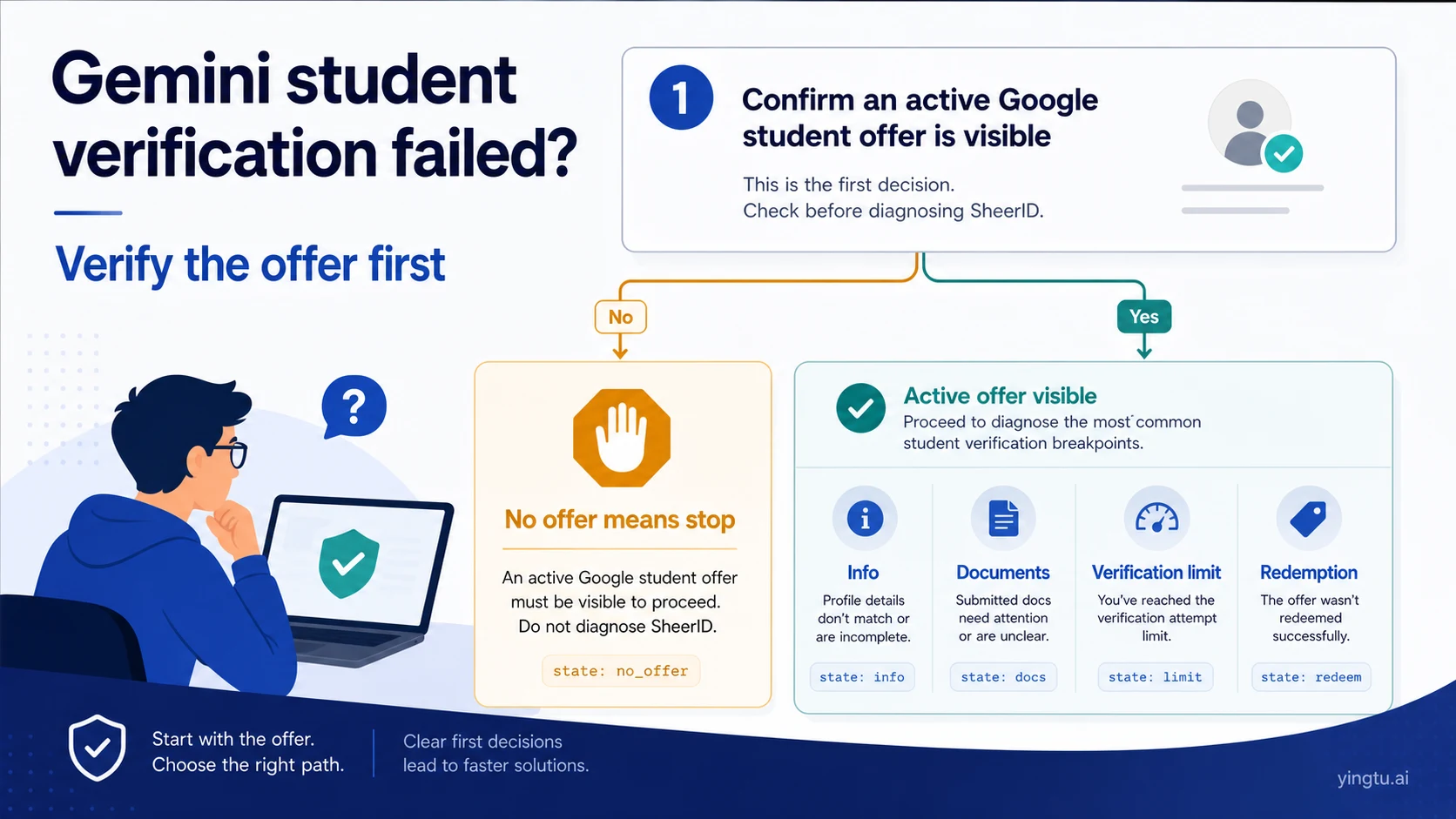
A missing student offer is not automatically a SheerID failure. First sign in to the personal Google account that should receive the benefit and confirm that an active student offer is actually visible. If there is no offer, stop sending identity documents. If the offer is visible and the flow has reached verification or redemption, match the screen to the state below.
| What you see | Owner | Smallest safe next step |
|---|---|---|
| No active student offer | Google offer page | Stop SheerID troubleshooting and verify current account and regional availability |
| School or identity information does not match | SheerID | Match the form to the school’s current records |
| Documents are requested or rejected | School records + SheerID | Provide current-enrollment evidence with only the necessary fields visible |
| Verification is limited, blocked, or pending | SheerID support | Preserve the verification ID, screen state, and submission time before contacting support |
| Eligibility is verified but the offer will not redeem | Google support | Keep the successful verification evidence and document the Google redemption or membership error |
SheerID owns the eligibility decision. Google owns whether an offer appears, whether redemption or checkout succeeds, and whether the membership is active. Do not change regions, borrow an identity, buy an account, rotate accounts, or use payment workarounds to blur that boundary.
Start with the offer, not the verification form
SheerID’s student FAQ describes verification as a step launched from a participating brand’s offer. That sequence matters. A saved verification URL, an old tutorial, or someone else’s claim link does not prove that your account has a claimable Google offer today.
Use the current Google Gemini student page while signed in to the account that should receive the membership. If the regional page says an earlier promotion has ended, or your account never receives an entry point, the problem is offer availability rather than a document decision. Broader availability belongs in the Gemini student offer guide, not in a SheerID retry loop.
Continue only when the account has reached a visible verification, document-upload, result, or redemption screen. This one precondition prevents the most expensive mistake: disclosing more identity data to solve a benefit that is not currently being offered.
Match the screen to one of five states
1. No active offer
The account shows a normal paid plan, a closed promotion, or no student entry point. Stop. SheerID cannot make Google expose a benefit. Confirm the current account and regional page without opening a new verification request.
2. Information mismatch
The school cannot be found, the institution suggestion is wrong, or the name, date of birth, or email does not match the school’s records. Use the institution’s official name and the same identity format shown in its records. Do not pick a similar school or try several identity variants until one happens to pass.
3. Documents requested or rejected
Instant verification did not finish, or the submitted proof did not establish current enrollment. Replace the missing evidence, not the account. The document should connect the same person, the same institution, and a current date or academic term.
4. Verification limit reached or still pending
The page blocks another attempt, reports a limit, or leaves an existing request unresolved. Stop creating duplicates. Record the exact message, verification ID if present, submission time and time zone, school-name format, and steps already completed. Send one coherent case to SheerID support.
5. Verified but unable to redeem
SheerID says the student status is verified, but Google still shows the free account, a sign-in loop, an unavailable offer, a checkout error, or a membership that never activates. Do not repeat eligibility verification. This is now a Google offer, redemption, or membership case.
Make the form match the school record
The most useful rule is simple: the form, the school record, and the uploaded proof must point to the same real student. SheerID may request the full school name, the student’s name, date of birth, email address, and evidence of current enrollment.
| Field | Use | Avoid |
|---|---|---|
| School | The institution’s official name from the current form | An abbreviation, informal campus name, or a similarly named institution |
| Name | The format shown in the school record | A Google nickname or an invented transliteration |
| Date of birth | The real date that matches the record | Editing the date to satisfy an eligibility assumption |
| An address you control and that the live form accepts | Borrowed, temporary, or inaccessible mailboxes |
If the school is missing, do not select the nearest-looking result. Confirm its official legal or English name, then use the “school not found” or help path only if the current form provides one. Old institution lists are not reliable evidence for a current campaign.
When local-script and Latin-script names differ, preserve the relationship between the two spellings. If the form cannot express the school’s record cleanly, show support both forms and the official document that links them. Do not create a modified “matching” certificate.
Build current-enrollment proof without oversharing
Useful proof normally shows three things clearly: the learner’s name, the school name, and a current enrollment date or academic term. Depending on the live request, examples can include a school-issued enrollment letter, a current registration or course record, or a valid student ID. These are examples, not universal acceptance promises; follow the document types displayed in the current flow.
Before uploading, check:
- Identity: the name matches the form and the institution is identifiable.
- Currency: the document proves current enrollment, not only past admission.
- Legibility: required fields are complete and readable, with no glare or missing edge.
Then minimize exposure. Hide unrelated identification numbers, financial amounts, bank information, home addresses, and other records that the live form does not request. Do not hide the name, school, or current-enrollment field, and do not alter the meaning of the document.
If proof is rejected, use the stated reason. A missing current date calls for a current record; an identity mismatch calls for a form or school-record correction; an unreadable image calls for a cleaner source. Re-uploading the same inadequate file under a new name is not a fix.
Handle a verification limit with one evidence packet
English results frequently surface “verification limit reached” and unresolved SheerID loops. Treat the phrase as a state, not a root-cause diagnosis. The safe response is to preserve the existing request and make it supportable.
Put these items in one evidence packet:
- A full screenshot or exact copy of the page message;
- The verification ID or reference number, if shown;
- Submission date, time, and time zone;
- The exact school name and name format entered;
- The steps completed and emails received;
- The document type, without attaching extra sensitive documents unless support requests them.
School matching, document review, eligibility status, and attempt limitations go to SheerID. Offer visibility, redemption, checkout, charges, and membership state go to Google. Neither support path needs your password, one-time code, or complete payment credentials.
When verification succeeded but redemption failed
Successful eligibility and successful benefit activation are separate completion points. Preserve the SheerID success result, then inspect the Google side without changing several variables at once.
Confirm that the same Google account opened the offer and is receiving the membership. Save the visible redemption, checkout, or membership message. Classify the outcome as “not offered,” “cannot redeem,” “checkout failed,” or “redeemed but benefit missing.” Then contact Google with both the successful eligibility evidence and the Google-side state.
Repeating SheerID at this point can trigger a limit without fixing the handoff. Switching accounts, regions, or payment methods also destroys the clean sequence that support needs to follow.
Stop these risky “fixes”
- Do not use a VPN, proxy, or region change to manufacture eligibility.
- Do not borrow school email, identity documents, or enrollment records.
- Do not buy verified accounts, verification links, or “guaranteed” services.
- Do not create repeated requests across several Google accounts.
- Do not use virtual cards, fake addresses, or payment tricks to repair an identity state.
- Do not send passwords, one-time codes, recovery codes, or payment credentials to support.
The goal is not to force approval. The goal is to make a true current-enrollment claim, an active offer, and the receiving account agree. If one of those conditions is missing, stop at that boundary.
FAQ
Can I verify through SheerID when Google shows no student offer?
Do not treat that as a normal claim path. Verification begins inside the current Google offer. First confirm account and regional availability; do not send documents through an old or copied link.
What if SheerID cannot find my school?
Confirm the institution’s official name and use the current form’s school-not-found or support path if available. Never select a similar institution just to proceed.
Does enrollment proof have to be in English?
There is no universal rule for every offer and region. Follow the live upload instructions. If they do not address the document language, use an official school-issued version and ask SheerID whether an additional explanation is required.
How long does document review take?
Do not rely on a fixed time copied from an old guide. Keep the submission time and verification ID, then use the current page or help center’s escalation condition.
Can I switch accounts after reaching the verification limit?
That changes the identity and benefit owner and can create duplicate requests. Preserve the current case and contact SheerID instead.
SheerID approved me, but Gemini still says the offer is unavailable. Who owns it?
Google owns the post-verification offer and membership state. Send Google the successful eligibility evidence and the current redemption or membership message; do not restart SheerID.
Can old documents be reused for a later re-verification?
Only respond when the current Google flow requests re-verification, and use proof that establishes enrollment at that later time. A historical approval is not a promise of future eligibility.
Finish with one controlled action
Return to the screen you actually have. Classify it as no offer, information mismatch, document review, verification limitation, or verified-but-not-redeemed. Take the single action owned by that state and preserve the evidence needed to reproduce it. That does not guarantee eligibility, but it prevents a clear support case from turning into an account and privacy problem.