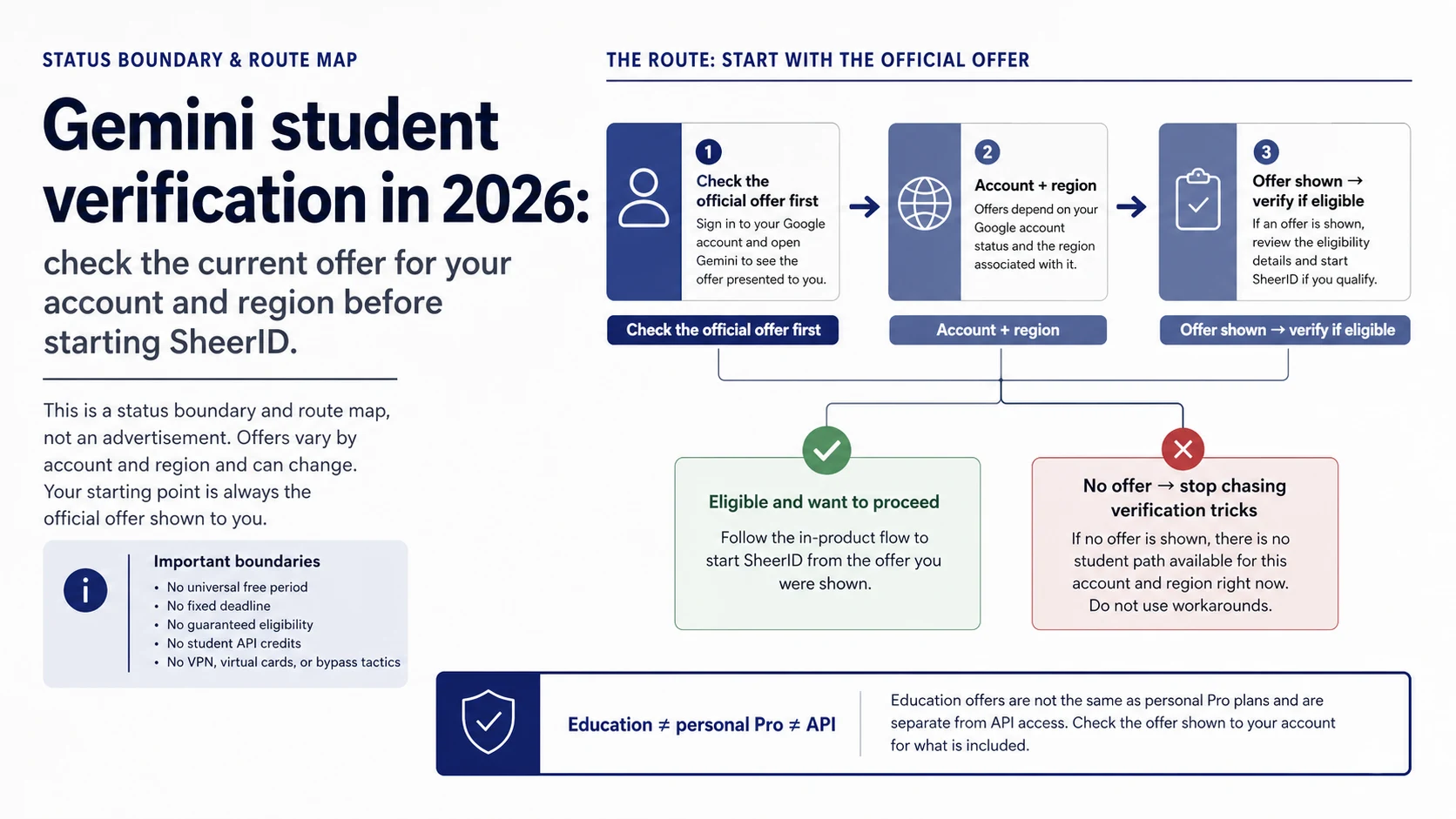
Do not start with SheerID. Start with the Google account you will actually use and check whether the official student or subscription page shows a student offer for that account and region. If there is no offer button—or the page says the previous offer ended—there is no legitimate student-claim flow to continue.
That one check separates four very different situations: an active personal offer, an ended campaign, a school-managed account, and a developer asking about API credits. Each has a different owner and a different next step.
Stop rule: no active official offer means no student verification path. You can still use regular Gemini, ask your school about Gemini for Education, or evaluate an ordinary Google AI Pro subscription. Student status alone does not create API credits.
| What you see now | Who owns the answer | What to do next |
|---|---|---|
| A student offer is visible | Google account and regional offer page | Read eligibility, end date, renewal, and payment terms, then use the button on that page |
| The old offer has ended or no button appears | Google’s current page | Stop looking for verification tricks; choose a regular, school, or developer route |
| A school account cannot use Gemini | School administrator / Workspace for Education | Ask whether the service and required license are enabled for your organization |
| The offer exists but documents fail | SheerID inside the official flow | Follow the stated rejection reason and submit current, truthful proof |
| The question is about an API key or credits | Google AI for Developers | Use the API’s separate project, region, quota, and billing rules |
First, verify the offer that your account can actually claim
On July 11, 2026, the official Gemini for Students page available to this region said the previous offer had ended. Treat that as the state of that page, not as a universal deadline for every country, account, school, or future campaign.
Use a three-step check instead of copying an old deadline:
- Sign in with the Google account that would own the subscription.
- Open the official Gemini for Students page and the account-visible subscription page.
- Continue only if the page itself shows a student offer, its eligibility rules, its duration, renewal terms, and an official verification action.
Third-party pages may still mention a one-month trial, a former year-long campaign, or a SheerID route. Those are not interchangeable. A general Google AI Pro trial is not automatically a student offer, and a verification link is not proof that your account is eligible.
Separate the five access routes before choosing one
Regular consumer access
This is the consumer route you can check without a student promotion. It is not the same as Google AI Pro, a school license, or Gemini API credit. When a former campaign ends, the official student page may still point readers here.
A personal Google AI Pro student offer
This is a conditional promotion attached to an eligible account and region. The current page must own availability, duration, renewal, and payment terms. A blog post saying “12 months free” or “available until 2026” cannot override what the signed-in account shows.
SheerID verification
SheerID is one step inside an active promotion. The safe order is Google offer page, eligibility prompt, SheerID verification, then a return to the Google membership page. Starting from a forwarded SheerID deep link reverses that ownership chain.
School-managed education access
Gemini for Education is controlled by a school or institution through Workspace for Education. A school email does not automatically grant a personal Pro promotion, and an administrator may need to enable services or assign a license.
Developer API access
The developer route has its own Gemini API documentation, projects, regional availability, free-tier rules, quotas, and billing. Passing a consumer student check or receiving school access does not prove that an API project received credits.
If an active offer exists, verify through the same official flow
Before submitting identity information, read the eligibility, campaign date, renewal behavior, and payment requirements on the page. If any of those details are missing, stop and confirm them first.
Enter verification from the offer page itself. Use your real name, school, enrollment status, and current proof as requested. Do not assume that every applicant needs the same document or that an academic email is sufficient.
After approval, return to the Google account or membership page. SheerID can confirm the verification step; Google still owns whether the promotion was applied, when billing begins, and whether the membership is active.
Route failures to the party that can actually fix them
| Symptom | Responsible owner | Best first action |
|---|---|---|
| No student-offer entry point | Google offer status | Check the signed-in account and region; do not resubmit documents |
| School or enrollment proof rejected | SheerID | Read the rejection reason and provide valid, current, matching evidence |
| School account lacks the feature | School administrator | Check domain policy, service switch, age rules, and license assignment |
| Claimed offer has a billing or membership problem | Google One / Google support | Save the order, email, and page message, then verify membership state |
| API key, quota, or billing fails | Google AI developer project | Keep the full error and inspect project and billing configuration |
Changing regions, creating extra accounts, using a VPN, or repeating submissions does not repair an absent campaign or invalid evidence. It also makes account and payment history harder to explain.
Watch for the most common English-language traps
The first trap is treating an AI-generated answer as the contract. It may combine an expired year-long offer with a general one-month trial. Open the owner page and confirm which offer your account is actually being shown.
The second is treating a Google Help community reply as a guaranteed policy. Community pages can expose real confusion, but only the signed-in product page and current official terms can establish eligibility.
The third is assuming “student” applies across products. A consumer promotion, a school-managed service, and an API project use different accounts, administrators, billing records, and support channels.
If the old promotion is gone, choose by task—not by the word free
- For everyday study, writing, and research, test whether regular Gemini is enough.
- If an individual needs higher limits or paid features, inspect the ordinary Google AI Pro terms shown to that account.
- For institution-wide learning, ask the school administrator about Gemini for Education.
- For an app or automation, evaluate the API separately; student identity is not an API entitlement.
If the actual problem is a region or product-surface error rather than student eligibility, use the Gemini availability route guide to separate web, mobile, AI Studio, API, and school access.
A four-part freshness check for any student-offer claim
- Owner: Is the claim on the Google student/account page, an education-admin page, or the API documentation?
- Account and region: Does the signed-in account show the same offer?
- Date and terms: Are duration, renewal, payment, and eligibility visible in full—not only in a snippet?
- Continuous path: Does the offer lead to verification and back to the correct membership page?
Stop using any guide that promises a success rate, guaranteed approval, a universal end date, or a VPN/account/payment workaround without a current first-party contract.
FAQ
Can students still claim an offer in 2026?
There is no safe global yes or no. The English student surface checked on July 11, 2026 said the previous offer had ended in the displayed region. Your answer is the active offer, if any, shown to your signed-in account and region.
Where is the official student entry point?
Start at Gemini for Students or the official subscription page visible inside your account. Enter SheerID only from an active offer flow.
Is a one-month Google AI Pro trial the student discount?
Not necessarily. A general trial and a student campaign can have different eligibility, duration, renewal, and account rules. Read the exact offer label and terms shown to your account.
What is the current deadline?
Use the date on the active offer displayed to your account. Do not reuse a former US or international deadline as a worldwide date.
What if my school is not listed?
If you already entered SheerID from an active offer, follow its school-addition, document-upload, or support options. If no such option exists, contact verification support rather than inventing a school or opening repeated requests.
Do returning users need to verify again?
Only when the current Google account page or an official message requires it. Do not search for a renewal deep link based on an old tutorial.
Does a school account include personal Google AI Pro?
Not automatically. School access depends on Workspace for Education administration; a personal Pro promotion is a separate consumer contract.
Does student verification include API credits?
No automatic entitlement can be inferred. API credits, quotas, free tiers, billing, and regions must be stated by the current developer documentation or project page.