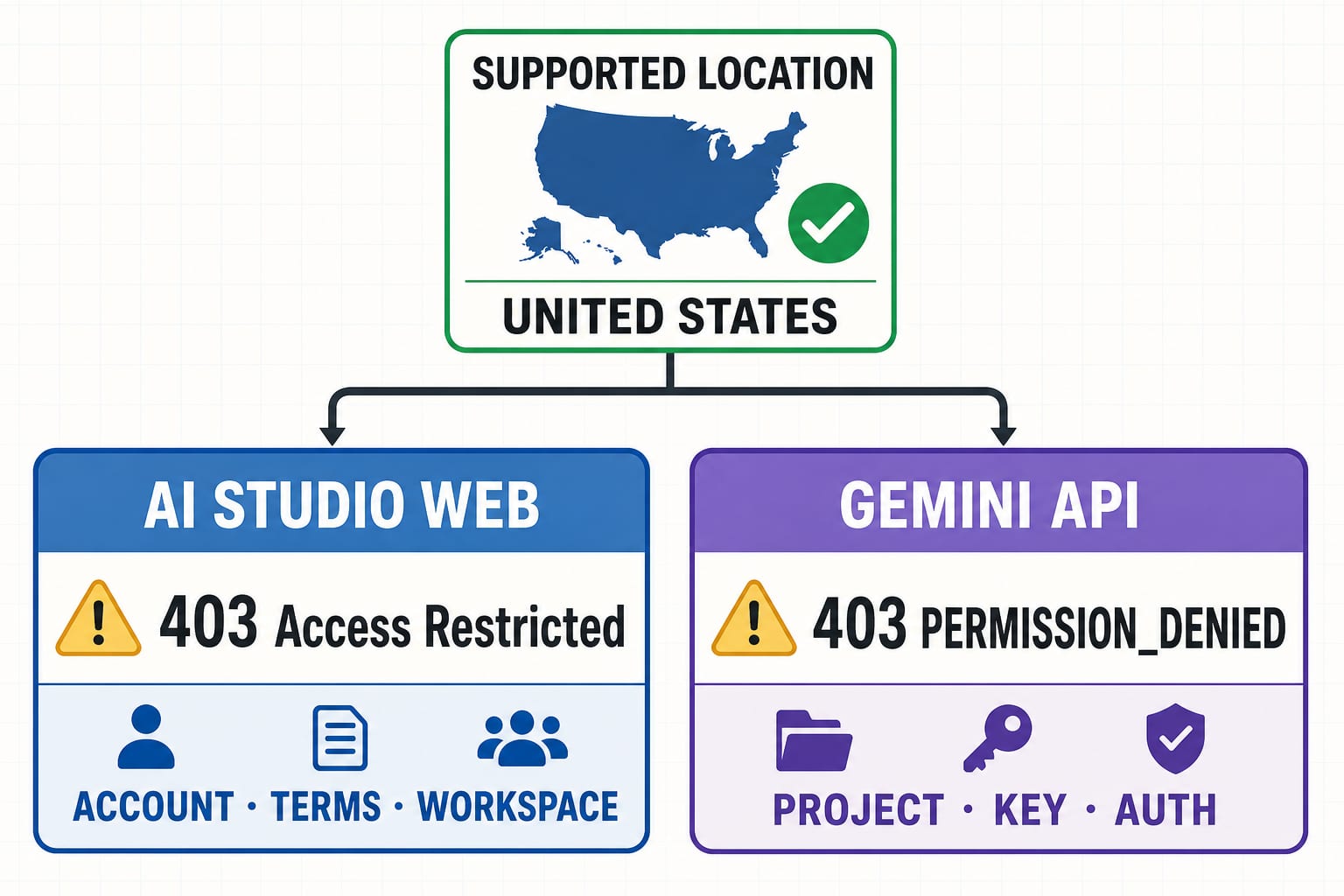
The United States is currently listed as an available region for Google AI Studio and the Gemini Developer API. If you are in the U.S. and still see 403 Access Restricted in the browser or 403 PERMISSION_DENIED from the API, do not assume that Google has blocked the whole country. A listed location is necessary, but it does not override account eligibility, terms acceptance, Workspace controls, project IAM, key state, authentication requirements, or project security checks.
Start by recording the exact failing surface and exact status string:
| What failed | What the signal usually means | First evidence to check |
|---|---|---|
AI Studio page shows 403 Access Restricted | Developer-service access or terms check failed; unsupported location is one possible cause | Current region list, age verification, signed-in account, terms, Workspace setting, project security state |
Gemini API returns 403 PERMISSION_DENIED | The key, permission, or authentication path is not accepted | Key-project association, key type/state/restrictions, required identity, exact resource |
API returns 400 FAILED_PRECONDITION | Google documents a separate free-tier country or billing precondition | Project plan and the free-tier rule for the request location |
API returns 404 NOT_FOUND | The requested model, file, parameter, or API-version resource is not valid | Current model catalog and API reference |
API returns 429 RESOURCE_EXHAUSTED | A rate, token, daily, or spend limit was exceeded | Authenticated project/model limit row and recent usage |
Stop rule: do not rotate locations, accounts, identities, payment profiles, or relay traffic to make a restriction disappear. Do not retry 400 or 403 in a loop. Diagnose the contract that produced the response; if the real account or location is ineligible under that contract, stop.
Check the country list without overdiagnosing it
Google maintains one available-regions page for Google AI Studio and the Gemini API. As checked on July 22, 2026, that page includes the United States. It also says a redirect can be caused by the 18+ requirement or incomplete Google Account age verification, so even a listed country does not prove that a particular account can enter AI Studio.
Use the page as a live lookup, not a permanent country-count table. Country support can change, and several similarly named Google products have different lists. The safest country check is:
- Open the official developer-service region page above.
- Search for the actual country or territory where the person and service use are located.
- Confirm that the signed-in user is at least 18 and that Google Account age verification is complete.
- Read the current Gemini API Additional Terms, which govern AI Studio and the Developer API and require access and API-client availability to remain within available regions.
- Continue to account and project checks even when the country is listed.
This is not the same as asking whether the consumer Gemini web app works. The consumer app has its own Help Center availability and account rules. Being able to chat at gemini.google.com does not grant AI Studio access, create an API key, enable billing, or authorize an API request.
If the browser says 403 Access Restricted
Google's AI Studio troubleshooting page says 403 Access Restricted means the use does not follow the service terms and identifies unsupported location as one common reason. The same page also lists additional checks: accepted terms, automated security review, project abuse status, and Google Cloud IAM for project actions.
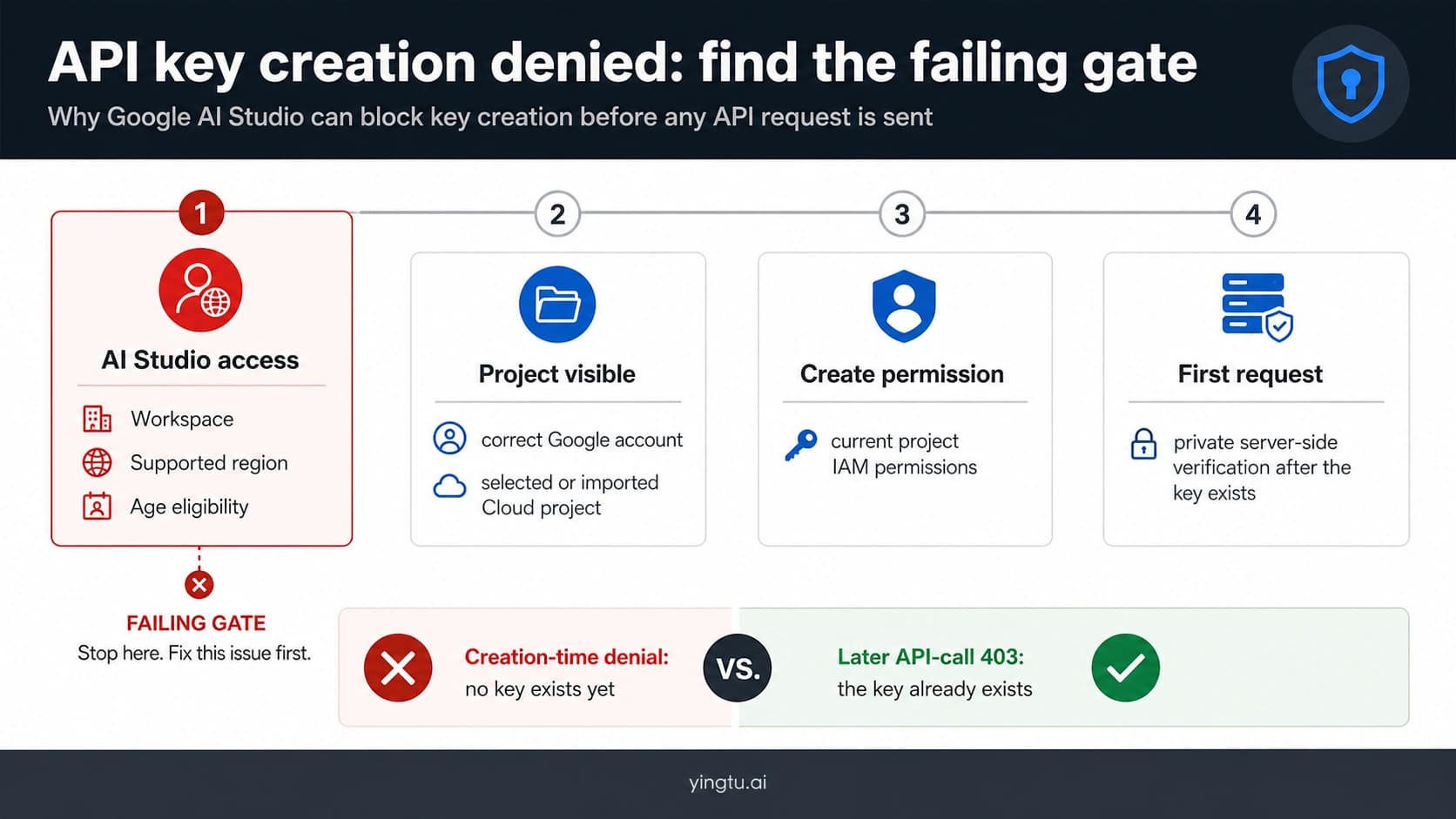
Work through the following order so that account and project failures are not mislabeled as geography.
1. Verify the signed-in Google account
Confirm which account avatar is active in AI Studio. A personal account and a work or school account can have different access even in the same browser. Verify the age on that exact account, accept the currently presented terms, and avoid testing with multiple accounts at once. A clean account record makes the result easier to interpret.
If a personal U.S. account can open AI Studio but a Workspace account cannot, the comparison points toward organization controls or account eligibility—not a U.S. country restriction.
2. Ask the Workspace administrator about AI Studio specifically
Google AI Studio is a separate service from the Gemini consumer app and from Gemini features bundled into Workspace. An administrator can control the service for organizational units or groups. School users under 18 are restricted by the developer-service age rule.
Give the administrator the affected account, organizational unit, time, exact on-screen message, and a link to the official AI Studio service control. Do not ask for a broad policy removal when a narrow service setting can be checked.
3. Check the selected Cloud project and IAM
Opening AI Studio and performing a project action are different gates. A user may enter the UI but be unable to import a project, create a key, view usage, or change billing.
Google's current IAM table states that importing a project requires resourcemanager.projects.get. Creating a new AI Studio key currently also requires apikeys.keys.create, serviceusage.services.enable, iam.serviceAccounts.create, and iam.serviceAccountApiKeyBindings.create. Those permissions reflect the current authorization-key flow and may change, so recheck the official table before changing a production role.
Use least privilege. Ask a project or organization administrator to grant only the operations needed for the job. The narrower AI Studio API-key setup guide covers a creation-time “you do not have permission to create a key” message; that is a different failure from a key that already exists but receives request-time 403 PERMISSION_DENIED.
4. Preserve a project security or abuse block
AI Studio also runs automated security and Trust & Safety checks, and Google says a flagged Cloud project can be denied. Do not try to disguise the project, origin, identity, or request. Preserve the exact warning, project number (not secrets), timestamp with timezone, and a minimal reproduction, then use Google's in-product feedback or the administrator/support route available to the project.
If the API returns 403 PERMISSION_DENIED
The Gemini API backend troubleshooting table assigns 403 PERMISSION_DENIED to missing key permissions or an authentication mismatch. Its examples include a wrong API key and using a tuned model without the required authentication. The status code by itself is not evidence of a regional block.
Use this request-time checklist.
Confirm the full, non-secret request fingerprint
Record:
- endpoint host and API version;
- HTTP code, API status string, and complete redacted error message;
- exact model or resource name;
- Google Cloud project associated with the key;
- key type and visible state in AI Studio;
- whether the request uses an API key, OAuth, or a service-account-bound authorization key;
- request timestamp, timezone, and request ID if returned;
- execution environment, such as a local backend, Cloud Run service, or CI job.
Never paste the key into a ticket, screenshot, log, browser URL, chat, or source repository. Show only a short fingerprint such as the last four characters if your incident process requires distinguishing two keys.
Test the key-to-project path, not a random new key
Open the AI Studio Projects and API Keys views and verify that the key belongs to the project you intended. Existing Cloud users may need to import a project before it appears in AI Studio. Then compare the application environment variable with the intended secret record without printing the value.
If both GEMINI_API_KEY and GOOGLE_API_KEY are set, Google's current key guide says GOOGLE_API_KEY takes precedence in supported client libraries. That can make a shell or deployment silently use an older key. Remove the ambiguity in the secret configuration and restart only the affected service.
Next, reproduce with the smallest request that still uses the same project, key, API version, and model. A useful command shape is:
hljs bashcurl -sS \
-H "x-goog-api-key: $GEMINI_API_KEY" \
-H 'Content-Type: application/json' \
-X POST \
"https://generativelanguage.googleapis.com/v1beta/models/<MODEL_ID_FROM_CURRENT_CATALOG>:generateContent" \
-d '{"contents":[{"parts":[{"text":"Reply with OK."}]}]}'
Replace the placeholder with an exact, currently supported model from Google's model catalog, and use the API version shown in that model's current reference. This is a diagnostic request, not a claim that one model ID or v1beta will remain current. Keep the unedited response body after redacting credentials.
If the minimal request works, the key and baseline service path are valid; compare the failing application's model, endpoint, API version, tuned-resource authentication, secret precedence, and request construction. If it still returns 403, keep investigating the same credential and project rather than creating a cloud of substitute keys.
Check the 2026 key transition
Google's current API-key guide says new keys made in AI Studio are authorization keys bound to a Google Cloud service account. It also says unrestricted standard keys are rejected, dormant unrestricted keys can be marked Blocked, and standard keys are scheduled to stop working with the Gemini API in September 2026.
For an older key, check the Key Type, restrictions, and state in AI Studio. Follow Google's migration instructions if it is a standard key; do not remove restrictions as a shortcut. If the key was exposed, rotate it through the documented secret-management process, verify the replacement, then disable or delete the compromised key. Security rotation is different from repeatedly generating keys to evade a permission result.
Billing can change a tier, not erase access rules
Billing has its own project and account contract. An API key inherits billing and quota state from its Cloud project; it does not have a personal subscription or an independent plan.
Google currently documents 400 FAILED_PRECONDITION—not generic 403 PERMISSION_DENIED—for a request from a country where the Gemini API free tier is unavailable. The documented action is to set up a paid plan for that project. That does not mean a payment method makes an unavailable developer-service region eligible, and it does not mean a Google AI consumer subscription upgrades an API project.
For a U.S. project, inspect the current plan shown in AI Studio before assuming billing is required. If billing is enabled, verify the linked billing account, project plan, balance/status, spend cap, and exact model eligibility. Google's billing system changed materially in 2026 and now distinguishes Prepay and Postpay states, so copied screenshots, old credit claims, and fixed minimums are unreliable. Use the authenticated AI Studio billing page and the current Gemini API billing documentation as the authority.
Route other status codes to their real owner
A successful country check should make the rest of the diagnosis more precise, not end it.
| Code and status | What to inspect | Retry policy |
|---|---|---|
400 INVALID_ARGUMENT | JSON shape, required fields, feature compatibility, API version | Correct the request; do not retry unchanged |
400 FAILED_PRECONDITION | Free-tier country eligibility and project billing state | Correct the precondition; do not retry unchanged |
403 PERMISSION_DENIED | Key-project association, key state, restrictions, IAM, required authentication | Correct auth/permission; do not retry unchanged |
404 NOT_FOUND | Exact resource, file, model ID, parameter, API version | Correct the resource; do not retry unchanged |
429 RESOURCE_EXHAUSTED | Project/model rate, token, daily, or spend evidence | Bounded backoff only after identifying the exhausted dimension |
500/503 | Gemini API status, request size, capacity, incident duration | Bounded exponential backoff with jitter and a maximum attempt/time budget |
Google explicitly advises against retrying client errors such as 400 and 403 as though they were transient. For a real 429, use the Gemini API rate-limit guide; it covers live quota evidence and capacity planning. Neither problem is fixed by switching keys inside the same project.
“No Content” in AI Studio is another separate signal. Open the warning detail. It can reflect safety settings, terms, or unsupported use and should not be recast as proof of a country block.
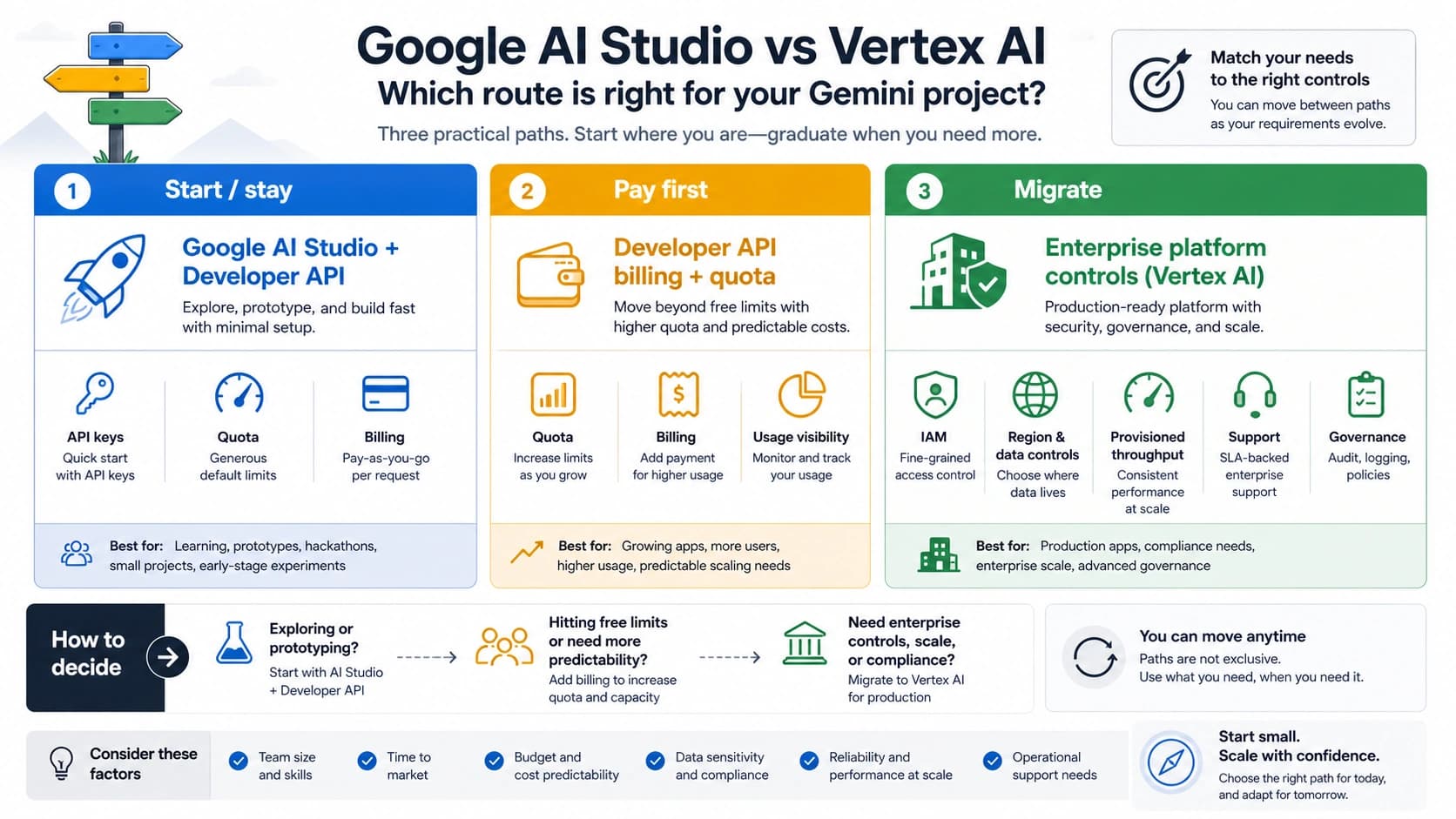
Keep four Gemini contracts separate
The fastest way to create a false fix is to carry eligibility from one Google product into another.
Google AI Studio
This is the developer web interface. Its access depends on the developer region and terms, age/account state, Workspace service control where applicable, project IAM for project actions, and security checks.
Gemini Developer API
This is the request-time API contract. It adds key or OAuth authentication, Cloud project association, model and API-version validity, billing/tier state, quota, and service status. A browser session that works does not prove that a server has the right key.
Consumer Gemini
This is the Gemini app for end users. Its country, age, language, account, subscription, and feature rules are documented separately. A Google AI subscription does not create API quota or resolve project IAM.
Google Cloud-hosted Gemini
Vertex AI and other Cloud-hosted Gemini routes have their own project, billing, API enablement, IAM, endpoint, model-location, data-governance, and capacity contracts. Cloud is not an automatic region workaround. Choose it only when that official product contract fits the workload, and configure it as that product—not as a relay around AI Studio.
Three examples that identify the right owner
U.S. personal account, browser 403
The U.S. is on the developer list, so the engineer records the active account and exact Access Restricted screen, confirms 18+ age verification and accepted terms, and checks whether the project is flagged. They do not purchase a subscription or alter their apparent location. The remaining owner is account/terms/security, not the country list alone.
U.S. Workspace account, AI Studio opens but key creation is disabled
Because the page itself opens, the admin checks the imported project and the current key-creation permissions. The user asks for the narrow required IAM operations or an administrator-created key under the organization's policy. This is a creation-time IAM case, not request-time PERMISSION_DENIED and not evidence that Workspace accounts are categorically unsupported.
Existing key, API 403 after deployment
The local environment works, but the deployed service fails. The team compares secret names and discovers that GOOGLE_API_KEY takes precedence over the intended GEMINI_API_KEY in that runtime. After correcting the secret mapping and preserving the same project/model test, the request succeeds. No country, billing, or quota change was needed.
These are diagnostic examples, not claims about the cause of an individual incident. The actual error body and current project state remain authoritative.
Build an escalation packet that can be acted on
If the failure remains after the applicable checklist, prepare a small evidence packet:
- product surface and signed-in account type;
- actual country or territory and current official list result;
- exact status code, status string, and redacted message;
- project ID or number, key type/state, and authentication method;
- model/resource and API version;
- timestamp with timezone and request ID;
- minimal reproduction and whether it fails from the same legitimate environment;
- Workspace organizational unit or relevant service setting, if applicable;
- checks already completed and their outcomes.
Send it to the project or Workspace administrator first when they control the missing permission. Use Google AI Studio's feedback/support route for a platform or project-security decision. Do not publish the packet if it contains account identifiers, billing details, request content, or credentials.
FAQ
Is Google AI Studio available in the United States?
Yes. The United States appears on Google's current available-regions page for Google AI Studio and the Gemini API. Access can still fail because of age verification, account terms, Workspace controls, IAM, key/authentication state, or security checks.
Does 403 PERMISSION_DENIED mean my country is blocked?
No. Google's Gemini API troubleshooting guide maps that status to key permissions or authentication. Check the full error and credential/project path. A country-related free-tier precondition is documented separately as 400 FAILED_PRECONDITION.
Will enabling billing fix AI Studio Access Restricted?
Not necessarily. Billing changes a project's API plan and tier state; it does not override developer-service region terms, age requirements, Workspace controls, IAM, or Trust & Safety decisions.
Can I use a VPN, proxy, Worker, relay, or different account to get around the restriction?
No safe troubleshooting guide should recommend that. It can violate the service terms, obscure the real owner, expose credentials, and create account or billing risk. If the real location or account is ineligible, stop and use only a genuinely available product under its own contract.
Why does Gemini chat work while AI Studio does not?
The consumer Gemini app and the developer services have different availability and account contracts. Consumer access does not grant AI Studio access or API project permissions.
Should I keep retrying a 403?
No. Google classifies 400 and 403 as client-side conditions that should not be retried unchanged. Fix the region/account/terms, key, permission, authentication, resource, or project condition first. Reserve bounded exponential backoff for retryable errors such as 429 and 5xx.
Do I need to replace an older standard Gemini API key?
Check its current Key Type and state in AI Studio. Google's July 2026 documentation says new AI Studio keys are authorization keys and that standard keys are scheduled to stop working with the Gemini API in September 2026. Follow the current migration instructions rather than weakening restrictions.
The practical rule is simple: country eligibility opens the diagnostic tree; it does not close it. Preserve the exact signal, identify the owning product contract, and change only the account, project, credential, billing, model, or retry condition that the evidence actually supports.