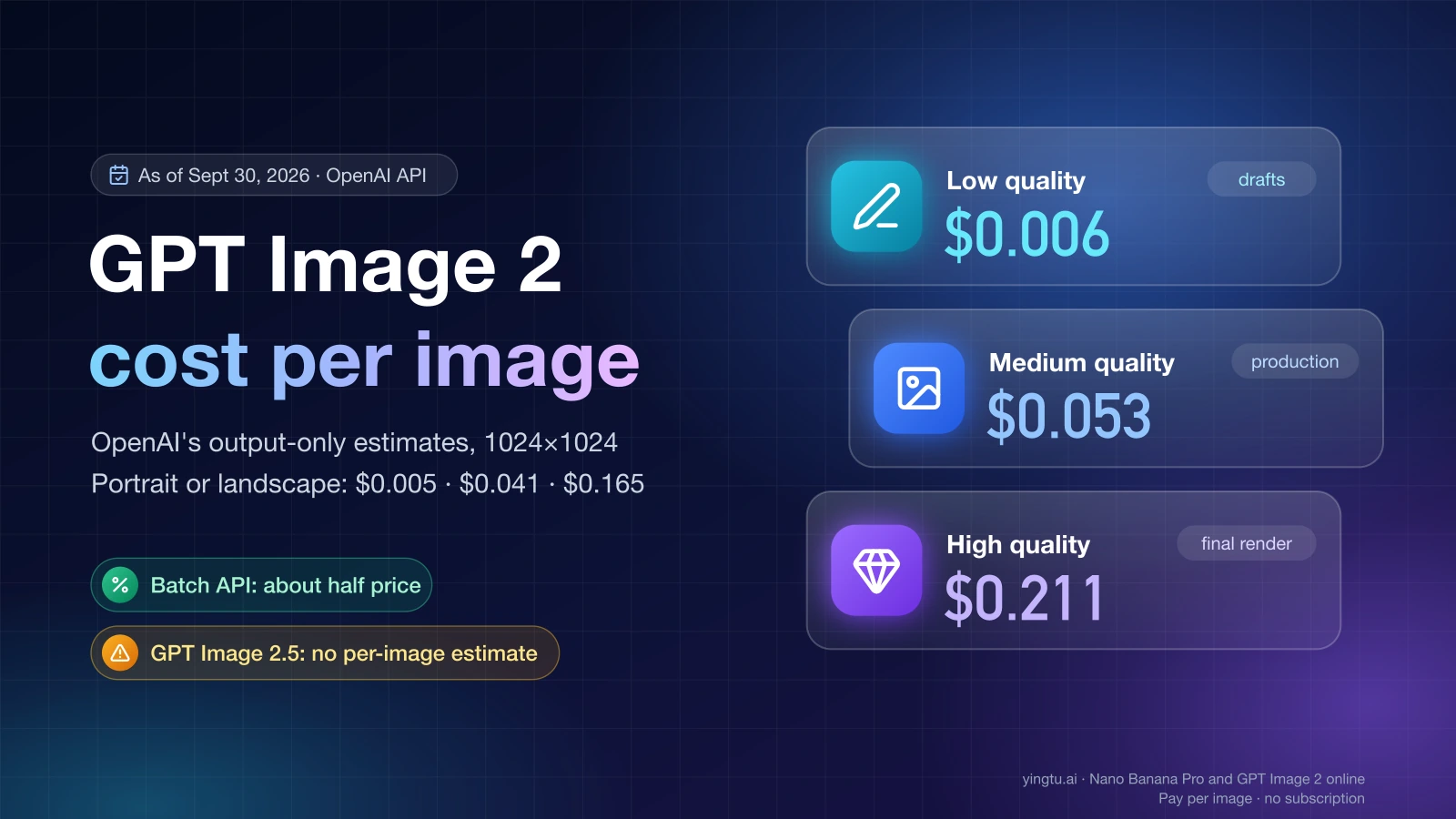
As of September 30, 2026, one 1024×1024 image from GPT Image 2 on the OpenAI API costs an estimated $0.006 at low quality, $0.053 at medium, and $0.211 at high. Portrait (1024×1536) and landscape (1536×1024) images are slightly cheaper: $0.005, $0.041, and $0.165. GPT Image 2 (gpt-image-2) is OpenAI's image generation model for the API, and it is billed in tokens rather than per image, so those figures are OpenAI's estimates of the output cost only. Your prompt, any reference images you upload, and every retry add to the bill.
Official GPT Image 2 cost per image
OpenAI publishes these estimates in the cost table of its image generation guide. They cover the generated image (the image output tokens) and nothing else.
| GPT Image 2, output only, as of September 30, 2026 | Low | Medium | High |
|---|---|---|---|
| 1024×1024 (square) | $0.006 | $0.053 | $0.211 |
| 1024×1536 (portrait) | $0.005 | $0.041 | $0.165 |
| 1536×1024 (landscape) | $0.005 | $0.041 | $0.165 |
Two things in that table surprise people. First, quality moves the price far more than size does: high quality costs about 33 to 35 times as much as low quality at the same size. Second, the non-square sizes cost less than the square one on GPT Image 2 even though they have more pixels. You can't derive a per-pixel rate from the table and extrapolate. Use the row for the size you actually generate. OpenAI notes that additional sizes are available beyond these three. The table only estimates these common ones.
The same table gives estimates for the older image models, which helps if you are deciding whether to migrate. At 1024×1024, as of September 30, 2026:
| Model, 1024×1024, output only | Low | Medium | High |
|---|---|---|---|
| GPT Image 2 | $0.006 | $0.053 | $0.211 |
| GPT Image 1.5 | $0.009 | $0.034 | $0.133 |
| GPT Image 1 | $0.011 | $0.042 | $0.167 |
| GPT Image 1 Mini | $0.005 | $0.011 | $0.036 |
At medium and high quality, a square GPT Image 2 image is the most expensive of the four. At low quality it is the second cheapest, behind GPT Image 1 Mini. For portrait and landscape the picture shifts again: GPT Image 1.5 costs $0.05 at medium and $0.2 at high for 1024×1536, both more than GPT Image 2's $0.041 and $0.165.
How the API bill is actually calculated
OpenAI bills GPT Image 2 by the token, in three parts:
Cost = text input tokens × text rate + image input tokens × image input rate + image output tokens × image output rate
These are the Standard token rates per 1 million tokens as of September 30, 2026, from the OpenAI pricing page. The Batch column is covered in the next section.
| Token type, per 1M tokens | Standard | Batch (gpt-image-2) |
|---|---|---|
| Text input | $5.00 | $2.50 |
| Cached text input | $1.25 | $0.625 |
| Image input | $8.00 | $4.00 |
| Cached image input | $2.00 | $1.00 |
| Image output | $30.00 | $15.00 |
The per-image estimates come from the last row. Working backward, $0.053 at $30 per million output tokens implies roughly 1,770 image output tokens for a medium square image. The token counts on your own requests are the numbers to budget with.
Text input is usually the small part. A 300-token prompt costs 300 × $5 ÷ 1,000,000 = $0.0015. Image input matters when you edit or pass reference images, because every uploaded image is converted to image input tokens at $8 per million. The pricing page also states that the Responses API, Chat Completions, and Batch are not priced separately. Tokens are billed at the chosen model's rates whichever endpoint you call.
A worked example
Suppose you generate 100 medium 1024×1024 product images. Each request has a 300-token prompt and one reference photo. The number of tokens a reference image uses depends on the image, so this example assumes 1,000 image input tokens per photo. Replace that with the counts from your own requests.
| Line item | Calculation | Cost |
|---|---|---|
| Image output | 100 × $0.053 | $5.30 |
| Text input | 100 × 300 tokens × $5 per 1M | $0.15 |
| Image input (assumed) | 100 × 1,000 tokens × $8 per 1M | $0.80 |
| Total, Standard | $6.25 | |
| Total, Batch | half of every rate | about $3.13 |
If 20 of those 100 images need a second attempt, add 20 more rows of output and input: 20 × ($0.053 + $0.0015 + $0.008) = $1.25. That brings the Standard total to $7.50. Retries are where most budgets slip. Track accepted images and generated images separately, because only the second number is what you pay for.
Two account-level factors can also change the total. Regional processing (data residency) endpoints cost 10% more for eligible models released on or after March 5, 2026 (GPT Image 2's snapshot is dated April 21, 2026), so check your endpoint before budgeting. If you use OpenAI models through Microsoft Azure or Amazon Bedrock, those services bill you on their own terms.
Batch API: half price if you can wait
The Batch API charges exactly half the Standard token rates for gpt-image-2, as shown in the table above (as of September 30, 2026). The same job therefore costs about half. A medium square image falls from an estimated $0.053 to about $0.027, and a high one from $0.211 to about $0.106.
The tradeoff is time. Batch jobs run asynchronously, so results come back later rather than while a user waits. That fits catalog images, nightly thumbnail runs, dataset generation, and A/B creative sets. It doesn't fit an app where someone clicks "generate" and watches the screen.
As of September 30, 2026, gpt-image-2 is the only image model listed in the Batch pricing table. The GPT Image 2.5 models are not listed there, so don't assume a Batch discount for them.
GPT Image 2.5 Flare and Sunburst: same token rates, no per-image estimate
OpenAI released two newer image models with snapshots dated September 8, 2026: gpt-image-2.5-flare-2026-09-08 and gpt-image-2.5-sunburst-2026-09-08. OpenAI describes Flare as its "fastest model for high-quality, everyday image generation" and Sunburst as its "most capable model for image generation and editing." Flare offers quality settings of low, medium, high, xhigh, max, and auto.
Both model pages say their token rates match GPT Image 2: $5 per million text input tokens, $8 for image input, and $30 for image output (as of September 30, 2026). Text output is not billed, since these models only output images.
What OpenAI does not publish is a per-image estimate for either 2.5 model. The model pages state that the GPT Image 2 calculator does not estimate GPT Image 2.5 token consumption. The same rate per token does not mean the same price per image. If a 2.5 model produces more or fewer output tokens for the same size and quality, the image costs more or less. That is especially true for Flare's xhigh and max settings, which have no counterpart in the GPT Image 2 table.
To price a 2.5 model before you commit, run 20 to 50 representative requests at your target size and quality. Then apply the same formula to the token counts you are billed for.
Which setting to pick for which job
Use these rules with the estimates above (all as of September 30, 2026):
- Drafts, prompt testing, or internal previews: use low quality. At $0.005–$0.006 per image, 1,000 test images cost about $5–$6 in output.
- Most production images such as blog art, social posts, and product shots: start at medium quality. If your layout allows portrait or landscape, use it, because 1024×1536 at $0.041 is cheaper than square at $0.053.
- Posters, text-heavy layouts, and hero images where detail shows: use high quality ($0.165–$0.211) only for the final render. Iterate at low or medium first, then re-run the approved prompt at high.
- Large jobs with no user waiting: send
gpt-image-2through the Batch API and cut the bill roughly in half. - You need GPT Image 2.5's quality or its editing: budget from a measured sample, because no official per-image number exists and Batch pricing is not listed.
- Heavy editing with reference images: budget the image input tokens separately, since they grow with every image you upload.
ChatGPT plans and API access are billed separately
A ChatGPT subscription does not pay for API usage. ChatGPT Plus costs $20 per month and includes image generation in the ChatGPT app, but OpenAI states that API usage is separate and billed independently. ChatGPT Images 2.5 is available on all ChatGPT tiers, and OpenAI does not publish image counts per plan. So a question like "how many images does Plus include" has no fixed answer, and it has nothing to do with the API prices above.
On the API side, as of September 30, 2026, gpt-image-2 (snapshot gpt-image-2-2026-04-21) is not available on the Free usage tier. You need to be on at least Tier 1, which allows 5 images per minute. The limits then rise with tier: 20 images per minute at Tier 2, 50 at Tier 3, 150 at Tier 4, and 250 at Tier 5. GPT Image 2.5 Flare has the same rate limit table.
How to tell if a per-image offer is cheap
Resellers and branded sites also quote GPT Image 2 prices, and many of them charge per image rather than per token. As of September 30, 2026, one inference provider lists $0.053 per image at medium quality, the same as OpenAI's own estimate. Another reseller lists $0.03, $0.05, and $0.08 for 1K, 2K, and 4K images. Sites with "GPT Image 2" in their name that sell monthly plans or credit packs are independent products, not OpenAI.
Before you compare, check four things:
- Match the size and quality. Compare a reseller's price with the OpenAI row for the same size and the same quality. A flat $0.03 is expensive next to a low-quality image ($0.005–$0.006) and cheap next to a high-quality one ($0.165–$0.211).
- Ask what is included. A per-image price may include prompt and reference-image tokens that OpenAI bills separately, or it may not.
- Check what happens on a retry. Find out whether you pay for failed or refused generations.
- Know who bills you. A reseller bills you on its own terms, not OpenAI's, and its limits, uptime, and data handling are its own too.
YingTu is one of those per-image options. As of September 26, 2026, it charges a flat $0.03 per image for GPT Image 2 VIP (gpt-image-2-vip) and for GPT Image 2.5 Flare and Sunburst. You choose from 30 exact sizes across 1K, 2K, and 4K, at low, medium, or high quality. That price is below OpenAI's medium estimate ($0.041–$0.053) and high estimate ($0.165–$0.211), and above the low estimate ($0.005–$0.006). It also gives the 2.5 models a fixed per-image price where OpenAI publishes none. You pay by pasting your own LaoZhang API key. Signing in with Gmail gives a $0.10 trial credit to the first 500 users, valid for 30 days. Sizes, quality options, and the current price are on the GPT Image 2 Online page. If you mostly generate low-quality drafts, OpenAI's direct API is the cheaper route.
FAQ
How much does the gpt-image API cost?
It depends on the model and quality. As of September 30, 2026, OpenAI's estimates for a 1024×1024 image range from $0.005 (GPT Image 1 Mini, low) to $0.211 (GPT Image 2, high). The final bill also includes text and image input tokens.
Is GPT Image 2 available on the API?
Yes, as gpt-image-2, but not on the Free usage tier. You need at least Tier 1 billing, which allows 5 images per minute as of September 30, 2026.
Is GPT Image 2 free to use?
Not through the API. Every image is billed in tokens. The ChatGPT app includes image generation on its plans, including the free tier, but that access does not carry over to the API.
Does editing an image cost more than generating one?
Usually, yes. An edit bills the same output tokens as a new image, plus image input tokens for every image you upload at $8 per million (as of September 30, 2026). Batch halves both.