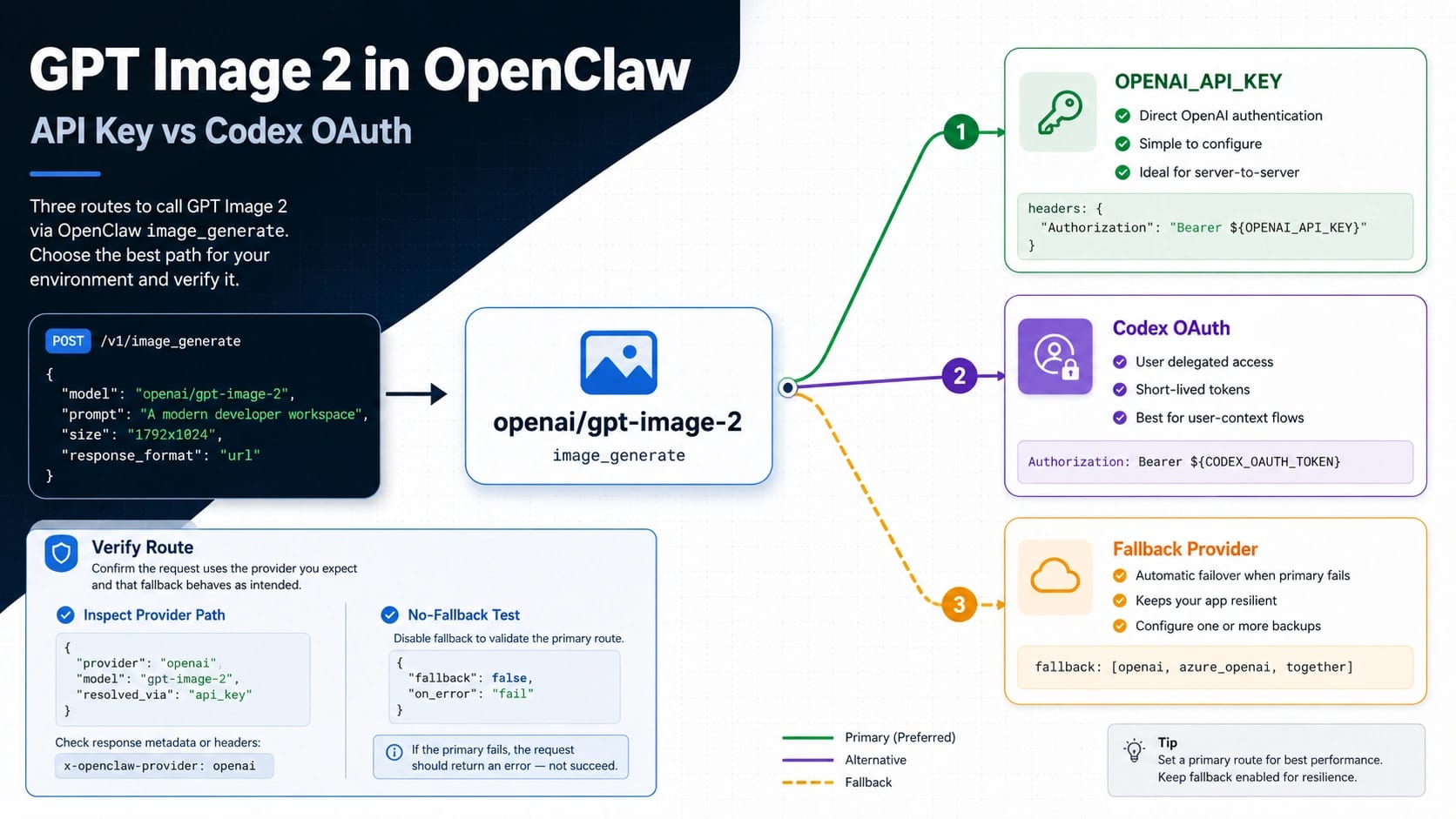
Use openai/gpt-image-2 when OpenClaw asks for the image model. The real decision is the auth path: use OPENAI_API_KEY when you want direct OpenAI Platform billing, org control, and predictable logs; use OpenAI Codex OAuth when you want subscription-auth convenience and your current OpenClaw profile actually supports image generation.
Do not trust the first image until you verify the route. Run an explicit model test, inspect the provider path or log output, and disable or identify fallback while you isolate the OpenAI path.
| Route | Use when | Verify by | Switch if |
|---|---|---|---|
OPENAI_API_KEY | You need direct OpenAI Platform control, billing clarity, and production accountability. | Confirm the OpenAI provider path and successful openai/gpt-image-2 request. | Cost, org policy, or quota pushes you to a different provider. |
| OpenAI Codex OAuth | You already use Codex auth and want a convenient OpenClaw image path. | Check the active auth profile, account/workspace, provider output, and no-fallback test. | The image call returns 403, the profile is stale, or logs never show the OpenAI route. |
| Fallback provider | You deliberately want a backup image route after the OpenAI path fails. | Confirm fallback was enabled and label the result as non-OpenAI. | You are testing whether GPT Image 2 itself works. |
If Codex OAuth image generation returns HTTP 403, stop prompting and check the OpenClaw version, auth profile, account/workspace, provider output, and fallback config before switching to API key. If the request needs a transparent background, use a model that supports it instead of forcing gpt-image-2.
Set up openai/gpt-image-2 in OpenClaw
OpenAI's official model ID is gpt-image-2. OpenClaw's image model reference adds the provider prefix, so the value to select inside OpenClaw is openai/gpt-image-2. That prefix matters: it tells OpenClaw that the image request belongs to the OpenAI provider layer rather than a text-model route, a Codex text route, or a fallback image provider.
OpenClaw's current OpenAI provider documentation describes image generation and editing for openai/gpt-image-2 through either an OpenAI API key or OpenAI Codex OAuth. Keep those two choices separate in your config notes. The model reference can be the same while the account, payer, logs, quota, and failure behavior are different.
Use a minimal model default first:
hljs json{
"agents": {
"defaults": {
"imageGenerationModel": {
"primary": "openai/gpt-image-2"
}
}
}
}
For the API key route, set the OpenAI key in the environment used by OpenClaw:
hljs bashexport OPENAI_API_KEY="sk-..."
Then keep the model default on openai/gpt-image-2 and run one image action. The value of the API key route is not just that it works; it gives the clearest production boundary. OpenAI Platform billing, organization state, request logs, model access, and support ownership stay attached to the OpenAI account you control.
For the Codex OAuth route, do not invent a fake API key. Authenticate the OpenAI Codex profile through OpenClaw's OAuth flow, confirm which account or workspace is active, and keep the same openai/gpt-image-2 image model reference. The value of that route is convenience: it can avoid a separate API key during supported OpenClaw workflows. The cost is that failure diagnosis must include token storage, refresh state, account selection, workspace selection, and whether the image route is really using the OAuth profile you intended.
Treat the setup as incomplete until you can answer three questions:
| Question | API key route answer | Codex OAuth route answer |
|---|---|---|
| Who owns the request? | The OpenAI API organization tied to OPENAI_API_KEY. | The OpenAI Codex account or profile selected in OpenClaw. |
| Where do you debug billing and quota? | OpenAI Platform account and project/org controls. | OpenClaw OAuth profile plus the OpenAI account/workspace behind it. |
| What proves the route? | Logs or provider output show the OpenAI provider path and openai/gpt-image-2. | Logs or provider output show the OAuth-backed OpenAI path and no fallback. |
That split prevents the common mistake: seeing an image and assuming GPT Image 2 handled it. Any configured fallback provider can produce an image after the OpenAI path fails. A generated file is useful only after route evidence says what handled the request.
Verify the route before you trust the image
Start with a provider inventory. OpenClaw's image-generation docs describe image_generate with provider-aware behavior, so list or inspect the available image routes before running the real prompt:
hljs bashimage_generate action=list
Then run a small explicit model test with the OpenAI route named in the request. Keep the prompt simple enough that quality is not the diagnostic variable:
hljs bashimage_generate model=openai/gpt-image-2 prompt="A simple product icon on a white desk, no text"
After the request finishes, inspect the provider path, selected model, auth profile, and fallback notes in the OpenClaw output or logs. The exact fields can vary by OpenClaw version and integration path, but the proof you need is stable: the request should name openai/gpt-image-2, the provider should be OpenAI, and fallback should be disabled or clearly labeled.
Use a no-fallback isolation test when you are debugging the OpenAI path. Disable fallback providers temporarily, or choose a profile where no alternate image provider can answer the request. The goal is not to make the whole agent less resilient forever. The goal is to prove the OpenAI route once without another provider hiding the failure.
Read the result like an operator:
| Result | Interpretation | Next action |
|---|---|---|
Image succeeds and logs show openai/gpt-image-2 | The intended route worked. | Save the working config and re-enable deliberate fallback if needed. |
| Image succeeds but provider is not OpenAI | Fallback handled the request. | Label the output as non-OpenAI and isolate the OpenAI route. |
| HTTP 403 on Codex OAuth | The OAuth-backed route is blocked for that profile/account/path. | Re-auth, check account/workspace, update OpenClaw, or switch to API key. |
| Model not found or unsupported | The active provider route does not expose openai/gpt-image-2. | Confirm provider prefix, OpenClaw version, and OpenAI model access. |
| Transparent background request fails | The request asked for an unsupported option. | Remove transparency or use another model/workflow for background removal. |
If you need a direct first-party API comparison, test outside OpenClaw with the OpenAI GPT Image 2 model page and the OpenAI image generation docs open beside your request builder. Direct OpenAI success does not automatically prove OpenClaw success, but it separates account/model readiness from OpenClaw routing.
Choose API key for production control
Use OPENAI_API_KEY when the image workflow has customers, reporting, approvals, repeatable costs, or support obligations behind it. The API key route is easier to explain to a team because each concern has a clear owner: OpenAI owns the model contract, your OpenAI organization owns billing and access, and OpenClaw owns the local routing from image_generate to the provider.
That does not make the API key route automatically cheaper or better for every test. It makes it auditable. If a request fails, you can check the outgoing model, the OpenAI account, project/org verification, quota, billing state, and the exact API response. If a request succeeds, you can attach the result to a route your operations team can monitor.
Pick API key first when any of these are true:
| Production requirement | Why API key is usually cleaner |
|---|---|
| You need predictable billing attribution | Usage maps to the OpenAI API account or project. |
| You need supportable failure logs | OpenClaw logs plus OpenAI API responses are easier to correlate. |
| You run batch or repeated image jobs | API quota, cost, and retry policy need a stable owner. |
| You serve multiple users | Central API controls are easier than per-profile OAuth state. |
| You must document data and account boundaries | The platform API path is easier to audit than a desktop auth profile. |
When cost becomes the next decision, move to a cost-focused comparison instead of expanding the OpenClaw route setup into a price catalog. The cheap GPT Image 2 API route page owns paid-provider comparison and cost tradeoffs. The route setup here only needs to decide whether OpenClaw is using the path you intended.
Use Codex OAuth only after profile proof
OpenAI Codex OAuth is attractive because it can fit the way a developer already works inside Codex-backed OpenClaw sessions. No separate OPENAI_API_KEY is needed for the supported route, and the setup can feel lighter during exploratory image generation.
That convenience is real, but it has a sharper verification burden. OAuth is not a magic free API key. It is an authenticated profile. A stale token, wrong account, wrong workspace, missing image access, unsupported route, or OpenClaw version mismatch can all look like a prompt problem if you keep retrying the same request.
Before relying on Codex OAuth, confirm:
| Check | What to look for |
|---|---|
| Active profile | The OpenClaw profile points at the OpenAI account you intended. |
| Token state | OAuth storage and refresh are healthy; stale credentials are cleared. |
| Workspace/account | The image route is not running under an unexpected workspace. |
| Provider output | The request resolves to OpenAI and openai/gpt-image-2, not fallback. |
| No-fallback test | Another provider cannot mask OAuth failure during diagnosis. |
HTTP 403 should move you to route diagnosis, not longer prompts. Re-authenticate, remove stale profile state, check whether a newer OpenClaw build is needed for the image route, confirm model availability for the account, and try again with fallback disabled. If the same 403 remains and production work is waiting, switch to OPENAI_API_KEY so the blocker is visible on the OpenAI Platform path.
For broad OpenClaw process failures before image generation is even available, use the sibling operational pages for OpenClaw not responding or OpenClaw installation errors. Keep those runtime problems separate from the narrower openai/gpt-image-2 route.
Fix 403, fallback masking, and unsupported output requests
Most failures fall into one of four branches: auth, provider selection, unsupported parameter, or environment readiness. Diagnose them in that order so you do not change random settings.
| Symptom | First branch | First check | Better next move |
|---|---|---|---|
| HTTP 403 with Codex OAuth | Auth/profile | Active account, workspace, token refresh, OpenClaw version | Re-auth, clear stale profile state, then rerun with fallback disabled |
| Image succeeds but not through OpenAI | Provider selection | Fallback notes and provider output | Disable fallback and force model=openai/gpt-image-2 |
image_generate is missing | Environment/tooling | Whether an image-capable provider is configured | Finish provider setup before debugging prompts |
openai/gpt-image-2 is not accepted | Model reference | Provider prefix and OpenClaw docs version | Confirm exact model reference and route support |
| Transparent background fails | Unsupported parameter | Background option in the request | Remove transparency or handle background separately |
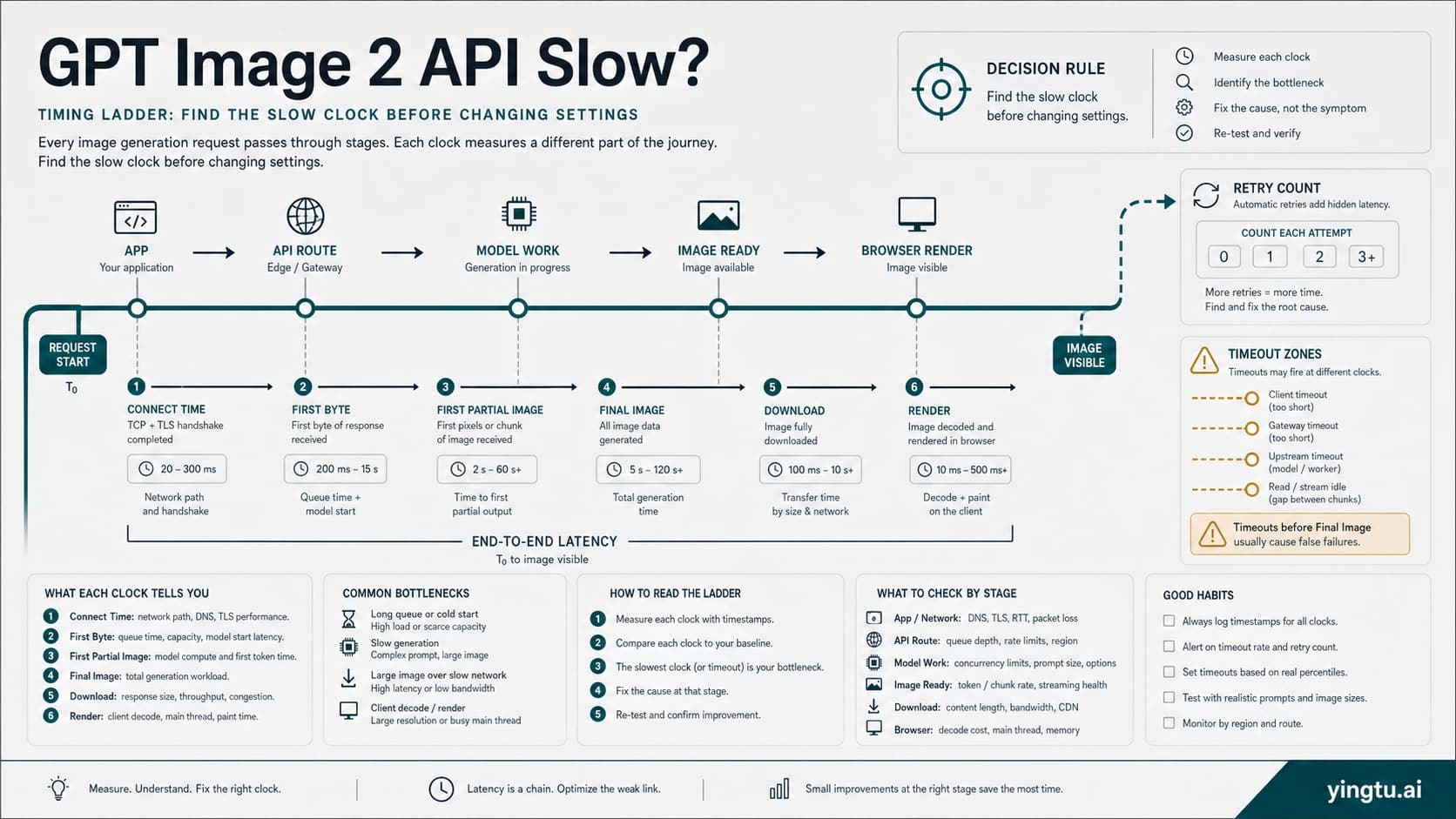
| Slow or inconsistent output | Route/capacity | Account quota, provider fallback, output size and quality | Retry only after route and parameter proof |
Transparent background deserves a hard stop. OpenAI's current image-generation tool options say gpt-image-2 does not support transparent backgrounds. If your asset must end with transparency, split the job: generate the image through the working route, then use another model or editing/compositing step for background removal. Do not keep prompting OpenClaw as if wording can turn an unsupported option into a supported one.
4K and high-resolution output also deserve a separate path. If the problem is exact size, custom dimensions, or saved-file verification, use the GPT Image 2 high-resolution settings page. OpenClaw route verification should prove who handled the request; size verification should prove what file came back.
Production checklist
Before handing the route to a teammate or an automated workflow, write down the operating contract:
| Item | API key route | Codex OAuth route |
|---|---|---|
| Model reference | openai/gpt-image-2 | openai/gpt-image-2 |
| Auth owner | OPENAI_API_KEY account/project/org | OpenAI Codex OAuth profile |
| Route proof | Provider output or logs show OpenAI | Provider output or logs show OAuth-backed OpenAI |
| Fallback policy | Disabled during proof, enabled only when labeled | Disabled during proof, enabled only when labeled |
| Failure branch | OpenAI API response plus OpenClaw logs | OAuth profile/account plus OpenClaw logs |
| Switch trigger | Cost, quota, org policy, or provider strategy | 403, stale profile, uncertain workspace, or production audit need |
Keep a small known-good prompt for future smoke tests. It should avoid text rendering, transparency, huge sizes, and complex edits. The smoke test is there to prove route health, not visual quality. After it passes, run the real image prompt with the same model reference and log settings.
The final rule is simple: an image is not route proof. Route proof is the model reference, provider path, auth owner, fallback state, and response or log evidence agreeing with each other. Once those agree, GPT Image 2 in OpenClaw becomes a controlled setup rather than a guess.
FAQ
What model name should I put in OpenClaw?
Use openai/gpt-image-2 for the OpenClaw image model reference. The official OpenAI model ID is gpt-image-2; OpenClaw adds the openai/ provider prefix for routing.
Does Codex OAuth mean GPT Image 2 API is free?
No. Codex OAuth is an auth route, not an official free OpenAI API entitlement. If your question is official free-tier status or safe test routes, use the GPT Image 2 API free-tier boundary.
Should I use API key or Codex OAuth?
Use OPENAI_API_KEY for production accountability, billing clarity, org control, and predictable logs. Use Codex OAuth for convenience only after the active profile, account/workspace, provider output, and no-fallback test prove the route.
Why do I get HTTP 403 with Codex OAuth?
Treat 403 as an auth/profile branch. Check the OpenClaw version, OAuth token state, active account, workspace, model access, and fallback config. If the route still fails and production work is waiting, switch to OPENAI_API_KEY.
How do I know fallback did not generate the image?
Run a no-fallback test, force model=openai/gpt-image-2, and inspect provider output or logs. If the image succeeds while logs show another provider, label the output as fallback and keep debugging the OpenAI route.
Can GPT Image 2 in OpenClaw generate transparent images?
Do not rely on gpt-image-2 for transparent-background output. OpenAI's current tool options do not support transparent backgrounds for GPT Image 2, so use another model or a separate editing step for that requirement.
Can I use OpenClaw for GPT Image 2 4K output?
Route setup and size control are separate. First prove OpenClaw used openai/gpt-image-2; then validate size settings and saved-file dimensions through a 4K workflow such as the GPT Image 2 high-resolution settings page.