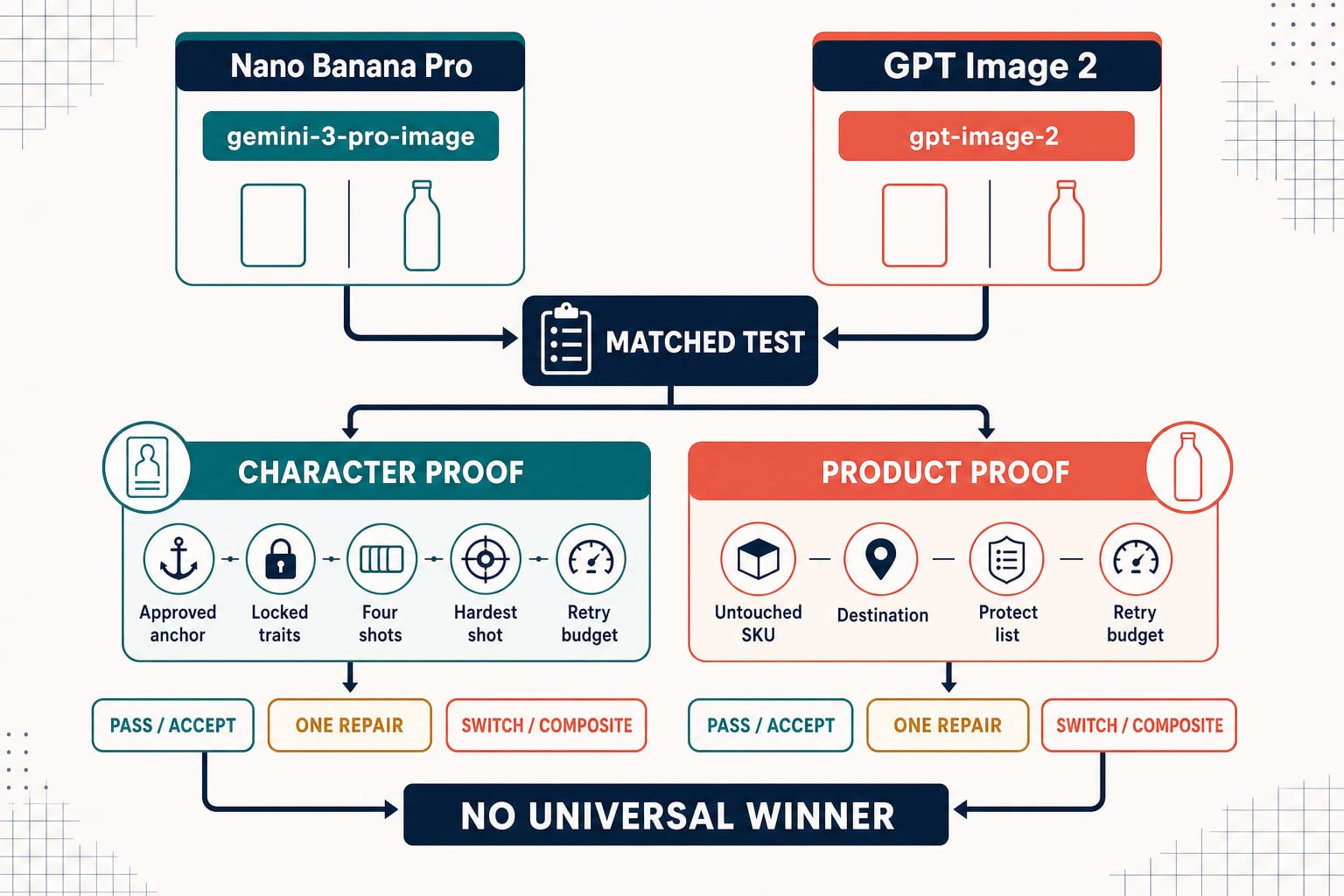
There is no defensible universal winner between Nano Banana Pro and GPT Image 2. Choose the workload first, then run a matched test with a rejection rule written before generation. For a recurring character, freeze an approved anchor and judge four separately reviewable shots. For a product background, hold the source SKU constant and reject any change to product truth.
This is stricter than a beauty contest. One flattering portrait does not prove that a character will survive a profile, full-body action, and difficult environment. One attractive product scene does not prove that the same route will preserve labels, color, geometry, reflections, and fine edges across a catalog. The winning route, if there is one, is the route that passes the hardest required shot within the fixed retry and repair budget.
The official identities also need to stay attached to the evidence. Nano Banana Pro is Google’s gemini-3-pro-image; GPT Image 2 is OpenAI’s gpt-image-2. A provider alias must be recorded as that provider’s route, not silently treated as the official API contract.
| Workload | Freeze before testing | Hard rejection | Next branch |
|---|---|---|---|
| Recurring fictional character | approved anchor, locked traits, allowed changes, four shots, hardest shot, retry budget | identity mark, face, body proportion, hair, outfit/prop, or visual-language drift | pass, one reduced-variable repair, or switch route |
| Real product background replacement | untouched SKU photo, destination, protect list, output intent, retry budget | label, color, geometry, crop, material, reflection, or fine-edge change | accept, mask-and-composite, manual retouch, or reshoot |
Branch 1: decide whether you are replacing a background or generating a new product shot
Product-shot generation asks a model to invent or restage a scene. Product photo background replacement starts with an existing product photo and asks for a controlled edit. Those jobs can produce similar-looking hero images, but they have different proof requirements.
For background replacement, the untouched input remains the source of truth. The generated result must still depict the same SKU, variant, included parts, camera angle, crop, and product claims. A newly generated bottle that merely resembles the input is a failed edit, not a successful replacement.
Use this comparison when you have:
- an authorized, non-sensitive product photo;
- a specific destination, such as a neutral studio sweep or a defined lifestyle scene;
- a written list of product attributes that must not change;
- time to inspect downloaded files, not only small previews;
- permission to test both routes under their current account and billing terms.
If you only need a clean cutout, mask, composite, edge repair, or transparent export, use the model-neutral AI product background remover workflow instead. That narrower workflow owns the editing mechanics; this page owns the decision between two generative routes.
Write the protect list before you write the prompt
A prompt such as “replace the background with a luxury bathroom” is incomplete. It describes the change but not the product truth that must survive it. Create two short lists before uploading the image.
Change only
- the background environment;
- environmental lighting that must be integrated with the new scene;
- the contact surface and a physically plausible shadow;
- empty canvas outside the protected product when a new aspect ratio is required.
Protect exactly
- silhouette, geometry, camera angle, crop, and included accessories;
- brand name, label copy, numbers, units, claims, and variant identifiers;
- product color, material, texture, transparency, and reflections;
- closures, handles, cables, thin parts, seams, and other easy-to-lose edges.
For example, a skin-care bottle test should name the cap shape, bottle color, label spelling, volume, finish, and pump geometry. “Keep the product unchanged” is useful, but the explicit list gives a reviewer observable reasons to accept or reject each output.
OpenAI’s current GPT Image generation guide identifies gpt-image-2 as a GPT Image model and documents editing an existing image with a new prompt. Its product-mockup prompting example specifically calls for a crisp silhouette, no halos, preserved geometry and label legibility, an opaque background, and a downstream removal step when transparency is required. These are useful workflow checks, not evidence that GPT Image 2 wins this comparison.
Google’s current Nano Banana image guide maps Nano Banana Pro to the stable gemini-3-pro-image route, describes it as the premium option for complex professional assets, and documents editing with image plus text input. Google’s model page confirms the stable gemini-3-pro-image ID. Support for editing still does not guarantee that a business-critical SKU will remain unchanged.
Run one matched A/B test
Use one input, one brief, and one reviewer rubric. Do not give a weak prompt to one route and a carefully repaired prompt to the other.
- Archive the untouched product photo and record its pixel dimensions and file format.
- Choose one destination background and one final display context.
- Freeze the protect list and the background-only change list.
- Set the same output intent and a fixed retry budget for both routes.
- Record the exact route ID, settings, timestamp, account owner, and prompt for every attempt.
- Download every candidate file before review.
- Accept or reject each result against the untouched input, then record the rejection reason.
A practical prompt can follow this shape:
Replace only the background with [destination]. Preserve the exact product silhouette, geometry, camera angle, crop, included parts, label spelling, numbers, colors, materials, texture, transparency, and reflections. Match the new scene’s light direction and create a plausible contact shadow. Do not redesign, restyle, relabel, resize, or add product details.
Use the same semantic constraints on both routes, but translate them into each interface’s supported controls. Do not claim the test is matched if one route receives extra reference images, a different resolution target, an undisclosed mask, or additional manual repair.
Reject on product truth before scoring the background
Review in two passes. The first pass is a hard gate; the second is a comparative score.
Pass 1: hard rejection
Compare each candidate with the untouched input. Reject it if any of these changes:
- silhouette, proportions, camera angle, crop, or included parts;
- logo, spelling, numbers, units, warnings, or variant name;
- product color, material, surface texture, transparency, or reflection pattern;
- fine edges, thin parts, openings, seams, or small accessories.
This is the first stop rule: product truth beats background attractiveness. If both routes fail it, the valid result is no winner.
Pass 2: scene integration
Only score candidates that pass product preservation. Then inspect:
- haloing, jagged contours, clipped edges, and color spill;
- contact with the surface rather than floating or sinking;
- shadow direction, softness, and density;
- light direction and color consistency;
- scale, horizon, and perspective;
- downloaded pixel dimensions, format, transparency behavior, and final display size.
Inspect at high zoom to find edge and label defects, then inspect again at the actual placement size. A flaw can disappear in a thumbnail while still breaking a zoomable product page; a technically imperfect edge may be irrelevant in a small campaign card. Keep both contexts in the decision.
Record a result, not a model reputation
Use a compact decision ledger:
| Field | Nano Banana Pro | GPT Image 2 |
|---|---|---|
| Exact route tested | gemini-3-pro-image or qualified provider route | official gpt-image-2 or qualified provider route |
| Preservation gate | pass / fail + reason | pass / fail + reason |
| Edge and halo check | pass / fail + note | pass / fail + note |
| Light, shadow, scale, perspective | pass / fail + note | pass / fail + note |
| Downloaded-file check | dimensions, format, transparency | dimensions, format, transparency |
| Attempts used | count | count |
| Billable route cost | current ledger value or unavailable | current ledger value or unavailable |
| Review cost | reviewer time × owner-labeled rate, or unavailable | reviewer time × owner-labeled rate, or unavailable |
| Manual repair cost | repair time × owner-labeled rate + repair-tool cost, or unavailable | repair time × owner-labeled rate + repair-tool cost, or unavailable |
| Final outcome | accepted / rejected | accepted / rejected |
Allowed conclusions include “Nano Banana Pro won this bounded test,” “GPT Image 2 won this bounded test,” “tie,” and “no winner.” They can also be “switch to cutout and composite,” “manual retouch,” or “reshoot.” Do not turn one bounded result into a universal model claim.
Calculate accepted-output cost after review
Listed price per generation is not the decision metric. The useful denominator is accepted output:
accepted-output cost = total billable route cost ÷ accepted outputs
Keep the other labor components separate:
- review cost per accepted image = total owner-labeled review cost ÷ accepted outputs
- manual repair cost per accepted image = total owner-labeled manual repair cost ÷ accepted outputs
If you need one delivered-cost figure, add those three currency-per-image values only after each owner and rate is recorded. Do not add an attempt count to a monetary cost.
Keep resolution or quality, retries, rejected files, failure charging, latency, and reviewer time attached to the route. If a lower-priced attempt repeatedly changes a label or creates a halo, it can be more expensive than a higher-priced route that yields an accepted file sooner. If neither route produces an acceptable result, do not hide the zero in the denominator by calling the least-bad output a winner.
Prices, quotas, speed, availability, regions, and failure billing can change. Recheck them inside the exact official or provider account used for the test rather than copying a permanent “cheapest model” claim from a comparison table.
Know when to stop generative editing
Stop and switch to a cutout/composite workflow when:
- either route keeps rewriting labels or variant identifiers;
- thin product parts repeatedly disappear;
- a transparent, reflective, furry, or translucent edge cannot pass review;
- geometry or camera angle drifts across retries;
- the background is acceptable but product truth is not;
- the fixed retry budget is exhausted.
A deterministic mask plus a separately licensed or generated background may be less exciting, but it provides clearer ownership of the product pixels. Manual retouch is appropriate when the result is close and the repair is observable. Reshoot when the source photo lacks enough edge detail, has destructive reflections, or uses lighting that cannot plausibly integrate with the destination.
Branch 2: compare recurring-character consistency with four shots
Character consistency is not the same as producing four attractive images. The job is to keep the same designed person recognizable while pose, framing, action, or environment changes. Start by naming what must remain invariant and what the brief allows to move.
For example, imagine an original fictional courier called Mara-07. The approved anchor is version 3. Locked traits are her short black bob with one copper streak, the notch in her left eyebrow, a brass compass pendant, a cropped teal jacket with one white sleeve stripe, and adult body proportions. Pose, expression, camera distance, weather, and background may change. The hardest delivery shot is a full-body run through rain at night because motion, small facial detail, reflective light, and outfit continuity all compete for attention.
That record is more useful than “keep the character consistent.” It tells the reviewer what drift looks like and prevents a later prompt repair from quietly redesigning the character.
OpenAI’s current gpt-image-2 model page documents text and image inputs, generation, editing, inpainting, and high-fidelity image inputs. Its official prompting guide recommends explicit preserve lists, indexed multi-image inputs, deliberate framing and pose language, and repeating critical details when they drift. Those are supported workflow mechanisms, not a promise of persistent character memory.
Google’s current Nano Banana image guide identifies Nano Banana Pro as gemini-3-pro-image and documents up to five character reference images for consistency in that model contract. Reference capacity is an input allowance, not a pass result. Five references can still produce a failed profile or action shot.
Freeze the comparison record
Complete this header before the first attempt:
| Proof-card field | Record before generation |
|---|---|
| Character or project ID | Mara-07, campaign name, or another rights-cleared fictional identifier |
| Approved anchor | exact file and version; never “the latest portrait” |
| Locked identity traits | face and marks, body proportions, hair, outfit/prop, visual language |
| Allowed changes | pose, expression, crop, background, lighting, or only the variables the brief permits |
| Route and evidence owner | official gemini-3-pro-image, official gpt-image-2, or a clearly named provider route |
| Reference pack and settings | files actually supplied plus route-appropriate input fidelity, size, aspect ratio, and other exposed controls |
| Fixed retry budget | the same number of billable opportunities for both routes |
| Hardest required shot | the shot whose failure blocks delivery |
| Reviewer and evidence date | one accountable reviewer and the date the route was checked |
“Matched” does not mean pretending the APIs expose identical controls. Use each route’s supported inputs, but record every functional difference. If Nano Banana Pro receives five character views while GPT Image 2 receives a different reference pack, that difference belongs in the decision record.
Use the four-shot character-consistency proof card
Run four separate outputs rather than a collage. A collage can hide whether the route can reproduce the character in independently generated deliverables.
| Shot | Requested change | Face / marks | Body | Hair | Outfit / prop | Visual language | Delivery size | Rejection symptom | Smallest repair | Decision |
|---|---|---|---|---|---|---|---|---|---|---|
| 1. Neutral portrait | clean baseline, eye-level, neutral light | pass / fail | pass / fail | pass / fail | pass / fail | pass / fail | pass / fail | note the exact drift | none or one isolated change | pass / repair / switch |
| 2. Profile or full body | choose the view that exposes the real delivery risk | pass / fail | pass / fail | pass / fail | pass / fail | pass / fail | pass / fail | note the exact drift | reduce one variable | pass / repair / switch |
| 3. Dynamic action | required movement with full interaction geometry | pass / fail | pass / fail | pass / fail | pass / fail | pass / fail | pass / fail | note the exact drift | simplify only pose or scene | pass / repair / switch |
| 4. Controlled stress | difficult environment or style change, not both unless delivery requires both | pass / fail | pass / fail | pass / fail | pass / fail | pass / fail | pass / fail | note the exact drift | remove one stress variable | pass / repair / switch |
For Mara-07, the neutral portrait verifies the facial anchor and copper streak. The profile or full-body shot exposes body proportion, pendant placement, and jacket structure. The action shot tests whether the outfit and marks survive motion. The rain-at-night stress shot checks whether the visual language and locked traits survive reflections, occlusion, and low light.
The card is deliberately blank. It is not a YingTu result, a synthetic benchmark, or a claim that either route passed. Fill it only with retained outputs and rejection reasons from the current test.
Apply a pass–repair–switch rule
Mark pass only when every locked trait and the hardest required shot meet the acceptance bar. A strong neutral portrait cannot compensate for a failed full-body action shot.
Mark repair when exactly one required dimension fails and one smaller, observable change could test the cause. Hold the anchor, route, retry budget, and acceptance rule stable; reduce one variable, such as removing rain while keeping the running pose. Do not spend a hidden chain of retries until a favorite route happens to win.
Mark switch when the reduced-variable repair still fails, the hardest shot remains below the bar, or the route needs more cleanup than the delivery budget permits. Switching is a valid production decision. So is recording no winner and budgeting manual cleanup.
For the full model-neutral method—reference preparation, drift diagnosis, repair branches, and character-library governance—continue to the consistent character generator workflow. This comparison owns the decision between two named routes; it should not duplicate the method owner.
Calculate accepted-output cost for the character set
Record billable attempts, total billable route cost, accepted outputs, review cost, and estimated manual repair cost for each route:
accepted-output cost = total billable route cost ÷ accepted outputs
Report review cost per accepted image and manual repair cost per accepted image as separate owner-labeled lines. The attempt count remains an audit field; it is not a currency numerator.
Keep the zero-denominator case visible. If a route produces no accepted version of the hardest shot, it does not have an accepted-output cost for that set; it has a failed route test. Do not relabel the least-bad image as accepted to make the calculation possible.
Keep official models and YingTu provider routes separate
The official OpenAI model in this comparison is gpt-image-2. In YingTu’s English workspace, checked July 28, 2026, the visible provider route is labeled GPT Image 2 VIP and maps to gpt-image-2-vip. That provider ID is not the official OpenAI API contract. Its price, accepted parameters, limits, logs, support path, failure billing, and account terms belong to the live provider route and must be checked there.
The same workspace exposes Nano Banana Pro as gemini-3-pro-image, with prompt, optional reference-image, size or resolution, aspect-ratio, preview, and code controls. A valid API key is required to generate. Interface availability proves that the controls are visible; it does not prove that YingTu completed, downloaded, or repeated this product-background task.
YingTu is useful as a browser-based place to stage an authorized product-background or recurring-character comparison when its current routes and terms fit your account. Optional reference controls and visible route labels do not establish persistent character memory, an accepted four-shot set, or equivalence with the official OpenAI contract. Keep the route ID in the ledger so a provider-wrapper result is never presented as an unqualified official-API benchmark.
FAQ
Which is better for consistent characters: Nano Banana Pro or GPT Image 2?
There is no verified universal winner. Freeze one approved character anchor, locked traits, allowed changes, four required shots, the hardest shot, and a fixed retry budget. The route that passes the full card at an acceptable cost wins only that bounded workload.
Does either route remember my character permanently?
Do not assume so. The checked official contracts support image inputs, generation, editing, and reference-guided workflows, but those mechanisms do not prove persistent identity memory across unrelated jobs. Supply and version the approved anchor and locked traits for each controlled test.
Are five Nano Banana Pro character references a guarantee of consistency?
No. Google documents up to five character reference images for gemini-3-pro-image, but an input allowance is not an acceptance result. Review a neutral portrait, profile or full body, dynamic action, and the hardest controlled stress shot.
What if both routes make a good portrait but fail the action shot?
Record no pass. Allow one reduced-variable repair for the failed required dimension, such as simplifying the environment while keeping the action. If the repair still fails, switch route or budget explicit manual cleanup.
Which is better for replacing a product photo background: Nano Banana Pro or GPT Image 2?
There is no verified universal winner. Test the same authorized product photo, destination, protect list, output intent, and retry budget on both. Reject any candidate that changes product truth, then compare scene integration and accepted-output cost.
Is generating a product scene the same as replacing the background?
No. Generation can invent a plausible product-like object. Background replacement must preserve the real input SKU while changing only its environment. A beautiful restaging that alters the label, shape, color, or included parts fails the replacement job.
What should I check first?
Check the product before the background: silhouette, geometry, camera angle, crop, label, numbers, color, material, texture, reflections, and thin parts. Only candidates that pass those checks should be scored for edge quality, light, shadow, scale, and perspective.
Does a preview or HTTP success prove the route works?
No. A preview, model list, prompt, reference upload, one output, screenshot, or HTTP 200 does not prove preservation. Review the downloaded file against the untouched input and repeat within a fixed test budget.
Can I compare YingTu GPT Image 2 VIP directly with official gpt-image-2 pricing?
Not without separating the contracts. gpt-image-2-vip is a provider route. Its pricing, parameters, limits, logging, support, and failure charging may differ from the official OpenAI route. Label the tested owner and ID in every row.
What if both models fail?
Record “no winner.” Then move to a mask-and-composite workflow, manual retouch, or a reshoot. Shipping an altered SKU to force a model verdict is the wrong outcome.
How many attempts make a fair test?
There is no universal number. Set the budget before seeing results and give both routes the same opportunity. Record every billed attempt and rejection; increasing retries only for the preferred model invalidates the comparison.