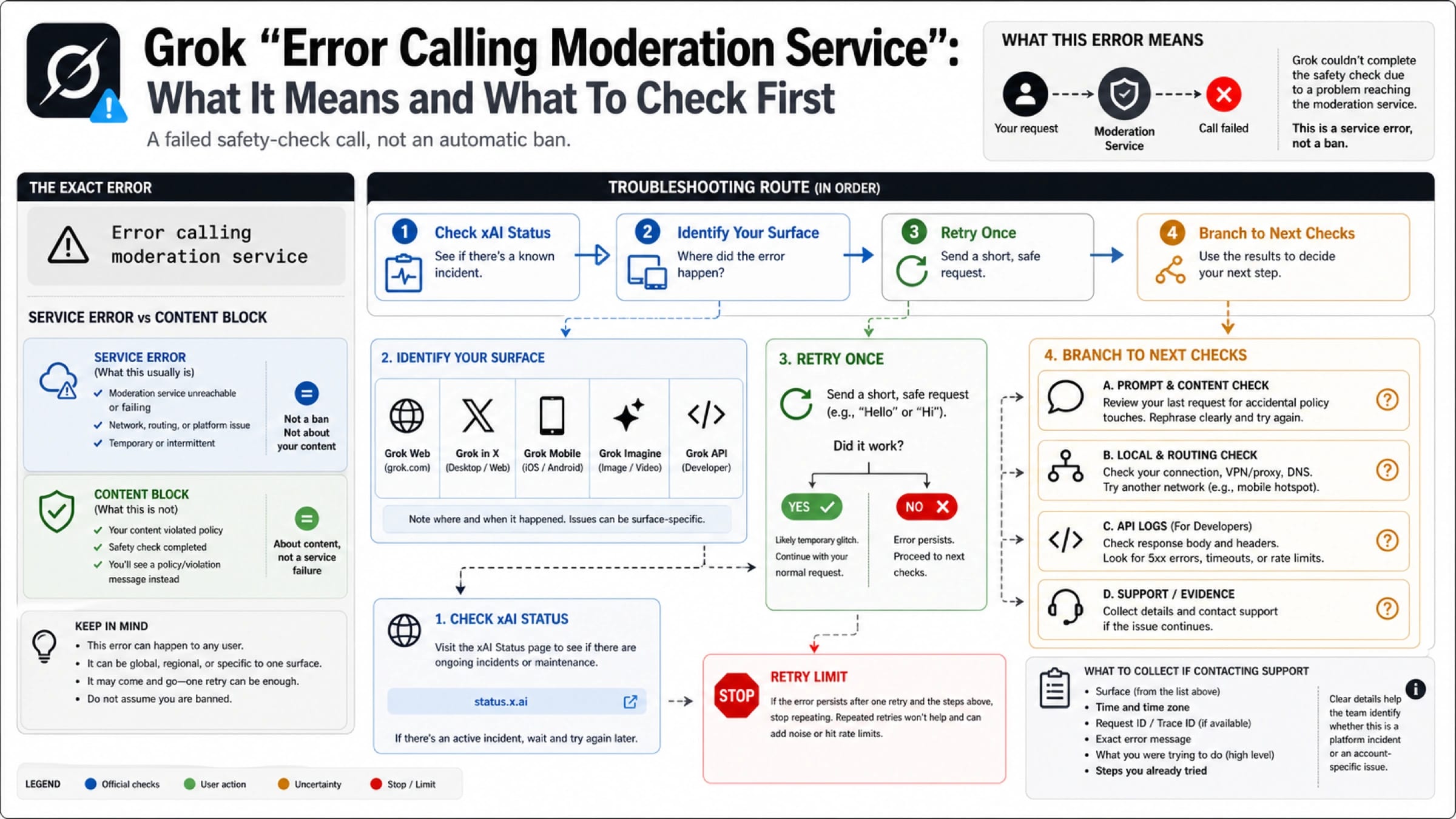
If Grok shows "Error calling moderation service," treat it as a failed moderation or safety-check call first, not proof that your account is banned or that your prompt was definitely rejected. The fastest safe path is to check xAI Status, identify whether the failure is on Grok Web, Grok in X, mobile, Grok Imagine, or the xAI API, then retry once with a short safe request before changing settings or rewriting everything.
| What you see | Most likely owner | First check | Do not do first |
|---|---|---|---|
| "Error calling moderation service" | Moderation-service call did not complete | xAI Status, affected Grok surface, one short safe request | Assume a ban, spam retries, or jump to VPN advice |
| A clear content or policy block | Prompt or output was rejected by safety policy | Rewrite the request into a legitimate, safer task | Try to bypass the policy |
| High demand, heavy usage, or rate-limit wording | Capacity, quota, or request volume | Wait, retry later, or inspect rate-limit signals | Treat it as a moderation failure |
| Upload, media, or storage-limit wording | File, image, or workspace constraint | Reduce files, check storage, or retry the media route | Debug prompt wording |
| API error with status code or response body | Integration, endpoint, model, region, or retry policy | Inspect HTTP status, error body, logs, request ID, and endpoint | Use app-cache fixes for an API problem |
Use this route board before broad fixes:
- Check the relevant xAI Status component.
- If a component is degraded, wait or monitor before changing local settings.
- If status is green, test one official surface with the same account.
- Retry once with a short safe request that does not need sensitive or ambiguous moderation.
- If the failure follows one complex prompt, simplify the prompt without bypass tactics.
- If the failure follows the account, surface, or API route, collect evidence for support or developer debugging.
Stop after one controlled retry. Repeated retries, proxy switching, or prompt-bypass experiments can hide the real owner of the failure and may create a policy problem of their own. xAI Status checked on June 4, 2026 (CST) showed no declared broad incident on the overview page, Grok Web, Grok in X, and API us-east-1, but a green status page only means no declared broad incident for that component; it does not prove every account, prompt category, app build, region, or integration route is healthy.
What "Error calling moderation service" means
The message means Grok tried to call a moderation or safety-check service and that call did not return a usable result for the current request. In plain language, Grok could not finish the gate that decides whether the request or output can continue. That is different from a clear rejection such as "content moderated" or "try a different idea," where the system has already decided that the content itself cannot proceed.
The difference matters because the first fix changes. A service-call failure can be caused by a temporary platform issue, one broken Grok surface, a local session or browser problem, a prompt that triggers extra review and then times out, or an API integration problem. A content block is a policy outcome. Treating both as the same thing leads to bad advice: clearing cache will not make a prohibited request acceptable, and rewriting an innocent prompt will not fix a degraded service component.
The message alone also does not prove your account has been banned. xAI's Acceptable Use Policy says violations can lead to account action, so account enforcement is possible in the broader system. But this exact error is weaker evidence: it says the moderation call failed, not that the account was closed, suspended, or permanently restricted. Look for account-specific notices, email, settings state, billing state, and repeated failure across official surfaces before making that conclusion.
Use the taxonomy before fixes
Classify the wording before you troubleshoot. Grok has several failure families that can look similar when you are blocked mid-task, but each family has a different owner.
| Error family | How to recognize it | Best first move | Best handoff if wording differs |
|---|---|---|---|
| Moderation-service call failure | The exact message says "Error calling moderation service" | Status, surface, one short safe retry | Stay with the moderation-service route |
| Content block | The wording says the content is moderated, disallowed, or should be changed | Reframe the request into a legitimate task | Do not bypass policy |
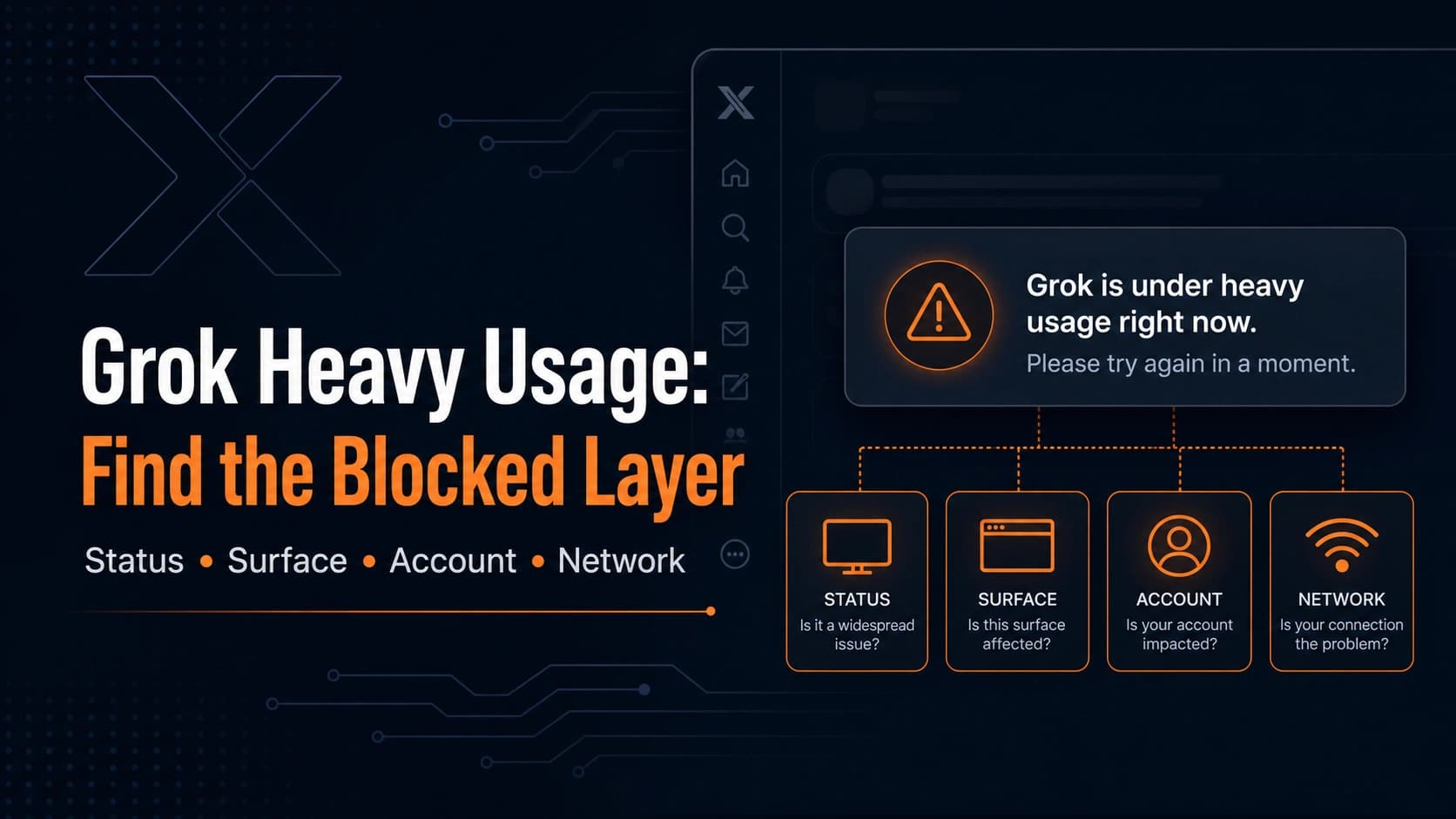
| High demand or heavy usage | Wording mentions demand, capacity, usage, or priority access | Check status and wait or test one official surface | Follow the heavy-usage recovery path |
| Storage or upload limit | Wording mentions storage allowance, upload failure, file quota, or media workspace | Reduce files or manage storage | Follow the storage-specific path |
| API error | You have an HTTP response, status code, error body, or logs | Debug API response and retry policy | Do not use consumer app fixes |
If the wording is high-demand or heavy-usage, use the Grok heavy-usage recovery guide. If the wording is storage or file quota, use the Grok storage limit exceeded guide. If the real question is adult image policy, API moderation policy, or unsafe content boundaries, use the Grok xAI NSFW image generation policy guide. If the intent shifts toward bypassing Grok safeguards, use the Grok image jailbreak safety guide and stop operational prompt attempts.
That routing is not just internal housekeeping. It prevents the most common wrong move: applying a generic "fix Grok" checklist to a message that needs owner diagnosis first.
Check xAI Status first, but do not stop there
Start with xAI Status because it is the public source that can declare a broad component problem. Check the overview and the specific surface you are using: Grok Web, Grok in X, iOS, Android, API region, Console, or Docs if relevant. If the component is degraded, the cleanest recovery path is to wait, monitor, and avoid changing several local variables at once.
On June 4, 2026 (CST), the xAI Status overview, Grok Web component, Grok in X component, and API us-east-1 component showed no declared broad incident. That status snapshot is useful because it tells you not to assume a platform-wide outage at that moment. It is not a permanent truth and it is not proof that your individual route is healthy. Status pages are broad incident boards; they cannot prove every account, app build, prompt category, region, or API integration is working.
Use status as a branch, not as a verdict. If a component is degraded, wait or monitor first. If status is green, move to surface isolation. The practical sentence is: "No broad incident was declared when I checked, so I need to learn whether the failure follows my account, one Grok surface, one prompt category, my local route, or my API integration."
Try one official surface once
If status is green, isolate the surface with the fewest possible changes. Use the same account and try one alternate official route: Grok Web, Grok inside X, the iOS app, the Android app, or Grok Imagine if the failure came from a media request. Send one short safe request, such as a simple summary or harmless factual question, rather than the same long prompt that just failed.
The goal is not to hop between every device you own. The goal is to answer one question: does the failure follow the account, the prompt, the surface, or the local environment? If a short safe request works on another official surface, finish the urgent task there and return to the original surface later. If the same account fails on multiple official surfaces with a simple safe request, the issue is less likely to be a browser cache problem and more likely to be account, service, prompt-category, or support-owner territory.
Keep the retry count small. Repeatedly submitting the same request can make the evidence worse because you no longer know whether you are seeing the original moderation-service failure, a rate limit, a temporary queue, or a policy outcome caused by increasingly aggressive rewrites.
Rewrite only the prompt branch
Prompt rewriting belongs only after the symptom points to the prompt. If one long, sensitive, ambiguous, uploaded, or media-heavy request fails but a short safe request works, simplify the original task. Remove unnecessary personal data, reduce ambiguity, split a multi-step request into smaller parts, and ask for a legitimate, clearly allowed outcome.
Do not rewrite as a bypass. Avoid role-play instructions, "ignore safety" language, evasion wording, or attempts to force Grok around moderation. xAI's policy says users should respect guardrails, and trying to defeat them can move the problem from a technical failure into a policy issue. The safe rewrite pattern is not "how do I make the moderation service accept this?" It is "what is the legitimate task I actually need, expressed clearly and narrowly?"
For image, video, and Grok Imagine workflows, be more conservative. xAI's Imagine documentation says generated media is subject to content policy review. That means a media request may pass through moderation checkpoints that a basic text request does not. If the error appears only on media generation or editing, test a harmless text prompt separately before assuming the whole account or platform is broken.
Use local fixes after ownership is clearer
Local fixes still have a place; they are just not the first branch. Once status and official-surface checks suggest the problem is local, work from low-risk to high-change:
| Local check | What it can prove | How to keep it clean |
|---|---|---|
| Refresh session or sign out and back in once | Session token or entitlement state may be stale | Do it once, then retest the same short safe request |
| Try a clean browser profile or private window | Extension, cookie, or cache interference | Keep account and prompt the same |
| Update the mobile app | Old app build may be failing one route | Do not reinstall before preserving evidence |
| Disable one extension or content blocker | Local script or network blocking may interfere | Change one variable at a time |
| Test a different network | Network or proxy may block a call | Treat this as connectivity testing, not moderation bypass |
Avoid VPN-first advice. A VPN or proxy test can sometimes reveal a network interference problem, but presenting it as a way to bypass moderation is both unsafe and diagnostically weak. If a network change matters, record it as a routing clue. Do not use it as a policy workaround.
If the error appears on upload or storage-heavy tasks, look for storage wording before clearing everything. The Grok storage limit exceeded guide handles WebKit storage, file allowance, and account storage variants, while the moderation-service route should stay focused on the failed safety-check call.
API callers need API evidence
If you are calling the xAI API, stop using consumer app advice. API failures should be diagnosed from the response and logs: HTTP status, error code, error message, endpoint, model, region, request ID or trace ID if available, retry count, and sanitized request context. The xAI debugging documentation says API errors usually return an error code and message, and 429 means too many inference requests rather than a consumer moderation-service banner.
The API moderation boundary is also important. xAI's API security FAQ says moderation still runs in real time for API requests, including cases where zero data retention applies. In other words, the API is not a moderation-free escape hatch. If your API workload receives a moderation-related failure, debug it as a production integration with policy review, not as a prompt-bypass challenge.
For API callers, the most useful packet looks like this:
| Field | Why it matters |
|---|---|
| Timestamp and timezone | Lets you compare the call with status events |
| Endpoint and region | Separates API us-east-1 from other surfaces |
| Model or media route | Distinguishes text, image, editing, and video workflows |
| HTTP status and response body | Shows whether this is rate limit, bad request, service issue, or moderation |
| Request ID or trace ID | Gives support a handle if available |
| Retry count and backoff | Shows whether the integration is amplifying the failure |
| Sanitized prompt category | Explains content class without exposing secrets |
Keep credentials out of every support message. Do not paste API keys, bearer tokens, private logs, card data, full sensitive prompts, private user data, or proprietary payloads into public forums or screenshots.
Build a support packet when it persists
Escalation is useful only when the packet is clean. If the error persists after status, one official surface test, one short safe retry, and branch-specific checks, collect evidence instead of repeating the same prompt.
For a consumer Grok error, include:
| Evidence | Safe detail to include |
|---|---|
| Screenshot | Exact message and visible surface |
| Timestamp | Local time, timezone, and date |
| Surface | Grok Web, Grok in X, iOS, Android, or Grok Imagine |
| Status state | What xAI Status showed when you checked |
| Account route | Same account or different account, without exposing credentials |
| Prompt category | Sanitized category such as "short safe text prompt" or "image upload" |
| Alternate-surface result | Whether the same account worked elsewhere |
| Local checks already tried | Session refresh, clean browser, app update, network test |
If the issue is tied to billing, account access, or paid recognition, add receipt owner and plan name only when needed and redact payment details. If the issue is tied to API usage, include the API packet instead of app screenshots alone.
What not to conclude from the message
Do not conclude "Grok is down for everyone" from one moderation-service message. Check status and look for broader incident evidence.
Do not conclude "my account is banned" from the exact message alone. Look for account notices and repeated account-level failure across official surfaces.
Do not conclude "the prompt is definitely blocked" unless Grok returns clear policy wording or a safer prompt test proves the issue is prompt-specific.
Do not conclude "VPN fixes moderation." At most, network testing can identify local routing or proxy interference. It should not become a bypass tactic.
Do not conclude "the API is the workaround." The xAI API is a moderated developer surface with its own errors, logs, billing, retry policies, and policy responsibilities.
FAQ
Is "Error calling moderation service" the same as "content moderated"?
No. "Error calling moderation service" usually means the moderation or safety-check call did not complete. "Content moderated" means the system has made a policy decision about the request or output. The first needs status, surface, prompt, local, or API diagnosis; the second needs a legitimate safer request.
Does this error mean my Grok account is banned?
Not by itself. The message is not a ban notice. Account action is possible under xAI policy for violations, but this exact wording only proves that the moderation-service step failed. Look for account-specific notices, email, settings state, and repeated account-level failure before treating it as enforcement.
What should I check first?
Check xAI Status and the relevant Grok component first. If status is degraded, wait or monitor. If status is green, try one official alternate surface with the same account and one short safe request.
Should I clear cache or reinstall the app?
Only after status and surface checks suggest a local issue. Cache, session, app update, extension, and network tests are useful later, but they are too broad as the first move for this exact error.
Can a VPN fix the moderation-service error?
Use network or proxy testing only to identify local connectivity interference. Do not use VPN switching as moderation bypass advice. If changing networks changes the result, record it as a route clue and keep the prompt legitimate.
Why does this happen with images or uploads?
Media routes can involve extra review and file handling. xAI's Imagine documentation says generated media is subject to content policy review. If the message appears only on image, video, editing, or upload tasks, test a harmless text prompt separately and then isolate the media route.
What if I see the error through the xAI API?
Use API evidence, not app advice. Capture the HTTP status, response body, error code or message, endpoint, model, region, request ID if available, retry count, and sanitized logs. Also check the relevant API status component.
What should I send support?
Send the screenshot, timestamp, timezone, surface, xAI Status state, same-account alternate-surface result, short safe retry result, sanitized prompt category, and local checks already tried. For API issues, add HTTP status, response body, endpoint, model, region, request ID, and retry policy. Redact secrets and private data.