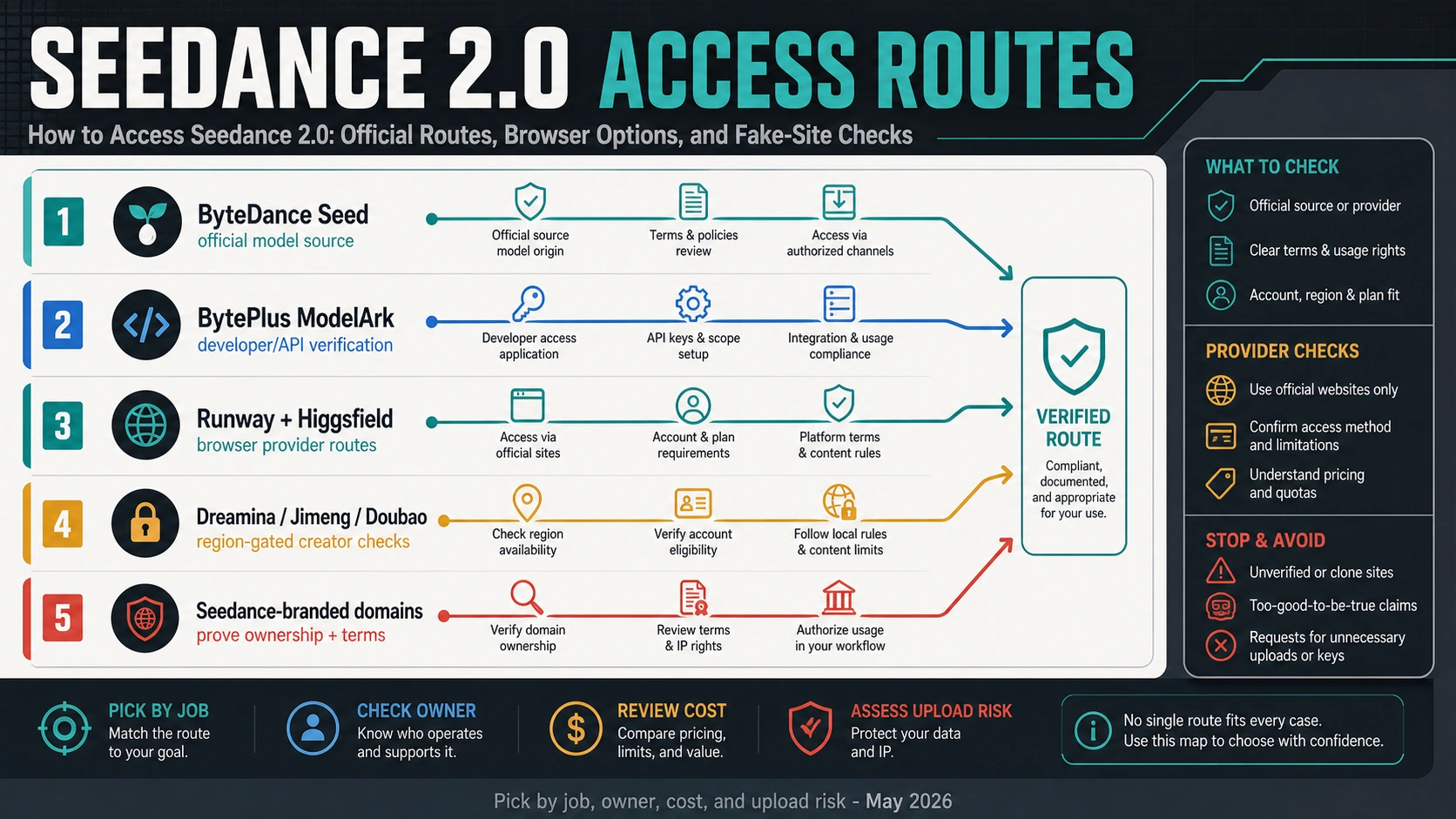
Seedance 2.0 MOD APK pages are not the safest first route or proof of official access. If you want to try Seedance 2.0 on Android, first separate the APK mirror from the Google Play Seedance 2 listing, the ByteDance Seed model page, the BytePlus developer route, and provider or wrapper sites; then verify publisher, package, data rules, Play Protect status, and upload terms before installing or sharing real assets.
| Surface | What it can prove | What to verify first |
|---|---|---|
| APK mirror or MOD APK page | Only that a third-party page claims to offer an APK, premium unlock, or download. | Operator, package origin, version date, permissions, Play Protect warnings, terms, privacy, support, and whether the claim is legal or official. |
Google Play Seedance 2 listing | Store-visible app facts such as publisher name, package, update date, ads/IAP labels, data-safety text, and support contacts. | Whether the publisher is the owner you expected, whether the package matches the store listing, and whether data collection or subscription rules fit your use. |
| ByteDance Seed page | Official model identity and capability framing for Seedance 2.0. | It does not prove that an APK, Play app, wrapper, or provider route is first-party. |
| BytePlus ModelArk | Developer/API route, account activation, model access, and billing or trial behavior. | Current docs, region, quota, API key ownership, task lifecycle, retention, and terms before coding. |
| Provider or wrapper site | Its own browser access, credits, plan limits, and upload workflow. | Company owner, terms, privacy, rights, refund, watermark, retention, and support before payment or real uploads. |
| Community video, GitHub, or APK advice | A lead that a route may exist. | Re-check the route owner before installing anything, bypassing warnings, paying, or using real assets. |
The practical rule is simple: do not chase a premium unlocked claim before you can name the route owner. Do not bypass Play Protect warnings. Use non-sensitive test prompts and mock assets until ownership, privacy, retention, commercial-use rights, and support are clear.
Is a Seedance 2.0 MOD APK the official route?
No. A MOD APK page is a third-party download claim unless the operator can prove first-party ownership, package integrity, terms, and rights. That is a high bar, and it is not met by a title such as Seedance 2.0 MOD APK Premium Unlocked.
The phrase premium unlocked is especially important. It suggests a bypass of paid features or subscription controls, not a normal official release. Even before malware risk, that creates license, account, update, support, and payment problems. A modded APK can also break the normal update chain: you may not know who modified the package, whether the file matches the store listing, which permissions were changed, or whether future updates will replace it cleanly.
Do not turn the APK question into an install tutorial. The safe answer is to route the decision:
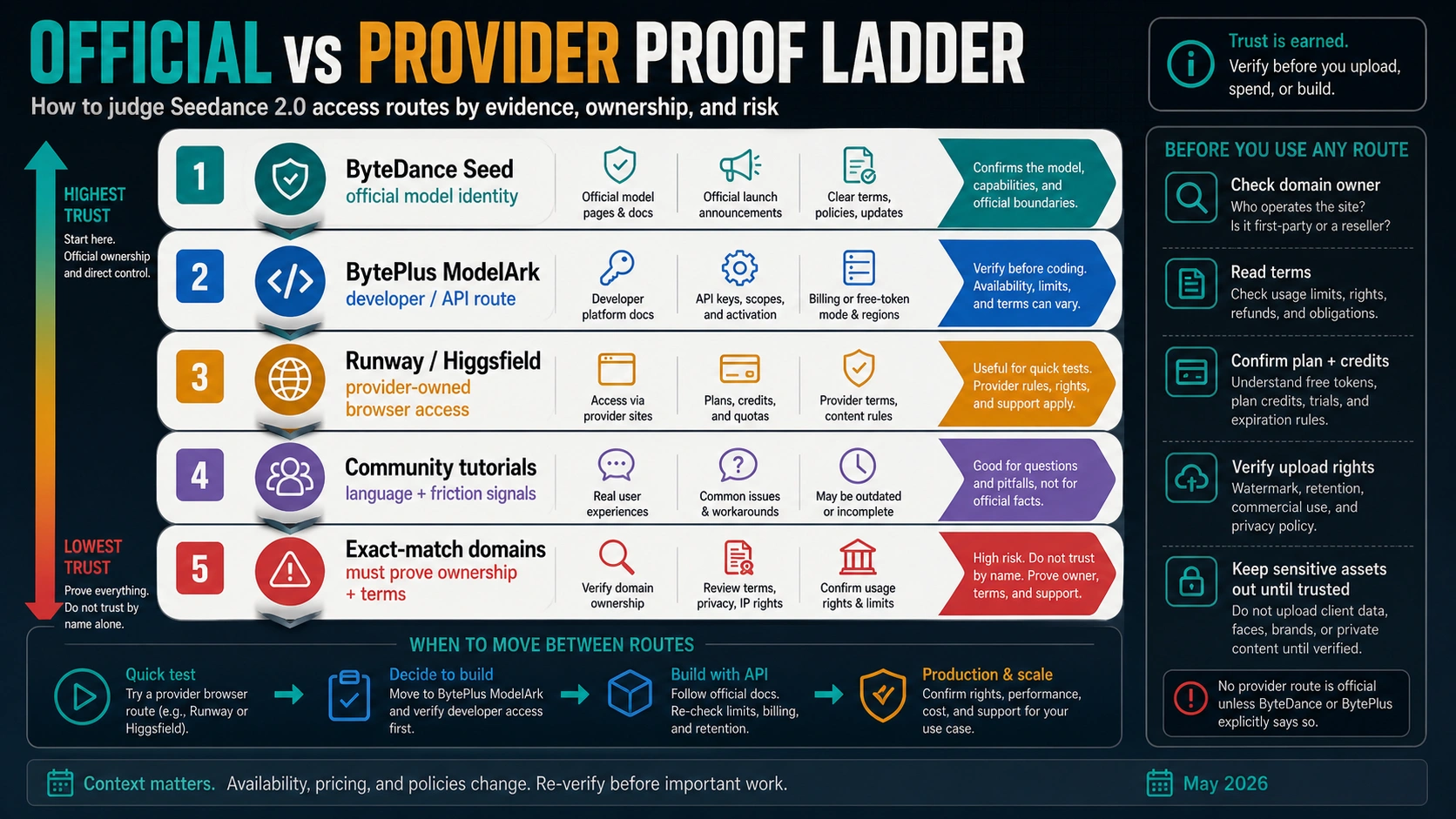
- If you want official model identity, start with ByteDance Seed.
- If you want Android app facts, audit the Google Play listing before trusting any file mirror.
- If you want developer access, verify BytePlus ModelArk.
- If you want a fast browser test, treat providers and wrappers as provider-owned contracts.
- If you see a MOD APK or premium-unlocked claim, stop until ownership, package source, terms, and Android safety checks are clear.
How should you check the Google Play Seedance 2 listing?
A Google Play listing is easier to audit than a random APK file, but it is still not automatic proof of ByteDance ownership. As of June 12, 2026, Google Play shows an app named Seedance 2 by CodeeAI PTE. LTD. with ads, in-app purchases, subscription language, an April 30, 2026 update, data-safety disclosures, and developer contact fields. Those are useful listing facts. They do not by themselves turn the app into the official ByteDance Seed model owner.
Use the Play listing as an audit surface:
| Check | Why it matters |
|---|---|
| Publisher name | The visible publisher should match the owner or provider contract you think you are accepting. |
| Package identity | The installed package should match the store route, not a similarly named APK from a mirror. |
| Update date and version behavior | AI app surfaces change quickly; an old or mirrored package can drift from current terms and security fixes. |
| Ads, in-app purchases, and subscriptions | These define billing expectations. They are not the same as BytePlus API billing or official creator credits. |
| Data safety | AI video apps often handle photos, videos, audio, prompts, and identity-like references. Collection and sharing rules matter before upload. |
| Support and deletion path | If generation fails, billing is disputed, or uploads need removal, you need a real support and data-deletion route. |
Google Play Protect is also part of the Android safety boundary. Google documents that Play Protect can scan apps, warn about harmful apps or unsafe URLs, and in some cases disable or remove apps. If Android or Play Protect warns you, do not treat the warning as an obstacle to bypass. Treat it as a signal to move back to owner verification or to a web/API route.
If Play is unavailable for your account or region, that does not make a MOD APK safer. It only means you need a different verified route: official web access, a developer platform, a provider with clear terms, or no install until the owner is clear.
What is the official Seedance 2.0 source?
ByteDance Seed's Seedance 2.0 page is the owner source for model identity. It identifies Seedance 2.0 as a ByteDance Seed video model and describes current capability framing such as motion stability, audio-video generation, and multimodal references across text, images, audio, and video.
That does not mean every Seedance-named app, APK, wrapper, or provider is official. A model page proves the model exists and gives the first-party capability frame. It does not give every reader an Android APK, a free account, a universal API key, a no-watermark export, or unlimited commercial rights.
For creator-style access, pages on Dreamina and CapCut can be relevant because they present Seedance 2.0 creator workflows and free-start language. Still, check the current page, account state, export rules, credits, watermark, and region behavior before treating that route as usable for your project. A creator app route is not the same as a developer API route, and neither route proves that a MOD APK mirror is safe.
For developer access, use BytePlus ModelArk. BytePlus owns the developer contract: account activation, model availability, API keys, task lifecycle, billing or trial behavior, quota, retention, and service terms. If you are building a product or customer workflow, do not copy code or model IDs from a random tutorial before checking the current BytePlus docs and console.
The clean source hierarchy is:
| Owner | Use it for | Do not use it for |
|---|---|---|
| ByteDance Seed | Model identity and capability boundary. | Android package trust, app subscriptions, or API activation. |
| Dreamina or CapCut | Creator-surface testing when the current page and account show access. | Developer API entitlement or APK safety. |
| BytePlus ModelArk | Developer/API verification, billing mode, task lifecycle, and production readiness. | Creator-app credits, Play app publisher facts, or mirror claims. |
| Google Play | Store listing facts for a specific Android app. | First-party model ownership unless the publisher proves it. |
| Providers and wrappers | Their own plan and upload contract. | Official ownership, universal free access, or rights outside their terms. |
When does free or premium access become risky?
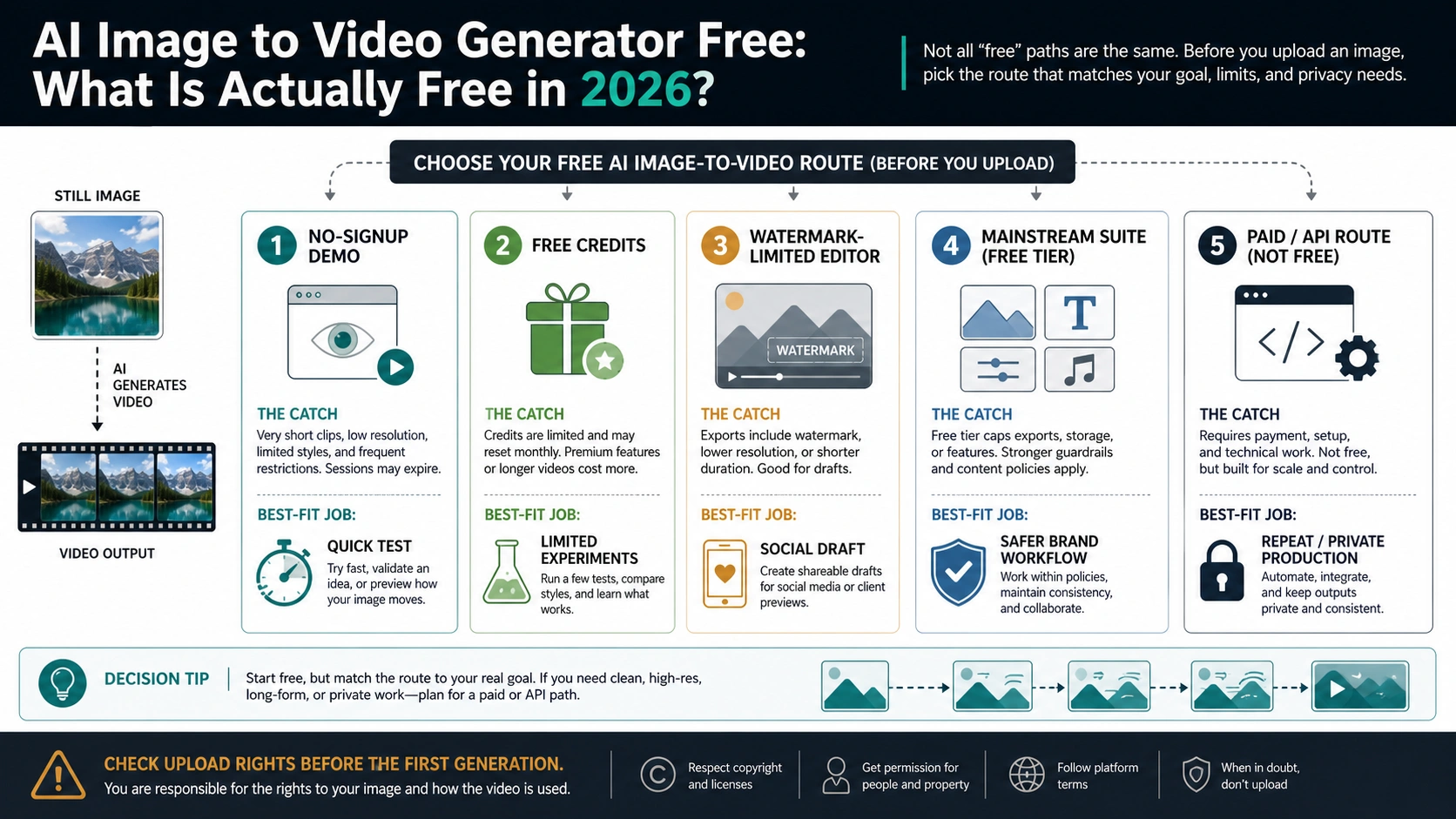
Free, trial, and premium unlocked are not the same thing. Free can mean a page is free to read, a creator app offers account credits, a developer platform grants trial capacity, a provider includes plan credits, or a wrapper advertises a free button. Premium unlocked usually means something different: a third-party is claiming paid features are bypassed.
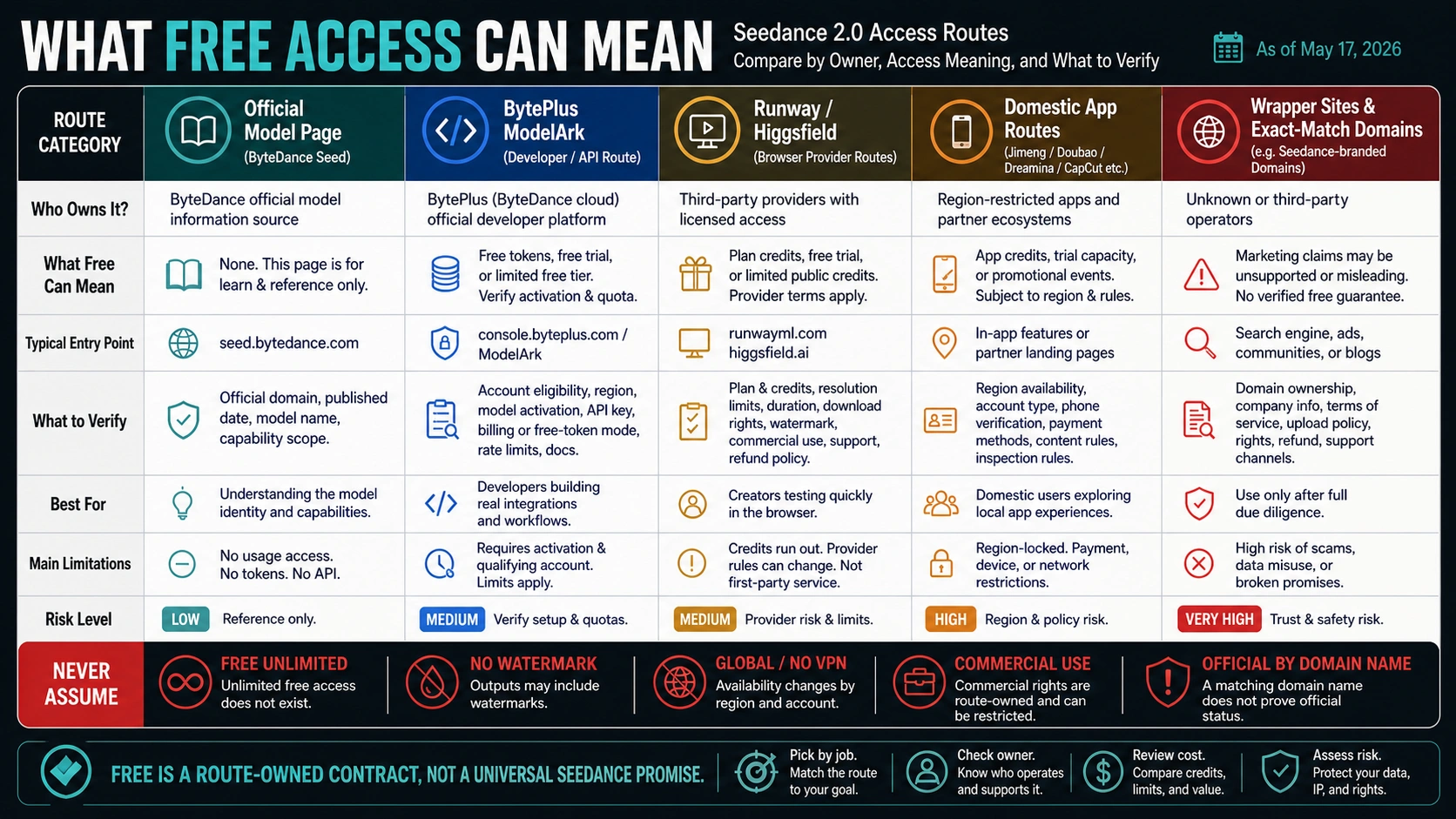
Use this matrix before you trust the claim:
| Claim | Safer interpretation | Stop rule |
|---|---|---|
Free to try on an owner-controlled page | A limited creator or account route may exist. | Verify account eligibility, credits, export, watermark, and upgrade boundary. |
| BytePlus trial or playground | Developer testing may be possible before paid usage. | Verify activation, quota, billing, region, model docs, and retention before coding. |
| Provider credits | The provider may offer limited browser tests. | Verify rights, privacy, watermark, download, refund, and support under that provider's terms. |
Free unlimited | A marketing claim, not owner proof. | Require the route owner to explain limits, cost model, rights, privacy, support, and retention. |
Premium unlocked APK | A bypass claim, not an official entitlement. | Do not install or upload real assets; move back to Play, official web, BytePlus, or a documented provider route. |
The reader job is not to find the most aggressive download button. It is to know which route can be trusted for the next action. For a casual test, a small browser provider experiment with non-sensitive assets may be enough. For production, you need an owner, a billable account, clear terms, and an output retrieval path.
How should you treat provider and wrapper sites?
Provider and wrapper routes can be useful, but only as their own contracts. A browser provider may make Seedance 2.0 available inside its workflow, with its own credits, queue, resolution, duration, download, watermark, moderation, privacy, refund, and support rules. That can be a valid low-risk test route when the provider is clear and your assets are safe to upload.
A wrapper site is different. It may use a Seedance-looking domain, copy model language, or offer a try now button, but the domain name alone is not official proof. Before paying or uploading, ask:
- Who operates the site and company?
- Does it prove ByteDance, CapCut, Dreamina, or BytePlus ownership or authorization?
- Which model, provider, or route does it actually call?
- Are terms, privacy, retention, refund, support, and commercial-use rules visible?
- Are credits, subscription renewal, watermark, download, and deletion rules documented?
- Does it ask for unnecessary account tokens, API keys, or sensitive uploads?
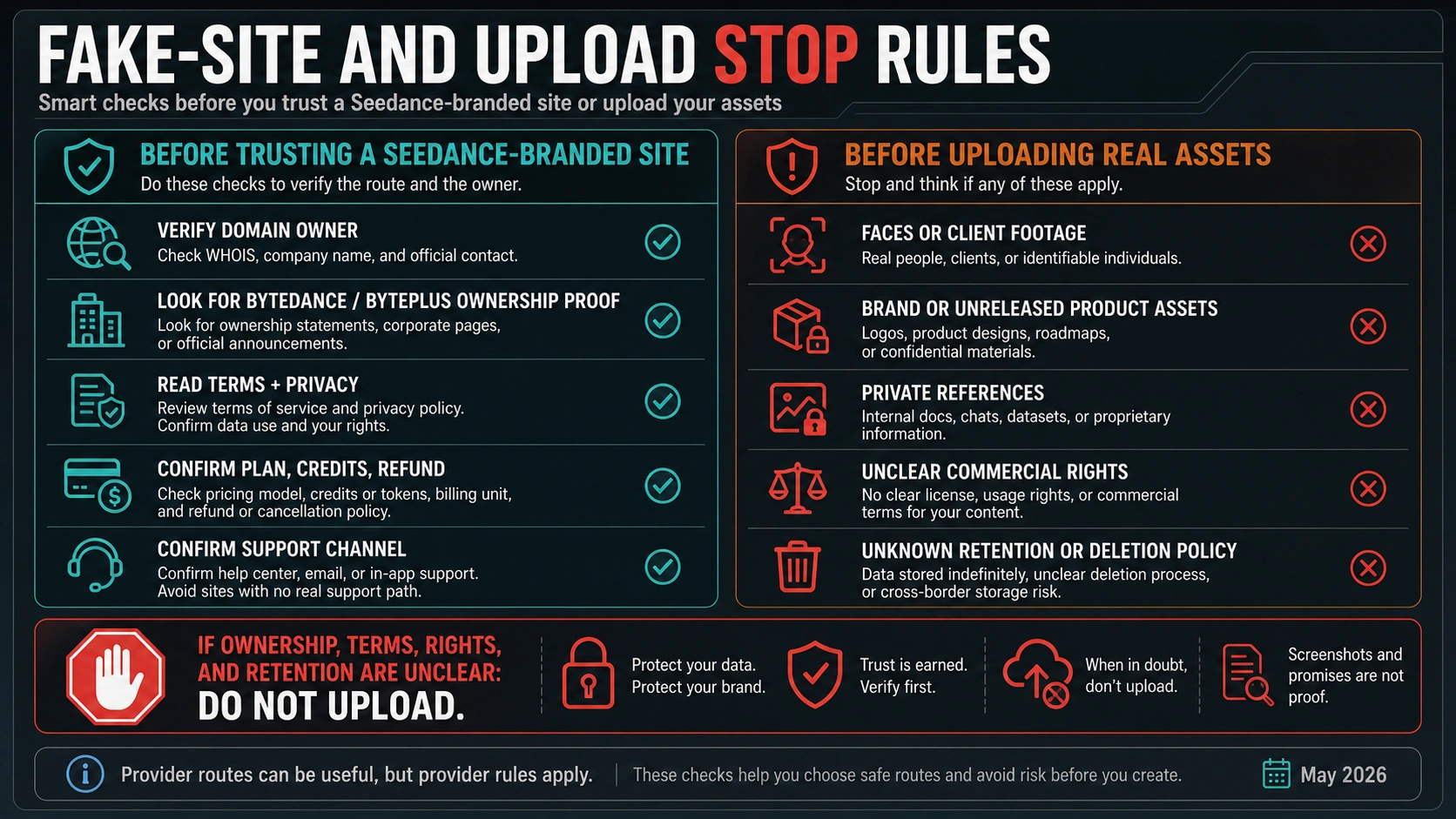
Stop immediately if a site claims official status by name alone, unlimited access, guaranteed no watermark, no review, no restrictions, or production-grade commercial rights without terms. The absence of a warning is not proof of safety.
What should developers verify before using the API route?
For developers, Seedance access is an integration contract, not a download hunt. BytePlus ModelArk is the route to verify before writing production code because it controls whether your account can activate the model, create tasks, retrieve outputs, handle failures, and pay for usage.
Before coding, verify:
| Check | Why it matters |
|---|---|
| Account and region eligibility | Docs can be public while a specific account cannot activate the model. |
| Model activation | The model must be enabled for the project that will own usage and logs. |
| API key ownership | Keys should belong to the billing and operations owner, not a personal test account. |
| Trial, resource-pack, or paid mode | Trial credits, prepaid capacity, and production billing are different commitments. |
| Task lifecycle | Video generation usually requires submit, poll, retrieve, fail, retry, and store behavior. |
| Retention and deletion | You need to know how outputs and uploaded references are stored and removed. |
| Moderation and acceptable use | Prompts, references, people, brands, and client assets can be blocked or restricted. |
Make one low-risk proof before building queues or customer flows: one generation, one retrieval, one failure path, one billing or trial observation, and one deletion or retention check. Do not publish exact prices, quotas, model IDs, region availability, speed, uptime, watermark, refund, or commercial-rights promises unless the current owner route proves them.
When should you avoid uploading real assets?
Seedance 2.0 workflows often use reference images, footage, audio, product shots, faces, brand material, or client assets. The upload decision should happen before the creative workflow, not after the first successful generation.
Avoid uploading real assets when:
- The route owner is unclear.
- You cannot find terms, privacy, retention, deletion, or data-use rules.
- The app or site asks you to bypass Android warnings.
- The asset contains identifiable people without route-specific consent.
- The asset includes client footage, unreleased products, brand material, legal documents, medical information, financial information, or confidential work.
- Commercial-use rights are not explicit enough for the intended output.
- You cannot get support or records if the output is blocked, removed, leaked, or billed incorrectly.
For a quick test, use synthetic prompts, mock products, public-safe references, or disposable non-sensitive assets. For production, write down the route owner, account owner, billing owner, input owner, rights owner, and output owner. If any of those are unknown, the route is not ready for real work.
A safe decision path
Use this sequence when you need a fast answer:
- Need the official model identity? Open ByteDance Seed.
- Need an Android app? Audit the Google Play listing before trusting any APK file.
- Need creator access? Check the current Dreamina or CapCut route and your account limits.
- Need API automation? Verify BytePlus ModelArk before coding.
- Need a browser test? Use a documented provider route with non-sensitive assets.
- Landed on a MOD APK or premium-unlocked page? Treat it as a stop condition, not a shortcut.
- See Play Protect, unknown-app, or unsafe URL warnings? Do not bypass them.
- Uploading real people, client footage, brand assets, or private material? Stop unless ownership, terms, rights, retention, and support are documented.
The point is not to avoid every non-official route. The point is to stop confusing convenience with ownership. A Seedance-looking page, app, or APK can be useful only after it proves which contract you are accepting.
FAQ
What is the safest Seedance 2.0 APK download route?
The safest Android route is not a MOD APK mirror. Start with Google Play listing verification if you need an app, or use official web/developer routes if the Play listing does not prove the owner you need. Check publisher, package, data safety, subscriptions, support, and Play Protect behavior before installing.
Is Seedance 2.0 MOD APK Premium Unlocked safe?
Do not treat it as safe or official by default. Premium Unlocked is a bypass-style claim, not proof of ownership, package integrity, legal entitlement, privacy, support, or update safety. It should trigger a stop rule, not an install flow.
Is the Google Play Seedance 2 app official?
As of June 12, 2026, the visible Google Play listing is named Seedance 2 and shows CodeeAI PTE. LTD. as publisher. That proves the store-visible listing facts, not ByteDance ownership. Verify publisher, package, data safety, subscriptions, support, and current app behavior before trusting it.
What is the official Seedance 2.0 website?
For model identity, use ByteDance Seed's Seedance 2.0 page. For developer/API access, verify BytePlus ModelArk. Creator routes such as Dreamina or CapCut can be useful when their current pages and your account show access, but they do not prove that a MOD APK or wrapper site is official.
Can I use Seedance 2.0 for free?
It can be free to try through route-owned credits or trials, but universal unlimited-free access is not proven. Name the route owner first: creator app, BytePlus trial, provider credits, wrapper claim, or APK mirror. Each one has different limits, rights, billing, privacy, and support.
Should I use Dreamina or CapCut instead of an APK?
If the current Dreamina or CapCut surface names Seedance 2.0 and your account has access, it is a better creator-route candidate than a modded APK. Still verify credits, export, watermark, region, account state, and terms before using real assets.
How do developers access Seedance 2.0?
Developers should verify BytePlus ModelArk, not an APK mirror. Check account activation, API key ownership, model availability, task lifecycle, billing or trial mode, retention, moderation, and current docs before building production workflows.
What if Play Protect warns about a Seedance APK?
Do not bypass the warning. Move back to the route owner, Google Play listing, official web route, BytePlus, or a documented provider. A warning means the install path needs more verification, not less.
Can I upload client footage or real people for a quick test?
Avoid that until the route owner, privacy rules, retention, deletion, commercial rights, and support path are clear. Use mock assets for testing. Real people, client material, private references, and brand assets require a documented route.