Hunyuan API Model Guide: TurboS Latest, Lite, Translation, and 3D Engine
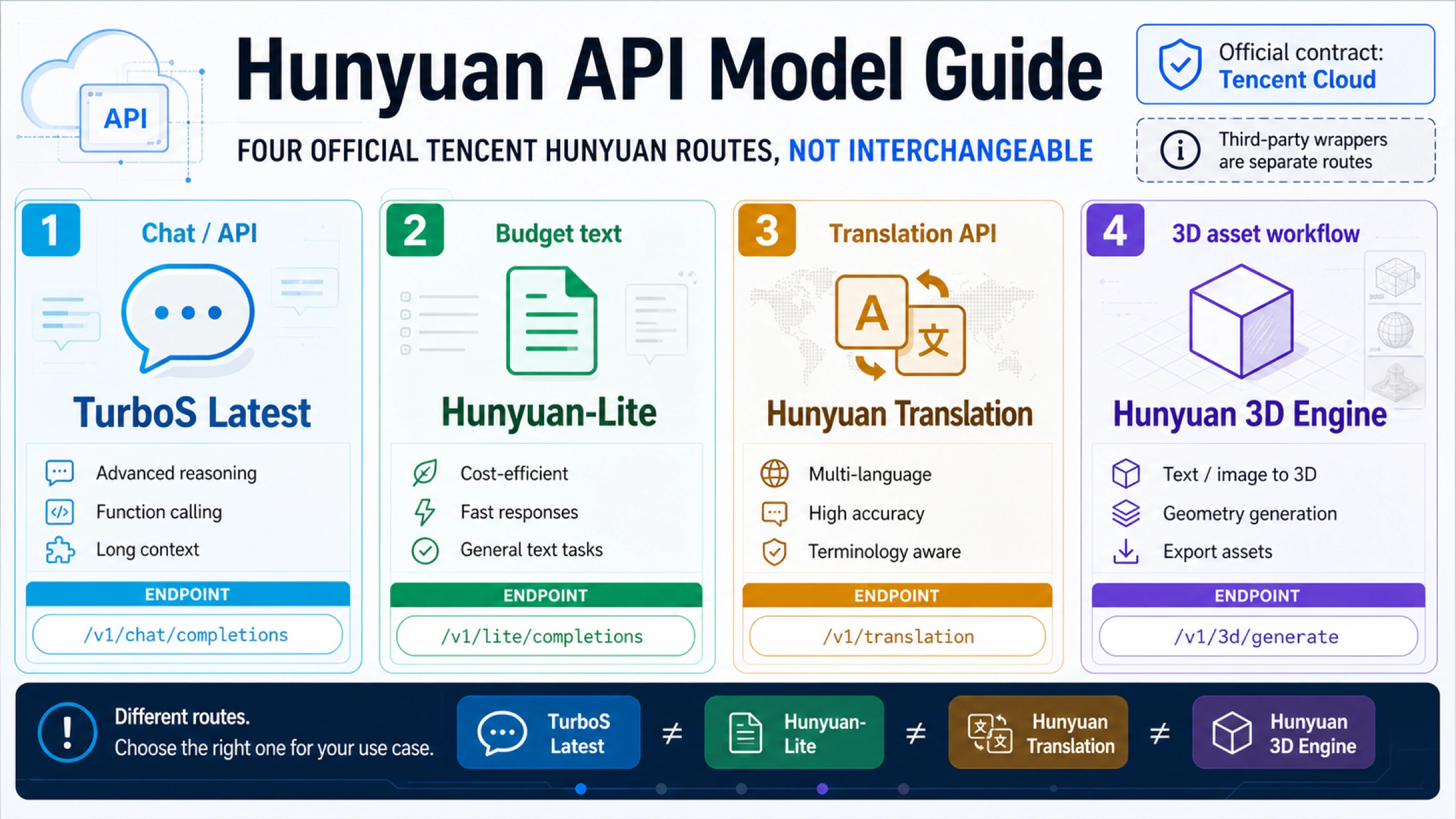
TurboS Latest, Hunyuan-Lite, Hunyuan Translation, and Hunyuan 3D Engine are four Tencent Hunyuan route choices, not one model ranking: use TurboS Latest for fast text/chat, Hunyuan-Lite for low-cost text tests, Hunyuan Translation for translation workflows, and Hunyuan 3D Engine for async 3D asset generation.
Treat Tencent Cloud docs and the Tencent Cloud console as the official source for model names, endpoints, billing rows, quotas, and 3D task behavior. Third-party provider pages can be useful compatible-route evidence, but they do not prove the official Tencent contract. Any claim about latest, Lite free status, pricing, language coverage, regions, quotas, or 3D output options should be rechecked before publication or production.
| If the job is... | Start with this Hunyuan lane | Official fact owner to recheck |
|---|---|---|
| Fast general text/chat with OpenAI-compatible client ergonomics | hunyuan-turbos-latest through Tencent Cloud's OpenAI-compatible chat route | Tencent Cloud Hunyuan product overview and compatible-interface examples |
| Low-cost text smoke tests, classification, or simple drafts | Hunyuan-Lite | Tencent Cloud Hunyuan pricing and model overview |
| Production translation where language coverage and translation quality matter | Hunyuan Translation / hunyuan-translation | Tencent Cloud model overview and ChatTranslations API docs |
| Text, image, or sketch to 3D asset workflow | Hunyuan 3D Engine | Tencent HY 3D Global product, billing, and async API docs |
| Third-party OpenAI-compatible Hunyuan access | Provider-compatible route only | The provider's own docs, not Tencent official pricing or quota |
The Quick Route Board
The safest decision order is job first, model name second. A developer who starts from the model string can easily overread the route: hunyuan-turbos-latest is a chat-completion model alias, Hunyuan-Lite is a separate low-cost text model, Hunyuan Translation is a translation-specialized model and API surface, and Hunyuan 3D Engine is a 3D asset system with task submission and result retrieval.
Tencent Cloud's Hunyuan product overview is the best single map for the text and translation family. It lists hunyuan-turbos-latest, hunyuan-lite, and hunyuan-translation in different rows with different input/output limits and different intended uses. The same doc also shows that Hunyuan contains multimodal, image, video, and other product families, so "Hunyuan" should not be treated as one linear ladder where every name competes for the same slot.
The practical route board is simple:
| Lane | Best first use | Do not use it for |
|---|---|---|
| TurboS Latest | General chat, reasoning, content, and OpenAI-compatible text workflows where throughput matters | Permanent "newest Hunyuan overall" claims |
| Hunyuan-Lite | Cost-sensitive text tests, smoke tests, simple NLP tasks, and early integration checks | Feature-heavy production work that needs search, knowledge enhancement, or the strongest model |
| Hunyuan Translation | Translation jobs that need a translation-optimized API and Tencent's documented language coverage | Generic chat prompts that only happen to translate text |
| Hunyuan 3D Engine | 3D asset generation from text, image, or sketch prompts | Chat completions, translation, or normal text-token pricing assumptions |

Official Source Map
Tencent Cloud currently adds an important platform note to the Hunyuan docs: Hunyuan capabilities are being migrated toward TokenHub, and new model capability or new service purchase should be checked there while existing purchased services may continue under the stated policy. That note belongs near implementation planning because a working old console path is not proof that the same route is the right path for new activation.
Use this source map before coding:
| Fact to verify | Source family | Why it matters |
|---|---|---|
| Model name, version update, input/output window, feature notes | Tencent Cloud Hunyuan product overview | Prevents treating latest, Lite, Translation, and 3D as interchangeable names. |
OpenAI-compatible base URL, API key, chat-completions path, and sample hunyuan-turbos-latest call | Tencent Cloud OpenAI-compatible Hunyuan examples | Confirms whether the route can be used with OpenAI-style clients. |
| Free resources, token billing rows, postpaid/prepaid behavior, and Lite status | Tencent Cloud Hunyuan billing overview | Keeps "free" and "paid" language tied to the current official row. |
| Translation-specific API behavior | Tencent Cloud ChatTranslations API docs | Keeps translation jobs on the translation route. |
| 3D activation, SecretId/SecretKey, async task APIs, and output workflow | Tencent HY 3D Global Quick Start | Keeps 3D Engine separate from text-chat assumptions. |
That map also decides how to read provider pages. A provider model page can show that a compatible route exists, but it cannot make Tencent Cloud pricing cheaper, remove Tencent quotas, or prove that a Tencent model alias has a different official meaning.
hunyuan-turbos-latest: Text And Chat Route
Use hunyuan-turbos-latest when the job is a normal text/chat Hunyuan job and you want the OpenAI-compatible client shape. Tencent Cloud's compatible-interface examples list the base URL as https://api.hunyuan.cloud.tencent.com/v1, show the full chat-completions path, and use model: "hunyuan-turbos-latest" in sample calls.
The minimal Python shape looks familiar if you already use the OpenAI SDK:
hljs pythonimport os
from openai import OpenAI
client = OpenAI(
api_key=os.environ["HUNYUAN_API_KEY"],
base_url="https://api.hunyuan.cloud.tencent.com/v1",
)
response = client.chat.completions.create(
model="hunyuan-turbos-latest",
messages=[
{"role": "user", "content": "Summarize the release note in three bullets."}
],
extra_body={"enable_enhancement": True},
)
print(response.choices[0].message.content)
The important word is compatible, not identical. Tencent documents OpenAI-compatible parameters and Tencent-specific parameters on the same page. Keep a small same-payload test for your own route before swapping a production app from one provider to another, especially if you depend on streaming behavior, enhancement flags, function calling, SDK retries, logging, or cost reporting.
Do not turn the word latest into a broader promise. In the model overview, hunyuan-turbos-latest is a TurboS row with its own update date and token limits. It should be framed as the current TurboS latest alias in Tencent's text/chat family, not as a claim that it is the newest or strongest Hunyuan product across translation, 3D, multimodal, image, or future TokenHub routes.
Hunyuan-Lite: Low-Cost Text Tests
Hunyuan-Lite is the lane for cost-sensitive text work and early integration tests. Tencent's pricing page, checked on May 8, 2026, lists Hunyuan-Lite as free to use, while the model overview describes it as a 256K-class Lite model with a smaller output ceiling than heavier text models.
That does not make Hunyuan-Lite a universal production default. The pricing page and model overview should be read together: Lite can be the right first route for smoke tests, simple extraction, classification, internal tooling, and early prompt evaluation, but it is not the place to assume every enhancement feature, quality tier, or production SLA. If the job needs stronger reasoning, knowledge enhancement, high-stakes answers, or higher output limits, test TurboS or another official Hunyuan text row instead.
The clean handoff is:
- Start Lite when the cost of many small tests matters more than maximum output quality.
- Keep the same test set for TurboS or another paid text model.
- Compare accepted-output cost, not only list price.
- Recheck the pricing page before using "free" in customer-facing copy or budget documents.
That last point matters because "free" is a current official row, not a permanent contract. If a billing page, console setting, region, account status, or service migration changes, old screenshots and provider pages do not protect a production budget.
Hunyuan Translation: Translation Route, Not Chat Prompt Shortcut
Hunyuan Translation deserves its own lane because Tencent documents it as a translation model, not merely a prompt pattern. The product overview lists hunyuan-translation, describes broad language coverage, and gives benchmark context for the translation-specialized model family. Tencent also exposes translation-specific API documentation under ChatTranslations.
Use the translation lane when your workflow is translation-first: bilingual product copy, document localization, support-message conversion, subtitle or transcript preparation, multilingual QA, or a pipeline that needs consistent translation behavior across many short segments. In those jobs, the useful checks are source language, target language, segment length, glossary handling, fallback behavior, and cost per accepted translation.
Use chat completions for translation only when the translation is part of a wider conversational or reasoning task. For example, a chat route can be fine when the model must read a customer message, summarize intent, translate the answer, and classify the escalation path in one operation. If the task is just high-volume translation, keeping it on the translation API route is easier to budget, monitor, and explain.
The mistake to avoid is writing "Hunyuan supports translation" and stopping there. A developer needs to know which endpoint owns the job, which model row controls the feature, and which facts need rechecking before shipping to another language.
Hunyuan 3D Engine: Async Asset Pipeline
Hunyuan 3D Engine is not a text model variant. Tencent positions it as a 3D asset generation platform for text, image, and sketch to 3D workflows, and Tencent Cloud's international docs put it under a separate Tencent HY 3D Global documentation family.
The API shape is also different. The 3D quick start says the professional 3D API is asynchronous: submit a job, receive a JobId, then query the result with that JobId. That is a production pipeline, not a chat-completions call. It changes how you design queues, retries, asset storage, progress UI, timeouts, moderation review, and customer-facing failure messages.

Use the 3D lane when the output is an asset, not text:
| Production concern | 3D route implication |
|---|---|
| Prompt or image input | Validate prompt length, image requirements, and user rights before submitting the task. |
| Async job handling | Store JobId, poll or schedule result retrieval, and define timeout/retry behavior. |
| Output formats | Recheck current docs for GLB, OBJ, STL, FBX, preview, or other output options before promising a format. |
| Billing and quota | Use Tencent HY 3D billing and free-resource pages, not Hunyuan text-token rows. |
| Review workflow | Treat generated assets as files that may need preview, human review, cleanup, and export controls. |
That separation prevents a common implementation mistake: taking a model list that happens to contain Hunyuan names and assuming all of them share the same authentication, endpoint, billing, and response shape.
Provider-Compatible Routes
Provider-compatible routes can be useful when they reduce integration friction, expose a familiar OpenAI-compatible endpoint, or let a team test a model before committing to a first-party console setup. They are still separate contracts.
Read a provider page as evidence for that provider's route only. It can describe the provider's endpoint, account model, pricing, rate limits, logs, support, retries, or model aliases. It should not be used to overwrite Tencent Cloud's official model names, billing rows, region behavior, translation coverage, 3D output formats, or service migration notes.
Before using a provider-compatible Hunyuan route in production, check five things:
- Exact model alias and whether it maps to a Tencent model row.
- Endpoint compatibility and unsupported parameters.
- Billing unit, minimum charge, retry billing, and failed-request behavior.
- Data handling, logging, retention, and support responsibility.
- Fallback plan if the provider route lags behind Tencent's official model update.
No provider recommendation is necessary for the route decision itself. The primary action is to identify the official Tencent lane first; only then decide whether a compatible provider route is operationally justified.
Production Recheck Checklist
Use the checklist below before committing the route to docs, customer copy, or production code.

| Claim | Recheck before using |
|---|---|
hunyuan-turbos-latest | Current model overview row, OpenAI-compatible sample, console availability, and whether latest still means the current TurboS route. |
| Hunyuan-Lite is free | Current Tencent pricing row, account status, service activation, region/console behavior, and whether any feature caveat changes the job fit. |
| Hunyuan Translation coverage | Current translation model row, ChatTranslations API docs, supported source/target languages, segment limits, and billing row. |
| Hunyuan 3D Engine output | Current Tencent HY 3D docs, async API version, output formats, free resources, quotas, and storage/review requirements. |
| Provider availability | Provider's own current docs, billing, limits, support, and data contract. Do not transfer those claims back to Tencent Cloud. |
The best practical test is a same-job route comparison. Run one short text/chat prompt on TurboS Latest, one cheap text test on Lite, one translation segment through the translation route, and one small 3D task through the async 3D flow. The goal is not a leaderboard. The goal is to prove that each route can finish the job it claims to own.
FAQ
What does hunyuan-turbos-latest mean?
It is a Tencent Cloud Hunyuan text/chat model alias shown in the OpenAI-compatible chat-completions examples. Treat it as the TurboS Latest route for text/chat work, not as a claim that it is the newest Hunyuan product across every product family.
Is Hunyuan-Lite free?
Tencent's pricing page, checked on May 8, 2026, lists Hunyuan-Lite as free to use. Keep that phrasing current and bounded: recheck the official pricing page, account state, and console behavior before using the claim in production or customer-facing material.
Should I use Hunyuan Translation or a chat model for translation?
Use Hunyuan Translation when translation is the job. Use chat completions only when translation is part of a broader reasoning or conversational workflow. The translation route is easier to budget and validate for high-volume localization.
Is Hunyuan 3D Engine an API model like TurboS?
No. Treat Hunyuan 3D Engine as a separate 3D asset workflow. Tencent Cloud's 3D quick start describes async task submission and result querying, so the production design needs JobId storage, polling, retries, asset review, and output-format checks.
Can a provider page prove Tencent's official pricing?
No. A provider page can prove that provider's compatible route, model label, and commercial terms. Tencent Cloud docs and console pages own Tencent's official model names, pricing, quotas, and API behavior.
Which Hunyuan lane should I test first?
Start from the job: TurboS Latest for general text/chat, Lite for cheap text tests, Hunyuan Translation for translation, and Hunyuan 3D Engine for 3D assets. After that, compare official route versus provider-compatible route only if provider convenience matters to your deployment.