Aspect ratio determines whether an AI-generated image fits its final surface without awkward cropping. A YouTube thumbnail usually needs 16:9, a mobile story needs 9:16, and a product tile often needs 1:1. If the ratio is wrong at generation time, the composition itself is often wrong, not just the crop.
Nano Banana Pro is Google's Gemini 3 Pro Image model. The current stable model code is gemini-3-pro-image, and Google recommends the Interactions API for the latest image-generation features. Aspect ratio and image size are now set through the response_format object documented in Google's image generation guide, not the older generationConfig.imageConfig pattern used by early examples.
This guide focuses on the production path: the supported Gemini 3 Pro Image ratios, current Python, JavaScript, and REST examples, the official pixel-size matrix, and the failure modes that make an API call return the wrong shape.
Supported Aspect Ratios: Current Reference
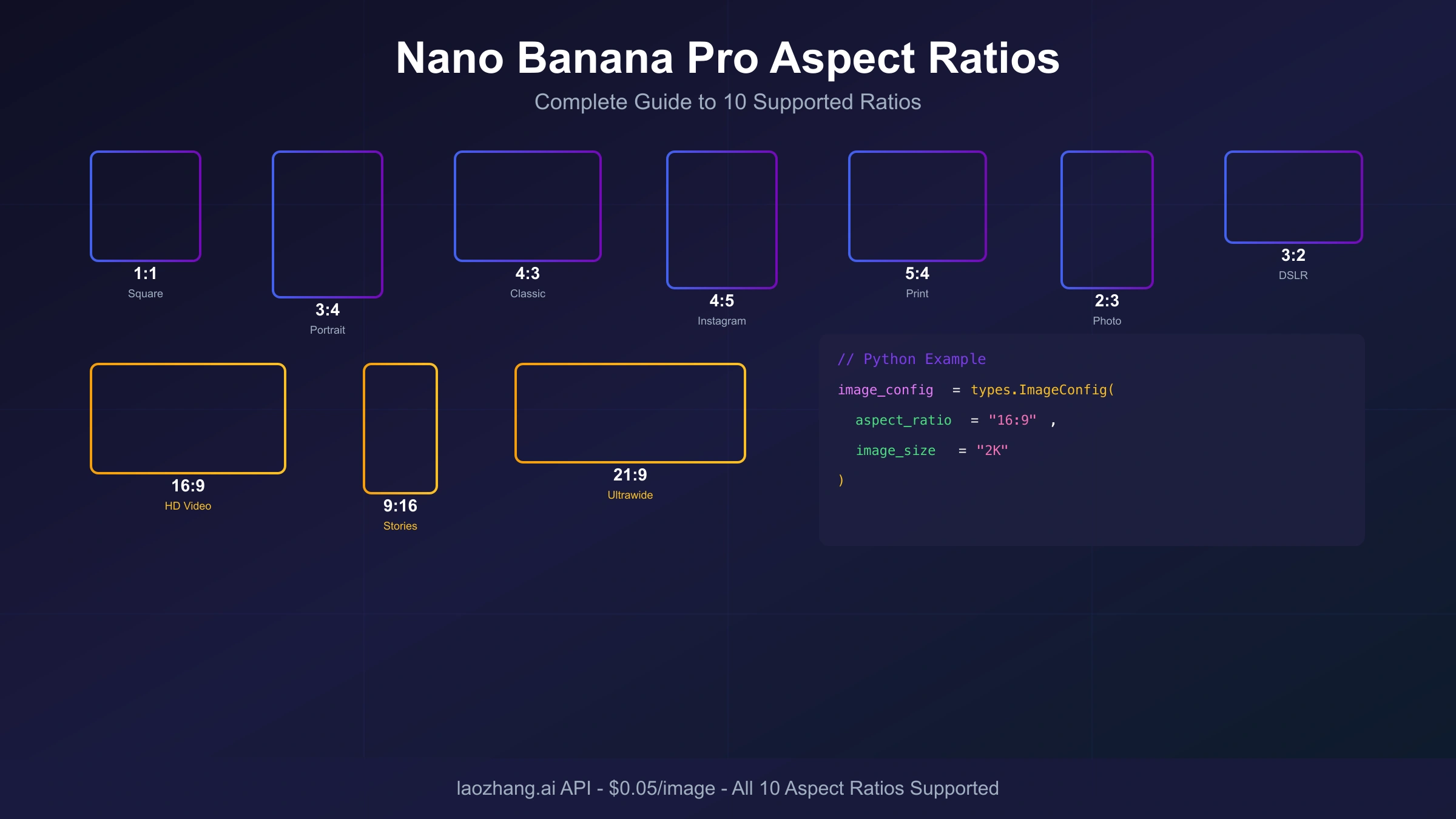
Gemini 3 Pro Image supports 10 published aspect ratios through response_format.aspect_ratio. These ratios are organized into three categories based on orientation and common use cases.
Landscape Ratios (Wider than Tall)
| Ratio | Description | Primary Uses |
|---|---|---|
| 21:9 | Ultrawide/Cinema | Movie banners, panoramic shots, website heroes |
| 16:9 | Standard Widescreen | YouTube thumbnails, presentations, desktop wallpapers |
| 3:2 | DSLR Standard | Photography prints, blog headers |
| 4:3 | Classic Format | Presentations, traditional photos |
| 5:4 | Large Format | Art prints, professional photography |
Square Ratio
| Ratio | Description | Primary Uses |
|---|---|---|
| 1:1 | Square | Instagram feed, profile pictures, avatars, product thumbnails |
Portrait Ratios (Taller than Wide)
| Ratio | Description | Primary Uses |
|---|---|---|
| 4:5 | Slight Portrait | Instagram posts, social media |
| 3:4 | Standard Portrait | Pinterest pins, portrait photography |
| 2:3 | DSLR Portrait | Posters, vertical prints |
| 9:16 | Vertical Mobile | TikTok, Instagram Stories/Reels, YouTube Shorts |
For Gemini 3 Pro Image, stay inside these 10 documented ratios. Gemini 3.1 Flash Image supports some additional extreme ratios, but those are not the safe assumption for Nano Banana Pro. If you need a custom ratio such as 2:1 or 5:3, generate the nearest supported shape and crop or pad after generation.
How to Set Aspect Ratio in the API
The current Interactions API places aspect ratio inside response_format when type is set to "image". The same snake_case fields are used in Python, JavaScript, and REST examples.
Parameter Details
- Parameter Name:
aspect_ratio - Companion Size Field:
image_size - Data Type: String
- Valid Values:
"1:1","2:3","3:2","3:4","4:3","4:5","5:4","9:16","16:9","21:9" - Default Behavior: matches the input image size when editing; otherwise generates a 1:1 square
- Case Sensitivity: The colon format is required;
"16/9"or"16x9"will not work
When you omit the aspect ratio parameter on a text-to-image request, the safe expectation is a square output. Always explicitly specify both aspect_ratio and image_size in production code so your layout tests and generated assets are predictable.
Parameter Placement
The ratio belongs under the image entry in response_format. Placing it at the root level of your request or under the legacy generationConfig object can leave the model using defaults.
Correct structure:
response_format -> type: "image" -> aspect_ratio
Incorrect (common mistake):
aspect_ratio at request root
generationConfig.imageConfig.aspectRatio
Current Code Examples by SDK
The following examples demonstrate aspect ratio configuration across different programming languages and API formats. Each example generates a 16:9 widescreen image suitable for YouTube thumbnails.
Python with Google GenAI SDK
hljs pythonfrom google import genai
import base64
import os
client = genai.Client(api_key=os.environ.get("GOOGLE_API_KEY"))
interaction = client.interactions.create(
model="gemini-3-pro-image",
input="A professional tech workspace with dual monitors, soft ambient lighting, modern minimalist design",
response_format={
"type": "image",
"aspect_ratio": "16:9",
"image_size": "2K",
},
)
with open("workspace_16x9.png", "wb") as f:
f.write(base64.b64decode(interaction.output_image.data))
JavaScript/Node.js with Google GenAI SDK
hljs javascriptimport { GoogleGenAI } from "@google/genai";
import * as fs from "node:fs";
const ai = new GoogleGenAI({ apiKey: process.env.GOOGLE_API_KEY });
async function generateImage() {
const interaction = await ai.interactions.create({
model: "gemini-3-pro-image",
input: "A professional tech workspace with dual monitors, soft ambient lighting",
response_format: {
type: "image",
aspect_ratio: "16:9",
image_size: "2K",
},
});
const buffer = Buffer.from(interaction.output_image.data, "base64");
fs.writeFileSync("workspace_16x9.png", buffer);
}
generateImage();
REST API (cURL)
hljs bashcurl -s -X POST "https://generativelanguage.googleapis.com/v1beta/interactions" \
-H "Content-Type: application/json" \
-H "x-goog-api-key: $GEMINI_API_KEY" \
-d '{
"model": "gemini-3-pro-image",
"input": "A professional tech workspace with dual monitors",
"response_format": {
"type": "image",
"aspect_ratio": "16:9",
"image_size": "2K"
}
}'
Gateway Compatibility Note
If you use an OpenAI-compatible gateway or relay service, do not assume it accepts Google's response_format shape unchanged. Treat the official Interactions API as the source of truth, then verify the gateway's current model alias, aspect-ratio field, resolution field, error format, and failed-call billing before routing production traffic through it.
Aspect Ratio and Resolution Combinations
Nano Banana Pro supports 1K, 2K, and 4K output sizes. The image_size field controls the resolution tier, while aspect_ratio controls the shape. Use the official pixel matrix rather than calculating dimensions yourself, because the published output sizes are not simply "short edge equals 2K" for every ratio.
Published Gemini 3 Pro Image Dimensions
Examples from the current matrix:
- 1:1 at 2K: 2048 × 2048 pixels
- 16:9 at 2K: 2752 × 1536 pixels
- 9:16 at 2K: 1536 × 2752 pixels
Complete Dimension Matrix
| Aspect Ratio | 1K Dimensions | 2K Dimensions | 4K Dimensions |
|---|---|---|---|
| 1:1 | 1024 × 1024 | 2048 × 2048 | 4096 × 4096 |
| 16:9 | 1376 × 768 | 2752 × 1536 | 5504 × 3072 |
| 9:16 | 768 × 1376 | 1536 × 2752 | 3072 × 5504 |
| 4:3 | 1200 × 896 | 2400 × 1792 | 4800 × 3584 |
| 3:4 | 896 × 1200 | 1792 × 2400 | 3584 × 4800 |
| 3:2 | 1264 × 848 | 2528 × 1696 | 5056 × 3392 |
| 2:3 | 848 × 1264 | 1696 × 2528 | 3392 × 5056 |
| 21:9 | 1584 × 672 | 3168 × 1344 | 6336 × 2688 |
| 4:5 | 928 × 1152 | 1856 × 2304 | 3712 × 4608 |
| 5:4 | 1152 × 928 | 2304 × 1856 | 4608 × 3712 |
Resolution Selection Guidelines
- 1K: Use for prompt and layout iteration when you only need to confirm composition.
- 2K: Use for most web and social assets when the final surface needs more detail.
- 4K: Reserve for large displays, print-adjacent work, or assets that will be cropped further.
At Google's official pricing checked on July 8, 2026, Gemini 3 Pro Image standard output prices 1K and 2K images at the same per-image rate, while 4K costs more. Treat that as a volatile billing fact and re-check pricing before publishing a cost calculator or quote.
Social Media Platform Guide
Different platforms crop and preview images differently. Use these ratios as starting points, then verify against the current upload surface for the account or placement you are targeting.
Platform-Specific Recommendations
| Platform | Content Type | Recommended Ratio | Resolution |
|---|---|---|---|
| Feed Post | 1:1 or 4:5 | 2K | |
| Story/Reel | 9:16 | 2K | |
| TikTok | Video/Image | 9:16 | 2K |
| YouTube | Thumbnail | 16:9 | 2K+ |
| YouTube | Shorts | 9:16 | 2K |
| Pin | 2:3 or 3:4 | 2K | |
| Twitter/X | Post | 16:9 or 4:3 | 2K |
| Post | 1.91:1 (use 16:9) | 2K | |
| Post | 1:1 or 4:5 | 2K | |
| Website Hero | Banner | 21:9 or 16:9 | 4K |
Operational Notes
Short-form mobile placements usually need 9:16 vertical framing. Generate at 9:16 from the start when the subject, text, or UI layout is meant to be read on a phone screen.
Square and 4:5 are both practical feed formats. Choose 4:5 when the subject benefits from more vertical room; choose 1:1 when the asset must remain reusable across thumbnails, catalogs, and profile grids.
For video thumbnails and website hero assets, keep important text and subject matter away from the edges. Even when the generated ratio is correct, downstream overlays can hide corners and lower thirds.
Common Mistakes and Troubleshooting
Aspect ratio configuration seems straightforward, but several issues frequently trip up developers. Understanding these common mistakes saves debugging time.
Mistake 1: Using Lowercase Resolution Values
Use the documented uppercase values for image_size: "1K", "2K", and "4K". If your output is smaller than expected, log the request payload and inspect the returned image dimensions before assuming the model ignored the prompt.
hljs python# Risky: not the documented value
response_format={"type": "image", "aspect_ratio": "16:9", "image_size": "4k"}
# Correct
response_format={"type": "image", "aspect_ratio": "16:9", "image_size": "4K"}
Treat casing bugs as request-shape bugs. Validate before sending the call rather than discovering the problem after assets have already been generated.
Mistake 2: Wrong Parameter Placement
Placing aspect_ratio at the root level instead of inside response_format:
hljs python# Wrong: aspect_ratio is not inside response_format
interaction = client.interactions.create(
model="gemini-3-pro-image",
input=prompt,
aspect_ratio="16:9",
)
# Correct: image output options live in response_format
interaction = client.interactions.create(
model="gemini-3-pro-image",
input=prompt,
response_format={"type": "image", "aspect_ratio": "16:9", "image_size": "2K"},
)
Mistake 3: Incorrect Ratio Format
The API requires the colon format exactly as specified:
hljs python# Wrong formats
aspect_ratio="16/9" # Slash not accepted
aspect_ratio="16x9" # X not accepted
aspect_ratio="1.78" # Decimal not accepted
aspect_ratio="widescreen" # Named values not accepted
# Correct format
aspect_ratio="16:9"
Mistake 4: Using Unsupported Ratios
Attempting to use ratios outside the supported 10 options:
hljs python# Won't work - not in supported list
aspect_ratio="2:1"
aspect_ratio="5:3"
aspect_ratio="1:2"
# Supported ratios only
aspect_ratio="1:1" # or 16:9, 9:16, 4:3, 3:4, 3:2, 2:3, 4:5, 5:4, 21:9
Mistake 5: Omitting Aspect Ratio Entirely
When you don't specify an aspect ratio on a text-to-image request, the output normally falls back to a square:
hljs python# This is likely to generate a square image, even if the prompt says widescreen
interaction = client.interactions.create(
model="gemini-3-pro-image",
input="A widescreen hero image for a product launch",
response_format={"type": "image", "image_size": "2K"},
)
Always explicitly set aspect ratio in production code, even if you want square output. This makes your intent clear and prevents surprises.
Troubleshooting Checklist
If your aspect ratio isn't working as expected:
- Verify
aspect_ratiois insideresponse_format, not at the request root - Check
image_sizeuses documented uppercase values (4K, not4k) - Confirm ratio format uses colon (
16:9not16/9) - Ensure ratio is one of the 10 supported options
- Confirm the model is
gemini-3-pro-image, not an old preview alias - Decode the returned image and verify its actual dimensions in your test harness
Best Practices for Production
Following these practices ensures reliable aspect ratio handling across your application.
Always Specify Both Aspect Ratio and Resolution
Never rely on defaults in production code. Explicitly set both parameters to ensure consistent output:
hljs pythonresponse_format={"type": "image", "aspect_ratio": "16:9", "image_size": "2K"}
This makes your code self-documenting and prevents issues when API defaults change.
Validate Aspect Ratio Before API Calls
Add input validation to catch errors early:
hljs pythonVALID_RATIOS = {"1:1", "2:3", "3:2", "3:4", "4:3", "4:5", "5:4", "9:16", "16:9", "21:9"}
def validate_aspect_ratio(ratio: str) -> str:
if ratio not in VALID_RATIOS:
raise ValueError(f"Invalid aspect ratio: {ratio}. Must be one of {VALID_RATIOS}")
return ratio
# Usage
ratio = validate_aspect_ratio(user_input)
Generate at Final Dimensions, Don't Crop
Nano Banana Pro composes images specifically for your chosen aspect ratio. A 9:16 vertical is designed with vertical composition in mind, not simply cropped from a wider image. Generating at the intended ratio produces better results than post-generation cropping.
hljs python# Better approach - generate at target ratio
response_format={"type": "image", "aspect_ratio": "9:16", "image_size": "2K"}
# Avoid - generating square then cropping
response_format={"type": "image", "aspect_ratio": "1:1", "image_size": "2K"}
# Then cropping to 9:16 - loses composition quality
Handle API Responses Defensively
Add error handling for cases where the API might return unexpected dimensions:
hljs pythonfrom PIL import Image
import io
def verify_dimensions(image_data: bytes, expected_ratio: str) -> bool:
"""Verify generated image matches expected aspect ratio."""
img = Image.open(io.BytesIO(image_data))
width, height = img.size
ratio_parts = expected_ratio.split(":")
expected = int(ratio_parts[0]) / int(ratio_parts[1])
actual = width / height
# Allow 5% tolerance for rounding
return abs(expected - actual) / expected < 0.05
Cost and Quota Guardrails
Aspect ratio itself is not the main billing switch. Resolution tier, output token accounting, grounding, and inference mode matter more. Still, ratio and resolution should be chosen together because they determine the final asset size and whether you need a second regeneration pass.
Official Resolution Pricing
At Google's official Gemini 3 Pro Image standard pricing checked on July 8, 2026:
| Resolution | Price per Image |
|---|---|
| 1K | $0.134 |
| 2K | $0.134 |
| 4K | $0.24 |
Batch and Flex modes list lower image-output prices, but they have different operational tradeoffs. Do not hard-code these prices into user-facing billing logic without re-checking the current Google pricing page.
Cost-Effective Workflow
For development and testing, use a lower-cost workflow discipline: validate the prompt, layout, and ratio first, then regenerate at the final size only after the composition is stable.
hljs python# Development phase: confirm composition and layout
draft_format = {"type": "image", "aspect_ratio": "16:9", "image_size": "1K"}
# Production phase: generate the publish asset
publish_format = {"type": "image", "aspect_ratio": "16:9", "image_size": "2K"}
429 and Usage Tiers
If a production job starts returning 429 RESOURCE_EXHAUSTED, do not keep retrying at full speed. Google ties rate limits to project usage tier and can also enforce spend-based limits on a rolling window. Back off, reduce expensive requests, inspect your current AI Studio limits, and request a limit increase only after you know the call pattern is legitimate.
Gateway Evaluation
Third-party gateways can be useful, but this page should not promise a cheaper or more stable route without current account evidence. Before using any gateway for Nano Banana Pro aspect-ratio work, verify the exact model alias, supported ratio list, image-size behavior, response schema, failed-call billing, refund policy, and logs for generated dimensions.
Summary and Quick Reference
Nano Banana Pro's aspect ratio control is useful when the API payload matches the current Gemini 3 Pro Image contract. Here's the practical reference:
Supported Ratios
1:1, 2:3, 3:2, 3:4, 4:3, 4:5, 5:4, 9:16, 16:9, 21:9
Quick Code Template
hljs pythonresponse_format={
"type": "image",
"aspect_ratio": "RATIO_HERE", # e.g., "16:9"
"image_size": "2K" # Use documented uppercase values
}
Platform Cheat Sheet
| Platform | Ratio |
|---|---|
| YouTube Thumbnail | 16:9 |
| TikTok/Reels/Shorts | 9:16 |
| Instagram Feed | 1:1 or 4:5 |
| 2:3 | |
| Website Banner | 21:9 |
Key Points to Remember
- Use the stable model code
gemini-3-pro-image - Put
aspect_ratioandimage_sizeinsideresponse_format - Format ratios with colon:
"16:9"not"16/9" - Treat pricing, limits, and gateway claims as current-account checks
- Generate at final ratio rather than cropping from square
For more Nano Banana Pro development resources, see our related guides: