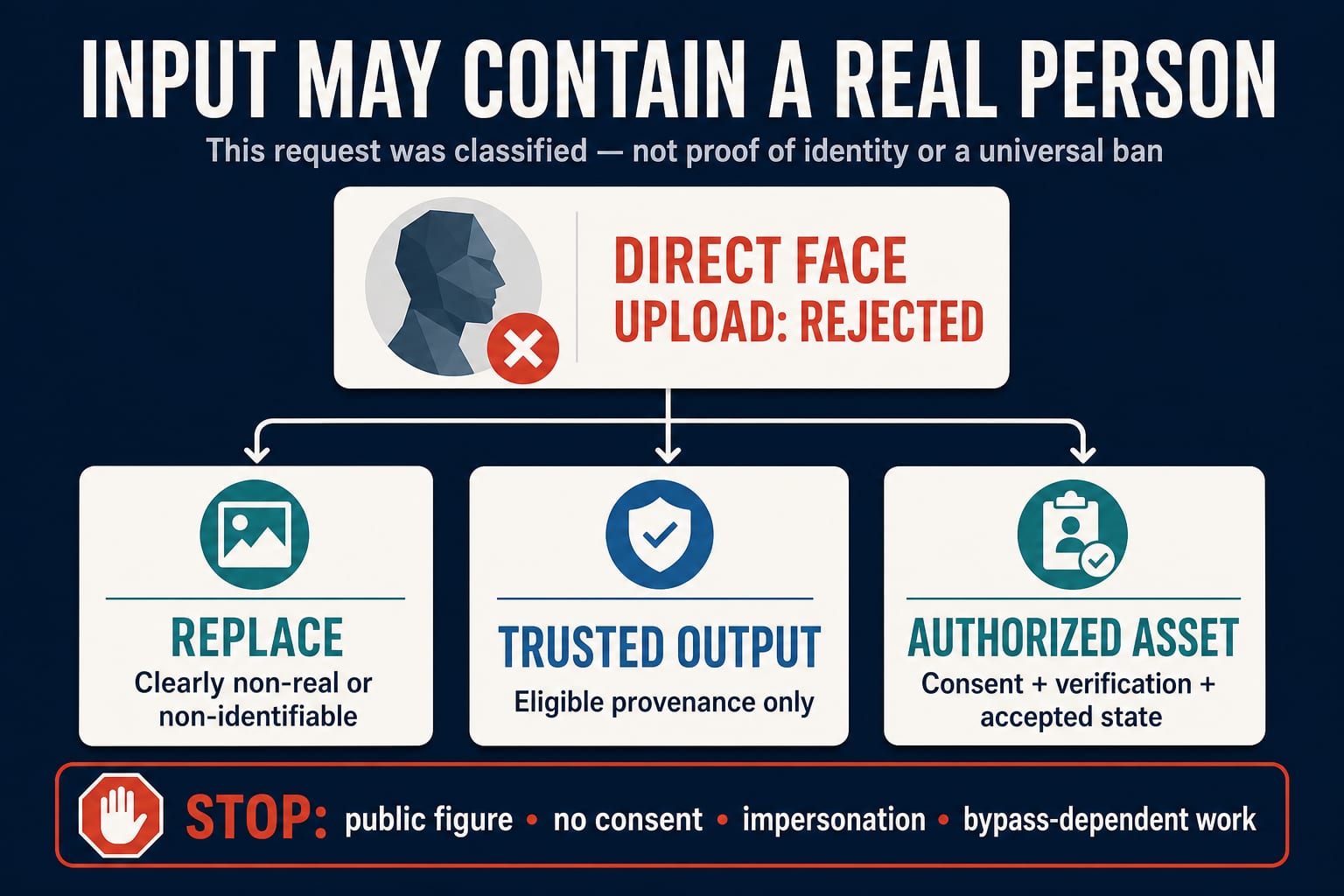
If ModelArk returns HTTP 400 InputImageSensitiveContentDetected.PrivacyInformation with “The request failed because the input image may contain a real person,” the current request has been rejected because the input classifier considered the image a possible real-person image. That does not prove the image actually shows a real person, and it does not mean Seedance 2.0 can never generate human-looking subjects.
On the documented ModelArk Seedance 2.0 route, the crucial distinction is how the face enters the workflow: direct upload of a reference image or video containing a real human face is not supported, while certain original ModelArk outputs and authorized real-human assets have separate, governed paths. Your legitimate next step is therefore to replace the input, use an eligible trusted output, use an authorized asset, or stop—not to disguise the same portrait and retry until it slips through.
| Your situation | What the error tells you | Best next action |
|---|---|---|
| You uploaded a selfie, headshot, actor photo, or face video directly | This route classified the input as a possible real-person image and rejected it | Use the authorized real-human asset workflow if you have consent and access |
| You used a realistic synthetic or stylized face | The classifier can still treat it as possibly real; the error does not certify the image's origin | Replace it with clearly fictional, non-identifiable material or use an eligible trusted output |
| You have an original face-containing ModelArk output | It may qualify as a trusted input only under the documented account, origin, and time-window rules | Reuse the unmodified original through the supported trusted-output path |
| You need a particular consenting actor | Direct portrait upload is the wrong input route | Complete authorization and verification, wait for an accepted asset, then use its Asset ID |
| The request targets a celebrity, public figure, or non-consenting person | Passing an input filter would not establish permission | Stop or change to a clearly fictional, non-identifiable subject |
Read the error literally—but not too broadly
The official ModelArk error table maps the message to InputImageSensitiveContentDetected.PrivacyInformation and recommends replacing the input. The word may matters. This is a moderation classification about the submitted image, not a finding about the person's identity, your rights, or the true provenance of the file.
It also describes one failed request. From the error alone, you cannot conclude that:
- the image definitely contains a real person;
- the account has been permanently restricted;
- every Seedance provider applies identical input rules;
- a crop, blur, rename, prompt change, or retry will be accepted;
- the failed task was free, uncharged, or refundable.
General capability claims do not override this route-specific rule. ByteDance describes Seedance 2.0 as accepting text, image, audio, and video references, but multimodal reference support is not the same as unrestricted permission to upload identifiable faces. A system can generate realistic people and still require a governed input path for a particular person's likeness.
Direct upload and governed face routes are different inputs
The current ModelArk Seedance 2.0 tutorial says the series does not support direct upload of reference images or videos containing real human faces. The same documentation then lists alternatives for portrait work. These are not exceptions created by prompt wording; they are inputs with provenance, account, or authorization state that ModelArk can evaluate.
1. A replacement that is clearly not a real-person asset
Use this when identity continuity is not actually required. A non-identifiable fictional character, a platform-provided virtual character, or a creative reference that does not preserve a real individual's likeness can keep the visual job intact without turning it into a real-person workflow.
This is a content decision, not a detector workaround. If the job still depends on viewers recognizing a particular person, changing a few pixels or avoiding the person's name has not changed the underlying request.
2. An eligible trusted ModelArk output
ModelArk documents a trust path for specified original face-containing outputs created on ModelArk. As checked on July 19, 2026, the tutorial limits this to supported output types generated under the same account, within the stated 30-day trust window, and in their original, unmodified form. Outputs from other platforms, cross-account files, modified files, and expired outputs do not inherit that trust.
Even a trusted input can still fail output moderation. “Trusted” describes eligible input provenance; it is not a guarantee that every prompt or resulting video will pass.
3. An authorized real-human asset
If the video must preserve the likeness of a consenting actor, employee, presenter, or creator, use the documented asset workflow instead of a loose portrait URL or Base64 upload. The ModelArk real-human asset guide describes an authorization invitation, account login, real-person verification, material upload, face-consistency review, asset acceptance, and later use through an Asset ID such as asset://<asset_id>.
Consent and a valid asset state solve different parts of the problem. Consent addresses permission from the person; verification and acceptance establish that the platform recognizes the governed asset. A signed release stored by your team does not automatically convert an ordinary image URL into an accepted ModelArk asset.
Access to this workflow can depend on the current account, region, entitlement, and asset-library status. Check the console and current documentation instead of assuming that another user's Asset ID flow is available to you.
A safe recovery sequence for this exact error
Do not begin by repeatedly editing the image. First establish which of the three legitimate input routes the job belongs to.
- Record the exact response. Keep the HTTP status, error code, complete message, request ID, route or provider, model identifier, and timestamp. Do not paste API keys, portrait files, or other sensitive data into a public issue.
- Identify the input form. Was it a public URL, Base64 data, an original ModelArk output, a preset digital character, or an
asset://URI? A direct URL to an authorized actor's headshot is still a direct upload. - Decide whether identity is necessary. If the task only needs “a presenter” or “a customer,” replace the reference with a clearly fictional or non-identifiable subject. If it needs one specific consenting person, move to the authorized asset route.
- Validate route state. For a trusted output, confirm same-account origin, supported source model, age, and that the file is original. For a real-human asset, confirm authorization, verification, acceptance/status, account, and the exact Asset ID.
- Submit one controlled test. Use the supported input form and a benign prompt. A successful input does not waive output moderation or likeness rights.
- Escalate without exposing the face. If a properly eligible asset still fails, give official support the request ID and non-sensitive route details. Ask whether the input type and asset state are supported; do not ask for a filter-bypass recipe.
Example: a synthetic presenter is rejected
Suppose a team generated a photorealistic presenter in another image tool, saved the PNG, and uploaded it to ModelArk as a reference image. The team knows the person is synthetic, but the error still appears.
The correct interpretation is not “ModelArk proved this is a stolen identity.” The route classified the image as possibly containing a real person, and an output from another platform does not qualify for ModelArk's documented trusted-output path. If a specific identity is unnecessary, the team can use a platform-supported fictional or preset character. It should not keep adding blur, noise, or crops to discover the detector threshold.
Example: a company presenter has signed a release
A company has written consent from an employee to appear in a training video. Uploading the employee's headshot directly can still trigger the error because legal authorization and supported input form are separate checks.
The production path is to use the authorized real-human asset workflow, have the presenter complete the required verification, wait for the material to be accepted, and submit the active Asset ID through the supported route. The team should retain the consent scope and asset status, but it should not publish the person's verification materials or Asset ID.
Example: an old Seedance output is used again
An original face-containing Seedance output under the same ModelArk account may be reusable through the trusted-output rule. Before relying on that route, confirm that the output type is listed, the original has not been modified, and it remains inside the current trust window. A downloaded, compressed, forwarded, edited, cross-account, or expired copy may not retain the required provenance.
What not to try
Avoid any recovery advice whose purpose is to make the same identifiable person harder for a safety system to recognize. That includes tactical cropping, face obstruction, adversarial noise, lookalike wording, removing a public figure's name while preserving the likeness, or automated retry loops.
BytePlus's video-generation service terms prohibit bypassing or circumventing safety filters. Separately, the ModelArk content pre-filter FAQ explains that generated content resembling public figures may be blocked to reduce impersonation, fraud, and deceptive deepfakes. The FAQ also says its reference set is not comprehensive. A filter that does not trigger is therefore not proof that a celebrity or public-figure likeness is permitted.
Use a simple stop rule: if the job depends on impersonation, a deceptive near-match, a public figure, a person who did not consent, or evading a refusal, do not continue. Recast the character as clearly fictional and non-identifiable, or use properly authorized talent.
Before you retry, check these six facts
| Check | Question to answer | Why it changes the fix |
|---|---|---|
| Route | Is this ModelArk, a partner integration, or another provider? | Policies and available asset workflows can differ by route |
| Input type | URL/Base64, trusted original, preset asset, or authorized Asset ID? | Direct face upload and governed assets are not interchangeable |
| Identity need | Must viewers recognize one specific person? | If no, a fictional or non-identifiable replacement is simpler |
| Authorization | Did that person approve this use and scope? | Platform acceptance does not replace likeness permission |
| Asset state | Is verification complete and the asset active/accepted? | A pending, rejected, expired, or wrong-account asset may remain unusable |
| Response evidence | Do you have the code, request ID, and timestamp? | Support can investigate a specific request without receiving the portrait publicly |
Pricing, quota, charging, refunds, retention, and availability are not answered by this moderation error. They can vary by route and account. Check the current owner documentation or support response before making a billing or data-handling claim.
FAQ
Does the error prove my image contains a real person?
No. It proves that the submitted request was rejected because the input classifier considered the image a possible real-person image. Synthetic and stylized faces can still be classified that way. ModelArk does not publish a detector threshold or a promise that a particular visual style will pass.
Is every human face banned in Seedance 2.0?
No. Seedance 2.0 can generate human-looking subjects. The documented ModelArk restriction is narrower: direct reference-image or reference-video upload containing a real human face is unsupported. ModelArk separately documents trusted outputs, preset digital characters, and authorized real-human assets.
Can I upload my own face if I consent?
Consent is necessary, but an ordinary direct upload is still the wrong route under the documented ModelArk rule. If your account has access, create an authorized real-human asset, complete the required verification and acceptance steps, and use the active Asset ID.
Why did an AI-generated face trigger the real-person error?
The classifier assesses the submitted image, not your private knowledge of how it was made. A photorealistic synthetic face may look like a possible real person. Unless it qualifies as a documented trusted ModelArk output, replace it with clearly fictional/non-identifiable material or use a supported asset route.
Will cropping, blurring, renaming, or changing the prompt fix it?
There is no documented guarantee that any of those changes will pass. If their purpose is to conceal the same person's identity from moderation, they are the wrong fix. Change the input route or change the creative requirement.
Are trusted outputs guaranteed to work?
No. They must satisfy the documented provenance, account, originality, and time-window conditions, and the resulting request can still fail other moderation checks.
Was I charged for the failed request?
The privacy-information error does not establish the billing outcome. Check the current route's usage records, billing rules, and request ID. Do not assume that every rejection is free or refundable.
What should I send support?
Send the request ID, timestamp, model or endpoint, provider/route, input form, and non-sensitive asset-state details. Redact API keys and personal data, and do not post the rejected portrait in a public thread.
The shortest correct answer is this: replace an unsupported direct face upload, or move a consenting person's likeness into the documented authorized-asset workflow. Treat trusted outputs as a narrow provenance rule, not a universal bypass, and stop any job that depends on impersonation or non-consensual likeness.