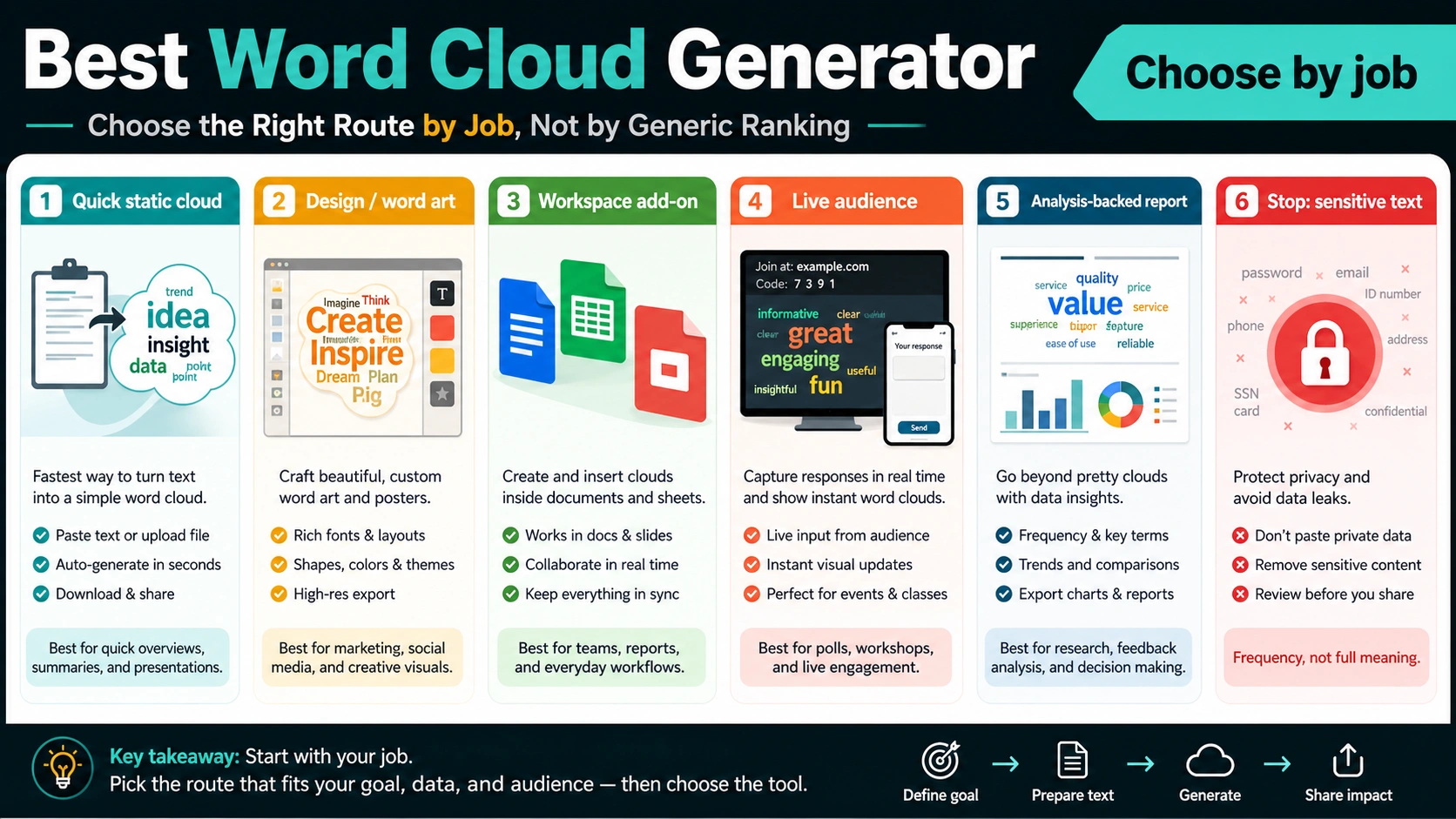
The best word cloud generator depends on the job, not on one universal ranking. Use a quick static generator when you need a public slide image, a design or word-art tool when shape and presentation matter, a Workspace or office add-on when the text already lives in a document or sheet, and a live-audience tool when people are submitting words in real time.
| If your job is... | Start with this route | Slow down when... |
|---|---|---|
| Make a quick slide or social visual from public text | Free static word cloud generator | You need editable exports, transparent backgrounds, or commercial-use rights. |
| Build a poster, classroom asset, gift, or brand visual | Design or word-art generator, including Canva-style tools | You are treating the visual as analysis rather than presentation. |
| Work from Google Docs, Sheets, Word, or PowerPoint | Workspace or office add-on route | The add-on requests broad permissions or cannot export the format you need. |
| Collect answers during a class, meeting, or poll | Live audience word cloud route | Participants need phrases, moderation, reporting, or follow-up analysis. |
| Summarize survey responses, reviews, or research notes | Analysis-backed workflow with counts and examples | The cloud will be used as evidence without checking context. |
A word cloud is a frequency visual. It can show which words appear often, but it cannot prove sentiment, importance, causality, or the reason people used those words. Before you paste text into any generator, check whether the text is public, remove obvious noise, preserve important phrases, and decide whether the final output needs PNG, SVG, PDF, CSV, transparent background, or a live-session report.
The fast safe path is simple: public text, simple export, quick overview. If the text contains customer data, student answers, meeting notes, research interviews, or anything that would be awkward in the wrong system, choose the route by privacy and evidence needs before you choose it by style.
Use the one-minute chooser first
The common mistake is to search for a generator and then ask it to solve every job. Static tools such as FreeWordCloudGenerator.com, WordClouds.com, Jason Davies' generator, WordCloud.app, and wordcloud.online are useful when the text is already safe to paste and the output is mostly a visual overview. They reduce time to first cloud, which is why they appear attractive for "make one now" searches.
That is not the same job as designing a shaped word-art image, building a classroom response activity, or supporting a report. WordArt.com and Canva-style routes emphasize layout, shapes, fonts, and presentation polish. Google Workspace Marketplace add-ons live closer to documents and spreadsheets, but their permissions and export behavior matter. Mentimeter, Poll Everywhere, and Wooclap collect audience responses before rendering a cloud, so they solve participation and reporting, not just image generation.
Use this quick lane split:
| Lane | Best when | What to verify |
|---|---|---|
| Quick static generator | You have public or low-risk text and need a fast PNG-style visual. | Export size, watermark, editability, and whether pasted text is stored. |
| Design or word-art generator | The final asset must look good in a poster, slide, class handout, or brand visual. | Commercial-use terms, font/shape control, transparent background, and download quality. |
| Workspace or office add-on | The text already lives in Google Docs, Sheets, Word, or PowerPoint. | Add-on permissions, document access scope, account owner, and whether export stays editable. |
| Live audience tool | People will submit answers during a class, workshop, meeting, webinar, or poll. | Response limits, moderation, phrase handling, session reports, and participant privacy. |
| Analysis-backed workflow | The cloud is part of a decision, report, or qualitative review. | Raw counts, sample size, examples, categories, and a second chart or table. |
If two lanes fit, choose the lane with the higher risk. A workshop icebreaker can start with live polling. A customer review summary should start with privacy, cleanup, and analysis checks before style.
Before you paste text, clean and classify the input
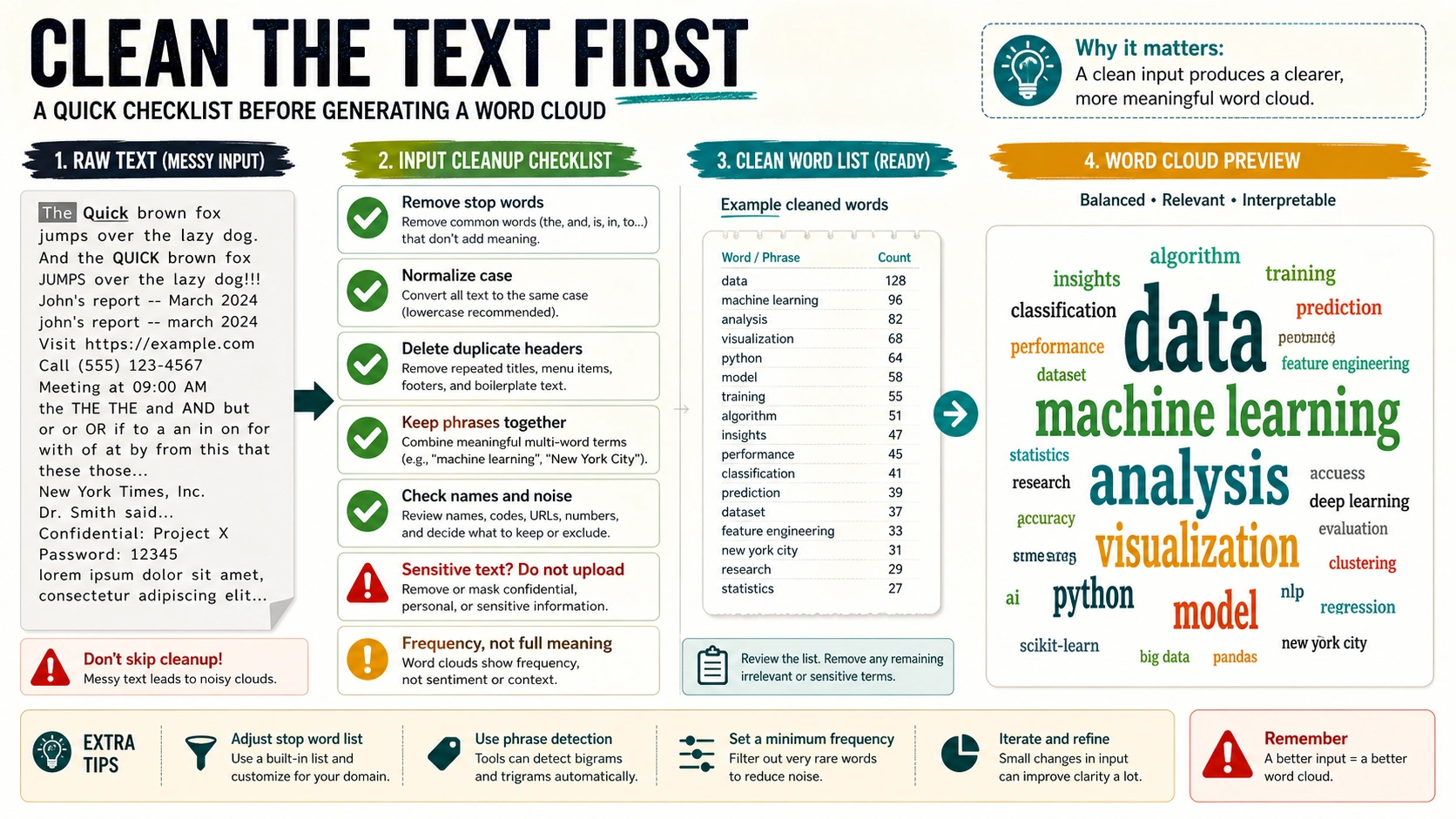
A generator cannot know which repeated words are meaningful and which are artifacts. Survey exports often repeat the same column headers. Meeting notes repeat speaker names. Review datasets repeat the product name. Classroom answers repeat the question. If those tokens stay in the input, the biggest words in the cloud may show formatting noise instead of reader intent.
Start with permission. Public copy, sample text, workshop prompts, and text you wrote yourself are low-risk. Student answers, customer reviews, support tickets, meeting notes, transcripts, interview excerpts, and client material require a higher bar. Check whether you are allowed to upload the text, whether the tool explains storage or deletion, and whether a local or in-account route would be safer than a public web form.
Then clean the text before judging the visual. Remove obvious stop words only when they do not carry meaning in the project. Normalize case so AI, ai, and Ai do not split. Remove duplicate titles, form prompts, email footers, timestamps, tracking strings, and repeated boilerplate. Preserve multi-word phrases when the phrase is the real unit, because splitting "customer support" into "customer" and "support" may change the conclusion.
Names need a separate decision. In a classroom or workshop, names may be irrelevant or private. In a user-interview synthesis, names may be identifiers that should be removed. In a stakeholder map, names may be the point. Decide before upload, not after the cloud already made a person's name large.
Sample size also matters. A word cloud from 15 sticky notes can be a useful conversation starter. It should not be presented as strong evidence. A cloud from 5,000 reviews still needs cleaning, deduplication, and context because repetition can reflect template language, spam, or one campaign rather than broad sentiment.
Quick free static generators are for low-risk visuals
Use a quick free generator when the value is speed: paste public text, remove a few stop words, choose a shape or color, export an image, and move on. This route fits conference slides, brainstorm summaries, blog illustrations, icebreaker prompts, public speech text, or a lightweight overview of non-sensitive responses.
The strength of tools such as FreeWordCloudGenerator.com, WordClouds.com, Jason Davies' Word Cloud Generator, WordCloud.app, and wordcloud.online is low friction. You can often paste text and see a cloud before you have made a spreadsheet, installed an add-on, or opened a design suite. That is useful when the cloud is not the evidence itself.
The weakness is the contract behind the word "free." Free can mean ad-supported, feature-limited, watermarked, lower-resolution, browser-only, or available without a visible account. It can also mean the tool does not clearly explain storage, output rights, or support. Avoid universal claims such as "always free," "private," or "commercial-ready" unless the specific tool page proves the claim for the current use.
For static tools, check four things before you trust the result:
| Check | Why it matters |
|---|---|
| Input handling | Tells you whether pasted text is safe for the tool route. |
| Stop-word and phrase control | Prevents boilerplate from becoming the visual story. |
| Export quality | Determines whether the cloud works in slides, documents, print, or web. |
| Count transparency | Helps you verify that the biggest words match the underlying frequency. |
If the tool cannot show counts, treat the cloud as a design object. If it can export counts or lets you inspect frequency, it becomes more useful for a report, but it still needs context.
Use design and AI word-art tools when presentation is the job
Design tools are not automatically better word cloud generators. They are better when the final job is visual polish: a classroom poster, a workshop handout, a social card, a brand presentation, an event graphic, or a gift-like word-art object. In that lane, fonts, shapes, color palettes, backgrounds, transparent PNGs, and templates can matter more than frequency controls.
Canva-style word-cloud pages fit people who already want the cloud inside a design workflow. WordArt.com fits the shape and word-art lane more directly. These routes can be the right choice even when a plain static generator is faster, because the real deliverable is a polished asset rather than a diagnostic chart.
Keep one boundary visible: better design does not make the cloud better analysis. An AI-assisted design route may suggest layouts, colors, or templates. It does not prove that the most visible word is the most important idea. If the cloud will appear in a business deck, research summary, grant report, or classroom assessment, pair it with counts, example quotes, or another visualization.
Commercial use needs a tool-specific check. Fonts, templates, stock elements, AI-generated design assets, and downloaded formats can have different terms. Do not assume that a free visual export can be used in paid campaigns, client work, merchandise, or public branding without checking the route's license and account terms.
Use Google, Word, PowerPoint, and Canva routes when workflow location matters
Sometimes the best generator is the one closest to the text. If the input is already in Google Docs or Google Sheets, a Google Workspace add-on can save copying and help keep the workflow inside the account. If the output belongs in Word or PowerPoint, you may be better off generating an image or editable export that fits the document rather than hunting for a native feature that does not match your version.
The Google Workspace Marketplace route needs permission discipline. A word-cloud add-on may request access to documents, spreadsheets, or account data because it has to read text and write output. That does not make it bad, but it changes the decision. The add-on owner, requested permissions, account context, and admin policy matter more than they do for a throwaway public text sample.
For Word and PowerPoint, separate "make the cloud" from "place the cloud." Some workflows use an external generator and insert the exported PNG, SVG, or PDF. Others use an add-in. The practical choice depends on whether the final slide needs to be editable, whether the image must have a transparent background, and whether the document can contain externally generated assets.
Canva sits between generator and design surface. It is useful when the text cloud is one element inside a designed page. It is less useful if you need raw counts, a reproducible data pipeline, or a strict audit trail from text to chart.
Live audience word clouds solve collection, not just design
A live audience word cloud starts with participant input. Mentimeter, Poll Everywhere, and Wooclap-style tools are built around sessions, prompts, responses, moderation, and display. They are the right route when the words are being collected during a class, meeting, webinar, workshop, town hall, or conference.
This lane has different success criteria from a static generator. You need to know whether participants can submit more than one word, whether phrases are allowed, whether inappropriate answers can be moderated, whether duplicate responses merge, and whether the host can export a report after the session. The visual cloud is only one part of the workflow.
Use live tools when the group experience matters. A live word cloud can show a room what people are thinking in the moment, reveal repeated vocabulary, or open a discussion. It is weaker when you need careful text analysis after the event. For that, export the responses and analyze them with counts, categories, quotes, or sentiment tools.
Privacy still matters in live settings. Student names, workplace feedback, health-related answers, and sensitive personal opinions should not be collected casually. Decide whether responses should be anonymous, moderated, saved, or deleted before the session starts.
Choose the export before choosing the tool
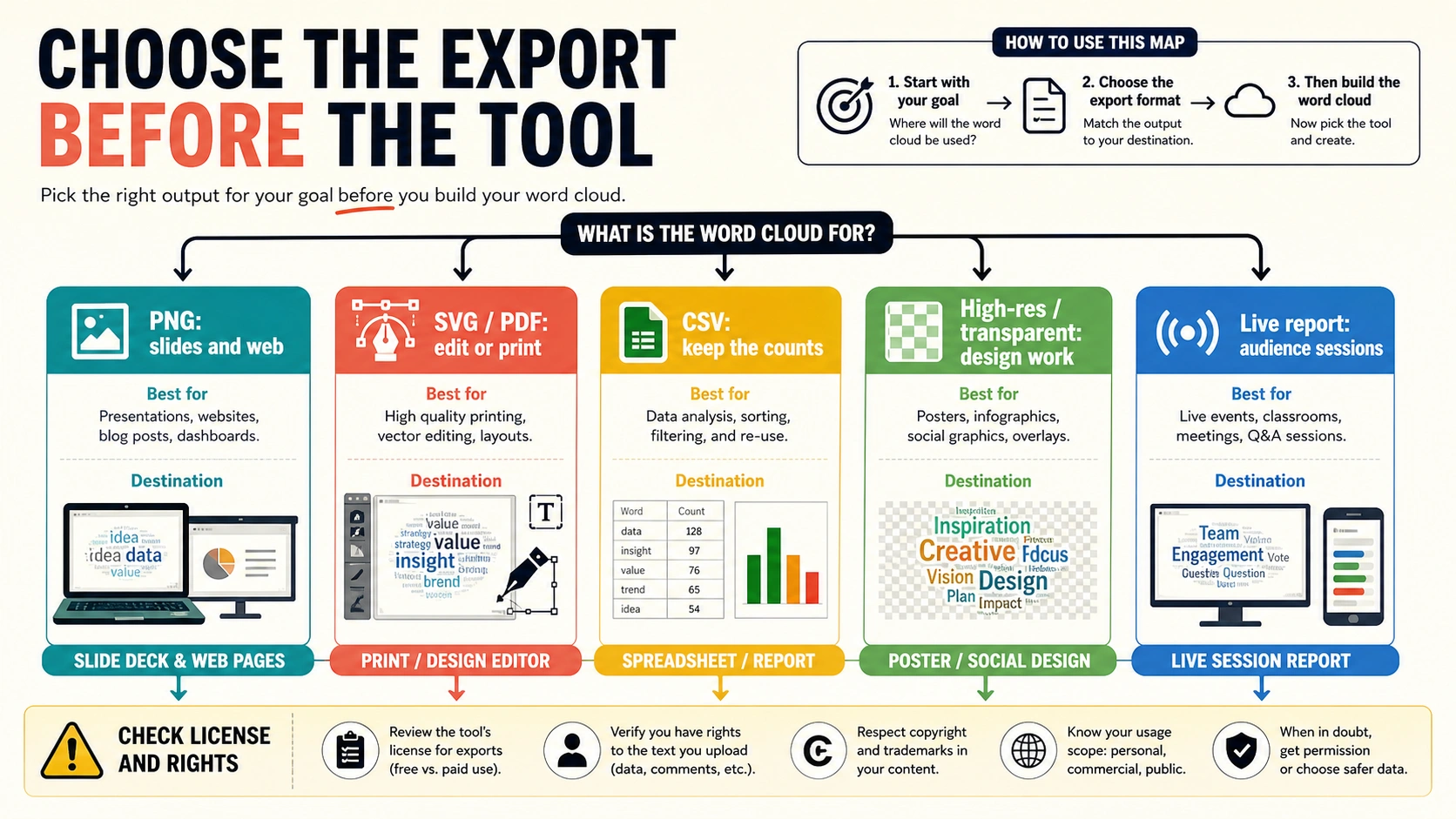
Export format is often the fastest way to eliminate the wrong generator. A tool can be easy and still fail the job if it only downloads a low-resolution image when you need an editable vector or a count table.
| Needed output | Better route | Why |
|---|---|---|
| PNG for slides, web, and quick sharing | Static generator or design tool | Fast and portable, but check resolution and watermark. |
| Transparent PNG | Design or word-art route | Useful for slide overlays, posters, and brand layouts. |
| SVG or PDF | Word-art or design route with vector export | Better for editing, resizing, and print. |
| CSV or word counts | Analysis-backed route or generator with count export | Lets you verify the cloud against the data. |
| Live session report | Audience response tool | Preserves participation context and response records. |
| Editable design file | Canva-style or design-suite route | Keeps layout work inside the design workflow. |
Choose the final destination first. A slide deck needs legibility at presentation size. A printed poster needs high resolution or vector output. A classroom activity may need a session report. A qualitative analysis needs the text, counts, and examples, not only the image.
When a word cloud is not enough
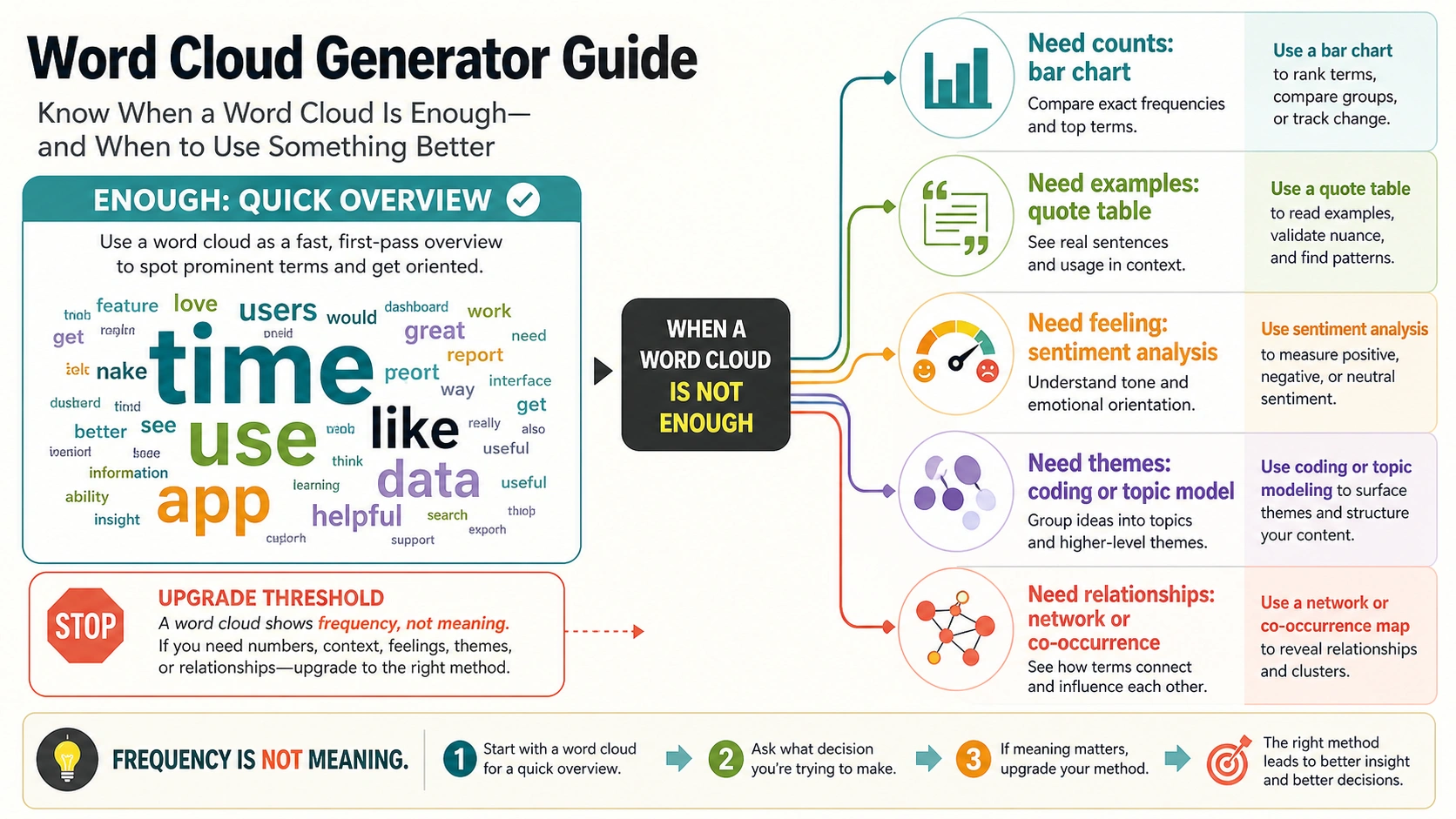
A word cloud is good for a quick overview. It is weak as a final answer. Large words can reflect frequency, but frequency can be caused by the prompt, repeated boilerplate, one vocal subgroup, form labels, duplicated records, or terms that appear in both positive and negative comments.
Use a bar chart when exact counts matter. A bar chart is less decorative, but it makes comparison clearer. Use a quote table when the words need examples. If "price" is large in a review cloud, the reader still needs to know whether people liked the price, hated the price, or asked for pricing transparency.
Use sentiment analysis only when the task is really about positive, negative, or neutral tone, and even then check examples. Sentiment can miss sarcasm, domain-specific language, or mixed comments. Use topic modeling, qualitative coding, or manual category review when the task is to understand themes. Use co-occurrence or network analysis when relationships between words matter.
The safest sentence to keep near any serious cloud is this: the cloud shows what appears often, not what is true, important, causal, or representative. That sentence protects both the reader and the presenter.
A practical selection checklist
Before you choose a word cloud generator, answer these questions in order:
- Is the text safe to upload to this route?
- Is the cloud only a quick overview, or will someone treat it as evidence?
- Does the text need cleanup, phrase protection, deduplication, or name removal?
- Does the final output need PNG, transparent background, SVG, PDF, CSV, or a live report?
- Does the tool explain storage, permissions, rights, and export limits clearly enough for the job?
- Can you verify the largest words against counts or examples?
- Would a bar chart, quote table, sentiment analysis, topic model, or live-response report answer the real question better?
If the answer to the first question is no, stop. Changing the cloud shape does not fix an unsafe upload. If the answer to the second question is "people will use it as evidence," slow down and pair the cloud with another proof format.
FAQ
Which free route should I use first?
The best free route is a quick static generator when your text is public or low-risk and you only need a simple image. Check export quality, watermark, storage language, and whether the tool lets you control stop words or phrases. Do not treat one tool's free claim as a universal rule.
Can ChatGPT create a word cloud?
ChatGPT can help prepare text, list frequent terms, write cleanup instructions, or generate code for a word cloud. If you need an actual downloadable word-cloud image, use a generator, design tool, spreadsheet workflow, or code route that gives you the export format you need.
Can Word or PowerPoint make one directly?
Word and PowerPoint workflows usually depend on an add-in or an image exported from another generator. The practical question is whether you need an editable object, a high-resolution image, a transparent background, or a simple pasted PNG.
What is easiest for students?
For a one-time class activity with non-sensitive text, a simple paste-and-generate tool is easiest. For live classroom responses, use a live audience tool so students can submit words during the session and the teacher can moderate or report responses.
What is the best Google word cloud route?
If the text already lives in Google Docs or Sheets, a Google Workspace add-on can be convenient. Check the add-on owner, requested permissions, admin policy, and export behavior before using it with student, customer, or workplace data.
Are these tools private?
Not automatically. Privacy depends on the route owner, account context, storage policy, logs, permissions, and the type of text you upload. Treat sensitive text as unsafe until the tool-specific route proves otherwise.
Do word clouds show sentiment?
No. A word cloud shows word frequency. Sentiment needs examples, tone analysis, or manual review. A large word can appear in praise, complaints, neutral descriptions, or repeated prompts.
Can I use a word cloud commercially?
Only if the specific tool, fonts, templates, design assets, and export license allow it. Check the route's terms before using a cloud in client work, merchandise, ads, paid reports, or brand campaigns.
Should I use a word cloud for survey results?
Use it as a quick overview or discussion starter, not as the final survey analysis. Pair it with counts, representative quotes, categories, and a bar chart or table when the survey result needs to support a decision.