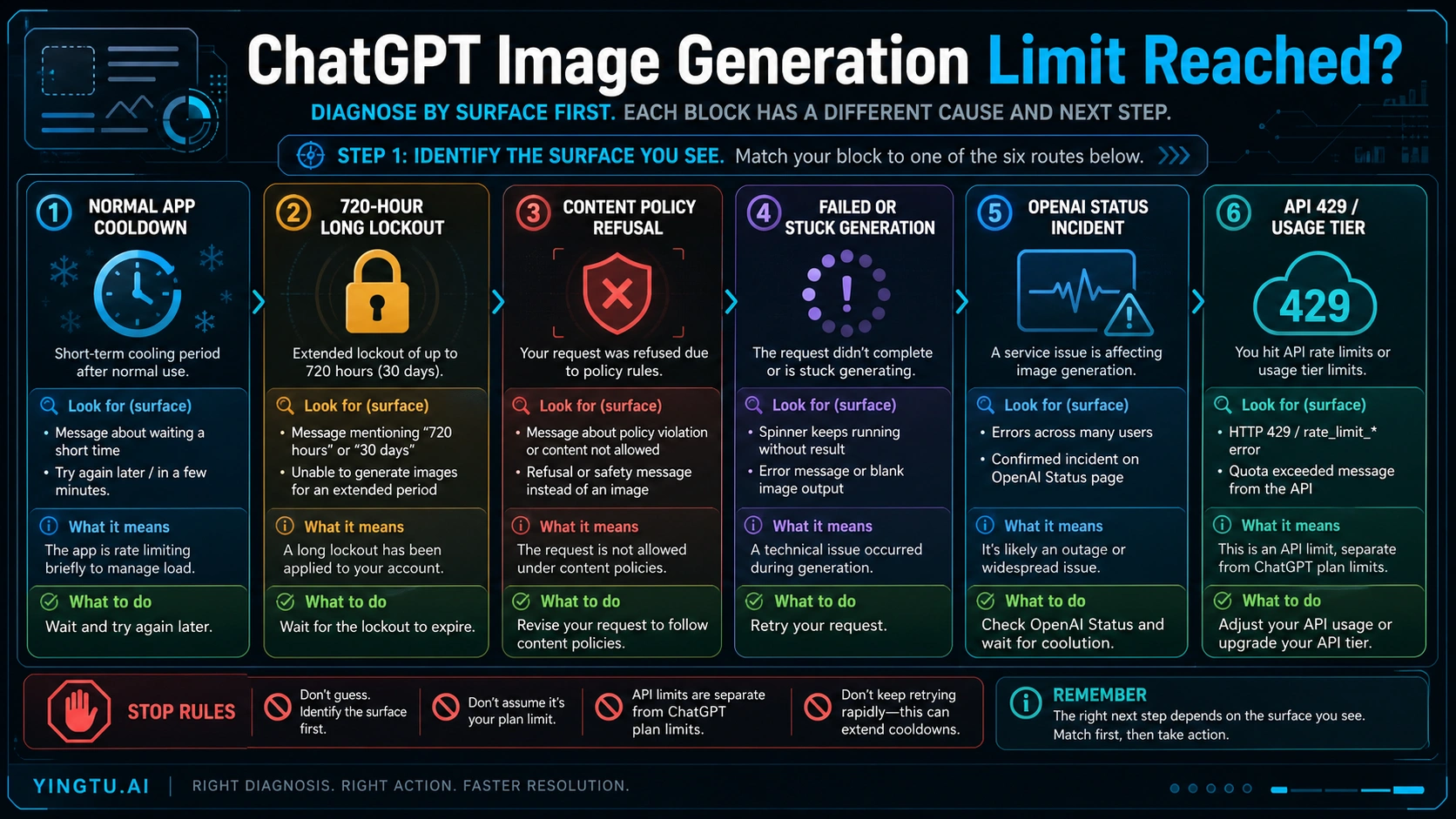
ChatGPT can block image generation in several different ways, and the fix depends on the message you see. If it is a short app wait message, wait for the in-product reset. If it says 720 hours or 30 days, treat that as a reported long-lockout or account-state symptom and collect support evidence. If it is a policy refusal, rewrite the request. If generation is stuck or failing across many users, check OpenAI Status. If it is an API 429, use the Platform Limits page because API limits are separate from ChatGPT plans.
As of May 4, 2026, OpenAI's public Help Center describes ChatGPT Images 2.0 as available on all ChatGPT tiers, and describes Images with thinking as available on paid ChatGPT tiers. The same public ChatGPT help does not publish a stable Free, Plus, or Pro image-count table. That makes a fixed old quota number weaker than the reset message in the product, the current account state, the status page, and, for API calls, the limits shown inside your own platform account.
| What you see | Likely owner | First safe action |
|---|---|---|
| A normal wait or cooldown message in ChatGPT | ChatGPT app usage limit or capacity state | Wait for the reset shown in the product and avoid rapid repeated retries |
A 720 hours or 30 days wait message | Reported long lockout or account-state symptom | Screenshot the message, note plan and platform details, then escalate if usage and lockout do not match |
| A content or safety refusal | Image policy or prompt safety | Rewrite the request to remove the restricted element |
| A blank, stuck, or failed generation | Service state, request failure, or transient incident | Check OpenAI Status and retry only after the service is healthy |
HTTP 429, rate_limit, or quota wording from code | OpenAI API usage tier, model, organization, or project | Check the error body, headers, model, organization, and platform Limits page |
Stop rule: do not use VPNs, cookie clearing, new accounts, scripts, or blind retry loops as the main fix. Those actions can make account and safety problems harder to diagnose.
Quick answer: identify which limit surface you hit
The useful first question is not "How many images do I get?" It is "Which counter or safety system stopped this request?" ChatGPT app limits, long lockout messages, policy refusals, service incidents, and API rate limits are different surfaces. They can all feel like "ChatGPT image generation is limited," but they do not share one reset clock or one recovery path.
Use this quick classification before changing plans or tools:
| Surface | What it usually means | What to do first | What not to do |
|---|---|---|---|
| ChatGPT app cooldown | The product is temporarily limiting image creation for your account, mode, plan, or current capacity | Wait for the displayed reset, then try one clean request | Do not keep hammering the same request |
Long 720 hours message | A reported long-lockout symptom that may be account-state, entitlement, risk, or capacity related | Capture evidence and contact support if it conflicts with low usage | Do not present it as a confirmed official monthly quota |
| Policy refusal | The requested image is not allowed in that form | Rewrite the prompt with safer, more generic language | Do not wait for quota reset when the issue is the request |
| Failed or stuck generation | The request did not complete, possibly because of service health or a transient backend issue | Check OpenAI Status and retry later | Do not assume every failure is quota exhaustion |
| API 429 | Your API call hit a programmatic limit, quota, model, organization, project, or billing boundary | Inspect the error body and the platform Limits page | Do not assume ChatGPT Plus or Pro changes API limits |
This branch-first approach also explains why older quota tables are risky. ChatGPT's app-facing limits can change with plan, feature, account state, and capacity. API limits are account-specific and usage-tier based. Community reports can be useful for recognizing wording like 720 hours, but they are not the same thing as OpenAI publishing a durable quota table.
What OpenAI confirms about ChatGPT Images now
OpenAI's Images in ChatGPT FAQ is the right place to anchor the product reality. It describes ChatGPT Images 2.0 as the current image-generation experience in ChatGPT and says image creation is available across ChatGPT tiers. OpenAI's ChatGPT release notes also describe the April 2026 Images 2.0 rollout across plans, with Images with thinking reserved for paid ChatGPT surfaces at the time of the checked source.
That availability statement is not the same as a fixed quota statement. As of May 4, 2026, OpenAI's public ChatGPT help pages do not provide a single table that says Free gets exactly one number, Plus gets exactly another number, and Pro is unlimited. The safer wording is:
| Claim | Safe handling |
|---|---|
| "ChatGPT can generate images." | Yes, subject to plan, feature, safety, and capacity limits. |
| "OpenAI publishes exact Free, Plus, and Pro image counts." | Not in the checked public ChatGPT Help Center evidence as of May 4, 2026. |
| "Images with thinking is the same for every plan." | No. Treat thinking-mode availability as plan and rollout dependent. |
| "An old Plus or Free count is still current." | Do not rely on it unless OpenAI currently publishes it. |
For readers, this means the in-product message matters. If ChatGPT shows a wait time, use that wait time. If it shows a refusal, fix the request. If it fails while other users are also seeing image errors, check status. If your code gets API 429, leave ChatGPT subscription assumptions out of the diagnosis.
For a broader route map around current ChatGPT Images naming and GPT Image 2 API paths, the separate ChatGPT Images 2.0 guide covers naming and route choice. Blocked image-generation recovery needs the narrower branch map below.
Normal cooldown versus a long 720-hour message
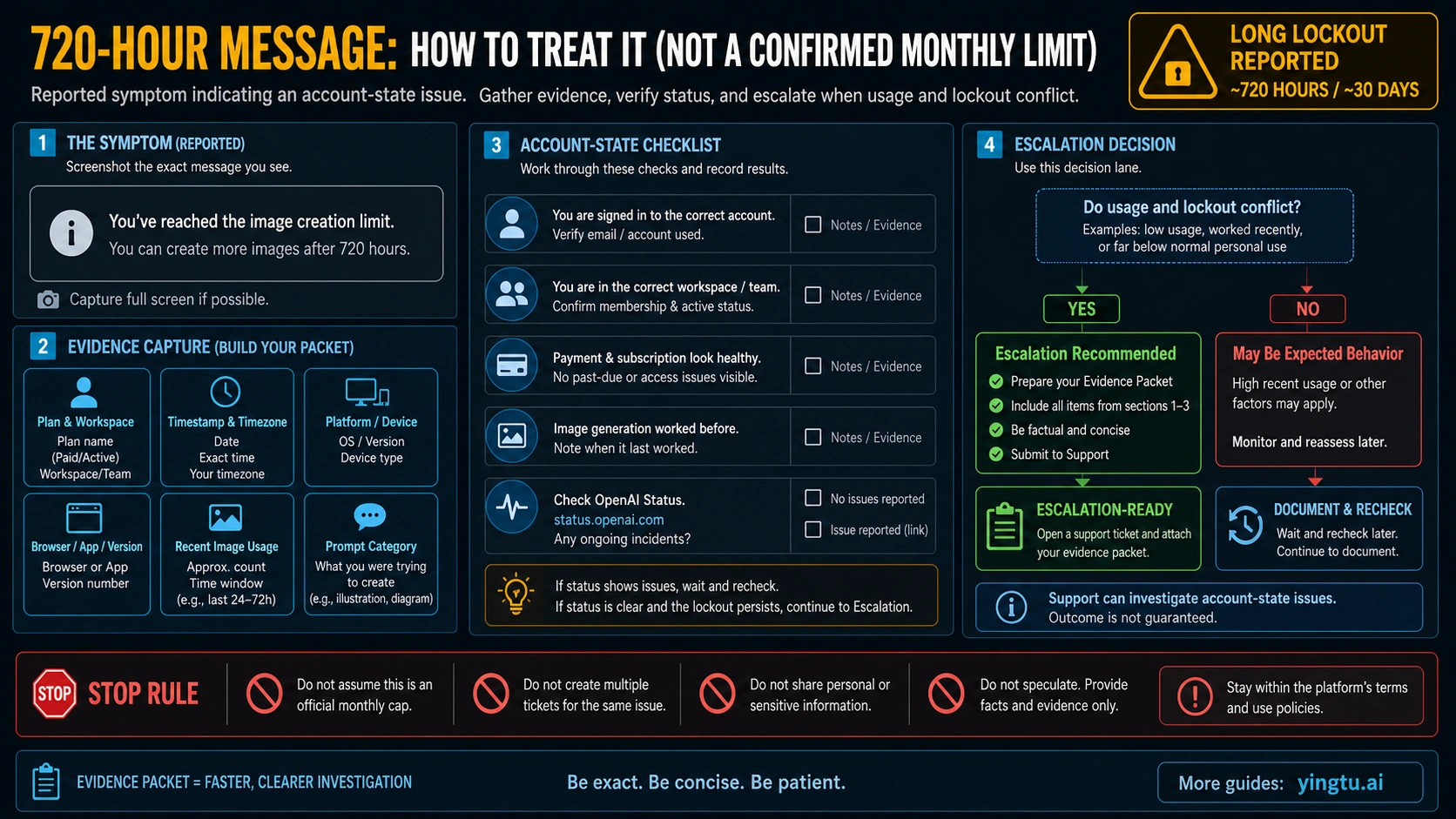
If ChatGPT shows a short wait or ordinary cooldown message, start with the reset shown in the product. Do not open multiple tabs and fire repeated image requests. Repeated blind retries add noise, make timestamps harder to understand, and may slow your own diagnosis.
A 720 hours or 30 days message deserves a different response. That wording appears in user reports and community threads, including paid-account complaints, but it should not be written as an official monthly cap unless OpenAI publishes it as policy. Treat it as a long-lockout symptom. The goal is to make support or account investigation possible without speculating.
Collect this packet before escalation:
| Evidence | Why it matters |
|---|---|
| Screenshot of the exact message | Support needs the literal wait wording and surface |
| Plan, workspace, or account type | Plus, Pro, Business, team, and workspace state can matter |
| Timestamp and timezone | Helps distinguish rolling windows, incidents, and account events |
| Platform and app version | Web, iOS, Android, and desktop sessions can behave differently |
| Approximate recent image usage | Shows whether the long wait conflicts with actual use |
| Prompt category | Separates quota from policy-sensitive requests |
| OpenAI Status state | Prevents account escalation for a service incident |
Escalate when the long wait conflicts with low or ordinary use, when it appears across devices, or when a paid account behaves inconsistently with the product surface. Keep the report factual. Do not share personal or sensitive content beyond what support needs, and do not open duplicate tickets with different stories.
Policy refusals and failed generations are different
A policy refusal is not a quota reset problem. If ChatGPT says the request cannot be created because of safety or policy, waiting for a quota reset will not make the same request safe. Rewrite the prompt around allowed subject matter, remove protected likenesses or restricted instructions, and describe the visual result more generally.
Failed or stuck generations are also different from quota. If the spinner runs without output, an image appears blank, or a general error appears, check service health before assuming your account is capped. OpenAI's status history includes image-generation incidents that affected both ChatGPT and APIs; for example, a May 1, 2026 incident was marked resolved after elevated image-generation error rates. A resolved incident is not proof of a current outage, but it shows why status checks belong in the branch map.
Use this order:
- Read the exact message.
- If it is policy language, rewrite the request.
- If it is a generic failure, check OpenAI Status.
- If status shows an active incident, wait and preserve the timestamp.
- If status is healthy and the same failure repeats, try one clean new conversation or platform, then collect evidence.
Avoid troubleshooting by changing many variables at once. Switching browser, network, prompt, plan, and account in one sequence makes it impossible to know which surface changed.
API image rate limits are separate
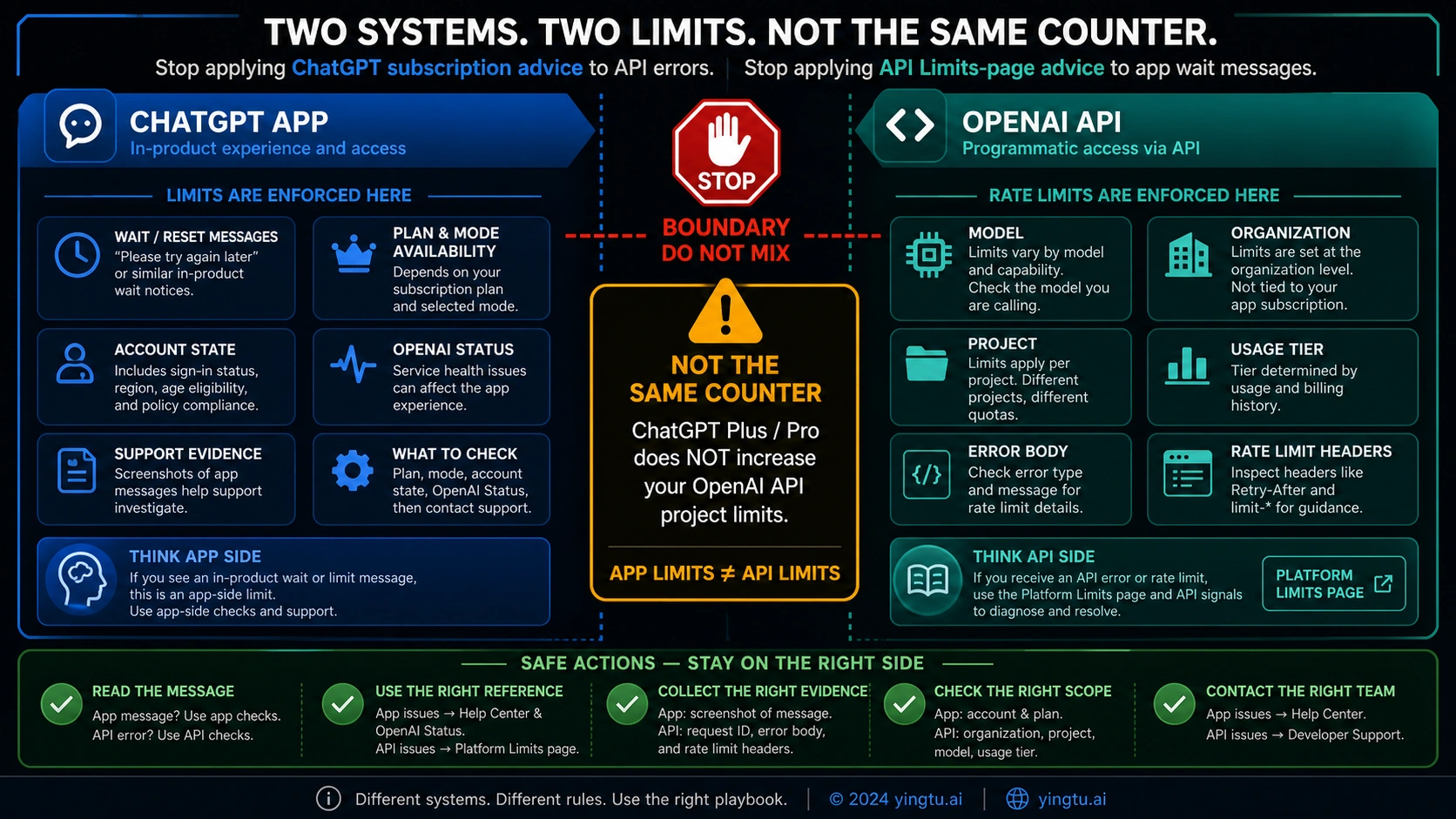
OpenAI's image generation rate-limit help article is API-focused. It says image API limits depend on the model and usage tier, and that exact values are available in the account's Limits view. The OpenAI API rate-limit guide also treats limits as organization, project, model, and usage-tier realities rather than ChatGPT subscription counters.
That distinction prevents a common mistake: ChatGPT Plus or Pro can improve the app-facing ChatGPT experience, but it does not automatically raise the limits of an OpenAI Platform API project. If your code receives HTTP 429, rate_limit, insufficient_quota, or quota wording, diagnose the API request as an API request.
Check these items in order:
| API evidence | Question it answers |
|---|---|
| HTTP status and error body | Is this retryable rate pressure or quota/account state? |
Error type and code | Is it rate limit, insufficient quota, billing, or access? |
| Model name | Are you calling the intended image model? |
| Organization and project | Are you looking at the same project that sent the request? |
| Usage tier and billing state | Does the account have the limits and spend state needed? |
| Response headers | Is there a reset or remaining-limit signal? |
| Platform Limits page | What are the current account-specific limits? |
For a developer-facing 429 recovery flow, the sibling OpenAI API 429 and insufficient quota guide goes deeper into request bodies, headers, billing, usage, and project scope. For image-model route decisions, use focused GPT Image 2 API articles such as is GPT Image 2 API free only after you know the problem is API-side.
What to do if you need more images today
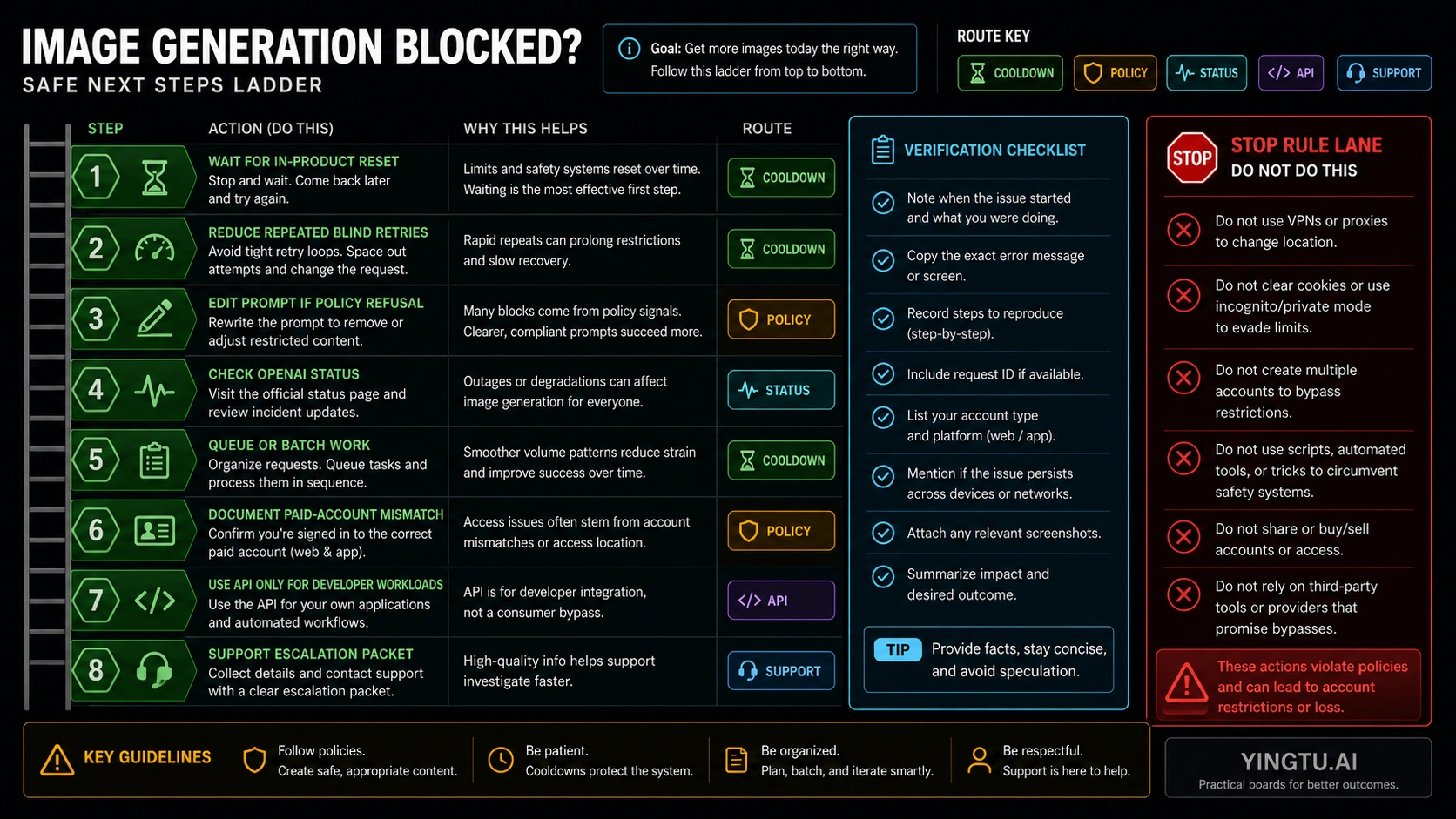
The safe path depends on why the image stopped. Do not jump straight from "blocked" to "find a bypass." Use the smallest legitimate move that matches the surface.
| Situation | Best next move |
|---|---|
| Normal app cooldown | Wait for the reset shown in ChatGPT, then send one clean request |
| Repeated failed generation | Check status, then retry after recovery or simplify the request |
| Policy refusal | Rewrite the prompt so the image request is allowed |
| Long lockout message | Gather the support packet and escalate only if usage and lockout conflict |
| Need many images for a production workflow | Consider API design, queueing, batching, and cost controls |
| API 429 | Fix request pacing, model/project scope, usage tier, billing, or quota state |
If the job is casual ChatGPT creation, the API is usually not a simple workaround. API use means keys, billing, logs, storage, limits, model routing, and policy handling become your responsibility. If the job is a product feature, automation pipeline, or batch workflow, API design may be the right route, but it should be treated as a developer path rather than a way to evade ChatGPT app limits.
If the job is urgent but consumer-facing, the practical options are narrower: wait for reset, reduce repeated retries, simplify the image request, check status, split work across time, or collect evidence for support. Those options are less exciting than a fake "unlimited" shortcut, but they preserve the account and make the next step diagnosable.
What not to trust
Old quota tables are the first thing to distrust. They may have been true for a specific launch window, model, plan, or capacity event, but they should not be presented as current policy unless OpenAI currently publishes the same number. This is especially important for Free, Plus, and Pro image counts.
Community threads are useful for language, not authority. They show how people describe symptoms like 720 hours, hidden monthly limits, sudden lockouts, or paid-plan frustration. They do not by themselves define OpenAI policy, plan entitlement, or account risk controls.
Bypass advice is the riskiest category. Avoid recommendations that depend on VPN rotation, cookie clearing, incognito sessions, new accounts, account sharing, automation scripts, or third-party "unlimited" promises. Even when a trick appears to work briefly, it does not explain the underlying surface and can create account, safety, billing, or support problems.
Provider claims also need current verification before they affect a troubleshooting decision. Speed, uptime, no-ban, unlimited, refund, failure-not-charged, minimum top-up, and model-coverage claims are volatile. They are not needed to solve a blocked ChatGPT image request, so they should not distract from the official diagnosis path.
FAQ
Does ChatGPT have a rate limit for image generation?
Yes. ChatGPT image generation is limited by plan, feature, account state, safety systems, and current capacity. The useful action is to follow the message shown in ChatGPT rather than rely on an old universal count.
What is the current ChatGPT Free image generation limit?
As of May 4, 2026, OpenAI's public ChatGPT help does not provide a stable Free image-count table. If a Free account shows a wait message, trust the in-product reset. If it shows a policy refusal or failed generation, diagnose that branch instead of assuming quota.
Does ChatGPT Plus remove the image limit?
No current public OpenAI source supports treating Plus as unlimited. Plus can change app access and priority relative to Free, but image generation can still be limited by plan, feature, capacity, safety, or account state.
Is ChatGPT Pro unlimited for images?
Do not assume Pro means unlimited image generation. If a Pro account shows a long lockout or a wait message, treat the message as the source of truth and collect evidence if it conflicts with actual usage.
What does a 720-hour image wait mean?
Treat it as a reported long-lockout symptom, not as a confirmed official monthly cap. Screenshot the message, record plan, platform, timestamp, recent usage, prompt category, and status-page state, then contact support if the lockout conflicts with actual use.
Is an API 429 the same as a ChatGPT image limit?
No. API limits depend on model, organization, project, usage tier, billing state, and account-specific limits. ChatGPT Plus or Pro does not automatically raise API project limits.
Should I clear cookies, use a VPN, or create another account?
No. Those are not reliable recovery steps and can make account issues harder to diagnose. Use the reset message, policy rewrite, status check, support packet, or API Limits page instead.
What if ChatGPT says the image request violates policy?
Rewrite the request. A policy refusal is not fixed by waiting for quota reset. Remove restricted elements, avoid protected likeness or unsafe instructions, and describe the desired visual in safer terms.