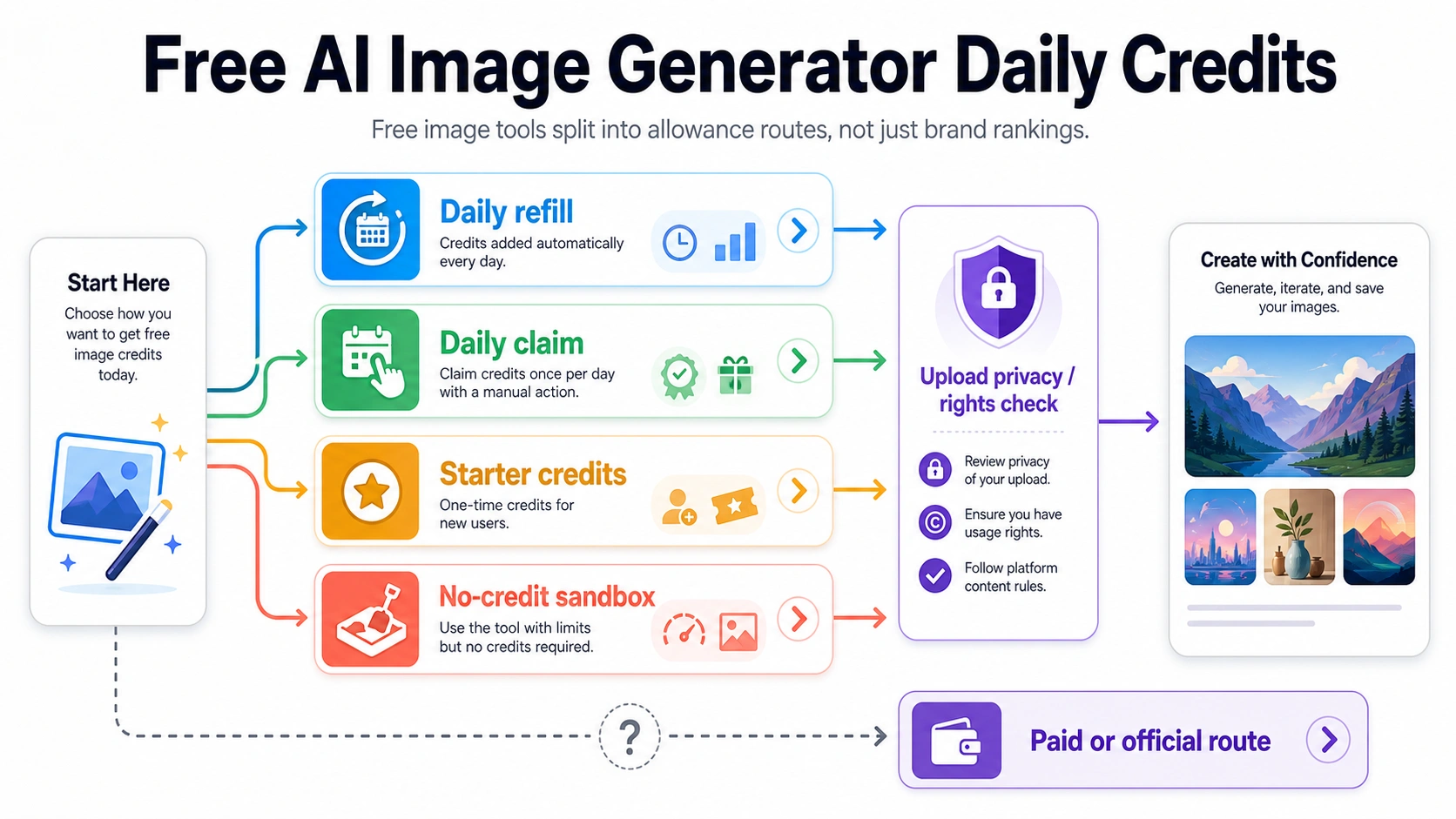
A good free AI image generator choice starts with the kind of allowance you are getting: a daily refill, a daily claim, a one-time starter pack, or a no-credit sandbox. For repeated practice, start with a documented daily-credit route; for anything involving client files, faces, product images, or unreleased assets, check privacy and rights before uploading. The safest free route is the one whose limits and tradeoffs match the image job.
| Reader job | Start with | Stop if |
|---|---|---|
| Quick prompts or throwaway ideas | No-credit sandbox | The tool does not explain output ownership, storage, or quality limits |
| Repeated practice over several days | Daily-credit route | Credits do not reset, do not roll over as expected, or useful models are locked |
| Design, text, or vector-style work | Documented design route | The free plan makes output public or hides export rights |
| Uploading faces, products, or client material | Privacy-first route | Upload handling, rights, or deletion controls are unclear |
| Production work or API scale | Paid or official route | Reliability, privacy, rights, or repeatability matters more than free allowance |
Start With The Allowance Type, Not The Biggest Promise
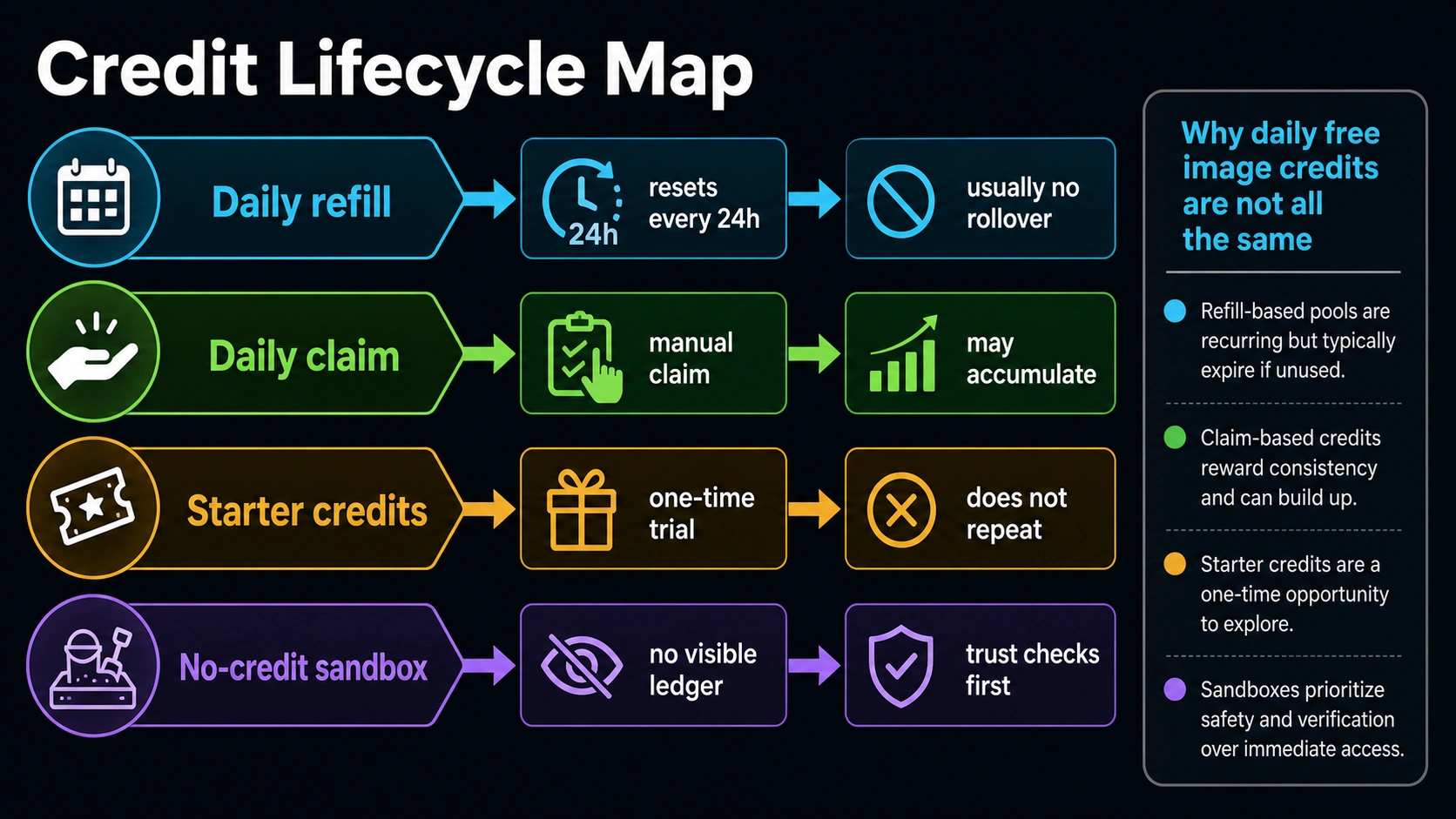
Free image-generation offers sound similar until you ask what is actually being renewed. A daily refill gives you a fixed amount again after a reset window. A daily claim asks you to sign in or press a claim button. Starter credits appear once and are useful for a trial, not for a recurring workflow. A no-credit sandbox may have no visible counter, but that does not answer who runs the service, how prompts and outputs are stored, or what happens when the route gets expensive to operate.
That is why a higher credit count is not automatically the better free tool. Thirty credits that reset every day with documented public-output rules can be easier to reason about than a "free forever" page that says nothing about ownership or support. Ten daily credits can be enough for prompt practice if one image costs one credit. Ten starter credits can disappear in one session if the tool charges several credits per model.
Use this comparison before opening accounts:
| Allowance type | Good for | Watch first |
|---|---|---|
| Daily refill | Repeat practice, low-volume design tests, learning a tool over time | Reset time, rollover, public output, model locks |
| Daily claim | People who remember to log in and collect credits | Whether credits accumulate, expire, or require account activity |
| Starter credits | First-session evaluation and model sampling | Do not count them as tomorrow's budget |
| No-credit sandbox | Low-risk idea sketches and prompt experiments | Owner, payer, logs, rights, support, quality, and durability |
| Paid or official route | Client work, production workflows, sensitive uploads, predictable support | Billing, limits, data handling, and failure behavior |
Current Free-Credit Examples To Use As Route Evidence
These examples are useful because each one demonstrates a different free route. Do not read the list as a universal ranking. Credit counts, model access, public/private rules, commercial-use terms, and speed claims can change, so recheck the owner page before relying on a number for a paid or client workflow.
| Route example | Current free mechanic checked May 21, 2026 | Best fit | Main caveat |
|---|---|---|---|
| Recraft Free plan | 30 credits per day; credits reset every 24 hours; subscription credits do not roll over; free-plan outputs are public | Documented daily refill for design, image, vector, and basic editing practice | Recraft's ownership docs say Free plan images are public, owned by Recraft, and not licensed for commercial use |
| NightCafe free credits | Daily 5-credit topup can be claimed every 24 hours after midnight UTC; missed days cannot be claimed later | Hobby art and community-oriented repeat practice | Treat it as a small daily art allowance and check sharing, output, and rights rules before client use |
| MyEdit AI image generator | 3 daily bonus credits for a free account | Quick web or mobile image tests with exports | Uploads and commercial claims should be checked against the live terms for your use |
| Image AI daily free credits | Non-paying users can claim 2 credits daily after 0:00 UTC; claimed credits can accumulate and do not expire | Daily-claim route for image tools that use an account credit balance | The owner reserves final interpretation rights, so treat it as a provider-specific reward program |
| OpenArt | Free plan includes daily free credits on basic models plus a one-time 20-credit premium-model bonus for new users | Basic-model practice with a separate starter bonus for premium features | The bonus is explicitly subject to change, and premium tools sit behind a different credit/plan boundary |
| ImagineArt subscription docs | Free plan lists 100 credits per day, refreshed daily; free credits do not roll over and Pro models require a subscription | High-volume casual testing on standard models | Do not treat daily free credits as Pro-model access, private output, or production entitlement |
| Imagefree | No sign-up, no credits, no daily limits claimed | Low-risk prompt experiments when account friction matters | No-credit convenience still needs owner, data, rights, and support checks |
The most transparent daily-credit example in this set is still Recraft because its docs spell out the number, reset window, upload limit, public free-plan output, and commercial-rights boundary. That does not make Recraft the best route for every reader. It means Recraft is a clean example of a documented daily refill. If you need commercial ownership, private outputs, or a provider that fits client work, the same Recraft docs push you toward paid-plan evaluation rather than free-plan reliance.
NightCafe, MyEdit, Image AI, OpenArt, and ImagineArt show why "daily credits" is not one contract. NightCafe uses a small manual daily topup. MyEdit gives a small daily bonus to free accounts. Image AI uses a daily claim system with accumulation. OpenArt separates basic-model daily access from a starter premium bonus. ImagineArt publishes a larger daily free allowance but keeps Pro models behind subscription access. The useful comparison is not the biggest number; it is what renews, what expires, what you can access, and what happens to outputs and uploads.
Starter-credit tools are still useful as a contrast, even when they are not the main answer. Ten signup credits or a one-time premium bonus can be a fair first-session test budget, but they should not be placed in the same bucket as daily-refilling credits. If the question is "what can I use every day without paying," a one-time bonus is only the first answer, not the continuing answer.
Imagefree sits in a separate category. Its no-credit and no-sign-up positioning is attractive for casual prompts, but the absence of a credit counter is not the same as a privacy, rights, or reliability guarantee. Treat no-credit tools as sandboxes until the operational story is clear.
The Trust Checklist Before You Upload Anything Real
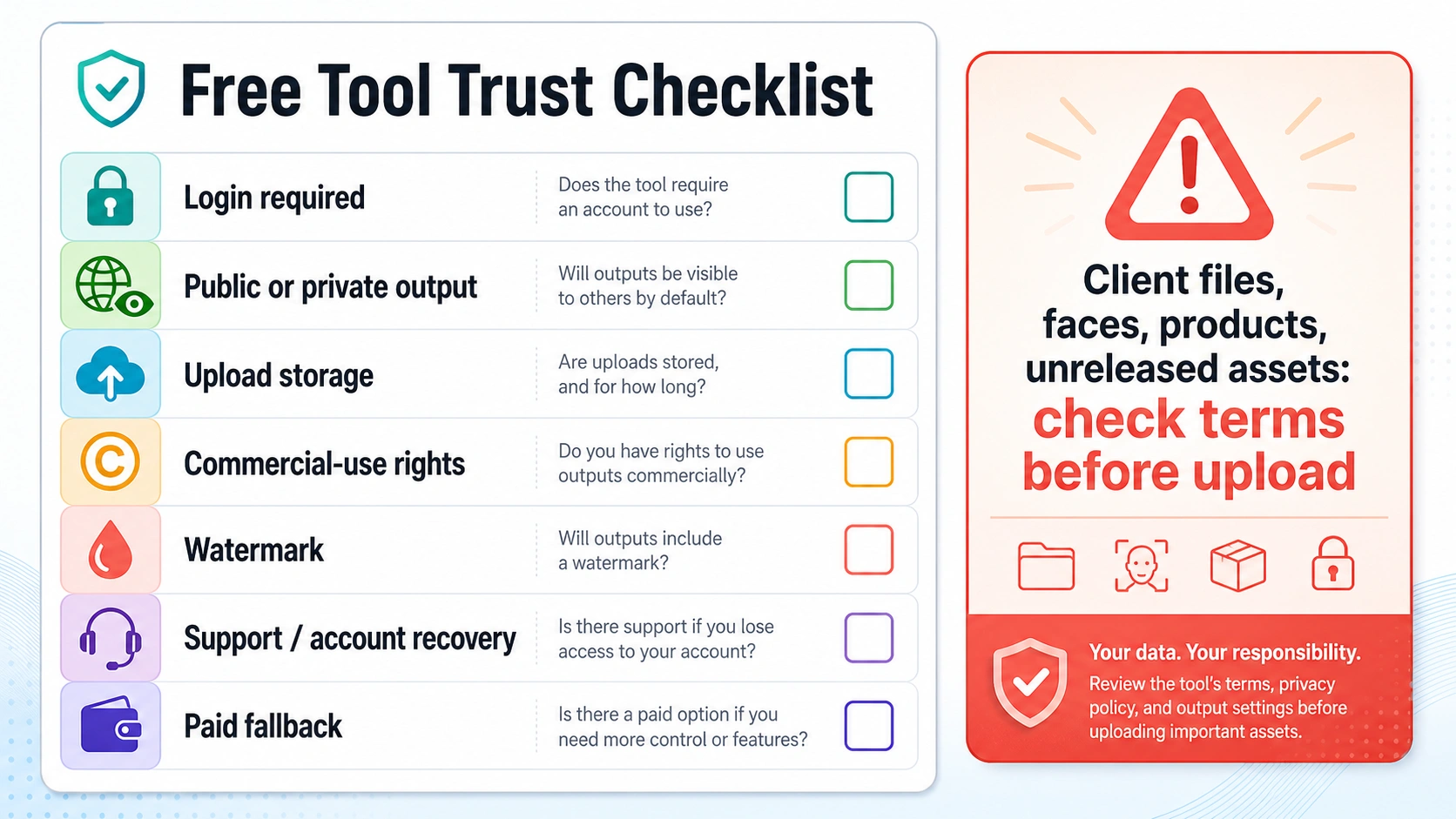
Free text-to-image prompting is one thing. Uploading a face, a product photograph, a brand asset, or a client reference image is another. The moment you upload existing material, the free allowance is no longer the most important part of the decision.
Use this checklist before upload-heavy work:
| Check | What to look for | Why it changes the route |
|---|---|---|
| Login and account owner | A real account, deletion path, support contact, and route owner | Anonymous tools are harder to audit after something goes wrong |
| Public or private output | Whether free-plan generations appear in a gallery or feed | Public outputs can be unacceptable for client, product, or unreleased work |
| Upload storage | How uploaded inputs are stored, processed, deleted, or used | Reference images can contain sensitive or proprietary details |
| Commercial-use rights | Whether outputs are licensed for your intended use | Marketing, packaging, stock, and client work need clearer terms than casual art |
| Watermark and export limits | Download format, resolution, watermark, and reuse restrictions | A free output may not be usable even if it looks good |
| Support and recovery | Help channel, account recovery, billing route, and failure behavior | Serious work needs a path when credits disappear or outputs fail |
| Paid fallback | A clear upgrade or official route | If the free route works but the risk is too high, the next step should be obvious |
Recraft illustrates why this checklist matters. Its free plan is strong for learning because the credit mechanics are clear, but its docs also say free-plan images are public, remain Recraft property, and are not commercially licensed. That is not a flaw if your job is personal practice. It is a stop sign if the output needs private ownership or commercial approval.
The same logic applies to no-sign-up generators. No account can be a benefit for a throwaway prompt, but it can be a liability for uploads because there may be no account dashboard, deletion path, usage record, or support thread. If a tool does not clearly explain input handling, keep uploads out of it.
Match The Route To The Image Job
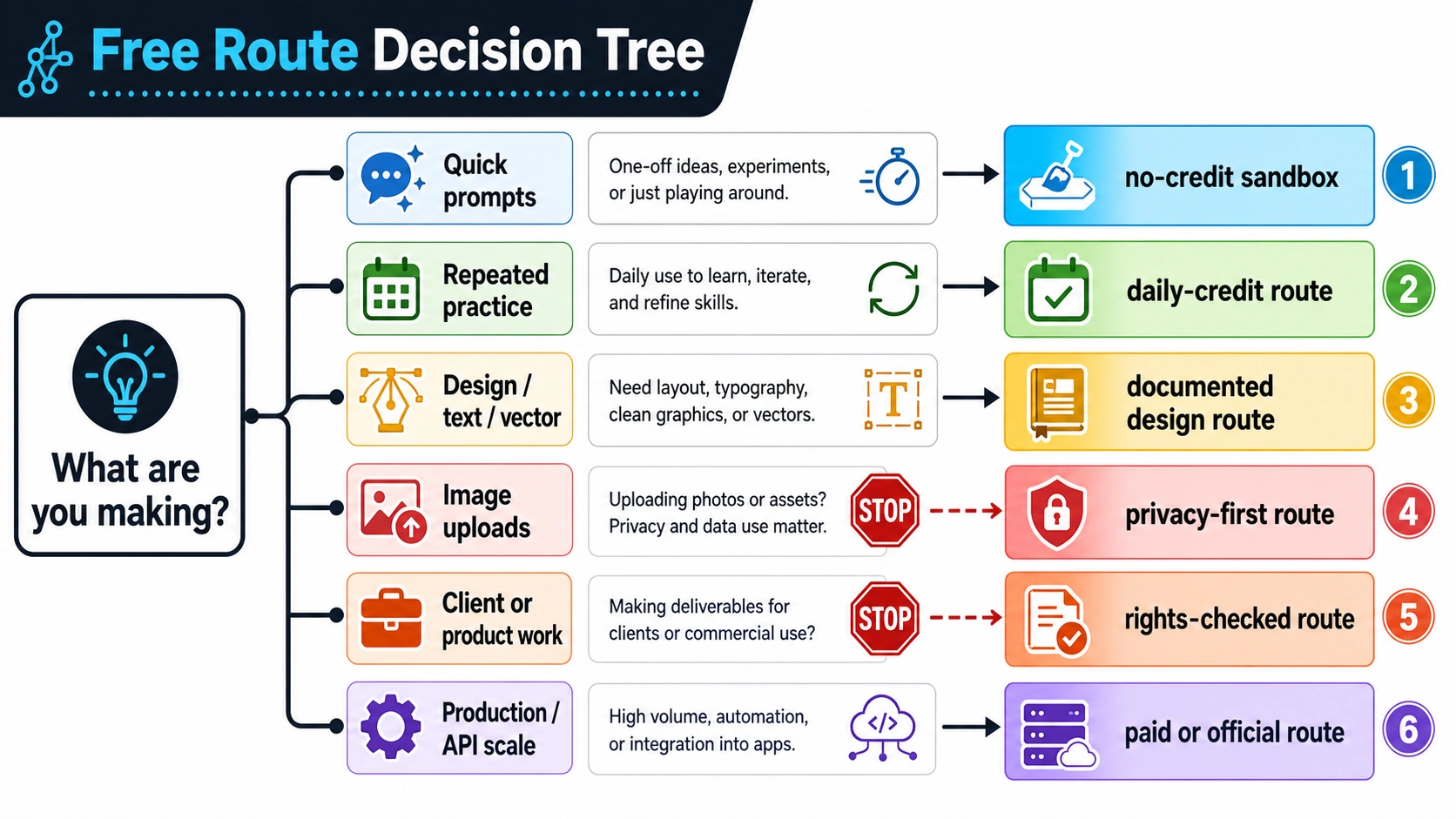
The best route changes with the work. A casual prompt does not need the same evidence as a client campaign. A student learning prompt structure does not need the same support path as a team building product visuals.
For quick prompts, start with a no-credit sandbox or a small starter-credit route. The purpose is idea exploration. Keep inputs generic, do not upload sensitive material, and do not assume the output is ready for commercial use. This is where pages like Imagefree can be useful: low friction, fast result, low commitment.
For repeated practice, use a documented daily-credit route. Recraft's 30 daily credits, NightCafe's small manual topup, Image AI's 2 daily claim credits, and ImagineArt's 100 daily free credits are all easier to reason about than a one-time starter pack, but they answer different jobs. The key is to test how many credits your real prompts consume. A daily allowance that supports ten lightweight tests may support far fewer high-cost edits, reference-image jobs, or premium models.
For design, text, or vector-style work, start with a route that documents the product surface, not just the image count. Recraft is relevant here because its docs mention image and vector generation plus basic editing on the free plan. OpenArt is useful when basic-model practice and premium-tool sampling need to be separated. MyEdit may fit browser or mobile creative tests, especially when quick high-resolution exports matter. The right question is not just "how many credits," but "does the free route support the output type I need?"
For uploads, choose privacy-first. If the work contains a face, a product, a client mood board, a trademarked package, or an unreleased asset, skip any route that cannot explain input handling. A small paid route with clearer terms can be safer than a free route with unclear storage.
For production or API scale, stop trying to stretch browser free credits. You need billing, logs, retries, support, and a route whose owner will still exist when traffic arrives. If your next question is specifically about GPT Image 2 free access, use the focused GPT Image 2 free and unlimited route guide. If you are comparing a single provider's credits and payment route, the ImagineArt pricing and free credits review is the narrower sibling.
Daily Credits, Starter Credits, And No-Credit Claims Are Different Contracts
Daily credits are recurring but limited. They are best when you can tolerate a small reset window and plan work in small batches. A daily refill that does not roll over rewards steady use. If you miss a day, you may lose that day's value. If a tool uses a daily claim system, your balance may depend on logging in, claiming rewards, or keeping account activity.
Starter credits are a test budget. They answer "can I try this route?" not "can I use it every day?" They are useful when you need to sample a multi-model platform, compare output style, or check export behavior. Do not build a habit around starter credits unless the platform also documents a recurring allowance or a fair paid fallback.
No-credit claims are a different promise. They remove the credit counter from the user's view, but they do not remove compute cost, moderation cost, storage cost, bandwidth, or support burden. That is why "no credits" should trigger a trust check rather than automatic enthusiasm. For casual prompts, it can be enough. For anything with privacy, rights, or repeatability requirements, it is not enough by itself.
The cleanest way to compare free routes is to write down five answers:
- Who owns the route?
- What is renewed, claimed, or granted once?
- What happens to outputs and uploads?
- What rights do you receive?
- What is the paid or official fallback when free is not enough?
If a route cannot answer those questions, keep it in the experiment bucket.
Internal Route Handoffs
Broad daily-credit selection should not swallow every image-generation question. Use the narrower page once your job becomes specific.
If you are asking whether GPT Image 2 itself can be used free, the route boundary is different from a general free-generator comparison. The GPT Image 2 free route guide separates ChatGPT app access, official API billing, provider credits, browser testing, and no-login wrappers.
If your real question is ImagineArt pricing, free credits, cancellation, and whether to pay, use the ImagineArt pricing and free credits review. It goes deeper on that single provider's credit and billing surface.
If you are already considering ImagineArt as a creative suite, the ImagineArt AI guide is a better fit than a broad free-credit list. If you specifically need image-to-image free routes, the Nano Banana Pro image-to-image free guide is closer to that workflow.
FAQ
Which free AI image generator gives daily credits?
Recraft is a clear documented example: its free-plan and credit docs list 30 credits per day, reset every 24 hours, and no rollover for subscription credits. NightCafe says users can claim a daily 5-credit topup. MyEdit says free accounts can claim 3 daily bonus credits. Image AI says non-paying users can claim 2 credits daily. ImagineArt lists 100 free credits per day on its Free plan, and OpenArt says its Free plan includes daily free credits on basic models. Recheck the owner page before relying on any number because free-plan mechanics are volatile.
Are daily free credits better than no-credit generators?
Not always. Daily credits are better when you need a visible allowance and a more auditable route. No-credit generators can be better for low-risk prompt sketches because they remove account friction. For uploads, client files, commercial assets, or production work, documented terms matter more than the absence of a credit counter.
Do free image credits roll over?
Sometimes they do, often they do not. Recraft says Free plan credits reset daily and do not roll over. ImagineArt's plan docs say free credits refresh every day and do not roll over. Image AI says claimed daily credits can accumulate and do not expire. Other tools may use manual daily claims, starter credits, referral credits, or paid top-ups with different expiration rules. Treat rollover as a provider-specific fact, not a category rule.
Can I use free AI image outputs commercially?
Only if the specific route's terms allow it. Recraft's ownership docs say Free plan images are public, owned by Recraft, and not licensed for commercial use. Other tools have their own route-specific rights, privacy, watermark, and upload rules. Check the live owner terms before using outputs in ads, packaging, stock, client work, or brand campaigns.
Are no-sign-up AI image generators safe?
They are acceptable for low-risk prompts when you do not upload sensitive inputs and do not need proof of ownership or support. They are not a safe default for faces, client references, product images, unreleased assets, or commercial work unless the owner, data handling, rights, and support path are explicit.
Why do free AI image tools use credits at all?
Image generation costs compute, storage, moderation, bandwidth, and support. Credits give the provider a way to limit free use, encourage signups, steer upgrades, or separate casual experimentation from paid workflows. A tool without a visible credit system still has operating costs somewhere.
Should I choose the tool with the most free credits?
No. Choose the route that fits the job. A smaller daily allowance with clear reset, output, upload, and rights terms can be safer than a larger or unlimited-sounding route with weak trust proof. Credit count matters after the route contract is clear.
When should I stop using free credits and pay?
Pay or move to an official route when reliability, privacy, commercial rights, repeatability, upload handling, support, or API control matters more than the free allowance. Free credits are excellent for testing; they are not always the right contract for production or client work.