As of June 13, 2026, gemini-3.1-flash-image does not have an official Gemini Developer API Free Tier row.
Google AI Studio can still be useful for trying Nano Banana 2 in the browser, but that does not create free production API quota for your backend. For app or service traffic, plan around the paid Developer API rows unless Google's pricing page changes.
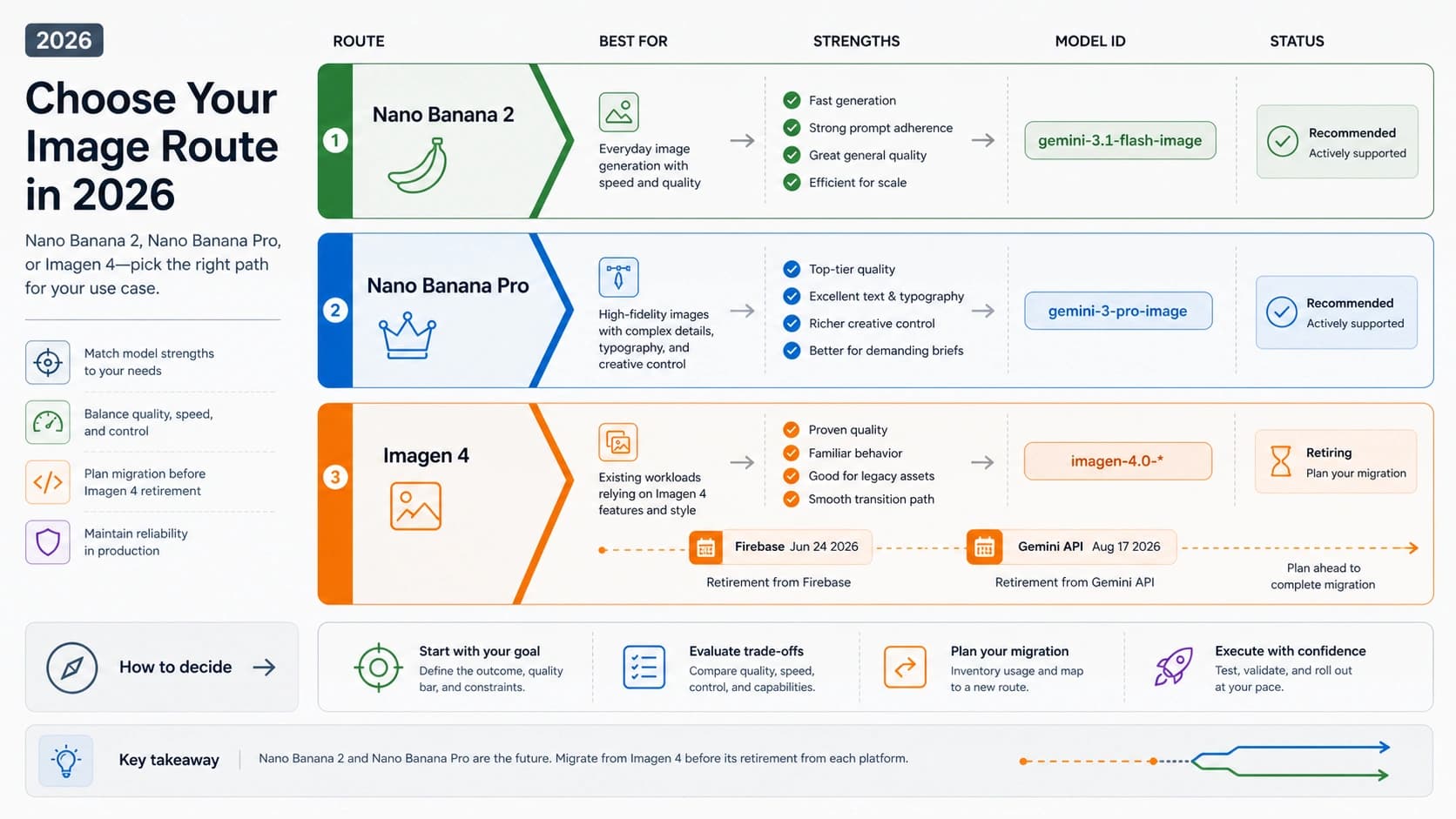
The current model ID is gemini-3.1-flash-image. Older gemini-3.1-flash-image-preview examples should be treated as legacy context rather than the current code contract.
Route answer: use AI Studio when you only need browser testing, use the paid Developer API for synchronous backend traffic, use Batch only when asynchronous paid jobs fit, and keep Gemini Apps limits separate from API quota.
Stop rule: do not ship production traffic because a snippet says the model is "free." Check the Google pricing row for model eligibility and AI Studio for the active project, model, and tier limits behind your key.
Quick Answer
| Question | Current answer | Where to verify |
|---|---|---|
Is the official API free for gemini-3.1-flash-image? | No. Google's Developer API pricing row lists Free Tier as not available for Standard and Batch image rows. | Gemini API pricing |
| Can I test it without building billing into my app first? | Yes for browser experimentation in Google AI Studio, subject to the active project and account limits shown there. | AI Studio and Google image-generation docs |
| Is Nano Banana 2 the same model? | Google maps Nano Banana 2 to gemini-3.1-flash-image. | Image generation docs |
| Should old preview code still be copied? | No for new work. Google released the GA model ID on May 28, 2026 and set preview shutdown for June 25, 2026. | Gemini API changelog |
| Are Gemini Apps limits API limits? | No. Gemini Apps are a consumer app surface with compute-based limits, not Developer API quota. | Gemini Apps Help |
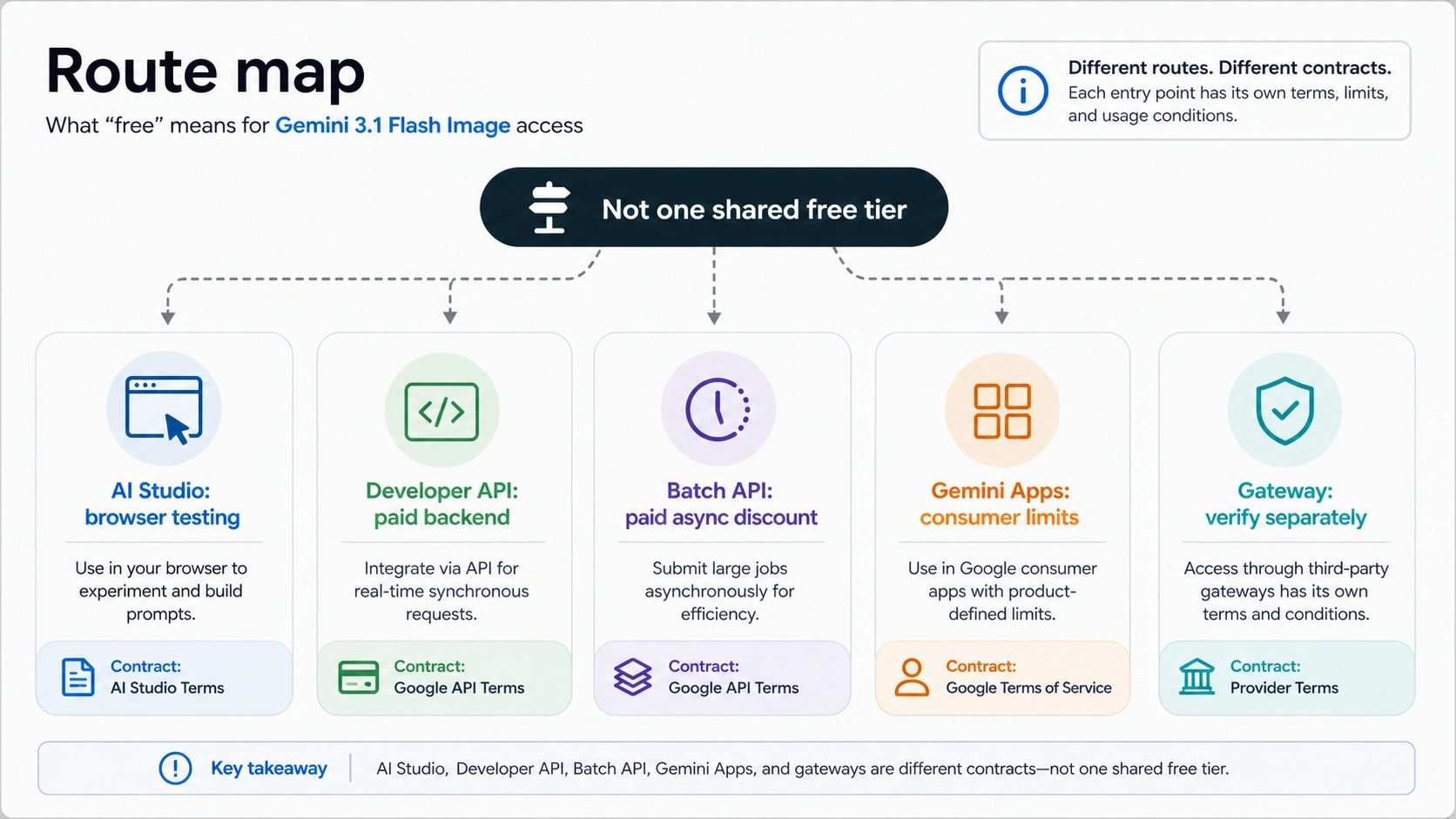
The short version is route-specific. "Free" can mean a browser test in AI Studio, a consumer app feature, a different Gemini model row, or a provider-owned promotion. It does not automatically mean free production API calls for Gemini 3.1 Flash Image.
For broader Gemini model free-tier questions, use the Gemini API free tier limits guide. For this model-specific image workflow, the paid-only pricing row is the controlling fact.
Pick The Right Access Route
The safest way to plan Gemini 3.1 Flash Image access is to choose the route before you think about code or quota.
| Route | Cost status for this job | Best fit | Main caveat |
|---|---|---|---|
| Google AI Studio | Browser testing route; not a backend quota promise | Prompt trials, visual quality checks, one-off experiments | Limits are account, project, model, and tier dependent. Check the active AI Studio project. |
| Gemini Developer API Standard | Paid row for synchronous API traffic | Apps, services, internal tools, and real-time image workflows | No official Free Tier row for this model as checked June 13, 2026. |
| Gemini Developer API Batch | Paid asynchronous row with lower output-image prices | Large jobs that can wait for batch completion | Lower cost does not mean free, and it is not the right lane for interactive UX. |
| Gemini Apps | Consumer app feature and compute-based usage | Personal use inside Gemini app surfaces | App limits are not API quota and should not be copied into backend planning. |
| Third-party gateway or wrapper | Provider-owned contract only | Possible evaluation after verifying current terms | No gateway cost, coverage, latency, or reliability claim is valid without current provider evidence. |
That split prevents the most expensive mistake: seeing AI Studio or Gemini Apps availability and assuming a server can call the same image model for free. The browser route proves you can try the model. The API pricing row decides whether your backend traffic has a free tier.
Official API Pricing Is Paid-Only For This Model
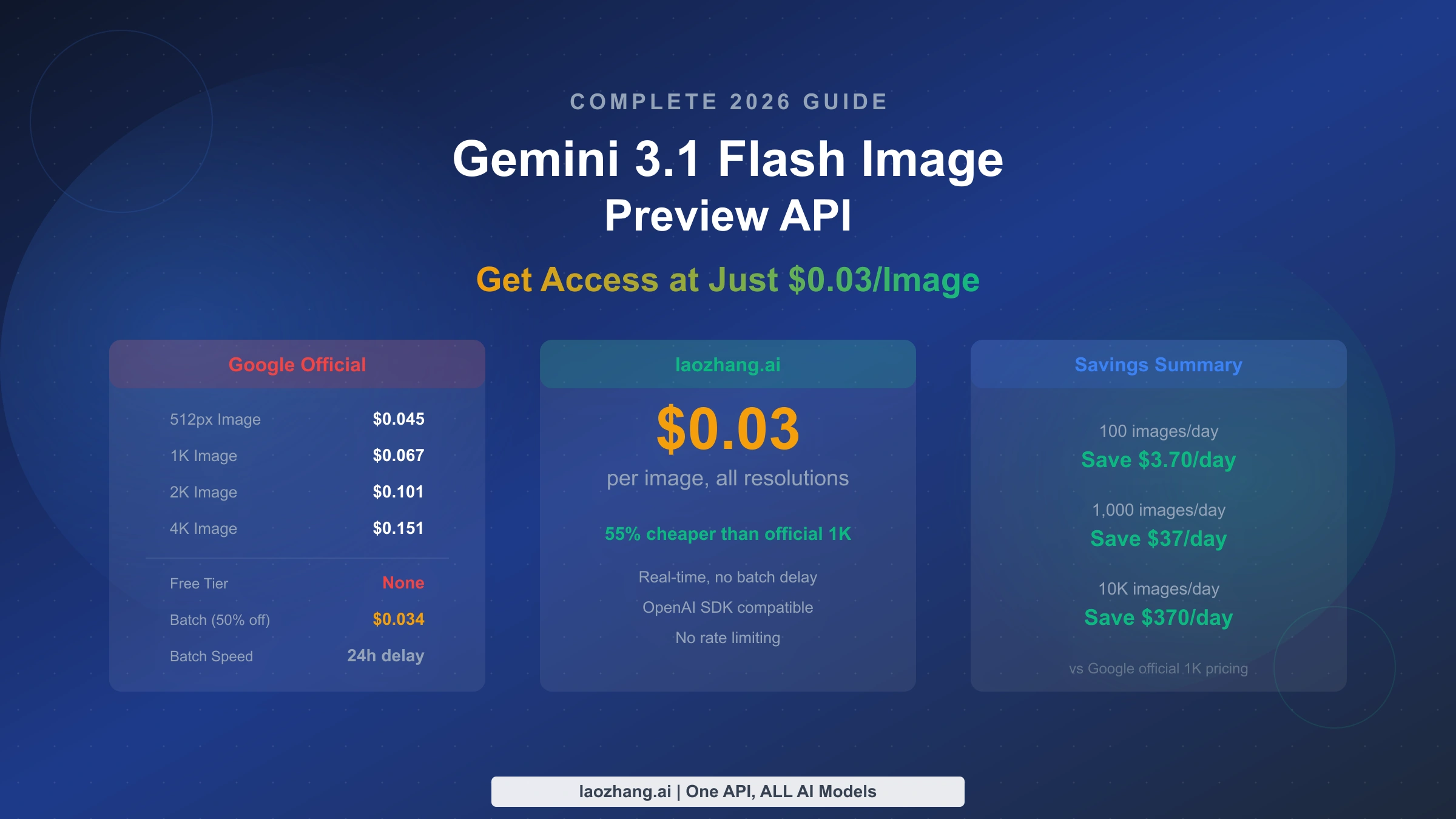
Google's pricing page is the source of truth for the Developer API free-tier question. As checked on June 13, 2026, the gemini-3.1-flash-image Standard row lists Free Tier input and output as not available. Its paid output image price is $60 per 1 million image tokens.
Google's own examples turn that paid Standard price into these approximate per-image costs:
| Output size | Standard API paid image output example |
|---|---|
| 0.5K | $0.045 |
| 1K | $0.067 |
| 2K | $0.101 |
| 4K | $0.151 |
Batch is also paid-only for this model, but the output image price is lower at $30 per 1 million image tokens. Google's example costs are:
| Output size | Batch API paid image output example |
|---|---|
| 0.5K | $0.022 |
| 1K | $0.034 |
| 2K | $0.050 |
| 4K | $0.076 |
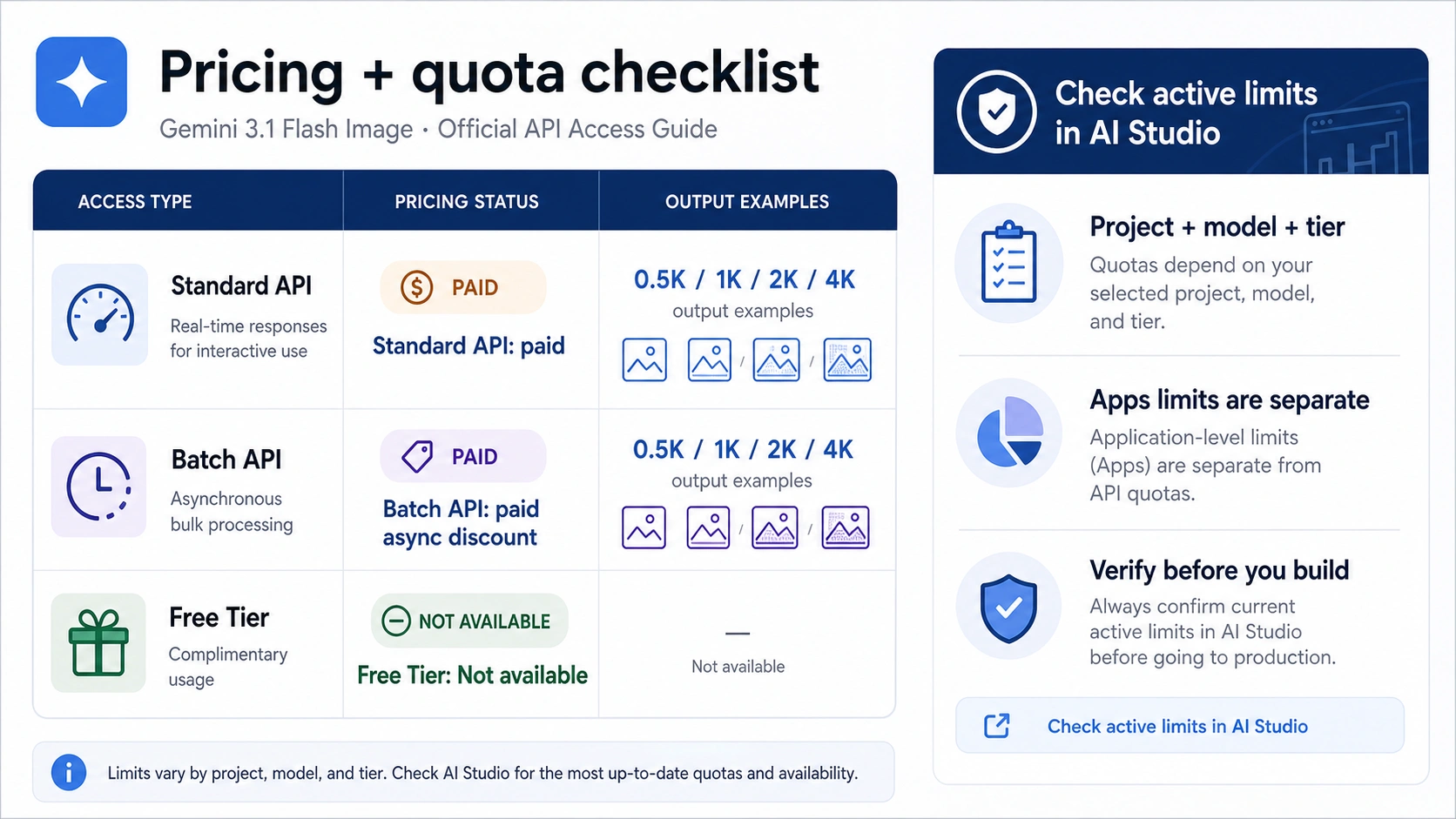
Those numbers should be treated as Google Developer API pricing examples, not universal market prices. They also need a date because model rows, preview labels, and billing surfaces can change. Before a launch, open the pricing page again and confirm the exact row for gemini-3.1-flash-image.
Batch deserves a careful reading. It can reduce cost when the job is asynchronous, but it does not create a free lane. Use it for workloads such as catalog refreshes, background creative variants, or scheduled asset generation where delayed completion is acceptable. Use Standard when the user is waiting for the image in an app session.
Use The Current Model ID
For new API work, use:
hljs txtgemini-3.1-flash-image
Do not start new code with:
hljs txtgemini-3.1-flash-image-preview
Google's changelog says the GA gemini-3.1-flash-image and gemini-3-pro-image versions were released on May 28, 2026. The same changelog marks the preview versions as deprecated with shutdown on June 25, 2026. That makes the old preview string useful only when you are reading older examples, auditing existing code, or preserving URL continuity for a refreshed page.
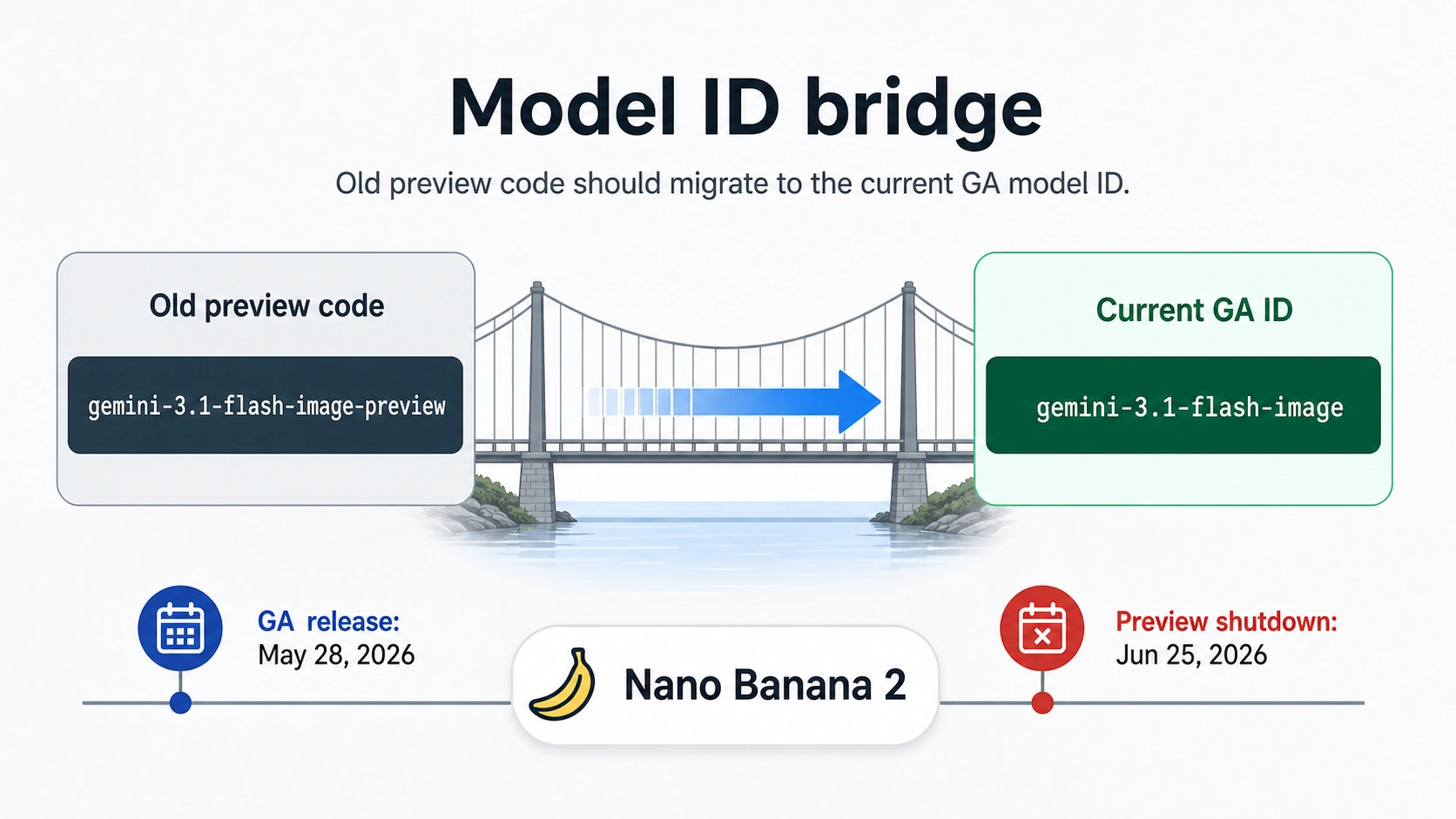
The image-generation docs also map Nano Banana 2 to gemini-3.1-flash-image. Use the display name when talking to humans and the exact model ID in code, logs, allowlists, and billing dashboards.
hljs pythonfrom google import genai
client = genai.Client()
response = client.models.generate_content(
model="gemini-3.1-flash-image",
contents="Create a clean product mockup on a neutral background.",
)
The operational check is simple: if a repository, tutorial, or dashboard still uses the preview suffix, verify whether it is historical context or active code. Active production code should migrate before the shutdown date.
How To Check Live Quota Before You Build
Google's rate-limit docs describe limits in RPM, TPM, and RPD: requests per minute, tokens per minute, and requests per day. They also frame limits by project, model, and tier. That means a static number from an older article is not enough for Gemini 3.1 Flash Image planning.
Use this order before a prototype becomes a customer-facing feature:
- Open AI Studio with the account that owns the API key or project.
- Select the same project your code will use.
- Confirm the model ID is
gemini-3.1-flash-image. - Check whether the project is on a free, billed, or higher usage tier.
- Record the active RPM, TPM, RPD, and any UI caveats shown for that project.
- Re-check before a demo, launch, pricing change, migration, or traffic spike.
The API key itself is not the quota owner. The project behind the key is the practical owner of limits, billing state, and usage reporting. Creating extra keys in the same project is useful for rotation and environment separation, but it is not a reliable quota multiplier.
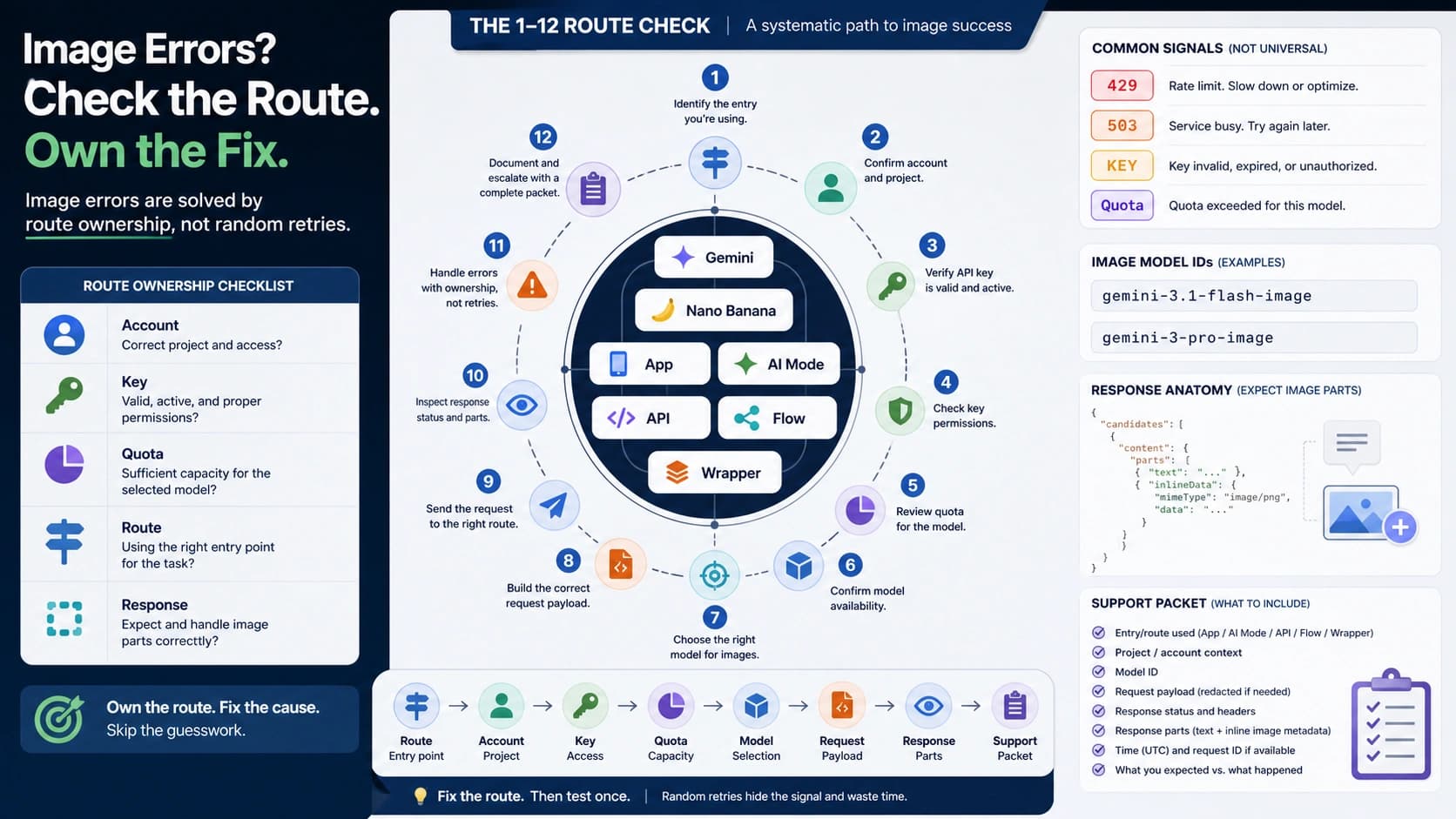
If you hit 429 or RESOURCE_EXHAUSTED, start by checking the project, model, and tier in AI Studio. Then reduce concurrency, add backoff, shorten prompts where possible, cache repeated outputs, or move the workload to the paid lane that matches normal traffic. For a deeper troubleshooting path, use the Gemini image generation rate limit guide.
When AI Studio Is Enough
AI Studio is the right first move when the goal is to learn whether Gemini 3.1 Flash Image can produce the kind of image you need. It keeps the early test close to Google's browser surface and avoids prematurely designing backend billing, storage, retries, and moderation around an unproven visual workflow.
Use AI Studio for:
- comparing prompt wording and reference-image behavior
- testing whether Nano Banana 2 fits the style or editing task
- capturing examples for an internal design review
- deciding whether a paid backend implementation is worth building
Do not use AI Studio as proof of production API entitlement. A browser generation can be available while the official Developer API row remains paid-only. A consumer or browser limit can also change without becoming a backend SLA.
The handoff point is workload responsibility. Once users, jobs, retries, logs, billing, data retention, or uptime expectations matter, plan around the Developer API route. If the job can wait, compare Standard with Batch. If the job is interactive, price Standard and design for rate-limit recovery.
Gemini Apps Are A Separate Consumer Surface
Gemini Apps can expose image generation to consumers under app-plan rules and compute-based limits. That is useful for personal work, but it does not answer the Developer API free-tier question.
Keep these boundaries straight:
| Surface | What it proves | What it does not prove |
|---|---|---|
| Gemini Apps | The consumer app may let a user generate images under current app rules. | Your backend has free gemini-3.1-flash-image API quota. |
| Google AI Studio | The model can be tried in a browser project environment. | Production API calls are free or a boundless entitlement. |
| Developer API pricing | The current official API row is paid or free for the model. | The exact live quota of every project. |
| AI Studio quota view | The active project limits behind a key or test project. | A permanent global promise for all accounts. |
This separation also prevents bad support decisions. If a user says image generation worked in Gemini Apps but failed in an API integration, do not debug it as one shared limit. Check the API model ID, pricing eligibility, project tier, billing state, and rate-limit dimension.
Decision Rules For Developers
Use this working rule set:
| If your job is... | Use... | Reason |
|---|---|---|
| One-off visual testing | AI Studio | Fastest way to inspect model behavior without production architecture. |
| A real-time app feature | Paid Developer API Standard | The user is waiting, so async batch is a poor fit. |
| A scheduled or bulk image job | Paid Batch API | Lower image output price can matter when latency is acceptable. |
| Personal consumer image generation | Gemini Apps | Consumer app route, not API route. |
| A provider or gateway evaluation | A separate current verification checklist | Provider facts do not replace Google's official pricing row. |
Before choosing a third-party route, verify current model coverage, cost basis, billing unit, failure policy, output ownership, data handling, latency, rate limits, and support path directly from that provider. Without that evidence, the safer published advice is to stay with the official route decision: AI Studio for testing, paid Developer API for production traffic, and Batch only when async delivery fits.
For model choice rather than free-tier status, use the dedicated Gemini 3 Pro Image vs Gemini 3.1 Flash Image comparison. The free-tier decision should not be mixed with the Pro-vs-Flash quality decision.
Migration Checklist From Preview-Era Examples
Use this checklist when refreshing code or docs that still mention gemini-3.1-flash-image-preview:
| Check | Action |
|---|---|
| Model string | Replace active calls with gemini-3.1-flash-image. |
| Pricing assumption | Re-check the Standard and Batch pricing rows before publishing cost estimates. |
| Free-tier wording | Replace vague "free" claims with "AI Studio testing" or "official API Free Tier not available," depending on the route. |
| Quota notes | Remove universal static limits unless they come from the active project dashboard. |
| User-facing docs | Explain that Nano Banana 2 maps to the current GA model ID. |
| Monitoring | Log model ID, project, tier, request count, image size, and rate-limit errors separately. |
The goal is not just syntactic cleanup. A stale model string can produce deprecation failures, stale pricing language can mislead budgeting, and mixed route wording can make support teams debug the wrong surface.
FAQ
Does Gemini 3.1 Flash Image have a free API tier?
No for the official Gemini Developer API row checked on June 13, 2026. Google lists Free Tier as not available for gemini-3.1-flash-image Standard and Batch image rows.
Can I use Google AI Studio for free image testing?
AI Studio can be used to try the model in the browser, subject to the active project and account limits shown there. Treat that as a testing route, not as free production API quota.
Is Nano Banana 2 the same as Gemini 3.1 Flash Image?
Yes. Google's image-generation docs map Nano Banana 2 to the current gemini-3.1-flash-image model ID.
Should I still use gemini-3.1-flash-image-preview?
Not for new production work. Use gemini-3.1-flash-image. The preview string belongs in legacy code review, older examples, migration notes, or historical URL context.
Is Batch free because it is cheaper?
No. Batch is a lower-cost paid asynchronous lane. It can reduce image output cost when latency does not matter, but it is not a Free Tier row.
Are Gemini Apps limits the same as API limits?
No. Gemini Apps are consumer app surfaces with their own compute-based limits and feature rules. Developer API quota belongs to the project, model, and tier behind the API key.
Where should I check my exact limits?
Use AI Studio for the active project behind your key. Check the model ID, project, tier, RPM, TPM, RPD, and any visible account or billing caveats before shipping.
What if I need a broader Gemini free-tier map?
Use the Gemini API free tier limits guide for model-family and project-quota questions. Use this model-specific route when the question is Gemini 3.1 Flash Image / Nano Banana 2 access.