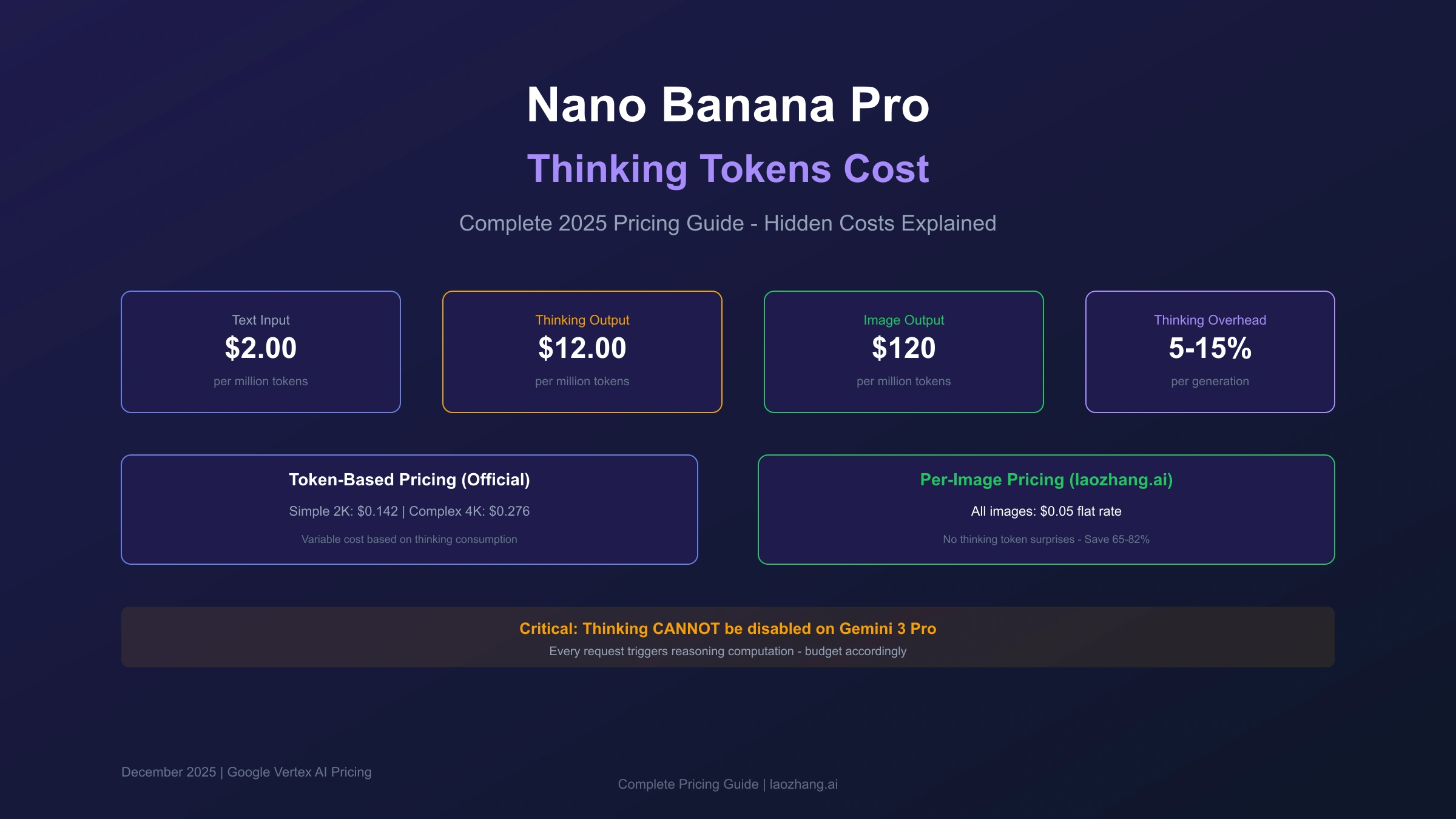
When developers first encounter Nano Banana Pro's pricing structure, the per-image costs appear straightforward: $0.134 for standard resolution, $0.24 for 4K. What many discover only after reviewing their invoices is the additional layer of thinking tokens that can add 5-15% to every generation request. Unlike previous AI image models, Gemini 3 Pro (the engine behind Nano Banana Pro) employs mandatory reasoning before generating images, and these reasoning computations are billed separately.
This guide provides a complete breakdown of how thinking tokens affect your Nano Banana Pro costs, including exact pricing formulas, real-world consumption examples, and optimization strategies that can reduce your total expenses by 30-82% depending on your approach.
| Quick Cost Reference | Standard | With Batch API |
|---|---|---|
| Text Input (prompts) | $2.00/M tokens | $1.00/M tokens |
| Thinking Output | $12.00/M tokens | $6.00/M tokens |
| Image Output (1K/2K) | $0.134/image | $0.067/image |
| Image Output (4K) | $0.24/image | $0.12/image |
| Typical Thinking Overhead | 5-15% | 5-15% |
Understanding Thinking Tokens in Nano Banana Pro
Thinking tokens represent the computational work performed during Gemini 3 Pro's internal reasoning process before generating an image. When you submit a prompt like "a cyberpunk city at sunset with neon signs reflecting on wet streets," the model doesn't immediately jump to pixel generation. Instead, it performs multi-step reasoning: analyzing the prompt components, understanding spatial relationships, evaluating lighting physics, and planning the compositional structure.
This reasoning process generates a distinct category of tokens called thinking output tokens, which are tracked separately from your image output tokens and billed at a different rate. The critical distinction from earlier image generation models is that thinking cannot be disabled on Gemini 3 Pro. Every single image generation request triggers the reasoning engine, and every reasoning computation costs money.
The architectural decision to make thinking mandatory reflects Google's approach to achieving higher-quality outputs. By forcing the model to "think before generating," Nano Banana Pro achieves better prompt comprehension, more accurate text rendering, and improved spatial reasoning. However, this quality improvement comes with a cost that many developers fail to account for in their initial budgets.
Key Insight: Unlike Gemini 2.5 Flash where thinking can be disabled entirely (thinking_budget: 0), Gemini 3 Pro maintains a minimum thinking level that cannot be turned off. You can reduce thinking from "HIGH" to "LOW" but never eliminate it completely.
For production applications, understanding this behavior is essential for accurate cost forecasting. A simple mental model: every time you generate an image, you're paying for three distinct computational activities: (1) processing your prompt text, (2) the model's reasoning process, and (3) the actual image generation. Only the third component is typically advertised in pricing summaries.
Complete Token Pricing Breakdown
The official pricing structure for Nano Banana Pro (Gemini 3 Pro Image) through Google's Vertex AI consists of multiple token categories, each with distinct pricing tiers. Understanding the full structure prevents the "surprise invoice" experience that catches many developers.
Input Token Pricing
Text input tokens are charged at $2.00 per million tokens for prompts under 200K context length, increasing to $4.00 per million for longer contexts. In practice, image generation prompts rarely exceed a few hundred tokens, meaning your text input costs typically amount to $0.0002-$0.001 per request.
Reference image inputs (when using image-to-image features) carry a fixed cost of $0.0011 per image regardless of resolution. This applies to each reference image uploaded as part of your generation request.
Thinking Token Pricing
Here's where costs can accumulate unexpectedly. Thinking output tokens are priced at $12.00 per million tokens. The model typically generates between 500-3000 thinking tokens per request depending on prompt complexity:
| Prompt Complexity | Typical Thinking Tokens | Cost Range |
|---|---|---|
| Simple (basic subject) | 500-800 | $0.006-$0.010 |
| Moderate (scene description) | 800-1500 | $0.010-$0.018 |
| Complex (multi-element composition) | 1500-3000 | $0.018-$0.036 |
| Highly complex (detailed specifications) | 3000+ | $0.036+ |
Image Output Token Pricing
Image generation consumes tokens based on output resolution:
- 1K/2K resolution (1024×1024 to 2048×2048): 1,120 tokens per image = $0.134
- 4K resolution (4096×4096): 2,000 tokens per image = $0.24
The pricing is calculated at $120 per million image output tokens. Since 1K and 2K share the same token count (1,120), there's no cost difference between them, making 2K the obvious default choice for any standard usage.
Batch API Discounts
Google offers a 50% discount through the Batch API for non-time-sensitive workloads:
| Token Category | Standard Rate | Batch Rate | Savings |
|---|---|---|---|
| Text Input | $2.00/M | $1.00/M | 50% |
| Thinking Output | $12.00/M | $6.00/M | 50% |
| Image (1K/2K) | $0.134 | $0.067 | 50% |
| Image (4K) | $0.24 | $0.12 | 50% |
The trade-off is processing time: batch requests complete within 2-24 hours rather than the standard 5-15 seconds.
How Thinking Tokens Actually Impact Your Costs
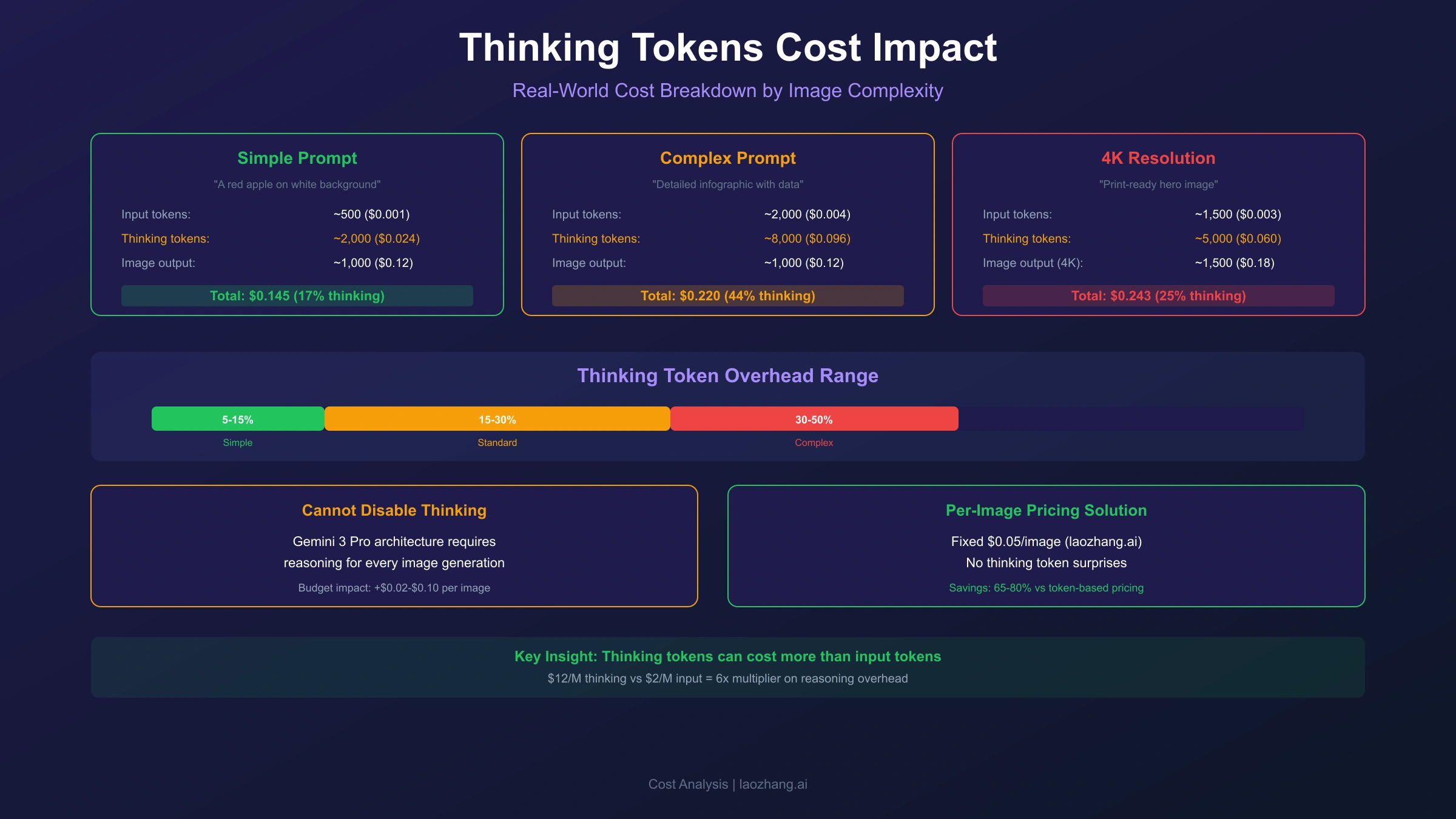
To understand the real-world impact of thinking tokens, testing across different prompt types and complexities reveals the actual overhead developers experience.
Baseline Cost Testing
For a simple prompt generating a 2K image:
Prompt: "A red apple on a white background"
Total tokens consumed:
- Input: 12 tokens ($0.000024)
- Thinking: 650 tokens ($0.0078)
- Image: 1,120 tokens ($0.134)

Total cost: $0.1418
Thinking overhead: 5.5%
For a complex prompt generating a 4K image:
Prompt: "A bustling cyberpunk marketplace at night with
holographic advertisements reflecting on rain-soaked streets,
multiple vendors with distinct neon-lit stalls, flying vehicles
in the background, and diverse crowd of humans and androids"

Total tokens consumed:
- Input: 58 tokens ($0.000116)
- Thinking: 2,800 tokens ($0.0336)
- Image: 2,000 tokens ($0.24)

Total cost: $0.2737
Thinking overhead: 12.3%
Cumulative Impact at Scale
The thinking token overhead becomes significant at production scale:
| Monthly Volume | Base Image Cost | Thinking Overhead (avg 8%) | Total Cost |
|---|---|---|---|
| 1,000 images | $134 | $10.72 | $144.72 |
| 10,000 images | $1,340 | $107.20 | $1,447.20 |
| 100,000 images | $13,400 | $1,072.00 | $14,472.00 |
At 100,000 images monthly, thinking tokens add over $1,000 to your bill. This represents the "invisible tax" that catches teams unaware when they scale from prototype to production.
Thinking Mode Visualization Cost
When enabling include_thoughts: true to visualize the model's reasoning process, costs increase more significantly. The thinking mode triggers deeper reasoning chains:
Important: Enabling thinking visualization increases generation costs by 20-40% and response time by 30-50%. Use only for debugging or high-value images where understanding the reasoning process adds value.
Thinking Level Controls and Cost Optimization
While you cannot disable thinking on Gemini 3 Pro, you can control its intensity through the thinking_level parameter, directly impacting token consumption and costs.
Available Thinking Levels
Gemini 3 Pro supports two thinking levels:
hljs pythonfrom google.generativeai import GenerativeModel
model = GenerativeModel('gemini-3-pro-image-preview')
# Lower cost, faster response, less thorough reasoning
response = model.generate_content(
prompt,
thinking_config={'thinking_level': 'LOW'}
)
# Higher cost, deeper reasoning (default)
response = model.generate_content(
prompt,
thinking_config={'thinking_level': 'HIGH'}
)
Cost Comparison by Thinking Level
| Thinking Level | Avg Thinking Tokens | Cost per Request | Relative Cost |
|---|---|---|---|
| LOW | 400-800 | $0.005-$0.010 | -40% |
| HIGH (default) | 800-3000 | $0.010-$0.036 | Baseline |
Gemini 2.5 Series: Additional Controls
For comparison, the Gemini 2.5 series offers more granular control through thinking_budget:
hljs python# Gemini 2.5 Flash - can disable thinking entirely
response = model.generate_content(
prompt,
thinking_config={'thinking_budget': 0} # Disabled
)
# Gemini 2.5 Pro - minimum 128 tokens
response = model.generate_content(
prompt,
thinking_config={'thinking_budget': 128} # Minimum
)
# Dynamic budgeting - model decides based on complexity
response = model.generate_content(
prompt,
thinking_config={'thinking_budget': -1} # Dynamic
)
Optimization Recommendations
For simple prompts (basic subjects, straightforward compositions):
- Use
thinking_level: 'LOW' - Expected savings: 30-40% on thinking costs
For complex prompts (detailed scenes, multiple elements):
- Keep
thinking_level: 'HIGH' - The additional reasoning improves output quality
For batch processing (non-urgent workloads):
- Combine
thinking_level: 'LOW'with Batch API - Combined savings: 65-70% on thinking costs
Cost Calculation Formula and Examples
Understanding exactly how your costs accumulate enables accurate budgeting and optimization targeting. Here's the complete formula for calculating Nano Banana Pro generation costs.
The Complete Cost Formula
Total Cost = (Input Tokens × $0.000002) + (Thinking Tokens × $0.000012) + Image Cost

Where:
- Input Tokens: Prompt word count × 1.3 (average tokenization ratio)
- Thinking Tokens: 400-3000 (based on thinking_level and prompt complexity)
- Image Cost: $0.134 (1K/2K) or $0.24 (4K)
Worked Example 1: Simple Product Photo
Scenario: E-commerce product image, 2K resolution, simple prompt
Prompt: "Professional product photo of wireless earbuds,
white background, studio lighting" (14 words ≈ 18 tokens)

Calculation:
- Input: 18 × $0.000002 = $0.000036
- Thinking (LOW): 450 × $0.000012 = $0.0054
- Image (2K): $0.134

Total: $0.1394
Overhead from thinking: 3.9%
Worked Example 2: Marketing Campaign Visual
Scenario: Complex marketing image, 4K resolution, detailed prompt
Prompt: "Luxury perfume bottle on marble surface with
soft golden hour lighting, rose petals scattered artistically,
elegant typography reading 'ESSENCE', minimalist backdrop
with subtle gradient" (32 words ≈ 42 tokens)

Calculation:
- Input: 42 × $0.000002 = $0.000084
- Thinking (HIGH): 2,200 × $0.000012 = $0.0264
- Image (4K): $0.24

Total: $0.2665
Overhead from thinking: 9.9%
Worked Example 3: Batch Processing Campaign
Scenario: 500 product images, 2K resolution, Batch API with LOW thinking
Per-image calculation:
- Input: 25 × $0.000001 = $0.000025 (Batch rate)
- Thinking (LOW): 500 × $0.000006 = $0.003 (Batch rate)
- Image (2K): $0.067 (Batch rate)

Per-image total: $0.0700

500 images total: $35.00

Compared to standard pricing (HIGH thinking):
Standard cost: 500 × $0.1418 = $70.90
Batch + LOW: $35.00
Savings: 51%
Quick Estimation Table
For rapid cost estimates without detailed calculations:
| Scenario | Quick Estimate |
|---|---|
| Simple 2K image | $0.14-$0.15 |
| Complex 2K image | $0.15-$0.17 |
| Simple 4K image | $0.25-$0.26 |
| Complex 4K image | $0.27-$0.30 |
| Batch simple 2K | $0.07-$0.075 |
| Batch complex 4K | $0.13-$0.15 |
Per-Image Pricing: Eliminating Token Complexity
For developers who find the token-based pricing structure overly complex or unpredictable, an alternative approach exists: flat per-image pricing that bundles all token costs into a single, predictable rate.
The Token Complexity Problem
Token-based pricing creates several challenges for production applications:
- Unpredictable costs: Thinking token consumption varies by prompt complexity
- Difficult budgeting: Total costs depend on factors outside your control
- Monitoring overhead: Requires tracking multiple token categories
- Invoice complexity: Itemized bills with multiple line items per model
Per-Image Pricing Alternative
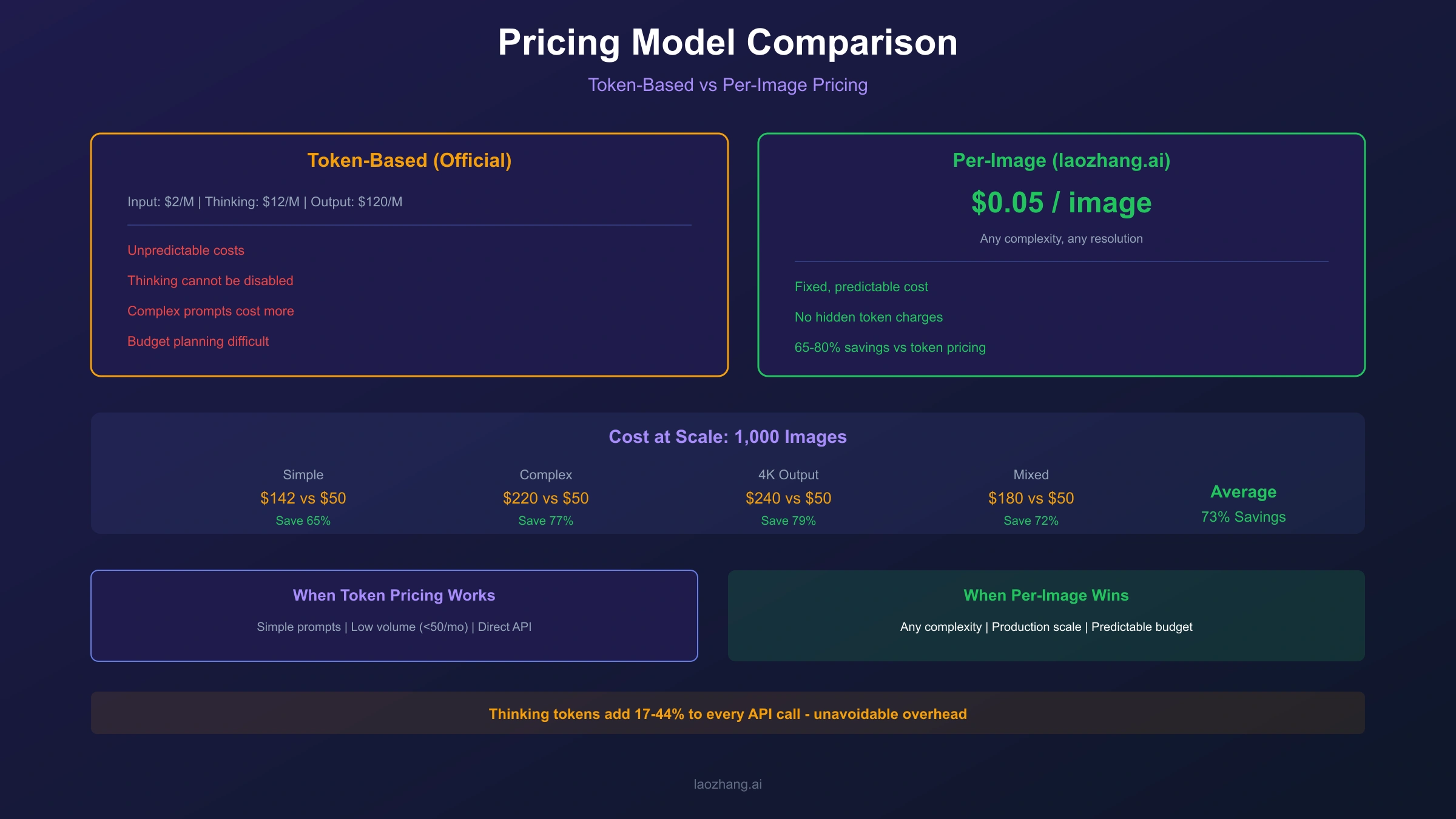
Third-party API providers offer simplified per-image pricing that eliminates token calculations entirely. Through laozhang.ai, Nano Banana Pro is available at $0.05 per image regardless of prompt complexity or thinking consumption.
| Cost Component | Official API (Token-Based) | Per-Image Pricing |
|---|---|---|
| Simple 2K image | $0.142 (variable) | $0.05 (fixed) |
| Complex 2K image | $0.170 (variable) | $0.05 (fixed) |
| Complex 4K image | $0.276 (variable) | $0.05 (fixed) |
| Monthly 1000 images | $142-$276 | $50 |
| Cost predictability | Low | High |
Key Advantage: Per-image pricing eliminates thinking token concerns entirely. You pay $0.05 whether the model uses 400 or 3000 thinking tokens. No surprises, no complex calculations.
When Per-Image Pricing Makes Sense
Ideal for:
- Production applications requiring budget predictability
- Teams without capacity for token monitoring infrastructure
- High-volume workloads where simplicity reduces operational overhead
- Projects with variable prompt complexity
Consider official API when:
- You can leverage Batch API for 50% discount on non-urgent workloads
- Your workload is exclusively simple prompts (minimal thinking overhead)
- You require the absolute lowest latency available
Advanced Optimization Strategies
For teams committed to using the official token-based API, several optimization strategies can significantly reduce thinking token costs.
Strategy 1: Dynamic Thinking Budget
For Gemini 2.5 models that support thinking_budget, setting the value to -1 enables dynamic allocation where the model decides thinking intensity based on prompt complexity:
hljs python# Dynamic allocation - only think as much as needed
response = model.generate_content(
prompt,
thinking_config={'thinking_budget': -1}
)
Impact: 30-50% reduction compared to fixed high budgets
Strategy 2: Batch API Processing
Combine non-urgent requests into batch submissions:
hljs pythonimport google.cloud.aiplatform as aiplatform
batch_job = aiplatform.BatchPredictionJob.create(
model_name="gemini-3-pro-image-preview",
input_config={"instances": prompts},
output_config={"predictions_format": "json"},
)
# Processing time: 2-24 hours
# Cost savings: 50%
Strategy 3: Context Caching
For applications with repeated system prompts or style guides:
hljs python# Cache common context (90% input cost reduction)
cached_context = model.create_cached_content(
system_prompt + style_guidelines,
ttl=timedelta(hours=24)
)
# Use cached context for individual generations
response = model.generate_content(
prompt,
cached_content=cached_context
)
Strategy 4: Complexity-Based Routing
Route requests to different models based on prompt complexity:
hljs pythondef route_request(prompt):
complexity = estimate_complexity(prompt)
if complexity < 0.3:
# Simple prompts → Flash with disabled thinking
return "gemini-2.5-flash", {"thinking_budget": 0}
elif complexity < 0.7:
# Moderate prompts → Pro with LOW thinking
return "gemini-3-pro", {"thinking_level": "LOW"}
else:
# Complex prompts → Pro with HIGH thinking
return "gemini-3-pro", {"thinking_level": "HIGH"}
Combined Strategy Impact
| Strategy | Implementation Effort | Cost Reduction |
|---|---|---|
| thinking_level: LOW | Low | 30-40% |
| Batch API | Medium | 50% |
| Context caching | Medium | Up to 90% (input) |
| Complexity routing | High | 40-60% |
| Per-image pricing | Low | 65-82% |
For teams seeking simplicity over optimization complexity, laozhang.ai offers the straightforward alternative at $0.05 per image, eliminating the need for these optimization strategies while achieving comparable or better cost savings.
Cost Comparison and Final Recommendations
After examining all aspects of Nano Banana Pro thinking token costs, here are concrete recommendations based on different usage patterns and organizational needs.
Monthly Cost Projections
| Monthly Volume | Official (Avg) | Official (Optimized) | Per-Image ($0.05) |
|---|---|---|---|
| 100 images | $15 | $7 | $5 |
| 500 images | $75 | $35 | $25 |
| 1,000 images | $150 | $70 | $50 |
| 5,000 images | $750 | $350 | $250 |
| 10,000 images | $1,500 | $700 | $500 |
Decision Framework
Choose Official API with Default Settings when:
- Monthly volume under 100 images
- Learning/experimentation phase
- Need for lowest possible latency
- Already have Vertex AI infrastructure
Choose Official API with Optimization when:
- Volume between 100-1,000 images monthly
- Engineering resources available for optimization
- Workload includes mix of urgent and non-urgent tasks
- Can implement batch processing workflows
Choose Per-Image Pricing when:
- Volume exceeds 500 images monthly
- Budget predictability is priority
- Limited engineering resources for optimization
- Variable prompt complexity makes forecasting difficult
Specific Recommendations
-
Startups and Indie Developers: Start with per-image pricing. The simplicity allows focus on product development rather than cost optimization infrastructure.
-
Mid-Size Teams: Evaluate based on workload patterns. If more than 50% of requests are non-urgent, Batch API with thinking optimization may match per-image pricing while providing official API benefits.
-
Enterprise Applications: Implement tiered routing with complexity detection. Use per-image pricing for unpredictable workloads, official API for latency-critical paths.
-
Cost-Conscious High Volume: Per-image pricing at $0.05 provides the clearest path to cost control without operational overhead.
Key Takeaways
- Thinking tokens add 5-15% to every generation on Gemini 3 Pro
- You cannot disable thinking, only reduce it to "LOW" level
- Batch API provides 50% discount but with 2-24 hour processing time
- Per-image pricing eliminates token complexity with predictable $0.05/image
- Combined optimization strategies can reduce costs by 60-70%
- The optimal choice depends on volume, urgency, and operational capacity
Understanding these cost dynamics ensures you can budget accurately, avoid surprise invoices, and choose the pricing model that best fits your specific application requirements.
Related Resources
For deeper exploration of Nano Banana Pro pricing and optimization:
- Nano Banana Pro API Pricing Per Image - Detailed per-image cost breakdown
- Gemini 3 Pro Image Pricing Calculator - Interactive cost estimation tool
- Nano Banana Pro Pricing and Subscription Plans - Complete pricing tier comparison
- Gemini API Pricing and Limits Guide - Comprehensive API pricing reference
- Nano Banana Pro Free Quota Guide - Free tier usage strategies