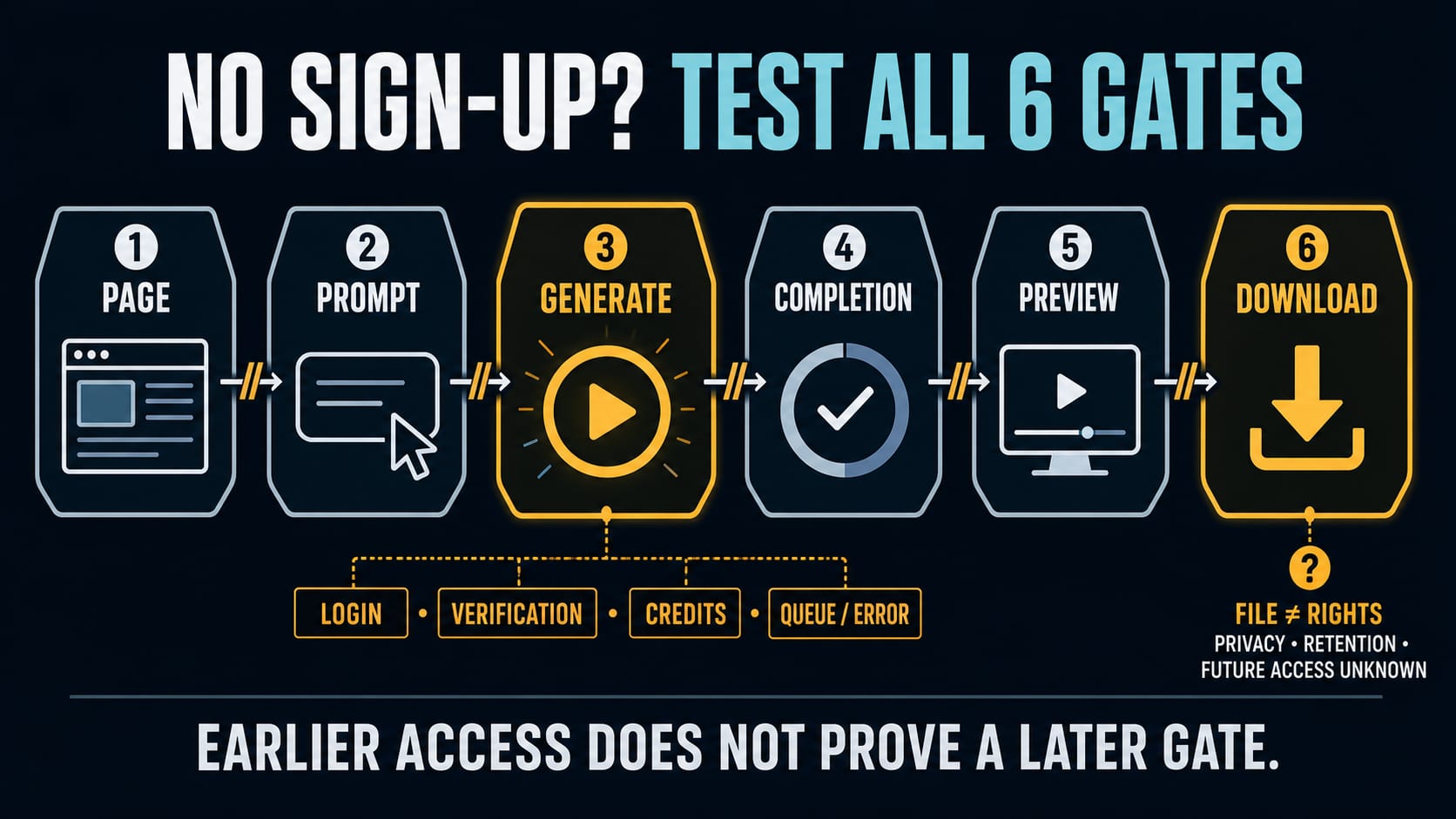
A free AI video generator can let you open the workspace and type a prompt without an account yet still demand a login when you press Generate. The only reliable answer is an end-to-end test: open the page signed out, enter a harmless text prompt, press Generate, wait for the job to finish, inspect the preview, and confirm that a file can actually be downloaded. In unsigned-browser checks on July 21, 2026, Creen reached a sign-in gate after Generate, while FreeAIVideo reached a creating state without showing a login dialog; the latter test did not establish completion or Download. That means neither observation supports a permanent “free, no-sign-up, downloadable video” promise.
The Six Gates Behind “No Sign-Up”
Treat access as six checkpoints, not one feature label. A route passes only as far as the last checkpoint you personally observe.
| Gate | What to verify | What passing it does not prove |
|---|---|---|
| 1. Page | The generator loads in a new signed-out browser | Prompt entry, generation, or availability in another region |
| 2. Prompt | You can enter text and select visible settings | That the selected model is real or available to guests |
| 3. Generate | Pressing Generate starts work without a login, card, or upgrade wall | That the job will complete successfully |
| 4. Completion | The job reaches a completed state rather than looping or failing | That the result is visible or usable |
| 5. Preview | A playable result appears and can be inspected | That a file download exists or has the advertised properties |
| 6. Download | A video file downloads and opens locally | Commercial rights, privacy, retention, or future free access |
This split prevents the most common mistake: calling a site “no sign-up” because its landing page or prompt box is public. The Generate and Download gates are the ones most likely to reveal the real contract.
What “Free” and “No Sign-Up” Actually Need to Mean
The labels that cluster around these tools answer different questions. Do not merge them into a single promise.
| Label | Narrow question it answers | Contract still missing |
|---|---|---|
| No sign-up | Must I create an account? | Login, email verification, IP limits, cookies, or later account gates |
| No login | Must I authenticate for this step? | Whether Generate or Download will remain open |
| Free | Is payment required for some bounded use? | Quota, queue, resolution, model, duration, or retry policy |
| No card | Must I provide payment details? | Whether the route needs an account or has a low allowance |
| No watermark | Is a visible mark absent from the downloaded file? | Rights, metadata, provenance markers, or commercial permission |
| Unlimited | Is there a stated numerical cap? | Fair-use rules, IP throttling, capacity, abuse checks, or service changes |
| Commercial use | Do the current terms permit the intended use? | Rights to inputs, likenesses, music, trademarks, or third-party material |
For a US reader, “no sign up” often implies no account creation, no email or phone verification, and no login. It does not automatically mean anonymous use. A service can still use cookies, IP-based limits, human-verification challenges, or abuse-detection signals. Unless its current policy explains data handling, the absence of an account says nothing conclusive about retention, training use, public visibility, or third-party processing.
Two Dated Guest-Route Checks, Not a Permanent Ranking
Provider behavior changes quickly, so these are route snapshots from July 21, 2026, not “best tool” awards.
Creen: public workspace, sign-in after Generate
Creen's current AI video generator page describes the route as free and unlimited, with no sign-up or login. In the dated unsigned-browser check, the page and workspace loaded, a harmless text prompt could be entered, and pressing Generate opened a Google, Apple, or email sign-in dialog.
That test establishes public page and prompt access. It does not establish guest generation, job completion, Download, output resolution, duration, watermark status, model identity, rights, retention, quota, or continuing availability. The page's broader model, speed, output, privacy, and usage statements remain provider claims unless the relevant checkpoint or first-party contract is independently verified.
FreeAIVideo: Generate reached “creating,” but the file was not verified
FreeAIVideo's current generator page states that a free hourly allowance is available without an account and describes human verification plus an IP-based hourly limit. It also presents no-watermark downloads and output settings as service features.
In the dated unsigned-browser check, a harmless text prompt reached a creating state without a login dialog. The observation stopped there. It did not verify a completed result, playable preview, downloadable file, watermark status, format, resolution, model identity, commercial rights, retention, deletion, failed-job handling, or regional consistency. The direct page now provides more detailed claims, but those statements do not retroactively turn an unobserved completion or Download gate into a pass.
The practical takeaway is not that one route “wins.” Creen exposed an account gate sooner; FreeAIVideo exposed a later checkpoint. Both need a fresh end-to-end test before you depend on them.
A Safe 10-Minute Test You Can Repeat
Start with text to video. Uploading an image adds rights, likeness, privacy, retention, and deletion questions before you even know whether the guest route works.
- Open a new private or otherwise signed-out browser window. Confirm that you are not silently logged in through Google, Apple, or the provider.
- Record the exact URL, date, visible country or language, stated model, selected aspect ratio, duration, quality, and any quota wording.
- Use one harmless prompt that contains no person, brand, copyrighted character, client detail, or private information.
- Press Generate once. Record the first new gate: sign-in, email, card, human verification, queue, credits, error, or creating state.
- If the job completes, play the entire preview. Look for broken motion, duplicate limbs or objects, unreadable text, accidental logos, or unexpected audio.
- If Download is available, save the file and open it locally. Record its container, dimensions, duration, audio track, file size, and visible watermark.
- Before sharing or using the clip commercially, read the current terms and privacy policy for ownership, permitted use, input handling, retention, deletion, public-gallery behavior, and dispute support.
Use a prompt that makes success easy to inspect:
A single red paper boat drifting slowly across a shallow rain puddle at dusk. One continuous wide shot, gentle camera push forward, soft reflections, no people, no text, no logos, landscape format.
One subject, one action, and one camera move make the output easier to judge. A crowded cinematic paragraph may hide whether the route works behind a difficult generation request.
Keep a Small Proof Record
A screenshot of the landing page is weak evidence. A compact route record makes later comparisons useful:
hljs textChecked: 2026-07-21, United States, signed out Route: exact generator URL Input: text only; no upload Stated model: shown / not shown Settings: aspect ratio, duration, quality, audio Generate gate: passed / login / verification / credits / error Completion: observed / not observed Preview: observed / not observed Download: observed / not observed Local file: format, dimensions, duration, audio, watermark Terms checked: URL and date Unknowns: quota, retention, deletion, rights, failed-job policy
This record also reveals when an article or tool list is stale. If the page wording, first gate, model label, or Download behavior changes, retest instead of relying on the old result.
When a No-Account Route Is the Wrong Choice
Guest access is useful for a disposable concept test. It is a poor default when the input or output matters.
Choose an accountable route with a clear support and policy surface when you need client work, confidential concepts, predictable quotas, deletion controls, invoices, team access, repeatable models, or a defensible commercial-use record. Current official routes illustrate the different contract: Google's Gemini video-generation help says video generation in Gemini Apps requires sign-in plus an eligible Google AI plan or qualifying Workspace access. Adobe's Firefly access guide requires an Adobe account, while its generative credits overview explains that video use depends on plan entitlements and credits.
Those routes are not literal answers to “no sign-up.” They are useful comparisons because an account can make policy, entitlement, history, and support ownership clearer. It does not automatically make a tool cheaper, private, commercially safe, or suitable for your project; those still require current checks.
Privacy and Rights Stop Rules
Do not upload a face, personal voice, private photo, client asset, unpublished product, copyrighted clip, or brand material merely to discover whether a site will ask you to log in. A text-only test answers the access question with less exposure.
If your actual job starts from a still image, first verify that you own it or have permission to animate it, then use the dedicated free AI image-to-video route guide for upload-specific checks. Real-person material needs consent and a legitimate purpose. Do not use a guest generator for impersonation, deceptive media, unwanted sexualization, harassment, or a workaround around a platform safeguard.
A completed clip also does not settle rights. Confirm the current terms for commercial use and check every output for third-party logos, recognizable characters, faces, music, and misleading content. “No watermark” is a file property, not a legal clearance.
Why a Guest Generation May Stall or Fail
The failure point tells you more than the marketing label.
| What happens | Likely contract revealed | Next move |
|---|---|---|
| Sign-in appears after Generate | Guest workspace, account-gated compute | Record the gate; decide whether an account is acceptable |
| Human verification appears | Guest use with abuse controls | Complete only normal verification; do not attempt bypasses |
| Credits or upgrade appears | Free page or prompt, metered generation | Check whose credits they are and what action consumes them |
| Queue never completes | Capacity, throttling, or a broken job | Retry once later; do not claim generation works |
| Preview appears but Download does not | View-only or export-gated result | Check the interface and terms; do not use capture tricks as proof of export |
| File downloads but looks wrong | Generation passed, quality failed | Simplify the prompt and change one variable at a time |
| Route works once, then stops | IP, cookie, session, or fair-use limit may apply | Treat the cap as unknown until the provider states or exposes it |
Do not respond with a VPN, borrowed account, disposable identity, another person's API key, watermark-removal trick, or verification bypass. Those actions do not validate a free route; they change the route and introduce new policy, security, and ownership risks.
A Simple Decision Rule
Use a no-sign-up AI video generator only when all three conditions are true:
- the test input is non-sensitive and fully yours;
- you can tolerate a failed job, changing limit, or disappearing route;
- you verify the exact output and current terms before publishing.
If any condition fails, choose a route with an account and an explicit contract. The cost of registration is usually smaller than the cost of losing a client asset, discovering an export wall after generation, or being unable to explain where a commercial clip came from.
FAQ
Is there a completely free AI video generator with no sign-up?
Some pages currently advertise guest generation, but “completely free” is too broad unless you verify the whole route. Test page access, prompt entry, Generate, completion, preview, and Download separately. Also check quotas, watermark, rights, and data handling. A route that works once may still have IP limits, capacity gates, or changing terms.
Does no sign-up mean no login or email?
Not necessarily. A public workspace may allow prompt entry and then request Google, Apple, or email authentication after Generate. Treat “no sign-up,” “no login,” “no email,” and “no card” as separate claims.
Can I download the AI video without an account?
Only if you observe the Download gate on the exact route you tested. A creating state or playable preview does not prove that a file can be downloaded. Save the file locally and inspect its format, dimensions, duration, audio, and watermark.
Are no-sign-up AI video generators anonymous?
Do not assume so. A service may use IP addresses, cookies, browser signals, human verification, logs, or third-party processing even when it does not create a user account. Check the current privacy policy and avoid sensitive test inputs.
Can I use a free guest-generated video commercially?
Guest access does not establish commercial permission. Read the current terms for the tool and model, confirm your rights to every input, and inspect the output for protected material, likenesses, logos, music, and disclosure requirements.
Should I test image-to-video without signing up?
Test text to video first. Image upload adds privacy, likeness, copyright, retention, and deletion questions. If you proceed, use an image you own or are authorized to use and review the upload policy before sending it.
Why did a generator ask me to sign in only after I pressed Generate?
The public interface and the compute service can have different access rules. The page and prompt box may be open for discovery, while actual generation is reserved for authenticated accounts. That is why Generate must be its own checkpoint.
How often should I recheck a no-sign-up tool?
Recheck immediately before relying on it for a project and whenever the page wording, model selector, quota message, Generate behavior, or Download flow changes. Guest routes are volatile; an old successful test is not a guarantee of current access.