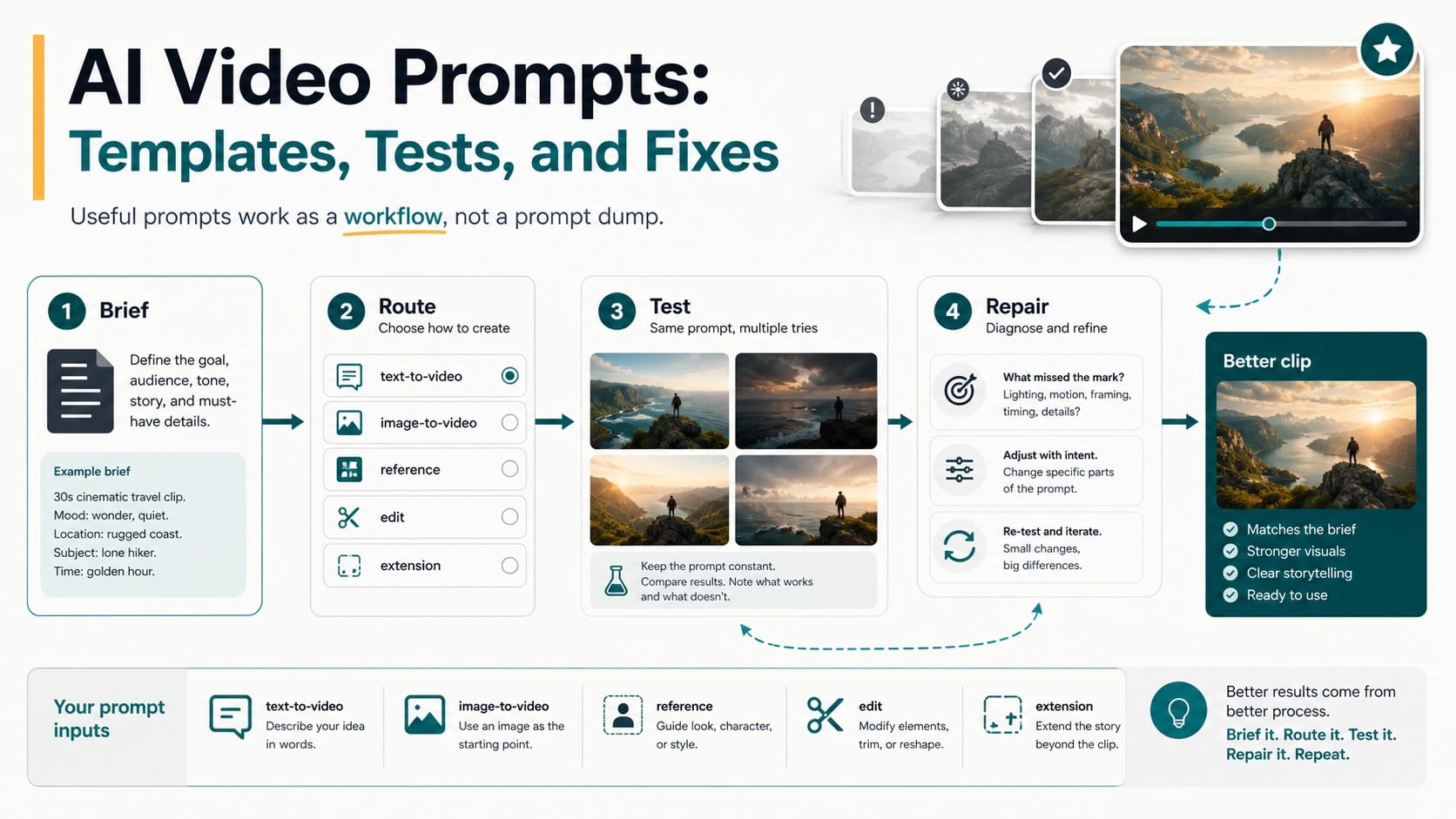
A good AI video prompt is a compact production brief, not just a prettier sentence. Before you copy a prompt pack, write one baseline idea, choose the route your generator actually uses, and decide what a pass or failure should look like in the first clip.
Use this formula before the examples:
| Prompt field | What it controls | What to test first |
|---|---|---|
| Subject + action | Who or what moves, and what changes on screen | Does the intended action happen without identity or object drift? |
| Setting + style | Where the shot happens and what visual world it belongs to | Does the scene feel specific rather than generic? |
| Camera + motion | Framing, pan, tracking, push-in, orbit, handheld, or static choices | Did the model follow the shot direction? |
| Lighting + mood | Day, night, product gloss, documentary realism, or cinematic contrast | Does the lighting support the job? |
| Duration + aspect | Clip length, orientation, platform, and format target | Is the result the right shape for the channel? |
| Audio, dialogue, or silence | Voice, ambient sound, speech, music, or no-audio intent | Does sound help, distract, or mismatch? |
The same idea should not be written the same way for every route. A text-to-video prompt must carry the whole scene. An image-to-video prompt should protect the source image and describe motion. A reference prompt should protect identity, product details, or style. First/last-frame, edit, and extension prompts each need a narrower instruction about what changes and what must stay fixed.
Run one baseline before you scale. Record the model, route, input assets, prompt version, settings, result, failure label, and next rewrite. If the failure is a policy block, an unavailable route, an expired model, or an unsupported setting, stop rewriting prose and fix the real owner instead.
Build the production brief before writing the sentence
The fastest way to improve AI video prompts is to separate decisions that are often mashed into one paragraph. A production brief gives each decision a home, so the next revision can change one control instead of adding five more adjectives.
hljs textJob: Route: Subject: Action beats: Setting: Camera and framing: Motion and timing: Lighting and palette: Style or texture: Audio or dialogue: Input assets: Must preserve: Must avoid: Expected result:
Start with the job. “A vertical product reveal for a six-second social ad” is more useful than “make a cinematic video” because it tells you what the clip must accomplish. Then choose the route and input assets. Only after those are fixed should you turn the brief into fluent prompt prose.
Not every field needs to be long. If the subject is already locked by a source image, do not redescribe it until the model starts changing it. If audio will be added in an editor, state “silent visual plate” and keep dialogue out of the generation. If the interface owns duration or aspect ratio as settings, record them beside the prompt instead of hoping prose overrides the UI.
A copyable baseline template
This template is deliberately plain. Replace the brackets, then remove any line that does not affect the shot.
hljs text[Framing and camera movement] shows [specific subject] [performing one clear action] in [specific setting]. [Environmental motion] supports the action without obscuring it. Lighting is [direction, quality, and palette]. The visual treatment is [style or texture]. The action progresses from [opening beat] to [ending beat]. Audio: [dialogue, ambient sound, music cue, or silence]. Preserve: [identity, product geometry, logo, wardrobe, composition, or color]. Avoid: [one or two visible failure risks].
The template is a starting instrument, not a guarantee. Google’s current Veo prompt guidance emphasizes framing, motion, style, lighting, character detail, location, action, and dialogue. Adobe’s video prompt guidance similarly starts from shot type, character, action, location, and aesthetic. Those fields travel well, but every route interprets them differently.
Rewrite the same idea for the route
Suppose the idea is a ceramic coffee cup becoming the hero object in a quiet morning ad. The creative goal stays fixed; the instructions change with the input contract.
| Route | What the prompt must carry | Example rewrite |
|---|---|---|
| Text to video | The full scene, subject, action, camera, light, and ending | “Macro product shot of a matte white ceramic cup on a walnut table at sunrise. Steam curls upward as the camera makes a slow half-orbit, revealing a small blue maker’s mark. Warm window light, restrained reflections, silent six-second reveal.” |
| Image to video | Motion, camera work, timing, and what the source image must retain | “Preserve the cup, maker’s mark, table grain, and morning light from the input image. Steam rises in two soft curls while the camera performs a slow five-degree push-in. No object rotation or new props.” |
| Reference to video | Which identity or product details are non-negotiable | “Use the reference images to preserve the exact cup silhouette, handle angle, blue mark, and glaze texture. Animate a quiet tabletop reveal with a slow lateral track and natural steam.” |
| First and last frame | The transition between two known compositions | “Move from the empty wide breakfast table in the first frame to the close product composition in the last frame. Keep the motion continuous: slow dolly forward, cup entering from frame right, no cuts.” |
| Edit | The requested change and the protected remainder | “Replace the harsh overhead reflection with soft window light. Keep the cup, logo, camera path, table, steam timing, and clip duration unchanged.” |
| Extension | What happens next from the existing final frame | “Continue from the final product close-up. Hold the cup geometry and lighting; let the steam fade as the camera settles into a static end card composition.” |
This is why a universal prompt pack breaks so quickly. The official Gemini API video guide treats text generation, image input, reference images, first/last frames, and extension as distinct Veo 3.1 workflows. Runway’s current image-to-video guide says the image already supplies composition, subject, lighting, and style, while the text should focus on motion, camera work, and temporal progression. Repeating the full visual description can fight the asset that is supposed to anchor the shot.
xAI also separates generation, image-to-video, reference-to-video, editing, and extension in its Imagine documentation. Kling’s current Video 3.0 guide distinguishes single-shot, multi-shot, element-bound, and image-led work. Treat the route selector, upload slots, and settings as part of the prompt system—not as decoration around a magic sentence.
Six useful AI video prompt examples
These are baseline prompts for different creator jobs. Each includes a pass signal so you know whether the next version should change the prompt, the assets, or the route.
1. Product reveal
hljs textMedium-wide studio shot of a charcoal running shoe on a low concrete plinth. A narrow strip light travels from heel to toe while the camera makes a slow 30-degree orbit. The knit texture, sole geometry, and small silver side mark remain crisp and unchanged. Cool graphite palette with one restrained cyan reflection. Silent, premium, six-second reveal.
Pass signal: the shoe stays structurally consistent, the light move is legible, and the camera finishes on a usable product angle. If the logo or geometry drifts, switch to reference-led generation before adding descriptive prose.
2. Character entrance
hljs textOne continuous medium tracking shot follows a bicycle mechanic stepping from a dim workshop into warm late-afternoon light. She wipes grease from one hand, looks toward an arriving rider, and smiles with recognition. Natural body motion, documentary texture, no cut, no crowd.
Pass signal: one person completes one readable action without an identity jump. For a recurring character, reference or element binding is more important than an elaborate face description.
3. Food close-up
hljs textExtreme close-up of dark chocolate sauce poured over a chilled vanilla dessert. The camera remains locked while the sauce folds slowly across the surface and catches a soft side light. Shallow depth of field, realistic food texture, no utensils entering frame, quiet room tone only.
Pass signal: the pour direction, viscosity, and camera lock remain stable. If the dessert mutates, reduce the action or anchor it with an input image.
4. Vertical social hook
hljs textVertical close shot of a blank paper card snapping open to reveal a hand-lettered question: “What changed the result?” The camera pushes through the card into a bright studio desk where three labeled prompt cards—brief, route, repair—land in sequence. Fast but readable motion, clean white and teal palette, no extra text.
Pass signal: the reveal reads within the first beat and the composition remains safe for a 9:16 crop. Generated text can drift; for exact campaign copy, plan a separate editing layer instead of spending generations on spelling.
5. Two-shot dialogue
hljs textShot 1: medium two-shot of two engineers beside a quiet prototype on a workbench. The first points to a moving part and says, “The motion is right, but the housing keeps changing.” Shot 2: close-up of the second engineer replying, “Then lock the reference before rewriting the prompt.” Consistent wardrobe, workshop lighting, voices, and prototype details across both shots.
Pass signal: the route actually supports multi-shot and dialogue control, both speakers remain identifiable, and the cut does not rewrite the object. If it does not, generate single shots separately and edit them together.
6. Image-to-video landscape
hljs textUse the input landscape as the first frame. Preserve the mountain silhouette, cabin position, snow line, and blue-hour palette. A thin layer of fog moves from left to right through the valley while one warm cabin light turns on. Slow static-to-push-in camera move; no new buildings or weather.
Pass signal: motion appears without replacing the composition. If the source image contains blur, impossible limbs, or contradictory motion cues, repair the still first; animation often magnifies those defects.
Test one prompt before spending the campaign budget
A prompt test is useful only when it isolates a decision. Hold the idea, route, assets, aspect ratio, and duration constant for the baseline. Then score the result against the job—not against a vague feeling that it could be “more cinematic.”
| Dimension | Pass question | Failure label |
|---|---|---|
| Subject fidelity | Did the person, product, or object stay recognizable? | identity drift |
| Action clarity | Did the intended action happen in the right order? | action drift |
| Camera compliance | Did framing and movement match the brief? | camera miss |
| Temporal continuity | Did objects and motion remain coherent across the clip? | continuity break |
| Format fit | Is the composition usable at the target aspect and duration? | format miss |
| Audio fit | Is dialogue or ambience correct, synchronized, and useful? | audio miss |
| Policy and route | Did the request reach a supported workflow without a block? | owner failure |
Change one major control for the second test. If you change the model, route, source image, prompt, duration, and aspect ratio at once, a better clip teaches you nothing. A same-prompt comparison is not a universal benchmark; it is a controlled way to discover which route follows your brief for this job.
Repair the failure you can see
“Make it better” is not a repair instruction. Label the visible failure, then choose the narrowest next move.
| Visible failure | Best next move | Do not waste the retry on |
|---|---|---|
| Generic scene | Add a specific location, material, time, and one visual contrast | A longer mood-word list |
| Wrong motion | Rewrite the action as ordered beats with direction and timing | Restating the subject appearance |
| Camera ignored | Use one camera move, one framing instruction, and a clear end composition | Combining orbit, pan, zoom, crane, and handheld cues |
| Character or product drifts | Add or improve reference assets; name protected details | More face or product adjectives in text-only mode |
| Too much happens | Reduce to one shot or split the sequence into separate generations | Squeezing a full story into the same duration |
| Text is misspelled | Generate the visual plate and add exact text in an editor | Repeatedly asking the video model to typeset a paragraph |
| Audio conflicts | Specify speaker, exact line, timing, ambience, or silence; otherwise add audio later | Ambiguous “cinematic sound” wording |
| Policy block | Check the content boundary and permitted route | Euphemisms or prompt obfuscation |
| Unsupported option | Change the model, route, input, or request setting | Rewording the scene description |
The stop rule matters. OpenAI’s current Sora discontinuation notice says its web and app experiences ended on April 26, 2026, and the Sora API is scheduled to end on September 24, 2026. A prompt that once worked in a Sora tutorial may now fail because the route is gone or approaching retirement. The same principle applies whenever a model, mode, duration, reference slot, or account surface changes: verify the route before diagnosing the prose.
Save the pattern, not just the sentence
A reusable prompt library should preserve decisions and outcomes, not only polished text. Save each successful or instructive test as a prompt card:
hljs textCard name: Creator job: Model and route: Input assets: Prompt version: Request settings: Must preserve: Observed result: Failure label: Change from previous test: Next test: Last route check:
After several projects, these cards reveal useful patterns: which camera instructions a route follows, which character assets hold up, which jobs need first/last frames, and which failures are really editing problems. That is more durable than collecting another hundred anonymous prompts.
If the job begins with a still image and route choice is the main question, use the image-to-video workflow guide. If the failure is specifically an invalid Sora prompt, use the Sora invalid-prompt troubleshooting guide. Keep those narrower jobs outside this workbook so each page can finish one task well.
FAQ
What is a good AI video prompt?
A good AI video prompt states the job, route, subject, action, setting, camera, motion, lighting, style, timing, audio intent, protected details, and expected result at the level the chosen workflow can control. It is good because it creates a testable brief, not because it contains many adjectives.
Can I copy and paste AI video prompts?
Yes, but treat a copy-paste prompt as a baseline. Replace its job, route, inputs, protected details, format, and pass signal before generating. If it was written for text-to-video, do not assume it is appropriate for image-to-video, reference, edit, or extension work.
What should an AI video prompt template include?
At minimum: framing, subject, action, setting, motion, lighting, style, timing, audio, must-preserve details, and a pass signal. Store model, route, input assets, aspect ratio, duration, and other request settings beside the prose when the interface owns them.
Are AI video prompt generators useful?
They are useful for expanding a brief into candidate language. They are less useful when they hide the route, invent unsupported settings, or produce generic prompt walls. Check every generated prompt against the actual input mode and remove fields the route cannot control.
Where can I find free AI video prompts for YouTube or social media?
Prompt libraries, community discussions, and creator examples can supply ideas, but “free” does not make a prompt repeatable. Convert any example into your own brief, choose the target aspect and duration, identify the hook and end frame, and run one controlled test before using it in a channel workflow.
Which AI makes video from text prompts?
Several current products and APIs offer text-to-video, but availability, model names, settings, pricing, and account access change. Choose by the route and control you need, verify the official product documentation, and test one representative brief. Do not choose from a permanent “best tool” answer attached to an undated prompt list.