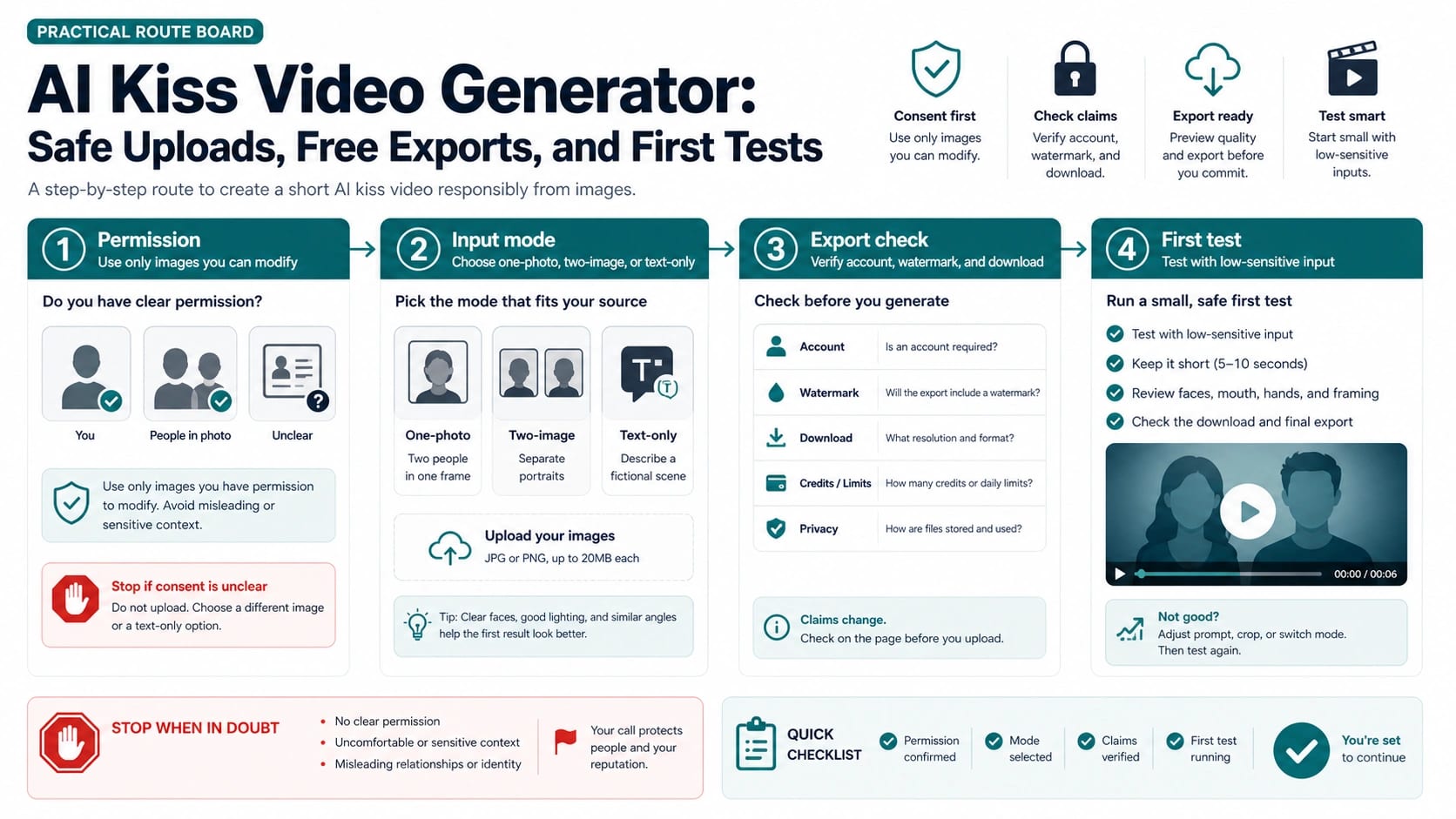
An AI kiss video generator should not be the first decision; the image is. If the photo shows real people, use only images you have permission to modify, avoid misleading or reputation-sensitive contexts, and check export and storage terms before upload.
| Route | Use it when | Check before upload | Stop when |
|---|---|---|---|
| One photo with two people | Both faces are clear in the same frame and the context is consented | Face clarity, crop, lighting, account requirement, watermark, and final download | Either person did not consent or the photo is private, age-ambiguous, intimate, or reputation-sensitive |
| Two separate images | The tool supports separate Person A / Person B inputs and both portraits are permission-cleared | Similar angle, visible face, non-sensitive source images, and whether the export is usable without a paid surprise | The image owner, subject, or relationship context is unclear |
| Text-only fictional scene | You want the kiss effect without tying it to a real likeness | Prompt wording, output rights, watermark, and whether the tool can download a usable clip | The prompt imitates a real person, celebrity, coworker, friend, or minor |
| Broad image-to-video editor | You need more control than a one-click kiss effect gives | Privacy terms, storage/deletion behavior, model controls, duration, and export format | A simpler route solves the job with less upload risk |
| Stop | Consent, age, privacy, export terms, or context is unclear | none | Do not upload; use a synthetic test, get permission, or choose another route |
Before spending credits, verify the account requirement, watermark behavior, final download resolution, storage/deletion terms, and current usage rules on the tool you are about to use. For the first run, use a low-sensitive or synthetic input, keep the clip short, then inspect face identity, mouth shape, hands, framing, refusal messages, watermark, queue, credits, and the actual export before trying a private photo.
Start With The Face Photo, Not The Tool
A kiss effect is usually short, playful, and technically simple. The source image is the sensitive part. A public synthetic couple image, a fictional character board, or a fully consented personal photo is a different decision from a friend photo, coworker image, celebrity likeness, private couple photo, client file, or age-ambiguous face.
Use a three-lane upload gate before any generator.
| Source image | Safer reading | Action |
|---|---|---|
| Your own image, a synthetic face, or a photo where every recognizable adult has agreed to this use | The route can be tested if the tool terms are acceptable | Continue with a low-sensitive first test |
| A private partner photo, client photo, workplace photo, old social image, or photo meant for a closed audience | Permission and storage risk are both live questions | Verify permission, avoid casual upload pages, or test with a synthetic stand-in |
| A minor or age-ambiguous person, celebrity-like face, non-consented person, intimate image, harassment context, or misleading relationship claim | The issue is not tool support; the source image should not be used | Stop before upload |
Mainstream AI policies make the stop lane more than etiquette. OpenAI's usage policies prohibit sexual violence, non-consensual intimate content, certain likeness misuse, child sexualization, privacy compromise, and safeguard circumvention. Google's Generative AI prohibited-use policy prohibits child sexual abuse or exploitation, non-consensual intimate imagery, privacy and IP violations, safety-filter circumvention, and sexually explicit content for pornography or sexual gratification. Runway's usage policy prohibits sexually explicit content, attempts to create or modify non-consensual intimate imagery, and use of another person's image, video, or audio without permission.
Those policies do not turn every SFW romantic clip into a legal problem. They do give a practical boundary: if the image involves a real person and you cannot explain why you have permission to modify it, do not upload it to a kiss video tool.
Choose One-Photo, Two-Image, Or Text-Only Mode
The input mode should match the source material. A one-photo effect works best when the source already contains two clear faces in the same frame. A two-image effect fits tools that ask for Person A and Person B portraits. Text-only mode is the lower-likeness route when the scene is fictional and no real face needs to be transformed.
| Mode | Good source | What usually breaks |
|---|---|---|
| One photo with two people | Both faces visible, similar lighting, enough space around the heads, no crowded group crop | The model may invent contact, distort mouths, or pick the wrong people when the photo is busy |
| Two separate images | Similar angle, similar age presentation, both portraits permission-cleared, tool supports separate inputs | Identity blending, mismatched height/angle, strange head position, or unnatural interaction |
| Text-only scene | Fictional characters, abstract romance, anime-style scene, no real likeness | Less control over identity, but lower risk for real-person misuse |
| Broad editor route | The job needs timing, captions, background, aspect ratio, or post-editing around the clip | The editor may be less specialized for the kiss effect |
Current owner pages show why this matters. Vidu's AI kiss page describes a two-image route and recommends front-facing upper-body images with the same aspect ratio. Vidux asks for Person A and Person B uploads and exposes duration choices. EaseMate exposes image-to-video, text-to-video, start/end frames, aspect ratio, model labels, and credit claims. Mango teaches photo requirements for one image containing two people. Those pages are useful as input-contract examples, not as a reason to copy every claim or restriction into your own decision.
Avoid discriminatory or narrow photo rules. The durable rule is not "only a certain couple type works." The durable rule is: clear adult faces, consent, non-sensitive context, enough crop space, similar lighting, and a tool mode that matches the image.
Verify The Free Export Before You Trust It
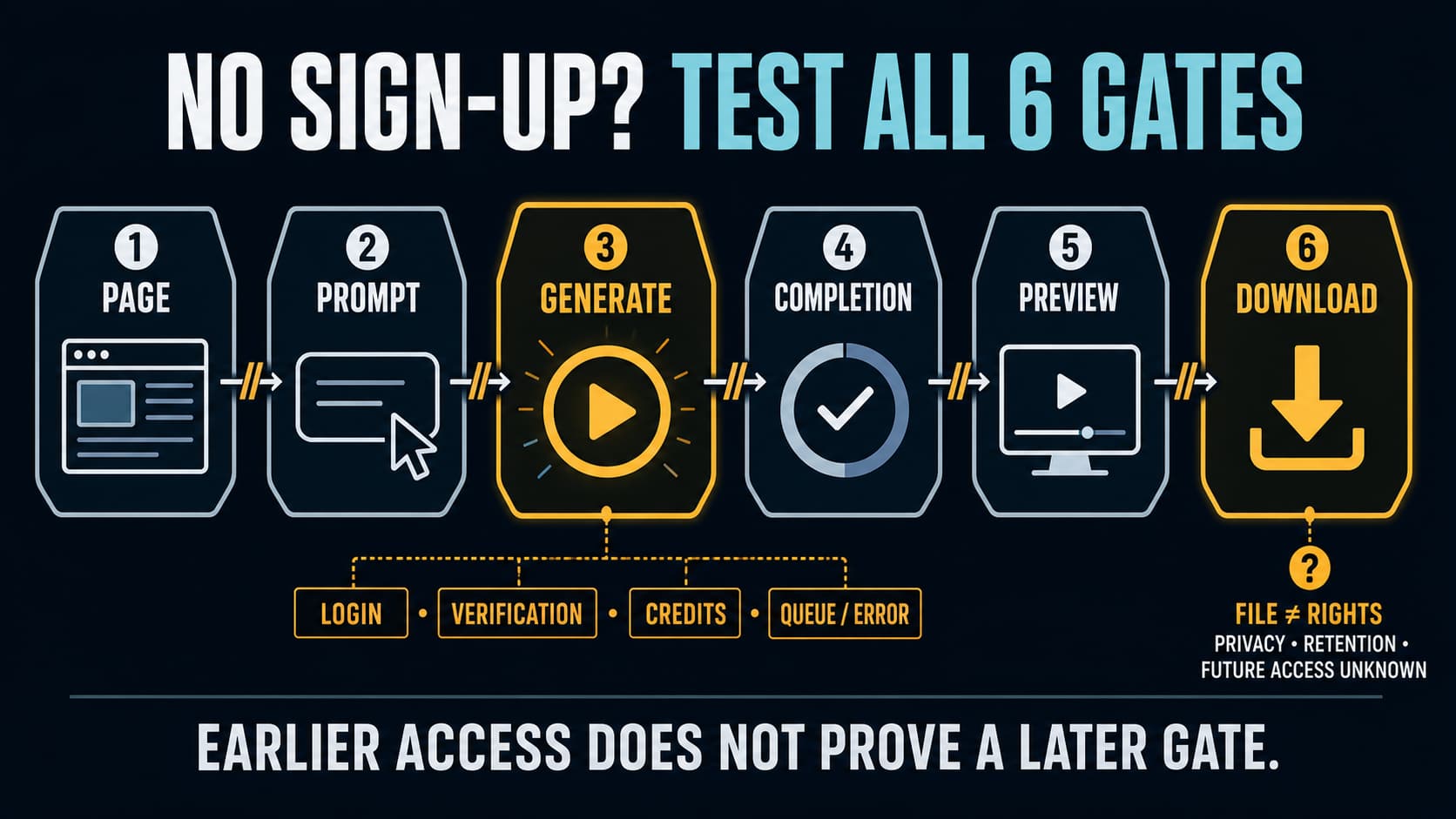
"Free" is not one contract. A tool can be free to open, free to generate a preview, free with credits, free with a watermark, free after login, free only at low resolution, or free until the final download. A useful AI kiss video generator test separates those states before the real upload.
Check these details in the live tool surface:
| Claim | What to verify | Why it matters |
|---|---|---|
| Free or credits | How many generations, whether failed attempts spend credits, and whether credits reset | A bad first test can consume the same allowance as a good result |
| No login | Whether login appears only at export, history, HD, or watermark removal | A no-login landing page may still gate the final file |
| No watermark | Preview, free download, paid export, and social-share output | A clean preview does not guarantee a clean downloadable clip |
| Private or secure | Source-image retention, deletion, training, staff access, public galleries, and account history | The upload risk starts before the output is public |
| Commercial use | Terms for source image, generated clip, watermark, music, and platform use | Tool permission cannot override missing consent from people in the photo |
| Speed | Queue time, duration, plan tier, region, and model load | "Seconds" is usually a marketing claim, not a delivery guarantee |
VEED is a useful example of visible caveats because its AI kissing page combines image-to-video and text-to-video routes with rights/consent language and account/watermark conditions. VideoPlus, Veevid, Yollo, JoggAI, Vidu, Vidux, Mango, EaseMate, and aikiss all expose different mixes of upload modes, file limits, kiss styles, free/no-login/no-watermark/private claims, duration, and download language. Treat those as claim types to audit. Do not treat a landing-page word like "private" or "free" as proof.
If cost and clean export become the main question, use the narrower free AI image-to-video generator guide. If the job expands beyond a kiss effect into general still-image animation, use the broader AI image-to-video route guide.
Run A Low-Sensitive First Test
The first generation should answer one question: can this source, mode, and export route produce a usable clip without creating a privacy or consent problem? It should not use the most sensitive image you have.
Use a short loop.
- Choose a low-sensitive or synthetic input that resembles the real task enough to test mode behavior.
- Keep the clip short. Five to ten seconds is enough to see mouth, face, hand, and export problems.
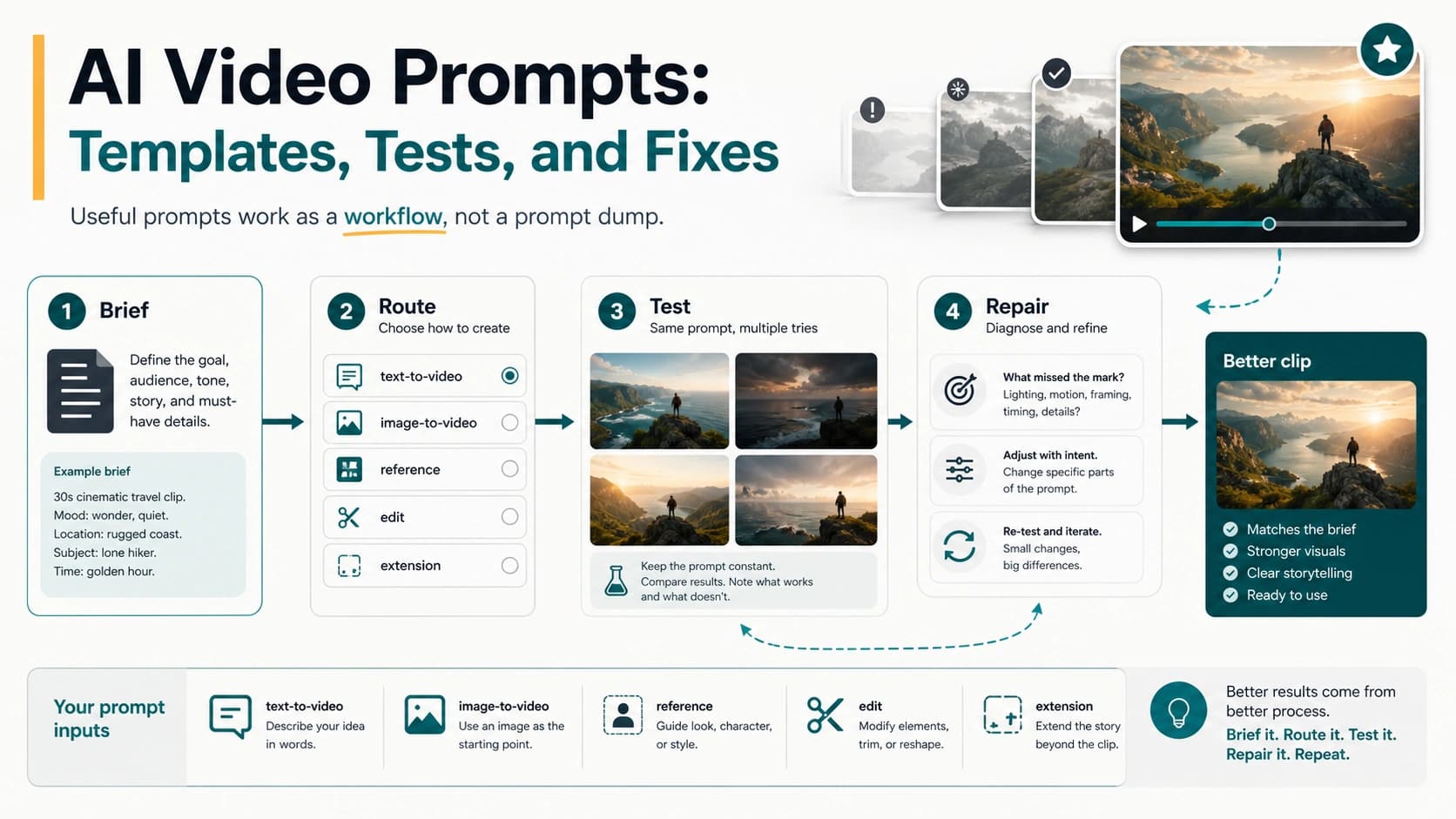
- Use a simple prompt: "gentle kiss scene, keep both faces stable, natural head movement, no new people, no text, no background change."
- Inspect identity, mouth shape, teeth, hands, head angle, crop, refusal messages, watermark, and actual download.
- Decide once: reroll for small prompt issues, crop or switch mode for image issues, verify export for account issues, and stop for consent or policy issues.
Use a real person's private photo only after the low-sensitive test proves the route and export state. If the test already reveals a watermark lock, strange face blending, account wall, queue problem, or missing download, the real photo does not need to be uploaded.
Diagnose The First Bad Result
Bad outputs are useful when they tell you what to change. They are expensive when they trigger blind rerolls.
| Symptom | Likely cause | Better next move |
|---|---|---|
| Face drift or identity change | Source face is too small, profile angle is hard, or the mode is blending people | Crop closer, use clearer portraits, or switch to text-only if identity is not needed |
| Mouth, teeth, or chin artifacts | The model is forcing contact that the frame does not support | Use a gentler action, simplify prompt, or choose a source image with better head angle |
| Wrong person moves in a group photo | One-photo mode cannot tell which two people matter | Crop to two people or use a two-image route |
| Refusal or blank output | Policy, age, likeness, explicitness, or upload sensitivity triggered | Remove sensitive material or stop rather than trying to bypass the refusal |
| Watermark or export lock | The free route is preview-only or plan-gated | Check plan/export rules or switch route before uploading real faces |
| Queue, failed generation, or credit loss | The route's limits or model load are the blocker | Pause, verify credits, and test another low-sensitive route if needed |
| Low-resolution export | Free export is not enough for the job | Use a route where final resolution and file format are visible before generation |
The biggest mistake is rerolling a contract problem. A better prompt will not remove a watermark, fix unclear consent, change storage terms, or create a clean export when the plan does not allow one. Reroll only when the source image and route are already acceptable and the defect is small.
Use Tool Examples Without Turning Them Into A Ranking
An AI kiss video tool list can help you learn the available patterns. It should not decide the upload for you.
| Tool pattern | What it teaches | What still needs checking |
|---|---|---|
| VEED-style editor route | Prompt plus image-to-video/text-to-video, export and account caveats, rights language | Watermark, account, plan, and exact output contract |
| Vidu or Vidux-style two-image route | Separate portraits and duration choices can be useful when the people are not in one frame | Consent, angle match, identity drift, and export state |
| EaseMate-style control-heavy route | Aspect ratio, start/end frame, model labels, and prompts can help advanced tests | Credit count, model availability, and whether complexity helps the casual job |
| Mango-style photo requirement route | One-photo tools often need clear, close, adult faces | Avoid copying unfair or narrow identity assumptions; use consent and clarity rules |
| VideoPlus or Yollo-style low-friction route | Readers want no-login, no-watermark, fast, private, or free claims | These are the exact claims to verify before upload |
| aikiss-style niche route | The market includes thin pages with scene filters and repeated promises | Use only if the actual upload, export, and privacy contract is clear |
If the content becomes explicit, intimate, coercive, or non-consensual, switch to the AI image-to-video NSFW boundary guide and apply a stricter consent gate. If the clip needs longer duration, use the long-duration free image-to-video guide. If the project needs production logs, model routing, or backend generation, a browser kiss-effect tool is probably the wrong owner.
FAQ
What is an AI kiss video generator?
It is an image-to-video or text-to-video tool that creates a short kiss or romantic interaction clip from one photo, two separate images, or a text-only fictional prompt. The important decision is whether the face image can be used and whether the tool can export a usable result.
Is it safe to upload a couple photo?
Only when every recognizable adult has consented to that use and the image is not private, age-ambiguous, intimate, reputation-sensitive, client-owned, or misleading. If the tool cannot explain storage, deletion, account history, or export terms, test with a synthetic or low-sensitive image instead.
Should I use one photo or two separate photos?
Use one-photo mode when both people are already clear in the same frame. Use two-image mode when the tool supports separate portraits and both images are permission-cleared. Use text-only mode when the scene is fictional or you do not need a real likeness.
Can I use a celebrity, friend, coworker, or old social photo?
Do not use a real person's image without permission for this specific transformation. Celebrity, friend, coworker, and old social photos create consent, likeness, harassment, and misleading-context risks even when the output is meant as a joke.
Are free AI kiss video tools really free?
Free can mean preview-only, credit-limited, login-gated, watermarked, low-resolution, or restricted at download. Verify the final export before uploading any real or private face photo.
Why does the first result look strange?
Kiss animation stresses face position, mouth shape, head angle, hands, crop, and identity consistency. Diagnose whether the issue is source image quality, input mode, prompt, policy refusal, watermark/export lock, or credits before spending another generation.
When should I use a general image-to-video tool instead?
Use a general editor when you need background motion, captions, aspect ratio control, longer duration, or post-editing around the clip. A kiss-specific tool is useful for a quick effect, but it is not the best owner for every video workflow.