The most reliable way to keep a character consistent in image-to-video is to stop treating “same character” as a prompt phrase. Make it a production contract: decide which traits are locked, prepare reference evidence for the hardest shot, animate one short diagnostic clip, and inspect the character at the first frame, the most demanding motion frame, and the last frame.
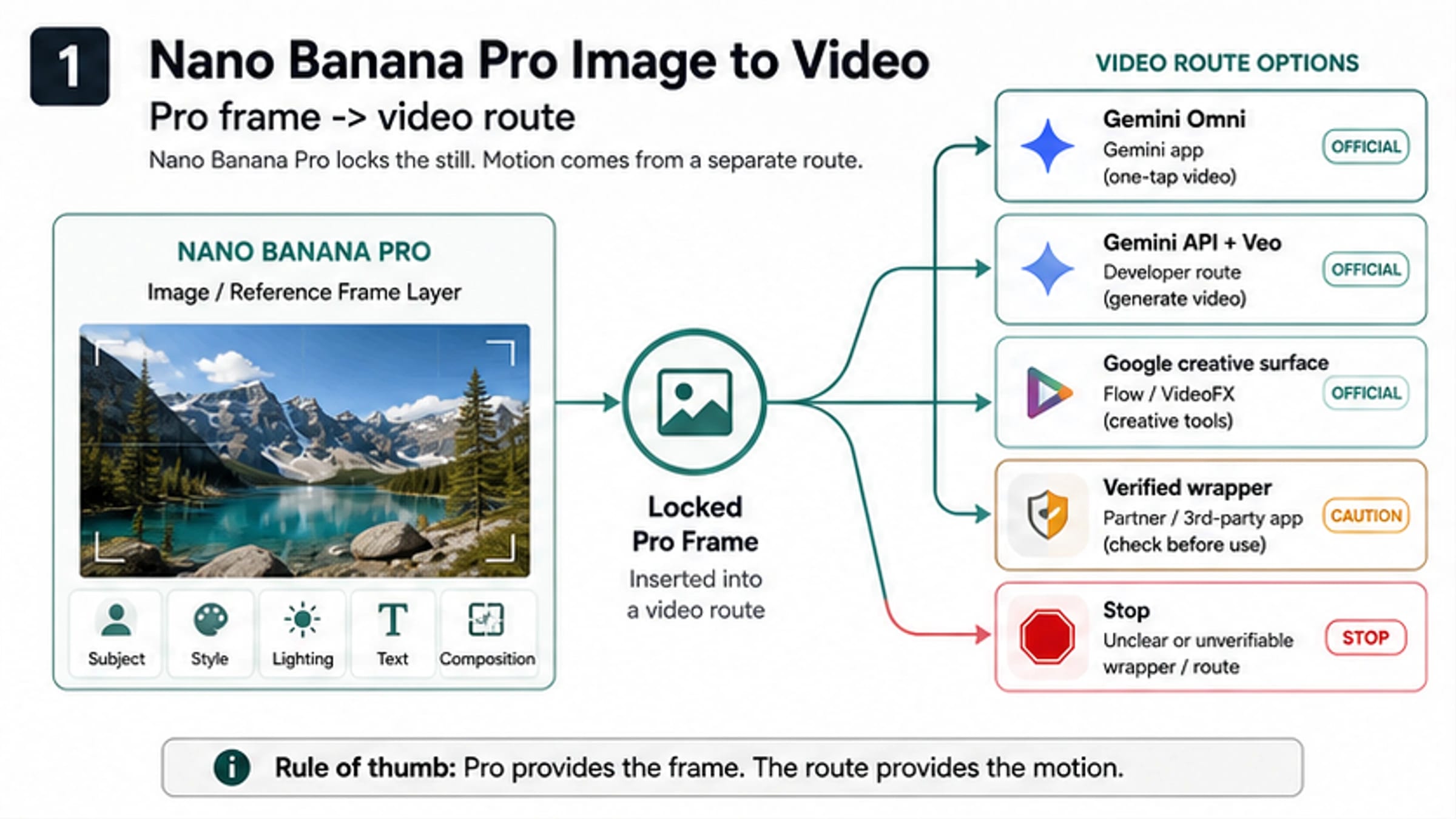
Nano Banana Pro belongs at the still-image and reference-frame layer in this workflow. Use it to create or repair an approved anchor, profile, full-body view, outfit detail, or ending composition. A separate video route creates the motion. No reference method guarantees zero drift, so the output still needs frame-level review.
Start with one rule: a clip does not pass just because frame one looks correct. Hair can change under motion, body proportions can stretch during a turn, a signature prop can disappear behind an occlusion, or the visual style can shift before the final frame.
Choose the reference method before you rewrite the prompt
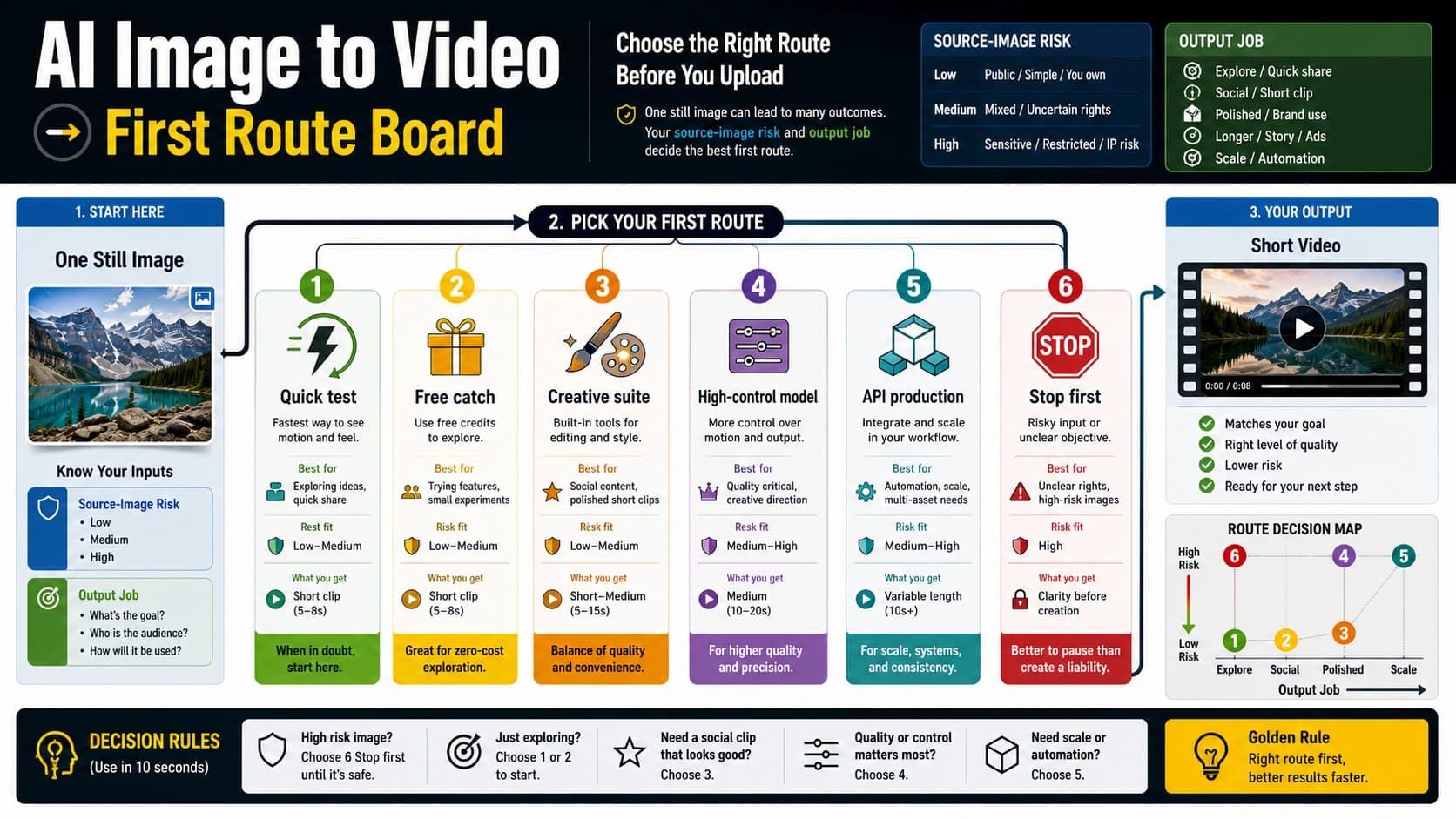
The input route decides what evidence the video model receives. Use the lightest route that contains the information your hardest required shot needs.
| Input method | Use it when | What it actually controls | Do not assume |
|---|---|---|---|
| Single first frame | One short shot begins close to the approved composition, with modest camera or character movement | The visible subject, outfit, lighting, style, and composition at frame zero | A front portrait will remain sufficient through a profile turn, full-body action, or heavy occlusion |
| Paired first and last frames | The approved ending composition matters: a reveal, entrance, pose change, product handoff, or match cut | The two endpoints supplied to a route that supports both images | Correct endpoints guarantee correct identity or motion between them |
| Reference-to-video | Subject identity, outfit, prop, or style evidence must remain available beyond frame zero | Route-specific content or subject references that can guide the generated clip | More references always help, or every provider maps them the same way |
| Structured or custom route | The production needs unusual angles, repeated multi-shot identity, controlled poses, or a critical likeness that lighter conditioning repeatedly misses | Stronger identity or structural conditioning, depending on the selected system | Training or extra controls remove the need for rights review, output QA, or manual cleanup |
Google's current Veo 3.1 documentation distinguishes these modes: an initial image can become the first frame, a lastFrame can define an interpolation endpoint, and up to three reference images can guide content on supported routes. That is evidence that the input modes exist—not proof that they preserve every identity detail. Check the current Gemini API video documentation for the selected route before production.
If you cannot name the hardest shot yet, do not select a route. A close-up talking head, a full-body run, a rear three-quarter turn, and a two-character handoff expose different missing evidence.
Build evidence for the hardest shot in Nano Banana Pro
Do not begin with a large gallery of nearly identical portraits. Begin with one approved anchor, then add only the views that resolve real uncertainty.
For a fictional mascot crossing a room and turning toward camera, a useful reference pack might contain:
- one three-quarter anchor with the approved face, hair silhouette, body proportions, outfit, prop, and rendering style;
- one profile view because the turn exposes the nose, jaw, ear, and hairline;
- one full-body view because the walk tests height, limb proportions, shoes, and costume length;
- one clean prop detail if the prop is story-critical;
- an approved final composition only if the selected route accepts a last frame and that ending matters.
Nano Banana Pro can help create or repair those still references, but approve them before they enter video generation. If two images disagree about jaw width, hair length, jacket seams, or prop scale, the video route receives a contradiction rather than extra evidence.
Create a lock/change matrix beside the references:
| Lock for this shot | Allowed to change deliberately |
|---|---|
| Face geometry and identifying features | Expression and gaze |
| Hair silhouette, length, and color | Hair motion caused by wind or movement |
| Body proportions and apparent age | Pose and action |
| Signature outfit, accessories, and props | Camera angle and framing |
| Rendering style, line quality, texture, and color logic | Lighting and setting, within the approved art direction |
This matrix keeps a useful motion request from fighting the identity request. “Run toward camera while the coat moves” is compatible with a locked coat design; “change into a different outfit” is not.
Match reference framing to the shot
A clear portrait is good evidence for a close-up, but weak evidence for a full-body spin. The LTX character-consistency guide makes this framing relationship explicit: the reference should resemble the intended starting shot, and multi-shot work benefits from a reference library with varied angles and framings.
Use this practical test: hide every reference that does not show the body part, angle, outfit detail, or prop that the hardest moment will reveal. If the remaining evidence is thin, repair the reference pack before spending video generations.
Run one hard diagnostic clip
The first test is not a beauty shot. It is a controlled attempt to discover whether the selected route can preserve the required identity under the hardest meaningful condition.
- Pick one short shot that contains one identity challenge: a head turn, full-body step, brief occlusion, or change from medium to wide framing.
- Use only approved, rights-cleared references.
- Ask for one major motion or camera change, not five.
- Keep the locked traits explicit and the allowed changes narrow.
- Generate the shortest clip that reaches the demanding moment.
- Save the input version, route, model, date, prompt, and output together.
- Review the first frame, the demanding middle frame, and the last frame before deciding what to change.
A diagnostic prompt can be compact:
Medium shot. The mascot takes two steps forward and turns 45 degrees toward camera. Keep face geometry, short black hair silhouette, body proportions, teal jacket with two silver fasteners, red satchel, and flat cel-shaded line style unchanged. Natural cloth movement only. No new accessories, no outfit change, no camera cut.
The reference supplies appearance. The prompt specifies motion, camera, timing, locked traits, and forbidden drift. Repeating a long biography does not replace missing visual evidence.
Review five identity dimensions at three frames
Use the same five dimensions at the beginning, the hardest motion moment, and the end. Record a simple pass, repair, or critical fail for each cell, with a short observation.
| Identity dimension | First frame | Demanding motion frame | Last frame | What counts as drift |
|---|---|---|---|---|
| Face | Geometry, age, feature spacing, identifying mark, or expression changing beyond the allowed performance | |||
| Hair | Silhouette, length, texture, part, or color changing rather than moving naturally | |||
| Body | Height impression, limb length, shoulder/hip proportions, or apparent age changing | |||
| Outfit and props | Garment construction, color, accessory placement, logo, or signature prop changing or disappearing | |||
| Visual language | Line weight, texture, materials, color logic, realism level, or character-to-background rendering style shifting |
Add three shot-level checks below the identity grid:
- Motion: Is the requested action readable without anatomy or prop failure?
- Camera: Did the framing and movement follow the shot plan?
- Ending composition: If an ending was specified, did the clip reach it without sacrificing a critical identity trait?
Set the acceptance rule before review. A reasonable fictional-mascot rule might be:
- every critical identity dimension must pass at all three checkpoints;
- one non-critical outfit texture variation may be repairable if it is not visible at delivery size;
- a face, body-proportion, or signature-prop failure is never averaged away by four easier passes;
- the hardest required shot—not the easiest clip—decides whether the route is viable.
This is a project threshold, not a universal benchmark. Ads may require exact product and mascot details; an impressionistic short may allow more texture variation; a client avatar may require a stricter consent and likeness boundary than either.
Repair the smallest true failure
Blind rerolling hides the cause. Use the visible failure to choose the smallest next move.
hljs textDid a critical identity dimension fail? ├─ No │ └─ Did motion, camera, timing, or ending composition fail? │ ├─ Yes → revise only that motion variable and rerun the same reference setup │ └─ No → approve the clip and its final frame for the next handoff decision └─ Yes ├─ Is the needed identity evidence missing or contradictory in the still pack? │ ├─ Yes → repair the Nano Banana Pro still or replace the conflicting reference │ └─ No ├─ Does the reference framing mismatch the hardest moment? │ ├─ Yes → supply the required profile, full-body, outfit, or prop view │ └─ No ├─ Is the shot asking for too much camera/action change at once? │ ├─ Yes → shorten the clip and remove all but one major change │ └─ No ├─ Would missing endpoint or persistent identity evidence solve the diagnosed gap? │ ├─ Yes → switch from first-frame to paired-frame or reference-to-video │ └─ No → evaluate a stronger structured/custom route or budget manual cleanup └─ Same critical dimension fails twice in reduced-variable tests → stop spending on that setup; switch route, revise the shot, or stop the asset
That final stop is important. If the same jaw shape, full-body proportion, or signature prop fails twice after you have reduced motion and supplied matching evidence, a longer prompt is not a diagnosis. Record the failure and change the production decision.
Common failures and minimum fixes
| Visible failure | Likely evidence gap | Minimum next test |
|---|---|---|
| Face changes only during a profile turn | Reference pack contains only frontal evidence | Add one approved profile or three-quarter reference; keep the same short turn |
| Coat, logo, or prop mutates under fast action | Too much motion plus a small or ambiguous design detail | Use a clearer still, enlarge the key detail, and reduce the action |
| Character matches at both endpoints but changes in between | Paired frames constrain composition more than temporal identity | Reduce motion or test reference-to-video/stronger conditioning; do not call the clip passed |
| Correct character, wrong ending | Single first frame lacks endpoint evidence | Use a supported paired-frame route if the ending is essential |
| Every reroll fails a different way | Conflicting references or too many simultaneous variables | Return to one approved anchor and one hard shot |
| Clip is acceptable, but export/rights are unusable | Provider or route contract failure | Switch route; prompting cannot repair ownership, watermark, or rights terms |
Approve every cross-clip handoff
Using the previous clip's last frame as the next clip's first frame can improve visual continuity, but only if that frame has already passed identity review. Otherwise, the workflow turns one small drift into the new source of truth.
Use this handoff rule:
- Inspect the candidate last frame on all five identity dimensions.
- Confirm that the pose and crop are suitable for the next shot.
- Compare it with the original approved anchor, not only with the preceding second of video.
- Mark the frame
approved handoff, record the source clip and frame time, and keep it immutable. - If it fails, return to the approved anchor or repair a new bridge frame in the still-image layer.
Do not automatically extract the last frame from every accepted clip. A clip can be usable in an edit even when its final frame is a poor next-shot anchor—for example, the face is motion-blurred, a prop is occluded, or the character is cropped at the knees before a full-body shot.
The Artlist workflow recommends last-frame chaining and a review loop. The added production safeguard is to promote only a reviewed frame. “Previous” does not mean “approved.”
Where YingTu fits—and where it does not
The current English YingTu video workspace exposes controls for text-to-video, image-to-video, first-frame, paired first-and-last-frame, and reference-media configurations across visible Veo and Wan routes. Treat it as a bounded place to inspect route controls and run a harmless diagnostic after checking the current model and key requirements.
The visible control surface is not evidence that a character-consistency generation will succeed. No successful YingTu identity-preserving output was produced for this guide, so do not read the route names as a quality claim, privacy promise, or benchmark. Record the exact route, model, date, and input mapping you actually test.
If your task is choosing a broad route for an ordinary still rather than preserving one character, use the general image-to-video guide. If you still need to build a reusable still-image character pack, the consistent-character guide owns that earlier job.
Stop before uploading a real person or client asset
Use a synthetic or disposable test until the provider and project boundaries are clear. Stop and verify before uploading:
- a real person whose informed consent and intended use are not documented;
- a child or other vulnerable person;
- a client character sheet, campaign, storyboard, logo pack, or unreleased product;
- a licensed character or artwork without the required rights;
- an ID, private location, medical context, financial context, or confidential background detail;
- a reference when storage, retention, training use, deletion, visibility, subprocessors, or account ownership is unclear;
- a likeness intended to deceive, impersonate, harass, or bypass approval.
For a real-person likeness, “the tool accepts the upload” is not rights clearance. Obtain the needed consent, releases, client approval, and provider-term review for the intended market and use. This workflow is not legal advice, and no visual match is worth crossing a consent or confidentiality boundary.
Three production examples
Mascot ad: start with the signature prop
A beverage mascot must turn, lift a bottle, and finish on a pack shot. Lock face, hair silhouette, body proportions, jacket, bottle label shape, and cel-shaded style. Prepare a three-quarter anchor, full-body view, and clean bottle reference in Nano Banana Pro.
Test the turn and lift as one short diagnostic. Review the bottle in the demanding middle frame; a correct face with a mutated bottle is a critical fail. If the final pack-shot composition is fixed, move to paired first/last frames only after the single-shot identity evidence is sound.
Short film: the occlusion is the hardest moment
A fictional detective walks behind a foreground pillar and reappears in profile. The opening portrait is not the hard part; reappearance is. Supply a profile reference, keep coat and hat construction locked, and use a short clip with a static camera first.
If the face changes after the pillar, reduce the walking motion and test the same occlusion. If the failure repeats with matching profile evidence, switch conditioning or redesign the shot. Do not accept a good first and last frame when the reappearance creates a different detective.
Approved avatar: the rights record is part of the asset
A company has written performer consent for a specific internal training series. Store the approval scope with the reference version, route, and review date. Lock face geometry, hair, body proportions, wardrobe, and realism level; allow expression and small gestures.
If the intended use expands to public advertising or a new market, stop and renew approval before generation. Technical consistency never enlarges the rights grant.
Copy this blank continuity record
hljs textProject / shot: Route, model, and date: Approved reference version: Rights / consent status: Hardest required moment: Locked identity traits: Allowed changes: Forbidden drift: FIRST HARDEST MOTION FRAME LAST Face: Hair: Body: Outfit / props: Visual language: Motion verdict: Camera verdict: Timing verdict: Ending-composition verdict: Overall: PASS / REPAIR / SWITCH / STOP Smallest reduced-variable retry: Approved next-shot anchor or handoff frame: Reviewer / approval date:
Keep accepted and rejected clips. A small evidence trail makes later drift diagnosable and prevents teams from rediscovering the same failed setup.
FAQ
Is one reference image enough to keep a character consistent?
It can be enough for one short shot that stays close to the reference angle and framing. It is weak evidence for a profile turn, full-body action, heavy occlusion, or a multi-shot sequence. Add only the views required by the hardest shot.
Should I use a first frame or first and last frames?
Use a single first frame when the shot begins from an approved composition and the ending is flexible. Use paired frames when the ending composition is essential and the route supports it. Paired endpoints still require review of the demanding middle frame.
When is reference-to-video the better route?
Use it when identity, outfit, prop, or style evidence needs to guide more than frame zero. Verify the selected route's current input mapping and limits; “reference” can mean different things across providers.
Can Nano Banana Pro generate the final video?
In this workflow, Nano Banana Pro prepares the still or reference pack. Motion comes from a separate video route. Keeping that boundary clear makes it easier to diagnose whether a failure belongs to the reference image, the shot request, or the video route.
Does repeating the same seed keep the same character?
Do not rely on it. A seed or repeated text prompt is not a substitute for approved visual evidence and frame-level acceptance. Use the reference method supported by the actual route and review the output.
Is it safe to use the previous clip's last frame as the next first frame?
Only after that exact frame passes all required identity checks and suits the next shot's framing. If it contains blur, occlusion, crop problems, or drift, return to the approved anchor or repair a bridge frame.
How many failed generations should I allow?
Set the limit before testing. A practical stop rule is to end a setup after the same critical identity dimension fails twice under reduced-variable conditions. Then switch route, strengthen the reference method, revise the shot, budget manual cleanup, or stop.
Can I use a real face or client character sheet?
Only after consent, rights, intended use, confidentiality, retention, and provider terms are acceptable for that asset. Use a harmless synthetic reference while any of those remain unclear.