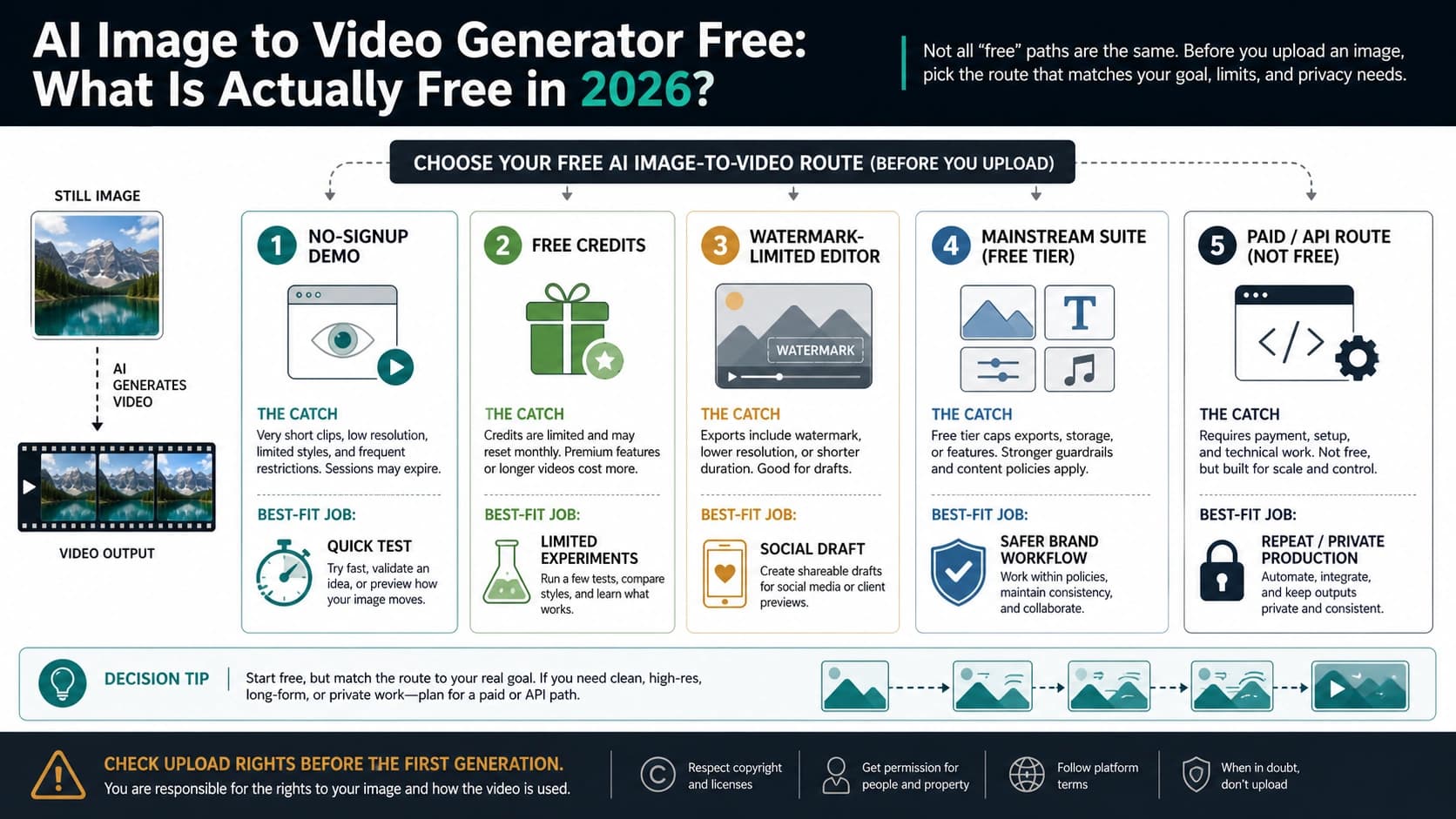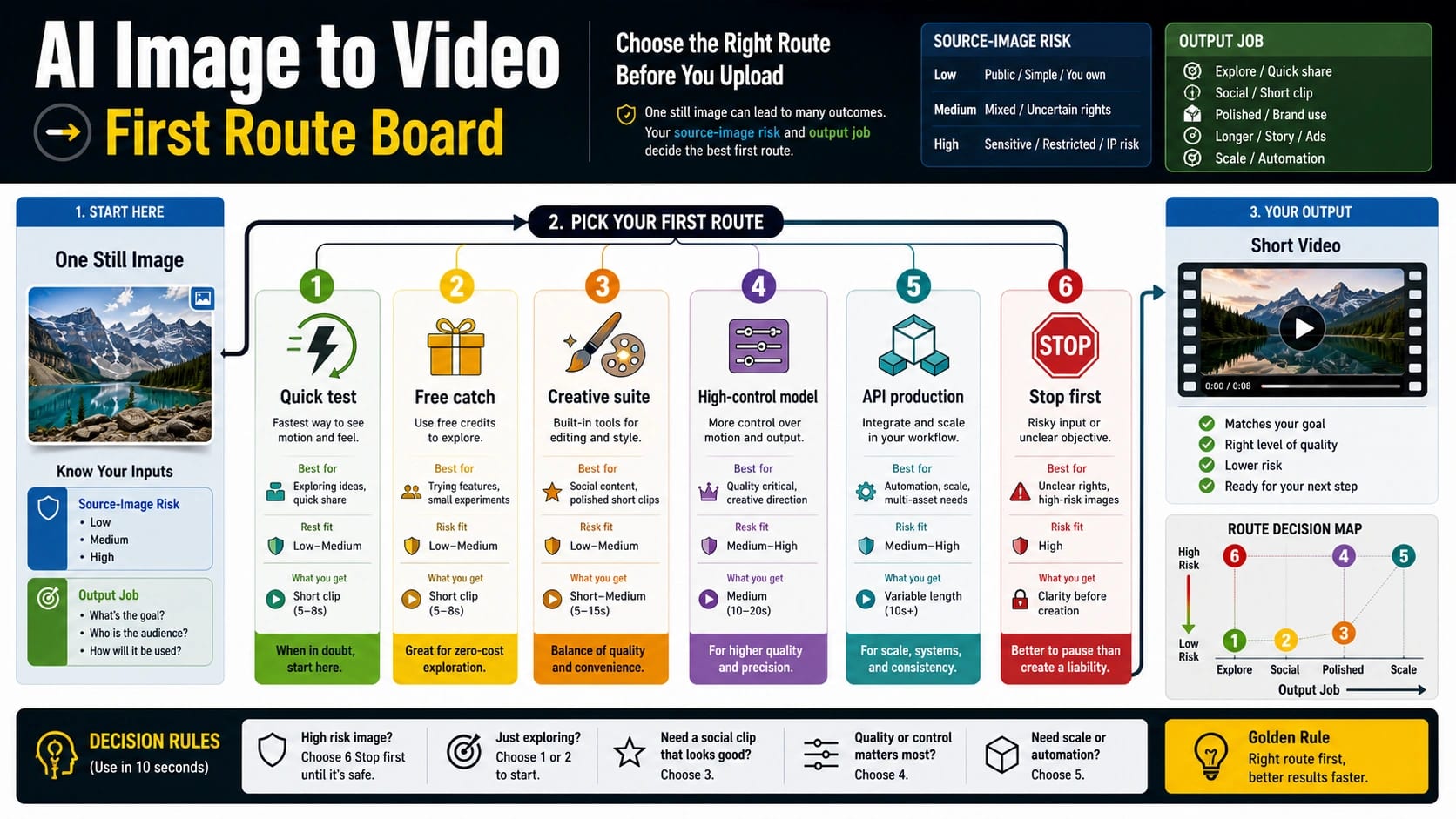
For AI image-to-video work, choose the route from the source image and the job first, not from a generic tool ranking. Use a quick browser/editor route for a disposable creative test; move to a trusted suite, named video model, or official/API workflow before uploading private faces, client assets, launch images, or anything you need to repeat.
| Your situation | First route to try | Stop or switch when |
|---|---|---|
| You have a public image and only need a fast short clip | Quick online editor or browser tool | The export adds a watermark, caps length, or changes the subject too much |
| You need a social or campaign asset with editing around it | Creative suite route such as Adobe Firefly or a similar editor/suite | The suite hides model control, export rights, or credit limits behind the plan |
| You need stronger camera motion, character consistency, or repeated tests | Named model route such as Runway, Kling, Vidu, Leonardo, or another high-control video model | The source image cannot survive motion, or the model changes identity, text, product shape, or style |
| You need repeatable production, logs, automation, or account-level responsibility | Official/API route after checking current model, price, limits, safety, and data terms | You cannot verify the current owner contract for upload rights, privacy, costs, limits, or failure handling |
| You mainly want free/no-watermark access, adult content, or a Google/Veo-specific route | Use the sibling guide for that narrower job | Do not let the narrow route take over this general image-to-video decision |
Before uploading, apply one stop rule: if the image contains a private face, client material, unreleased product, confidential document, or a reference you are not allowed to transform, do not test it in a casual free converter. The prompt can describe motion, camera movement, timing, and what should stay unchanged; it cannot fix rights, privacy, a weak source image, or a route that cannot export the clip you need.
Start With The Source Image
The source image is the ceiling for the clip. A clean portrait, product photo, illustration, or landscape can give an image-to-video model a stable first frame. A noisy crop, tiny product label, busy group shot, or image full of text gives the model more ways to warp the subject when motion begins.
Runway's Image to Video prompting guidance makes the useful split clear: the image supplies composition, subject, lighting, style, and first-frame context, while the prompt should focus on motion, camera movement, and temporal progression. The current Runway guidance is optimized for Gen-4.5, but the workflow lesson is route-independent: do not use the prompt to redescribe the whole image. Use it to say how the scene moves.
Classify the image before choosing a tool.
| Source image | What it can safely test | Better first move |
|---|---|---|
| Public, synthetic, stock-style, or disposable practice image | A quick editor, free-credit test, or model demo | Keep the first test short and avoid complex motion |
| Product photo, brand asset, staff image, client creative, or unreleased campaign | A trusted suite or approved account where rights and export terms are visible | Verify upload, storage, team, and commercial-use terms before generation |
| Private face, minor, ID, medical/financial context, confidential document, or licensed reference | Nothing in a casual converter | Stop, create a harmless stand-in, or use an approved production route |
This first decision is not legal advice; it is operational risk control. A tool can be excellent at motion and still be the wrong upload surface for a sensitive image. OpenAI's current Sora API guardrails, for example, reject input images with human faces, so an official route can be stricter than a casual demo surface. A free route can be useful for a harmless concept image and still be too opaque for a client asset.
Match The Route To The Job
Use the smallest route that can answer the next decision. If the job is "can this image move at all?", a quick editor is enough. If the job is "can we ship this clip for a campaign?", the route must also answer rights, export, account, and repeatability questions.
| Route | Best for | What to verify before relying on it |
|---|---|---|
| Quick online editor | One disposable concept test, social draft, or prompt experiment | Watermark, queue, export length, resolution, upload terms, and whether generation still works after signup |
| Free/no-watermark route | Readers whose main job is cost, no signup, credits, or clean export | Current free credits, watermark rules, export dialog, and account limits; use the dedicated free image-to-video route when cost is the main question |
| Creative suite | Design workflow, campaign assets, templates, captions, brand review, or easier editing around the clip | Plan limits, model choice, export rights, team controls, storage, and whether the suite is using a named model route |
| High-control model | Camera motion, subject consistency, first/last-frame control, style control, or repeated creative tests | Source-image quality, seed/settings controls, reroll cost, identity drift, and model availability |
| Official/API route | Repeatable production, backend integration, logs, quotas, support, and account responsibility | Model ID, image input rules, price unit, quota, safety policy, data handling, retry behavior, and current availability |
| Stop or handoff route | NSFW, Veo-specific free access, or model-comparison intent | Move to the right sibling article instead of forcing that narrower job into a broad route chooser |
Adobe Firefly's image-to-video page is a useful creative-suite example because it presents image upload, prompting, aspect ratio, model/workflow choices, and terms/privacy language around the upload action. On July 8, 2026, its visible route language still reinforces the same point: a suite can expose multiple model/workflow choices, so the account and export contract matter as much as the model name. Vidu's image-to-video page is useful for a different reason: it shows why a model/workflow route can matter when the job depends on first-frame control, motion settings, duration, resolution, or source-image quality before export.
Named model routes have a different job. Runway, Kling, Vidu, Leonardo, and similar video-model surfaces can be better when the clip needs stronger motion control, first/last-frame behavior, repeatable style, or tighter character/product consistency. That does not make them automatically better for every source image. If the image is low quality, contains tiny text, or depends on exact product geometry, a stronger model can still produce a wrong clip faster.
Write The First Motion Prompt
The first prompt should be short because it is a diagnostic tool. You are not trying to write a movie brief. You are trying to learn whether the source image can survive one controlled motion.
Use this five-part prompt pattern:
| Prompt part | What to write | Example |
|---|---|---|
| Camera movement | How the viewer or camera moves | "Slow push-in with a slight right pan" |
| Subject action | What changes in the image | "The jacket fabric moves gently in the wind" |
| Timing | Duration and pacing | "Natural 5-second motion, no fast cuts" |
| Stability rule | What must stay unchanged | "Keep the face, product shape, logo, and lighting stable" |
| Negative constraint | What not to invent | "Do not add new people, text, props, or scene changes" |
For a product image, a good first prompt might be: "Slow studio push-in, the product rotates only slightly, reflections move naturally, keep label text and product shape unchanged, no new objects." For a portrait, a safer prompt is often: "Subtle camera push-in, natural hair and clothing movement, keep identity, expression, lighting, and background stable, no face change." For a landscape: "Slow drone-like forward movement, water ripples naturally, clouds drift slightly, keep mountains and composition stable."
Avoid asking for everything at once. A prompt that requests a camera orbit, new background, dramatic lighting, character action, text overlay, and style transfer gives you no clear diagnosis when the output fails. First prove motion. Then add complexity.
Spend One Test Generation Deliberately
The first generation should answer one question: reroll, fix the source image, switch route, or stop. If you treat the first clip as a final deliverable, you will waste credits on avoidable rerolls.
Use a short loop:
- Prepare a duplicate source image. Remove unnecessary borders, crop cleanly, improve clarity, and avoid private context.
- Write one narrow motion prompt. Keep camera movement, subject action, timing, and stability rules visible.
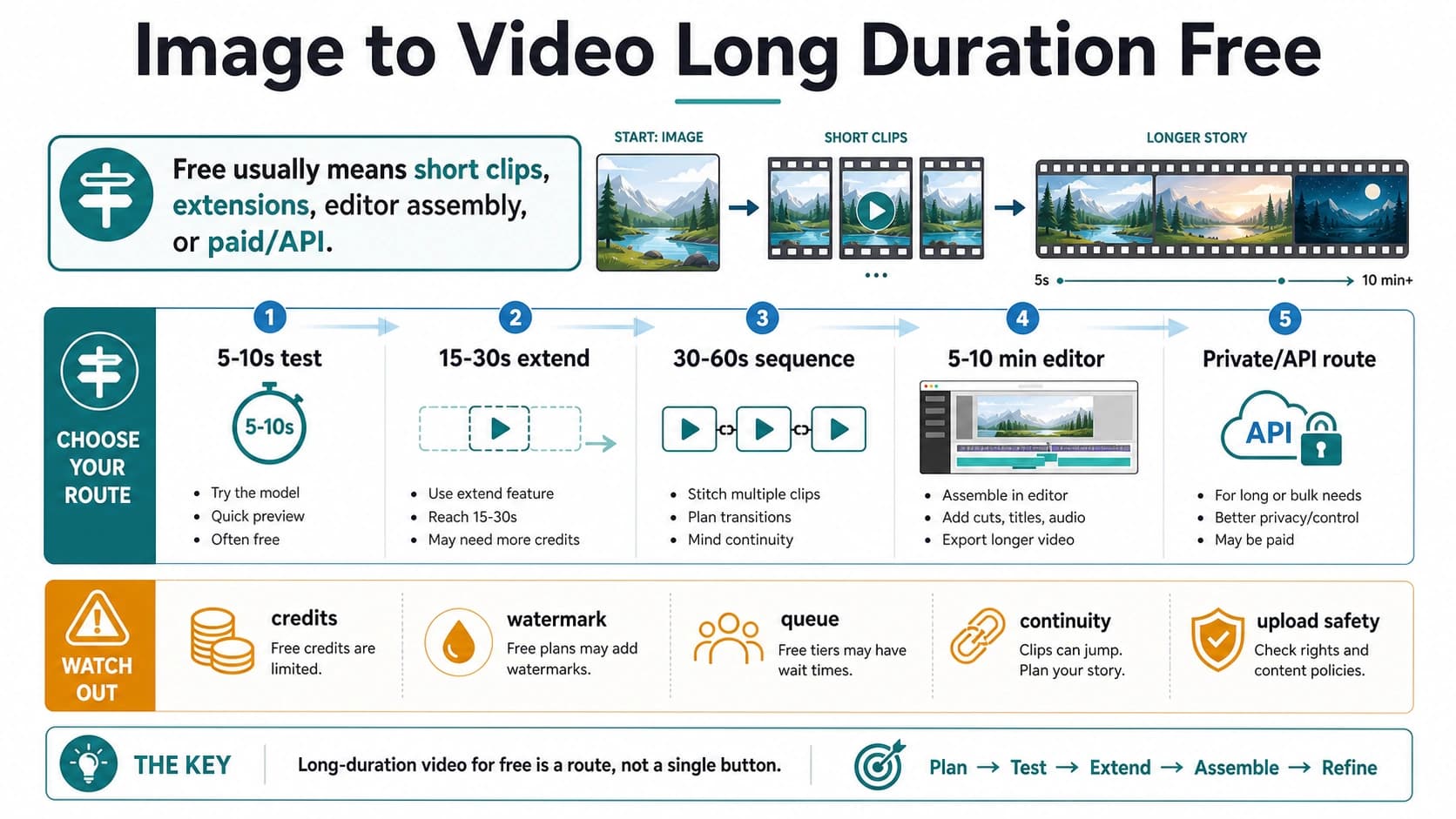
- Generate the shortest useful test. Three to five seconds is enough to diagnose most first-route problems.
- Inspect the failure type. Do not click reroll until you know whether the problem came from the prompt, source image, free/export limits, safety policy, or route capability.
- Decide once. Reroll when the problem is small. Switch when the route cannot export or control the result. Stop when rights, privacy, or source quality fail.
| Failure type | What it looks like | Next move |
|---|---|---|
| Prompt issue | Wrong camera move, wrong subject action, pacing too fast, style shift | Rewrite the prompt with fewer instructions and a clearer stability rule |
| Source-image issue | Warping, flicker, changed identity, unstable text, distorted product shape | Improve or replace the image before spending another attempt |
| Free/export issue | Watermark, low resolution, short duration, queue, blocked export | Check the plan or switch to a route with clean export |
| Sensitive-image issue | Refusal, policy warning, blank clip, or unsafe upload context | Remove the sensitive material or stop |
| Production-route issue | No logs, no API, unclear owner, no retry control, weak repeatability | Move to an official/API route or a provider you can audit |
The most common mistake is rerolling a contract problem. If the free route cannot export without a watermark, a better prompt will not solve it. If the source image contains sensitive material, a different model does not make a casual upload safe. If the clip needs repeatable backend generation, a browser editor is the wrong owner even when the first output looks good.
Use Tool Examples As Route Evidence
Tool examples are useful when they teach what kind of route you are choosing. They are weak when they become a permanent ranking. Model rosters, prices, free access, export rules, and limits can change quickly, so treat each official page as a current owner signal rather than a timeless score.
| Example route | What it proves | Reader action |
|---|---|---|
| Adobe Firefly image-to-video | A mainstream suite can combine upload, prompt, aspect ratio, model/workflow choices, and editing handoff | Use when surrounding creative workflow and account terms matter as much as raw model output |
| Runway image-to-video prompting | The source image functions like the first frame, and motion instructions should carry the prompt | Use when you need to debug prompt versus source-image failure |
| Canva or AIReel image-to-video pages | Quick editor and wrapper pages can combine upload boxes, template workflow, model labels, and free/credit language on exact-match surfaces | Use them as route evidence, not a permanent ranking; verify model owner, credits, watermark, export, and upload contract before relying on either |
| Vidu image-to-video | A model/workflow surface can emphasize image upload, first/last-frame control, motion settings, duration, resolution, and source-quality limits | Use when camera control or first/last-frame workflow matters more than a one-click editor |
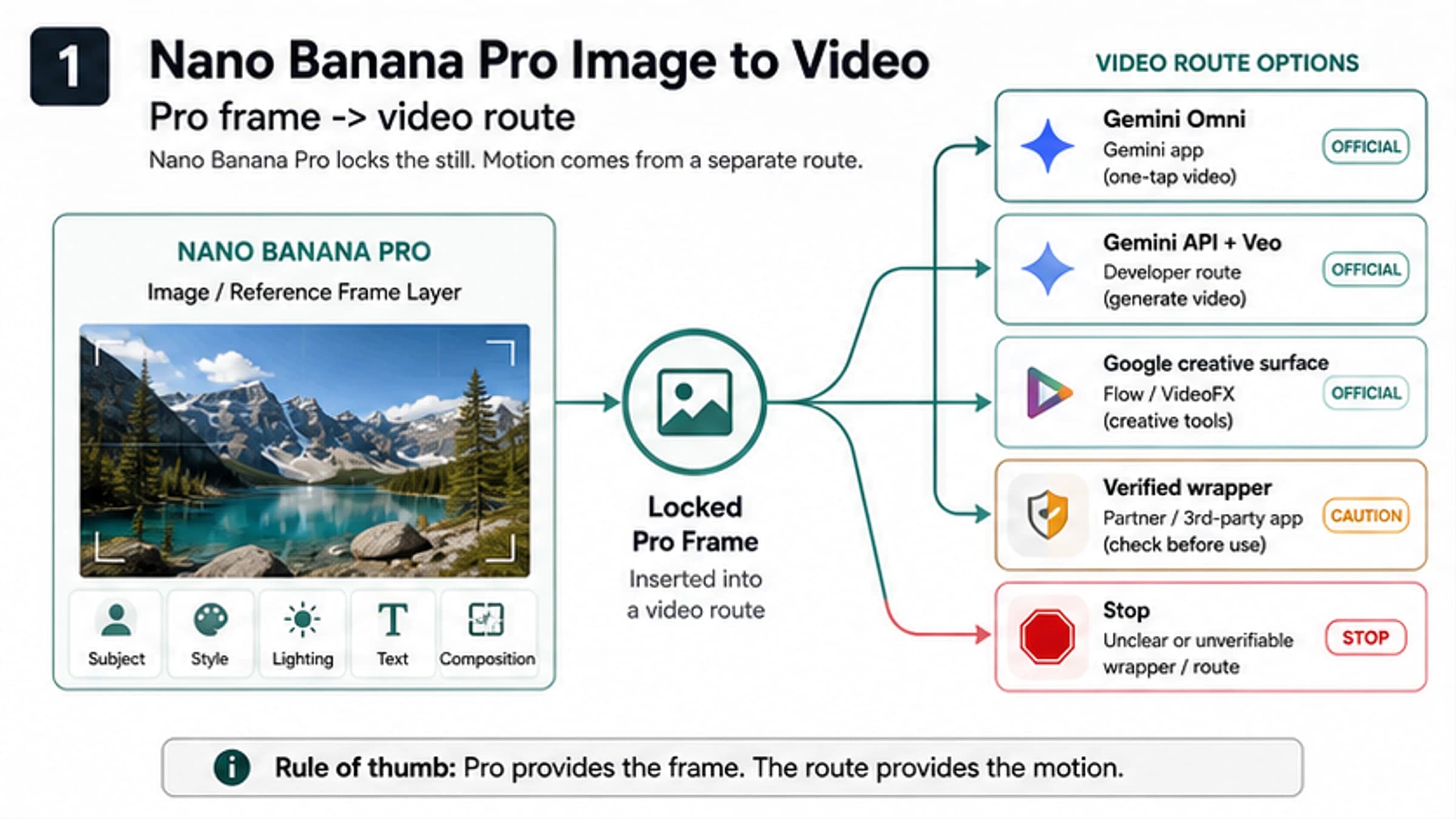
| Gemini Omni video generation | A Google consumer/editor surface can turn photos into video and is replacing Veo inside the Gemini app | Keep Gemini consumer/editor access separate from Google Cloud/Veo API claims |
| OpenAI Sora API | An official API surface can use image references and async jobs, but the current Sora 2 Videos API is deprecated and scheduled to shut down on September 24, 2026 | Use only as lifecycle-aware API/model context, not as a permanent browser-converter replacement |
| Google Cloud / Veo API | Developer surfaces can expose model IDs, image input rules, resolution/duration choices, quota, safety, endpoint lifecycle, and paid API ownership | Use current GA endpoint and pricing evidence when the job needs logs, limits, retries, and budget control |
For Google-specific work, separate the surfaces before choosing. Gemini Omni's video generation overview, Google Cloud's Veo generation documentation, and Vertex AI pricing describe different owners and obligations. As of July 8, 2026, Gemini app video generation, Flow-style creative workflows, Google Cloud Veo endpoints, and third-party wrappers should be treated as separate contracts, especially because preview endpoint names and paid-per-second API pricing can change independently.
The same rule applies to Sora, Kling, Runway, Vidu, and other named models. Once the decision becomes "which video model is strongest for this exact project?", move to a model-comparison route such as /en/blog/sora-2-vs-veo-3-vs-kling. The broad image-first decision should stay focused on upload safety, route ownership, first motion, and switch thresholds.
Hidden Constraints To Check Before Export
The visible generate button is only one part of the route. The real usability often depends on constraints that appear later.
| Constraint | Why it matters | Where to verify |
|---|---|---|
| Watermark | A good draft may still be unusable for delivery | Export dialog, plan page, or account screen |
| Credits | Failed rerolls may spend the same allowance as useful outputs | Account balance, pricing page, or model selection screen |
| Export quality | Some routes preview well but export low resolution or short clips | Export settings and plan limits |
| Rights and privacy | Uploading the wrong source image can be the biggest risk | Terms, privacy language, team policy, and source-image owner |
| Source fidelity | Product shapes, faces, text, and brand details can drift under motion | First test output and route-specific controls |
| Model owner | Wrapper language may hide which model or provider created the result | Official page, provider docs, or model selector |
| API accountability | Production jobs need logs, retry control, quota, and support | Official/API documentation and account controls |
Do not publish or promise claims like no watermark, unlimited generation, commercial use, privacy safety, refund, no failure cost, uptime, speed, or exact price unless the current owner surface proves it. In many projects, the right answer is not "use the most powerful model"; it is "use the route where the hidden constraint is visible before the first real upload."
When To Use A Sibling Route Instead
Some image-to-video questions are too narrow for a broad route chooser. Use the sharper page when the reader job has already changed.
| If the real question is... | Better handoff |
|---|---|
| "Which free tool has no signup, credits, or no watermark?" | /en/blog/ai-image-to-video-generator-free |
| "Can I make adult or NSFW image-to-video content?" | /en/blog/ai-image-to-video-nsfw |
| "Is Veo 3.1 free, or which Google route should I use?" | /en/blog/veo-3-1-free |
| "Should I use Sora, Veo, or Kling for video quality?" | /en/blog/sora-2-vs-veo-3-vs-kling |
The broad rule stays simple: classify the source image, choose the route owner, write one motion prompt, run one short test, and switch or stop based on the failure type.
FAQ
Can AI turn an image into a video?
Yes. Image-to-video AI uses a still image as the starting frame or visual anchor, then generates motion from a prompt, settings, or model controls. The hard part is not the definition; it is choosing a route that fits the source image, export need, and risk level.
What should I try first?
For a disposable public image, try one quick editor or free-credit route with a short motion prompt. For a face, product, client asset, confidential image, or repeat workflow, start with a trusted suite, named model route, or official/API route where upload and export terms are visible.
Is a free image-to-video tool enough?
Free can be enough for a low-risk test. It is weak when you need clean export, no watermark, reliable credits, privacy clarity, commercial use, repeatability, or API control. Use the free route article when cost and no-signup details become the main job.
How do I prompt image-to-video motion?
Do not redescribe the whole image. Write camera movement, subject action, timing, stability rules, and what must not change. A narrow prompt such as "slow push-in, subtle fabric movement, keep identity and lighting stable, no new objects" is better for diagnosis than a long scene rewrite.
Is it safe to upload product photos or faces?
Only when the route is trusted enough for that image. Private faces, client assets, unreleased products, confidential documents, IDs, medical or financial context, and licensed references should not go into a casual free converter without clear approval.
When do Gemini Omni, Google Veo, Sora, Kling, Runway, or Vidu matter?
They matter after the job needs a named video model, stronger motion control, first/last-frame behavior, model-specific quality, a Google consumer/editor route, or developer/API ownership. If you only need a harmless first motion test, a quick editor may be enough.
When is an API route better?
Use an API route when the job needs repeat generation, logs, quota control, retries, integration, predictable budgeting, or account-level responsibility. Verify the current model ID, image input rules, price unit, safety behavior, data terms, and support owner before building around it.