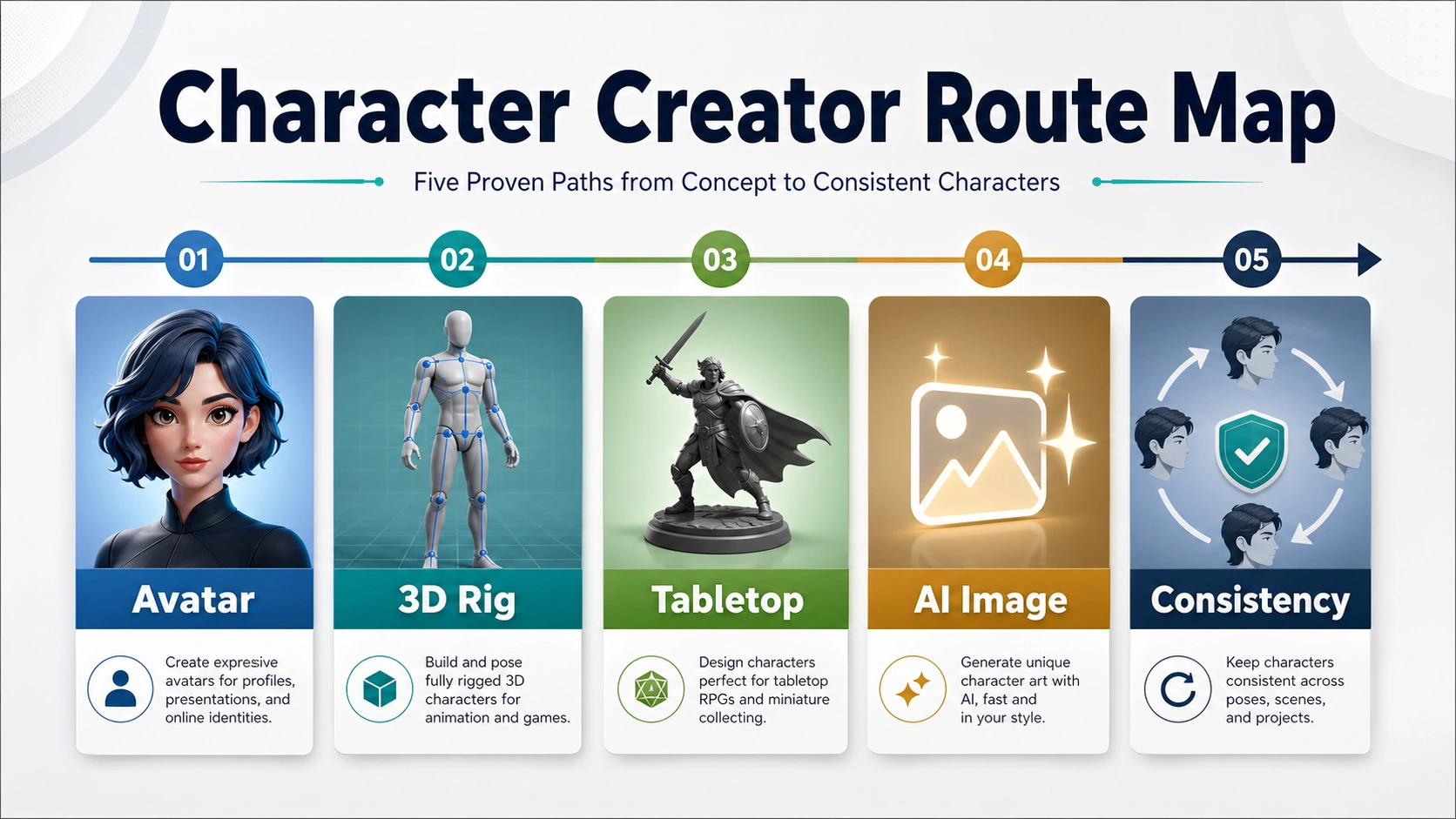
A character creator is only the right tool if it matches the output you need: a quick avatar, a rigged 3D character, a tabletop miniature, an AI character image, or the same character repeated across scenes. Choose the output route first, then compare the individual tools inside that route.
- Use an avatar or OC maker when the final deliverable is a profile image, portrait, or social/community character sheet.
- Use professional 3D character software when the character must be rigged, animated, exported, or moved into a game, film, or real-time pipeline.
- Use a tabletop or DnD creator when the character is mainly for a campaign visual, miniature, pose preview, or player-facing reference.
- Use an AI character generator when you need prompt-based concept art, style exploration, or fast image variations.
- Use a consistency workflow when the same character must appear across many scenes, poses, outfits, or images without drifting.
Stop before you pay or build a workflow around any creator until you know the export format, commercial-use terms, editability, and repeatability limits. Those details decide whether the creator is merely fun to use or actually usable for the project.
Start With the Output, Not the Tool Name
The phrase character creator hides several incompatible jobs. A browser avatar maker can be perfect for a profile image and useless for a game-ready rig. A 3D character package can be powerful for animation and excessive for a one-off OC portrait. A tabletop miniature builder can solve a DnD campaign need without helping an illustrator create repeated character scenes. An AI character generator can explore visual ideas quickly, but it may not preserve the same face, outfit, and body proportions across many images unless the workflow is designed for consistency.
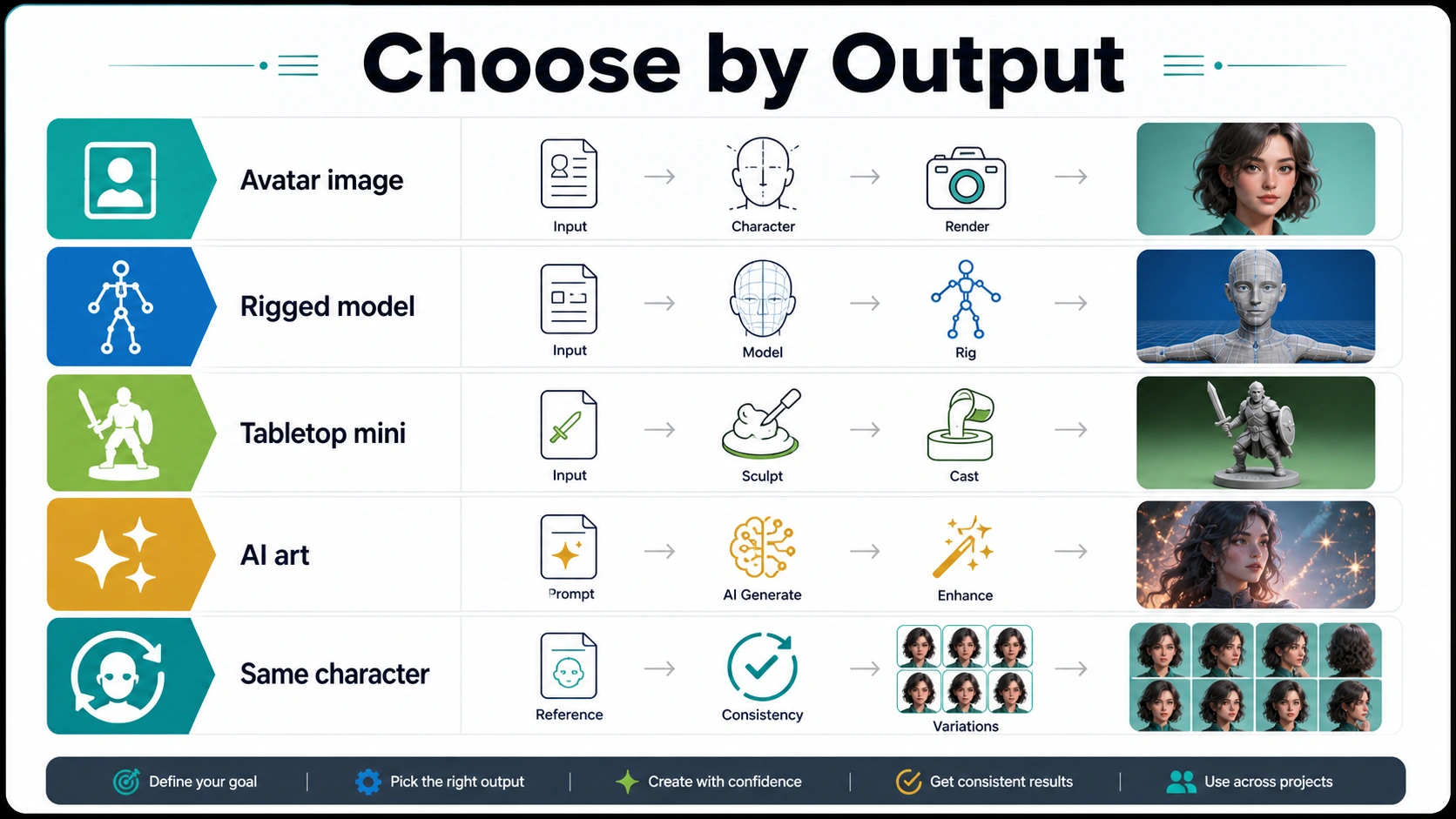
Use this route board before looking at any ranked list:
| Output you need | Start with this creator type | Switch routes if... |
|---|---|---|
| Profile avatar, OC portrait, casual full-body image | Avatar maker, doll maker, Picrew-style maker, or simple browser character creator | You need rigging, animation, commercial certainty, or repeated identity across scenes |
| Game, film, animation, real-time production asset | Professional 3D character creator software | You only need a flat image or social avatar |
| DnD party visual, tabletop miniature, campaign handout | Tabletop/RPG character creator or miniature builder | You need a production 3D rig, exact commercial art license, or multi-scene AI output |
| Prompt-based concept art or style exploration | AI character generator | You need the same character reliably repeated across many scenes |
| Story, comic, book, or campaign where identity must stay stable | Consistent-character workflow | A one-off creator is enough and consistency does not matter |
The best first move is therefore not "find the best character creator." It is "name the final output." Once the output is clear, tool choice becomes much simpler and the wrong options fall away quickly.
Quick Avatar and OC Makers
Use a quick avatar maker when the character is mainly a visual identity: a profile picture, forum icon, social avatar, OC sheet, game-adjacent portrait, or casual full-body design. Tools in this route often feel playful because they let you pick face shape, hair, eyes, clothes, pose, accessories, and background without learning prompt syntax or 3D software.
This route is strongest when the output is a flat image and the design rules come from the creator itself. Picrew-style makers, Doll Divine-style directories, and simple full-body browser creators can be fast because they constrain the design space. The limitation is also the benefit: you work inside the parts, styles, and permissions that the creator or individual artist provides.
Before using an avatar creator for anything beyond personal display, check the usage rules. Some community makers allow personal icons only. Some allow sharing with credit. Some restrict commercial use, edits, or resale. Do not assume that every image made in a free online character creator is commercially reusable. The safer workflow is to keep the creator page, license note, or artist terms with the exported image so you can prove where the character came from later.
Use this route when speed matters more than full control. Switch away from it when the project needs a rig, a 3D mesh, reliable repeated identity, or rights that the maker does not clearly grant.
Professional 3D Software
Use professional 3D character creator software when the character must exist as a production asset rather than a flat illustration. Reallusion's Character Creator is the clearest example of this branch: it is positioned around 3D humanoid character design, rigging, animation, clothing, morphs, and real-time production workflows. In this branch, the word "Character Creator" can be a branded software product, not just a generic category.
That distinction matters. A 3D character creator is the right route if the next step involves Unreal, Unity, animation, mocap, facial expression systems, game cinematics, or film/virtual-production assets. It can be a poor first route if the reader only wants a Discord avatar, a DnD portrait, or one AI concept image. The setup cost is not only money; it is learning time, asset management, topology, export formats, textures, and pipeline compatibility.
When evaluating a 3D creator, ask four questions:
| Check | Why it matters |
|---|---|
| Does it export the file type your pipeline needs? | A beautiful character is not useful if it cannot enter your engine, renderer, or animation tool. |
| Does the rig match your animation plan? | Game, film, VTuber, and mocap workflows can need different rig expectations. |
| Are clothing, hair, and morphs editable later? | Character projects often change after the first design pass. |
| What license applies to exported assets? | Marketplace, client, game, and commercial use can require different rights. |
Choose this route for production 3D. Do not choose it just because it sounds more "complete" than an avatar maker; it is only better when the downstream output actually needs 3D.
Tabletop and DnD Makers
Use a tabletop or DnD character creator when the character is part of a campaign, party sheet, miniature, pose preview, or player-facing visual aid. This route is not the same as a general avatar maker because the final job is usually tied to race/class flavor, equipment, armor, weapons, stance, base, miniature ordering, or campaign sharing.
Hero Forge-style tools fit this route because they are built around customized tabletop characters and miniatures. The value is not that they generate the broadest possible art style. The value is that they let a player or game master visualize a character in a format that belongs to tabletop play: posed, equipped, readable, and often connected to a physical or printable miniature workflow.
This route fails when the output expectation changes. If you need a rigged character for a game engine, a miniature creator may not export the right production asset. If you need painterly key art, a miniature pose may feel too literal. If you need a recurring comic protagonist, a tabletop builder may give you a good reference but not enough visual flexibility for dozens of scenes.
The practical stop rule is simple: use tabletop tools for tabletop deliverables. Use them as references if they help, but do not assume they replace illustration, AI image consistency, or 3D production software.
AI Character Generators
Use an AI character generator when you need fast visual exploration from text prompts: concept art, mood directions, costume variants, style tests, social images, or rough character options before a more committed workflow. Canva's AI Character Generator and Recraft's character generation surface are examples of this branch: they start from prompts, visual styles, and image-generation controls rather than fixed avatar parts or 3D rigs.
AI character generation is useful when you do not yet know the final look. You can test "desert ranger," "cyberpunk healer," "storybook fox prince," or "retro sci-fi pilot" quickly and compare directions. It is also useful for nontechnical creators because the interface can be simpler than 3D software.
The weak point is repeatability. A one-off AI character image can look excellent while the next prompt subtly changes the face, body shape, outfit, age, or style. If the project only needs one hero image, that may be fine. If the project needs the same character across a storyboard, children's book, comic, or campaign arc, a normal prompt-to-image generator is usually not enough.
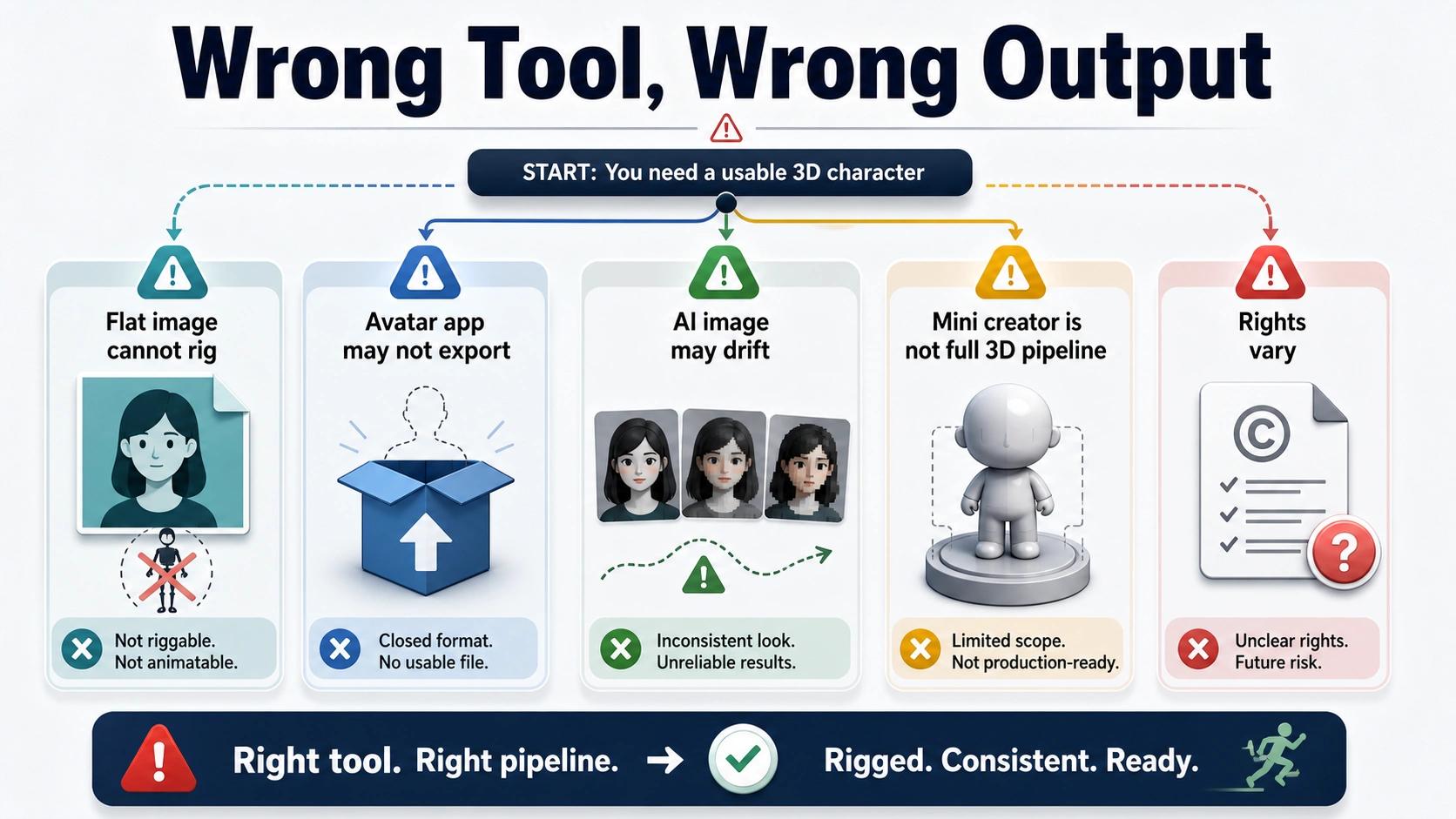
Treat AI character generators as fast ideation tools unless they explicitly support reference images, character memory, training, or another consistency method. If the same identity must survive many scenes, move to a consistency workflow instead of trying to rescue drift after dozens of images.
When You Need the Same Character Across Scenes
Recurring characters are a separate job. If a character must appear in different rooms, camera angles, outfits, poses, seasons, or expressions while still being recognizably the same person, the question is no longer just "which character creator should I use?" It becomes a consistency problem.
This is where a simple character creator and a normal AI generator often break down. They may make a good initial reference, but they do not automatically preserve identity. The stronger workflow uses a character sheet, approved references, reference-image generation, embeddings, LoRA-style training, or a tool that is built around repeatable identity.
For that deeper job, use the dedicated consistent character generator guide. It covers AI character consistency, reference images, model behavior, drift, multi-character scenes, and production workflows. Keeping that job separate prevents the broad route decision from collapsing into an AI consistency roundup.
The handoff rule is clear: if the final output is one character image, stay in the creator route that matches the output. If the final output is a series with the same character, switch to the consistency route early.
Check Rights, Exports, and Editability Before You Commit
The most common mistake is choosing a creator because the first image looks good, then discovering too late that the file, license, or editing path does not support the project. This is why the rights and export check belongs before final tool commitment, not after it.
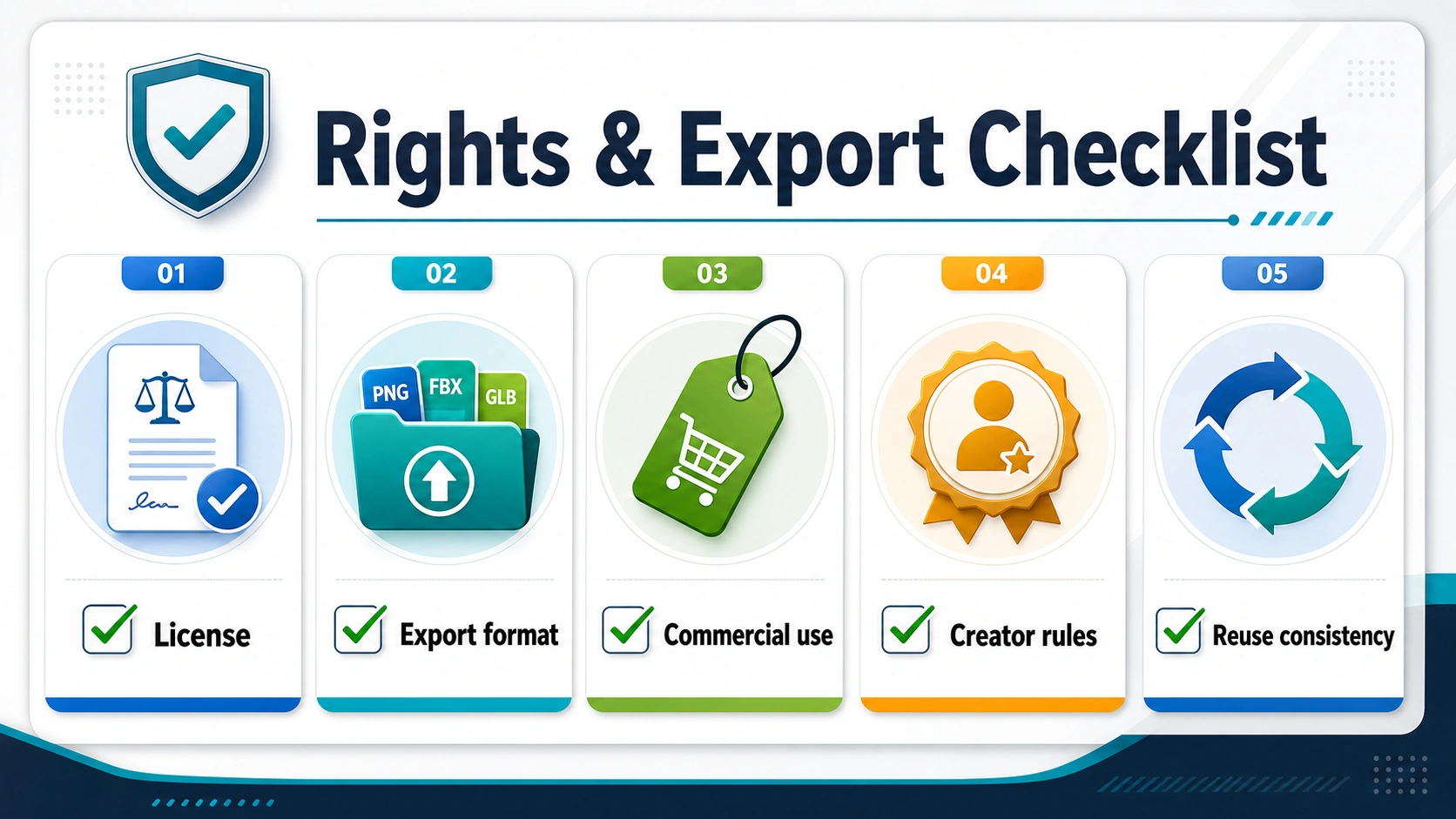
Use this checklist before paying, publishing, ordering, or building a workflow around a character creator:
| Question | Why it changes the decision |
|---|---|
| Can you use the output commercially? | Personal avatars, client work, merch, game assets, and book art can have different rights. |
| What file do you actually get? | PNG, SVG, STL, FBX, OBJ, texture maps, and editable project files serve different jobs. |
| Can you edit the character later? | Campaigns, stories, games, and brand work rarely end with the first design. |
| Can you reproduce the same character? | One-off creators are risky for comics, storyboards, and multi-image campaigns. |
| Does the creator impose style, platform, watermark, or attribution limits? | A tool can be acceptable for personal use and still unsuitable for publication. |
For community avatar makers, read the creator-specific rules. For 3D software, read the asset-export and license terms. For tabletop tools, understand whether you are designing, ordering, downloading, printing, or sharing. For AI generators, separate platform terms from the rights attached to the input material, reference images, and output. This is not legal advice; it is the minimum project hygiene needed before a character design becomes public or commercial.
A Practical Selection Flow
Use this flow when you are not sure where to start:
- Name the final deliverable in one sentence: "I need a full-body avatar," "I need a rigged 3D NPC," "I need a DnD miniature," or "I need the same character across a picture book."
- Pick the route that matches that deliverable, not the route with the most exciting examples.
- Make one test character and check the export, rights, editability, and repeatability before creating more variants.
- If the first route fails, switch route early instead of forcing the wrong tool to behave like another category.
- Keep evidence of the creator, terms, and export settings with the character files if the project will be published or sold.
The right character creator is the one that makes the next step easier. For a profile image, that may be a simple avatar maker. For a game character, it is likely a 3D workflow. For a DnD night, it may be a tabletop builder. For concept art, it may be an AI generator. For a recurring protagonist, it is a consistency system.
FAQ
What is the best character creator?
There is no single best character creator for every project. Choose by output: avatar makers for profile images and OC portraits, 3D character creators for rigged production assets, tabletop creators for DnD and miniatures, AI character generators for prompt-based art, and consistency workflows for the same character across many scenes.
What is a free online character creator good for?
A free online character creator is best for low-risk personal visuals: avatars, OC portraits, simple full-body designs, profile images, and quick character concepts. Check the maker's rules before commercial use, resale, client delivery, or publication.
Is Reallusion Character Creator the same as a character creator?
No. Reallusion Character Creator is a branded professional 3D character software product. The broader phrase character creator can also mean avatar makers, tabletop tools, AI character generators, game-specific creators, and consistency workflows.
What should I use for a DnD character?
Use a tabletop or DnD character creator when you need a campaign visual, miniature design, equipment preview, pose, or player-facing reference. If you only need an illustrated portrait, an avatar maker or AI image generator may be faster. If you need a physical miniature workflow, start with a tabletop-specific creator.
Is an AI character generator better than an avatar maker?
It depends on the job. An AI character generator is better for style exploration and original prompt-based images. An avatar maker is often better when you want predictable parts, quick assembly, and a simple profile or OC image. Neither is automatically better for repeated character identity unless the workflow includes consistency tools.
How do I make the same character appear in multiple images?
Use a consistency workflow instead of relying on a normal one-off generator. Start with a character sheet, approved references, and a tool that supports reference images, embeddings, training, or character memory. The dedicated consistent character generator guide covers that deeper workflow.
Can I use characters made with these tools commercially?
Only if the tool, creator, or license terms allow it for your use case. Commercial use can depend on the platform, individual maker rules, paid plan, asset type, reference material, and output route. Read the current terms before using a generated or assembled character in a book, game, client project, merch, ad, or paid campaign.
What should I check before paying for a character creator?
Check the final output format, commercial-use terms, editability, repeatability, export limits, watermark rules, and whether the tool matches your deliverable. A creator that is fun for one image can still be the wrong choice for a rigged asset, tabletop miniature, client design, or multi-scene character series.