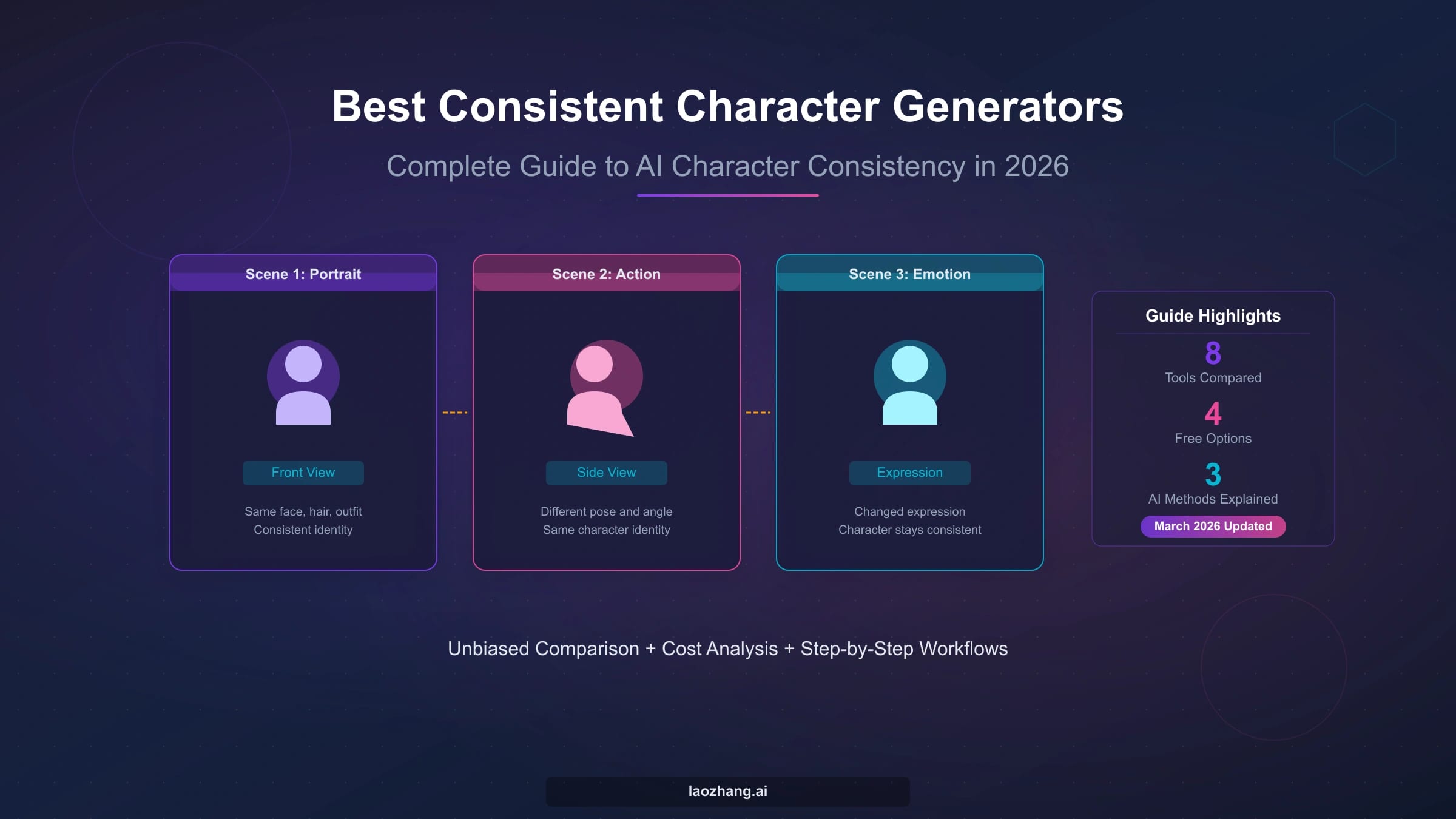
One polished portrait is not proof that a character workflow is ready for a series. Before you commit, make the same design survive four deliberately different images: a neutral portrait, a profile or full-body view, a dynamic pose, and a controlled scene or style change. Approve the route only if the face proportions, body silhouette, hair, signature outfit or props, and core visual language remain recognizable.
| Hardest requirement | Start with | Switch when |
|---|---|---|
| Explore a look with no continuity promise | Prompt-only generation | Image two already needs the same identity |
| Make a few nearby variations | One clear character reference | A profile, full body, or outfit change loses the design |
| Preserve identity and clothing through controlled changes | Several non-conflicting references or an iterative multi-reference workflow | Added references fight each other or the same feature keeps drifting |
| Reuse a named character across many scenes | A dedicated character-reference or persistent-character feature | Hard poses, strong style changes, or character pairs fail repeatedly |
| Run a high-volume pipeline with a strict character contract | A trained or custom workflow with planned human cleanup | The required cleanup is still too expensive or unpredictable |
Treat the hero portrait as shot one; shots two through four are the real stress test. If a clear reference and a reduced-variable test still fail on the same identity dimension, stop adding adjectives and move to a route with stronger persistence.
Stop before uploading a real person's face, a child's image, client-owned art, or an unreleased character. Confirm consent, public-versus-private handling, retention and deletion, training use, export rights, and the current commercial terms for the route you are considering.
Choose the route from the hardest shot
There is no useful “best overall” answer until the production requirement is clear. A workflow that makes ten attractive headshots can still fail a children's book, comic, campaign, or game asset set if the character becomes unrecognizable in profile, loses their body proportions in motion, or swaps costume details between scenes. Start with the image that is most likely to break the identity, then select the lightest route that can plausibly survive it.
Prompt-only generation is suitable for exploring a look when continuity is optional. Repeating a written description may preserve broad concepts such as “short black hair and an amber jacket,” but it does not create dependable visual memory. A seed is not a substitute for that memory either. Midjourney's own Seeds documentation says seeds should not be relied on to save a character or appearance across prompts.
A single visual reference is the sensible first test for a short series with nearby poses or scenes. It gives the system an actual face, silhouette, palette, and outfit to condition on. The weakness appears when the required view is missing from the reference: a front-facing crop cannot fully explain a profile, a full-body proportion, the back of a jacket, or the shape of a signature prop.
Multiple references become useful when each image adds non-conflicting evidence. One can define the face, another the profile, and another the full outfit. More inputs are not automatically better, however. If two references disagree about hairstyle, age, body shape, or clothing, the workflow must resolve that conflict somehow, and the output may average or swap details rather than preserve them.
Dedicated character-reference features and trained or custom routes make sense when the character must recur across many scenes, strong camera changes, or a long production schedule. They increase setup and ownership work: references need versioning, failures need review, and the team still needs a policy for cleanup. “Persistent” means the route carries more identity information; it does not mean every pose, prop, or costume will be copied perfectly.
The decision rule is simple: choose from the hardest required shot and the length of the series, not from the prettiest first output. If you are still deciding whether the final asset should be a 2D illustration, avatar, tabletop miniature, or 3D model, settle that broader output route in the character creator guide before testing continuity.
Decide what the model is allowed to change
Consistency does not mean freezing every pixel. A useful recurring character can turn, move, emote, enter new lighting, and change scenes while remaining identifiable. The production contract must separate identity anchors from intentional variables; otherwise every variation looks like a failure, or real drift gets excused as creativity.
Build a lock/change matrix before generating the second image:
| Dimension | Lock for identity | Allow to change deliberately | Treat as drift when |
|---|---|---|---|
| Face | Relative feature spacing, jaw shape, eye shape, distinctive marks | Expression, gaze, modest age-appropriate motion | Feature geometry or defining marks move between shots |
| Hair | Length, hairline, silhouette, key color blocks | Wind, minor styling, scene-driven movement | Bob becomes long hair, fringe changes, or silhouette loses recognition |
| Body | Approximate height, build, limb proportions, posture cues | Pose, foreshortening, camera perspective | Build or proportions change without story intent |
| Outfit and props | Signature jacket shape, scarf, emblem, recurring prop | Planned costume variation, damage, weather response | Buttons, pockets, colors, symbols, or props mutate accidentally |
| Visual language | Core palette, rendering family, line or texture character | Controlled lighting or a planned style test | The person looks like a different design rather than the same design re-rendered |
A compact contract is more useful than a long adjective pile. For example:
Lock: short black bob with blunt fringe, crescent mark on the left cheek, amber field jacket, teal scarf, lean build, muted cinematic palette. May change: expression, pose, camera angle, lighting, weather, setting. Forbid: age shift, new jewelry, missing cheek mark, jacket redesign, unrelated illustration style.
That contract gives both the generator and the reviewer something concrete to follow. It also makes disagreements visible. If a later scene requires formal clothing, update the allowed-change rule deliberately instead of silently accepting whichever outfit the next generation invents.
The lock list should be short enough to remain usable. Over-locking can make motion stiff or force the route to fight the requested scene. Preserve the few traits that carry recognition, then give pose, expression, camera, and environment enough freedom to do their jobs.
Build a reference pack that explains the hard views
Your reference set should explain the hardest view, not repeat the easiest one. Five nearly identical front portraits provide less production information than one clean portrait, one profile, and one full-body image. The goal is coverage, not volume.
A practical fictional-character reference pack contains:
- a neutral, well-lit hero portrait with the face unobstructed;
- a profile or three-quarter view that reveals nose, jaw, hairline, and head silhouette;
- a full-body view that shows build, height cues, footwear, and costume proportions;
- a clear outfit or prop view for details that must recur;
- a small expression set only when expression range is part of the job.
Use the cleanest approved image as the identity anchor. Add another reference only when it answers a missing question. A dramatic backlit portrait may be excellent key art but poor identity evidence; a neutral view can be visually plain and still be more valuable for production.
Conflicting references are a common hidden cause of drift. Before uploading a set, compare age, facial geometry, hairstyle, body proportions, costume construction, palette, and rendering style. If the references disagree, decide which one owns each dimension or remove the conflict. Do not expect the system to infer your preferred version from a mixed pack.
Keep the prompt equally disciplined. A reusable structure is:
Preserve [locked identity traits] from the approved reference. Change only [pose, camera, action, scene, or expression]. Keep [signature outfit or prop rules]. Do not introduce [known drift risks].
The prompt is a change request, not a second character sheet. The visual references should carry appearance; the text should identify what changes in this shot and which boundary must hold. For a broader preserve-versus-change decision that is not specifically about a recurring character, use the image-to-image route guide.
Run four shots before production
A route passes only when it survives a controlled change. Generate a small acceptance set before producing dozens of panels, pages, or campaign assets. Keep the same reference pack and identity contract across the set so the differences reveal route behavior rather than shifting instructions.
Shot 1: neutral portrait
Use a clear, low-complexity portrait to establish the baseline. This verifies that the route can read the reference at all. Record the approved face proportions, hair silhouette, cheek mark, palette, and upper-body costume details. A strong result here is necessary, but it is not sufficient.
Shot 2: profile or full body
Choose the view that the master reference explains least well. A profile tests face geometry and hair shape; a full-body shot tests build, limb proportions, clothing construction, and footwear. If the identity fails here, adding busy scenery will not repair it.
Shot 3: dynamic action
Request a movement that changes pose, foreshortening, and expression. The character should bend, reach, run, climb, or interact with a prop while retaining the same identity anchors. This is where a route that merely copies the composition of the reference often breaks down.
Shot 4: scene or style stress
Change one major production variable: night lighting, weather, camera distance, a different environment, or a controlled rendering style. Do not change all of them at once. The purpose is to test whether identity survives beyond the visual conditions of the hero image, not to create the most spectacular possible scene.
Review all four shots together across five dimensions: face, body silhouette, hair, outfit or props, and palette or visual language. Mark each dimension as pass, repair, or switch:
- Pass when the character remains recognizable and the requested change is intentional.
- Repair when one dimension fails once and a smaller controlled test can identify the cause.
- Switch when the same dimension fails after a clear reference and reduced-variable retry, or when manual repair would erase the route's time or cost advantage.
Do not average the set into a vague feeling of “mostly consistent.” A route with three excellent portraits and one unusable full-body result has failed a project that requires full-body action. The acceptance decision follows the production requirement, not the gallery average.
Diagnose drift one variable at a time
Change one cause at a time or the next generation teaches you nothing. When face, outfit, camera, prompt, style, and reference strength all change together, an improved result does not reveal which change helped—and a worse result does not reveal which one caused the damage.
Use the visible symptom to select the smallest next experiment:
| Symptom | Smallest experiment | Switch threshold |
|---|---|---|
| Face geometry changes | Reuse the same clear reference, neutral light, simple background, and one angle change | A profile or three-quarter view still becomes a different person |
| Hair silhouette drifts | Remove motion and headwear; test front and side views with the hair rule explicit | Length, fringe, or outline still changes repeatedly |
| Body proportions shift | Use a full-body reference and neutral standing pose before returning to action | The neutral full-body test still changes build or limb proportions |
| Outfit details mutate | Isolate one approved clothing view and request no costume change | Signature colors, shapes, or emblem still merge or disappear |
| A prop moves or redesigns itself | Test the character and prop in a plain composition with separate descriptions | The route cannot keep ownership or shape stable even without scene complexity |
| Style overwhelms identity | Return to the baseline rendering, lock identity, then add style as the only change | The same face collapses as soon as the required style is introduced |
| The output copies the reference pose | Keep the identity reference but add a separate pose cue or a simpler action | New poses repeatedly revert to the source composition |
Endless prompt expansion is not a recovery strategy. If a clean test repeatedly fails the same dimension, either provide evidence the route is missing, use a stronger persistence method, split the generation into controlled passes, or plan human compositing and cleanup. The right answer can be to reject the route.
Add a second character only after both pass alone
If each character cannot pass independently, combining them only hides the source of failure. First run the four-shot test for character A, then for character B. Give each a distinct silhouette, palette, clothing language, and signature feature so the scene has enough information to keep them separate.
Next, generate a neutral two-person composition with simple lighting and no complex action. State spatial ownership clearly—who stands left or right, who wears which outfit, and who holds which prop. Review for attribute bleed: swapped hair, shared facial features, merged clothing colors, duplicated marks, or a prop assigned to the wrong person.
Only after the neutral pair passes should you introduce interaction, occlusion, or a complex environment. If the characters keep blending, generate them separately and compose them in a controlled production pass, or move to a route that explicitly supports the required multi-subject persistence. A crowded scene is not the place to debug two identities for the first time.
What current reference routes actually do
Named products are examples of different persistence contracts, not a universal ranking. Current documentation supports the following bounded conclusions:
| Route example | What the official documentation supports | Boundary to keep visible |
|---|---|---|
| Midjourney V7 Omni Reference | One Omni Reference image can guide a person or object; the text prompt still matters and reference influence can be adjusted | Intricate details may not match, and a seed is not dependable character memory |
| Ideogram Character Reference | A reusable character reference can be defined from a clear, well-lit portrait | Availability, compatible options, plans, and output terms are separate current product contracts |
| Leonardo Character Reference | Reference guidance offers strength choices for influencing a generated character | It is not a face swap and does not guarantee a perfect replica |
| Gemini image generation | Current image routes can use multiple references and iterative prior images for character views and sequential work | Model names, reference capacities, limits, and lifecycle can change; generated images carry SynthID |
For Midjourney, use the current Omni Reference documentation for V7 rather than calling the feature Character Reference. The older Character Reference documentation applies to supported earlier versions and explicitly warns that intricate details or real-person likeness may not match exactly.
Ideogram's Character Reference guide emphasizes a clear portrait and documents the feature as a reusable character input. Leonardo's image guidance documentation exposes Character Reference strength levels while stating that the feature is not a face swap or a perfect-replica guarantee.
Google's current Gemini image generation documentation describes multi-reference workflows and sequential image use. Those capabilities make the route relevant when a project needs several views or iterative scene development, but exact model IDs, input capacities, prices, and limits should be checked in the current documentation and account surface before implementation.
Choose among these contracts by testing your hard shot. A provider's example gallery demonstrates possibility, not a pass for your character, your references, or your production rights.
Check trust and ownership before scaling
A useful route can still be the wrong place for a sensitive reference. Before uploading a real person, a child, commissioned artwork, client IP, or an unreleased design, identify who owns the input and what the selected service may do with it.
Verify the current terms for the exact route and plan:
| Contract question | What to confirm | Evidence to keep |
|---|---|---|
| Consent and input rights | You have permission to upload the person, artwork, costume, logo, and reference photography | Release, commission agreement, license, or owner approval |
| Public visibility | Generations and references are private, public, or discoverable under the selected settings | Current account setting and dated screenshot |
| Retention and deletion | How long inputs and outputs remain and whether deletion is available | Current privacy/help page and deletion confirmation |
| Training or improvement use | Whether inputs or outputs may be used to improve services and whether an opt-out exists | Current policy and account choice |
| Output and commercial terms | The plan and jurisdiction permit the intended publication, client, merchandise, or advertising use | Current terms and purchase record |
| Export and provenance | Files, metadata, prompts, and provenance signals can be retained for the production record | Original exports, manifests, and approval log |
Do not infer commercial permission from a “free” label, a successful download, or another user's account. Likewise, do not infer privacy from the absence of a visible gallery. These are contract questions, not image-quality questions.
When the job starts from a real person's likeness rather than a fictional character, route selection has additional consent and identity risks. The AI pictures with your face guide owns that narrower decision.
For a long series, maintain a versioned character library: the approved reference pack, lock/change matrix, prompt skeleton, accepted four-shot set, rejected failure examples, model or feature name, relevant settings, and approval date. This record makes later drift diagnosable and prevents a team from quietly replacing the source identity halfway through production.
Production checklist before the first batch
- Name the hardest required shot. Profile, full body, action, style shift, costume change, or two-character interaction should drive the route.
- Choose the lightest plausible persistence method. Prompt-only, one reference, several references, a dedicated character feature, or a trained/custom workflow.
- Write the lock/change matrix. Make identity anchors, allowed variables, and forbidden drift explicit.
- Build the reference pack for coverage. Prefer complementary front, side, full-body, and detail views over repeated hero portraits.
- Generate the neutral baseline. Confirm that the route reads the approved identity at all.
- Run the four-shot acceptance set. Do not start the full series after shot one.
- Repair with one-variable experiments. Record the symptom, smallest test, and result.
- Pass, switch, or budget cleanup. Scale only when the hardest shot meets the actual project standard.
The same still-image references can later support a motion workflow, but video identity, movement, camera continuity, and temporal artifacts create a separate acceptance problem. Use an image-to-video route guide for that handoff instead of assuming a still-image pass guarantees video continuity.
Frequently asked questions
Can a free route be enough for a recurring character?
It can be enough to run the four-shot test, but free access does not prove production suitability. Check the current generation allowance, queues, watermark or export behavior, reference support, privacy, deletion, and commercial terms for the exact account. A free route is useful when it lets you test the hardest shot with no important asset at risk. Move on if the route cannot preserve the required identity dimension or if its contract does not fit the intended use.
How many reference images should I use?
One clear image is enough to start a test. Add a profile, full-body view, outfit detail, or expression only when it supplies information the first image cannot. The useful count depends on the route and the shots you need. More references can reduce ambiguity, but conflicting references can create new drift. Coverage and agreement matter more than volume.
Can a prompt alone keep the same character across images?
A prompt can repeat broad traits and may be adequate for loose concept exploration, but it is not dependable visual identity memory. It does not fully specify exact face geometry, silhouette, or costume construction. If image two must clearly be the same person, start testing with a visual reference or a persistence feature. Repeating a seed does not replace that route.
Do I need a LoRA or custom model?
Not for every series. First test a clear reference with the hardest required shot. A trained or custom route becomes proportionate when the character must survive many scenes, strong view changes, a large batch, or a long production life—and lighter reference methods repeatedly fail the same dimension. Training also adds data, versioning, hosting, and cleanup responsibilities, so it should solve a measured failure rather than serve as the default first step.
Can the character change outfits and remain recognizable?
Yes, when the face, hair silhouette, body proportions, signature marks, and visual language carry enough identity without the original outfit. Treat the costume change as the only major variable in a controlled test. If recognition disappears as soon as the jacket changes, the route may have learned the clothing as the identity. Strengthen the non-clothing references before producing the new wardrobe.
How do I keep two recurring characters separate?
Pass each character alone first. Give them distinct silhouettes, palettes, hairstyles, outfits, and signature features. Then test a simple pair with explicit spatial and prop ownership before adding interaction or a busy scene. If features or clothing keep swapping, generate separately and compose, or choose a route with a stronger multi-subject contract.
Is it safe to use a real person's photo?
Only when you have a lawful, appropriate reason and the person's informed permission, and the selected route's current policy allows the intended use. Check visibility, retention, deletion, training use, output rights, age restrictions, and impersonation or sensitive-content rules before upload. A fictional-character workflow should not be used to bypass safeguards for real-person likeness.
Can I use the output commercially?
That depends on the current service, plan, input rights, jurisdiction, and intended use. Do not treat a provider's marketing phrase or a free download as a legal clearance. Confirm the current terms, keep the relevant version and purchase record, and make sure you own or have licensed every reference element. For client or merchandise work, record human review and approval as part of the production file.
Will a consistent still character stay consistent in video?
Not automatically. A still-image reference pack can provide useful keyframes and identity anchors, but video adds motion, changing angles, occlusion, lighting transitions, and frame-to-frame drift. Test the motion route separately with short clips before committing to a long sequence, and keep the still-image character contract available for comparison.
Approve the workflow only when its hardest required shot passes, its failure threshold is explicit, and its input and output contract fits the project. That decision is worth more than any single perfect portrait.