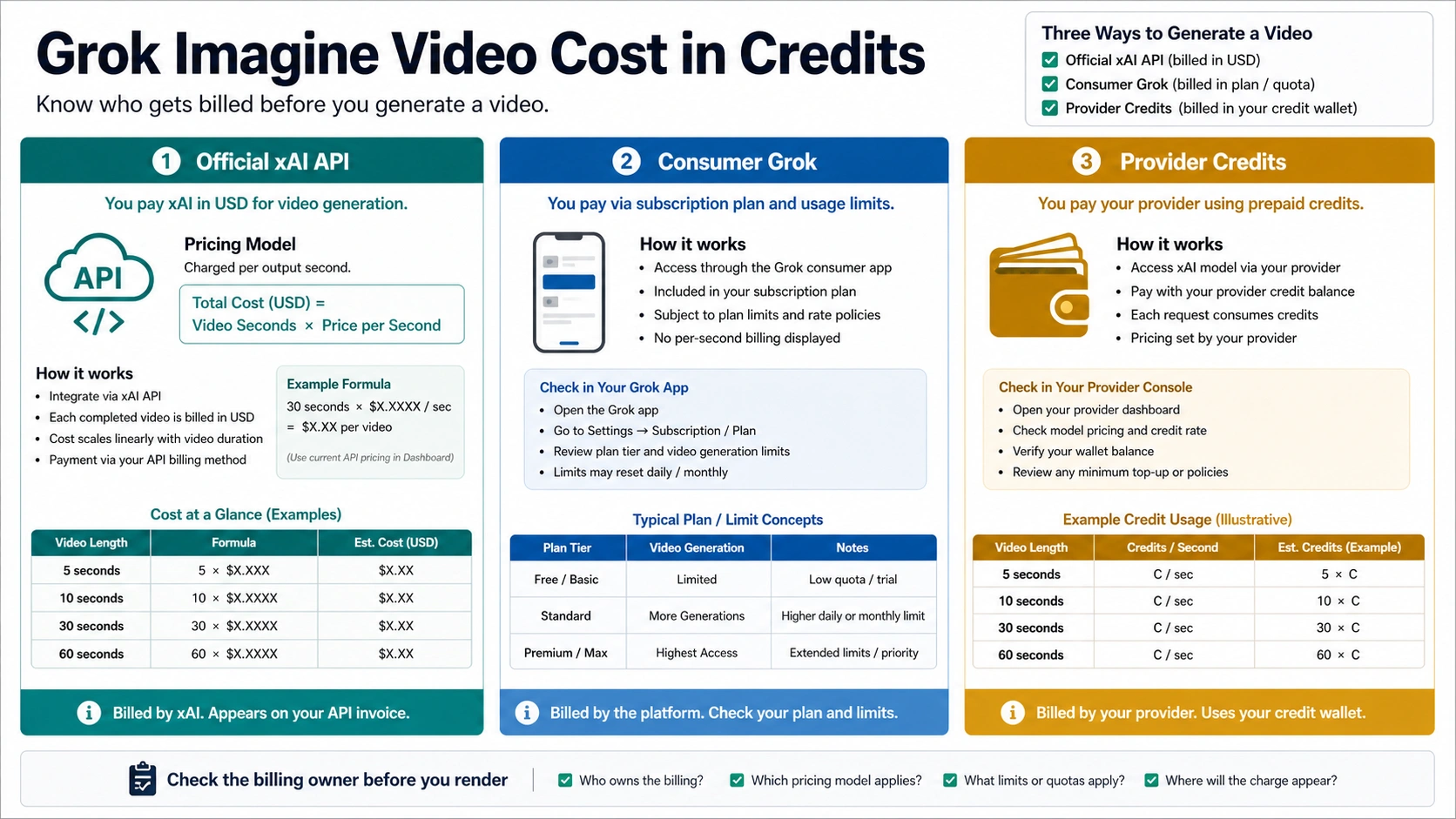
Grok Imagine Video does not have one universal credit price. On the official xAI API, budget starts with generated seconds and the current per-second model price; inside consumer Grok, access and limits belong to the current plan screen; on third-party tools, credits belong to that provider's wallet and cannot be copied to another platform.
The Short Answer: First Ask Whose Credits
If you are using the official xAI API, the clean formula is:
video cost = generated seconds x current xAI per-second price
On May 9, 2026, the official xAI model page for grok-imagine-video listed output pricing at $0.05 per second, stated that API users are charged for each second of generated video, and showed resolution-specific rows of $0.05 per second for 480p and $0.07 per second for 720p. The same page also listed image input at $0.002, video input at $0.01 per second, us-east-1 and eu-west-1 regions, and 70 requests per minute. Treat those as dated API facts, not permanent consumer-app limits.
| Where you generate | What the cost number means | What to check before rendering |
|---|---|---|
| Official xAI API | Dollars per generated second, with resolution and input media rows on the model page | Current grok-imagine-video model page, duration, resolution, input mode, and account limits |
| Consumer Grok or X app | Access and limits shown by the current plan, app, region, and account screen | Current subscription, visible limits, app surface, and whether video generation is enabled |
| Third-party video tool | That provider's own credits, packs, resets, and failure rules | Credit-dollar exchange, duration rules, resolution rules, and whether Grok Imagine Video is really the model used |
The practical rule is simple: xAI API pricing can answer the API budget question, but it cannot decode a provider's credit wallet. A provider that says "60 credits per second" and another provider that says "10 to 40 credits per video" may both be describing their own products. Neither number becomes a universal Grok Imagine Video credit.
The Official xAI API Cost Formula
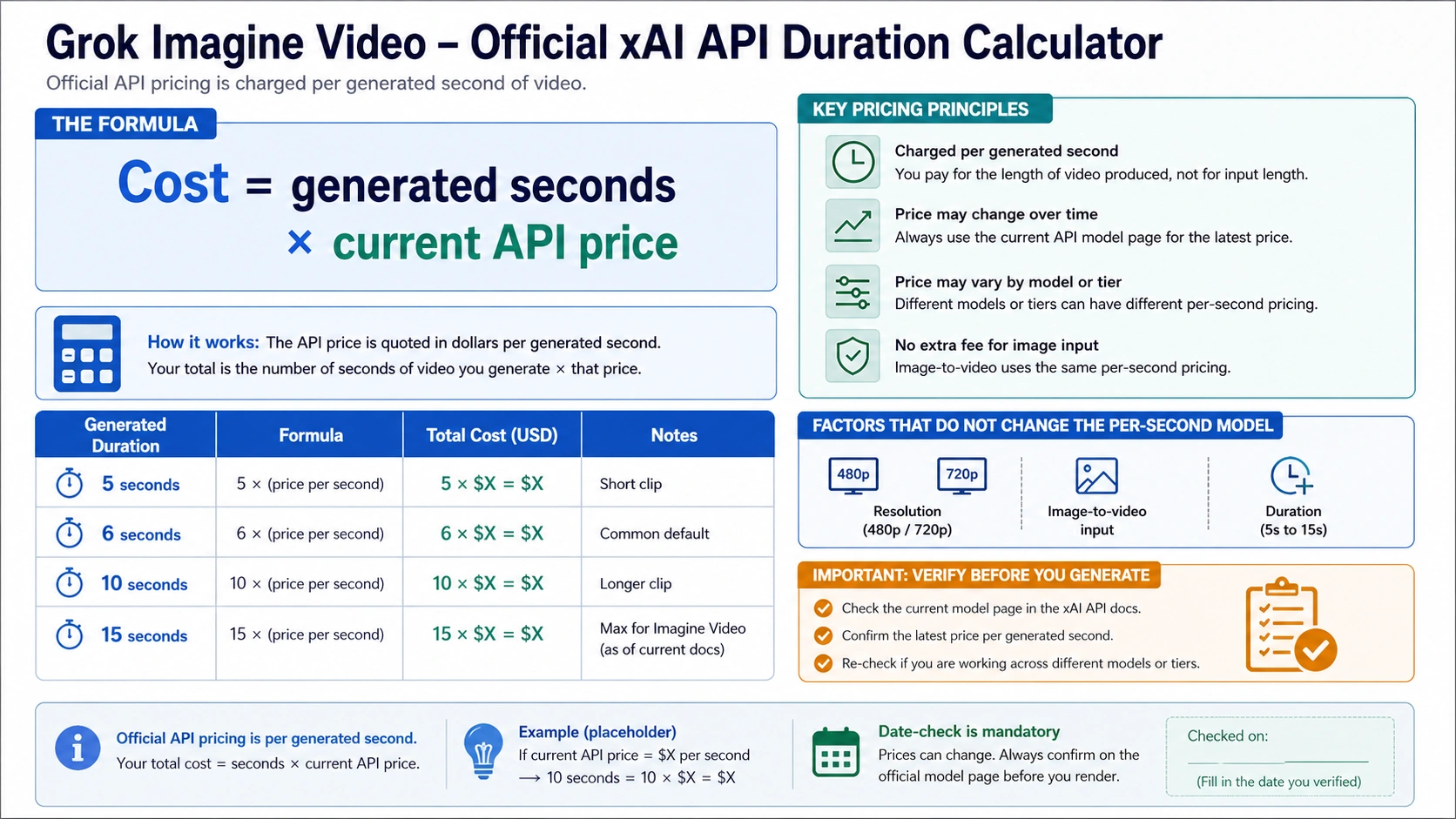
For developers, grok-imagine-video is an API model, not a chat-model toggle. xAI's video generation documentation shows an asynchronous flow: submit a generation request, receive a request_id, poll until the job is done, and then use the temporary video URL. The request can include duration, aspect ratio, and resolution.
That shape matters for cost because the billable output is a video with a length. The docs allow the duration parameter from 1 to 15 seconds for video generation. They also describe 480p as the default standard-resolution output and 720p as the HD option. The model page supplies the price rows; the generation docs explain the controls that make the budget move.
Using the May 9, 2026 xAI rows, the simplest text-to-video examples look like this before taxes, account-specific terms, or provider packaging:
| Planned clip | 480p API estimate at $0.05/sec | 720p API estimate at $0.07/sec |
|---|---|---|
| 5 seconds | $0.25 | $0.35 |
| 6 seconds | $0.30 | $0.42 |
| 10 seconds | $0.50 | $0.70 |
| 15 seconds | $0.75 | $1.05 |
These examples are useful only while the official rows stay the same. xAI's model page also says Video Extension API pricing is promotional and subject to change, so any extension workflow deserves a fresh check before a production budget is approved. If a cost estimate is going into a client quote, team budget, or automated workflow, reopen the current model page rather than copying an old table.
Input media can add another layer. Image-to-video starts from an image, reference-to-video can use reference images, editing starts from a video, and extension continues an existing clip. The model page lists image input and video input rows in addition to output pricing. For quick text-to-video planning, output seconds usually dominate the estimate. For workflows that upload videos or extend existing clips, count both the input side and generated output side.
Why Provider Credit Numbers Disagree
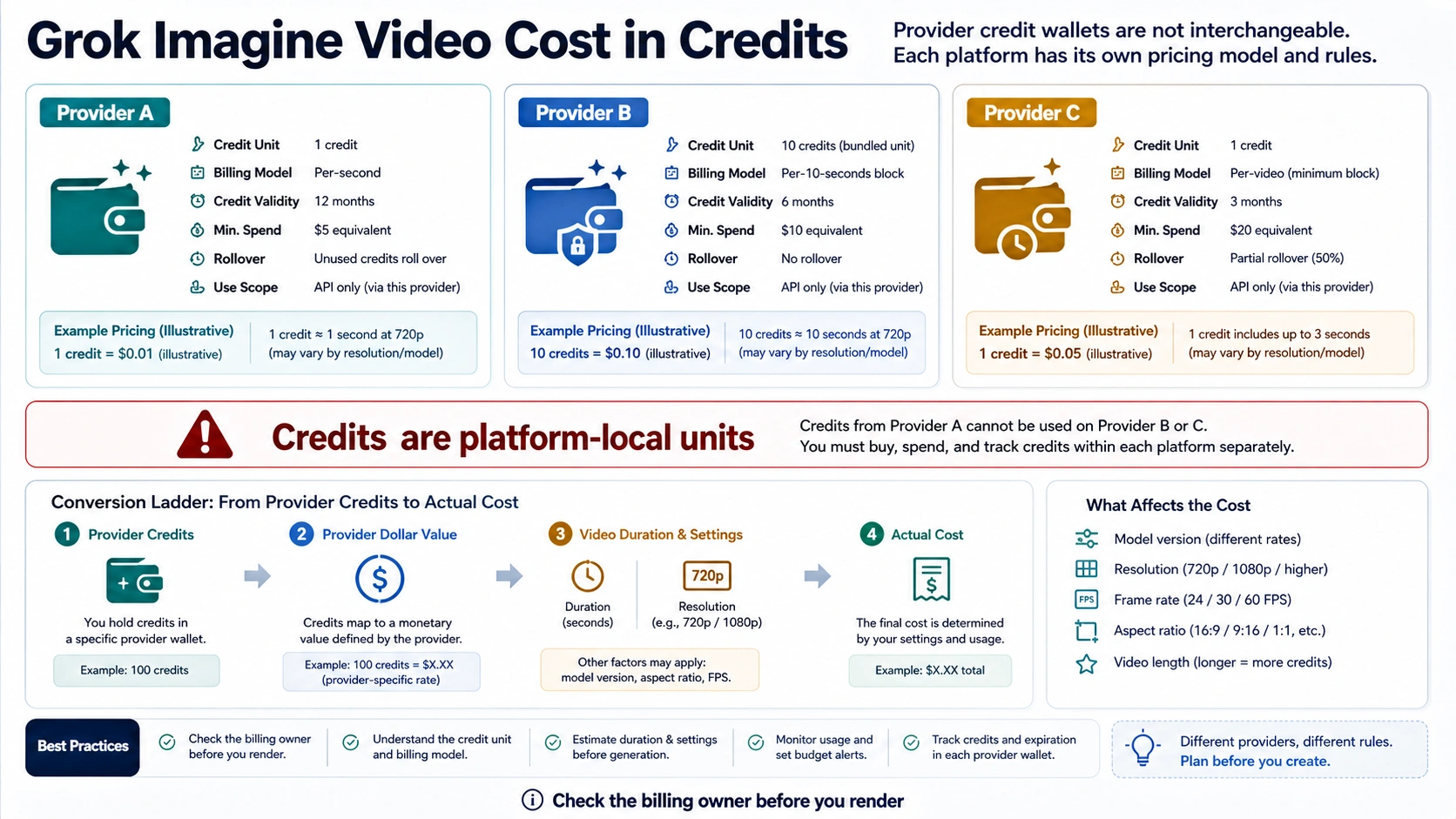
Credits are not a universal currency. They are accounting units inside the product that sells or grants them. One platform can decide that a 10-second 720p clip consumes hundreds of credits. Another can make a short clip cost a small fixed pack amount. A third can bundle credits into a subscription where the effective dollar value changes by plan.
That is why visible Grok Imagine Video credit numbers disagree across hosted tools. OpenCreator's Grok Imagine Video page frames its rule as 60 credits per second, so a 10-second video would be 600 OpenCreator credits inside that wallet. UlazAI's Grok Imagine page uses a different duration-and-resolution credit table. Both can be true because each provider defines its own credits, pack price, reset behavior, and accepted-output policy. The model name may look similar, but the credit wallet is not portable.
Use this conversion ladder whenever a tool shows credits:
| Step | Question | Why it matters |
|---|---|---|
| 1 | Who owns the credits? | xAI API dollars and provider credits are different contracts. |
| 2 | How many credits does the clip consume? | Duration, resolution, mode, queue, or plan tier can change the burn. |
| 3 | What is one credit worth on that plan? | Credit packs and subscriptions can make the same credit count cost different amounts. |
| 4 | What happens on failure or moderation block? | Some platforms may reserve, refund, or consume credits differently. |
| 5 | Is the model really grok-imagine-video? | Some tools use "Grok" wording loosely or route through a provider catalog. |
Do not average provider credit numbers into a "typical Grok cost." If Platform A's 10-second clip is 600 credits and Platform B's is 40 credits, the difference may come from credit value, plan pricing, resolution, generation mode, or the provider's own margin. The only fair comparison is the final dollar-equivalent cost for the same duration, resolution, and output acceptance rule.
Consumer Grok Is a Different Surface
Consumer Grok and Grok in X should be treated as app surfaces, not as the official developer API price table. A consumer plan can control whether video generation appears, how many attempts the account can make, which region or app version gets the feature, and whether the account sees temporary demand limits. Those facts belong to the current account and plan screen.
That distinction prevents two common mistakes. The first mistake is using xAI API dollars to predict a consumer subscription limit. A subscription may include access, but it does not mean each visible generation maps to the public API billing rows. The second mistake is using a forum or video claim about "free" or "unlimited" consumer generation as a durable cost contract. Consumer limits can move by account, plan, rollout, region, demand, and app surface.
If the task is a developer integration, use the official xAI docs and API console. If the task is a few videos inside the app, check the Grok or X account screen before relying on any static number. If the task is adult-content visibility, safety settings, or Spicy Mode, leave cost planning and use the separate Grok Imagine Spicy Mode availability guide, because that is a policy and account-control question, not a credit calculator.
Before You Click Generate
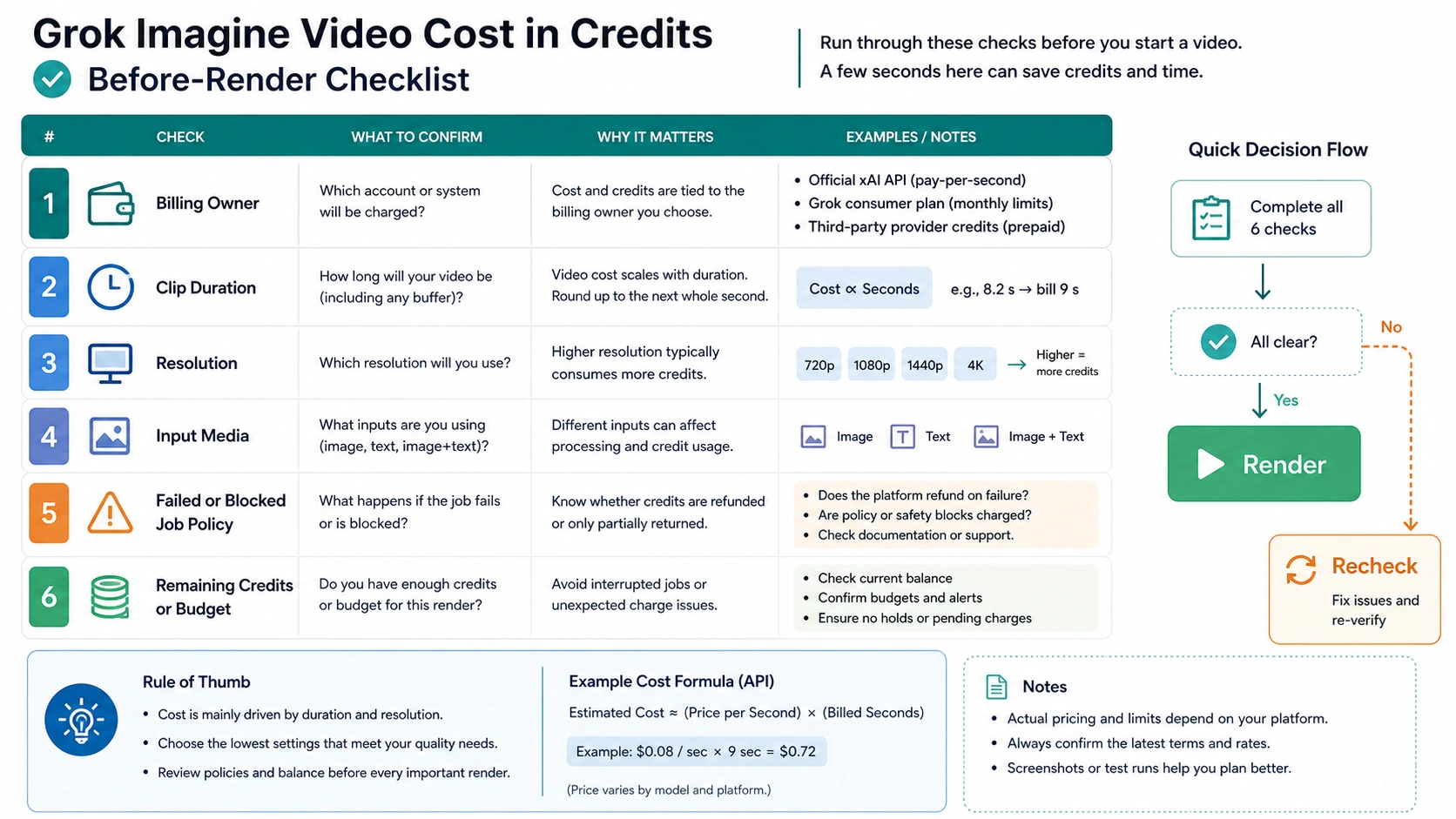
The safest cost check takes less than a minute:
| Check | API route | Consumer route | Provider route |
|---|---|---|---|
| Billing owner | xAI | Grok/X account | Provider wallet |
| Clip length | duration from 1 to 15 seconds | Visible generation controls | Provider duration selector |
| Resolution | 480p or 720p row | App option if exposed | Provider option if exposed |
| Input media | Image or video input rows when used | App upload behavior | Provider upload cost rule |
| Failed or blocked jobs | Check API and account billing behavior | Check current app message | Check provider refund or reserve rule |
| Budget remaining | API spend and rate limits | Plan limit screen | Credit balance and reset time |
For a one-off clip, the key decision is usually duration and route. For a workflow that will generate dozens of clips, also test failure behavior. A rejected prompt, expired job, timeout, or moderation block can change the real budget if the platform reserves credits before completion or bills part of the process. The xAI generation docs expose job states such as pending, done, expired, and failed, but a billing promise still belongs to the current account and contract. Do not assume failed work is free unless the owner says so.
If you are comparing a provider against the official API, normalize to one accepted output. For example: "one 10-second 720p clip that meets the prompt and is downloadable." Then compare the official API estimate, the provider credit burn, the dollar value of those credits, queue speed, storage, failure policy, and any watermark or rights limitation. A provider can still be worth using if it reduces setup friction, but the credit count alone is not enough to prove it is cheaper.
When a Wrapper Can Still Be the Right Choice
A third-party tool is not automatically bad. It can be the practical route when the user wants a browser workflow, preset styles, team billing, storage, sharing, a queue, or several video models in one interface. The cost mistake happens only when the wrapper's internal credits are described as if they were official Grok credits.
Use a wrapper when the full route is acceptable:
| Wrapper reason | What makes it acceptable | What should stop the purchase |
|---|---|---|
| Faster start | No API key setup, browser prompt box, easy preview | Unknown model owner or vague "Grok-like" wording |
| Shared team wallet | One credit pack for editors or creators | No clear credit-dollar conversion |
| Multi-model testing | Grok Imagine Video sits next to other models | Provider does not show model, duration, resolution, or failure rules |
| Creative workflow | Assets, presets, storage, or publishing tools matter | Watermark, rights, or privacy terms do not fit the project |
For API developers choosing between Grok text, media, and voice routes, the broader Grok 4.3 vs Grok 4.20 model guide is the better starting point. For ordinary image generation replacements after Grok Imagine feels too limited or too expensive, use the Grok Imagine free alternatives guide. Keep those jobs separate from video cost math.
A Practical Budget Rule
Use three levels of confidence:
- High confidence: official xAI API estimate for a known duration, resolution, and input mode, checked on the current model page.
- Medium confidence: provider credit estimate where the provider clearly states credit burn, pack price, resolution, and failure policy.
- Low confidence: forum comments, screenshots, videos, old plan tables, or "free/unlimited" claims without a current owner screen.
For a developer budget, start from the official API estimate and add an evaluation buffer for retries, prompt iteration, failed generations, and storage or download handling. For a creator budget on a provider, calculate the effective cost of one accepted clip, not only the displayed credits. For a consumer app user, the most honest answer is account-specific: the current plan screen decides whether video generation is available and how limits appear.
The simplest pre-render sentence is the one to keep: "I know who owns the credits, how many seconds I am generating, which resolution I selected, and what happens if the job fails." If any part of that sentence is unknown, check before rendering.
FAQ
How much does a 10-second Grok Imagine Video cost?
On the official xAI API, use generated seconds times the current per-second row. On May 9, 2026, the model page showed 480p at $0.05 per second and 720p at $0.07 per second, so a 10-second estimate was $0.50 at 480p or $0.70 at 720p before any additional input-media considerations. A third-party provider can show a completely different credit number because its credits are local to that provider.
Does Grok Imagine Video use credits or dollars?
The official xAI API page presents dollar pricing per second. Many hosted tools present credits because they sell or grant credits inside their own product. Consumer Grok may show plan access or limits rather than API-style billing. The word "credits" only has meaning after the route owner is known.
Why does one site say 60 credits per second?
That can be true for that site. It does not mean xAI defines a universal 60-credit-per-second cost. Convert that provider's credits into dollars using its pack or plan, then compare the same duration and resolution against the official API estimate.
Is 720p more expensive than 480p?
For the official API rows checked on May 9, 2026, yes: the model page listed 480p at $0.05 per second and 720p at $0.07 per second. Recheck the current model page before treating those values as a live quote.
Do failed or blocked videos consume credits?
Do not assume. The generation docs show statuses such as pending, done, expired, and failed, but billing behavior belongs to the current API contract or provider policy. Provider tools can reserve, refund, or consume credits differently. Check the owner screen or terms before a large batch.
Is consumer Grok cheaper than the API?
It depends on the job. Consumer Grok can be easier for occasional creation if the account already has access. The API is better for programmatic workflows, repeatable duration and resolution control, and budget tracking. The API price table does not prove a consumer plan's quota, and a consumer subscription does not prove API cost.