As of July 8, 2026, a free image-to-video tool can usually help you test motion from a still image, but long duration rarely means one unlimited clean render. For longer output, start by choosing the target length: a short test clip, an extension chain, a planned sequence, an edited long-form video, or a paid/API route with clearer export and privacy terms.
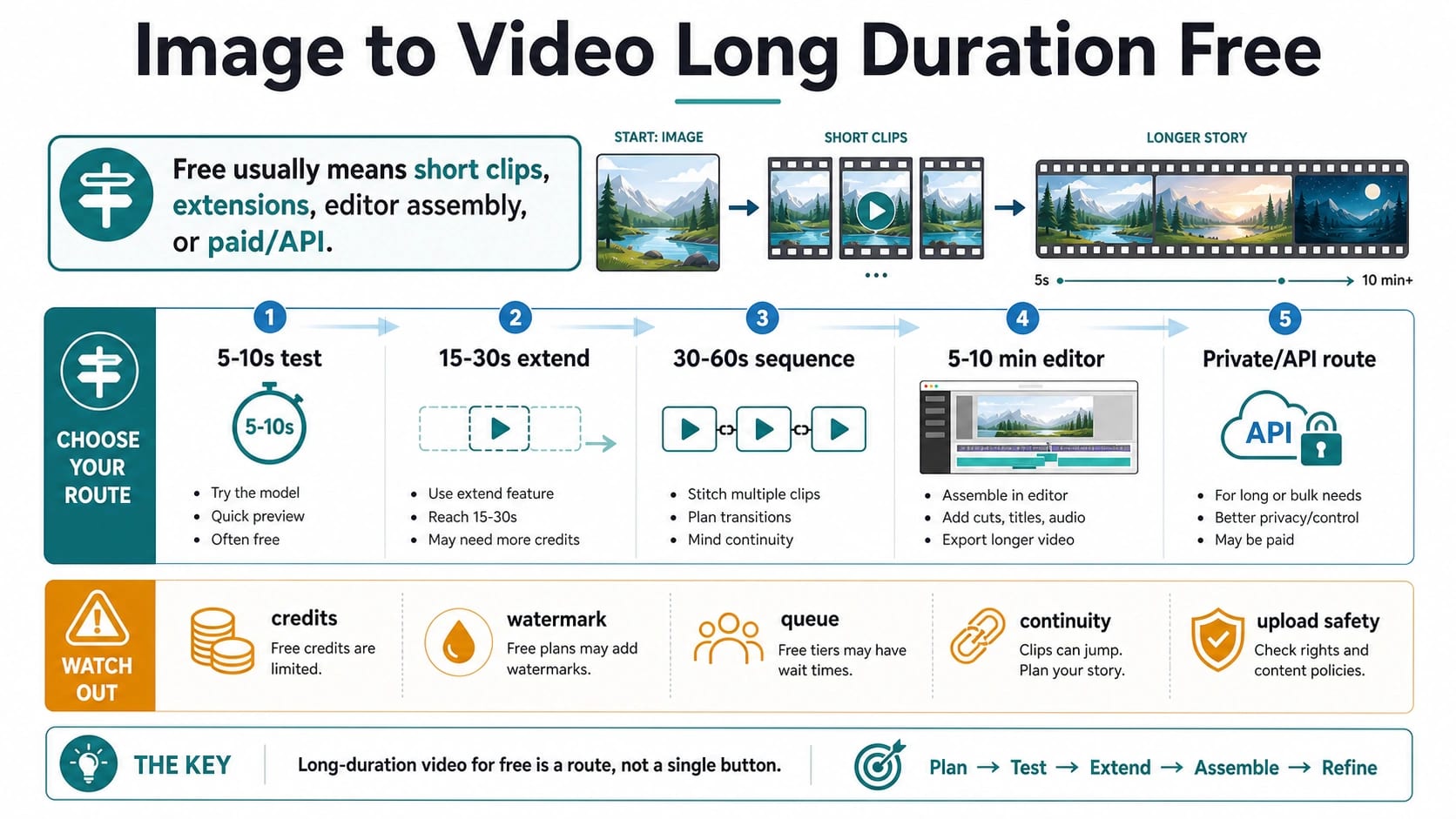
| Target output | Most honest first route | Free catch to verify |
|---|---|---|
| 5-10 seconds | Short image-to-video test | Credits, duration, watermark, queue |
| 15-30 seconds | Extend or continue a good first clip | Reroll cost, continuity, extra credits |
| 30-60 seconds | Several planned clips in a sequence | Transitions, prompt drift, export quality |
| 5-10 minutes | Editor assembly around short generated shots | Video minutes, watermark, stock/audio rights |
| Private or repeatable production | Paid plan, official API, or controlled workflow | Storage, logs, pricing, failed-render policy |
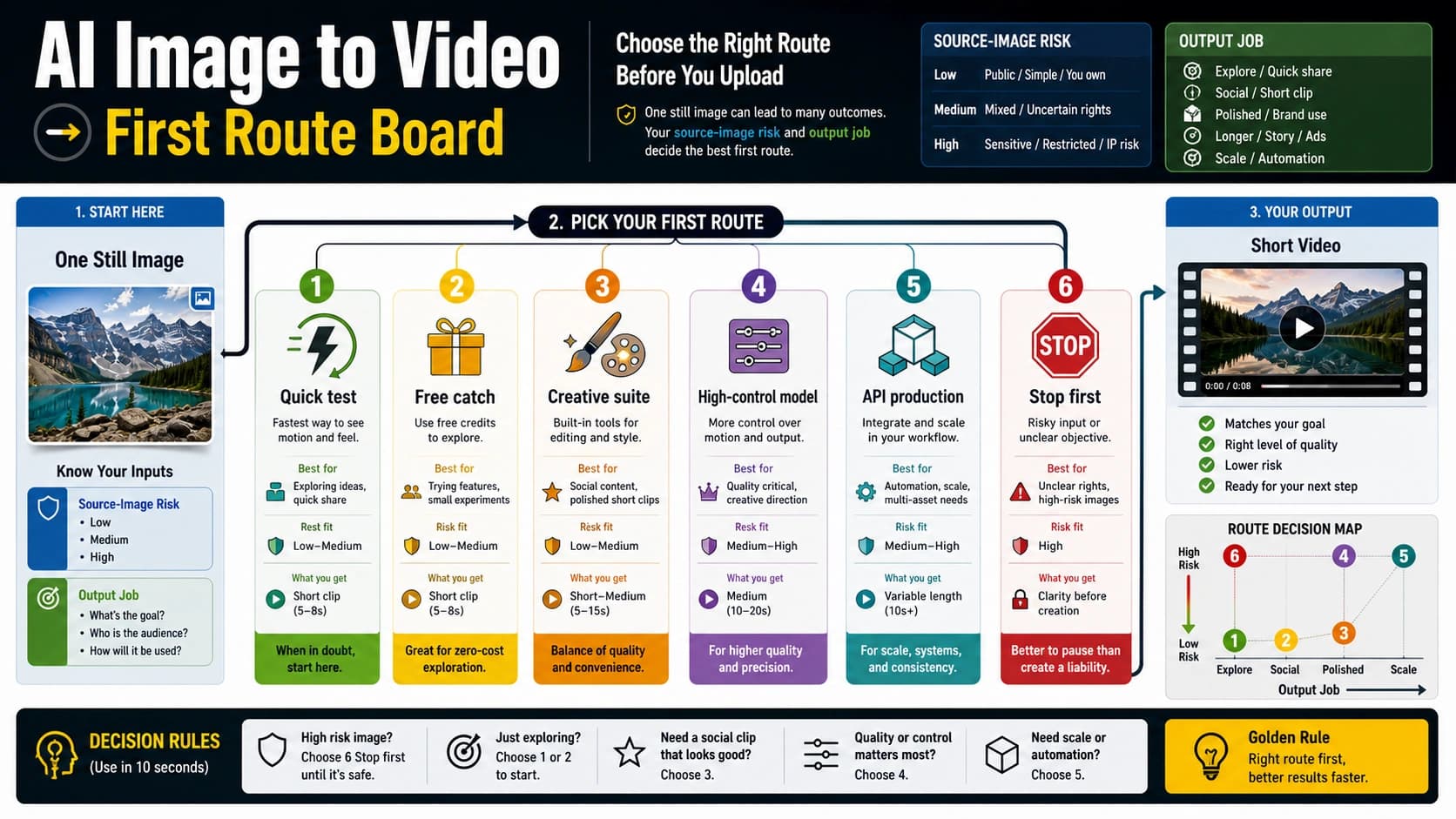
Stop before uploading faces, customer assets, IDs, medical or financial context, licensed art, or unreleased product images to an unverified free wrapper. If the image is sensitive or the final export must be clean, choose a trusted account, mainstream editor, official model/API route, or private workflow before chasing another free generator.
The Honest Answer: Free Long Duration Is A Route, Not One Tool
The useful answer is not "use this one free generator." It is: decide how long the video needs to be, then choose the cheapest route that can reach that length without wasting credits or exposing the wrong image.
A 5-second or 8-second motion test is a very different job from a one-minute product teaser. A 10-minute explainer is different again. The first can be a single free or free-to-start generation. The second usually needs multiple clips, extensions, and a timeline. The third is closer to editing than pure image-to-video generation.
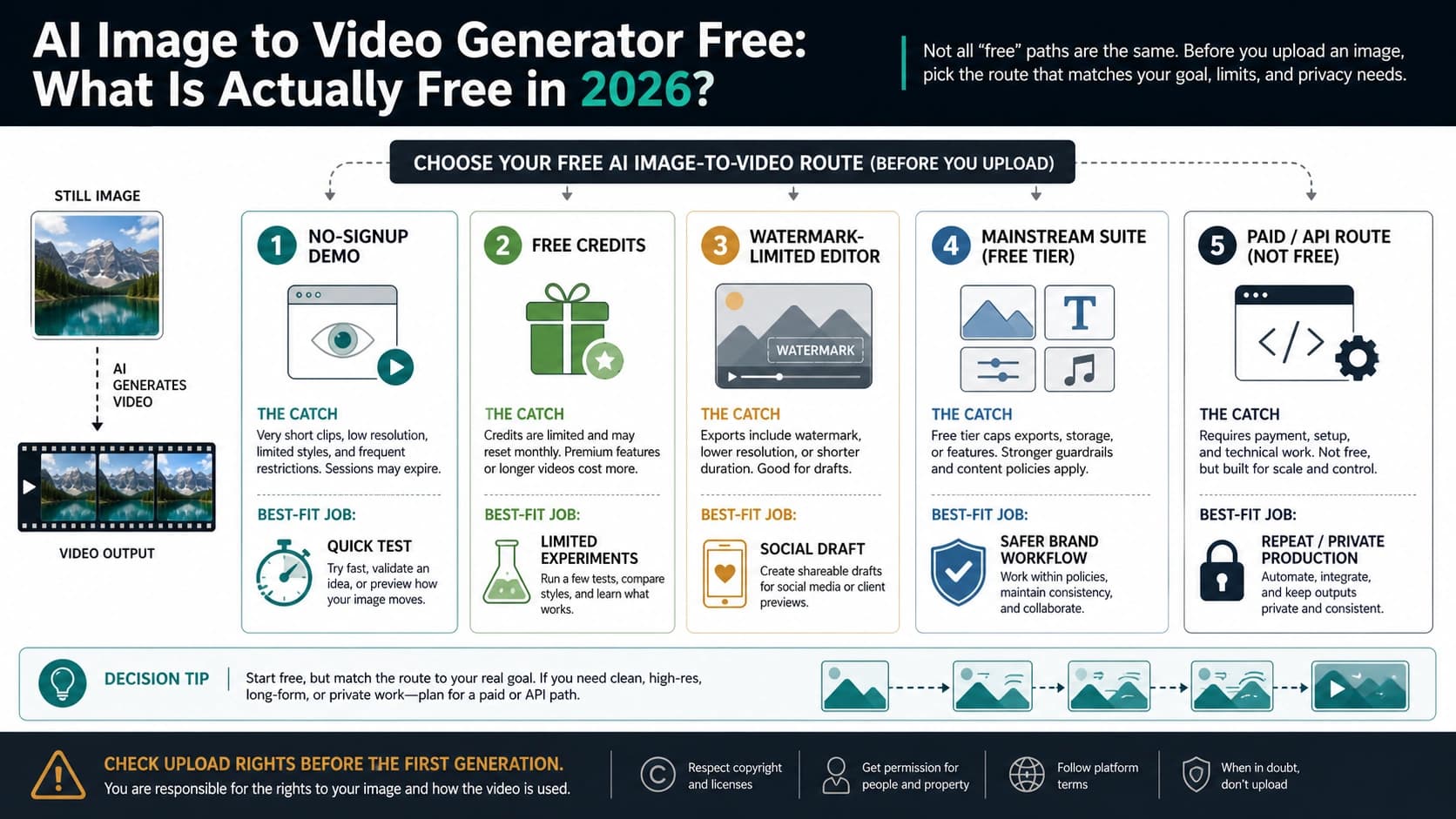
That distinction matters because many pages use the same words for different contracts. "Free" may mean a one-time credit balance, a limited monthly allowance, a watermarked export, a queue, a no-signup preview, or an editor plan that gives video minutes but charges separately for certain generative models. "Long duration" may mean 8 seconds on the visible UI, a 16-second model setting, a 7-second extension, or a multi-clip edit.
If you only need to see whether a still image can move, a free test is reasonable. If you need a clean long deliverable, treat free as a prototype phase. The safest workflow is to prove the motion cheaply, then decide whether extension, editor assembly, or paid/API production is worth it.
For the broader free-tool question, use the separate free AI image-to-video generator guide. The duration decision is narrower: it is about extension, credit burn, output length, and the point where "free" stops being the right route.
Choose By Target Length Before Choosing A Tool
For 5-10 seconds, test the image and prompt. This is where free or free-to-start image-to-video tools are strongest. A short clip can prove whether the camera move, subject motion, lighting, and style make sense. You do not need a perfect export yet. You need a fast signal.
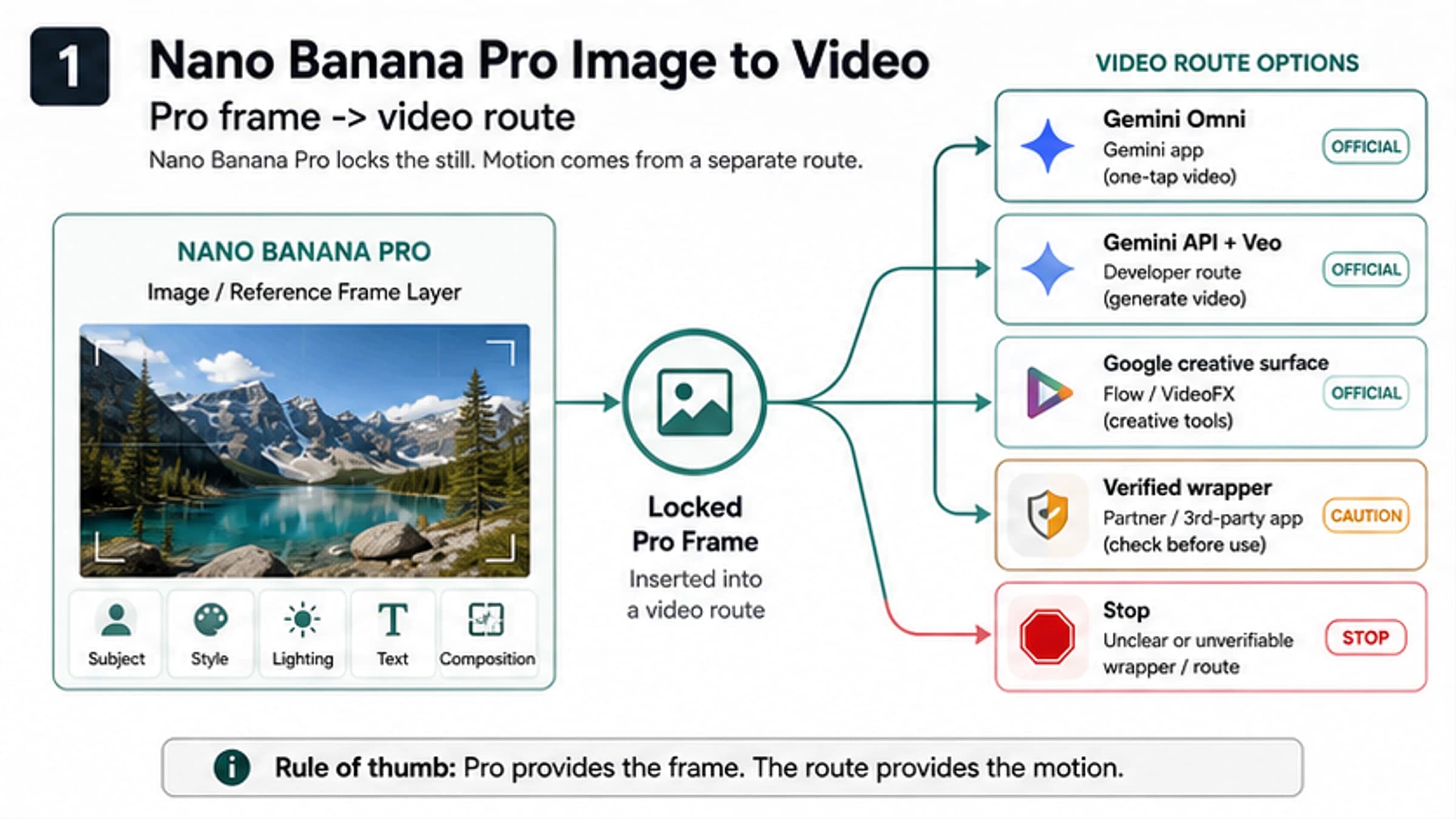
Runway's current image-to-video prompting guidance, for example, is optimized around Gen-4.5 and still treats the source image as first-frame context while the prompt controls motion. Google's current Gemini API video overview separates Gemini Omni Flash as the default video-generation route from Veo 3.1 for specific controls such as extension, last-frame, native-audio, and image-based direction. Those route distinctions are not a weakness. They show the normal shape of the job: high-quality video generation starts in controlled chunks.
For 15-30 seconds, extension becomes the core feature. Do not extend a weak first clip. If the first clip has bad motion, warped objects, a drifting face, or a product that changes shape, extension usually multiplies the problem. Fix the prompt, crop, motion instruction, or source image before spending more credits. Some tools expose continuation or extension routes; Vidu's current docs, for example, include image-to-video duration controls and extension functionality, with duration and pricing depending on model and mode.
For 30-60 seconds, plan shots instead of chasing one render. A social video can be one story made from several short AI shots. Plan the sequence: opening image move, product angle, detail shot, transition, final card, voiceover or caption. This gives you more control than repeatedly extending one clip until continuity breaks.
For 5-10 minutes, think like an editor. Invideo-style video-minute plans, stock/media editors, captions, voiceover, and timeline assembly can create longer videos, but that is not the same as one coherent AI-generated video from one image. If the reader job is a tutorial, explainer, sales video, or YouTube draft, the honest route is usually: generate a few moving shots, then assemble them with text, audio, stock clips, and cuts.
For private or repeatable production, use a route you can audit. Client assets, unreleased products, regulated contexts, and repeat workflows need clearer ownership. A paid account, official API, enterprise route, or internal workflow can be cheaper than losing time to unclear free wrappers. Official Google AI pricing currently treats Veo 3.1 video generation as a paid API route rather than a generic free browser allowance, which is exactly the kind of owner boundary you should respect.
Why Free Routes Get Short Fast
Free image-to-video fails most often because the reader treats credits as one number. In practice, credits are consumed by a chain of decisions.
Seconds are the first cost multiplier. A 10-second clip usually costs more than a 5-second clip. A model that charges per second makes this visible, but the same logic exists in credit-based browser tools. More seconds mean more frames, more chances for drift, and more compute.
Rerolls cost more than people expect. If the first output misses the camera direction, changes the product, warps a hand, or makes a face unstable, the next attempt may consume the same scarce credits. A free plan that looks generous can disappear quickly if the first prompt is vague.
Extension is not free time. Extension or continuation can be powerful, but it usually adds a new generation step. The tool may charge for the additional seconds, the selected model, the resolution, or the number of outputs. The extension may also fail continuity, which creates another reroll decision.
Resolution and export can change the contract. Some tools let you preview for free but charge credits or require a plan for higher resolution, watermark removal, commercial export, or final download. Adobe Firefly's image-to-video route, for instance, is tied to generative credits and short video output; it is useful for a mainstream creative workflow, not proof that long clean video is free.
Queues and off-peak modes are also part of the cost. Some pricing pages expose slower/off-peak options or cheaper modes. That can be acceptable for experiments and painful for production. If the result is needed today, queue time belongs in the route decision.
The simple rule: generate the shortest clip that can answer the question. If the question is "will this product image survive motion?" do not start with the longest duration. If the question is "can this landscape become a 30-second background loop?" test motion and continuity before extending.
Tool And Route Examples, With The Catch Beside Each One
Use these examples as inspection patterns, not as a permanent ranking. Free plans, credits, watermarks, model access, and export rules change quickly.
| Route | What it can help with | What to check before relying on it |
|---|---|---|
| LumeFlow-style exact-match tools | Quick image-to-video tests with visible duration choices | Whether "long" is actually 5s/8s, how many credits are required, and whether free credits are limited |
| Runway | Controlled short image-to-video tests and stronger creative tooling | Free-plan credits, watermark, current model duration, web credits versus API credits |
| Vidu | Longer per-clip options and explicit extension/continuation routes | Model version, duration range, extension duration, resolution, credit price, and off-peak delay |
| Adobe Firefly | Mainstream short image-to-video inside a creative suite | Generative credit use, duration, resolution, export rules, and account plan |
| Pika or Pollo-style credit tools | Browser experimentation with credits and model choices | Credit renewal, duration, output count, resolution, watermark, and commercial-use language |
| Invideo-style editors | Longer edited videos built from timeline, captions, voice, and short AI shots | Video minutes, watermarked exports, provider/model costs, stock/audio terms |
| Google/Veo official routes | Clearer owner for high-end model/API work | Consumer app versus Flow versus Google Vids versus Gemini API versus Vertex AI |
Runway is a good example of why you should inspect the contract before generation. Its current prompt guidance is model-specific, and plan/account surfaces decide free credits, watermarks, export, and paid upgrades. That is not a reason to avoid it; it is a reason to plan the first test carefully.
Vidu is a useful example of the extension route. Its docs expose image-to-video controls and video extension in the function map, with duration options depending on model generation. That can be closer to the long-duration job than a pure 5-second demo, but it still does not remove pricing, credit, model, and continuity checks.
Google/Veo is a useful owner-boundary example. If you are thinking about the official model route, current Google AI pricing and Vertex AI docs should be your source for free-tier status, duration, pricing, and supported features. A browser wrapper that says it can generate a Veo-style clip is not the same contract as Google's official API or Vertex AI route. For a deeper Veo-specific access discussion, use the Veo 3.1 free route guide and recheck current official pages before treating any quota or availability claim as durable.
The Least-Wasteful Extension Workflow
Start with a clean source image. Use a clear crop, stable subject, and enough room for the motion you want. If the tool must invent hidden parts of a product, face, body, or background, extension risk rises. For product images, avoid asking for motion that changes the item itself unless that change is intentional.
Write the first prompt as a motion test, not a movie script. A good first prompt answers three things: what should move, how the camera should move, and what must stay unchanged. For example: "slow push-in on the product, subtle background parallax, keep logo and packaging shape unchanged." That is more useful than asking for a long cinematic scene before you know whether the source image holds up.
Generate the shortest useful clip. If the tool offers 5 seconds and 10 seconds, start with the shorter option unless the route requires the longer clip to test motion. Watch for object drift, face instability, broken text, flicker, jump cuts, and unwanted style shifts.
Extend only after motion and continuity pass. The first extension should preserve the camera direction and subject state. If the extension creates a new shot rather than a continuation, treat it as a sequence clip, not as proof that the tool can make one long continuous video.
Assemble before over-extending. Once you have two or three decent short clips, an editor timeline often beats another extension. You can cut on motion, add captions, use voiceover, insert a product close-up, or create a loop. This is how many "long" free-to-start workflows become usable: not by forcing one endless generation, but by turning short outputs into a planned sequence.
Stop when the failure repeats. If two prompt fixes still create product drift, face instability, unreadable text, or motion that changes the subject identity, the problem is probably route fit. Switch to a different model, a mainstream editor, a paid route, or a safer source image instead of spending more free credits.
What To Verify Before Uploading Or Exporting
The most expensive mistake is not always the paid plan. Sometimes it is uploading the wrong image to the wrong route.
Rights and sensitivity come first. Do you own or have permission to use the source image? Does it show a real person, a client asset, a private location, a medical or financial context, a minor, an ID document, or an unreleased product? If yes, avoid casual free wrappers unless their terms, storage, and access controls are clear enough for that asset.
Storage and deletion matter. A no-signup tool can still store uploaded files. It can also lack a clear dashboard for deletion, support, or access history. If the page does not explain how uploaded images are handled, keep the input disposable.
Watermark and export are separate from generation. A tool may let you generate for free but require a paid plan for watermark removal, HD export, commercial use, or longer output. Check the export step before you spend all available credits.
Failed renders may still consume credits. Pricing pages do not always make failed-render credit treatment easy to see. If the tool is credit-limited, treat the first prompt as a controlled test.
Commercial use is not automatic. A free plan can be fine for private tests and unsuitable for client delivery. If the video will be posted, sold, used in ads, or delivered to a customer, read the plan terms and rights language before relying on a free output.
For sensitive or production assets, the better question is not "which free generator is longest?" It is "which route owner can I trust with this source image and this export requirement?"
When Free Should Become Paid, API, Or Editor Work
Free is worth trying when the image is low-risk, the output is a test, and the target duration is short. It becomes the wrong route when the cost of uncertainty is higher than the cost of a controlled plan.
Move beyond casual free tools when you need:
- a clean export without watermark;
- repeated output, not one lucky clip;
- private or client-owned source images;
- predictable credit accounting;
- backend integration, logs, or API control;
- stable commercial-use terms;
- a 30-60 second sequence with audio, captions, or brand review;
- a multi-minute explainer, tutorial, or product video.
For a one-minute social asset, the best route may be several short generations plus an editor. For a product launch video, it may be a mainstream creative suite with team review. For a backend workflow, it may be an official API or a gateway your team can audit. For a casual experiment, it may be a free wrapper with a disposable image.
The route should follow the job. Long duration is not only a model capability. It is a production shape.
FAQ
Is there a truly free long-duration image-to-video generator?
There are free or free-to-start routes for short clips and tests. A truly free, unlimited, clean, long-duration generator is not the normal contract. Longer output usually means extensions, multiple clips, editor assembly, watermarked exports, limited credits, or a paid route.
What counts as long duration for image-to-video?
For model generation, even 10-16 seconds can be meaningfully longer than a basic short test. For social video, 30-60 seconds usually means several planned clips. For 5-10 minute videos, think editor timeline rather than one image-to-video render.
Should I choose the tool with the longest duration setting?
Not automatically. A longer setting is useful only if the first clip preserves the subject, motion, and continuity. A shorter stable clip is often more valuable than a longer unstable one.
How do I make a 30-second video from one image for free?
Start with a short test. If it works, generate one or two extensions or additional shots. Assemble them in an editor with cuts, captions, audio, or a loop. Check watermark/export before treating the result as final.
Can I make a 10-minute video from one image for free?
You may be able to build a 10-minute edited video around one image using an editor, captions, voiceover, stock elements, and short AI-generated shots. That is different from one coherent 10-minute AI video generated from a single still image.
Is Google Veo free for long image-to-video?
Official Google/Veo access depends on surface and plan. Current Google AI pricing lists Veo 3.1 video generation as a paid-tier API route, while consumer and creative surfaces have their own rules. Recheck official Google pages before assuming free access, duration, or extension support.
Is no watermark the same as free?
No. A tool can be free to generate and still require payment for watermark removal, HD export, commercial use, longer duration, or additional credits.
Can I upload a product photo or face to a free tool?
Only if the image is safe for that route and you understand the tool's storage, privacy, rights, and export terms. For real people, client work, confidential products, IDs, medical/financial context, or licensed art, start with a trusted route.
What is the best first step?
Use a disposable or low-risk source image, generate the shortest useful motion test, inspect continuity and export rules, then decide whether to extend, assemble in an editor, or switch to a paid/API route.