OpenAI Model Map: GPT-5.5, GPT Image 2, Codex, Realtime, Audio, and Sora 2
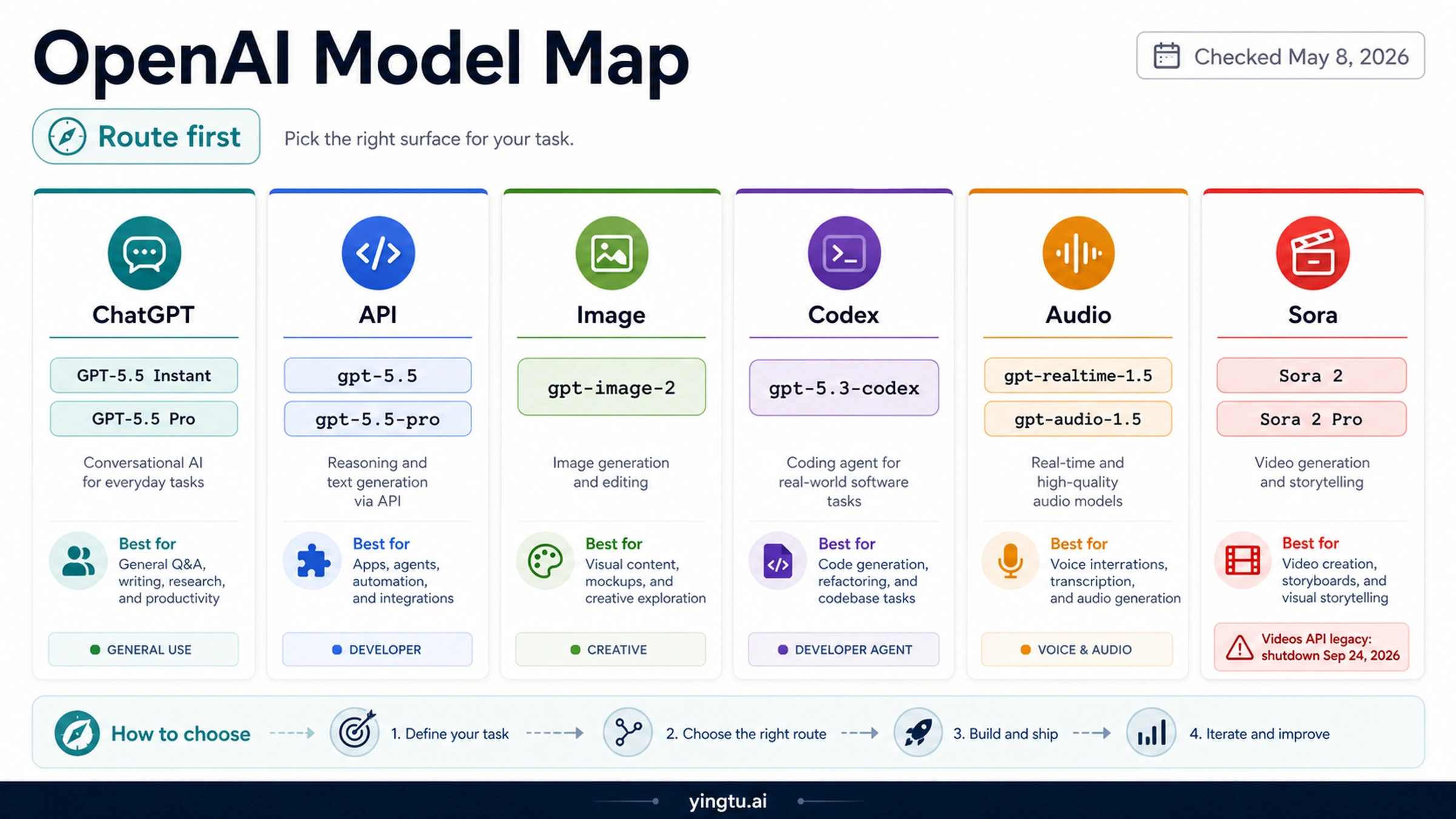
As of 2026-05-08, these OpenAI names are real, but they are not one route. GPT-5.5 Instant is the ChatGPT default path, gpt-5.5 and gpt-5.5-pro are API reasoning model IDs, GPT Image 2 maps to gpt-image-2, GPT-5.3-Codex remains a coding model route, Realtime 1.5 and Audio 1.5 serve different audio interfaces, and Sora 2 API work needs the legacy/deprecated Videos API caveat.
| If your job is... | Start with this surface | Use or check this name | Caveat |
|---|---|---|---|
| Use the fastest ChatGPT default path | ChatGPT | GPT-5.5 Instant | Treat it as a ChatGPT route label unless OpenAI documents a matching API ID. |
| Run harder API reasoning | OpenAI API | gpt-5.5 or gpt-5.5-pro | Use the public model ID and current API docs, not the ChatGPT display name. |
| Build or edit images | Images API or Responses image tools | gpt-image-2 | Keep pricing, free-use, and limit claims in focused image guides unless freshly verified. |
| Choose a coding model | Codex and coding-agent routes | gpt-5.3-codex or Codex-supported gpt-5.5 | Codex access, ChatGPT sign-in, and API-key routes can differ. |
| Add voice or audio | Realtime API or Chat Completions audio | gpt-realtime-1.5 or gpt-audio-1.5 | Realtime sessions and REST-style audio jobs are not the same interface. |
| Work with Sora video | Sora app/web, or legacy Videos API only where still supported | Sora 2 / Sora 2 Pro, sora-2, sora-2-pro | The API model pages are legacy and the deprecations page lists a 2026-09-24 Videos API shutdown. |
The safe order is task first, surface second, model name third. If a route depends on current availability, deprecation, pricing, quotas, or provider support, check the official page again before building or publishing a claim.
GPT-5.5 Names: Instant, API, and Pro Are Not the Same Handle
GPT-5.5 is the easiest place to make a naming mistake because the ChatGPT and API surfaces now use closely related names for different jobs. OpenAI's Help Center article on GPT-5.3 and GPT-5.5 in ChatGPT describes ChatGPT-facing modes such as Instant, Thinking, and Pro. That is the product surface a ChatGPT user sees in the app.
The developer surface is different. OpenAI's API model pages list gpt-5.5 and gpt-5.5-pro as public API model IDs. Use those IDs when the job is an API call that needs reasoning performance. Do not copy the words "GPT-5.5 Instant" into code and assume that it is the same public model ID.
OpenAI's GPT-5.5 Instant announcement adds one more split: Instant is the ChatGPT default path, and the API route described there is chat-latest. The system-card language can include internal naming, but production code should follow the public API route OpenAI documents for the endpoint being used.
Use GPT-5.5 Pro when the request is hard enough to justify a slower, higher-compute route. The API model page for gpt-5.5-pro points developers toward Responses API use and background mode for longer work. That matters because a Pro request is not just "the same model but better"; it can change latency expectations and request handling.
Surface Route Map: Pick the Product Layer Before the Model
The model list becomes practical only after the surfaces are separated. A ChatGPT user choosing a default mode, a backend engineer writing a Responses API call, a Codex user choosing a coding model, an image workflow using the Images API, a voice agent using Realtime, and a video workflow touching Sora are all making different decisions.

The wrong route usually creates a false troubleshooting path. If a ChatGPT mode is missing, the first check is the app account, rollout, plan, or model picker. If an API model ID fails, the first check is the endpoint, organization access, model availability, request shape, and billing context. If a Codex model fails, the question may be whether the client is using ChatGPT sign-in, API-key authentication, local CLI selection, IDE integration, or a cloud task.
The route map also prevents cannibalizing deeper topics. If the reader only needs Codex setup and fallback behavior, the focused Codex GPT-5.5 guide owns that job. If the reader needs the ChatGPT Images 2.0 product split, the ChatGPT Images 2.0 guide is the right next step. If the reader needs a Sora API build decision, use a Sora-specific page after the status boundary is clear.
Developer Model IDs: Use Public IDs Where They Exist
When the job is developer implementation, the safest habit is to ask "which public ID does this surface expose?" before writing code. The API model page is the source for the ID, not the app label. That is why gpt-5.5, gpt-5.5-pro, gpt-image-2, gpt-5.3-codex, gpt-realtime-1.5, gpt-audio-1.5, sora-2, and sora-2-pro should be treated as surface-specific developer IDs rather than one flat model menu.

| Public name or label | Developer-safe interpretation |
|---|---|
| GPT-5.5 Instant | ChatGPT default route; API work should follow OpenAI's documented chat-latest route or current model docs. |
| GPT-5.5 Pro | ChatGPT Pro mode and gpt-5.5-pro API model are related names, but the API route has its own endpoint behavior and latency expectations. |
| GPT Image 2 | Model family / product wording; the developer model ID is gpt-image-2. |
| GPT-5.3-Codex | Coding model route with its own API model page, not a replacement for every Codex model picker choice. |
| Realtime 1.5 | Low-latency Realtime route, especially for voice agents and streaming sessions. |
| Audio 1.5 | Chat Completions audio route for REST-style audio input/output jobs. |
| Sora 2 / Sora 2 Pro | App/web product route plus legacy API model pages; do not treat it as a fresh long-term API build path without rechecking deprecation status. |
This is also why a single "best model" table is not enough. If the workload is a chat product, the right row may be gpt-5.5 or gpt-5.5-pro. If the workload is image generation, comparing GPT-5.5 to GPT Image 2 is the wrong layer; the image route belongs to gpt-image-2. If the workload is a voice agent, start from Realtime. If the workload is batch audio or REST audio processing, Audio 1.5 is the better surface to inspect first.
Codex: Coding Route Depends on the Codex Surface
OpenAI's Codex model documentation is the source to use for Codex behavior. It describes GPT-5.5 as the first model to try for serious Codex work when the route exposes it, while also keeping gpt-5.3-codex as an important coding model. That means Codex is not just a mirror of the public API model catalog.
For a signed-in Codex workflow, the first question is whether the model picker or CLI route exposes the model for your account. For API-key authentication inside Codex, the availability boundary can differ. That split is why a developer can confirm gpt-5.5 on the OpenAI API model page and still need a separate Codex-route check before assuming the same model works in every Codex mode.
Use gpt-5.3-codex when the job is specifically coding-agent work and the route calls for the Codex-tuned model. Use Codex-supported gpt-5.5 when it appears and the task benefits from stronger general reasoning. Use a fallback such as GPT-5.4 only when the current Codex route does not expose GPT-5.5 or the task does not justify the heavier model. The full command and fallback details belong in the Codex GPT-5.5 article, not in this map.
GPT Image 2: Product Name, Model ID, and Workflow Are Separate
GPT Image 2 is a clearer developer route than the ChatGPT GPT-5.5 names: OpenAI's model page lists gpt-image-2, and the image generation guide explains how image generation and editing routes fit the API. Use that ID when the job is image generation, image editing, or image-to-image work.
The workflow still matters. A direct Images API call is not the same design as a multi-step Responses API workflow that also reasons over text or files. The image guide makes that route distinction explicit, so do not reduce GPT Image 2 to a single button or a flat cost per picture.
This model map should not answer every GPT Image 2 subquestion. Official free-tier status belongs in Is GPT Image 2 API Free?. Usage and limits belong in GPT Image 2 usage limits. Cheapest paid provider comparisons belong in GPT Image 2 API cheap routes, and output-size questions belong in GPT Image 2 4K image generation. Keeping those topics separate protects the main map from stale price or quota claims.
Realtime 1.5 and Audio 1.5: Voice Session Versus Audio Job
The audio names are easy to combine because both can handle audio, but they serve different interfaces. gpt-realtime-1.5 is the Realtime model for low-latency audio-in/audio-out experiences. Think voice agents, interactive conversations, live interruption, and streaming session behavior.
gpt-audio-1.5 is the Chat Completions audio model. That is a better starting point when the product shape is a request/response audio job instead of a persistent Realtime session. It can still be multimodal, but the interface expectation is different.
The practical split is simple: if the user experience requires live voice interaction, inspect Realtime first. If the job is transcription-like understanding, audio response generation, or a REST-style step inside a larger application, inspect Audio 1.5 first. If older preview audio or realtime model names appear in code, check OpenAI's deprecations page before carrying them forward.
Sora 2 and Sora 2 Pro: Separate App Access From API Build Risk
Sora needs the most visible caveat because there are two things a reader may mean. The Sora app/web route is still a product experience, and OpenAI's Sora Help Center page describes Sora app onboarding and usage. Sora 2 and Sora 2 Pro also have API model pages, but those pages are labeled legacy, and OpenAI's deprecations page lists the Videos API shutdown date as 2026-09-24.

That does not mean "Sora never had an API" or "Sora app access proves a new stable API route." It means the app/product route and the legacy/deprecated API route must be kept separate. If the job is consumer video creation, start with the Sora app/web path and its current account or invite requirements. If the job is production API work, treat any Sora 2 or Sora 2 Pro API plan as migration-sensitive until the current docs show a supported build path.
For deep setup, errors, pricing, or access troubleshooting, use a focused Sora article such as the Sora 2 API access guide after this boundary is clear. A map page should tell you which route owns the question; it should not become a second Sora API manual.
Which OpenAI Model Should You Start With?
Start with the job, not the model family. A product team building a chat assistant should not choose GPT Image 2 because it is newer. A developer building a gallery editor should not route through GPT-5.5 because it is stronger at reasoning. A voice product should not choose Audio 1.5 when it needs Realtime interruption. A video workflow should not treat Sora app access as backend availability.
| Job | First route to inspect | Why |
|---|---|---|
| ChatGPT user wants the current default | GPT-5.5 Instant in ChatGPT | It is an app mode, not a model ID to paste into every API call. |
| Backend reasoning or agentic API workflow | gpt-5.5 or gpt-5.5-pro | These are public API model IDs with different compute and latency expectations. |
| Coding assistant or repository task | Codex model picker / Codex docs | Codex route and authentication mode can matter as much as the model name. |
| Image generation or image editing | gpt-image-2 | The image model owns image output; cost and limits need a focused current check. |
| Live voice agent | gpt-realtime-1.5 | Realtime is built around low-latency audio sessions. |
| REST-style audio processing | gpt-audio-1.5 | Chat Completions audio is a better fit for request/response audio jobs. |
| Sora video creation | Sora app/web first; API only with current deprecation check | The app route and legacy Videos API route are not interchangeable. |
If the next decision depends on exact price, usage limit, regional availability, plan entitlement, or provider routing, pause and recheck the relevant official page. Those claims change too often to be safely copied from a general model map.
FAQ
Is GPT-5.5 Instant an API model ID?
Treat GPT-5.5 Instant as a ChatGPT route label. OpenAI's Instant announcement describes its API route as chat-latest, while the stable public model IDs for hard reasoning are documented separately as gpt-5.5 and gpt-5.5-pro.
Is GPT-5.5 Pro available through the API?
OpenAI's gpt-5.5-pro model page lists it as an API model. Use the model page for endpoint behavior and current availability, and expect heavier compute and slower responses than the standard GPT-5.5 route.
When does GPT-5.3-Codex still matter?
Use GPT-5.3-Codex when the job is a coding-agent route that benefits from a Codex-tuned model or when Codex documentation points to that model for the current surface. Do not replace all coding decisions with generic GPT-5.5 reasoning just because GPT-5.5 is newer.
Is GPT Image 2 the same thing as ChatGPT Images 2.0?
No. GPT Image 2 is the model/API wording, with gpt-image-2 as the developer model ID. ChatGPT Images 2.0 is the app-facing product route. Use the ChatGPT Images 2.0 guide when the product/API split is the main question.
Should I use gpt-realtime-1.5 or gpt-audio-1.5?
Use gpt-realtime-1.5 for live voice agents and streaming interaction. Use gpt-audio-1.5 for Chat Completions audio jobs where a request/response interface is enough.
Is Sora 2 safe to build on through the API?
Only after a current deprecation check. Sora 2 and Sora 2 Pro model pages exist, but OpenAI labels them legacy and the deprecations page lists the Videos API shutdown as 2026-09-24. App access and API build readiness are different decisions.