GPT Image 2 online without ChatGPT Plus: $0.03 an image, 30 exact sizes
Use GPT Image 2 VIP online without ChatGPT Plus for $0.03 per image: 30 exact sizes from 1K to 4K, low/medium/high quality and reference edits.
Exact sizesPrice $0.03/ image1K / 2K / 4KEditing: Supported$0.1 for new users
GPT Image 2 VIP runs on the OpenAI Images API. On YingTu it costs $0.03 per image, with 30 exact sizes across 1K, 2K and 4K, low, medium or high quality, and reference-image editing. Pick it when you need exact dimensions, text in the image, or an OpenAI-compatible workflow. GPT Image 2.5 Flare and Sunburst are in the studio at the same price.
OpenAI-compatible routeText to imageImage editingQuality tiers
Model ID
gpt-image-2-vip
Price
$0.03/ image
Output sizes
1K / 2K / 4K
API format
OpenAI Images
Image editing
Supported
Aspect ratios
Key facts (as of October 5, 2026)
GPT Image 2 is OpenAI’s image model behind ChatGPT Images 2.0 (announced April 21, 2026). OpenAI offers it in ChatGPT and the OpenAI API; YingTu runs it through LaoZhang’s gpt-image-2-vip route.
Price here: $0.03 per image at any of 30 exact sizes from 1K to 4K, in low, medium or high quality. No subscription; LaoZhang bills each image.
Measured time: median 45 s over 84 real generations on YingTu (fastest 35 s, slowest 64 s).
Edits: up to 5 reference images of up to 20 MB each.
New users who sign in with Gmail get $0.1 of credit: about 3 GPT Image 2 images.
Ready-made prompts
Click one to open the image studio with that prompt and aspect ratio already set.
Text poster
4:5
A minimal coffee poster with the exact headline “COFFEE MADE SIMPLE”, high contrast type, warm natural light, clean commercial layout.
Product banner
16:9
A clean e-commerce banner with a centered product, generous copy space, neutral background, and precise visual hierarchy.
UI illustration
1:1
A polished onboarding illustration with a simple interface motif, restrained colors, crisp shapes, and generous negative space.
Made with GPT Image 2 on YingTu
Real outputs from the prompt template library, each with its prompt and the time the request took. Open one to run the same prompt.
Halloween party poster · 47 sPrompt
A Halloween party poster: a silhouetted castle under a huge orange full moon, bats flying past, a row of grinning jack-o'-lanterns in the foreground. Headline "HALLOWEEN NIGHT PARTY", subtitle "Oct 31 · 8 PM · The Old Warehouse", a small line at the bottom "Costumes required · Prize for best look". Deep purple and orange, vintage screen-print texture, crisp text.
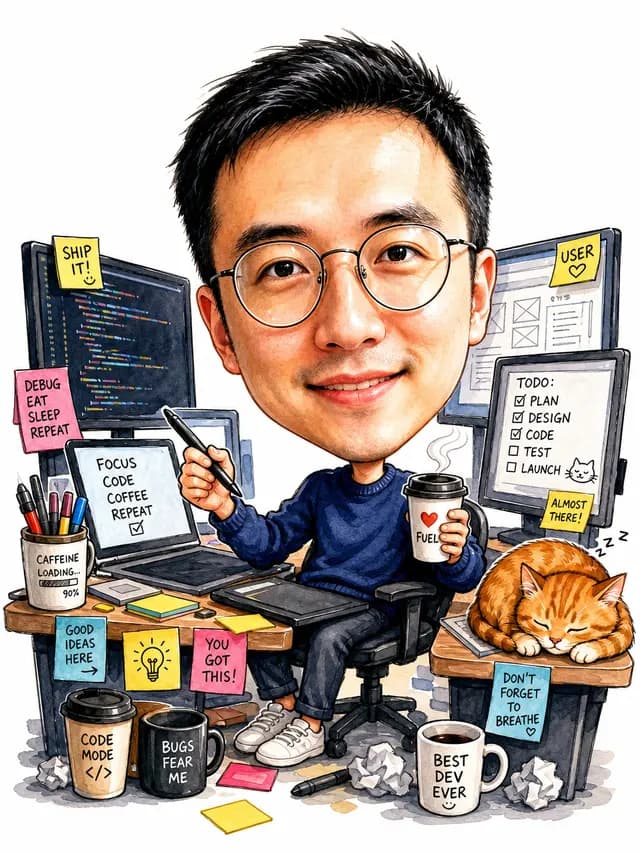
Draw the person in the reference image as a caricature: big head, small body, features exaggerated but instantly recognizable, same glasses. He sits at a desk crowded with monitors, coffee cups and sticky notes, holding a stylus in one hand and a coffee in the other, with a sleepy orange cat beside him. Bright hand-drawn watercolor and marker style, white background, playful and friendly.
Design a logo for a specialty coffee shop called "Moonbean": the center line of a coffee bean becomes a crescent moon, clean geometric lines. Below it the name "MOONBEAN COFFEE" and a small line "SINCE 2026". Deep ink green with warm gold, flat vector style, centered on white, plus a small mockup of the logo printed on a kraft paper cup in the lower right.
A poster for a city jazz festival: a golden saxophone as the hero image surrounded by flowing neon lines and notes. Headline "CITY JAZZ NIGHTS", subtitle "Oct 18 — 20 · Riverside Lawn", a small line at the bottom "Scan to get tickets". Deep navy with gold and coral, retro Art Deco style, layered layout, crisp text.
An illustrated recipe card for "Tomato & Egg Stir-fry": a watercolor of the finished dish at the top, ingredients on the left: 2 tomatoes, 3 eggs, 1 scallion, a pinch of salt and sugar; four steps on the right with small illustrations: beat the eggs, scramble and set aside, cook tomatoes until juicy, combine and season. Hand-painted watercolor on off-white paper, crisp text.
import base64
import mimetypes
import os
import sys
import requests
API_KEY = os.environ.get("LAOZHANG_API_KEY")
ifnot API_KEY:
raise RuntimeError("Set the LAOZHANG_API_KEY environment variable before running this example.")
REQUEST_TIMEOUT_SECONDS = 500
headers = {"Authorization": f"Bearer {API_KEY}"}
defextension_for_mime(mime_type):
return {
"image/jpeg": "jpg",
"image/png": "png",
"image/webp": "webp",
"image/gif": "gif",
}.get(mime_type, "bin")
defdecode_base64_image(value, fallback_mime="image/png"):
mime_type = fallback_mime
encoded = value
if value.startswith("data:"):
header, encoded = value.split(",", 1)
mime_type = header[5:].split(";", 1)[0] or fallback_mime
return base64.b64decode(encoded, validate=True), mime_type
defparse_json_response(response):
try:
result = response.json()
except ValueError as error:
print("API returned a non-JSON response.", file=sys.stderr)
raise SystemExit(1) from error
ifnotisinstance(result, dict):
print("API returned an unexpected JSON shape.", file=sys.stderr)
raise SystemExit(1)
return result
defextract_image(result):
ifnotisinstance(result, dict):
returnNone
images = result.get("data") or []
first_image = images[0] if images andisinstance(images[0], dict) else {}
encoded = first_image.get("b64_json")
ifisinstance(encoded, str) and encoded:
return decode_base64_image(encoded)
image_url = first_image.get("url")
ifisinstance(image_url, str) and image_url:
image_response = requests.get(image_url, timeout=REQUEST_TIMEOUT_SECONDS)
image_response.raise_for_status()
mime_type = image_response.headers.get("Content-Type", "image/png").split(";", 1)[0]
return image_response.content, mime_type
returnNonedefsave_result_image(result):
extracted = extract_image(result)
ifnot extracted:
keys = sorted(result.keys()) ifisinstance(result, dict) else []
print(f"No image data in response. Top-level keys: {keys}", file=sys.stderr)
raise SystemExit(1)
image_bytes, mime_type = extracted
output_path = f"output.{extension_for_mime(mime_type)}"withopen(output_path, "wb") as output_file:
output_file.write(image_bytes)
print(f"Image saved: {output_path} ({mime_type})")
API_URL = "https://api2.laozhang.ai/v1/images/generations"
headers["Content-Type"] = "application/json"
payload = {
"model": "gpt-image-2-vip",
"prompt": "A minimal coffee poster with the exact headline “COFFEE MADE SIMPLE”, high contrast type, warm natural light, clean commercial layout.",
"size": "2048x2048",
"quality": "high"
}
try:
response = requests.post(
API_URL,
headers=headers,
json=payload,
timeout=REQUEST_TIMEOUT_SECONDS,
)
except requests.Timeout as error:
print(
"Request timed out after 500 seconds. The result status may be unknown; ""check call and billing logs before retrying.",
file=sys.stderr,
)
raise SystemExit(1) from error
if response.status_code != 200:
print(f"API error {response.status_code}: {response.text}", file=sys.stderr)
raise SystemExit(1)
save_result_image(parse_json_response(response))
FAQ
Is this the official GPT Image 2 website?
No. GPT Image 2 is OpenAI’s model, offered by OpenAI in ChatGPT and the OpenAI API. YingTu is an independent studio that reaches it through LaoZhang’s gpt-image-2-vip route and bills per image.
Can I use GPT Image 2 without ChatGPT Plus?
Yes. On YingTu you pay $0.03 per image with a LaoZhang key and no subscription; new users who sign in with Gmail get $0.1 first, about 3 images.
How much does GPT Image 2 cost?
$0.03 per image here at any of the 30 sizes and three quality levels. It is the cheapest of the three main models on YingTu (Nano Banana 2 $0.055, Nano Banana Pro $0.09).
How accurate is GPT Image 2 with text?
In the poster test on the AI poster generator page it spelled three lines exactly in English, Chinese, Japanese, Korean, Russian and Spanish (6 of 6). Long paragraphs and small print still need proofreading.
Why is GPT Image 2 slower?
It took a median of 45 s per image here (Nano Banana 2 14 s). If you need many quick drafts, start with Nano Banana 2 and switch for the final.
Which sizes can I choose?
30 exact pixel sizes across 1K, 2K and 4K, so banners and print files come out at the size you set. Each level offers the same 10 ratios (1:1, 2:3, 3:2, 3:4, 4:3, 4:5, 5:4, 9:16, 16:9, 21:9); the largest sizes are 3840×2160 and 2880×2880.
Can I call GPT Image 2 from my own code?
Yes. The code block on this page is the same OpenAI-compatible Images request the studio sends; the GPT Image 2 API page has more examples.
What can I do when ChatGPT’s image limit runs out?
Keep going with GPT Image 2 here and pay per image: $0.03 an image from a LaoZhang balance, with no ChatGPT plan. New users who sign in with Gmail get $0.1 first, about 3 images.
Can GPT Image 2 make 4K images?
Yes. Pick a 4K size in the studio (there are 10), for example 3840×2160 (16:9), 2160×3840 (9:16) or 2880×2880 (1:1); a 4K image costs the same $0.03 as 1K or 2K.
How do I use GPT Image 2 online?
Open the image studio with the button at the top of this page: GPT Image 2 is already selected, so type a prompt and click Generate image. Sign in with Google first (Gmail accounts get $0.1) or paste a LaoZhang API key, add up to 5 reference images if you want an edit, and pick a size and a quality level. Each image is billed on its own.